






Was the Hellblade 2 trailer made with Unreal Engine?
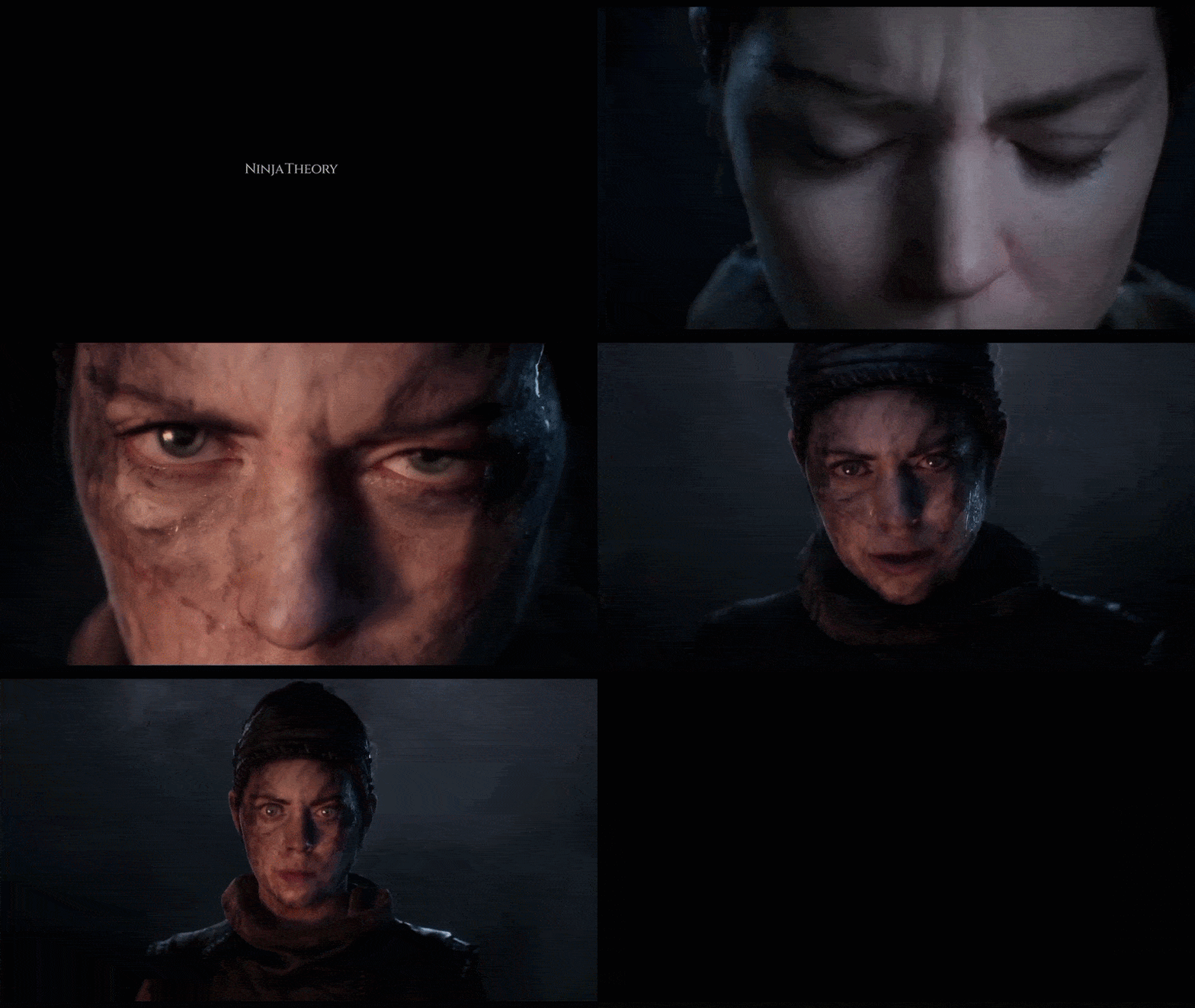
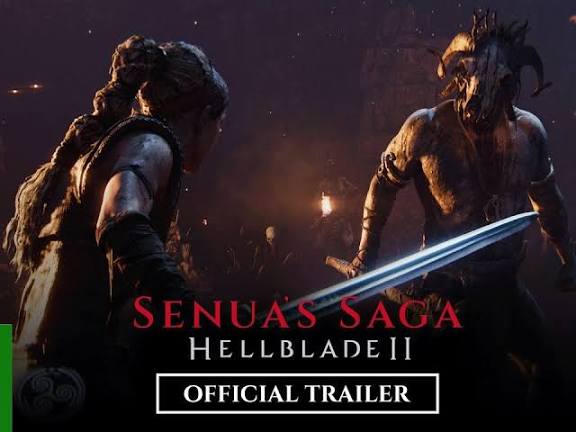
Yes – the Hellblade 2 trailer was created using Unreal Engine and captured entirely in-engine. Ninja Theory’s debut trailer for Senua’s Saga: Hellblade II (first shown at The Game Awards 2019) was rendered in Unreal Engine, showcasing what the Xbox Series X hardware could do. In fact, Xbox’s Phil Spencer confirmed the reveal footage was “captured entirely in-engine,” meaning it wasn’t a pre-rendered CGI video but generated with the game’s real-time engine. This established an authentic benchmark – the developers chose to present Senua’s new saga using the actual game engine to ensure the visuals represent the game’s target quality.
Unreal Engine has been Ninja Theory’s technology of choice (the first Hellblade ran on Unreal Engine 4). For the sequel, they continued this practice. The trailers and sneak peeks we’ve seen so far are built within Unreal, leveraging its advanced rendering pipeline. Epic Games even highlighted Hellblade II’s announcement as a showcase of Unreal Engine’s capabilities, noting the “riveting new trailer rendered in Unreal Engine” that set a high bar for next-gen reveals.
In summary, the Hellblade 2 trailers are indeed made with Unreal Engine, using the same tools and engine that power the game itself. This in-engine approach gives viewers a genuine look at the visual style and fidelity that Ninja Theory is aiming for in the final game.
What version of Unreal Engine was used for the Hellblade 2 trailer?
Senua’s Saga: Hellblade II is being developed on Unreal Engine 5, but the exact version used evolved over time. The initial announcement trailer (2019) was produced before UE5 was available, likely using a highly customized Unreal Engine 4 build. However, once Unreal Engine 5 became accessible, Ninja Theory transitioned the project to UE5 to tap into its next-gen features. This means later trailers and gameplay showcases are running on UE5.
By the time of the 2021 gameplay reveal trailer and beyond, Hellblade II was firmly on Unreal Engine 5. In other words, the version used for newer trailers (and the final game) is UE5, specifically tailored for Xbox Series X|S and high-end PCs. For example, the Game Awards 2021 segment – which showed an extended in-engine sequence – benefited from UE5’s improved lighting and detail capabilities. Essentially, Unreal Engine 5 is the backbone of Hellblade 2’s trailers and game development, elevating the sequel’s visuals far beyond what Unreal Engine 4 achieved in the first game.
How does Unreal Engine 5 enhance the visuals in the Hellblade 2 trailer?
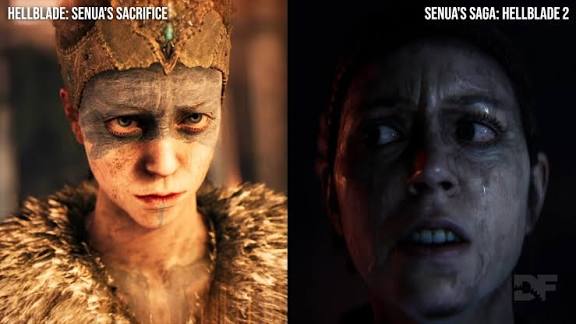
Unreal Engine 5 elevates the Hellblade 2 trailer’s visuals through advanced technologies enabling unprecedented realism. Nanite’s virtualized geometry renders high-poly models like detailed rocks and character features in real-time, using scanned Icelandic landscapes for authenticity. Lumen’s dynamic global illumination creates realistic light bounce, enhancing torch-lit and stormy scenes with natural shadows and reflections. UE5’s post-processing delivers cinematic depth-of-field, motion blur, and filmic grain, giving the trailer a polished, film-like quality. MetaHuman technology enhances Senua’s facial rendering, with lifelike skin, eyes, and emotional expressions, achieving top-tier character realism. These features allow Ninja Theory to craft a visually stunning trailer with faster iteration, removing technical barriers for a next-gen experience.
Here are the key enhancements:
- High-Poly Detail through Nanite: Nanite enables high-poly models like pebbles and carvings, rendered in real-time with photogrammetry scans for authentic detail.Nanite’s virtualized geometry handles dense assets without manual LOD adjustments. Scanned Icelandic landscapes integrate seamlessly, retaining intricate details. This allows the trailer’s environments to feel tangible and richly detailed. Real-time rendering ensures consistent quality across close-ups and wide shots.
- Realistic Global Illumination with Lumen: Lumen’s dynamic lighting creates authentic light bounce, enhancing torch and lightning scenes with natural shadows and diffusion.Lumen ensures realistic illumination in dark caves and stormy exteriors. Light bounces off wet surfaces, creating believable gradients and depth. Volumetric fog integrates seamlessly with dynamic lighting. This system delivers mood-rich, immersive visuals without baked lighting.
- Advanced Post-Processing and Effects: UE5’s post-processing provides cinematic depth-of-field, motion blur, and filmic grain, ensuring a polished, film-like aesthetic.Shallow focus highlights Senua’s face while blurring backgrounds smoothly. Motion blur enhances fast actions without artifacts. Filmic grain adds subtle realism to the trailer’s look. These effects elevate the trailer to high-end cinematic standards.
- Unprecedented Digital Human Rendering: MetaHuman technology renders Senua’s face with lifelike skin, eyes, and emotional expressions, setting a new benchmark for character realism.Senua’s skin features translucent shading and detailed pores. Eyes reflect moisture and subtle emotions convincingly. Advanced materials ensure realistic rendering under varied lighting. This fidelity makes Senua’s performance emotionally compelling and visually striking.
In summary, Unreal Engine 5 elevates Hellblade 2’s trailer visuals through high-fidelity assets, dynamic lighting, and superior character rendering, resulting in a trailer that truly feels next-gen.
What makes the Hellblade 2 trailer stand out graphically?
The Hellblade 2 trailer excels graphically due to its photorealistic detail, advanced lighting, lifelike character animation, and cinematic direction. Environments, built from Icelandic photogrammetry scans, feature dense geometry via Nanite, with pebbles and rocks casting accurate shadows. UE5’s Lumen delivers dynamic lighting, with rain, fire, and lightning creating realistic reflections and atmospheric depth. Senua’s facial animations, driven by MetaHuman technology, showcase seamless emotional transitions, with lifelike skin and eyes. Cinematic camera work, depth-of-field, and smooth motion blur enhance the filmic quality, while dramatic editing and a Norse-inspired soundtrack amplify emotional impact, making the trailer a visual benchmark.
Here are the reasons it stands out:
- Photorealistic Detail: Photogrammetry scans of Icelandic terrain create ultra-dense environments with individual pebbles and realistic textures, enhanced by Nanite.Scanned cliffs and beaches feature tangible, irregular details. Nanite ensures high-poly geometry without LOD issues. Senua’s costume and hair react realistically to light. This fidelity makes the world feel like a real, lived-in place.
- Next-Gen Lighting and Atmosphere: Dynamic lighting from rain, fire, and lightning, with volumetric fog and reflections, creates a moody, immersive atmosphere.Lumen’s light bounce illuminates wet surfaces and caves naturally. Raindrops and fog catch light realistically, adding depth. Firelight reflections on skin enhance realism. These effects make environments feel alive and reactive.
- Facial Animation & Character Realism: Senua’s MetaHuman-driven face displays seamless emotional shifts, with lifelike eyes, skin, and muscle movements.Facial expressions transition smoothly, conveying fear and determination. Eyes and skin react realistically to light, showing subtle details. Motion capture ensures authentic performance fidelity. This realism makes Senua a standout digital character.
- Cinematic Quality and Direction: Dramatic camera angles, depth-of-field, and smooth motion blur, paired with intense editing, deliver a film-like experience.Strategic shots focus attention, like close-ups on Senua’s face. Depth-of-field mimics real lenses for immersive visuals. Editing builds tension with clear pacing. The soundtrack enhances the trailer’s emotional and visual impact.
In essence, the Hellblade 2 trailer marries bleeding-edge graphics technology with artful cinematic design, creating a visual experience that stands out even in today’s era of polished game trailers.
How was facial animation handled in the Hellblade 2 Unreal Engine trailer?
Facial animation in the Hellblade 2 trailer was achieved through a combination of advanced performance capture and Unreal Engine’s MetaHuman facial technology. Here’s how they did it:
- Performance Capture: Actress Melina Juergens’ facial and body movements were recorded simultaneously using a head-mounted camera and mocap markers.Full performance capture ensured Senua’s expressions mirrored Juergens’ acting. Head rigs captured micro-expressions like brow furrows and lip trembles. Body mocap added authentic gestures and posture. This holistic approach preserved the performance’s emotional depth.
- MetaHuman Framework: Senua’s face rig was built with MetaHuman tools, enabling high-fidelity textures and realistic shaders for skin, eyes, and teeth.MetaHuman’s standardized rig provided expressive, lifelike facial animations. Realistic shaders enhanced skin translucency and eye reflections. The framework streamlined applying captured data to Senua. This technology ensured visual consistency and realism.
- MetaHuman Animator: Epic’s MetaHuman Animator rapidly translated Juergens’ facial performance onto Senua’s model, capturing subtle expressions with minimal tweaking.Live demos showed real-time application of Juergens’ expressions to Senua. The tool preserved nuances like eyelid quivers and jaw tension. Minimal hand-tweaking accelerated animation workflows. This feature delivered near-photoreal facial animation quality.
- Collaboration with 3Lateral: Ninja Theory worked with Epic’s 3Lateral to refine Senua’s facial model, ensuring cutting-edge realism for trailer close-ups.3Lateral’s expertise in digital humans enhanced Senua’s facial rig. Collaboration ensured top-tier detail in skin and muscle movements. This partnership pushed MetaHuman technology’s boundaries. The result was a highly impactful digital human.
The team captured Melina Juergens’ expressions and, using Unreal Engine 5’s cutting-edge tools, applied them to Senua with minimal loss of realism, yielding incredibly expressive and realistic facial animations.
Does Hellblade 2 use real-time rendering for its trailer scenes?
Yes. The Hellblade 2 trailer’s scenes are rendered in real-time using the game engine, rather than being pre-rendered CGI. When we say “real-time,” it means the footage was generated by Unreal Engine on target hardware (or equivalent development hardware) as the engine plays out the scene, just like how a game would render frames during gameplay. This is different from traditional offline CGI where frames are painstakingly rendered over hours on render farms.
Microsoft and Ninja Theory have been clear that Hellblade 2’s trailers are in-engine. In fact, the reveal trailer was captured on an actual Xbox Series X console. The official Xbox Wire announcement stated that the footage “shown was captured in-engine and reflects the power of Xbox Series X”, underscoring that what we see is running on the game hardware in real time. This suggests that if you had the game running on a similarly powerful system, it could replicate those scenes on the fly.
However, a subtle clarification: “in-engine real-time” for a trailer doesn’t necessarily mean it’s interactive gameplay with AI and player input. The Hellblade 2 trailer scenes were likely orchestrated within Unreal Engine’s cinematic tools (Sequencer), possibly running at a cinematic frame rate and resolution for capture purposes. But the key point is that Unreal Engine is doing the rendering as the scene plays out, rather than it being a pre-rendered video. Epic Games even reportedly confirmed the earlier footage was running in real-time (with the obvious caveat that it’s on dev hardware, not an older console).
The benefit of real-time rendering is that what you see in the trailer is very close to what you’ll see in the actual game engine. Features like lighting, materials, and post-processing are all being handled by the engine’s real-time pipeline. In Hellblade 2’s case, the trailer’s stunning graphics aren’t just video magic – they are produced by the same rendering systems that will generate the game’s visuals during play.
To put it simply, the trailer is an in-engine cinematic, rendered on the fly. It’s a testament to Unreal Engine 5 that such a trailer can be produced without offline rendering. The final game may optimize certain settings for performance (resolution, framerate), but the core visuals and assets remain the same. This is why the Hellblade 2 trailer is so exciting – it’s showing real-time next-gen graphics, not just a pre-rendered target.
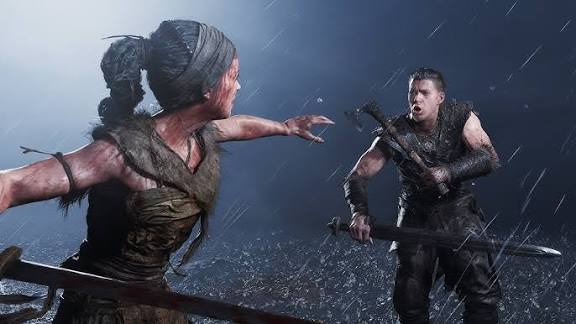
What Unreal Engine 5 features are visible in the Hellblade 2 trailer?
Here are the key UE5 features that viewers can spot and the evidence of their use:
- Nanite Virtualized Geometry: Nanite renders dense geometry like pebbles and crags in the beach and cave, maintaining detail without LOD issues.Rocky environments feature countless detailed stones and surfaces. Nanite handles film-quality scanned models seamlessly. The giant’s flesh retains sharp, complex textures. This ensures rich, high-fidelity environments throughout the trailer.
- Lumen Global Illumination & Reflections: Lumen’s dynamic lighting creates realistic light bounce and reflections on wet surfaces, enhancing torch and storm scenes.Torchlight subtly illuminates cave walls with natural gradients. Reflections on water and skin remain stable across angles. Lightning diffuses realistically through fog. Lumen’s real-time GI delivers immersive, believable lighting.
- Virtual Shadow Maps (VSM): VSM ensures crisp shadows for small objects like pebbles and grass, maintaining cohesion even at extreme angles.Every pebble casts high-resolution shadows under torchlight. Lightning reveals sharp, accurate shadows without jagging. VSM supports Nanite’s detailed geometry. This feature enhances the trailer’s visual consistency.
- MetaHuman Technology: Senua’s face uses MetaHuman’s rig and shaders for ultra-realistic skin, eyes, and facial animations, driven by performance capture.Senua’s skin shows translucent detail and pore accuracy. Eyes reflect light with emotional realism. The rig supports seamless expression transitions. MetaHuman tools elevate Senua to top-tier digital human quality.
- Chaos Physics and Niagara VFX: Chaos physics drives cloth and hair, while Niagara creates dynamic sparks, smoke, and debris for dramatic effects.Senua’s hair and clothing react naturally to wind. Sparks and embers enhance fire scenes dynamically. Debris scatters realistically during giant impacts. Niagara ensures high-detail, performance-friendly particle effects.
- Temporal Super Resolution (TSR) and Anti-Aliasing: TSR maintains sharpness with minimal aliasing, ensuring a crisp, film-like image despite real-time rendering.The trailer’s image is pristine, with sharp geometry. Hair strands show minimal aliasing artifacts. TSR upscales lower resolutions effectively. This feature delivers a polished, cinematic visual quality.
In summary, the Hellblade 2 trailer is a buffet of Unreal Engine 5 features, creating a playable cinematic with unparalleled detail and dynamism.
How realistic is the lighting and environment in the Hellblade 2 UE5 trailer?
The lighting and environments in Hellblade 2’s trailer achieve near-photorealistic realism through Unreal Engine 5’s Lumen, physically-based materials, and real-world data. Lumen’s global illumination creates natural light bounce, with gradients and soft shadows in torch-lit caves and stormy scenes. Dynamic light sources like fire and lightning integrate seamlessly, reflecting accurately on wet surfaces. Environments, built from Icelandic photogrammetry, feature detailed cliffs and beaches with realistic material responses, enhanced by volumetric fog and reactive foliage. High-resolution shadows and accurate occlusion further sell the realism, making the trailer’s world feel like a tangible, filmed location.
The trailer’s lighting and environments are as realistic as we’ve ever seen in a game context. By using real-world scanned data for environments and leveraging Unreal Engine 5’s real-time lighting (Lumen) and material system, Ninja Theory achieved an atmosphere where every rock, every shadow, and every glint of light behaves like it would in the real world. The result is an environment that doesn’t just look like a game level – it looks like a location that truly exists, captured by a camera.
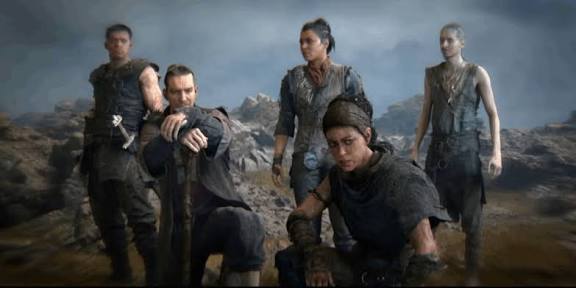
What cinematic tools in Unreal Engine were used for the Hellblade 2 trailer?
Here are the key cinematic tools and techniques likely used for the Hellblade 2 trailer:
- Sequencer: Sequencer arranged scenes, scripting camera cuts, animations, VFX, and audio for precise control over the trailer’s timeline.This timeline editor choreographed Senua’s actions and giant encounters. Camera transitions and VFX triggers were meticulously timed. Sequencer enabled rapid iteration of shots. It mimics video editing for cinematic precision.
- Cinematic Cameras and Lenses: Virtual cameras simulated real-world lenses, using depth-of-field for close-ups and wide shots to enhance visual drama.Telephoto lenses focused on Senua’s face with blurred backgrounds. Wide-angle shots captured expansive environments dynamically. Smooth camera movements added a filmic feel. These settings ensured professional cinematography in-engine.
- Control Rig and Animation Tools: Control Rig fine-tuned mocap animations, adjusting blinks or head turns directly in Unreal for quick iteration.Procedural tweaks refined Senua’s subtle movements efficiently. Animation blueprints streamlined minor edits without external software. This tool enhanced mocap-driven performances. It supported rapid trailer scene adjustments.
- Live Link for Motion Capture: Live Link streamed mocap data into Unreal, allowing real-time preview of Senua’s facial and body performances.Melina Juergens’ facial capture was visualized instantly in-engine. Real-time feedback enabled quick performance tweaks. This integration streamlined mocap workflows. It ensured authentic, seamless animation integration.
- Movie Render Queue: Movie Render Queue output high-quality 4K footage with anti-aliasing and motion blur for a polished trailer.Frame-by-frame rendering ensured crisp, cinematic visuals. Anti-aliasing passes eliminated jagged edges effectively. Motion blur added filmic smoothness. This tool delivered broadcast-ready trailer footage.
- Post-Process Effects & Color Grading: Post-process volumes applied LUTs, motion blur, and bloom, creating mood-specific color tones and cinematic polish.Blue-gray rain scenes contrasted warm fire-lit shots. Bloom enhanced flame glows realistically. Depth-of-field adjusted dynamically per shot. These effects gave the trailer a professional film finish.
This toolset is one of Unreal Engine’s strengths, enabling the team to achieve Hollywood-level cinematography and polish entirely within the game engine.
Was Metahuman used in the development of the Hellblade 2 trailer?
Absolutely. Epic Games’ MetaHuman technology was utilized in bringing Senua (and potentially other characters) to life in Hellblade 2’s trailer. In fact, Ninja Theory has openly collaborated with Epic on pushing digital human realism – Senua is essentially a custom MetaHuman at the highest possible quality.
During the Game Developers Conference 2023, Epic and Ninja Theory showcased how they used the MetaHuman framework and the new MetaHuman Animator on Hellblade 2. It was demonstrated that Senua’s facial rig is built using MetaHuman tools, allowing the developers to capture actress Melina Juergens’ performance and apply it to the digital Senua with uncanny fidelity. The phrase used was that Senua is being brought to life with Unreal Engine’s MetaHuman tool. This implies that the team leveraged MetaHuman Creator (or its underlying tech) to generate Senua’s face model and rig by scanning Melina’s face and crafting a highly detailed digital double.
Moreover, Epic’s 3Lateral team (now part of MetaHuman tech) supported Ninja Theory in creating Senua’s trailer model. 3Lateral specializes in hyper-realistic digital humans, and their support indicates that Senua’s trailer appearance was on the cutting edge of what MetaHuman tech could do at the time. The result was described as “unprecedented levels of visual and performance detail for Senua — one of the most impactful and authentic digital humans ever made”. That’s essentially a description of a MetaHuman character, because the MetaHuman system’s goal is exactly that: to produce photorealistic digital humans with ease of customization.
To break it down, MetaHuman was likely used in two main ways for Hellblade 2:
- Creating the Base Character: Using Mesh to MetaHuman, Ninja Theory could take a detailed scan or sculpt of Melina/Senua’s face and convert it into a MetaHuman-compatible model. This gives Senua a facial rig that is standardized and extremely expressive, plus highly realistic textures for skin, eyes, teeth, etc. The mention of translucency in skin and lifelike eyes in the trailer aligns with MetaHuman’s materials.Mesh to MetaHuman created a high-fidelity Senua model from scans. The standardized rig ensured expressive, realistic animations. Textures delivered lifelike skin and eye details. This process streamlined crafting a photoreal digital double.
- Animating the Face: With the newly released MetaHuman Animator (around 2023), the team can record an actor’s facial performance via an iPhone or a head-mounted camera and in a matter of minutes get a fully animated facial track applied to Senua’s face in-engine. Epic’s demo literally showed Melina speaking a line and Senua’s digital face reproducing it almost instantly, which is a MetaHuman Animator use case. This was presented as a leap in ease and fidelity of facial animation capture – and Hellblade 2 was the poster child for it.MetaHuman Animator rapidly applied Juergens’ performance to Senua. Real-time capture preserved subtle expressions like nostril flares. Minimal tweaking ensured efficient animation workflows. This tool delivered unprecedented facial animation fidelity.
So, when you see Senua’s subtle facial movements in the trailer – the quiver in her eyelids, the flaring of her nostrils as she breathes heavily, the way her jaw trembles when she’s afraid – that’s the MetaHuman-powered rig faithfully replaying Melina Juergens’ performance. The Metahuman system ensures consistency and realism, meaning every tiny detail of the face is accounted for in the rig (down to the tongue and pupil dilation).
In summary, MetaHuman tech was indeed used in the Hellblade 2 trailer’s development, both in constructing the highly realistic character model of Senua and in driving her facial animations. This synergy of Ninja Theory’s artistry and Epic’s MetaHuman technology is a major reason why Senua’s depiction in the trailer is so striking and has set a new bar for digital humans in games.
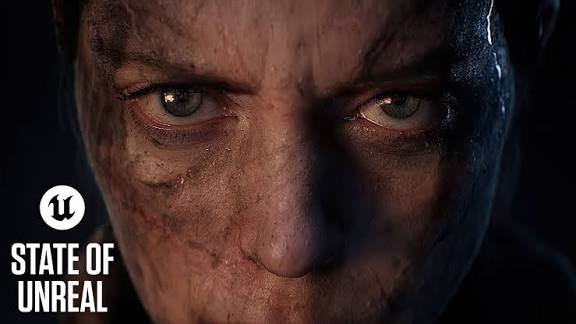
How does the Hellblade 2 trailer compare to other UE5 game trailers?
Hellblade 2’s trailer sets a high benchmark among Unreal Engine 5 game trailers, excelling in photorealistic character rendering and cinematic presentation. Compared to The Matrix Awakens’ broad cityscapes, Hellblade 2 focuses on intimate realism, with Senua’s MetaHuman-driven face surpassing the demo’s character close-ups. Against Lumen in the Land of Nanite’s early cave demo, Hellblade 2 adds complex combat, weather, and narrative depth. Other UE5 trailers like Black Myth: Wukong and Lords of the Fallen lean toward fantastical or gothic styles, while Hellblade 2’s linear, narrative-driven scope allows unmatched detail per asset. Its focused design and Xbox exclusivity enable Ninja Theory to maximize UE5’s features, making it a flagship for real-time cinematic visuals.
Here’s how it compares:
- The Matrix Awakens (UE5 Tech Demo, 2021): Hellblade 2’s intimate realism and detailed assets outshine the demo’s broader city focus, with superior facial rendering.The Matrix Awakens excels in open-world scale but limits character close-ups. Hellblade 2’s Senua showcases MetaHuman-driven emotional depth. Its environments feature denser, scanned details. The trailer feels more cinematic than the demo’s tech showcase.
- Lumen in the Land of Nanite (UE5 early demo, 2020): Hellblade 2 surpasses this demo with complex scenes, facial animation, and dynamic weather, enhancing the cave concept.The early demo showed basic Nanite and Lumen in caves. Hellblade 2 adds combat, multiple characters, and narrative. Its environments include storms and detailed exteriors. This trailer feels like a fully realized cinematic experience.
- Other UE5 Game Trailers: Hellblade 2’s photorealism and cinematic pacing outpace Black Myth: Wukong’s fantastical style and Lords of the Fallen’s gothic visuals.Black Myth: Wukong emphasizes action and lush environments. Lords of the Fallen features detailed castles but less human realism. Hellblade 2 combines character, environment, and effects uniformly. Its linear focus enables unmatched visual fidelity.
Hellblade 2 is frequently cited alongside or above those as a graphical pacesetter, often mentioned in the same breath as tech demos and cutscenes, rather than typical gameplay trailers.
Is the gameplay in Hellblade 2 as cinematic as the trailer suggests?
Previews and developer insights confirm that Hellblade 2’s gameplay is designed to be highly cinematic, aligning closely with the trailer’s presentation. The game emphasizes a narrative-driven experience with scripted sequences, seamless transitions between gameplay and cutscenes, and choreographed camera angles for dramatic impact. Combat features motion-captured animations with filmic flourishes, like slowed hit frames, while exploration integrates story elements without hard cuts, maintaining visual fidelity. The deliberate pacing, minimal HUD, and in-house mocap ensure a cohesive, movie-like experience, making gameplay feel like an interactive extension of the trailer’s cinematic quality.
Here’s what supports this:
- Narrative Focus and Scripted Sequences: Gameplay features scripted sequences with cinematic camera shifts, blending playable and cutscene moments seamlessly.Camera angles transition dynamically during key events, like giant encounters. Dialogue and reactions occur within gameplay, not separate scenes. This approach creates an interactive movie feel. Previews describe it as highly scripted and dramatic.
- Combat with Cinematic Flourishes: Combat uses motion-captured animations with slowed hit frames, enhancing impact and maintaining a filmic aesthetic.Strikes feature brief slow-motion for weighty hits, a cinematic trick. Animations blend smoothly, avoiding gamified jarring. Minimal HUD keeps immersion intact. This ensures combat feels like the trailer’s choreographed battles.
- Exploration and Story Integration: Exploration integrates story through dynamic camera follows and seamless in-engine cutscenes, preserving trailer-like visuals.Senua’s movements trigger story events without cuts, like visions. Cameras follow dynamically in tight spaces, maintaining fidelity. Environmental storytelling enhances immersion. This mirrors the trailer’s atmospheric pacing and detail.
Playing Hellblade 2 will likely feel like you’re inside the trailer, experiencing those events firsthand with minimal gamified distractions.

What role did motion capture play in the Hellblade 2 trailer?
Motion capture was central to the Hellblade 2 trailer, driving realistic character animations for both acting and combat. Melina Juergens’ full performance capture, including facial and body movements, delivered Senua’s emotional authenticity, with head rigs capturing subtle expressions. Combat sequences, like spear throws and group battles, were choreographed and recorded with stunt performers, ensuring natural movement. Ninja Theory’s in-house mocap studio and combat training for animators enhanced realism. Animation tweaks, like pausing frames on hits, added cinematic impact, while collaboration with 3Lateral ensured seamless facial and body sync, making the trailer feel authentically acted.
Here’s how mocap was used:
- Performance Capture for Acting: Melina Juergens’ facial and body movements were captured simultaneously, translating her emotional performance onto Senua.Full mocap preserved flinches, heavy breathing, and terrified reactions. Head rigs captured subtle facial nuances accurately. This ensured Senua’s performance felt human and authentic. Emotional trailer moments relied on this capture fidelity.
- Motion Capture for Combat and Movement: Combat moves, like spear throws, were choreographed and captured with stunt performers for realistic group dynamics.Staged combat sequences delivered natural, trained warrior movements. Animators’ combat training enhanced choreography realism. Captured group interactions avoided AI-like behaviors. This grounded the trailer’s battles in authentic motion.
- Animation Enhancements: Captured animations were tweaked, like pausing frames on hits, to amplify combat impact while retaining mocap realism.Brief pauses on strikes added cinematic weight to actions. Artistic tweaks enhanced mocap without losing authenticity. This balanced realism with stylized drama. The result was visceral, film-like combat sequences.
- Collaboration with 3Lateral: Collaboration with 3Lateral aligned facial and body mocap, ensuring seamless sync for Senua’s performance.3Lateral’s expertise ensured precise facial-body integration. Timecode alignment via MetaHuman Animator streamlined workflows. This delivered consistent, lifelike animations. The trailer’s authenticity benefited from this technical synergy.
Ninja Theory’s heavy investment in mocap shows in the final product: the trailer feels acted, not just animated, which deepens its cinematic quality and emotional resonance.
How can developers create cinematic trailers like Hellblade 2 in Unreal Engine?
Here are some steps and tips for developers (from indie to AAA) to craft similar in-engine cinematic trailers:
- Leverage Real-Time Sequencer: Sequencer layouts trailer scenes, syncing shots, animations, and audio for instant feedback and rapid iteration.Unreal’s Sequencer enables scene-by-scene trailer planning like a short film. Developers can animate cameras and characters within the engine. Real-time feedback allows quick tweaks to lighting and angles. This workflow ensures cinematic polish without offline rendering delays.
- Use High-Quality Assets (Megascans, MetaHumans, Marketplace): Realistic assets like Megascans and MetaHumans provide photorealistic environments and characters for high-fidelity trailers.Quixel Megascans offers free scanned models for detailed scenes. MetaHuman Creator generates rigged, realistic human models. Unreal Marketplace provides cinematic assets for quick integration. These resources allow small teams to achieve AAA-level visuals efficiently.
- Emphasize Lighting and Post-processing: Dynamic lighting and post-process effects like depth-of-field and color grading create a dramatic, film-like atmosphere.Lumen enhances mood with realistic light bounce and reflections. Post-process effects focus viewer attention and add polish. Animating effects per shot heightens cinematic impact. Consistent lighting style ensures a cohesive trailer aesthetic.
- Integrate Motion Capture or Quality Animation: Mocap or MetaHuman Animator delivers realistic character animations, enhancing trailer believability with minimal effort.Live Link streams mocap data for seamless integration. MetaHuman Animator captures facial animations from simple devices. Control Rig refines animations for specific shots. Realistic timing and weight elevate character performances significantly.
- Use Cinematic Editing Techniques: Sequencer’s camera cuts and time dilation, paired with narrative pacing, create emotionally engaging trailers.Strategic cuts between wide and close shots build impact. Slow motion highlights key moments effectively. Narrative arcs ensure viewer engagement throughout. Audio synchronization with music drives pacing and intensity.
- Iterate and Optimize within the Engine: Real-time iteration and Movie Render Queue enable rapid polishing and high-quality trailer output.Play In Editor allows instant sequence testing and tweaks. Movie Render Queue renders crisp, cinematic footage. Real-time adjustments streamline polishing workflows. This ensures trailers achieve a professional, high-sheen finish.
- Take Advantage of Unreal Engine’s Community and Learning Resources: Epic’s tutorials and community forums provide cinematic creation techniques and practical insights.Free courses teach Sequencer and lighting fundamentals. Community forums share advanced tips and solutions. Studying other trailers offers workflow insights. These resources empower developers to master cinematic tools.
In summary, developers can create cinematic trailers like Hellblade 2 by combining Unreal Engine’s real-time tools with a filmmaker’s mindset, achieving stunning results through strategic asset use and iterative polishing.
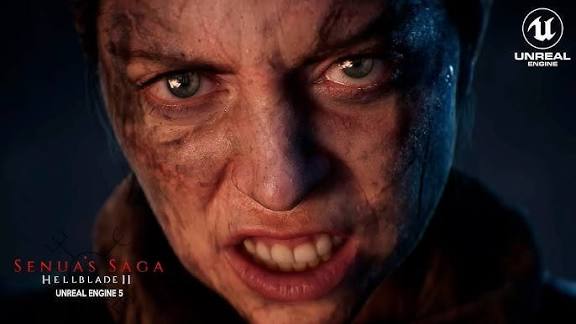
What are fans saying about the Hellblade 2 trailer’s Unreal Engine visuals?
Fans are astounded by the Hellblade 2 trailer’s Unreal Engine 5 visuals, praising their realism and technical prowess. The real-time rendering shocked many, with comments like “I thought it was CGI!” flooding forums. Senua’s facial animations, especially her emotive eyes and tears, are hailed as unmatched, evoking strong emotional responses. Fans see it as a new graphical benchmark, outshining other current-gen titles and showcasing Xbox Series X capabilities. Initial skepticism about in-engine claims turned to hype as previews confirmed consistent quality. The trailer’s dark, authentic artistry also resonates, with fans calling it “visually iconic” and eagerly anticipating a game that delivers on this visual promise.
The Hellblade 2 trailer has generated widespread excitement among fans and industry observers, particularly regarding its visuals. In the gaming community, the response to the trailer’s Unreal Engine-powered graphics has been one of awe and almost disbelief. Many fans commented that at first glance they could hardly believe the trailer was running in real-time.
The phrase “too real” comes up often – as in, Hellblade 2’s visuals look almost too realistic for a game. On forums and social media, viewers marveled at the detail in Senua’s face, the quality of the lighting, and the atmosphere. Comments like “I thought it was CGI, but it’s in-engine!” or “This is the best graphics I’ve ever seen in a game trailer” were common sentiments. The in-engine nature was especially shocking; one discussion noted it as “an impressive feat given that the trailer was captured entirely in-engine”, underlining fan astonishment that these are not pre-rendered graphics. Fans and tech enthusiasts have started holding Hellblade 2 up as a new graphical benchmark.
Comparisons to other games invariably put Hellblade 2 at the top; people say it makes many current-gen games look last-gen in comparison. Phrases like “on another level” are used frequently. This expert validation reinforced what fans felt – that Hellblade 2 is raising the bar. On dedicated Xbox forums, fans took pride in Hellblade 2 as a demonstration of what the Xbox Series X (and Unreal Engine 5) can do graphically, something to rival any PlayStation exclusive or PC showcase. A particular point of buzz is how convincing Senua’s facial expressions are. Fans who are familiar with game development commented that Senua’s facial animation might be the best they’ve ever seen in a video game trailer.
Some mentioned being emotionally moved just by the trailer, which is a testament to how well the facial performance came through. The term “CGI-level” has been thrown around, with the caveat that “it’s not CGI, it’s actually real-time”. In discussions, you’ll find people pointing out specific moments – for example, “the part where Senua’s eyes dart around in fear looked so human” or “I got chills when I saw the tear roll down her cheek mixing with her face paint”. All this positive chatter essentially recognizes Ninja Theory’s success in delivering a character that viewers can empathize with just from a short trailer, thanks largely to the visual fidelity.
Is the Hellblade 2 trailer representative of in-game graphics?
By all accounts, yes – the Hellblade 2 trailer is highly representative of the in-game graphics that players can expect. Unlike some trailers that use cinematic techniques or separate rendering paths, Hellblade 2’s footage is created within the game engine and appears to reflect the actual visual quality of the game during play (with the caveat of cinematic framing).
There are a few strong pieces of evidence for this:
- In-Engine and Real-Time: The trailers are real-time captures on target hardware, using the same assets, shaders, and lighting as the game.Assets like Senua’s model and environments are identical in-game. Real-time rendering ensures consistent visual fidelity. Lighting and effects mirror gameplay systems. This guarantees the trailer reflects actual game visuals.
- Consistent Previews: Gameplay previews show visuals matching or surpassing the trailer, with no noticeable downgrade in quality.Direct feed footage maintains trailer-level detail and lighting. Analysts confirm gameplay segments rival cinematic trailers. Visuals have improved as development progressed. This consistency builds trust in the trailer’s accuracy.
- Engine Feature Usage in Gameplay: Nanite, Lumen, and MetaHuman features are active during gameplay, ensuring trailer-like detail persists.Senua’s model retains high fidelity in playable moments. Environments use the same detailed geometry and lighting. No separate cutscene render mode exists. Gameplay visuals align closely with trailer quality.
- Seamless Cutscene Integration: Real-time cutscenes flow into gameplay, maintaining the same assets and rendering for a cohesive look.Scripted events use trailer-like assets without breaks. Camera shifts preserve visual quality during transitions. Players experience trailer scenes interactively. This ensures a consistent visual experience.
- Target Platform Footage: Captured on Xbox Series X, the trailer reflects the game’s target hardware capabilities with minimal optimization differences.Trailer visuals run on console-equivalent hardware. Possible framerate or resolution tweaks are minor. Core artwork remains unchanged. Players should see near-identical fidelity.
- Statements from Developers/Publishers: Ninja Theory and Microsoft confirm the trailer represents the game’s graphical quality without misleading enhancements.Official statements emphasize Xbox Series X fidelity. No downgrade concerns arose in previews. Developers aim for trailer-like visuals. This transparency supports the trailer’s representativeness.
In conclusion, the Hellblade 2 trailer is a very accurate representation of in-game graphics, with players expected to experience the same detailed environments, character models, and lighting effects during gameplay.

What techniques did Ninja Theory use to build emotion in the Hellblade 2 trailer?
Here’s how they built such an emotional impact:
- Authentic Performance Capture: Melina Juergens’ captured performance delivers Senua’s genuine fear, anger, and sorrow, enhancing viewer empathy.Full mocap translates nuanced expressions like tearful eyes. Senua’s voice cracks and body language feel real. MetaHuman enhances performance fidelity. This authenticity makes Senua’s emotions deeply relatable.
- Cinematic Storytelling and Direction: Dynamic camera work and editing immerse viewers in Senua’s anxiety and resolve, amplifying emotional intensity.Close, shaky shots convey adrenaline during tense moments. Quick cuts build dread in cave scenes. Steady shots highlight Senua’s determination. Editing mirrors thriller film techniques for impact.
- Atmospheric Audio Design (Voices and Music): Diegetic chants and Senua’s head voices, paired with intense sound effects, heighten tension and emotional stakes.Nordic-inspired chants build ritualistic intensity. Whispers reflect Senua’s mental struggle, adding chaos. Sound drops create poignant silences. Audio crescendos drive fear and empathy.
- Relatable Themes and Expressions: Themes of fear, leadership, and empathy, shown through Senua’s reactions, connect viewers to her emotional journey.Senua’s responsibility for her group evokes empathy. The giant’s suffering adds tragic depth. Tear-streaked face paint visualizes emotional turmoil. These elements make stakes feel personal.
- Pacing and Tension Build-Up: A rollercoaster pace from somber to chaotic to sorrowful aligns viewers’ emotions with Senua’s narrative arc.Eerie starts build to panicked action sequences. Quiet moments contrast with intense battles. The tragic climax delivers heartbreak. Pacing ensures continuous emotional investment.
- Historical/Cultural Authenticity Aiding Emotion: Authentic costumes and rituals ground the supernatural narrative, making emotional stakes feel real and poignant.Scanned costumes enhance historical realism. Rituals tie to researched Norse culture. Mental health themes add symbolic depth. This authenticity deepens viewer emotional engagement.
In summary, Ninja Theory built emotion in the Hellblade 2 trailer through a synergy of performance, cinematography, audio, and narrative context, making the audience feel what Senua is feeling.
Can indie developers replicate Hellblade 2 trailer quality using Unreal Engine 5?
Unreal Engine 5’s tools enable indie developers to approach Hellblade 2’s trailer quality, but matching its full scope is challenging. UE5’s free features like Nanite and Lumen, plus Megascans and MetaHuman assets, provide indies with AAA-grade rendering and photorealistic content. MetaHuman Animator and Marketplace assets simplify animation and environment creation, while community tutorials share professional techniques. However, Ninja Theory’s polish, expertise, and team size create a high bar. Indies can achieve stunning short sequences by focusing on limited scopes and leveraging available resources, but replicating the trailer’s complexity requires significant time, skill, and strategic planning.
Here’s why indies can get close but face challenges:
- UE5 is Free and Feature-Complete: UE5’s full feature set, including Nanite and Lumen, is accessible to all, enabling high-end rendering.Indies can use ray-tracing and 8K textures freely. No feature restrictions limit small teams. The same rendering power as AAA studios applies. This levels the technical playing field significantly.
- Megascans and Libraries: Free Megascans and MetaHuman Creator provide photorealistic assets, reducing the need for custom content creation.Scanned rocks and plants fill environments realistically. MetaHumans offer rigged, lifelike characters. These assets shortcut AAA-level visual creation. Indies can build detailed scenes efficiently.
- MetaHuman Animator and Blueprint Tools: MetaHuman Animator and pre-built effects allow indies to create convincing animations and VFX with minimal setup.iPhone-captured facial animations achieve near-AAA quality. Niagara and Chaos deliver dynamic effects easily. Blueprints simplify complex interactions. These tools streamline high-fidelity content creation.
- Community and Marketplace: Marketplace assets and community tutorials provide affordable animations and techniques to enhance cinematic quality.Free or low-cost assets include armor and animations. Tutorials share AAA workflow insights. Community forums troubleshoot specific issues. This support empowers indies to push visual boundaries.
- Time and Polish: Limited manpower makes achieving Hellblade 2’s consistent polish across complex scenes difficult for small teams.Polishing a full trailer requires extensive iteration. Complex scenes demand significant effort. Indies may excel in short sequences. Broad scope challenges small team resources.
- Expertise: Artistic and technical expertise is needed to maximize UE5 tools for cinematographic perfection, posing a learning curve.Lighting and animation require experienced direction. Mastering Lumen demands artistic skill. Tutorials help, but expertise takes time. Indies may need to upskill gradually.
- Hardware: High-end PCs are needed for real-time iteration, though Movie Render Queue allows slower rendering on modest setups.Powerful GPUs enable smooth high-quality workflows. Modest PCs can render trailers slowly. Hardware barriers are manageable. Indies can optimize for available resources.
- Team Size vs Scope: Indies must focus on smaller scopes to achieve Hellblade-level quality, as full games require extensive content.Short, polished sequences are feasible for small teams. Full trailers demand vast assets. Strategic scoping maximizes impact. Indies can rival AAA in limited contexts.
The bottom line is, indies can now attempt what only AAA could do a few years ago, achieving moments of comparable beauty with UE5, though matching Hellblade 2’s full scope requires strategic focus.

How does Lumen contribute to the lighting in the Hellblade 2 trailer?
Here’s what Lumen contributes in the trailer:
- Dynamic Global Illumination: Lumen’s real-time bounced light creates natural gradients in dark caves, enhancing torchlit scene realism.Torchlight bounces off cave walls, dimly illuminating surroundings. Subtle light gradients replace harsh black voids. Senua’s back catches rim lighting realistically. This cohesion elevates atmospheric authenticity.
- Accurate Ambient Lighting: Lumen ensures ambient light from fires and skies bounces naturally, adding realism to outdoor scenes.Wet ground reflects faint sky and fire glow. Lightning briefly floods scenes convincingly. Ambient fill avoids overly contrasty looks. This creates believable environmental lighting.
- Soft Shadowing in Indirect Light: Lumen’s diffuse bounced light softens shadows, ensuring realistic indirect lighting in enclosed spaces.Caves show soft or no shadows in bounced light. Indirect areas maintain natural darkness gradients. Lumen handles ambient occlusion seamlessly. This enhances visual coherence.
- Reflections (Via Lumen or Hybrid): Lumen’s software ray tracing delivers stable reflections on water and skin, avoiding glitches.Water and wet skin reflect firelight accurately. No screen-space reflection artifacts appear. Possible hardware ray tracing enhances quality. Reflections remain consistent across angles.
- No Baking Required = Dynamic Scenes: Lumen dynamically updates lighting for moving torches and fires, ensuring seamless realism.Falling giants and thrown torches adjust lighting instantly. Dynamic light sources integrate naturally. No pre-baked lighting limits flexibility. This supports the trailer’s dynamic sequences.
In conclusion, Lumen contributes by making every light source in Hellblade 2’s trailer count, bouncing light around for realism, providing accurate ambient illumination, and enabling high-quality reflections, ensuring a cohesive, physically-based lighting environment.
Where can I learn more about cinematic trailer creation in Unreal Engine?
If you’re inspired by Hellblade 2’s trailer and want to learn how to create cinematic content in Unreal Engine, there are plenty of resources and official documentation to guide you. Here are some great starting points:
- Unreal Engine Official Documentation – Cinematics and Movie Making: Epic Games provides extensive documentation on using their cinematic tools. The Cinematics and Movie Making section of the Unreal Engine docs covers everything from Sequencer basics to advanced topics like camera rigs and movie rendering. It’s a good idea to read through these to understand the capabilities of the engine. You’ll find how-to’s on setting up sequences, controlling cameras, blending animations, and adding effects specifically for cinematics. The docs also cover the use of the Movie Render Queue for exporting high-quality video of your sequences.Comprehensive guides detail Sequencer and camera setups. Advanced topics include animation blending techniques. Movie Render Queue export tips ensure quality. This resource builds a strong cinematic foundation.
- Unreal Online Learning Courses: Epic has free online learning courses for Unreal Engine. In particular, they have courses focused on cinematography and animation in Unreal. For example, they hosted an Animation Learning Challenge with tutorials on how to animate characters and lipsync in engine. Those courses are still available on their learning portal. Topics include using Control Rig for animation, lighting for storytelling, and using MetaHumans. These are step-by-step video lessons, great for beginners. A notable course series is “Sequencer for Beginners” which many have found helpful, and also “Lighting for Emotional Impact” which goes into lighting techniques for scene mood.Video lessons cover Sequencer and lighting basics. Animation tutorials include Control Rig and MetaHumans. Beginner-friendly courses ensure accessible learning. These build practical cinematic skills.
- Unreal Engine YouTube Channel (Tutorials & Talks): The Unreal Engine YouTube channel has recorded webinars and talks. Search for sessions like “Mastering Sequencer” or “Cinematic Lighting in Unreal.” There was a good GDC talk called “The Future of Cinematic Gameplay Authoring in UE” and often they share Unreal Fest presentations, such as one from Unreal Fest 2024 about new Sequencer features. Watching those can give you both practical tips and a sense of how pros set up their workflows. Epic often brings in guest developers to explain how they made a trailer or in-game cutscene using Unreal – those case studies are gold.Webinars offer practical Sequencer and lighting tips. GDC and Unreal Fest talks share pro workflows. Guest developer case studies provide insights. These videos inspire and educate effectively.
- Community Tutorials and Forums: The Unreal Engine community is very active. Websites like 80.lv, CGSociety, and even YouTube channels by creators (JSFILMZ, William Faucher, etc.) have tons of tutorials on making cinematic content. For instance, William Faucher on YouTube has specific tutorials on cinematic lighting and rendering in UE5, taught in a very approachable way (he’s a former Hollywood lighter). The Unreal Engine forums and AnswerHub can help if you have specific questions or run into issues – just search for keywords like “Sequencer camera cut not working” and you’ll likely find solutions.Creator tutorials cover lighting and rendering techniques. Forums troubleshoot specific cinematic issues. Community sites share advanced tips. These resources enhance practical knowledge.
- Official Unreal Sample Projects: Epic releases sample projects that you can open and learn from. One particularly relevant one is the “Sequencer” sample that comes with Unreal (check the Learn tab of the Epic Launcher). There’s also the City Sample from The Matrix Awakens demo – exploring that can show you how they organized a cinematic demo in UE5. It’s heavy, but you can see how they did camera animations and such. The MetaHuman sample project includes a cinematic sequence of a MetaHuman with dialogue; it’s a great way to see proper setup of facial animation and cameras.Sequencer sample demonstrates cinematic setup basics. City Sample shows complex demo organization. MetaHuman sample details facial animation workflows. These projects offer hands-on learning.
- Unreal Engine Field Guide (for Virtual Production): Epic offers a free PDF called the Virtual Production Field Guide. While it’s more geared to filmmakers using Unreal for real-world production, many principles overlap with making game trailers. It discusses how to manage a virtual production, which includes things like shot planning in Sequencer, use of live cameras, etc. It’s a broader read but can expand your understanding of Unreal’s role in cinematics.The guide covers shot planning and camera techniques. Virtual production principles apply to trailers. It broadens cinematic creation perspectives. This resource deepens workflow understanding.
- Hands-on Practice – recreate scenes: Lastly, a great way to learn is by trying to recreate a simple cinematic scene in Unreal yourself. Start small: maybe make a 30-second trailer of a character walking through a forest at sunset. Use Sequencer to time the walk, move a camera, add some music. It doesn’t need to be Hellblade-level at first; the key is to get familiar with the tools. As you get comfortable, you can build complexity (e.g., add dialogue, multiple shots, visual effects). The learning resources above will help at each step.Small projects build Sequencer and camera familiarity. Gradual complexity adds dialogue and effects. Practice fosters tool mastery. This approach ensures steady skill growth.
In summary, to learn more about creating cinematic trailers in Unreal Engine, tap into Epic’s official learning materials and the vibrant community knowledge base, combining foundational courses with practical experimentation.
By following these resources, you’ll be well on your way to crafting your own stunning in-engine cinematics, perhaps not unlike Ninja Theory’s work – who knows, maybe your project will be the next trailer that blows people away!

Frequently Asked Questions (FAQs)
- Is the Hellblade 2 trailer running in real time in-engine?
Yes, the trailer runs in real-time using Unreal Engine on Xbox Series X. It showcases true game engine graphics, not pre-rendered CGI. The capture reflects real-time rendering capabilities. This demonstrates the engine’s power during gameplay-like conditions. - Is Hellblade 2 being made with Unreal Engine 5?
Yes, Hellblade 2 is built on Unreal Engine 5. The project transitioned from UE4 to leverage UE5’s advanced features. Trailers and the final game utilize UE5’s capabilities. Lumen, Nanite, and other tools enhance its next-gen visuals. - How did they make Senua’s face so realistic in the trailer?
Senua’s realism comes from performance capture and MetaHuman technology. Melina Juergens’ facial performance was mapped to Senua’s digital face. MetaHuman Animator provided a detailed facial rig for nuances. This captured skin wrinkles, eye movements, and subtle expressions. - Was MetaHuman used for Hellblade 2’s characters?
Yes, MetaHuman tools crafted and animated Senua’s lifelike appearance. Ninja Theory collaborated with Epic and 3Lateral for MetaHuman integration. MetaHuman Animator enabled near-instant facial animation reproduction. This technology achieved the trailer’s photorealistic character visuals. - Are the trailer’s scenes part of the actual gameplay or just cutscenes?
The trailer shows in-engine scripted sequences, likely narrative cutscenes. Cutscenes blend seamlessly with gameplay in Hellblade 2’s design. Environments and events will appear in-game with cinematic presentation. Players experience these visuals, though control may be limited. - Did Ninja Theory use motion capture for Hellblade 2’s trailer?
Yes, motion capture drove nearly all trailer animations. Melina Juergens and stunt actors were recorded in a mocap studio. Combat, gestures, and expressions were polished in-engine. This grounded animations in real human motion for fluidity. - What Unreal Engine 5 features are showcased in the Hellblade 2 trailer?
The trailer showcases several UE5 features:- Nanite: Enables highly detailed geometry like rocks and pebbles. Nanite creates intricate environmental details effortlessly. Every surface benefits from enhanced geometric fidelity. This contributes to the trailer’s photorealistic landscapes.
- Lumen: Provides realistic global illumination and reflections. Lumen ensures natural bounce light and dynamic lighting. Reflections enhance wet surfaces and environments. This creates immersive, cohesive lighting effects.
- Virtual Shadow Maps: Deliver crisp, high-resolution shadows. Shadows remain sharp even on small objects. This adds realism to intricate scenes. It supports the trailer’s visual clarity.
- MetaHuman tech: Powers digital human creation and animation. Senua’s face achieves lifelike realism through MetaHuman. Detailed facial rigs capture subtle expressions. This elevates character authenticity significantly.
- Chaos & Niagara: Likely used for physics and VFX. Cloth, hair physics, and particle effects like smoke shine. These systems add dynamic environmental interactions. They enhance the trailer’s immersive atmosphere.
- Can small developers achieve Hellblade 2-level graphics with UE5?
Small developers can approach Hellblade 2’s graphics with UE5’s tools. Nanite, Lumen, and MetaHumans are accessible to indies. However, matching the full polish requires significant expertise. Small teams can create high-quality moments with strategic asset use. - What are people saying about Hellblade 2’s graphics?
Fans and journalists praise Hellblade 2’s photorealistic visuals. Facial animations and atmospheric lighting are standout features. Many consider it a benchmark for next-gen graphics. The real-time rendering shocked viewers with its fidelity. - When will Hellblade 2 be released and on what platforms?
Hellblade 2 releases May 21, 2024, on Xbox Series X|S and PC. It’s an Xbox exclusive with no PlayStation or last-gen versions. Available on Xbox Game Pass at launch. The game leverages cutting-edge tech for its visuals.
Conclusion
The Hellblade 2 trailer showcases a cinematic blend of Unreal Engine 5’s technology and Ninja Theory’s artistry, creating an emotional epic. It highlights real-time gameplay visuals that rival film quality, using tools like Nanite and Lumen for detailed environments and lighting. Senua’s lifelike expressions stem from MetaHuman performance capture, reflecting actual game development practices. The trailer sets a new standard for next-gen visuals, exciting gamers for Hellblade 2 and future graphics. It blurs the line between interactive and cinematic experiences, marking a milestone in game storytelling.
For developers, the trailer is a masterclass in using photogrammetry, advanced materials, and mocap within UE5 to push visual boundaries. It inspires both indie and large studios to aim for film-like quality with accessible tools. The trailer’s impact raises expectations for immersive, realistic games. As studios adopt these technologies, the gap between games and films will shrink. Hellblade 2 heralds a new era of emotionally rich, visually stunning interactive storytelling.
Sources
- Eurogamer / Digital Foundry — Oliver Mackenzie, Hellblade 2 looks like the most visually ambitious Unreal Engine 5 game yet. Eurogamer blocked direct fetching here, but independent references point to this exact slug.
- Eurogamer / Digital Foundry — preview analysis: I couldn’t verify a second distinct Eurogamer page from your note; the closest separate live match I found is the companion DF video, Hellblade 2 Preview Reaction: The New State Of The Art For Unreal Engine 5?.
- The Verge — Jay Peters, Microsoft releases a new trailer for Senua’s Saga: Hellblade II.
- VGC — Tom Ivan, Ninja Theory has offered a new look at Hellblade 2’s facial animation tech.
- Epic Games / Unreal Engine blog — Senua’s Saga: Hellblade II highlights a long list of Unreal Engine titles at The Game Awards 2019.
- GamesRadar+ — Connor Sheridan, Senua’s Saga: Hellblade 2 is the first new Unreal Engine 5 game confirmed for Xbox Series X.
- GamingBolt — Usaid, Senua’s Saga: Hellblade 2 Trailer Graphics Analysis – Is The Game Showcasing The Full Power Of The Xbox Series X/S?.
- GamingBolt — continuation note: this is the same URL as the item above; the photogrammetry, reflective water, smoke/particles, and tears details appear later in that same article.
- Polygon — Oli Welsh, Senua’s Saga: Hellblade 2 preview: What Unreal Engine 5 can do with a new kind of realism. This is the live page for the Polygon piece you paraphrased.
- Dean Takahashi — live at GamesBeat, Epic Games and Ninja Theory show off Senua’s face from Senua’s Saga: Hellblade II. This is the live page corresponding to your VentureBeat citation.
- Pure Xbox — Xbox’s Hellblade 2 Is ‘On Another Level’ Says Digital Foundry, Despite Series S Concerns.
- MetaHuman / Epic — New MetaHuman Animator feature set to bring easy high-fidelity performance capture to MetaHumans. The old Unreal Engine blog URL now redirects here.
- Unreal Engine blog — The Animation Learning Challenge 2021: Meet the winner.
- Experience Points / Anshar Studios — Anshar Studios – Making A CineMatic Trailer In UE4.
- Unreal Engine documentation — Cinematics and Movie Making in Unreal Engine.
- Xbox Wire — Everything You Need to Know about Xbox Series X and The Future of Xbox… So Far
Recommended
- How to Create Realistic Hair Using the New Hair Tools, Geometry Nodes, and Hair Curves in Blender
- Camera Switching in Blender Animations: Mastering The View Keeper
- How to Use MetaHuman Animator: A Step-by-Step Guide for Realistic Facial Animation
- Metahuman Facial Motion with Faceware: Complete Workflow for Realistic Face Animation in Unreal Engine 5
- Devil May Cry: Complete Guide to the Iconic Action Franchise, Characters, and Latest Updates
- How to Fix Missing Textures/ (or Linked) Files Detected in Blender: A Complete Troubleshooting Guide
- Metahuman Animator: How to Animate Realistic Characters in Unreal Engine 5
- Saving Render Settings for Multiple Cameras in Blender with The View Keeper
- What is the “Lock Camera to View” feature in Blender?
- Optimizing Blender Camera Settings with The View Keeper Add-on























































































