








Creating 3D hair in Blender is challenging but rewarding, defining a character’s personality and story. Blender’s tools support realistic strand-based and stylized polygon hair, suitable for fantasy, sci-fi, historical, modern, and cartoon styles. This guide covers techniques, Cycles/Eevee rendering, and game engine exports (e.g., Unreal Engine’s Groom for MetaHumans) for beginners and experts.
Blender’s Hair Systems – Strand vs. Polygon: Blender offers Particle Hair and Geometry Nodes Hair (Hair Curves) for realistic strand-based hair, which is resource-intensive. Stylized projects often use solid meshes or hair cards (textured strips) for efficiency, with each method suiting specific character styles.
Leveraging Pre-Made Assets: Pre-made assets like PixelHair provide realistic hairstyles for Blender, Unreal, or MetaHumans, saving time. Training resources like Blender Realistic 3D Character Creation Course teach manual grooming. Combining assets and manual techniques ensures customized, high-quality hair.
In This Article (9 sections)
Blender hair for fantasy characters
Fantasy hair blends creativity and skill, reflecting historical/mythical inspirations like medieval braids or magical manes, complementing character lore.
- Epic Lengths and Braids: Use strand-based systems for long, flowing hair or braids. Sculpt guides in Particle Hair or Hair Curves, or use Geometry Nodes’ Braid Hair Curves for automatic braids, ideal for dwarf beards or Viking plaits.
- Mixing Realism and Stylization: Realistic fantasy (e.g., The Witcher) uses hair curves with clumping/frizz and Hair Dynamics for motion. Stylized looks (e.g., anime) model hair as meshes for bangs or spikes, ensuring a clean, illustrative style.
- Accessories and Ornaments: Add beads or tiaras as separate objects or particles. Use sculpt mode or pinning to adjust hair around accessories, preventing clipping.
- Shaders and Rendering: Use Principled Hair BSDF in Cycles for realistic highlights with fantasy colors. For glow, add emission shaders (Cycles) or bloom (Eevee). Eevee lacks Principled Hair support, requiring simpler shaders for NPR.
- Workflow Tip: Reference historical/mythical art. Model a base mesh as a guide, then add hair curves for precise fantasy looks.
- Using Assets: PixelHair’s braids/updos can be customized (recolored, ornamented) to fit fantasy characters, ensuring seamless integration via shrinkwrap/sculpting.
Blender hair for sci-fi characters
Sci-fi hair pushes boundaries with avant-garde, tech-infused styles, balancing creativity and real-time performance for games/VR.
- Futuristic Styles and Materials: Create shaved patterns with density textures or neon colors with vibrant materials. Cycles’ Principled Hair shows realistic highlights; Eevee/game engines need emissive shaders for glow.
- High-Tech Hair Construction: Model cable-like hair with Bezier Curves or Geometry Nodes for geometric patterns, suitable for robotic or zero-gravity effects.
- Real-Time Considerations: Use hair cards (converted particle hair) for efficiency in games, or Unreal’s Groom system via Alembic for high-end strand rendering with physics.
- Dynamic and Zero-Gravity Hair: Simulate zero-G with Hair Dynamics (gravity=0) or sculpt static poses. Unreal’s groom or mesh bones handle in-engine physics.
- Shading and Rendering: Cycles excels for translucent/glowing hair; Eevee requires simpler shaders. Denoise hair passes or composite emissive elements to reduce fireflies.
- Workflow Example – Cyberpunk Hair: Combine stubble mesh, particle mohawk, and cloth simulation for a neon blue mohawk, exportable as Alembic or FBX meshes.

Blender hair for historical characters
Historical hair demands authenticity, recreating period-specific styles (e.g., Viking braids, Victorian updos) with realistic references.
- Period-Accurate Hairstyles: Use Particle Hair for realistic strands (e.g., loose bun curls). For structured styles (e.g., baroque wigs), sculpt a mesh base, then add hair particles for fibers.
- Beards and Facial HairCurls and Pompadours: Apply Curl Hair Nodes for curls (e.g., 18th-c. wigs) or waves (e.g., 1950s pompadour). Use Interpolate/Clump for volume control.
- Curls and PompadoursBeards and Facial Hair: Use separate particle systems for beards/scalp hair, ensuring fullness with children particles. Cycles renders accurate shadows; Eevee needs transparency tweaks.
- Accessories and Headwear: Style hair around hats/veils using collisions or manual combing, fading density for natural transitions.
- Achieving a Realistic Look: Use Principled Hair BSDF with melanin for accurate colors. Optimize dense styles with Interpolated Children strands, disabling for Alembic exports.
- Using Assets: PixelHair’s braids/buns can be adjusted for historical accuracy, adding frizz/noise for a lived-in look.
Blender hair for modern characters
Modern hair requires high realism, covering diverse textures (straight, curly, coily) and styles (fades, braids) for believable close-ups.
- Diverse Hair Types: Use few guides with Clump/Frizz for straight hair; Curl Hair Curves and Clump for curly/afro-textured hair, or scatter curl geometry for efficiency.
- Haircuts and Grooming: Create fades/undercuts with length textures or vertex groups. Use Pinch/Slide brushes for sharp partings or bangs, with Shrinkwrap for forehead fit.
- Shading and Realism: Principled Hair BSDF in Cycles ensures lifelike highlights via melanin settings. Use Many Lights Sampling to reduce noise. Eevee requires temporary diffuse shaders.
- Fine Grooming and Detailing: Tweak with Smooth/Add/Delete brushes for stray hairs. Add baby hairs via separate systems or Shrink brush for realistic hairlines. Break symmetry for natural asymmetry.
- Export Workflow: Export strands as Alembic for Unreal’s Groom/MetaHumans, or meshes via FBX for simpler platforms. Disable children for Alembic accuracy.
- PixelHair for Rapid Prototyping: PixelHair’s contemporary styles (fades, dreadlocks) can be customized, speeding up workflows while maintaining control for production-quality results.
Test modern hair under varied lighting (street, indoor) to adjust roughness/color, ensuring convincing results in any scenario.

Blender hair for cartoon characters
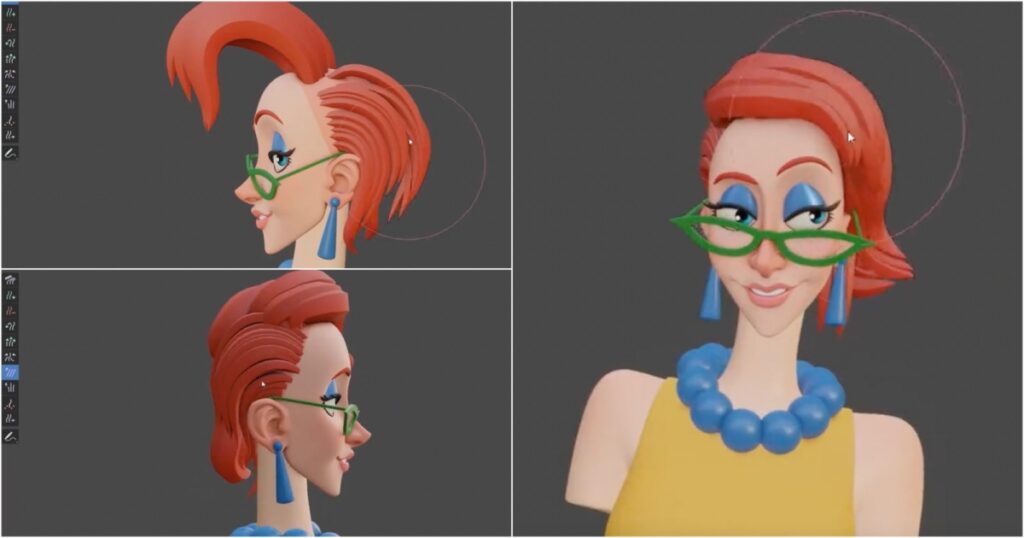
Cartoon hair prioritizes expressiveness and clear silhouettes, using stylized techniques like solid mesh modeling or minimal strands to match the art style and simplify animation.
- Sculpting and Modeling Stylized Hair: Sculpt hair as a mesh for full control. Block out shapes with primitives, refine in Sculpt Mode using Grab/Snake Hook for dynamic forms, and carve grooves with Clay Strips/Draw for hair locks. Retopologize for clean geometry if needed for games/animation. Apply shadeless/toon shaders for 2D looks or Principled BSDF with sheen for 3D cartoon styles, adding minimal modeled strands or textures for detail.
- Simplified Strand or Curve Techniques: Use particle hair with fewer, thicker strands for fluffy effects, styled with solid/ramp-colored materials. Alternatively, model strands as Bezier curves with bevels for whimsical shapes like curls, ideal for sparse, stylized designs.
- Shading and Appearance: Use Toon Shader for 2D hard shadows or Freestyle/solidify for outlines. For 3D styles, add hair cards with alpha textures over sculpted masses for fibrous detail. Match concept art using hand-painted textures or Grease Pencil guides.
- Animation and Rigging: Rig mesh hair with bones or deformers for simple animation (e.g., 2-3 bones for a ponytail). Use ChildOf constraints or soft-body physics for subtle motion, or animate manually for expressive poses, avoiding complex strand simulations.
- Example – Cartoon Workflow: Sculpt a superhero’s quiff as a curving lock, add slicked-back side pieces, retopo, and apply a gradient shader for shine. Use Freestyle for outlines and rig with bones for bounce, ensuring a bold, low-cost style.
Frequently Asked Questions (FAQs)
- Should I model hair as a mesh or use Blender’s hair particle/curves system?
Strand-based hair suits realistic, dynamic styles (e.g., portraits, VFX), offering high realism but heavy computation. Mesh hair is ideal for stylized or real-time projects, providing clear silhouettes and performance efficiency. Realistic characters favor hair systems; cartoon/anime use meshes. Mix methods for hybrid results. - Difference between Hair Particle and Hair Curves systems?
Hair Particle System emits strands from a mesh, styled manually, and is legacy but simple. Hair Curves (Geometry Nodes) uses procedural nodes for flexible, non-destructive grooming (e.g., clumping, braiding). Use Hair Curves for advanced control; Hair Particles for traditional workflows or unsupported features. - Why does hair look black/not show in Eevee?
Principled Hair BSDF works only in Cycles; Eevee shows it as black/thin lines. Preview in Cycles viewport, use temporary Eevee shaders (e.g., Principled BSDF with anisotropy), or Workbench for grooming. Ensure Alpha Hashed for transparency and enable particle display. - How to export hair to Unreal/Unity?
Export strands as Alembic for Unreal’s Groom (enable Export Hair, disable children). In Unreal, import as Groom asset, assign material, and bind to character. For Unity/stylized hair, convert to mesh and export FBX, using alpha textures for hair cards. Alembic suits high-fidelity; FBX ensures compatibility. - How to make hair move naturally?
In Blender, use Hair Dynamics or Cloth/Soft Body for animations, tuning stiffness/collisions. In games, Unreal’s Groom uses Chaos physics; mesh hair uses bones or cloth sims. Hybrid manual animation works for stylized control. Test substeps/collisions to avoid erratic motion. - When to use hair cards vs. strand-based hair?
Hair cards suit real-time games or low-end hardware, reducing costs while approximating strands. Strand hair is for renders/cinematics/high-end real-time, offering realistic shading but high resource use. Prototype both to balance quality and performance. - How to improve hair realism?
Add variance with Roughness/Clumping/Frizz, use Interpolated Children for density, adjust strand thickness, and use Principled Hair BSDF with rim lighting. Groom irregular hairlines/partings, vary strand color subtly, and increase render samples for clarity. - Create hair from scratch or use assets like PixelHair?
PixelHair assets save time, offering professional grooms for quick results, but may lack uniqueness. Customize assets for originality. Scratch-made hair gives full control and skill practice but is time-intensive. Use assets for speed, refine for uniqueness. - Easiest way to create braids?
Use Geometry Nodes’ Braid Hair Curves for procedural braids, adjusting tightness/radius. Manually, model a braid segment and deform along a curve, or use three particle systems for spiral combing. PixelHair braids can be placed and blended. Combine methods for complex styles. - How to create convincing curly/afro-textured hair?
Use Curl Hair Curves node for customizable curls, paired with Clump for natural locks. Legacy particles use Kink: Curl with randomized phase. Add Interpolated Children with roughness for volume. Model ringlets for scattering if needed. Use Principled Hair BSDF with high roughness and backlighting for diffuse, multi-tonal curls.

Conclusion
Blender supports diverse hair creation, from realistic to cartoon styles. For fantasy/sci-fi, use strand-based systems and Geometry Nodes, leveraging assets like PixelHair for efficiency. Historical/modern characters need fine grooming and Cycles for realism, with Alembic or FBX exports for games. Cartoon hair favors sculpted meshes with simple rigs for style and animation ease. Test lighting/materials/motion, prototype in Cycles or engines, and mix techniques to craft hairstyles that enhance characters within project constraints.
Sources and Citations
- Blender Documentation
- – Alembic Export: Hair as Curves:
- https://docs.blender.org/manual/en/latest/files/import_export/alembic.html
- Blender Documentation
- – Supported Features in Eevee, Principled Hair BSDF:
- https://docs.blender.org/manual/en/latest/render/eevee/limitations/supported_features.html
- Blender Release Notes 3.5
- – New Hair System and Assets:
- https://www.blender.org/download/releases/3-5/
- Yelzkizi / PixelHair
- – Understanding PixelHair:
- https://yelzkizi.org/understanding-pixelhair/
- Yelzkizi
- – Blender Hair to Unreal Groom Workflow:
- https://yelzkizi.org/blender-hair-to-unreal-groom-workflow/
- Yelzkizi
- – Mastering 3D Hair Creation in Blender:
- https://yelzkizi.org/mastering-3d-hair-creation-in-blender/
- Yelzkizi
- – Realistic Hair with Hair Curves & Geometry Nodes:
- https://yelzkizi.org/realistic-hair-with-hair-curves-and-geometry-nodes/
- Yelzkizi
- – Blender Hair Sculpting Tips:
- https://yelzkizi.org/blender-hair-sculpting-tips/
- Yelzkizi
- – PixelHair FAQs:
- https://yelzkizi.org/pixelhair-faqs/
- Blender StackExchange
- – Using Hair Nodes for Curls and Clumping:
- https://blender.stackexchange.com/search?q=hair+nodes+curls+clumping
- Yelzkizi
- – Geometry Nodes Hair Guide:
- https://yelzkizi.org/?s=Geometry+Nodes+hair
- Yelzkizi
- – PixelHair Product Page: Lewis Hamilton Braids:
- https://yelzkizi.org/product/lewis-hamilton-braids/
- Blender Manual
- Unreal Engine Documentation
- Unreal Engine Documentation
- – Hair Rendering and Simulation:
- https://dev.epicgames.com/documentation/en-us/unreal-engine/hair-rendering-and-simulation-in-unreal-engine
Recommendations
- Microsoft Flight Simulator 2024 Support for PlayStation VR2 is Now Live (Sim Update 5): How to Play in VR on PS5 and PS5 Pro
- Resident Evil Requiem Includes A Surprising Homage To The Lord Of The Rings Movies — Fans Spot Hidden Shelob-Inspired Scene
- The Last of Us Part 2’s Major Death Was “Controversial Internally Too,” Former Naughty Dog Dev Says
- Silent Hill 2 Remake Reaches 6 Million Players: Official Milestone Date (April 24, 2026)
- Super Mario Has Become the Face of TikTok Shop AI Slop, and It’s Fooling Millions
- How to Put Pattern on Texture in Blender: A Step-by-Step Guide to Creating Custom Materials
- Cash Cleaner Simulator & Desynced Publisher Surpasses $10M Revenue on Steam: Indie Success Story Explained
- Developers With Foreign Legal Entities May Be Allowed to Include Games in the Russian Software Registry: Requirements, VAT Benefits, and What Changes in 2026
- Marathon Open Beta Announced: Everything We Know About the Server Slam Dates, How to Join, Rewards, and Launch Details
- Best 3D Sculpting Software: Top Tools for Digital Artists



































































































