











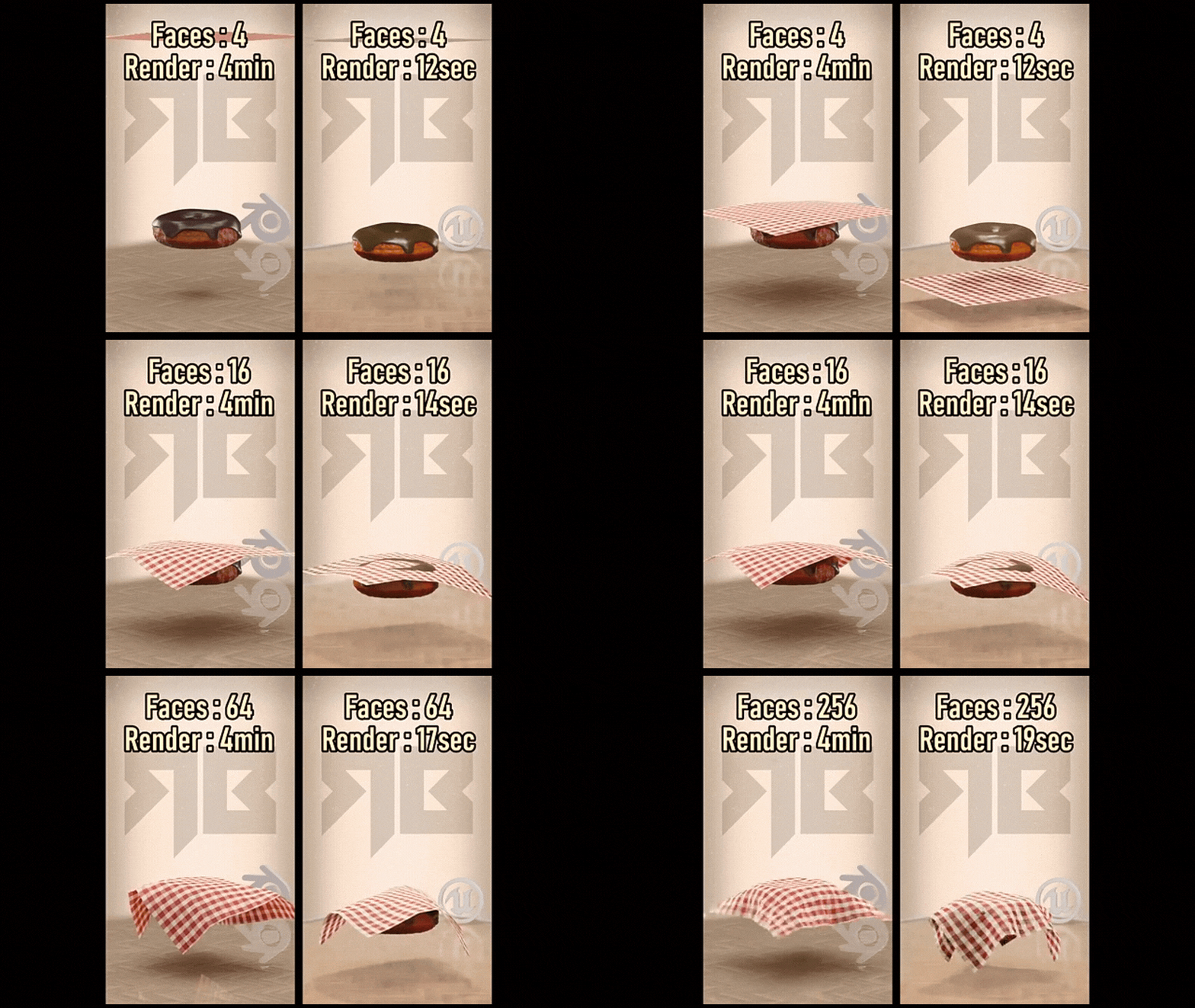
Overview of Cloth Simulation in Blender and Unreal Engine 5
Cloth simulation employs physics algorithms to emulate fabric behavior in 3D environments. Blender’s offline Cloth modifier is ideal for animations, allowing results to be baked for rendering. Unreal Engine 5’s Chaos Cloth solver enables real-time interactive cloth during gameplay. Blender 4.0+ enhances bending and stretching with advanced spring models, while UE5.3+ uses XPBD for high-quality real-time simulation. Blender focuses on 3D modeling and animation workflows, whereas UE5 prioritizes real-time game performance. In Blender, artists create pre-rendered scenes like waving flags or character clothing, baking simulations frame-by-frame. In UE5, developers apply cloth physics to elements like capes or banners, enabling dynamic reactions to gameplay events such as wind or character motion.
Workflow Differences Between Blender and Unreal Engine 5 for Cloth Simulation
Blender Workflow
Blender integrates cloth simulation into its offline 3D creation process. Artists model a cloth mesh, apply the Cloth modifier, and configure properties like mass, stiffness, and damping. Gravity and wind effects are enabled, and collisions are set with a Collision modifier. Simulations run on the timeline, often requiring baking to store vertex positions for smooth playback. The process is iterative, involving tweaking parameters, running simulations, and refining results, making it suitable for pre-rendering animations.
Unreal Engine 5 Workflow
UE5’s cloth simulation operates in real-time within the game environment. The workflow involves:
- Importing a Skeletal Mesh that includes the cloth component.
- Using the Section Selection tool in the Skeletal Mesh Editor to identify the cloth section.
- Creating a Cloth Asset to store simulation data.
- Entering Cloth Paint mode to paint weights, determining vertex movement freedom (0 for fully simulated, 1 for fixed to the skeleton).
- Defining simulation parameters like stiffness, damping, and collision thickness via a Physics Material or asset settings.
- Testing the simulation in-editor or during gameplay, where cloth reacts to real-time forces like character movement.
Blender’s precomputed, iterative approach contrasts with UE5’s dynamic, interactive setup. Blender excels for art-directed renders, while UE5 is tailored for game physics integration.
Step-by-Step Guide: Creating Cloth Simulations in Blender
- Prepare Cloth Object: Model a mesh, such as a plane for a flag or a garment for a character, ensuring enough subdivisions for realistic bending and draping.
- Add Cloth Modifier: In the Physics Properties tab, apply the Cloth modifier, selecting presets like Cotton or Silk as starting points.
- Adjust Physical Properties:
- Set mass to define cloth weight.
- Adjust structural and bending stiffness to control stretching and rigidity.
- Configure damping to reduce oscillations.
- Set quality steps for simulation accuracy.
- Enable internal springs for volume preservation or pressure for balloon-like effects.
- Set Up Collisions: Apply Collision modifiers to objects the cloth interacts with, adjusting thickness margins. Enable self-collision to prevent cloth folding issues.
- Pin/Animate Cloth (Optional): Create vertex groups for pinning, assigning weights to fix vertices. Use property weights for advanced stiffness control.
- Run Simulation: Play the timeline to observe cloth movement under gravity, collisions, and forces, adjusting settings as needed.
- Bake Simulation: Cache the simulation in the Cloth Cache settings for consistent playback and rendering.
- Enhance Visual Quality: Apply a Subdivision Surface modifier post-simulation for smoother rendering or use sculpting tools to add wrinkles.
- Apply/Export (Optional): Freeze the cloth shape by applying the modifier or export animations via Alembic for game engine use.
- Iteration: Adjust damping, stiffness, or use proxy objects to optimize performance, refining until the simulation meets expectations.
Step-by-Step Guide: Creating Cloth Simulations in Unreal Engine 5
- Prepare/Import Mesh: Import a Skeletal Mesh with cloth, rigged to a skeleton, or create a simple skeletal mesh for non-character cloth like flags.
- Set Up Physics Asset: Ensure the Physics Asset’s collision bodies (capsules, spheres) align with the mesh to prevent cloth clipping during simulation.
- Open Clothing Tool: In the Skeletal Mesh Editor, use Section Selection to choose the cloth section and create a Clothing Asset.
- Assign Cloth Asset: Link the created Cloth Asset to the selected mesh section in the details panel.
- Activate Cloth Paint: Paint weights in Cloth Paint mode, where 0 allows free movement and 1 fixes vertices to the skeleton, controlling simulation behavior.
- Configure Cloth Properties:
- Set gravity scale to match desired physics.
- Adjust stiffness, damping, and iteration count for simulation quality.
- Configure collision thickness and enable self-collision if necessary.
- Use presets or a Chaos Cloth Config asset for reusable settings.
- Test in Persona: Preview the simulation in the editor, playing animations to check cloth response, adjusting weights or collisions as needed.
- Iterate on Weight Paint/Collisions: Refine weights and physics asset to fix issues like cloth catching or sliding, ensuring smooth simulation.
- Use Chaos Panel Cloth (Optional): In UE5.3, use the experimental Chaos Panel Cloth Editor to design garments with panels and seams for advanced workflows.
- In-Game Testing: Place the mesh in a level, run the game, and observe cloth behavior, tweaking substeps, damping, or LODs to optimize performance.

Ease of Use: Which Platform Offers a More User-Friendly Cloth Simulation Process?
Blender’s Ease of Use
Blender’s cloth simulation is accessible, requiring only a Cloth modifier and timeline playback to see results. Parameters are straightforward, with presets and tutorials aiding beginners. The workflow integrates seamlessly with modeling and animation, allowing direct mesh edits in one environment. Visual feedback in the viewport simplifies adjustments. Complex scenes with multiple cloths or tight garments can be challenging, but single-object simulations remain intuitive for non-real-time projects.
Unreal Engine’s Ease of Use
UE5’s cloth simulation demands familiarity with skeletal meshes, physics assets, and weight painting, posing a steeper learning curve. For Unreal users, the workflow is logical, but beginners face multiple editor modes. Real-time testing in-engine streamlines game development, avoiding export issues. Improved UI, on-screen instructions, and documentation ease the process, making it efficient once mastered, particularly for game-specific cloth integration.
Which is More User-Friendly?
- Blender: Preferred by hobbyists and filmmakers for its intuitive interface, minimal setup, and ease of experimentation without game engine knowledge.
- Unreal: Favored by game developers for in-engine iteration, eliminating external tool reliance and ensuring game-ready results.
Community feedback praises Blender’s simplicity for basic tasks but notes limitations in advanced scenarios. UE5 users acknowledge Chaos Cloth’s learning curve but value its improving artist-friendliness and game integration. Many artists prototype in Blender and finalize in Unreal, leveraging each platform’s strengths. Blender is more accessible for beginners; UE5 excels for game workflows once learned.
Performance Comparison: Memory Usage in Blender vs Unreal Engine 5 Cloth Simulations
Blender’s cloth simulation, CPU-based with multi-threading, can be memory-intensive due to baking vertex positions for each frame. High-resolution cloth (e.g., 100k-vertex dress over 250 frames) creates large caches, potentially consuming gigabytes of RAM, especially with multiple cloths or self-collision. Users report crashes with 32 GB RAM in complex scenes. Optimizations include cache compression, limiting frame ranges, or using low-poly proxy meshes for simulation, applying subdivisions later. Memory usage scales with simulation complexity, but offline processing allows high-quality results without frame rate constraints.
Unreal Engine 5’s Chaos Cloth, designed for real-time, computes cloth per frame without storing historical data, keeping memory usage constant (mesh data, solver buffers, collision data). Memory grows with vertex count (e.g., 500 vs. 5000 vertices), but cloth uses less memory than textures or animations. A 65k vertex limit exists for performance. High-poly cloth (e.g., 20k triangles) can halve frame rates due to CPU computation, not memory. Unreal’s memory efficiency suits games, but performance requires optimization to maintain 60 FPS.
Comparative Insights:
- Blender’s memory usage scales with cache size; Unreal’s is bounded but CPU-intensive.
- Blender may need 4 GB for a 10-second sim; Unreal uses MBs but recomputes constantly.
- Blender optimizations: break simulations into parts, reduce detail.
- Unreal optimizations: reduce vertices, lower solver iterations.
- VRAM in Unreal adds minimal cost; Blender’s Alembic exports to Unreal spike memory like baked caches.
Memory Optimization Techniques:
- Blender: Use disk cache, simulate parts separately to manage RAM.
- Unreal: Disable cloth simulation at distance, use LODs for simpler meshes, limit active cloth objects.
Blender is memory-heavy for complex, long simulations; Unreal is CPU-intensive but memory-efficient, requiring optimization for real-time performance.
Accuracy and Realism: Evaluating Cloth Simulation Results in Both Platforms
Blender Accuracy and Realism
Blender’s offline simulator achieves realistic cloth motion with high Quality Steps and self-collision. Its mass-spring system simulates wrinkles and material behaviors (e.g., denim vs. silk) via adjustable settings. High realism requires dense meshes and experimentation, sometimes with sculpting or shape keys for fixes. Limitations include lack of custom constraints for dynamic changes, making complex character cloth challenging. Blender excels for film-quality visuals, prioritizing realism over speed.
Unreal Engine 5 Accuracy and Realism
UE5’s Chaos Cloth uses position-based dynamics for stable, fast simulations but may appear springy or less wrinkled due to real-time constraints and coarser meshes. Simplified collisions (capsules vs. full mesh) cause minor interpenetration. Chaos improves over Apex Cloth, offering better collision handling and self-collision support. Realism is convincing for gameplay (e.g., flags, capes), enhanced by shading tricks like normal maps, but extreme motions or layered cloth may show artifacts or require damping to avoid instability.
Conclusion on Realism:
- Blender achieves higher per-frame realism with detailed simulations, unrestricted by time.
- Unreal delivers plausible real-time realism, limited by performance, using texture tricks for visual fidelity.
- Blender suits film-quality cloth; Unreal’s cloth looks realistic in motion but may lack fine details in close-ups.
Simulation Speed: Which Platform Delivers Faster Cloth Simulation Results?
Blender Simulation Speed
Blender’s cloth simulation is not real-time except for simple cases. Complex simulations (high-poly, self-collision) slow to seconds per frame, e.g., 250 frames at 0.5s/frame takes ~125s, or 5s/frame takes ~20 minutes. Multi-core CPUs help, but cloth is CPU-bound. Iteration involves test sims with simplified settings before final bakes. Speed trades off with accuracy, prioritizing quality over real-time performance.
Unreal Engine 5 Simulation Speed
UE5’s Chaos Cloth simulates in milliseconds per frame (e.g., 2-3ms for 60 FPS) for moderate cloth, leveraging C++ optimization and multi-threading. High-poly cloth (e.g., 20k triangles) can exceed frame budgets, halving frame rates. Unreal provides instant in-game results with no precomputation, but complex cloth requires tweaks to maintain real-time. Editor cloth painting may lag, though in-game performance is robust within limits.
Which Delivers Results Faster?:
- Unreal: Faster for real-time execution, simulating cloth instantly in-game, ideal for interactive workflows.
- Blender: Slower due to precomputation, but can achieve high-fidelity results faster for complex cloth, as Unreal may struggle at 60 FPS.
- Simple cloth: Both are fast; Unreal maintains real-time, Blender near real-time.
- Complex cloth: Blender simulates slowly but surely; Unreal may fail to maintain frame rate without simplification.
- Iteration: Unreal allows quicker in-game testing; Blender requires rebaking, but brute-force high-quality sims can resolve issues faster than Unreal’s tweaks.
Unreal is faster for real-time, Blender for high-fidelity offline results. Optimizations include reducing quality/vertices or disabling simulation when unnecessary.

Why Many Games Avoid Real-Time Cloth Simulation on 3D Characters
Real-time cloth simulation is limited in games due to:
- Performance Constraints: Cloth consumes CPU/GPU resources, impacting AI, rendering, etc. A simulated shirt may strain frame budgets, especially on consoles/lower-end PCs.
- Memory and Data Issues: Pre-baking cloth movements is impractical; real-time simulation avoids large caches but increases CPU load.
- Complexity of Interaction: Cloth interactions with characters/environments are prone to glitches (e.g., flipping inside-out), requiring robust handling.
- Lack of Directability: Physics-driven cloth is unpredictable, risking unwanted visuals; developers prefer controlled animations for key characters.
- Small Details Not Worth Simulating: Tight clothing (e.g., shirts) gains little from simulation, so it’s rigged to skeletons for efficiency.
- Visual Inconsistency: Simulated cloth may clash with static environments, prompting baked animations for style consistency.
- Development Time and Complexity: Cloth setup and glitch-free testing add significant time, often unfeasible for non-core features.
- Physics Engine Limitations: Older engines struggled with vertex limits/stability; Chaos Cloth improves but remains performance-heavy.
Examples in Games:
- Dark Souls uses low-quality cloth sims for capes, accepting minor clipping for subtle motion.
- Uncharted 4 avoids shirt simulation, using normal map blending for stable, realistic visuals.
Games limit cloth to key elements (e.g., capes) or use animation tricks to ensure performance, stability, and visual consistency, prioritizing player experience over perfect realism.
Alternatives to Real Time Cloth Simulation in Game Development
Game developers use alternatives to real-time cloth simulation to mimic cloth behavior while avoiding performance costs:
- Bone Rigging and Animation (Skinned Cloth): Rig cloth with extra bones (e.g., for a coat’s tails) and animate manually or with simple physics like pendulums. Less CPU-intensive, stable, and controllable, blending physics and keyframes. Used in older games for capes or skirts, but lacks true cloth flexibility.
- No Simulation / Static Modeling: Model clothing as part of the character with sculpted folds, using skeletal animation or shaders (e.g., normal map blending in Uncharted 4) to fake motion. Ideal for tight clothing, minimizing dynamic needs.
- Selective Physics (Capsule or Spring Physics): Use rigid bodies or capsule colliders for cloth parts (e.g., earrings, skirt segments) to approximate motion. Simpler than full cloth simulation, often using low-res proxies like A-pose models with Nvidia Apex.
- GPU-based Cloth Solutions: Use GPU solvers like Nvidia’s APEX or Havok Cloth for efficiency, handling multiple cloth pieces. Limited by console GPU budgets, but offloads CPU work.
- Pre-Baked Simulations (Animated Cloth): Simulate cloth offline in tools like Blender, then import as animations for cutscenes or specific moves. Non-interactive but realistic, with potential large file sizes.
- Tearing and Environmental Cloth via Precomputation: Use vertex shaders for simple cloth motion (e.g., flag ripples) or precomputed tearing patterns for destructible objects, minimizing CPU cost.
- Scripting and Blendshapes: Sculpt cloth poses (e.g., blown left/right) and interpolate via blendshapes based on movement, offering controlled, non-physics motion.
- Simplified Cloth Simulators: Use lightweight systems like spring chains or AnimDynamics in Unreal for ponytails or strips, simpler than full grid simulation.
Developers often fake motion with shaders or animations and simplify physics for larger pieces like capes, using tools like Marvelous Designer for static drapes or emerging ML Cloth for faster approximations.

Integrating Cloth Simulations from Blender into Unreal Engine 5
Blender cloth simulations can be integrated into UE5 for specific use cases like cutscenes, complex interactions, or realistic rest poses:
- Alembic Geometry Cache Import: Export Blender’s cloth animation as an Alembic file (.abc) for vertex animations. Import into UE5 as a Geometry Cache or Skeletal Mesh animation for playback in cutscenes, preserving exact motion. Requires UV export, non-interactive, and memory-heavy for long animations.
- Skeletal Mesh and Animation: Bake cloth motion to a skeletal mesh with bones or blendshapes in Blender, then export as a Skeletal Mesh animation to UE5. Less accurate but memory-efficient, suitable for simpler motions.
- Static Rest Poses and Physics Assets: Simulate a cloth’s rest pose in Blender, export as a static mesh or rigged mesh for UE5, and optionally apply Chaos Cloth. Ensures realistic initial shapes without transferring animation.
- Bake and Trigger Approach: Use Blender’s baked animation to drive Chaos Cloth in UE5, allowing minor real-time deviations via kinematic targets. Requires advanced setup with physics blueprints or C++.
Integrating via Engine Features: Use UE5’s Geometry Cache Track in Sequencer for cutscene playback of Alembic caches, combining with skeletal animations. Baked animations account for collisions but lack dynamic interaction.
Exporting Considerations:
- Use Alembic for vertex animations, FBX for bone animations.
- Match scale (Blender meters to UE5 centimeters) and ensure tri/quad polygons.
- Break large Alembic files into segments or compress for faster import.
Using Blender to Aid Unreal Cloth: Run Blender sims to inform Chaos Cloth constraints, setting realistic stretch limits without direct animation import.
Integration is ideal for complex, deterministic, or performance-heavy cloth motions, leveraging Blender’s offline power and UE5’s real-time rendering.

Best Practices for Optimizing Cloth Simulations in Blender
To optimize Blender cloth simulations:
- Use Low-Poly Proxy: Simulate on a decimated mesh (e.g., 5k vs. 50k vertices), then apply Subdivision Surface or Surface Deform for visual detail.
- Simplify Collision Geometry: Use low-poly or primitive collision objects (e.g., boxes, capsules) to reduce collision checks, hiding from render.
- Balance Cloth Resolution vs. Collision Quality: Set Collision Quality close to Simulation Quality Steps, adjusting Collision Distance to avoid penetration without excessive computation.
- Pin or Constrain: Pin non-moving cloth parts (e.g., upper clothing) to reduce simulated vertices, using animated vertex groups for control.
- Apply Scale and Check Normals: Apply transformations (Ctrl+A) and ensure correct normals to avoid physics errors.
- Increase Simulation Scale: Scale scene 10x for better solver stability, simulating on a duplicate and scaling down results.
- Use Cache Efficiently: Bake one cloth at a time, lock caches, and disable Cloth modifiers for non-simulating objects to save memory.
- Split Simulations: Simulate non-interacting cloths separately in different scenes or files, combining later.
- Limit Simulation Time Range: Cache only necessary frames (e.g., 50-150) to save time and memory.
- Use Continuous Baking Cautiously: Prefer explicit baking for final runs to ensure complete caches.
- Reduce Unneeded Calculations: Disable self-collision unless essential, limit wind/force fields, and add damping to stabilize and speed up simulations.
- Monitor Memory: Check cache size to avoid RAM overload, adjusting resolution or duration if needed.
- Use Debug Tools: Visualize collisions in viewport overlays, adjust Speed Multiplier (e.g., 0.5) for stability, then scale playback.
- Final Bake with High Quality: Iterate with low-quality settings, then increase Quality Steps for final bakes.
- Leverage New Features: Explore Simulation Nodes (future versions) for granular control and optimization.
These practices reduce simulation time and memory usage, ensuring stable, efficient results.

Best Practices for Optimizing Cloth Simulations in Unreal Engine 5
To optimize UE5’s Chaos Cloth for game performance:
- Keep Cloth Meshes Low-Poly: Use minimal vertices (e.g., 500 vs. 5000), employing LODs to disable or simplify cloth at distance.
- Paint Appropriate Cloth Weights: Fix non-moving areas (e.g., coat shoulders) to weight 1.0, simulating only free-hanging parts, excluding small rigid elements like buttons.
- Tune Physics Asset Collisions: Use minimal, well-fitted collision bodies, removing irrelevant ones (e.g., arms for a skirt) to reduce checks. Avoid multiple cloth-cloth interactions.
- Optimize Solver Settings:
- Reduce iteration count/substeps (e.g., 3 vs. 5) for stability.
- Adjust gravity scale for gentler settling.
- Disable self-collision unless critical.
- Set reasonable collision thickness to avoid excessive iterations.
- Use Local Space Simulation: Simulate in local space for stability, reducing solver workload.
- Limit Cloth Simulation Count: Enable cloth only for key characters (e.g., player, main NPC), disabling via Blueprints for distant or hidden objects.
- Use Wind Sparingly: Minimize wind forces, faking with shaders or bones for distant objects.
- Leverage Chaos Cloth GPU (Future): Monitor for GPU or ML Cloth advancements for performance gains, profiling with stat Cloth commands.
- Avoid Over-Constraining: Ensure pins and animations don’t conflict with colliders to prevent solver churn.
- LOD Physics Asset: Simplify collision bodies at distance for distant cloth simulations.
- Capsule Simplification: Use few large capsules (e.g., 3-4 for a coat) to reduce collision checks, accepting minor interpenetration.
- Update Rate: Consider lower update frequency (e.g., 30 Hz) for slower cloth, if feasible via code.
- Turn Off Cloth When Not Visible: Disable cloth for off-screen or unimportant objects to save resources.
- Optimize Cloth Painting: Hide unpainted mesh sections, use gradient tools to speed up editor performance.
- Collision Filtering: Set cloth to collide only with its character’s physics asset, ignoring unnecessary objects.
- Profile Early: Use UE5’s profiling tools to monitor cloth CPU usage, adjusting early.
- Consider ML Cloth (Experimental): Explore Epic’s ML Cloth for high-fidelity, low-cost simulations.
- Fallbacks: Implement triggers to disable cloth if FPS drops, ensuring performance stability.
These practices ensure efficient, visually appealing cloth simulations in UE5, balancing quality and performance.

Common Challenges and Solutions in Cloth Simulation Workflows
- Cloth Interpenetrating (Clipping Through):
- Blender Solutions: Increase Collision Quality steps, adjust collision Distance, simplify collision mesh, ensure correct normals/scale. Enable Self-Collision to prevent folding issues. Slow simulation speed (Speed multiplier < 1) to catch collisions.
- Unreal Solutions: Align Physics Asset capsules, increase Collision Thickness, add damping/drag to reduce flaring. Adjust weight painting to constrain clipping areas, lower gravity/wind to minimize swings.
- Cloth Exploding or Unstable:
- Blender: Increase Quality Steps, check pin constraints/forces, ensure non-penetrating initial pose. Lower Pressure/Internal Springs values, add structural/collision Damping.
- Unreal: Avoid initial collider penetration, use “teleport” mode or gradual sim enable. Disable cloth during fast animations/teleports, tweak material parameters (e.g., avoid low mass, high stretch).
- Performance Dropping:
- Blender: Use proxy meshes, lower quality for drafts, disable unnecessary self-collision, simplify colliders. Simulate cloth sections separately, split scenes for memory issues.
- Unreal: Reduce vertices/cloth objects, disable sim at distance, profile collisions. Simplify Physics Asset, use cloth LODs.
- Cloth Too Stiff or Loose:
- Too Stiff:
- Blender: Lower tension/compression/bending stiffness, reduce Pin constraints.
- Unreal: Lower Edge/Bend Stiffness, adjust weight painting for more freedom.
- Too Loose:
- Blender: Increase structural stiffness, add Springs.
- Unreal: Raise Stiffness, increase substeps, blend with animation drive.
- Too Stiff:
- Multiple Cloth Pieces Interaction:
- Blender: Enable collisions between cloths, simulate sequentially (bake inner layer, use as collider for outer). Avoid simultaneous active sims for stability.
- Unreal: Combine into one cloth asset, redesign to avoid collisions, make layers stiff/attached, or drive secondary layers via bones/morphs.
- Controlling Cloth in Wind/Movement:
- Use capsule colliders as boundaries. In Blender, animate invisible boundaries/force fields. In Unreal, adjust Drag/Linear Velocity Scale to limit lag. Increase bending stiffness or use two-sided constraints to prevent inside-out flipping.
- Starting Pose Issues:
- Blender: Use shape key for pre-draped start, run settling sim first.
- Unreal: Use Teleport flag, start with pre-simulation, or add short settle animation to transition from rig pose.
- Troubleshooting Weird Behaviors:
- Check for unassigned/fixed vertices, stray Pin groups, or modifier interference. Remove duplicate vertices/non-manifold edges. Repaint weights in Unreal, adjust modifier stack in Blender.
- Achieving Consistent Results:
- Blender: Set fixed seed for reproducibility, lock sim during critical moments.
- Unreal: Temporarily drive cloth with animation for consistency.
- Combining with Animations:
- Blender: Place Armature modifier before Cloth for local space sim.
- Unreal: Cloth follows skeletal mesh automatically, use Kinematic mode/Animation Drive for partial animation.
Start simple, test incrementally, and leverage community forums for specific issues.
Community Feedback: Experiences with Cloth Simulation in Blender and Unreal Engine 5
Blender Community Feedback
- Slow but Steady: Users appreciate realism but note slow performance for complex scenes compared to tools like Marvelous Designer.
- Difficult for Advanced Cases: Simple sims (e.g., sheet falling) are easy, but layered clothing is challenging, often requiring workarounds in productions.
- Successful Use Cases: Effective for animations with proper optimization, praised for control (pinning, sewing) and visual quality with self-collision.
- Recent Updates: Blender 4.0 alpha shows beginner-friendly improvements, excitement for future simulation nodes.
Unreal Engine 5 Community Feedback
- Improved Realism, at a Cost: Chaos Cloth offers better collisions than Apex, but performance needs optimization, with early versions slower.
- Ease of Use and Info Availability: Initial lack of documentation made learning tough, improved by Epic’s updates and community tutorials.
- Success Stories: Used successfully in MetaHuman garments and indie projects, enhancing visuals with proper setup.
- Pain Points: Laggy weight painting, bugs like non-tearing cloth, and lack of cloth-to-cloth collision support.
General Observations
- Learning and Community Support: Extensive Q&As on BlenderArtists/StackExchange and Unreal forums/AnswerHub provide solutions.
- User vs. Technical Perspective: Artists focus on visual quality, technical users on performance.
- Takeaways: Blender valued for quality, UE5 for real-time convenience. Both require optimization and iteration, with excitement for new features (Blender’s nodes, UE’s ML Cloth).

Comparing Cloth Simulation Tools: Blender’s Cloth Modifier vs Unreal’s Chaos Cloth
Simulation Method
- Blender: Mass-Spring Model with implicit integration, using tension/shear/bending springs for deterministic, CPU-based sims.
- Chaos Cloth (UE5): Position-Based Dynamics (PBD/XPBD), manipulating particle constraints for stable, explicit real-time sims.
User Interface and Workflow
- Blender: Cloth Modifier in Physics Properties, with presets (silk, denim) and sections for properties, pinning, collisions. Timeline-based, non-procedural for topology changes, complemented by Cloth Brush.
- Unreal: Clothing panel in Skeletal Mesh Editor, creating Cloth Assets, painting weights, tweaking via Cloth Config/Physics Material. Real-time feedback with weight visualization.
Features
- Blender Cloth Modifier:
- Pinning via vertex groups, sewing seams, pressure for inflation.
- Dynamic base mesh, tearing, fluid force interaction.
- Self-collision, caching, no real-time except viewport preview.
- Chaos Cloth (UE5):
- Cloth Paint/masks, tethers to limit stretching, self-collision.
- Collides with physics bodies/environment, supports wind/LOD.
- Teleport/ragdoll integration, no baking, recordable via Take Recorder.
Quality and Realism
- Blender: High realism with dense meshes and quality steps, ideal for complex interactions, but time-intensive.
- Unreal: Good for games, less detailed wrinkles unless dense (costly), enhanced by tricks like angular velocity transfer.
Interactivity
- Blender: Non-interactive except low-quality previews, requires sim runs for adjustments.
- Unreal: Fully interactive, updating cloth in real-time with character/environment changes.
Integration with Other Systems
- Blender: Integrates with animation (shape keys, armatures), interacts with rigid bodies indirectly.
- Unreal: Part of physics engine, syncs with ragdolls, driven by animation/physics, limited Niagara integration.
Use Cases Differences
- Blender: Pre-rendered animations, VFX, concept art in DCC workflows.
- Unreal: Real-time games, VR, cinematics, requiring dynamic cloth.
Limitations
- Blender: Not real-time, struggles with high complexity, requires rebaking for changes.
- Unreal: No multi-layer cloth collisions, needs tuning for extreme cases, performance issues with heavy cloth.
Output/Results
- Blender: Mesh cache for export/modeling, high-fidelity renders.
- Unreal: Transient real-time sim, no animation output unless recorded, game-ready visuals.
Blender’s Cloth Modifier excels in offline, high-fidelity control; Chaos Cloth prioritizes real-time interactivity. Complementary in workflows, Blender suits design/export, Unreal handles gameplay dynamics.
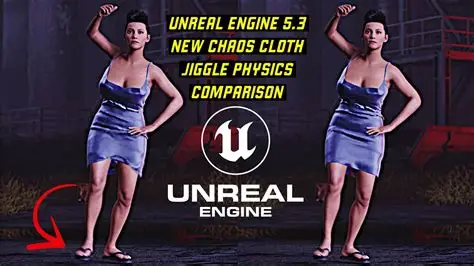
Impact of Cloth Simulation on Game Performance and Player Experience
Game Performance Impacts
- Frame Rate and Resource Usage: Cloth simulation, particularly in Unreal Engine 5’s Chaos Cloth, consumes significant CPU resources, potentially causing frame rate drops (e.g., a heavy cloth curtain reduced FPS from 80 to 35). Multiple cloth objects exacerbate this, risking stuttering. Developers limit cloth to key elements to maintain stable performance.
- Loading and Memory: Real-time cloth has low memory overhead (vertex data, physics buffers), but baked geometry caches (e.g., Alembic imports) can spike memory usage and load times. Excessive cloth objects may increase physics memory, potentially causing crashes in unoptimized scenes.
- Physics Step Influence: Cloth runs at fixed physics timesteps, and heavy simulations can delay other tasks, leading to uneven frame pacing, especially if threads compete in multithreaded systems like Chaos.
- Mitigation: Games offer toggles to disable cloth in PC settings, swapping to static meshes for low-end systems. Console versions balance cloth usage for 30/60 FPS targets, ensuring performance stability.
Player Experience Impacts
- Visual Immersion: Well-executed cloth simulation enhances realism, making characters and environments feel dynamic (e.g., a swaying cape). It subtly elevates visual quality, noticeable when absent in modern games.
- Visual Glitches: Poor cloth sims cause immersion-breaking issues like clipping (skirts through legs) or erratic behavior (cloth covering cameras), frustrating players or creating unintended humor.
- Gameplay Influence: Cloth is usually cosmetic but can provide visual cues (e.g., wind-driven cloth signaling gameplay mechanics). Overly dynamic cloth may distract or, rarely, affect hitboxes if not managed (typically made non-solid).
- Performance Perception: Unoptimized cloth can cause lag, negatively impacting player experience without clear attribution, prompting some to disable it via mods for performance.
- Design Considerations: Fast-paced games avoid cloth on playable characters to prevent camera obstruction or hitbox issues, while cinematic games (e.g., Witcher 3’s Geralt) use it for character flair, ensuring no gameplay interference.
Notable Examples
- Assassin’s Creed: Early titles used minimal cloth (e.g., Altair’s belts); later ones like Unity added dynamic cloth to crowds, enhancing immersion as hardware improved.
- Batman: Arkham Series: Batman’s cape, a near-gameplay element, uses controlled physics for gliding and visual weight, optimized to avoid glitches.
- Dark Souls: Low-fidelity cloth on armors clips but is forgivable due to the game’s art style and focus on gameplay over realism.
Player Experience vs. Performance Trade-off
Developers prioritize stable frame rates over perfect cloth realism, allocating performance budgets carefully. Cloth enhances key elements (e.g., hero capes) while minimizing use elsewhere to avoid impacting AI or rendering. Quality settings adjust cloth detail across platforms, with richer sims on PC/next-gen consoles and static/animated cloth on weaker systems like Switch.
Audio/Visual Synergy
Cloth motion can trigger rustling sounds, deepening immersion. Static models lack this, making simulated cloth more lifelike when paired with audio cues.
Conclusion: Cloth simulation boosts immersion but risks performance drops and glitches if unoptimized. Developers balance minimal, impactful cloth use to maintain smooth gameplay and visual coherence, with future advancements like ML Cloth promising richer sims at lower costs.
Future Trends in Cloth Simulation for 3D Modeling and Game Development
Here are some future trends and developments to watch:
- Machine Learning and AI-Driven Simulation: Unreal Engine 5.5’s ML Cloth system trains neural networks on high-fidelity sims for near-offline quality in real-time, reducing performance costs. AI could predict drapes or upscale coarse sims with fine wrinkles, enhancing both games and modeling workflows.
- Unified Physics and VFX Systems: Real-time engines like Unreal are used in virtual production, driving convergence of game and film cloth sims. GPU-accelerated solvers (e.g., NVIDIA PhysX 5) could enable high-detail cloth in both.
- Hardware Advancements: Next-gen GPUs/CPUs with AI cores or potential physics processors (e.g., PBD cores) will support more cloth objects/vertices, reducing current hardware limitations.
- Improved Algorithms:
- XPBD Improvements: Multi-layer solvers for efficient constraint handling, improving speed/stability.
- Finite Element Methods (FEM): More accurate material simulation, viable with hardware advancements.
- Adaptive Simulations: Dynamically refine cloth mesh in high-stress areas, balancing detail and performance.
- Parallel/GPU Computing: Fully GPU-driven cloth sims, offloading CPU for other tasks.
- Integration with Design Workflows: Blender’s Simulation Nodes and procedural systems enable non-destructive cloth design, with real-time feedback akin to Marvelous Designer, streamlining modeling.
- Cloud and Distributed Simulation: Offload complex cloth sims to cloud servers for VFX or game testing, streaming results to reduce local hardware strain.
- VR and Real-Time Interaction: VR/AR demands fast, accurate cloth sims (e.g., virtual clothing try-ons), driving predictive or low-latency solvers.
- New Material Types and Effects: Simulating diverse materials (e.g., chainmail, anisotropic fabrics) and dynamic effects like tearing or wear, enhancing realism.
- Environmental Interaction: Cloth reacting to fluids (e.g., wet cloth becoming heavier) via coupled sims, adding realism to games/VFX.
- Ease of Use & Democratization: Improved UIs, automatic weighting, and better documentation make cloth sims accessible, encouraging widespread use.
Forward-Looking Example: ML Cloth could enable hundreds of NPCs with film-quality cloth sims via neural net inference, while modeling tools might allow VR-based, real-time cloth design with instant feedback. Collaborative, cloud-based physics sessions could further streamline workflows.
Conclusion: Future cloth sims will be faster (via hardware/ML), smarter (adaptive algorithms), and more integrated, blurring offline and real-time boundaries. Games and VFX will feature richer, more realistic cloth with minimal performance costs, enhancing virtual worlds.

Expert Tips for Achieving Realistic Cloth Movement in 3D Environments
Here are some expert tips and tricks, gleaned from professionals and seasoned users, to help achieve that believable cloth motion in both offline and real-time scenarios:
- Use Real-World References: Study fabric behavior (e.g., silk vs. leather) via videos to set mass, stiffness, and damping, ensuring animations reflect realistic physics.
- Tweak Material Settings:
- Stiff Fabrics: High bending/stretching stiffness, low damping, fewer substeps.
- Flowy Fabrics: Low stiffness, moderate damping, low friction for smooth sliding.
- Ensure Proper Scale: Match real-world units (Blender: 1m, Unreal: 1cm) for accurate gravity/collisions, scaling sim domain if needed.
- Layered Approach: Simulate inner clothing layers first, using them as colliders for outer layers to ensure stability.
- Fine-Tune Weight Painting (Games): Use gradients for smooth transitions (e.g., fixed to free on a cloak), partially weighting seams for controlled flexibility.
- Animate Colliders for Anticipation: Add slight forward forces or early wind to prevent cloth lag during fast movements.
- Strategic Constraints: Pin attachment points (e.g., skirt waist) firmly, use soft pins/springs for subtle motion, avoid over-constraining free areas.
- Moderate Damping/Drag: Use 10-30% damping in Blender, adjust Chaos Cloth coefficients to settle cloth realistically after a few sways.
- Collision Margin Tricks: Increase collision distance slightly, offset cloth inward visually to hide gaps, accepting minor interpenetration for snug appearance.
- Blend Simulation with Keyframes: Tweak cached sims with shape keys (Blender) or drive bones/morphs (Unreal) for precise control in key moments.
- Subtle Forces for Life: Add low-strength turbulence (Blender) or oscillating wind (Unreal) for micro-motion, avoiding static CG look.
- Polish Frame by Frame (Offline): Sculpt cached cloth frames in Blender to fix glitches, avoiding full re-sims.
- Smooth Transitions: Fade physics influence during toggles (e.g., death ragdolls) or use camera cuts to mask cloth spawning/despawning.
- Test in Motion and Still: Check cloth in walk cycles, stops, and turns to ensure natural overshoot/settling.
- Rendering Aspects: Use motion blur, anisotropic textures, and two-sided materials with subsurface scattering to enhance visual realism. Simulate thickness for lifelike edge bending.
Conclusion: Realistic cloth movement requires balancing physics (inertia, stiffness, collisions) with artistic tweaks (damping, keyframes, rendering). Iterate extensively, using community insights and tests to refine settings for lifelike results.
Conclusion: Choosing the Right Platform for Your Cloth Simulation Needs
Selecting between Blender and Unreal Engine 5 for cloth simulation depends on your project’s goals, workflow, and constraints:
- Blender for High-Quality, Non-Interactive Projects: Choose Blender for 3D animations, visual effects, or still renders requiring film-level realism. Its Cloth Modifier offers deep control for precise parameter tweaks, baking, and editing, ideal for pre-rendered content like short films, architectural visualizations, or product ads. Blender excels in complex scenarios (e.g., multi-layer cloth, sewing, tearing) where fidelity and consistency outweigh interactivity, allowing offline iteration within a single environment.
- Unreal Engine 5 for Real-Time, Interactive Applications: Opt for Unreal’s Chaos Cloth for games, VR, or interactive simulations where cloth must respond dynamically to player actions or gameplay events (e.g., a hero’s cape fluttering in wind). Chaos Cloth integrates with game physics and animations, offering instant feedback in play mode, crucial for real-time development. It prioritizes performance within frame budgets, making it suitable for interactive experiences.
- Mixed Workflows: Often, both platforms are used. Simulate cloth in Blender for initial drapes or complex motions, then export static meshes to Unreal for Chaos Cloth in gameplay or Alembic caches for cutscenes. This leverages Blender’s precision for design and Unreal’s speed for runtime, combining strengths for hybrid projects.
- Skill Level and Team Dynamics: Solo artists or small teams without engine expertise may prefer Blender’s simpler, artist-focused workflow for non-interactive outputs. Game developers comfortable with engines might stick to Unreal’s cloth tools, which require minimal coding. Large studios split tasks: technical artists handle real-time cloth, while animators use offline tools for cinematics.
- Performance vs. Perfection: For physically perfect cloth in controlled scenes (e.g., film props), Blender’s offline capabilities shine. For “good enough” real-time cloth with minor approximations, Unreal’s Chaos Cloth is ideal. Baked animations favor offline tools; dynamic responses require real-time engines.
- Future-Proofing: As Unreal advances toward cinematic quality (e.g., ML Cloth) and Blender enhances real-time previews (e.g., Simulation Nodes), the gap between offline and real-time narrows. Current pipelines, however, maintain distinct strengths: Blender for control, Unreal for interactivity.
Summary: Use Blender for ultimate control in non-interactive, high-fidelity projects; Unreal for real-time, performance-conscious applications. Combine them for mixed workflows, leveraging Blender’s precision and Unreal’s dynamics. Evaluate your project’s needs—quality vs. performance, baked vs. dynamic, control vs. automation—to choose the optimal platform or blend, ensuring efficient, visually compelling cloth simulations.

Frequently Asked Questions (FAQs)
- Can I use Blender’s cloth simulation for game assets in Unreal Engine 5?
Yes, simulate cloth in Blender and export via Alembic (.abc) for baked animations in Unreal’s cutscenes. For real-time gameplay, import the static mesh and apply Chaos Cloth in Unreal for dynamic simulation. - Which is easier for a beginner: Blender or Unreal Engine 5 cloth simulation?
Blender is easier for beginners, requiring only a Cloth Modifier to start. Unreal’s Chaos Cloth involves skeletal meshes and weight painting, which has a steeper learning curve but offers real-time feedback for game development. - How do I prevent cloth clipping in Unreal Engine 5?
Ensure a well-aligned Physics Asset with appropriately sized capsules. Increase Collision Thickness, adjust weight painting to constrain loose areas, and enable self-collision for folding cloth. Add damping to reduce excessive motion. - Why is my Blender cloth simulation slow?
Optimize by using low-poly proxies, pinning non-moving areas, lowering Quality Steps for drafts, and simplifying collision meshes. Bake segments separately, avoid unnecessary self-collision, and ensure sufficient RAM with 64-bit Blender. - Can Unreal Engine 5 simulate flags or capes in real-time?
Yes, Chaos Cloth handles flags or capes effectively. Create a Cloth Asset, paint fixed areas (e.g., flagpole attachment), and let the rest simulate, reacting to wind or movement. Keep poly counts low for performance. - Which platform offers more realistic cloth physics, Blender 4.0 or Unreal Engine 5.3?
Blender achieves higher realism with offline, high-resolution sims, capturing fine details. Unreal’s Chaos Cloth prioritizes performance, offering convincing real-time results but with less intricate wrinkling due to frame rate constraints. - Why do games limit cloth simulation to few objects?
Cloth simulation is resource-intensive, risking frame rate drops and visual glitches. Developers prioritize key elements (e.g., hero capes) and use static or bone-animated clothing elsewhere to ensure smooth performance and stability. - Can Unreal Engine 5 simulate cloth tearing?
Chaos Cloth doesn’t natively support tearing. Workarounds include mesh swapping or Niagara particles. For tearing, simulate in Blender with breaking thresholds and import as an Alembic animation to Unreal. - How do I export a Blender cloth simulation to other engines/software?
Export as Alembic (.abc) with UV Write enabled for animated meshes, importable as geometry caches in Unreal or Unity. Alternatives include point cache (MDD) or FBX for bone/shape key animations. - Should I simulate clothing in Blender before or after rigging?
Rig and animate the character first, then apply cloth simulation. Parent the cloth to the armature in Blender to follow character motion, ensuring realistic secondary dynamics. For games, always rig first for engine integration.
Note: Always check community forums (e.g., BlenderArtists, Unreal forums) and official documentation for the latest tips and updates on cloth simulation workflows.

Conclusion
In summary, cloth simulation is a powerful tool that, when used appropriately, can greatly enhance the realism of both rendered scenes and interactive games. Blender and Unreal Engine 5 each offer robust cloth simulation capabilities, but they serve different needs.
Blender excels in high-detail, controllable simulations ideal for film and design, while Unreal Engine 5’s Chaos Cloth enables believable real-time cloth motion crucial for gaming and VR. By understanding their workflows, strengths, and limitations, creators can leverage Blender’s physics for polished precomputed animations and Unreal’s cloth for dynamic, real-time experiences, or even combine them for the best of both worlds. Armed with best practices and community insights, you can tackle common cloth sim challenges and achieve impressively realistic results in your project. The technology and techniques around cloth simulation continue to advance, opening up exciting possibilities – from more characters in games sporting flowing attire, to faster, easier cloth setup for artists.
With careful optimization and the right platform choice, realistic cloth movement is within reach for projects at every level, enhancing immersion and visual quality for audiences and players alike.
Sources and Citations
- Blender Manual – “Cloth Modifier,” docs.blender.orgdocs.blender.orgblenderartists.org – Official documentation describing Blender’s cloth simulation settings and suggesting low-poly simulation with subdivision for quality.
- Unreal Engine Documentation – “Clothing Tool in Unreal Engine (Chaos Cloth),” Epic Gamesdev.epicgames.comdev.epicgames.com – Official guide explaining UE5’s cloth paint workflow and Chaos cloth solver details.
- 80.lv Article – “Cloth Simulation for Games: Difficulties and Current Solutions,” Ellie Harisova80.lv80.lv – Industry professionals discuss why real-time cloth is challenging and how developers simplify or avoid it in games.
- Epic Games Forum – “Cloth Physic Simulation is So SLOW in UE5,” user 56legionforums.unrealengine.comforums.unrealengine.com – User feedback comparing Chaos Cloth performance to NVidia’s Apex (PhysX) and noting quality vs. performance trade-offs.
- Epic Games Forum – “Chaos cloth physics – Heavy performance impact,” user Hype_Ldbgforums.unrealengine.com – Reports how a 20k tri cloth halved frame rate and advice that Chaos prioritizes quality at performance cost, suggesting culling to manage impact.
- LinkedIn Post – “Chaos Cloth Physics vs default cloth (PhysX) in UE5,” Thuan Nguyenlinkedin.com – Unreal authorized instructor notes Chaos cloth’s better collision and not needing external tools, while acknowledging optimization is still needed.
- Blender Artists Forum – “Cloth simulation issues,” thetony20blenderartists.org – Experienced Blender user cautioning that advanced cloth scenarios in Blender are difficult and citing Blender Studio avoiding cloth sim for complex cases.
- Blender StackExchange – “Cloth simulations take too much RAM,” Danablender.stackexchange.com – User encountering memory crash with multiple cloth objects, highlighting Blender’s memory usage in heavy simulations.
- Unreal Reddit Discussion – “Should you import cloth physics from Blender or use UE4’s cloth?” (Archived)forums.unrealengine.com – Community opinion suggesting using Unreal’s cloth for ease in a game context, as importing Blender sims yields baked (non-dynamic) results.
- Unreal Documentation – “Alembic File Importer in Unreal,” Epic Gamesdev.epicgames.comdev.epicgames.com – Explains how Alembic caches allow complex external simulations to be brought into Unreal for real-time playback, with format limitations (tri/quad mesh requirement).
- 80.lv Article – “Cloth Simulation for Games”80.lv80.lv – Interviews with game developers explaining performance budgeting for cloth and expectations that future tech (like next-gen consoles) will allow more freedom for cloth sims.
- Blender Artists Forum – “Some love for blender cloth simulation,” kakachiex2 and Richard_Marklewblenderartists.org – Discussion highlighting Blender cloth’s slowness compared to Marvelous Designer and plans (circa Blender 2.7 era) to improve it.
- Unreal Engine AnswerHub – “Cloth going crazy in game, fine in animation,” Wall6lyforums.unrealengine.comforums.unrealengine.com – Q&A where a user’s coat behaves erratically in gameplay; community advises physics asset overhaul, exemplifying troubleshooting workflow.
- Blender Manual – “Cloth Settings – Physical Properties,” docs.blender.orgcode.blender.org – Developer notes on Blender’s improved spring model giving independent control over tension, compression, shear, bending stiffness for realism.
- Unreal Engine ML Cloth Documentation – “Machine Learning Cloth Simulation Overview,” Epic Gamesdev.epicgames.com – Introduction of ML-driven cloth in UE5.5 promising near offline quality with efficient performance and memory usage, indicating future trend.
- Epic Games Forum – “Is Chaos cloth system game-viable (UE5.4)?,” community (Reddit summary)linkedin.comlinkedin.com – Chaos Cloth considered stronger in quality, with mention of using “Kinematic Collider” and user experiences (some still had body overlap issues, hinting at ongoing improvement needs).
- Blender Artists Forum – “Collision issue for cloth simulation,” silexblenderartists.org – Advice to balance cloth vs collider resolution and use simplified collision proxies, which is a best practice shared by experts.
- Richard Yot (Artist) via BlenderArtists – Cloth tipsblenderartists.orgblenderartists.org – Tips from forum discussing scaling up simulation domain by 10× for stability and separating complex collisions (e.g., detach arms as colliders) to improve Blender sim results.
- Unreal Engine Forum – “Chaos Panel Cloth (5.4) Updates,” Epic staffportal.productboard.com – Mentions XPBD simulation parameter updates and new dataflow nodes for cloth, showing evolving tools.
- Real-time VFX Forum – Discussions on cloth in games (various) – General consensus that cloth is used sparingly in production, reaffirming points from 80.lv article about performance and control trade-offs.
Recommended
- Jacksepticeye Co-Produces Bloodborne Animated Movie: Everything We Know About Sony’s R-Rated Animated Adaptation
- How do I create a dolly zoom effect in Blender?
- Subnautica 2’s Messy Publisher Drama Takes Another Turn: Why Krafton Vanished From Store Listings
- Canva Just Bought Cavalry & MangoAI: What the 2026 Acquisitions Mean for Motion Design and AI Video Ads
- “Thanks for Being Here! What’s Your Favorite Role I’ve Done So Far?” – Why Actors Ask Fans This Question and What It Reveals
- The Outer Worlds Mods – Best Mods, Installation Guide, and Community Insights
- The 1994 Live-Action Flintstones Flick Is Getting a “Stonebook” 4K Blu-ray: Release Date, Preorders, and Bonus Features
- Arnold Schwarzenegger Teases Conan 3, Commando 2, and a New Predator Movie: What We Know So Far
- Smooth Obstacle Avoidance System Set Up in Unreal Engine: RVO vs Detour Crowd, NavMesh Settings, and Best Practices
- Optimizing Blender Camera Settings with The View Keeper Add-on

























































































