










In This Article (28 sections)
What is Clothy3D Studio and What Does it Do
Clothy3D Studio is a free auto-rigging and conversion toolset, currently in public beta, designed to automatically fit and rig 3D clothing onto humanoid character models. It functions as a workflow bridge, similar to combining Marvelous Designer’s clothing adaptation with Mixamo’s rig retargeting, allowing users to reuse garments across different characters regardless of the original software used (such as Daz3D, Unreal Engine MetaHumans, or Reallusion). By converting models into “interchangeable assets,” the software adapts clothing, transfers rigs and skin weights, and wraps meshes to new topologies. This streamlines the process for animation in DCCs like Blender, Maya, Unity, and Unreal Engine by eliminating manual weight painting and rigging.— ×2
Clothy3D Studio Download and Installation Guide for Windows
The software is available as a roughly 300 MB ZIP package for Windows. Because it is in beta, there is no formal installer; users simply extract the folder and run the Clothy3D_Studio.exe. To activate the suite, users must register a free account on the website and log in within the application. The toolset includes automatic update checks upon launch to provide the latest beta features and fixes.
Clothy3D Studio System Requirements and Internet Connection Requirement
Clothy3D Studio is exclusive to Windows 10 or 11 (64-bit). It requires a minimum of 16 GB of RAM, a multi-core CPU, and a three-button mouse with a scroll wheel. Most importantly, it requires a constant, active internet connection to function, as it performs online license checks and may utilize cloud services. Offline mode is currently unsupported.

Clothy3D Studio Pricing and Free Beta Export Limits
While free during its public beta, the software imposes a limit of 100 successful exports (saving FBX or asset files) per month. After the beta, the developers plan a freemium model where a free tier remains with monthly limits, while a paid version will offer unlimited exports. Currently, there is no paid option available.
Clothy3D Affiliate Program Rewards and How to Earn More Exports
Users can increase their monthly export quota through an affiliate program. Referring a new user provides +10 exports, and publishing a high-quality free asset to the Clothy3D Marketplace also adds +10 exports. However, uploading low-quality or rule-breaking assets can result in a 20-export penalty.
Clothy3D Studio Tools Explained: Cloth Convertor, Character Convertor, Dress3D, Skeleton Transfer, Deform3D
The suite consists of five specialized, modular tools:
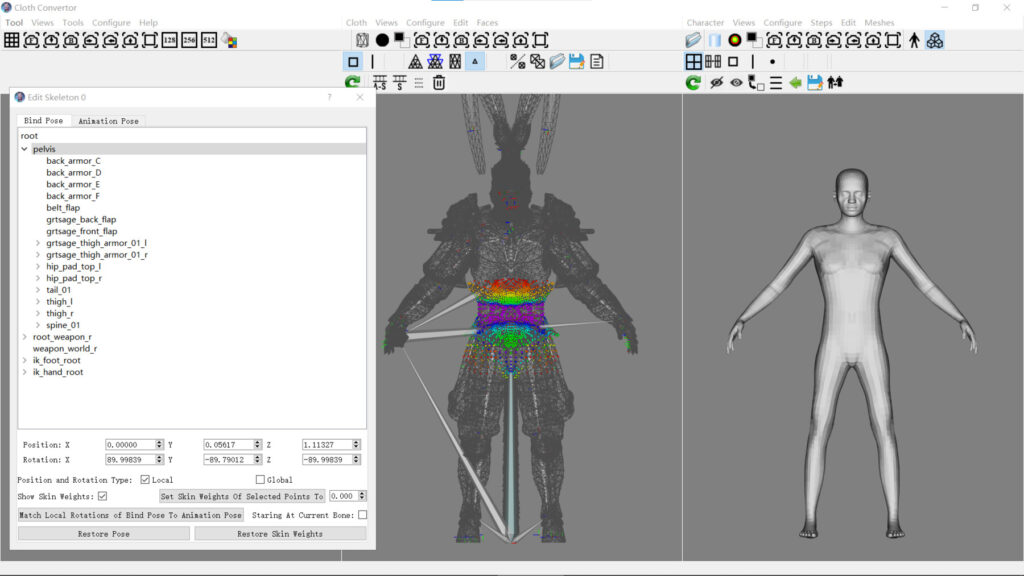
- Cloth Convertor: Converts 3D clothing models (OBJ, FBX, etc.) into “interchangeable cloth” assets by aligning them to a base figure and calculating skin weights.
- Character Convertor: Standardizes rigged characters into “interchangeable base characters” by wrapping a template mesh to the character’s shape.
- Dress3D: The core tool that fits interchangeable clothes onto base characters, merges skeletons, transfers skin weights, and adds “cloth bones” for secondary movement.
- Skeleton Transfer: Retargets a full skeleton and its skin weights from one interchangeable character to another, allowing for rig unification across different body types.
- Deform3D: A general topology wrap tool that conforms one mesh to the shape of another and can transfer textures between meshes.
Clothy3D Supported Import and Export Formats (OBJ, FBX, DAE, DXF, 3DS)
Clothy3D supports a wide range of formats for interoperability. Clothing can be imported as OBJ, FBX, DAE, DXF, or 3DS, while rigged characters require FBX or DAE. Finished assets and dressed characters are exported as FBX (to preserve rigging) or OBJ (for static meshes).

How to Convert 3D Clothes with Clothy3D Cloth Convertor
To convert clothing, users import a model and separate any rigid parts from the soft mesh. They must match the garment to a provided base character by wrapping or point matching. After optionally stitching parts or decomposing layers, the tool processes the model to calculate skin weights and generates an interchangeable cloth asset.
How to Convert a Character with Clothy3D Character Convertor
Users import a rigged humanoid (without clothes) and wrap Clothy3D’s internal base model to it using “Deformer Templates” (for known types like MetaHumans) or manual point matching. The tool then maps the original skeleton’s weighting to a standardized format, exporting an interchangeable character asset that preserves the original rig’s animation capabilities.
How to Auto-Fit and Rig Clothes with Clothy3D Dress3D
In Dress3D, users load an original character for reference and the corresponding interchangeable character and cloth assets. The tool can automatically merge skeletons if they are compatible and allows for the creation of “cloth bones” (e.g., for skirts or capes). To prevent clipping, users can delete character polygons hidden under the clothes. The final result is a combined FBX with a single skeleton ready for animation.
How to Transfer Skeletons and Skin Weights with Clothy3D Skeleton Transfer
This tool allows users to copy the skeleton hierarchy and skin weights from a source character (middle scene) to a target character (right scene). By using the “Set/Transfer Skeleton” function, the target mesh is rigged automatically based on the source’s data. This is particularly useful for making custom models compatible with standard rig systems like the Unreal Engine mannequin or Mixamo.

How to Wrap Meshes and Transfer Topology with Clothy3D Deform3D
Deform3D is the tool within Clothy3D Studio designed for mesh wrapping and topology transfer. The process involves importing a “target shape” model into the middle scene and a “source mesh” (the one providing the topology) into the right scene. Both models must be static. Users can perform cleanup, simplify geometry, and align the meshes so the source overlaps the target. Multiple source objects can be merged and stitched to maintain structural integrity.
Deform3D offers two wrapping methods: using a Deformer Template for automation or manual Point/Face Matching to interactively align the source to the target. Once the source takes the shape of the target, textures such as color and normal maps can be projected from the target onto the source UVs. The final result is exported as an FBX or OBJ. Typical use cases include the retopology of high-poly scans, refitting clothing assets to new character shapes, and projecting textures between different levels of detail.
Clothy3D Supported Rigs and Skeletons
Clothy3D supports several industry-standard rigging systems out-of-the-box. Supported skeletons include Daz 3D Genesis (3, 8, and 9), Reallusion Character Creator/iClone, and Mixamo. For game engines, it supports Unity Mecanim (Humanoid) and Unreal Engine 4 and 5 mannequins. It also supports Marvelous Designer avatars and custom tetrapod humanoid rigs. The software recognizes bone hierarchies and naming conventions to automate mapping, allows for the merging of compatible skeletons during dressing, and can rename or restructure skeletons upon export to match specific target requirements.
Clothy3D MetaHuman Clothing Workflow and MetaHuman Body Type Support
Clothy3D provides native support for all 18 official MetaHuman body types, allowing clothing to be adapted across different proportions and builds. Users can design garments in Marvelous Designer for a MetaHuman body and then use Clothy3D to auto-fit those clothes to any of the 18 types. The workflow involves converting the clothing and the MetaHuman body using templates. While Clothy3D focuses on body clothing rather than the complex facial rig, it ensures that exported clothing is weighted correctly to the MetaHuman skeleton for use in Unreal Engine character blueprints.

Exporting Clothy3D Assets to Blender, Maya, Unity, and Unreal Engine
Assets are exported in standard FBX or OBJ formats. In Blender, FBX imports include the armature and skinned mesh. In Maya, the joint hierarchy and skin clusters are preserved, allowing for animation retargeting via HumanIK. For Unity, the exported assets follow the Mecanim Humanoid schema for easy bone mapping. In Unreal Engine, meshes can be associated with existing mannequin skeletons or imported with a generated skeleton. While Clothy3D exports material assignments, users generally need to manually re-apply texture images within the destination software.
Clothy3D FBX Export Settings and Upgrading Skeletons to Unreal Engine 5
When exporting for Unreal Engine, the tool manages scale (centimeters) and the Z-up axis. A specific feature in Dress3D allows users to “Upgrade skeleton to UE 5 skeleton,” which renames bones, adds missing root and IK bones, and adjusts rotational alignment to match the UE5 mannequin standard. This saves users from manual retargeting and ensures compatibility with UE5’s animation assets and Control Rig.
Clothy3D Marketplace for Interchangeable Clothes and Base Character Assets
The Clothy3D Marketplace is a community hub for trading interchangeable cloth, character, and template assets. During its beta phase, it features free and test-priced assets. Users must “purchase” assets via the marketplace to link them to their account before they can be used in the software. Users can also become vendors by listing their own assets, which involves an approval process and assigning a unique asset ID. The marketplace includes a messaging system, user reviews, and a request system where users can commission specific assets from vendors.
Clothy3D Studio Tutorials and Documentation
Learning resources include an official documentation portal featuring tool-specific guides for Dress3D and Character Convertor. There is a Tutorials section for scenario-based learning and a YouTube channel with video walkthroughs using AI voiceovers. Additional information can be found on community platforms, LinkedIn, and through examining free example assets provided in the marketplace.
Clothy3D vs Marvelous Designer vs CLO 3D
Marvelous Designer and CLO 3D are used to create 3D clothing from 2D patterns using cloth simulation. Clothy3D does not create garments from scratch but instead automates the rigging and fitting of existing clothing meshes to various characters. While MD and CLO focus on the design and realistic drape of a garment, Clothy3D focuses on technical integration and pipeline automation. They are complementary; an artist might design in MD and then use Clothy3D to rig the result for multiple character types.
Does Clothy3D Replace Cloth Simulation in Blender or Unreal Engine
Clothy3D does not replace physics-based cloth simulation. It produces skinned meshes that move with the character’s skeleton, which is efficient but lacks dynamic physics like wind response or realistic collisions. For high-end realism, such as a flowing cape, users should still use Blender’s cloth modifier or Unreal’s Chaos Cloth. Clothy3D serves as a preparation tool that provides a properly rigged starting point for those simulation systems.
PixelHair Realistic Hairstyles for Blender Characters
PixelHair is a library of high-quality 3D hairstyles for Blender, created by Yelzkizi. These assets use a hair cap and shrinkwrap technique for easy fitting to different head shapes. The library is transitioning to Blender’s modern Geometry Nodes hair system for parametric control. PixelHair assets can be exported to Unreal Engine as Alembic grooms for strand-based hair or as optimized hair cards for better game performance.
The View Keeper Blender Camera Add-on
The View Keeper is a Blender add-on that manages multiple camera views using a single camera object. It allows users to store unlimited “records” of camera positions and settings, including unique resolutions, aspect ratios, and sampling settings per view. It supports batch rendering, allowing multiple angles to be rendered in sequence automatically. This reduces scene clutter and helps maintain consistency across different shots and output formats.

Frequently Asked Questions (FAQs)
- Is Clothy3D Studio really free to use?
Yes: Clothy3D Studio is currently free during its public beta phase. You can download and use all features without payment. Keep in mind there’s a limit of 100 exports per month for free users. The developers plan to continue offering a free version (with limited monthly exports) even after beta, alongside a paid tier with unlimited exports. - What are the system requirements for Clothy3D Studio, and do I need an internet connection?
Clothy3D runs on Windows only (Windows 10/11). It’s recommended to have at least 16 GB of RAM for processing models. A 3-button mouse is needed for viewport navigation. Importantly, an active internet connection is required to use the tools, the software checks your account license online, so it won’t function offline. - Which 3D file formats and rig types does Clothy3D support?
Clothy3D can import clothes in OBJ, FBX, DAE (Collada), DXF, and 3DS formats. It imports rigged characters as FBX or DAE. It exports finished assets in FBX or OBJ for use in other programs. It supports popular rig skeletons: Daz Genesis 3/8/9, Marvelous Designer avatars, Mixamo rigs, Unity Mecanim (Humanoid), and Unreal Engine 4 & 5 mannequins. This means you can easily work with characters/outfits from those ecosystems. - Can Clothy3D auto-fit clothes made in Marvelous Designer or CLO3D to other characters?
Absolutely. That’s a key use case. You can take a garment modeled in Marvelous Designer, import it into Clothy3D’s Cloth Convertor, and then Dress3D can fit and rig it to any supported character (say a MetaHuman or a Daz figure). Clothy3D doesn’t replicate Marvelous Designer’s design features (it doesn’t create clothing from patterns or simulate drapes), but it uses MD-created meshes as input and makes them wearable on different characters. - Does Clothy3D do cloth simulation like in Blender or Unreal Engine?
No, Clothy3D itself does not simulate cloth physics, it performs static fitting and rigging. The clothing it outputs is a skinned mesh that will move with the character’s bones, not a dynamic simulation. For physical cloth movement (fluttering, collision, etc.), you’d still use Blender’s cloth modifier or Unreal’s Chaos Cloth on the Clothy3D-rigged garment. Clothy3D prepares the clothing (so it’s properly attached to the character) but doesn’t handle real-time physics. It’s complementary to simulation, not a replacement. - Can I use Clothy3D Studio for MetaHumans in Unreal Engine?
Yes, Clothy3D has strong MetaHuman support. It supports 18 MetaHuman body types out-of-the-box. You can convert clothing for MetaHumans and even transfer outfits between different MetaHuman sizes. The workflow might involve exporting a MetaHuman body to Clothy3D, converting it, then dressing it with any outfit. The resulting clothed character can be exported as an FBX and brought into Unreal, matching the MetaHuman skeleton for easy animation retargeting. - I hit the 100 export limit, how can I get more exports without paying?
You can increase your monthly export count through the affiliate and rewards program. For each new user who signs up with your referral link, you get +10 exports. Additionally, if you publish a free asset on the Clothy3D marketplace, you get +10 exports per asset shared. These bonuses apply to the current month’s export total. It’s a great way to extend your usage for free by spreading the word or contributing to the community. - My character is just a static mesh (no rig). Can Clothy3D rig it for me?
Yes. You can use Skeleton Transfer to rig a static character by transferring a rig from another character. The process would be: convert your static model into an interchangeable character (you might first give it a skeleton by using a template or a very basic rig in Character Convertor), then use Skeleton Transfer with a source like the Unreal mannequin or a Mixamo rig to give your model a full skeleton and skin weights. In short, with the right source rig to transfer from, Clothy3D can effectively auto-rig your custom model. - What is the Clothy3D Marketplace and how do I use assets from it?
The Clothy3D Marketplace is an online hub where users share and sell interchangeable cloth and character assets. You can find clothing items or base characters that others have converted. To use one, you “purchase” it on the marketplace (many are free; you still click buy for $0). It then gets added to your account library, and you can load it in Clothy3D Studio. During beta, any paid listings use fake credits (no real money). Using marketplace assets can save you time, for example, instead of converting a particular jacket yourself, you might download an already-rigged jacket asset and immediately Dress3D it onto your character. - Where can I find help if I get stuck using Clothy3D Studio?
There are plenty of resources. The official documentation on Clothy3D’s website covers each tool in detail. They also have tutorial videos on their YouTube channel demonstrating the workflow step by step. Additionally, the website’s FAQ section addresses common questions (like concepts of interchangeable assets). If you need community help, you might check for a Discord or forums (Clothy3D’s social or LinkedIn announcements may have community links). And of course, you can reach out via the Contact & Support page on their site. The tool is actively supported, so you’ll likely get guidance if you run into any issues.

Conclusion
Clothy3D Studio represents a significant step forward in simplifying the 3D character clothing pipeline. By providing a free (at least in beta) suite that can automatically convert, fit, and rig clothing on virtually any humanoid character, it saves artists and developers countless hours of manual work. Instead of re-rigging garments for each new character or struggling with compatibility between different 3D platforms, Clothy3D bridges those gaps. We’ve seen how its five tools, from Cloth Convertor to Dress3D, systematically take you from an unrigged outfit and a character, to a fully dressed, skinned character ready for animation.– ×2
The software leverages interchangeable assets as a clever intermediary, enabling mix-and-match between characters and clothes that were never originally designed for each other. For example, you can put a Daz outfit on a Unity character, or a Marvelous Designer dress on a MetaHuman, with relative ease. The support for major skeleton standards (Daz, Mixamo, Unreal, etc.) makes it a truly universal adapter in the character workflow.
Clothy3D doesn’t work alone in a vacuum, it’s at its best when integrated into a full pipeline. You still use content creation tools likeMarvelous Designer or Blender to model and simulate clothing, but Clothy3D is the tool that takes those results and makes them game-ready or film-ready on your characters. It doesn’t replace high-end cloth simulation in engines; instead, it complements it by providing a solid rigged basis for further physics if needed. Essentially, Clothy3D handles the tedious technical rigging, so artists can focus on creative aspects.– ×1
Clothy3D in the Wider Creative Ecosystem
We also explored how Clothy3D fits into an ecosystem with solutions like PixelHair for hair and The View Keeper for camera work. While Clothy3D dresses your characters, PixelHair can quickly give them realistic hairstyles – a powerful combo for character artists to rapidly generate complete, production-quality characters (clothed and groomed). And once those characters are ready in Blender, The View Keeper add-on helps present them efficiently with multiple camera angles and batch renders. These pipeline additions (developed by the same creative community) show a trend: automation and smart tools are reducing the grunt work across all aspects of 3D character creation, from dressing to hair to rendering.
In terms of SEO and search-friendliness, we’ve covered all the key topics a user might query: how to download Clothy3D, system requirements, pricing, how each tool works, supported formats, comparisons to Marvelous/CLO, and related tools like PixelHair. If you were searching for “free 3D cloth auto-rig tool” or “how to rig clothes for MetaHumans”, we’ve answered those with cited details. The hope is that this comprehensive article not only informs you about Clothy3D Studio’s capabilities but also serves as a practical guide to implementing it in your workflow.
The 3D industry is quickly embracing such AI-assisted or automation-assisted tools, and Clothy3D is at the forefront for wardrobe automation. It empowers individual artists to do in minutes what used to take teams hours or days, all while maintaining quality. As Clothy3D evolves out of beta, with a growing marketplace and community, it might very well become an indispensable standard tool alongside the likes of Blender, Maya, and Unreal for character artists and technical directors alike.
Final Thoughts on Clothy3D Studio
In conclusion, “Free 3D Cloth Software is Here: Clothy3D Studio” – and it delivers on that promise by making character clothing easier than ever. Whether you’re a solo creator trying to kit-bash various assets into a coherent character, or a studio technical artist streamlining your character pipeline, Clothy3D Studio offers tremendous value. It doesn’t replace your creative tools but supercharges them, handling the heavy lifting of fitting and rigging. With Clothy3D, dressing your 3D characters is no longer a tedious chore – it’s almost as simple as drag-and-drop, letting you bring your vision to life faster and focus on what truly matters: the art itself.

Sources and Citations
- Thacker, Jim. “Free tool Clothy3D Studio auto-fits clothing to 3D characters.” CG Channel, 29 Oct. 2025:
- Clothy3D Official Documentation – Install, Activate and Upgrade:
- Clothy3D Official Documentation – Cloth Convertor Guide:
- Clothy3D Official Documentation – Character Convertor Guide:
- Clothy3D Official Documentation – Dress3D Guide:
- Clothy3D Official Documentation – Skeleton Transfer Guide:
- Clothy3D Official Documentation – Deform3D Guide:
- Clothy3D FAQ Page:
- Clothy3D Affiliate and Rewards Guide:
- Yelzkizi / Daniel I. – BlenderArtists Forum Post on PixelHair:
- PixelHair FlippedNormals Product Listing – “PixelHair – 3D hair for Blender and Unreal”:
- Yelzkizi.org Search Snippets / PixelHair pages:
- Superhive / BlenderMarket – The View Keeper Lite Add-on Page:
- BlenderNation – “Behind the Scenes: Alora (3D Albino Character)”:
- ArtStation Marketplace – “Clothy3D: auto-fitting and rigging any clothing model…”:
- Clothy3D Official Website:
- Clothy3D Official Website – Plans & Pricing:
- Clothy3D Official Website – Tutorials:
- Clothy3D Official Website – Marketplace:
Recommendations
- What’s New in Blender 4.4: A Comprehensive Overview of Features and Improvements
- Supergirl Trailer Reveals Kara’s 3-Day Race to Save Krypto
- How to Automate Blender Camera Switching with The View Keeper
- Blender Add-Ons for Customizable Procedural Clouds: Best Tools for Volumetric Sky, Cloudscapes, and Fast Art Direction
- Obsidian Was Originally Planning To Make Fallout: New Vegas 2 – What Happened and Why It Never Released
- How to Create a Cinematic Short Film with Metahuman, Motion Design, Text Actors, UDraper, and Cloth Simulation in Unreal Engine 5
- Autodesk Releases Arnold 7.5.1 With Free Cloud Rendering: Flow Render Tech Preview, Limits, and What’s New
- Attack on Titan Creator Hajime Isayama Admits Ending Regrets: Why He Says the Finale Felt “Insincere”
- Kusan: City of Wolves: Official Release Date Trailer, Gameplay, Platforms, Demo, and Everything We Know (2026 Update)
- Amazon Is Experimenting With Playable Game Demos on Twitch: Game Lift Feature Explained, How It Works, and What It Means for Cloud Gaming



































































































