









In This Article (25 sections)
Introduction
Modern tools like iClone, Unreal Engine, and MetaHuman digital actors are making the creation of immersive 3D worlds and dynamic crowds more accessible. This guide covers real-time animation, lifelike crowd population, integration of models from Daz 3D and MakeHuman, and best practices for motion capture and audio synchronization.
How to animate 3D worlds in Unreal Engine using iClone Live Link
The iClone Unreal Live Link plugin allows creators to stream characters, lights, and cameras directly into Unreal Engine, bypassing the traditional FBX import/export process. It enables real-time animation adjustments and previsualization of complex shots, allowing characters to interact with high-fidelity environments while synchronizing playback via timecode.
Leveraging iClone Live Link for seamless animation workflows
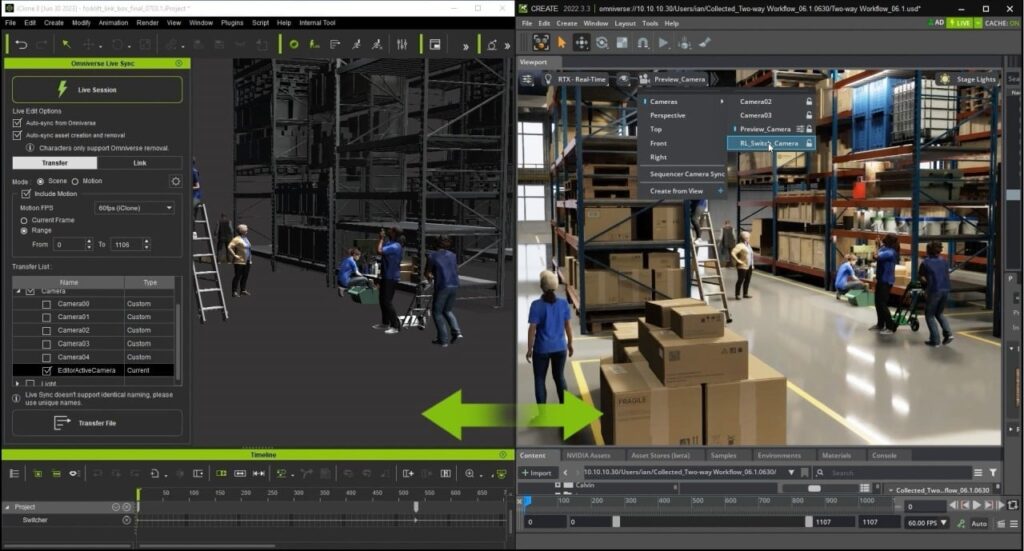
iClone Live Link unifies the production pipeline by allowing animators to use iClone’s intuitive tools, like puppet controllers and motion libraries, while viewing results instantly in Unreal. This bi-directional workflow supports automated character setup, shader assignments, and the ability to import Unreal props back into iClone for precise interaction alignment.
Combining iClone and Unreal Engine for interactive storytelling
This combination allows for rich, responsive narratives where animations are triggered by user input or game logic using Unreal’s Blueprint system. Directors can refine camera angles and animation timing in real-time, making it ideal for virtual production and multi-device motion capture during live shoots.
Creating realistic crowd interactions with iClone and Unreal Engine
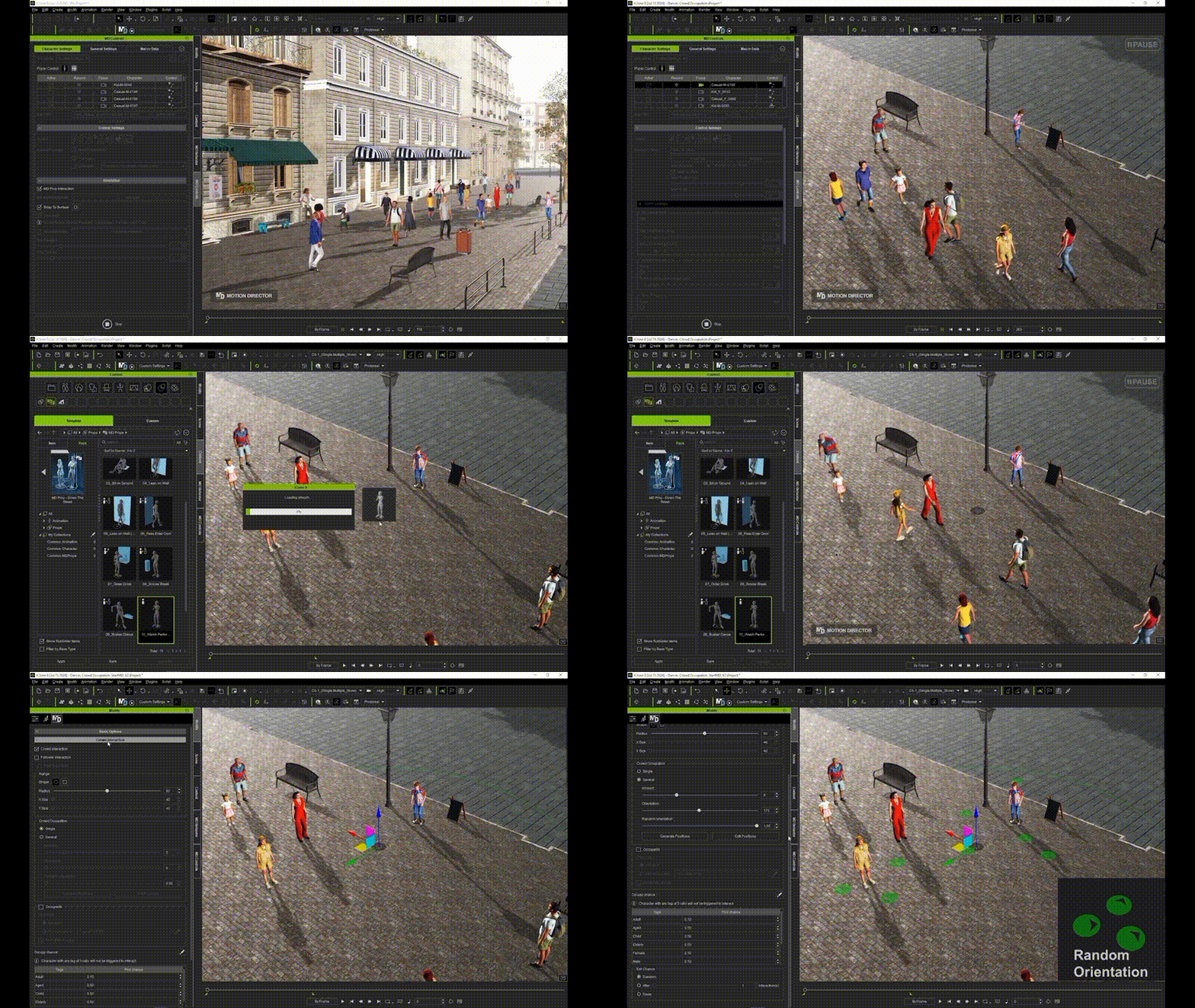
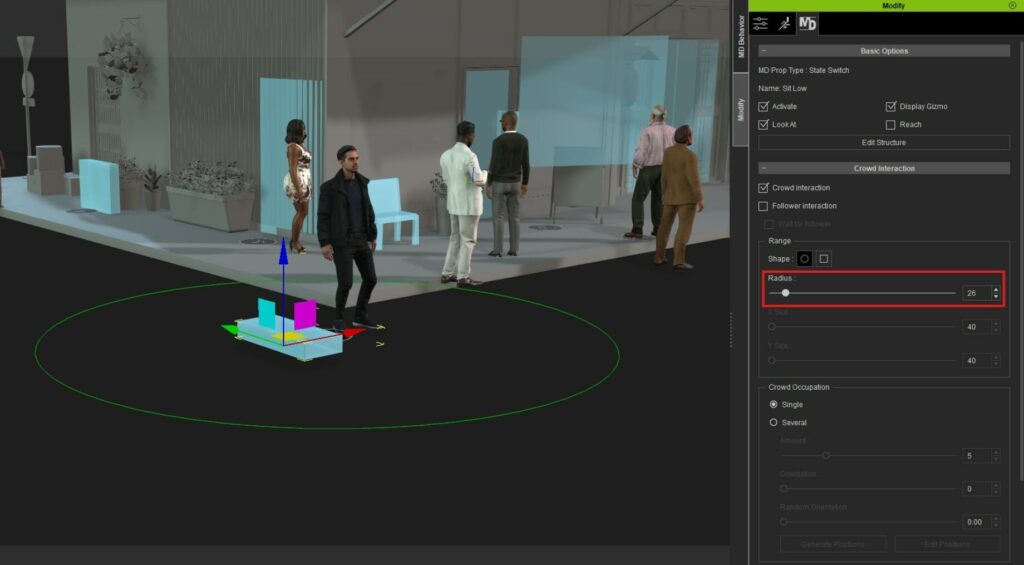
iClone’s Motion Director system enables the creation of large, intelligent crowds that navigate environments and avoid collisions. These simulations can be sent to Unreal Engine via Live Link or baked export, providing realistic, randomized behaviors for NPCs in settings like marketplaces or city streets.
Integrating MetaHuman characters for dynamic crowd simulations
Creators can use iClone Live Link to drive high-fidelity MetaHuman faces and bodies. For larger crowds, Unreal’s Mass AI system uses LOD scaling to manage performance, allowing MetaHumans to be used for close-up characters while simpler models populate the background.
Optimizing Performance for Large-Scale Crowd Animations
Performance optimization involves using Level of Detail (LOD) models to reduce polygon counts, Hierarchical LODs (HLOD) in Unreal for proxy meshes, and animation baking. Other techniques include using iClone’s Lite mode, simplifying collision detection, and utilizing profiling tools to identify bottlenecks.

Implementing Motion LIVE Plugin for Real-Time Motion Capture
The Motion LIVE plugin aggregates data from multiple hardware devices such as Perception Neuron, Rokoko, or iPhone to drive body, face, and hand animations simultaneously. This plug-and-play system allows for rapid prototyping and live performance capture within iClone.
Utilizing Motion Capture Data for Lifelike Character Movements
Mocap data from libraries like Mixamo or custom recordings can be retargeted to characters using Unreal’s IK Retargeter. To ensure realism, animators must clean up data to fix foot sliding and use secondary motions like physics-based cloth simulation or weight shifts.
Setting up Facial Animations for MetaHuman Characters
Facial animations can be created through iClone’s real-time puppeteering, Unreal’s facial Control Rig for manual keyframing, or the MetaHuman Animator for high-fidelity 4D capture via iPhone. Combining these methods allows for convincing lip-sync and nuanced emotional expressions.
Using Daz 3D Models for NPC Animations in Unreal Engine
The Daz to Unreal Bridge transfers fully rigged characters into Unreal Engine. Once imported, animations can be retargeted to Daz’s unique bone hierarchies, and NPC behaviors can be managed through Unreal’s Behavior Trees and AI systems.
Integrating Daz 3D assets into Unreal Engine scenes
Daz assets, including clothing and props, integrate with high-quality PBR materials. The Bridge supports Genesis 3 and 8 rigs, though materials for skin and hair may require manual adjustment. Socket attachments and physics can be added for interactive props.
Converting MakeHuman characters for use in Unreal Engine projects
MakeHuman provides an open-source option for creating custom human models with rigs compatible with the Unreal Mannequin. These characters support blendshapes for facial expressions and can be retargeted for use with standard Unreal animations.
Customizing MakeHuman characters for specific animation needs
MakeHuman models can be further tailored in Blender to add accessories or specialized rigging. Within Unreal, Animation Blueprints can manage unique needs like cloth physics or specific skeletal interactions for diverse character roles.
Enhancing NPC behaviors with advanced animation techniques
Advanced techniques include animation blending, additive layers for subtle motion, and IK for precise environmental interaction. These methods ensure NPCs react naturally to their surroundings, such as adjusting footing on uneven terrain.
Creating immersive environments with animated 3D elements
Immersive worlds feature dynamic elements like moving vehicles, foliage, and day-night cycles animated via Sequencer or Blueprints. Niagara particle systems and Chaos physics add further depth through environmental effects and destructible objects.
Best practices for animating 3D text and signage in virtual environments
Unreal’s Text3D plugin allows for high-resolution animated signage. Best practices include using Sequencer for transforms, ensuring readability, and using animated materials for effects like neon flickering or LED scrolls.
Tips for synchronizing audio with animated 3D text
Syncing is achieved by using markers and events in Sequencer, scrubbing audio waveforms for visual alignment, and using audio-driven animation scripts. Consistent frame rates and manual fine-tuning ensure that text movements feel unified with the sound.
Exploring the capabilities of Motion LIVE for crowd control
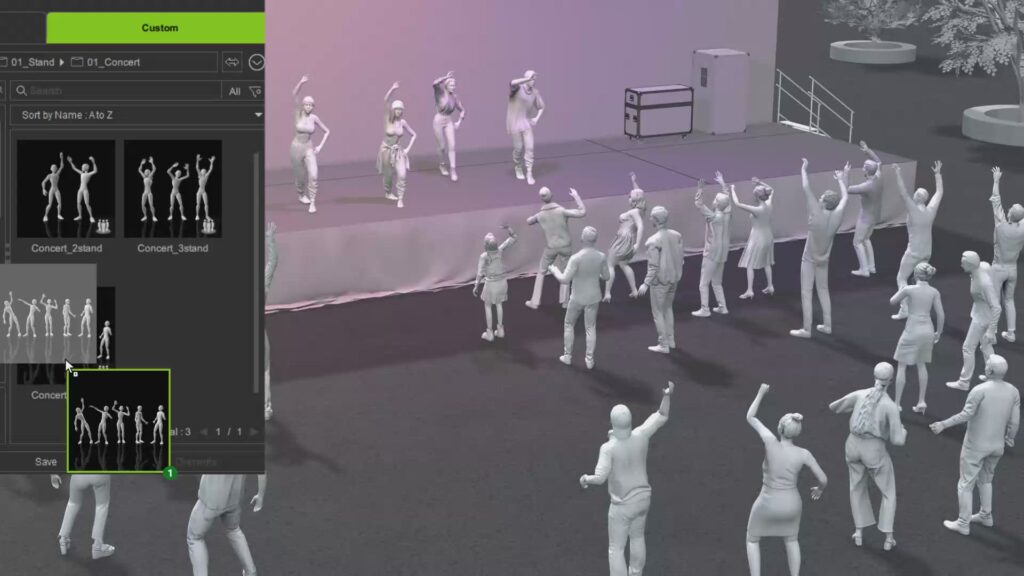
Motion LIVE can drive multiple characters simultaneously or provide distinct motion passes for crowd variants. This allows for authentic human realism in large groups, as performers can puppeteer virtual extras live or record varied base behaviors for randomization.

Troubleshooting common issues in 3D world animations
Common issues include T-posing, which requires checking Animation Blueprints, and material errors like pixelated hair. Foot sliding can be fixed with IK nodes, while performance lag is addressed through LODs and culling. Timecode sync and retarget pose adjustments help resolve lag and bone rotation errors.
Future trends in 3D animation and crowd interaction technologies
The future of animation involves AI-powered automation, ubiquitous high-fidelity MetaHumans, and cloud-based real-time collaboration. Trends include markerless motion capture, smarter AI-driven crowd agents, and the integration of realistic simulations like strand-based hair and ML deformers into real-time workflows.
Conclusion
The integration of tools like iClone’s Live Link, Unreal Engine, and assets from MetaHuman, Daz 3D, and MakeHuman revolutionizes 3D animation, enabling creators to craft immersive worlds efficiently. iClone’s Motion Director and Unreal’s Mass AI simplify crowd simulation, populating scenes with dynamic populations while maintaining performance. Tools like Motion LIVE allow real-time motion capture, blending high-fidelity MetaHumans or pre-rigged Daz models with custom performances for realistic, scalable results. This synergy lowers barriers, letting beginners produce professional-grade scenes on a budget, while intermediates streamline workflows and advanced users push creative boundaries with live-directed crowds or polished facial animations.
By reducing technical hurdles, these tools shift focus to storytelling and character development, empowering animators to orchestrate entire scenes. Future advancements in AI-driven animation and real-time engines will further enhance capabilities, but core principles leveraging each tool’s strengths, ensuring smooth animations, and prioritizing audience engagement remain key. Subtle details like a flickering neon sign or a crowd’s synchronized cheer create memorable experiences. With these techniques, creators can confidently animate vibrant, captivating worlds, bringing their visions to life with impact and immersion.

Frequently Asked Questions (FAQs)
- What is iClone Live Link and why is it useful for Unreal Engine animation?
iClone Live Link is a plugin that connects iClone to Unreal Engine, enabling real-time transfer of characters, cameras, lights, and animations. It eliminates the need for repetitive FBX exports, allowing animators to work quickly in iClone and see instant results in Unreal. This is ideal for rapid iteration, pre-visualization, and efficient cinematic or interactive character workflows. The WYSIWYG approach ensures animations match the final output, streamlining the animation process significantly. - How can I create a crowd in Unreal Engine without manually animating every NPC?
Crowds can be created using iClone 8.4+ Crowd Simulation with Motion Director, enabling intelligent navigation and collision avoidance for multiple characters. Design group behaviors and transfer them to Unreal via Live Link or export. Unreal’s Mass AI system spawns large crowds with simplified logic, applying varied base animations like five unique walkers randomized across 50 NPCs for realistic crowds without individual animation, saving significant time. - What are MetaHumans and can I use them in my Unreal Engine project alongside iClone?MetaHumans are high-fidelity digital humans from Epic Games, featuring realistic skin, strand hair, and facial rigs. They integrate seamlessly with Unreal and iClone via the MetaHuman Live Link, which drives facial expressions, body motions, and lip-sync from iClone in real time. This allows custom animations using iClone’s tools, but performance considerations, like using LODs for crowds, are crucial due to their high detail.
- How do I bring a Daz 3D character into Unreal Engine and get it animated?
Use the Daz to Unreal Bridge to export Daz 3D characters, including clothing and hair, into Unreal, where materials and skeletons are set up automatically. Retarget animations to the character’s skeleton, often matching the Epic mannequin for Genesis characters. Animations can come from Unreal’s assets, Daz aniblocks, or Sequencer, with quick tests like retargeting the ThirdPersonWalk ensuring functionality after material fine-tuning. - Is it possible to use motion capture for multiple characters at the same time?
iClone’s Motion LIVE supports simultaneous motion capture for multiple characters using devices like Perception Neuron or Xsens suits, assigning each performer’s data to a unique character. Data can be recorded together or layered sequentially for interactions, with Unreal’s Live Link or imported animations maintaining sync. Tools like Take Recorder or timecode sync ensure alignment, though this requires substantial hardware. - How do I animate 3D text in Unreal Engine and make it appear/disappear on cue?
Using Unreal’s Text3D plugin, create 3D text and animate it in Sequencer by adjusting location, rotation, scale, or material opacity for smooth appearances. Alternatively, use Blueprints to trigger visibility or animations on cues, like player actions. Options include scaling, fading, or toggling visibility, with emissive intensity animations for effects like neon signs, enhancing dynamic scene elements. - My crowd simulation in iClone slows down when I edit characters – is this normal?
Slowdowns are expected when editing in iClone’s Crowd Simulation due to switching from Lite to Edit mode, which activates full character details. Edit in smaller batches or apply broad changes to minimize pauses, returning to Lite mode for performance. Ensure adequate RAM and optimize poly counts, as this trade-off allows handling large crowds while maintaining interactivity. - My character’s facial animation isn’t showing up on my MetaHuman in Unreal – what did I miss?
Ensure the MetaHuman Live Link setup includes the MetaHuman Identity, Linked FaceBP, and Face Animator component, with iClone outputting to the MetaHuman rig’s blendshapes. Verify face animation tracks are recorded in Sequencer or Take Recorder and that Live Link streams face keys. If issues persist, test manual keyframes in Control Rig and confirm proper plugin setup and asset imports. - What emerging technologies should I watch to stay ahead in 3D animation?
Monitor AI-assisted animation tools like Cascador, MetaHuman advancements, and accessible motion capture via iPhone or VR trackers. Unreal’s Control Rig, physics-based animations, and Niagara VFX, alongside procedural tools like Houdini or MassAI, are key. Real-time collaboration platforms like Omniverse also enable concurrent scene work, enhancing efficiency in creating high-fidelity, populated 3D worlds. - What’s the best way to add realistic facial expressions and lip-sync to a Daz or MakeHuman character?
Use blendshape morphs from Daz or MakeHuman characters in Unreal with plugins like FaceFX or OVRLipSync for audio-driven lip-sync, or map ARKit blendshapes via Live Link Face. Alternatively, import characters into iClone/CC4 for AccuLips or Face Puppet, then transfer animations to Unreal. Morph targets are key, with iClone simplifying the process or Unreal requiring manual keyframing or plugin setup.
Sources and Citations
- Reallusion Official – iClone Unreal Live Link for 3D Character Animation, https://www.reallusion.com/iclone/live-link/unreal-engine/default.html
- Reallusion Magazine – Large Crowds in iClone (WarLord, Feb 2024), https://magazine.reallusion.com/2024/02/26/large-crowds-in-iclone/
- Reallusion Official – Crowd Simulation with Motion Director (iClone 8.5), https://www.youtube.com/watch?v=1tQCwlcQgfk
- Epic Games Documentation – 3D Text Actor in Unreal Engine, https://dev.epicgames.com/documentation/en-us/unreal-engine/3d-text-actor-in-unreal-engine
- Daz 3D Documentation – Daz to Unreal Bridge Details, https://www.daz3d.com/daz-to-unreal-bridge/
- Reallusion Magazine – Reallusion Unveils Motion LIVE @ SIGGRAPH 2018, https://magazine.reallusion.com/post_tag/motion-live/
- Reallusion Manual – Timecode Sync for Multi-character Recording, https://manual.reallusion.com/Timecode/ENU/1.0/01-Welcome/Welcome.htm
- Epic Games – MetaHuman Animator Release Info, https://www.unrealengine.com/en-US/blog/delivering-high-quality-facial-animation-in-minutes-metahuman-animator-is-now-available
- Reallusion Magazine – AI Empowers Impressive Crowd Simulation in iClone (José Tijerín, Apr 2024), https://magazine.reallusion.com/2024/04/16/ai-empowers-impressive-crowd-simulation-in-iclone/
- Daz 3D Tutorial – Character Animation in Unreal Engine (Real-Time Filmmaking course), https://www.daz3d.com/real-time-filmmaking-in-unreal-engine
Recommended
- 13 Years After It Was Cancelled, Star Wars: Battlefront III Prequel “Star Wars: First Assault” Is Playable On PC (Here’s What We Know)
- A Quiet Place: Part III Cast Update: Jack O’Connell Joins as Emily Blunt and Cillian Murphy Return
- The Well Is Not Empty Announced for PC: Release Window, Story, Trailer, and Gameplay Details
- R.E.P.O. Official Cosmetic Update Launch Trailer Breakdown: New Skins, Magic Staffs, and Gameplay Changes Explained
- Spider-Man: Miles Morales Actor Talks About That Missing Venom Game: What Nadji Jeter Revealed About Insomniac’s Plans
- How to Get the Perfect Hair Roughness for a Realistic Look
- How to Animate a Camera in Blender
- Remedy new CEO former EA VP Jean-Charles Gaudechon: start date, background, and Remedy’s self-publishing plans
- Nicolas Cage superhero detective in Spider-Noir: Release Date, Trailer, Cast, and Story (2026)
- Fans Who Paid Up To $450 For Barbie Dream Fest Are Calling It a ‘Barbie Nightmare Fest’: Refunds, Reviews, and What Happened



































































































