






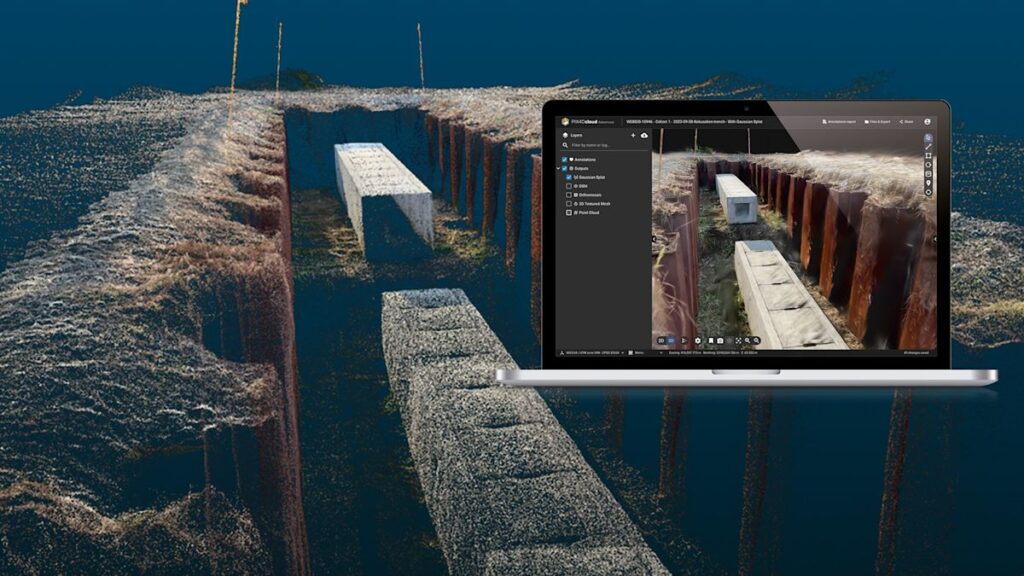
Gaussian splatting moved quickly from research into everyday capture apps and lightweight viewers because it can reconstruct photorealistic scenes from photos/video and render them efficiently as screen-space “splats” rather than polygon meshes. The technique is commonly associated with the 2023 work by Bernhard Kerbl and colleagues, which represents scenes as many anisotropic 3D Gaussians and renders them with a fast visibility-aware splatting algorithm.
In late March 2026, a dedicated plug-in workflow arrived for Cinema 4D, framing splats as editable, renderable assets rather than static imports. Industry coverage describes the release as a procedural workflow focused on importing, viewing, rendering, exporting, and iterating splat data directly in Cinema 4D, with support for Redshift and Standard/Physical pipelines and a non-destructive design goal.
A key technical reason splats are “different” from photogrammetry meshes is that Gaussian splat datasets typically store extended per-point attributes (including scale, rotation, opacity, and view-dependent colour via spherical harmonics coefficients) in a specialised PLY layout, and they do not contain face topology.
In This Article (19 sections)
Gaussian Splat Studio for Cinema 4D: what it is and what it does
Gaussian Splat Studio is presented by Alpha Pixel as a procedural plug-in for importing, viewing, rendering, and exporting Gaussian Splat point data directly in Cinema 4D, with dedicated viewport and render controls and automatic shader setup for Redshift and Standard/Physical workflows. The product page lists compatibility with Cinema 4D 2024, 2025, and 2026 on Windows and Mac, and a price point of $59.99.
The plug-in’s core positioning is less about “opening a file” and more about making splats behave like native scene elements: controls for density, size, opacity, and orientation; fast preview options for heavy captures; and integration with MoGraph-style Effectors, Fields, and Forces for procedural art direction. In addition to scan-faithful rendering, it advertises multiple “looks” including “True Gaussian Splat”, a stylised “Point Cloud” mode, and card/geometry-driven alternatives intended to provide broader shading control.
From a pipeline perspective, it also foregrounds compositing-centric utilities: generating depth maps from Effectors and rendering viewport mattes to preview cut-outs and transparency behaviour closer to the true splat display than a simplified proxy.
Best sources to create Gaussian splats for Cinema 4D (Luma, Polycam, etc.)
Most Cinema 4D splat pipelines start upstream: a capture (phone video or photos), a reconstruction/training step, then export to a Gaussian Splat PLY. Tool ecosystems frequently cited for producing .PLY splats include mobile/cloud capture services, plus technical pipelines such as Nerfstudio that can train and export splats.
Polycam’s help centre documents workflows that explicitly involve a downloaded PLY file and optional processing in SuperSplat before importing into other DCCs/engines, which strongly signals PLY as a supported interchange for its Gaussian splat workflows. PlayCanvas’s Gaussian splatting documentation also treats “Select Gaussian Splat on export from Luma” as a normal step and frames PLY as the common interchange format across capture tools and editors.
For teams that prefer local, reproducible training and explicit export controls, the Nerfstudio “Splatfacto” documentation describes exporting Gaussian splats to .ply via its viewer or CLI. This matters in Cinema 4D contexts because splat PLY headers are not uniform across all “PLY-looking” files; a pipeline that can verify/standardise attributes before import reduces downstream surprises.

How to import Gaussian splat .PLY files into Cinema 4D
Import success hinges on one non-obvious fact: “.PLY” is a container extension used for multiple kinds of 3D data (meshes, point clouds, and Gaussian splat datasets), but Gaussian splat PLYs require specialised per-vertex properties and typically contain no element face section. In practice, a quick reliability check is reading the PLY header up to end_header and confirming splat-specific properties such as scale_0..2, rot_0..3, opacity, f_dc_*, and f_rest_*.
Gaussian Splat Studio’s published feature set is centred on importing “Gaussian Splat ply files” and then exposing controls for density/size/opacity/orientation and separate viewport vs final render settings. A practical import sequence consistent with the plug-in’s stated workflow is: load the splat PLY via the plug-in’s import controls; normalise world scale if the capture comes in at an extreme size; correct orientation if needed; then choose a preview mode/density that keeps the Cinema 4D editor responsive before switching to final render settings.
Scale and axis issues are not edge cases. Reporting around the plug-in highlights that splat scenes vary widely in scale/density and that “not every PLY is oriented the same way”, including a YZ flip option for correcting some axis mismatches. Treating scale/orientation as first-class import steps—and saving a Cinema 4D scene state that records those transforms—reduces the risk of “fixing” the same splat repeatedly across shots.
Gaussian splatting in Cinema 4D: viewport performance tips and settings
Gaussian splat datasets often contain hundreds of thousands to millions of “points” (Gaussians), and PLY source files can be heavyweight for both storage and loading. As a result, the viewport strategy is usually the difference between a usable motion-design workflow and a scene that becomes effectively “static”. Plug-in coverage describes tactics such as interactive splat reduction during navigation (quality drops while moving, restores when movement stops) and a dedicated fast preview mode for heavy scenes.
Viewport performance tuning is also tightly tied to splat appearance controls. Gaussian Splat Studio exposes adjustments for splat size and minimum/maximum pixel radius, explicitly framed as a practical balance between preserving thin detail (smaller splats) and filling holes/coverage gaps (larger splats). This aligns with how splats are rendered: each 3D Gaussian projects to a 2D splat that is composited in depth order, so screen-space size and opacity are perceptually dominant.
A production-friendly approach is to separate “layout responsiveness” from “final look” by committing to distinct viewport and render settings. The plug-in explicitly calls out keeping viewport preview and final render settings separate, preserving the source splat while enabling rapid iteration in-camera. This separation is especially important when splats are being driven procedurally (Effectors/Fields), because performance costs can spike during interactive playback even if a still frame renders acceptably.
Best ways to render Gaussian splats in Cinema 4D with Redshift
Gaussian Splat Studio describes three rendering “looks” that map directly to common production needs: “True Gaussian Splat” for scan-faithful appearance, “Point Cloud” for a stylised dot mode and faster iteration, and card/geometry-based rendering when broader shading control is required. The key workflow implication is that “best” rendering is shot-dependent: a hero close-up that needs silhouette richness may favour True Gaussian Splat; a fast-moving transition may favour Point Cloud; and a hybrid shot with heavy CG integration may favour geometry-driven proxies to gain conventional shading controls.
For Redshift specifically, the plug-in’s public documentation and coverage emphasise automatic shader construction and a relight blending control designed to move between a luminescent “captured lighting” look and a more light-responsive look under Redshift lights. This is a pragmatic choice because “vanilla” 3D Gaussian splatting does not explicitly model scene illumination, and typical splat colour is stored as view-dependent coefficients (spherical harmonics) rather than a cleanly separated albedo/lighting decomposition.
When aiming for predictable render behaviour with splats, two Redshift-native principles still hold: rely on physically grounded materials where applicable, and use attribute-driven shading for per-point variation (colour/opacity proxies) only when the data is known to exist. Redshift’s documentation includes a Cinema 4D “Vertex Attribute” shader for reading colour/scalar per-vertex attributes, which is relevant when a splat workflow converts or proxies splats into mesh/point representations where vertex attributes become a shading hook.

How to relight Gaussian splats inside Cinema 4D
Relighting is where splats are both compelling and constrained. Captured splats frequently embed the original lighting “feel” into their appearance because the reconstruction is optimised to match the training imagery, and the commonly used representation stores view-dependent colour with spherical harmonics rather than a physically separable lighting solution. That is why plug-in coverage frames relighting “as a dial, not a fight”: a blending control transitions between a fully luminescent, scan-faithful look and a more light-reactive state that responds to Redshift lights.
Gaussian Splat Studio’s product page similarly describes relight support intended to “balance the original captured look with new illumination” for more believable composites while remaining flexible and non-destructive. This phrasing is important: it implies an art-directable approximation rather than a guarantee of physically correct re-lighting under arbitrary HDRIs, which matches the broader research consensus that vanilla 3DGS is not inherently relightable without additional modelling.
Academic work shows what “true” relighting entails in a Gaussian primitive pipeline: augmenting Gaussians with normals/BRDF parameters and decomposed lighting, then using physically based differentiable rendering and visibility handling to achieve plausible shadows and material responses. The gap between those research pipelines and day-to-day DCC relighting explains why practical Cinema 4D relight workflows should prioritise match-and-blend (integrating CG elements into a captured scene) over expecting fully rewritable lighting physics from a single splat capture.
Gaussian splats in Cinema 4D for VFX compositing and clean plate workflows
Compositing workflows depend on mattes, depth, and predictable transparency. Gaussian Splat Studio explicitly foregrounds “rendering viewport mattes” in true Gaussian Splat mode to generate “alpha-style holdouts” while previewing silhouette and edge coverage as it will behave in the true splat display. This is a practical response to a known friction point: splat rendering is inherently semi-transparent and composited via alpha blending, so edges rarely behave like binary cut-outs.
Coverage of the plug-in also notes a specific limitation and workaround: viewport rendering is treated as accurate for splat display, but Cinema 4D’s native viewport render path does not provide an alpha channel, so an alpha mode changes the viewport output and level adjustments may be required in the compositing step if a harder matte is needed. This framing is consistent with splat math: since semi-transparent values are part of how splats composite, a “perfectly white matte” is not always representative of how the splat should integrate over background plates.
Depth is the other half of clean plate logic. Gaussian Splat Studio advertises easy depth map creation from Effectors, which enables workflows such as depth-based defocus, atmospheric layers, and z-masking for CG insertions—without forcing an immediate mesh conversion. In practice, this makes splats especially attractive for background environment capture, where the captured depth structure is “good enough” to support comp separation even if the asset is not a watertight mesh.

Editing and art-directing Gaussian splats in Cinema 4D
The plug-in’s value proposition is strongest when splats stop being treated as “immutable scans”. Public documentation and coverage emphasise that splats can be animated, isolated, distorted, and refined directly in Cinema 4D using MoGraph effectors, Fields, and force-based controls, while also generating depth maps for downstream compositing. This shifts the decision-making from “is the scan perfect?” to “is the scan directable?”, which is more aligned with motion design needs where stylisation, timing, and framing are often more important than forensic reconstruction.
A practical art-direction mindset for splats is to treat them as a “volumetric photograph with structure”: allow the scan-faithful mode to establish realism quickly, then apply controlled procedural variation (density, opacity, spatial masks) to support camera moves, typography integration, and transitions. This is also where separating viewport behaviour from final render behaviour becomes creatively useful: it allows brutal simplification during blocking, while preserving high-density detail for final frames.
Using MoGraph-style controls and effectors with Gaussian splats (what’s possible)
Cinema 4D’s MoGraph Effectors are designed to affect clone-generating objects and related systems, and Fields blend layered influences to drive effect strengths across space. Gaussian Splat Studio claims MoGraph-style control through Effectors, Forces, and Fields, positioning splats as participants in the same procedural ecosystem as typical motion design rigs.
In practical terms, this enables workflows where effectors drive motion and stylised variation, while Fields shape influence regions for selective art direction—mirroring established MoGraph patterns such as stacking effectors and masking their influence using field layers. Coverage describes an interaction model consistent with Cinema 4D norms: select the splat object, add an effector/force, and it registers into the plug-in’s control tabs (with manual drag-in if tools are added out of order).
What remains inherently constrained is anything that depends on explicit surface topology (edge loops, UV seams, deformation along a mesh). Gaussian splat PLYs contain independent Gaussians, not connected faces, and this absence of topology is fundamental to the representation. MoGraph can still drive spatial transforms, density/visibility proxies, and stylised “dissolve” behaviours effectively—but mesh-like operations should be treated as approximations unless a conversion stage creates actual geometry.
Non-destructive Gaussian splat workflow in Cinema 4D
Non-destructive iteration is repeatedly highlighted in both the developer’s product description and independent coverage: the workflow is framed around refining density/appearance/output without destroying the source splat data. Technically, this is consistent with modern splat pipelines that treat PLY as a “source format” (high precision, canonical archive) while generating optimised derivatives for a target platform or shot.
Gaussian Splat Studio’s explicit separation of viewport and render settings reinforces this non-destructive concept: simplifications for interactive work do not have to become permanent changes to the asset. It also creates a practical safety rail for teams: the Cinema 4D scene can become a procedural “look file” and shot container, while the original PLY remains the reference that can be reprocessed externally as tools improve.
This approach also aligns with broader splat ecosystem practices: editors such as SuperSplat explicitly separate import/edit/optimise stages from exporting to multiple formats (compressed PLY, web packaging, archival PLY), encouraging an iterative chain rather than one-way conversion.

Converting Gaussian splats to point clouds or geometry in Cinema 4D
A common misconception is that “splat → mesh” is a simple file conversion. Even tool vendors that support Gaussian splats directly caution that conversion requires computing Gaussian parameters (or, conversely, computing mesh structure), and results can vary; it is not a one-step format swap.
Gaussian Splat Studio’s published “conversion” story is therefore best understood as providing alternative renderable representations rather than guaranteeing a watertight mesh reconstruction. Its multiple “looks” include a “Point Cloud” mode and a card/geometry-based mode intended for broader shading control, and coverage also mentions a proxy geometry view for understanding what is happening under the hood. In production, these modes can be treated as:
- A stylised point-based render for speed and graphic aesthetics.
- Geometry-driven proxies that allow more conventional shading behaviours where strict mesh topology is not required.
For teams that truly require polygonal assets (collision, UV-based texturing, deformers that expect surfaces), photogrammetry mesh reconstruction remains the reliable route; Gaussian splats are fundamentally topology-free until a separate reconstruction stage is introduced.
How to export Gaussian splats from Cinema 4D for other tools
Gaussian Splat Studio advertises exporting cleaned results as PLY (including “Splat PLY”), which positions Cinema 4D as an authoring/edit stage rather than a dead end. That matters because PLY is widely treated as the “lingua franca” interchange format for splats across editors and viewers.
A robust export approach is to maintain three tiers of assets:
- the original high-quality capture PLY (archive/reference),
- a Cinema 4D-exported “cleaned” PLY for shot continuity and downstream sharing,
- a platform-optimised derivative (compressed PLY, standalone web viewer package) produced in a dedicated splat editor when distribution/performance matters.
SuperSplat’s documentation is explicit that it can export multiple formats (including .compressed.ply and packaged web viewers) and warns that only PLY files containing Gaussian splat data will import—reinforcing the idea that exported Cinema 4D assets should preserve correct splat attributes if they are meant to remain “splats” outside the host DCC.
Common Gaussian splat .PLY problems in Cinema 4D and how to fix them
The most common failure mode is importing the wrong kind of PLY. Chaos’ support guidance is precise: Gaussian splat PLYs differ from traditional point-cloud PLYs and mesh-based PLYs, and splat-capable features may fail if the header lacks splat properties (scale_*, rot_*, opacity, f_rest_*) or if the file includes an element face section (mesh PLY). The first fix is therefore classification: inspect the header and confirm it is truly a Gaussian splat PLY.
The second common issue is axis/orientation mismatch. Coverage around Gaussian Splat Studio calls out that PLY orientation is not consistent and notes a YZ flip option for correcting some visual axis errors on import. When a splat appears “sideways” or mirrored, treat it as an axis convention mismatch rather than corrupted data, and use the tool’s orientation controls (or a dedicated editor) to standardise it before animation work begins.
The third recurring issue is scale. Splats can arrive at wildly different world sizes, and Gaussian Splat Studio exposes world scale controls explicitly because interactive and render behaviour becomes unpredictable when a splat is orders of magnitude too large or too small relative to scene cameras/lights. Similar warnings appear in other authoring workflows: splats “don’t inherently contain scale or orientation information” in a way that maps cleanly to all downstream contexts, so a reference scale/orientation step is often required.
Finally, file heaviness is a persistent constraint. PlayCanvas’ PLY documentation describes uncompressed PLY as potentially ranging from tens of MB to multiple GB and slower to parse (especially ASCII), which directly affects import/load times in DCC tools. If a pipeline needs smaller assets, consider a dedicated optimisation stage (e.g., exporting compressed representations) while keeping the original PLY as the quality reference.

Gaussian splatting plugin comparison for Cinema 4D: Gaussian Splat Studio vs other importers
Cinema 4D users now face a tool-choice question that splits into two categories: (1) Cinema 4D-centric procedural authoring tools that make splats “behave” like motion-graphics elements, and (2) renderer- or importer-centric tools that primarily focus on loading and rendering splats.
Gaussian Splat Studio’s differentiator—based on its own documentation and multiple independent write-ups—is the breadth of the workflow: viewport and render controls, multiple looks, MoGraph/Fields/Forces integration, relight controls, viewport mattes, depth-map utility, and export back to PLY, designed for non-destructive iteration on Cinema 4D 2024–2026 across Windows/Mac.
By contrast, smaller import-centric plug-ins often position themselves as “simple importers”. For example, a Gumroad-listed “GSplat Importer for C4D” is described as a simple Cinema 4D plug-in designed to import .ply files containing Gaussian splat data (notably “best with Polycam PLY’s”), which suggests a narrower scope than a full authoring toolchain.
Renderer-native approaches shift the decision again. Chaos added support for rendering 3D Gaussian Splats in V-Ray 7 for Cinema 4D, and third-party reporting characterises it as native support expected to appeal to arch-viz and VFX studios, particularly for detailed background environments. This route can be attractive when the pipeline is already V-Ray-centric, but it is primarily a rendering integration rather than a Cinema 4D procedural editing framework.
Similarly, OTOY documents Gaussian Splat support in OctaneRender, including support for .ply Gaussian splat files. That can be valuable in Octane-first pipelines, but the trade-off is that “workflow depth” may be defined by the renderer’s feature set rather than Cinema 4D’s MoGraph-driven procedural ecosystem.
Gaussian splats vs photogrammetry meshes: which is better for motion design
The decision is less about which is “better” and more about what the shot needs the asset to do.
Gaussian splats excel at quickly producing photorealistic reconstructions suitable for novel-view rendering, using clouds of 3D Gaussians rendered via splatting rather than mesh rasterisation. Their common interchange format (Gaussian splat PLY) encodes per-splat scale, rotation, opacity, and view-dependent colour (spherical harmonics), and it contains no face topology. In motion design terms, this often translates into: rapid “real-world environment” acquisition, visually rich parallax, and a strong base for stylised transitions—especially when paired with procedural controls and fast preview modes.
Photogrammetry meshes, by contrast, produce explicit surfaces: faces, UV workflows, and compatibility with mesh-native operations (deformers, sculpting edits, robust collisions, standard texture baking). The PLY ecosystem itself highlights this difference: mesh-based PLYs contain element face, while Gaussian splat PLYs do not. For motion design, meshes tend to dominate when the shot requires: close-up object interaction, physically consistent shading under new lights without approximation, clean holdouts, or heavy integration with simulation/rigging that expects surfaces rather than point-based primitives.
A practical rule consistent with VFX-focused reporting is to treat splats as particularly strong for detailed background environments and rapid set extension, while maintaining mesh workflows for assets that must behave like conventional CG objects under full production constraints.
Frequently Asked Questions (FAQs)
- What versions of Cinema 4D are listed as compatible with Gaussian Splat Studio?
Compatibility is listed for Cinema 4D 2024, 2025, and 2026, on Windows and Mac. - Does Gaussian Splat Studio support Redshift only, or also the Standard/Physical renderers?
It is described as supporting Redshift and Standard/Physical material workflows, with automatic shader construction for those pipelines. - Why do some .PLY files import incorrectly or fail to load?
Because.PLYcan represent meshes, point clouds, or Gaussian splats, and Gaussian splat imports typically require splat-specific properties (e.g.,scale_*,rot_*,opacity,f_dc_*,f_rest_*) and no face section; a non-splat PLY may fail or behave unpredictably. - How can a Gaussian Splat PLY be quickly identified without specialised tools?
Inspect the header text up toend_header. Gaussian splat PLYs typically include splat-specific attributes such asscale_0,rot_0,opacity, andf_rest_*. - What is the most common fix for an imported splat that is rotated onto the wrong axis?
Axis conventions vary; coverage of Gaussian Splat Studio highlights a YZ flip option to correct certain orientation mismatches. - Is it normal for splat mattes/alphas to look “soft” compared to mesh cut-outs?
Yes. Splats are composited via alpha blending and include semi-transparent contributions; coverage notes viewport-render alpha limitations and recommends level adjustments in compositing if a harder matte is required. - Can Gaussian splats be fully relit like conventional CG geometry?
Vanilla 3D Gaussian splatting does not explicitly model illumination and is generally unsuitable for fully physical relighting without additional modelling; research shows relightable Gaussian frameworks require extra properties such as normals/BRDF parameters and explicit lighting decomposition. - What does “relighting” typically mean inside Gaussian Splat Studio workflows?
Coverage describes a relight blending control that transitions between a scan-faithful luminescent look and a state that responds more to Redshift lights, implying an art-directable blend rather than guaranteed physical relighting. - How can splat assets be reduced for sharing or web use while keeping a high-quality reference?
A common ecosystem approach is to keep the original PLY as the high-quality reference and export compressed derivatives (e.g., compressed PLY or packaged viewers) using a dedicated splat editor, which explicitly supports multiple export formats and treats PLY as the canonical archive. - When is a photogrammetry mesh still the better option for motion design?
Meshes remain preferable when the shot needs explicit surface topology for deformations, UV-based lookdev, rigid collisions, or predictable shading under new lights without approximation—capabilities splat PLYs do not provide because they contain no face topology.

Conclusion
Gaussian splatting’s core advantage—photoreal scene capture with fast rendering—comes from representing scenes as large sets of anisotropic Gaussians with per-splat attributes and view-dependent colour, rather than as polygon meshes. Gaussian Splat Studio’s March 2026 arrival in Cinema 4D is significant because it moves splats from “external viewer novelty” into a procedural motion-graphics workflow: dedicated viewport and render controls, MoGraph/Fields/Forces integration, relight blending, matte/depth utilities, and export back to PLY for downstream pipelines.
The production-success pattern is consistent across the sources: treat PLY as a specialised splat container (verify headers), normalise axis and world scale early, use fast preview and density controls to maintain interactivity, and approach relighting and compositing with an understanding that splat transparency and baked appearance are fundamental characteristics, not bugs.
Sources and Citations
- Alpha Pixel product documentation for Gaussian Splat Studio
- Independent release coverage with workflow/control details
- Foundational research introducing 3D Gaussian Splatting
- Authoritative PLY / format references explaining why splat PLYs differ
- Gaussian splat ecosystem documentation treating PLY as common interchange
- Cinema 4D MoGraph and Fields documentation
- Redshift documentation for attribute-driven workflows / per-vertex attributes
- Relighting research beyond vanilla 3DGS
- Renderer and alternative tool references for comparison
Recommendations
- Red Hood Gang Red Brick Location in LEGO Batman: Legacy of the Dark Knight
- ALS Metahuman Motion Matching: How to Combine Realistic Movement and Character Animation in Unreal Engine 5
- For All Mankind Season 5 Conspiracy Thriller Explained
- Cyberpunk 2077 Hair Mods: Top Custom Hairstyles, Installation Guides, and Community Favorites
- Elden Ring Movie’s Popcorn Bucket Should Be Iron Fist Alexander, Fans Declare (A24’s Alex Garland Adaptation)
- Cloth Simulation in Blender vs Unreal Engine 5: Workflow Comparisons, Performance Insights, and Best Practices
- Capcom Addresses The Street Fighter 6 Incest Storyline Fans Have Been Losing Their Minds Over
- War Machine Review (2026): Netflix’s Alan Ritchson vs Alien Killer Robot Sci-Fi Action Movie
- Final Fantasy XI Free Trial Expansion: No Time Limit and Higher Level Cap
- How Do I Create a Cinematic Camera Shot in Blender?



































































































