






In This Article (8 sections)
GitHub AI Scan and Agentic Autofix: What They Do and How They Differ
GitHub Agentic Autofix and AI Scan reached general availability on October 15, 2026, adding two different AI-assisted capabilities to GitHub’s application security workflow. AI Scan focuses on detecting potential vulnerabilities in qualifying pull request changes, while Agentic Autofix focuses on investigating existing code scanning alerts and preparing proposed fixes for human review. The distinction matters because one tool addresses the introduction of new security issues and the other addresses remediation of known backlog alerts. Together they can reduce some of the manual work between detection and repair, but neither removes the need for developers to understand findings, test changes, and review the security reasoning behind them.
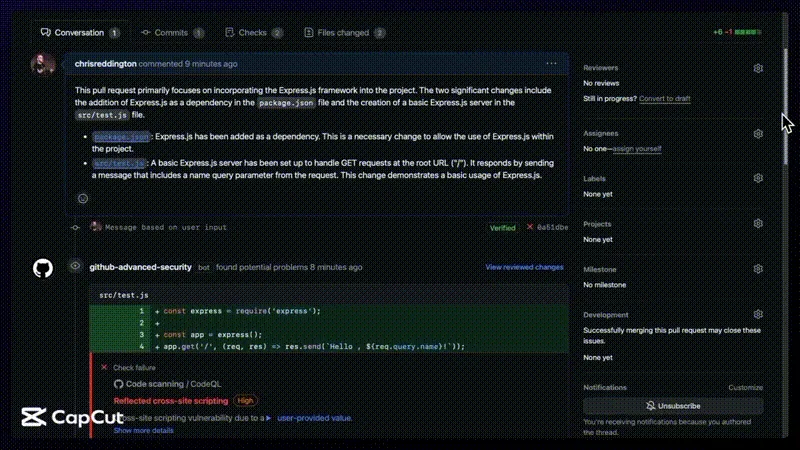
AI Scan is designed to examine qualifying pull request changes when code scanning and the relevant AI Scan setting are enabled. GitHub documents that it runs when a pull request is opened and after additional commits, and that it does not require a build before analysis. The service may also search the repository for additional context when evaluating changed code. This timing puts security feedback close to the moment when a developer introduces a change, which can make investigation easier because the author is already familiar with the code and the intended behavior. A finding should still be treated as something to investigate rather than automatic proof that a vulnerability is exploitable in every deployment.
Agentic Autofix works from a different starting point. A developer assigns an eligible code scanning alert to Copilot, and the agent investigates the surrounding repository context, modifies code, attempts validation, and prepares a draft pull request containing its proposed repair. This differs from classic Copilot Autofix, which provides a suggested change for an individual supported alert. The agentic workflow can explore a broader portion of the repository and is therefore potentially more useful when a vulnerability crosses file boundaries or depends on shared utilities. Its output remains a proposal that engineers need to inspect and verify.
Repository context is especially important for remediation. A vulnerability may be reported at one line while the real security condition involves several helper functions, shared abstractions, or multiple call paths. Repairing only the reported location can leave another route to the same unsafe behavior. Agentic Autofix can investigate surrounding files, but that broader scope also means reviewers need to understand why each modification was made. A technically plausible patch that the team cannot explain may solve one problem while introducing maintenance or functional risks elsewhere.
AI Scan is positioned as a complement to CodeQL rather than a replacement for it. CodeQL builds a database representation of source code and runs queries against it to identify potential problems, while AI Scan extends pull request analysis into selected technologies outside CodeQL’s existing coverage. GitHub’s October announcement names PHP, Shell and Bash, Terraform configuration in HCL, Dockerfiles, JSP for Java, and Blazor for C# among the covered technologies. These examples show where the AI system can add coverage, but they should not be expanded into a claim that every language, framework, configuration format, or security weakness is supported.
The best way to evaluate the combined workflow is to understand which mechanism examines which parts of a repository. A project may include application code, infrastructure definitions, container files, scripts, and framework templates, each with different analysis coverage. Teams therefore benefit from maintaining a practical coverage map rather than assuming one enabled feature protects the whole project. More scanners can generate more feedback, but the objective is actionable findings and verified repairs rather than the largest number of enabled security features.

Enabling AI Scan, Assigning Alerts, and Reviewing Agentic Autofix Repairs
AI Scan enablement is controlled through GitHub’s administrative hierarchy. Enterprise policy determines whether organizations are allowed to enable the feature, and GitHub documents that the enterprise policy initially disallows it. Allowing AI Scan at the enterprise level does not automatically activate it across every organization or repository. Organization owners and security managers then control the relevant security setting for eligible organization-owned repositories. Administrators should therefore verify the effective configuration at each level instead of assuming a repository-level option can override a higher-level restriction.
For eligible public repositories owned by personal accounts, repository administrators can control AI Scan directly. Organization-owned repositories follow the organization’s settings and can opt out where the applicable configuration permits. Code scanning must also be enabled for the workflow to function. After configuration, a qualifying pull request offers the best way to confirm whether analysis is actually occurring. If expected feedback does not appear, administrators should investigate eligibility and settings rather than treating silence as evidence that the change contains no security problems.
AI Scan findings are advisory. GitHub states that they do not cause the code scanning check to fail and cannot be used through ruleset requirements to block pull request merges. This means an unresolved AI Scan finding does not automatically prevent a developer from merging code. Organizations that want stronger handling must create their own review expectations, such as requiring a reviewer to assess security-related comments before approval. Such a policy would be an internal development practice rather than a native blocking capability of AI Scan.
For Agentic Autofix, GitHub documents an alert-level workflow through the repository’s Security and quality section. Open Code scanning, select the eligible alert, and use Assign to Copilot under Assignees. The current documentation limits Agentic Autofix to backlog alerts on the repository’s default branch. Security campaigns can also assign groups of alerts, with GitHub allowing between one and 25 alerts in a single assignment that produces one agent session and one pull request. The ability to batch alerts can save time, but grouping should be guided by whether the resulting repair remains understandable.
Several alerts involving the same unsafe helper or shared subsystem may form a coherent batch. Unrelated vulnerabilities spread across separate areas of the application may produce a pull request that is harder to review and test. The goal should be a change with a clear security purpose rather than the maximum number of alerts per session. GitHub also supports automation through the code scanning REST API, allowing the agent bot to be assigned through the alert update interface. API users should follow the current endpoint schema and permissions rather than rely on assumptions from earlier preview versions.
Agentic Autofix can use applicable custom instructions when generating its proposed repair. Repository guidance can therefore help the agent understand established engineering practices, approved security utilities, test commands, compatibility requirements, or other project-specific conventions. These instructions are most useful when they explain the project clearly rather than attempting to replace tests or architecture. An agent still needs evidence that its change repairs the security issue and preserves legitimate behavior. Documentation should guide the work rather than become the only form of validation.
GitHub says Agentic Autofix reruns CodeQL during the repair workflow, but this validation is best effort and has documented limits. It cannot confirm repairs for custom CodeQL queries, the security-extended query suite, or alerts generated by third-party tools through that same mechanism. A successful CodeQL rerun can therefore support a specific conclusion about the relevant analysis result without proving the entire application is secure. Security validation and functional validation should remain separate questions.
Reviewers should begin with the original security condition and ask how the patch changes the path from untrusted input or unsafe behavior to the sensitive operation. They should then examine scope, looking for unrelated refactoring, new dependencies, or behavior changes that make the fix harder to understand. Existing tests can confirm that common workflows still function, while a targeted regression test can capture the vulnerability that motivated the repair. The pull request should also describe validation accurately, distinguishing between a command being attempted and the relevant alert actually disappearing.
GitHub documents that Agentic Autofix creates a draft pull request summarizing the proposed repair and validation attempts. Reviewers can inspect the agent session and request further changes through pull request comments. If validation fails or the agent suspects a false positive, that uncertainty should remain visible rather than being hidden behind a confident summary. Human review is therefore part of the intended workflow, not an optional extra after the agent has finished. The purpose of the agent is to accelerate investigation and patch preparation while leaving the final engineering judgment with the team.

Plans, Eligibility, Copilot Requirements, and AI Credit Costs
AI Scan’s launch announcement identifies eligible public repositories owned by organizations or personal accounts, while private and internal organization-owned repositories require GitHub Code Security or GitHub Advanced Security. Agentic Autofix has a similar but separately documented eligibility model. The October 15 announcement emphasizes GitHub Code Security and GitHub Advanced Security customers on GitHub Enterprise Cloud, including data residency deployments, while current access documentation also describes eligible public repositories on GitHub.com and organization-owned repositories with the required entitlement. These statements should be preserved with their source context instead of compressed into a single universal access rule.
Repository ownership type matters. GitHub’s access documentation excludes repositories in the personal namespace of Enterprise Managed Users, which is different from organization-owned repositories operating within an enterprise. Administrators should therefore evaluate the exact repository rather than assuming that an enterprise subscription makes every repository eligible. Deployment environment, ownership structure, administrative policy, and security-product entitlement can all affect access. A missing feature may therefore be a configuration issue rather than a product defect.
GitHub also distinguishes Code Security from Secret Protection. These are separate security products with different purposes and entitlements. Owning one security-related product does not automatically establish access to every other GitHub security feature. Organizations should therefore verify which entitlement is required for the repository and feature they intend to use. This prevents administrators from purchasing or enabling an unrelated product while leaving the actual eligibility issue unresolved.
A separate GitHub Copilot license is not required for AI Scan. GitHub’s Agentic Autofix access documentation similarly states that users do not need an individual GitHub Copilot license to use the feature. That can be confusing because the workflow uses the Copilot brand and includes an Assign to Copilot action. Product naming should not be used as a substitute for the documented licensing rules. Repository eligibility and organizational configuration are the more important factors.
The October 15 Agentic Autofix announcement does, however, identify a configured Copilot billing method as an access requirement. This is different from requiring every user to purchase a Copilot subscription. Administrators should separate whether a Copilot license is required from whether the account needs a billing method capable of funding AI usage. These are distinct operational questions and can fail for different reasons. A repository may be eligible while a session still cannot begin because billing or usage controls are not correctly configured.
Both AI Scan and Agentic Autofix consume Code Security AI Credits. Agentic Autofix also consumes GitHub Actions minutes during its workflow. Public repository eligibility does not eliminate AI-credit consumption, although applicable included allowances can be used before metered usage begins. Organizations therefore need to evaluate security adoption alongside usage costs rather than treating general availability as unlimited free access. The amount of value produced depends on how much useful security work the credits generate.
GitHub allows administrators to create a SKU-level budget for Code Security AI Credits and also supports broader bundled AI-credit budgets. Multiple hard limits can affect availability. GitHub documents that exhausting a hard budget can stop AI Scan from producing findings and prevent Agentic Autofix from starting new sessions even though the features remain enabled in settings. This distinction is important for troubleshooting because a configured feature can appear inactive when the real cause is a usage limit.
For cost analysis, session counts alone provide little evidence of value. A useful internal measure is the effort required to obtain an accepted and verified repair, including agent usage, Actions minutes, reviewer time, rejected patches, and additional engineering work. A cheap session that produces unusable changes can be more expensive operationally than a more resource-intensive session that saves substantial developer time. GitHub reports combined usage for these features under Advanced Security in the AI usage view, so billing reviewers should account for that aggregation when comparing expenditure with outcomes.

Key Limitations and How Teams Should Use AI Scan and Agentic Autofix Together
AI Scan and Agentic Autofix solve different problems and should not be treated as one automatic end-to-end security pipeline. AI Scan looks for potential vulnerabilities in qualifying pull request changes, while Agentic Autofix prepares proposed repairs for eligible existing code scanning alerts. Enabling one does not automatically mean every finding will flow into the other. The tools enter the development lifecycle at different stages and operate under different eligibility rules. Teams need explicit ownership for triage, remediation, validation, and merge decisions.
AI Scan also has important coverage limitations. GitHub documents that it does not scan entire repositories and excludes pull requests originating from forks or created by Dependabot. This restriction is especially important for open-source maintainers because a public repository can be eligible while an external contributor’s fork-based pull request receives no AI Scan analysis. Teams with significant outside contribution should therefore assess security coverage according to how code actually enters the project, not simply according to repository visibility. Manual review or other tooling may still be necessary for excluded contributions.
Agentic Autofix is similarly bounded. Its current workflow focuses on eligible backlog alerts on the default branch rather than every possible security issue in every branch. Its validation is best effort, and some alert types cannot be confirmed through the built-in CodeQL rerun. The agent may also encounter false positives, missing dependencies, incomplete test environments, or project-specific behavior that automated analysis cannot fully interpret. A generated patch should therefore be treated as a candidate repair rather than a security guarantee.
The evidence produced by each stage should remain distinct. An AI Scan finding identifies something worth investigating. A code scanning alert represents another form of security evidence. An Agentic Autofix pull request proposes a remediation. A successful validation run supports a narrower claim that a particular analysis condition has changed. None of these is equivalent to a completed security review of the whole application.
Human reviewers remain responsible for business logic and security assumptions that automated tools may not understand. Authorization rules, tenant boundaries, financial constraints, data ownership, and application-specific trust relationships can all determine whether code is secure even when static analysis finds nothing suspicious. Conversely, an automated finding can identify a real issue whose exploitability depends on deployment conditions that only the development team understands. Security review therefore requires combining automated evidence with project knowledge.
A successful rollout should begin with a small set of representative repositories and measure practical outcomes. Teams can examine whether AI Scan findings are understandable and relevant, whether Agentic Autofix patches reduce remediation effort, and how frequently reviewers reject or substantially rewrite proposed changes. They can also monitor credit consumption and Actions usage against the amount of accepted work. This provides more meaningful evidence than counting the number of AI features enabled across the organization.
The strongest workflow preserves clear responsibility at every stage. Developers should know who evaluates AI Scan findings, who can assign alerts to the agent, who reviews generated pull requests, and what evidence is required before merging a security fix. Automated tools can reduce repetitive investigation and patch preparation, but they do not remove the need for accountable decisions. GitHub’s October 15 releases are therefore most useful when treated as additional security capabilities inside an existing engineering process rather than as replacements for that process.

Frequently Asked Questions (FAQs)
- When did GitHub Agentic Autofix and AI Scan become generally available?
GitHub published the general availability announcements for both Agentic Autofix and AI Scan on October 15, 2026. The two releases are related to application security, but they address different parts of the workflow. AI Scan focuses on detecting potential vulnerabilities in qualifying pull request changes, while Agentic Autofix focuses on investigating eligible existing code scanning alerts and preparing proposed repairs. General availability means the features moved beyond preview status under GitHub’s documented eligibility and configuration rules. It does not mean every repository automatically receives both capabilities without the required settings, entitlements, and billing arrangements. - Are Agentic Autofix and classic Copilot Autofix identical?
No. GitHub distinguishes Agentic Autofix from the classic Copilot Autofix experience. Classic Autofix provides a suggested change for an individual supported code scanning alert, while Agentic Autofix can investigate broader repository context, modify multiple files where needed, attempt validation, and prepare a draft pull request. That wider scope can be useful when a vulnerability depends on shared functions or several related pieces of code rather than one isolated line. The agentic workflow also introduces different access, usage, and review considerations. Teams should therefore confirm which feature generated a repair before applying documentation about eligibility, costs, or validation. - Does enabling AI Scan mean a repository has complete security coverage?
No. AI Scan expands security analysis for qualifying pull request changes, including selected technologies outside CodeQL’s existing coverage, but it is not a complete security assurance system. GitHub documents limitations around supported technologies, contribution types, and the scope of the code being analyzed. AI Scan also does not replace manual review of authorization rules, business logic, deployment assumptions, or application-specific trust boundaries. A repository can receive no AI Scan finding and still contain vulnerabilities outside the feature’s coverage. Teams should therefore understand which tools examine each part of the project and where additional review remains necessary. - Should developers ignore advisory AI findings?
No. “Advisory” describes how AI Scan findings affect GitHub’s merge controls, not whether an individual issue matters. GitHub says AI Scan findings do not fail the code scanning check and cannot directly be used through rulesets to block a merge. A reported issue may still identify a serious vulnerability that requires immediate correction. Reviewers should inspect the underlying claim, determine whether the risky data flow or behavior actually exists, and assess its consequences in the application. Teams can create internal review requirements for these findings even though GitHub does not enforce them as native merge blockers. - Can a clean CodeQL result prove an entire application is secure?
No. A clean CodeQL result means the configured analysis did not identify matching issues under the queries and conditions that were run. It does not establish that every possible vulnerability, business-rule failure, authorization mistake, or deployment weakness is absent. CodeQL is powerful because it analyzes program structure and data flows according to defined security queries, but those queries still have a scope. Reviewers also need functional tests, application knowledge, and other security evidence where appropriate. Security conclusions should therefore remain proportional to what the analysis actually tested. - Can Agentic Autofix handle several alerts in one assignment?
Yes. GitHub documents the ability to assign between one and 25 alerts together through the backlog or a security campaign. That assignment produces one agent session and one pull request containing the proposed repairs for the selected group. Batching can be efficient when the alerts share a common cause, such as multiple uses of the same unsafe helper or pattern. Combining unrelated vulnerabilities from different parts of the application may make the resulting pull request harder to understand and verify. The most useful grouping is therefore based on reviewability and shared context rather than simply choosing the maximum number of alerts. - What should reviewers do when the agent cannot validate a repair?
Reviewers should treat the failed or incomplete validation as unresolved evidence rather than assume the repair is correct. GitHub documents that Agentic Autofix validation is best effort and that some alert types cannot be confirmed through its CodeQL rerun. The team may need to reproduce the original vulnerability, run the relevant scanner manually, add a targeted regression test, or inspect the affected data flow directly. Functional testing is also necessary to make sure the repair did not break legitimate behavior. The reason validation could not be completed should remain visible in the pull request so the final approval decision reflects the actual level of certainty. - How should teams judge whether Agentic Autofix is useful?
Teams should evaluate the quality and cost of accepted outcomes rather than count how many agent sessions or pull requests were generated. Useful measures include how often proposed repairs are accepted, how much reviewer effort they require, whether developers need to rewrite substantial portions, and whether the original security condition is genuinely resolved. The amount of AI Credits, GitHub Actions usage, and additional engineering time also matters when assessing efficiency. A large number of generated patches provides little value if most are rejected or difficult to understand. The strongest evidence of usefulness is a reduction in remediation effort while maintaining or improving the quality of verified security fixes. - Can hard spending limits affect security automation?
Yes. GitHub documents that AI Scan and Agentic Autofix consume Code Security AI Credits, while Agentic Autofix also uses GitHub Actions minutes. If an applicable hard AI-credit budget is exhausted, AI Scan may stop producing new findings and Agentic Autofix may be unable to start additional sessions. The feature can still appear enabled in settings even though processing is constrained by the budget. This makes usage monitoring important because silence from the tool does not necessarily mean a pull request was analyzed and found clean. Administrators should verify both configuration and available budget when expected security automation does not run. - Should AI-generated security fixes be merged automatically?
No. An AI-generated patch should receive review appropriate to the vulnerability and the consequences of changing that part of the application. Reviewers need to understand the original security problem, how the proposed change removes or reduces the unsafe behavior, and whether legitimate functionality still works afterward. They should also examine unrelated modifications, new dependencies, tests, and the validation evidence reported by the agent. A targeted regression test can help preserve the security condition after the fix is merged. Automation can accelerate investigation and patch preparation, but the fact that a change was generated by Agentic Autofix does not establish that it is correct, complete, or safe to merge without human judgment.

Conclusion
GitHub Agentic Autofix and AI Scan expand application security workflows by addressing two different stages of the process: identifying potential vulnerabilities in qualifying pull request changes and preparing proposed repairs for existing code scanning alerts. Their value depends on teams understanding repository eligibility, administrative controls, coverage limits, and usage costs rather than treating general availability as automatic or complete protection.
Reviewers also need to keep findings, proposed fixes, and validation evidence separate because each supports a different level of confidence. A strong implementation should prioritize understandable findings, focused patches, preserved functionality, visible validation, and an acceptable balance between AI usage and the engineering effort still required. Used this way, the tools can shorten the path from security feedback to a reviewable repair while keeping final responsibility with the maintainers who understand what was analyzed, what changed, and why the evidence is sufficient to merge.
Sources and Citations
- GitHub Changelog, October 15, 2026, Agentic Autofix General Availability : Announces the remediation workflow, draft pull requests, default branch restrictions and launch access conditions, including charges for AI Credits and Actions minutes. GitHub Changelog
Agentic Autofix for Code Scanning Alerts General Availability - GitHub Changelog, October 15, 2026, AI Scan General Availability : Announces AI Scan for pull requests, covering technology examples, advisory findings, repository eligibility, execution exclusions and Code Security AI Credit billing. GitHub Changelog
AI Scan for Pull Requests Generally Available - GitHub Docs, AI Scan for Pull Requests : Documents execution conditions, configuration, supported technology examples and advisory findings. It also explains limitations and circumstances where scanning is skipped. GitHub Docs
AI Scan for Pull Requests - GitHub Docs, About Autofix for Code Scanning : Compares Agentic Autofix sessions with classic Copilot Autofix suggestions, explaining eligibility, usage costs, validation limits and the need for human review. GitHub Docs
About Autofix for Code Scanning - GitHub Docs, Managing Access to Agentic Autofix : Explains repository eligibility and how enterprise policies, organization settings and repository controls govern access, including procedures for enabling or disabling the feature. GitHub Docs
Managing Access to Agentic Autofix for Code Scanning - GitHub Docs, Resolving Code Scanning Alerts : Describes assigning default branch alerts to Copilot, reviewing generated pull requests and requesting revisions, alongside validation limitations and manual remediation options. GitHub Docs
Resolving Code Scanning Alerts - GitHub Docs, Fixing Alerts in a Security Campaign : Explains campaign remediation and assigning up to 25 alerts to a single Copilot session, producing one pull request for review. GitHub Docs
Fixing Alerts in a Security Campaign - GitHub Docs, Code Scanning with CodeQL : Explains CodeQL’s database and query approach, supported languages and setup options, including default configuration, customized workflows and external continuous integration systems. GitHub Docs
Code Scanning with CodeQL - GitHub Docs, Enterprise Security and Analysis Policies : Documents enterprise policies governing security feature availability and whether repository administrators can change settings, with controls applying across organizations and their repositories. GitHub Enterprise Cloud Docs
Enforcing Policies for Code Security and Analysis for Your Enterprise - GitHub Docs, Global Organization Security Settings : Explains organization settings for CodeQL, AI Scan, Copilot Autofix, Dependabot and secret scanning, including how eligible repositories inherit AI Scan settings. GitHub Docs
Configuring Global Security Settings for Your Organization - GitHub Docs, Code Scanning on Pull Requests : Describes the security overview report for pull requests, including CodeQL and AI Scan metrics, remediation outcomes, filters and visibility permissions. GitHub Docs
Code Scanning on Pull Requests - GitHub Docs, Code Scanning REST API : Provides endpoints for retrieving and updating scanning alerts and AI Scan settings, with authentication requirements, request parameters and response examples. GitHub Docs
REST API Endpoints for Code Scanning - GitHub Docs, GitHub Advanced Security License Billing : Explains licensing based on active committers and separate Code Security AI Credit charges, including included allowances and metered use by AI features. GitHub Docs
GitHub Advanced Security License Billing - GitHub Docs, Setting Up Budgets : Explains budget types, scopes and spending controls, including shared AI credit budgets and Code Security AI Credit limits that can stop further usage. GitHub Docs
Setting Up Budgets to Control Spending on Metered Products - GitHub Docs, Budgets and Alerts : Distinguishes spending notifications from hard budget limits and explains how exhausted Code Security AI Credit budgets affect scanning and new remediation sessions. GitHub Docs
Budgets and Alerts - GitHub Docs, Viewing Product and License Usage : Shows how administrators inspect usage, filter billing data and download reports. AI Scan and Agentic Autofix consumption is reported together. GitHub Docs
Viewing Your Usage of Metered Products and Licenses
Recommendations
- Pokémon Pokopia: Bubbly Basin (How to Get Windup Inkay)
- Hope Review: Plot, Cast, Ending Notes, and Is It Worth Watching
- Sony Explores Unconventional Release Strategy for Its Beatles Biopics: 4 Films, One Bold Plan
- Palworld’s Official Card Game Presents First Booster Pack Dawn of Palpagos Ahead of July 30 Release
- Trump’s Tariffs Ruled Illegal by Supreme Court: What It Means for Gaming Prices (Switch, PS5, Switch 2)
- Brazilian Court Orders Xbox to Restore Hacked Account and Pay Damages
- R.E.P.O. Official Cosmetic Update Launch Trailer Breakdown: New Skins, Magic Staffs, and Gameplay Changes Explained
- Phantom Blade Zero: All Medicine Locations for Apprentice Healer
- Phantom Blade Zero: Primal Stone Location for A Severed Mindseal
- Final Fantasy Resonance: How to Open the Nameless Ruins Chest



































































































