










Water simulation is one of the most demanding and rewarding disciplines in computer graphics. Whether creating cinematic ocean shots, rushing rivers, crashing waterfalls, shoreline interactions, or highly detailed splash effects, SideFX Houdini remains one of the industry’s most powerful tools for fluid simulation. At the heart of most production water workflows is FLIP, a hybrid particle and grid-based solver capable of producing realistic large-scale and small-scale fluid behavior.
The challenge with realistic water is not simply making liquid move. Artists must balance physical accuracy, simulation stability, performance, caching efficiency, meshing quality, shading realism, and render optimization. A successful Houdini water workflow combines all these components into a pipeline that produces believable results while remaining manageable for production schedules.
This guide explores the complete Houdini FLIP fluid workflow for oceans, rivers, waterfalls, splash effects, and real-time integration pipelines.
In This Article (19 sections)
Houdini FLIP fluids basics for realistic water simulation
FLIP stands for Fluid Implicit Particle simulation. It combines particles and volume grids to solve fluid motion efficiently while maintaining realistic behavior.
In Houdini, FLIP simulations use particles to carry velocity information while volume grids handle pressure solving and collision interactions. This hybrid approach allows artists to simulate large bodies of water without the extreme computational costs associated with pure particle systems.
The strength of FLIP lies in its flexibility. The same solver can be used for calm lakes, flowing rivers, breaking waves, violent ocean storms, pouring liquids, and destruction-driven splash effects.
Understanding the relationship between particle separation, voxel size, collision quality, and solver settings is critical. Most simulation problems originate from incorrect scale, insufficient resolution, or unstable collision setups rather than flaws in the solver itself.
Realistic water begins with physically accurate scene scale and carefully controlled simulation parameters.

Best Houdini water sources for rivers, oceans, and pouring liquids
Creating realistic water starts with proper sourcing.
For rivers, artists typically use elongated FLIP source volumes designed to continuously emit water along a defined flow path. This approach creates natural directional movement and supports long-duration simulations.
Ocean simulations often combine FLIP with Houdini Ocean Spectrum tools. The FLIP solver handles near-camera interactions while ocean displacement systems provide large-scale wave motion beyond the active simulation area.
Pouring liquids commonly use emitter geometry attached to moving containers or animated fluid sources. The source volume continuously injects particles into the simulation, creating realistic pouring behavior.
The choice of source type directly influences simulation stability. Oversized emitters frequently generate excessive turbulence, while undersized sources may fail to maintain sufficient fluid volume.
Effective water sources establish a stable foundation before any advanced simulation work begins.
How to set up a FLIP tank for stable water sims in Houdini
The FLIP Tank shelf tool provides a convenient starting point for many water simulations.
A properly configured FLIP tank establishes simulation boundaries, initializes fluid particles, and defines solver behavior. The tank should closely match the intended water volume while avoiding excessive empty space that increases computational costs.
Particle separation is one of the most important settings. Smaller particle separation produces greater detail but increases memory requirements and simulation time dramatically.
Boundary conditions also require attention. Open boundaries allow fluid to exit the simulation area, while closed boundaries contain liquid within the tank.
For large-scale simulations such as oceans or rivers, artists often use narrow-band FLIP setups to focus computational resources near active fluid regions rather than simulating unnecessary interior volume.
Stable tank configurations create predictable simulations that remain manageable throughout production.
Houdini collision setup for water interacting with moving objects
Collision quality often determines whether a water simulation appears professional or amateur.
Moving boats, characters, rocks, vehicles, debris, and environmental objects require accurate collision representations. Poor collision geometry frequently causes particle explosions, fluid penetration, or unstable behavior.
Artists generally convert collision geometry into signed distance fields. These volumetric representations provide reliable interaction between FLIP particles and moving surfaces.
Velocity transfer is equally important. Water should inherit motion from moving objects to create wakes, splashes, and realistic interaction patterns.
Collision resolution must be sufficient to capture important geometric features without generating excessive computational overhead.
Carefully prepared collision systems dramatically improve simulation realism and stability.

Whitewater in Houdini: foam, spray, and bubble simulation settings
Whitewater is essential for realistic water rendering.
Large water bodies rarely appear as smooth liquid surfaces. Breaking waves generate foam, splashes produce spray, and underwater turbulence creates bubbles.
Houdini’s Whitewater Solver analyzes FLIP simulations and generates secondary particle systems representing these effects.
Foam particles typically remain near the surface and accumulate in turbulent regions. Spray particles become airborne during energetic events such as crashes and impacts. Bubble particles remain submerged before gradually rising toward the surface.
Proper tuning requires balancing particle counts against rendering performance. Excessive whitewater can overwhelm simulations, while insufficient secondary effects make water appear lifeless.
Effective whitewater simulation adds visual richness and scale to water scenes.
How to reduce FLIP splashing and jitter in Houdini water sims
Unwanted splashing is among the most common FLIP problems.
Excessive particle velocity, poor collision quality, insufficient substeps, or overly aggressive source settings can generate unrealistic splashes and instability.
Increasing solver substeps often resolves many jitter issues by allowing the simulation to evaluate motion more accurately between frames.
Velocity smoothing techniques can help reduce noisy fluid behavior without eliminating desired motion.
Collision quality improvements frequently solve jitter problems near moving objects.
Artists should also evaluate particle separation settings, as insufficient resolution may produce unstable behavior that appears as random splashing.
Controlling unwanted turbulence improves both realism and predictability.
Houdini water meshing tips for clean surfaces and fewer artifacts
Raw FLIP particles must be converted into renderable surfaces.
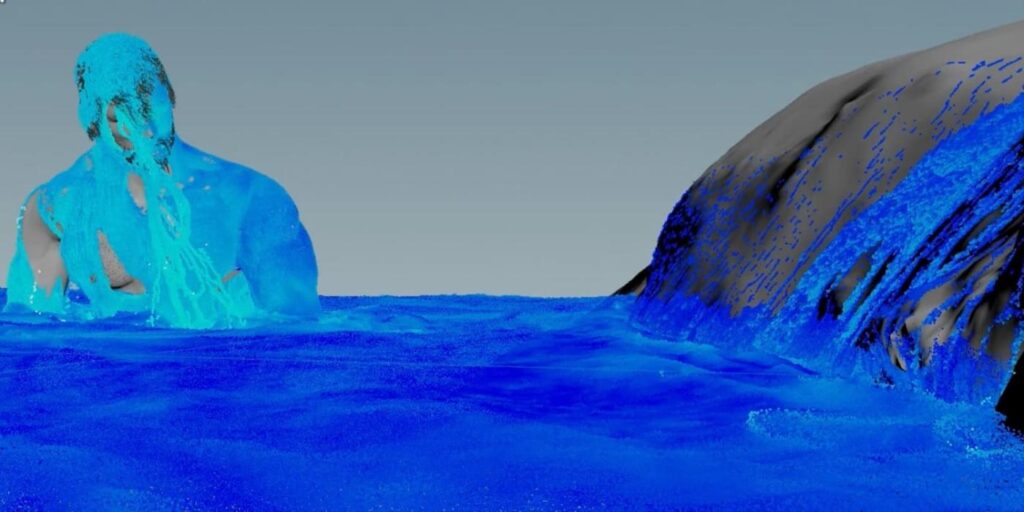
The Particle Fluid Surface node generates meshes from particle data, transforming simulated points into continuous liquid geometry.
Meshing quality depends heavily on particle density and surface parameters. Low particle counts often create holes, flickering surfaces, and unstable geometry.
Filtering operations help remove noise and improve visual consistency. Surface smoothing should be applied carefully to preserve important fluid detail.
Adaptive meshing workflows allow artists to maintain high detail near the camera while reducing complexity elsewhere.
Clean water meshes are critical for achieving believable rendering results.

How to add small-scale detail with Houdini ocean spectrum and ripples
Even high-resolution FLIP simulations struggle to capture every water detail.
Ocean Spectrum tools provide procedural wave generation capable of adding realistic surface motion across vast areas. These displacement systems complement FLIP simulations by introducing high-frequency detail without increasing simulation costs.
Ripple systems add localized surface disturbances around impacts, collisions, and environmental interactions.
Combining procedural wave layers with simulated fluid motion creates water surfaces that feel significantly more realistic.
Many production pipelines rely heavily on displacement techniques because simulating every wave physically is computationally impractical.
The most convincing water often results from blending simulation and procedural detail.
Houdini water simulation caching and disk I/O best practices
Large water simulations generate enormous datasets.
Efficient caching strategies are essential for production success. Artists should separate simulation caches, whitewater caches, and mesh caches whenever possible.
Compressed formats reduce storage requirements while maintaining acceptable performance.
Network storage solutions should be evaluated carefully because disk speed directly affects simulation and playback performance.
Incremental caching workflows allow artists to review results without repeatedly simulating completed sections.
Proper cache management prevents bottlenecks and improves iteration speed.
Faster Houdini water sims with particle separation and substeps
Performance optimization begins with understanding resolution.
Particle separation controls simulation density and represents the most significant performance factor in FLIP workflows.
Doubling simulation resolution often increases computational demands dramatically. Artists should use the lowest resolution capable of achieving required visual quality.
Substeps improve stability but increase processing time. The goal is finding the minimum value that maintains acceptable simulation behavior.
Narrow-band techniques, adaptive workflows, and selective refinement help maximize efficiency.
Optimized simulations allow artists to iterate faster and dedicate resources to final-quality versions.
Art-directing water motion in Houdini with velocity fields and forces
Realistic simulation does not always produce the desired artistic result.
Velocity fields provide powerful control over fluid movement. Artists can guide rivers, influence wave direction, shape splashes, and direct fluid flow toward specific visual goals.
Force nodes introduce additional motion through wind, turbulence, attraction fields, and custom vector influences.
Combining physically based simulation with artistic control produces water that satisfies both realism and storytelling requirements.
Successful visual effects work often involves balancing simulation accuracy with creative intent.
Art direction transforms technically correct water into visually compelling water.
Fixing Houdini FLIP volume loss and thin sheets of water
Volume loss is a common challenge in FLIP simulations.
As water moves through complex interactions, small amounts of fluid may disappear due to numerical limitations within the solver.
Thin sheets of water are particularly vulnerable because insufficient particle density can cause breakup and instability.
Increasing resolution often helps preserve fluid volume, though at greater computational cost.
Surface tension settings can improve thin liquid behavior by encouraging particles to remain connected.
Volume preservation workflows become increasingly important for waterfalls, pouring liquids, and large-scale splash simulations.
Maintaining consistent fluid mass contributes significantly to realism.
Houdini water simulation for waterfalls and shoreline waves
Waterfalls and shorelines present unique simulation challenges.
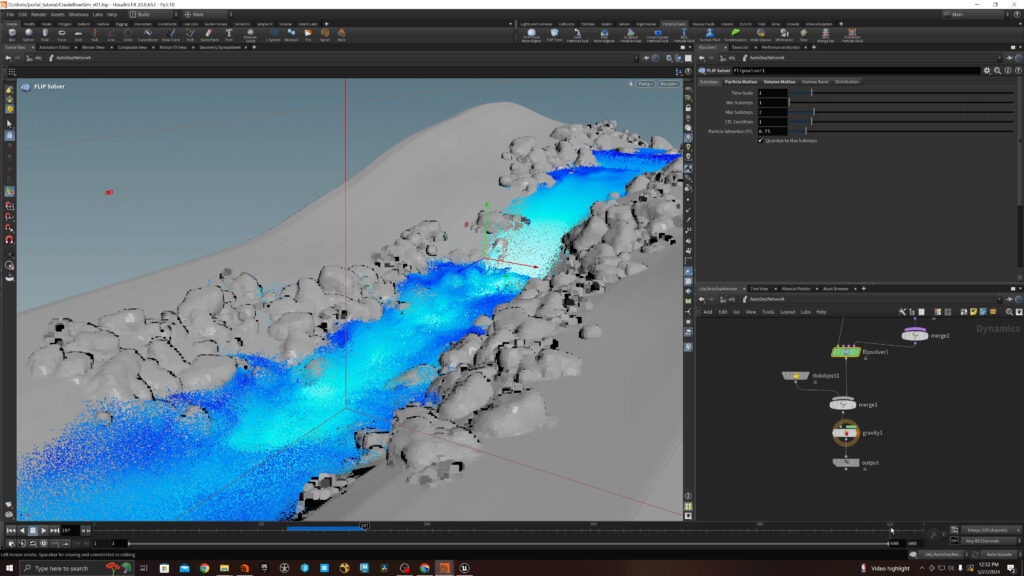
Waterfalls combine fast-moving liquid, mist generation, impact splashes, foam accumulation, and turbulent airflow. These environments often require multiple simulation layers working together.
Shoreline waves involve continuous interaction between water and terrain. Ocean Spectrum tools frequently generate incoming wave motion while FLIP simulations handle breaking wave behavior near the shore.
Hybrid workflows allow artists to achieve cinematic realism without excessive computational expense.
Waterfalls and shorelines remain among the most visually demanding fluid effects in computer graphics.

Rendering realistic water in Houdini with reflections, refraction, and caustics
Simulation quality alone does not guarantee realism.
Water rendering depends heavily on shading, lighting, and optical behavior. Reflections communicate environment detail while refraction reveals underwater features.
Accurate Fresnel effects determine how reflective water appears at different viewing angles.
Caustics contribute additional realism by projecting focused light patterns through water surfaces.
Modern renderers such as Karma, Redshift, Arnold, and V-Ray provide physically based water shaders capable of reproducing these effects.
High-quality rendering transforms simulated geometry into believable liquid.
Exporting Houdini water sims to Unreal Engine and other DCC apps
Many productions require Houdini water simulations to move between applications.
Alembic remains one of the most common formats for transferring water meshes into Unreal Engine, Maya, Blender, Cinema 4D, and other digital content creation tools.
USD workflows are becoming increasingly important for large-scale production pipelines due to their flexibility and interoperability.
In Unreal Engine, artists typically import mesh caches and combine them with native materials, Niagara systems, and environmental effects.
For real-time projects, simulation data often requires optimization to maintain performance.
Effective export workflows ensure that water simulations retain visual fidelity across multiple platforms and applications.
frequently asked question(FAQs)
- What is FLIP simulation in Houdini?
FLIP is a hybrid particle and volume-based fluid simulation method used to create realistic liquids such as water, oceans, rivers, and splashes.
- Why is Houdini popular for water simulation?
Houdini provides industry-leading fluid tools, procedural workflows, scalability, and extensive artistic control.
- What particle separation should I use for water simulations?
The ideal value depends on scene scale and detail requirements. Smaller particle separation creates more detail but increases simulation costs.
- How do I create realistic ocean waves in Houdini?
Most artists combine Ocean Spectrum displacement tools with FLIP simulations for interactive regions.
- Why does my FLIP simulation jitter?
Jitter often results from insufficient substeps, poor collision geometry, unstable sources, or low simulation resolution.
- What is whitewater used for?
Whitewater generates foam, spray, and bubbles that add realism to energetic water simulations.
- How can I speed up water simulations?
Optimize particle separation, use narrow-band FLIP techniques, reduce unnecessary simulation areas, and cache efficiently.
- What causes volume loss in FLIP simulations?
Numerical limitations, low resolution, and thin liquid structures can contribute to fluid volume loss.
- Can Houdini water simulations be used in Unreal Engine?
Yes. Alembic and USD workflows are commonly used to transfer Houdini water simulations into Unreal Engine.
- What renderer works best for Houdini water?
Karma, Redshift, Arnold, and V-Ray are all capable of producing highly realistic water rendering results.
Conclusion
Houdini’s FLIP fluid system remains one of the most powerful solutions available for realistic water simulation. Whether creating oceans, rivers, waterfalls, splash effects, shoreline interactions, or cinematic liquid sequences, artists benefit from an unmatched combination of physical accuracy and procedural control. Success depends on understanding simulation fundamentals, optimizing performance, maintaining clean collision systems, generating convincing whitewater, and producing high-quality meshes and renders. By combining FLIP simulation with Ocean Spectrum tools, advanced shading workflows, and efficient caching strategies, artists can create water effects that meet the demanding standards of modern visual effects, animation, game development, and virtual production pipelines.
Sources and Citation
SideFX Houdini Official Documentation
https://www.sidefx.com/docs/houdini/
SideFX FLIP Fluids Documentation
https://www.sidefx.com/docs/houdini/fluid/flipsolver.html
SideFX Whitewater Solver Documentation
https://www.sidefx.com/docs/houdini/nodes/sop/whitewatersolver.html
SideFX Ocean Spectrum Documentation
https://www.sidefx.com/docs/houdini/ocean/index.html
SideFX Masterclass Presentations
https://www.sidefx.com/tutorials/
Houdini Water FX Production Tutorials
https://www.sidefx.com/learn/
SIGGRAPH Fluid Simulation Research Papers
https://dl.acm.org/conference/siggraph
ACM Digital Library – SIGGRAPH Proceedings (Fluid Simulation Research)
https://dl.acm.org/conference/siggraph/proceedings
Academy Software Foundation – OpenUSD Documentation (Industry VFX Pipeline Reference)
https://openusd.org/release/index.html
Academy Software Foundation – OpenColorIO Documentation (Industry VFX Pipeline Reference)
https://opencolorio.readthedocs.io/
Karma Rendering Documentation
https://www.sidefx.com/docs/houdini/solaris/karma.html
Unreal Engine Alembic File Importer Documentation
https://dev.epicgames.com/documentation/en-us/unreal-engine/alembic-file-importer-in-unreal-engine
Unreal Engine Universal Scene Description (USD) Documentation
https://dev.epicgames.com/documentation/en-us/unreal-engine/universal-scene-description-in-unreal-engine
Recommendations
- Nintendo Finally Puts Super Mario Galaxy Music on Spotify: Official Playlist Has 130 Tracks (Galaxy 1 + Galaxy 2)
- HYPERyuki Snowboard Syndicate Gameplay Trailer Explained
- TerraSplines Spline-Based Terrain Editor For Unity: Non-Destructive Spline Terrain Sculpting for Roads, Rivers, and Shape Areas
- Sojourn Past: Official Gameplay Trailer
- The Elder Scrolls: Blades Will Shut Down on June 30, 2026: Shutdown Time, Delisting, and What Players Need to Know (Nintendo Life)
- Call of Duty Movie Update: Release Date, Director, and Latest News
- How The View Keeper Improves Blender Rendering Workflows
- Sonic Concert Returns Without Crush 40: Live & Learn Lawsuit Fallout, Tour Changes, and What It Means for the Sonic Music Legacy
- Schedule 1 Mods (Schedule I Game): Best Mods, How to Install, and Troubleshooting (2026)
- The Odyssey Tickets Are Being Resold for Hundreds of Dollars: Why IMAX Demand, Scalping, and Fan Frenzy Are Driving Prices Sky High



































































































