




In This Article (8 sections)
Hytale Update 6 Release Date, System Requirements, and Major Changes
Hytale Update 6 released on August 27, 2026, after thirteen weeks of prerelease development. Its headline additions include an in-game Mod Browser, Hardcore rules, Spectator Mode, expanded Creative tools, support for riding moving entities, and improvements to player-hosted multiplayer connections. Rather than delivering one large content expansion, Update 6 strengthens several systems that support custom worlds, cooperative challenges, community projects, and more advanced building.
Several distinctions are important when using the update. Installing a mod is not the same as enabling it for a particular world, a shared Hardcore life pool is not a separate allowance for each player, and improved networking does not mean every connection problem has been eliminated. Understanding those boundaries makes it easier to separate the stable Hytale Update 6 features from later hotfixes and systems being tested for future releases.
The August 27 launch date should also be distinguished from the dates of its maintenance patches. As of September 7, 2026, Hytale’s documentation identifies Release 0.6.4 as the current Update 6 build. Update 7 has a separate prerelease branch, with published testing notes beginning on September 3. Features appearing in that branch should not automatically be described as stable Update 6 additions.
Hytale Update 6 also introduces a hardware requirement of OpenGL 4.1 or later. Updating a graphics driver is a reasonable troubleshooting step when supported hardware is not functioning correctly, but a driver cannot add OpenGL capability that the graphics processor itself does not possess. A startup failure caused by unsupported hardware should therefore be separated from a mod installation or world-loading problem.
Players updating an established Hytale world should follow a controlled process. Preserve a backup, confirm the installed game version, and review the active mods before loading the world. Updating the game, replacing several mods, and altering world settings simultaneously makes any resulting issue much harder to identify. Recording the last working game build and mod configuration provides a useful point of comparison if something breaks after the update.

Hytale Mod Browser: Finding, Installing, Updating, and Checking Community Content
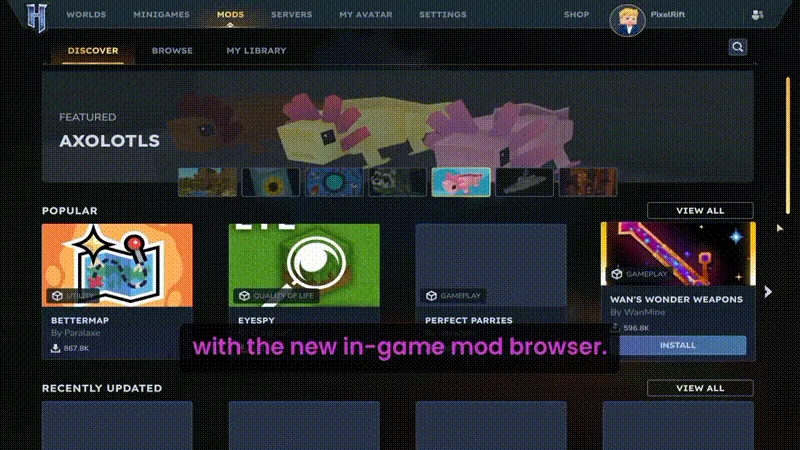
The Hytale Mod Browser is an integrated interface for discovering and managing community content. It is accessed directly from the main menu after the game has been updated, so players do not need to enter a survival world or equip a Creative tool before using it. Its discovery areas include featured projects, popular downloads, and recently updated entries, while each project page contains descriptions, screenshots, download counts, supported versions, and installation controls.
The browser does not mark the beginning of Hytale modding. Hytale’s existing architecture already distinguishes between executable server plugins, data assets, visual and audio assets, and shared worlds or prefabs. Single-player also operates through a local server, which helps explain why mods are generally associated with a world or server instead of functioning only as conventional client-side modifications. A decorative asset pack and a gameplay plugin may both be called mods, but they can affect different systems and require different forms of testing.
Because the browser is built into the game, its basic discovery and installation workflow does not require a separate management application. Third-party systems such as CurseForge remain available through their own applications and websites, but their menus and installation buttons should not be confused with Hytale’s native interface. Regardless of where the files are obtained, the selected content may still need to be enabled for the intended world.
When the Mod Browser entry is missing, the first useful step is to check the installed Hytale version and launcher branch. Following screenshots from an older prerelease build without confirming their date can create unnecessary confusion. An absent menu entry is also different from a browser that opens but cannot retrieve content. The first issue suggests a build or branch problem, while the second requires examination of the displayed loading or connection error.
The browser supports category filters and searches across project names and descriptions. A productive search begins with the function the player wants rather than an assumed project title. Terms such as “storage,” “furniture,” or “building” can identify relevant projects without requiring prior knowledge of their exact names. If the results are too broad, applying a category can narrow the list. If the search produces very few results, removing filters or simplifying the phrase is more useful than immediately concluding that no suitable project exists.
Project pages should be evaluated before installation. Download counts indicate reach but do not prove that a mod is appropriate for a particular world. A more deliberate comparison asks three questions:
- What systems or assets does the project change?
- Which Hytale build does it officially support?
- What would a successful test look like after installation?
Installation begins from the selected project page. Players should review the description and compatibility details, activate the installation control, and allow the download to finish. During Update 6’s prerelease development, the browser was changed so additional installations enter a queue rather than canceling downloads already in progress.
Downloading a mod does not always activate it for an existing world. CurseForge’s Hytale instructions explicitly distinguish installation from world activation. For a previously created world, the documented process is to right-click the world, select the desired mods, and save the updated world settings. Players should confirm that the correct project is active in the correct world rather than assuming that a successful download automatically applies it everywhere.
A disposable test world is preferable for a first installation, especially when the project changes gameplay or introduces new blocks and items. The test should directly exercise the advertised feature. A decorative block should be placed, saved, and checked after reloading. A gameplay plugin should be tested under the conditions in which its effect is supposed to occur. Adding one project at a time also produces a clearer troubleshooting record than installing several unfamiliar mods together.
My Library serves as the management area for installed projects and provides update and removal controls. It separates maintenance from discovery, so users do not need to repeat a broad search whenever an installed mod receives a new version. Before updating, it is useful to determine whether the new release is required for the current Hytale build, fixes a specific problem, or simply adds optional content. A working setup does not always need to be changed immediately when the update is unrelated to the current world.
Removing a project and disabling it for one world are also different actions. A mod may be installed globally but inactive in a particular experiment, while another world may still depend on it. Hytale’s asset documentation further explains that content can exist in the general Mods directory or inside an individual world. Asset packs created through the in-game editor initially belong to that world unless they are later moved to the broader Mods location.
Before removing content, identify whether a world depends on its blocks, items, entities, or behavior. Preserve a backup before experimenting because removing a project that supplied world data can have different consequences from disabling a harmless interface feature. Recording the game build and active mod versions before maintenance also makes it easier to compare the updated configuration with the previous working state.
Compatibility must be considered at several levels. The advertised game version is only the starting point. Dependencies, optional dependencies, load relationships, other active mods, and the existing world all affect whether a project functions correctly. Hytale’s server API supports metadata for server-version ranges and dependency relationships, but these declarations do not represent exhaustive testing of every possible project combination.
Update 6 changed the network protocol from hytale/2 to hytale/3, with additional packet-layout changes during prerelease development. The official notes warn that servers and plugins need to be rebuilt for the new protocol. Ordinary players should obtain a compatible release from the project creator rather than assuming an older plugin will work unchanged. Server operators must also ensure that clients and servers use matching protocol requirements.
A useful compatibility test asks three separate questions:
- Does the world start successfully?
- Does the mod’s advertised feature operate correctly?
- Does it remain correct after saving, leaving, and returning?
A successful launch alone is not enough to establish that a modded world is ready for unrestricted play. Testing is most informative when performed on a backup or copied world with the smallest relevant set of active projects.
Hytale’s announced policy is that Mod Browser projects remain free to access. Update 6 also describes a future creator-support system in which players may support mods and receive unique cosmetics produced by the official Hytale team. That support feature was presented as a future plan rather than an active Update 6 purchasing system.
Free access to the mod and optional creator support should remain separate concepts. The announcement does not justify inventing cosmetic prices, subscription plans, creator revenue percentages, or a launch date. Until more details are confirmed, the accurate summary is that mods remain free and an optional cosmetic-based support system is planned.
Useful creator support is not limited to payments. Clear feedback, reproducible bug reports, exact game and mod versions, and concise explanations of confusing documentation can help creators resolve problems more effectively than general complaints.

Custom Worlds, Hardcore Rules, and Spectator Mode
Custom-world installation was added to the Update 6 Mod Browser during the August 27 hotfix cycle. After a world package has been installed, selecting Create World generates a playable entry in the world list. The process includes a confirmation because a downloaded world can contain mods capable of executing code on the user’s computer.
That confirmation should be treated as a meaningful security decision rather than a routine message to dismiss automatically. Before approving an unfamiliar package, review its description, creator information, stated requirements, included functionality, and the reason it needs any executable components. The first session should focus on confirming that the expected starting area, rules, and save behavior work correctly before committing to a lengthy playthrough.
One world package can generate multiple independent world copies. Removing the original world mod does not delete worlds that have already been created from it. This makes it possible to maintain one copy for a main playthrough and another for testing or learning an unfamiliar scenario. Clear names help prevent players from opening, altering, or overwriting the wrong version.
This preservation behavior applies specifically to worlds already created from a world package. It should not be generalized into a claim that every gameplay mod can be removed safely from every save. A world containing blocks, entities, or systems supplied by another project may react differently when that dependency is removed.
Update 6 introduces four active Hardcore rulesets alongside an Off setting. It is accurate to say that the menu contains five options, but inaccurate to describe all five as active Hardcore modes. The available choices are:
- Off: Standard play without the new Hardcore life restrictions.
- Permadeath: Each player receives one life.
- Three Strikes: Each player receives three lives by default.
- Nine Lives: The world receives a shared pool of nine lives by default.
- Soulbound: One player’s death ends the run for the entire group.
The starting allowances for Three Strikes and Nine Lives can be adjusted during world creation, but they cannot be set to zero. Setup takes place by opening Customize while creating a new world and choosing the desired option from the Hardcore dropdown. The feature is not presented as an ordinary switch for retroactively converting a long-running world into a Hardcore save.
The difference between individual and shared life pools changes multiplayer planning considerably. In a hypothetical four-player Nine Lives world, the default allowance is nine total deaths across the group, not nine lives for each player. One participant can consume several shared lives, giving the team a reason to discuss risk, dangerous exploration, and how to protect less experienced members.
Three Strikes creates a different structure because mistakes reduce an individual allowance instead of immediately consuming a communal resource. Permadeath gives everyone one independent opportunity, while Soulbound creates the strictest collective condition because one fatal mistake ends the challenge for all participants.
Choosing a Hardcore mode is therefore a social decision as well as a difficulty setting. Before beginning, a group should agree on whether it wants individual survival pressure, management of a common resource, or an all-or-nothing challenge in which every member’s safety determines the outcome.
Spectator Mode allows an eliminated participant to remain in the session as an observer rather than leaving completely. This is particularly useful in Hardcore worlds where the surviving players may continue for a substantial period after another participant is removed from active play.
Spectators can follow surviving players or move through the world with a free camera. They are invisible and intangible, and non-player characters ignore them. Update 6 also includes permission-controlled spectator commands, so administrative tools should not be mistaken for unrestricted powers automatically available to every observer.
The feature separates active participation from continued social involvement. An eliminated player can watch the rest of the run without blocking movement, attracting enemies, or physically changing events. Groups may still want to decide whether spectators are allowed to provide information gathered through unrestricted camera movement.
In a casual cooperative session, spectator commentary may be welcome. In a competitive challenge, reporting hidden dangers or unexplored routes could undermine the intended restrictions. The camera itself does not determine which behavior is acceptable, so communication rules should be agreed before the run begins. Spectator Mode works best when its purpose is clear, whether that means continued social participation, observation for a recorded event, or a deliberately restricted viewpoint.

Creative Tools, Moving Platforms, Multiplayer Networking, and Update 6 Hotfixes
Update 6 expands Creative building through the Color Tool, Block Palette Presets, larger selections, and improvements to editing and storage for complex builds. The Color Tool appears in the Specialized Tools section of the Creative Inventory and provides three related methods for changing a structure’s appearance:
- Coloring: Replaces targeted blocks and can preserve their existing shape variants.
- Gradient: Creates controlled transitions between colors.
- Shading: Applies lighter or darker block choices according to a light source, surface direction, or custom palette.
Each mode serves a different purpose. Coloring is useful for testing a replacement material scheme while keeping the structure intact. Gradient works when a transition is part of the intended visual design, while Shading builds tonal variation directly into the block selection.
Large changes should begin with a small sample area. Testing a wall section, roof corner, or doorway first makes it easier to judge whether the palette works before applying it across an entire structure. Preserving a copy before extensive recoloring also makes it possible to compare the new design with the original.
Block Palette Presets add reusable material selections through Quick Settings, supported by an editor for creating and maintaining palettes. Saved presets help multiple structures share a consistent visual language without requiring each later material choice to be reconstructed from memory.
Update 6 also raises builder-tool selections to 16 million blocks and improves the storage and editing workflow for large constructions. That figure describes the number of blocks that can be included in a selection, not the maximum size of an entire Hytale world. The most useful result is not simply a larger selection but the combination of a tested palette, the appropriate Color Tool mode, and a preserved version of the build before major alterations.
The update also allows players to stand on appropriately configured hard-collision entities and move with them. This enables custom moving platforms, barriers, lifts, and other interactive constructions. The behavior specifically concerns player interaction and should not be generalized into identical collision support for all non-player characters and entities.
Some blocks shown in the official demonstration belong to the upcoming Chapter 1 update rather than Update 6 itself. The demonstrated interaction and every visible asset should therefore not be treated as the same release feature.
Creators should test moving entities through an entire interaction rather than only confirming that they appear solid while stationary. A useful platform test should examine:
- Approaching and boarding the platform
- Remaining stable while it moves
- Leaving it at the intended destination
- Interactions with walls, ceilings, barriers, and other moving objects
- Behavior during direction changes or sudden stops
- Multiplayer synchronization for participating clients
A platform that works in an empty test space may need substantial adjustment when placed beside obstacles or inside a complex challenge. Multiplayer testing is especially valuable because the creator’s local view may not reveal how another participant experiences the movement. The new collision support expands building possibilities, but it does not guarantee that every arrangement of moving entities will be comfortable, synchronized, or fair.
Update 6 also changes how player-hosted multiplayer connections are established. Its prerelease networking documentation describes ICE with STUN and TURN, including a relay route when a direct connection cannot be made. The relay uses UDP, so networks that block this traffic cannot use it. Double NAT was specifically identified as unresolved during the release cycle.
Connection establishment and in-game performance should be diagnosed separately. A player who cannot join the session is experiencing a different problem from someone who connects successfully but encounters lag or stuttering. A useful troubleshooting record includes the exact game build, whether the problem affects every guest or only one participant, and whether the same players can connect to an unmodified comparison world.
Performance comparisons also need controlled conditions. Hytale’s server documentation identifies view distance as an important memory consideration. Changing view distance while simultaneously installing new content makes it difficult to determine which change affected performance. A meaningful test should keep the world, active mods, player count, and viewing conditions as consistent as possible.
Update 6 improves connection handling and several performance-related systems, but it should not be presented as a universal solution for restrictive networks, double NAT, overloaded hosts, blocked UDP traffic, or every combination of community projects.
The August 27 release was followed by several maintenance patches:
- Hotfix 0.6.1, August 27: Added the custom-world installation workflow and connection improvements.
- Hotfix 0.6.2, August 27: Addressed installation failures when an identical file had already been placed manually in the Mods folder. When a different file with the same name blocks installation, the browser now identifies the conflicting filename instead of presenting a misleading connection error.
- Hotfix 0.6.3, August 31: Restored NPC shadows and fixed social-interface problems.
- Hotfix 0.6.4, September 7: Improved automatic port forwarding, same-network behavior, and host connections used when rejoining sessions. It also corrected position and scale preservation when upgrading certain Update 5 entities.
The distinction between identical and conflicting files is important. An installation containing the exact same file is not the same as one blocked by a different package using the same filename. Troubleshooting should begin with the file identified by the browser rather than deleting the entire Mods directory.
The entity migration fix in 0.6.4 is preventive and does not repair entities that had already been migrated incorrectly. A fix that preserves position and scale during future upgrades is different from a recovery tool for corrupted information already written into a world. Owners of older saves should preserve backups before repeating migrations or changing related files.
For any persistent problem, record the exact Hytale version, project name, relevant filename, active world, and steps required to reproduce the issue. Change one element at a time and keep a copy of the last working setup. The goal is to identify whether failure occurs during discovery, downloading, installation, world activation, loading, or actual gameplay. Treating all of those stages as one generic “mods do not work” problem makes both personal troubleshooting and creator support less effective.

Frequently Asked Questions (FAQs)
- When did Hytale Update 6 release?
Hytale Update 6 released on August 27, 2026, after approximately thirteen weeks of prerelease development. The live update introduced the in-game Mod Browser, Hardcore rules, Spectator Mode, expanded Creative tools, moving-platform support, and multiplayer connection improvements. Several maintenance patches followed to fix installation, networking, social-interface, shadow, and entity-migration problems. - Is an external mod manager required to use the new browser?
No. The native Mod Browser is available directly through Hytale’s main menu and handles community-content discovery, downloading, updating, and removal without requiring a separate application. Third-party tools such as CurseForge can still provide alternative installation methods, but their interfaces and procedures should not be confused with the browser built into Hytale. - Why does an installed mod not appear to work in a world?
The mod may have been downloaded successfully without being enabled for that particular world. Players should open the world’s settings, select the installed project, save the changes, and then reload the world. It is also worth checking that the mod supports the current Hytale version and does not depend on another project that is missing or outdated. - Must every multiplayer participant manually install the host’s mods?
No. Hytale’s server-side modding structure allows the server or world host to provide the required mods and asset packs to connecting players. Participants should not normally need to build an identical client-side Mods folder manually before joining. However, everyone still needs a compatible game version and a successful connection to the host or server. - Are browser updates automatically proof of compatibility?
No. An available update only shows that the project creator has published another version. Supported-version declarations and dependency information describe the environment in which the mod is expected to work, but they cannot guarantee compatibility with every world or combination of other projects. Testing the update in a copied world before applying it to an important save remains the safer approach. - Does removing a downloaded world package delete the worlds created from it?
No. Worlds already generated from a downloaded world package remain as independent entries after the source package is removed. Players can also create several separate worlds from the same package for different playthroughs or experiments. This protection applies to created worlds specifically and does not mean that every gameplay mod can be removed safely from a save that relies on its blocks, items, or systems. - Does Nine Lives provide nine lives to each player?
No. Nine Lives gives the entire world one shared pool of nine lives by default. In a four-player session, the group still has nine total deaths available rather than nine deaths per person. Every loss therefore affects the whole team, making communication, careful exploration, and collective risk management especially important. - What happens to someone eliminated from a Hardcore run?
An eliminated participant can enter Spectator Mode and continue watching the surviving players. Spectators are invisible, intangible, ignored by non-player characters, and can observe another participant or use a free-moving camera. The group can decide separately whether spectators are allowed to provide information discovered through that unrestricted viewpoint. - Is the 16-million-block figure Hytale’s maximum world size?
No. The figure refers to the maximum number of blocks that supported builder tools can include in a selection. It improves the ability to copy, move, recolour, edit, and store very large constructions, but it does not define the total dimensions or block capacity of a Hytale world. World size and Creative selection capacity are separate technical limits. - What is the current stable Update 6 version covered here?
As of September 7, 2026, Hytale’s official documentation identifies Release 0.6.4 as the current stable Update 6 build. That version includes the original August 27 features and later fixes for port forwarding, same-network connections, host rejoining, and certain entity migrations. Update 7 features appearing in the separate prerelease branch should not be described as stable Update 6 content unless they are formally released.

Conclusion
Hytale Update 6 is best approached as a set of connected tools rather than an invitation to change everything at once. The most reliable starting point is a backed-up world, a clearly identified game version, and one well-understood addition at a time.
For mod users, the essential distinction is between discovering a project, installing its files, and enabling it in the intended world. For Hardcore groups, the crucial decision is whether consequences apply individually or collectively. For creators, the strongest results come from testing palettes, tools, and moving obstacles on a manageable scale before applying them broadly.
The same discipline applies to troubleshooting. Identify the stage where a problem occurs, check the relevant hotfix, and avoid assuming that a future plan or prerelease feature is already part of the stable experience. That approach makes Update 6’s expanded possibilities easier to explore without placing an established world at unnecessary risk.
Sources and Citations
- Release information and feature boundaries were checked against Hytale’s official Update 6 announcement, its continuously updated Update 6 hotfix record, and the separately published Update 7 prerelease patch notes. The distinction between the stable release and prerelease testing versions is reflected throughout the article.
- Installation and compatibility explanations draw on Hytale’s official asset-pack documentation, Hytale Server Manual, and Hytale Server API reference. CurseForge’s Hytale mod installation documentation and its more detailed beginner’s installation guide explain how to obtain, install, enable, and manage downloaded content.
- Contemporaneous coverage from GamingOnLinux, MMOHuts, and GPORTAL provides additional context. Further launch-period coverage includes LogicServers. Practical testing examples and workflow recommendations are explanatory guidance, not claims that a particular mod combination or hardware configuration was independently benchmarked.
Recommended
- SpaceXAI and Cursor Launch Their First Frontier AI Model to Challenge Industry Leaders
- Rhythm Heaven Groove Review: Gameplay, Minigames, Multiplayer, and Everything You Need to Know
- Onimusha: Way of the Sword Official Release Date Announced for September 25, 2026
- Most Anticipated May 2026 Game Releases Ranked by Wishlist Count
- Happy’s Humble BURGATORY Turns Fast Food into Co-Op Cooking Horror
- Super Mario Bros. Speedrunner Claims He’s Being Sabotaged Amid Input Swapping Ban
- The Social Reckoning Trailer Explained: Jeremy Strong Transforms into a Defiant Mark Zuckerberg in Aaron Sorkin’s Facebook Sequel
- Magic: The Gathering, Doom Prevails Commander Deck Guide (Upgrades, Combos, and Best Cards)
- Phasmophobia Developer Kinetic Games Launches Kinetic Publishing With a Quality Over Quantity Strategy
- Mario Tennis Fever Update 1.1.0 Adds Galaxy Court, Black Hole Racket, and Online GameShare
- Compulsion Games Goes Independent: South of Midnight Rights, Xbox Split, and What Comes Next
- PlayStation Boss Teases Future Console Experiences Hinting at PS6 Handheld: “Leveraging Technologies that Work in Various Forms and Locations” Explained
- Top 10 Physically Strongest Marvel Characters (Ranked by Raw Strength)



































































































