






In This Article (29 sections)
Probability Mask Unreal Engine 5 explained for real-time character grooming
The Probability Mask is a real-time UE5 technique for creating realistic hair and fur color transitions. Developed by AVASCOT and showcased by Francesco Di Luisi, it assigns colors to individual strands based on probabilities rather than continuous gradients. This texture-driven approach mimics the random, organic color distribution seen in nature, allowing artists to achieve complex multi-tone fur that avoids the synthetic look of standard blending techniques.
AVASCOT UE5 groom shader overview for hair and fur lookdev
The AVASCOT groom shader is a tool for Unreal Engine 5 that brings film-quality hair and fur look development into real-time workflows. It replicates controls found in offline renderers like Arnold, providing each hair strand with an individual “identity.” The shader supports per-fiber color distribution, realistic blending, and variations in width or roughness. It allows artists to dial in attributes with immediate feedback, as demonstrated on complex models like the African wild dog.
Why standard gradient blending makes fur transitions look fake in UE5
Standard gradient blending in UE5 often looks “fake” because it applies a smooth color interpolation to every hair fiber. In reality, fur transitions are stochastic; individual hairs are usually a solid color, and different colored hairs intermingle where patterns meet. A simple gradient blend produces unnatural “in-between” colors, resulting in a smooth, airbrushed, and synthetic appearance that lacks the random salt-and-pepper transition found in nature.

Probability Mask vs standard blend in Unreal Engine 5 groom materials
The Probability Mask treats color blending as a per-strand decision, whereas a standard blend linearly interpolates colors. In a standard blend, a 50% gray mask makes every hair an identical 50/50 mix of two colors. With a Probability Mask, 50% gray means half the strands are fully the first color and half are fully the second. This produces a dithered, speckled transition that preserves the distinct identities of individual hairs and appears much more natural.
How the Probability Mask uses a single texture to drive strand color distribution
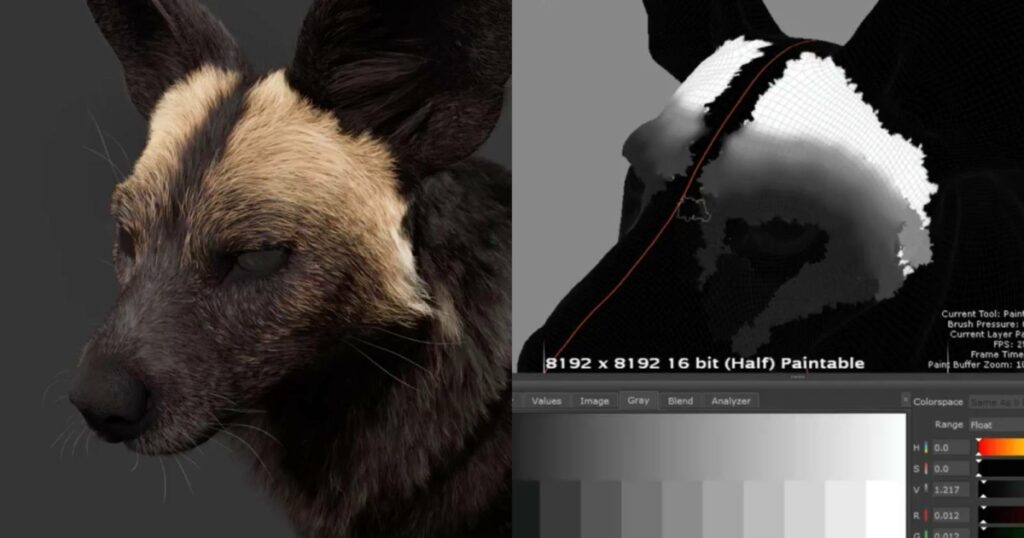
This system uses a single grayscale texture to drive complex color distribution by mapping it over the groom via hair root UV coordinates. Each pixel’s brightness represents the probability of a hair strand taking on a secondary color. The shader samples the texture at the strand’s root and compares it to a unique random number for that strand. This encapsulates a complex, attribute-driven VFX workflow into one artist-friendly texture map, efficiently encoding granular variation across the entire groom.
Painting grayscale Probability Mask textures for hair and fur (best workflow)
The best workflow involves painting a grayscale mask in the UV space of the character’s scalp or body mesh. Brighter areas represent a higher probability of the secondary color, while darker areas favor the base color. Artists should use grayscale intensity to indicate the desired mix (e.g., 20% brightness for a 20% secondary color mix). To ensure realism, one should avoid perfectly sharp edges by using feathering or subtle noise to break up uniform regions. Using 16-bit PNG or EXR files helps preserve smooth probability gradients.
Probability Mask gray values meaning: brighter vs darker areas
Grayscale values in the mask act as thresholds for randomness rather than direct color blends. Brighter values increase the chance of a strand adopting the secondary color, while darker values retain the base color. Pure white (1.0) indicates a ~100% chance of the new color, and pure black (0.0) indicates a ~0% chance. Mid-gray (0.5) results in an approximate 50/50 distribution. This direct relationship allows artists to precisely control the “density” of color patterns across the fur.

Probability distribution workflow for grooms: how per-strand “chance” is calculated
The shader performs a per-strand probability test in four steps:
- It samples the mask at the strand’s root to get a probability value (P).
- It generates a stable random value (R) between 0 and 1 for each strand.
- It compares the two: if R < P, the strand receives the secondary color; otherwise, it keeps the base color.
- This binary result is used to assign colors.
Because the random seed is fixed per strand, the pattern is consistent and does not flicker, ensuring a stable, randomized distribution that matches the mask’s gray values.
RGB probability maps for multi-color fur patterns and hair color breakup
RGB probability maps expand the technique by encoding probabilities for multiple colors in a single texture. Each channel (Red, Green, Blue) can represent the probability of a different accent color, allowing for complex patterns like those of a calico cat. This method can also be used for “color breakup,” where channels drive subtle variations in hue or melanin to prevent a flat appearance. Multi-channel maps are memory-efficient and simplify the authoring of intricate, multi-hued fur.
Per-hair variation parameters for organic fur detail in Unreal Engine 5
Realism is enhanced by randomizing several per-hair attributes:
- Width and Length: Randomizing thickness and height adds a fuzzy, natural outline.
- Roughness and Shine: Varying the specular response per strand prevents a uniform, fake appearance.
- Curl or Wave: Introducing random stray directions or “frizz” breaks up perfectly combed looks.
- Color Variants: Subtle hue or value shifts (color breakup) add depth.
- Clumping: Varying clump influence breaks up repetitive patterns.
Layering these variations ensures that no two hairs are identical, creating an organic quality.

Unreal Engine 5 groom material setup for Probability Mask shading
To implement this, create a material using the Hair shading model and the Hair Attributes node. Sample the Probability Mask texture using the Root UV output. Use logic (such as an “If” or “Step” node) to compare the texture value with a per-strand random seed. The result (0 or 1) serves as the alpha for a Lerp node between the Base and Secondary colors. This setup is then assigned to the Groom Asset. Additional refinements include using 16-bit textures and checking debug views like “Seed” or “Root UV” in the Groom Editor to ensure proper distribution.
Importing hair and fur grooms into UE5 via Alembic (production pipeline)
UE5 utilizes an Alembic-based pipeline for grooms. Hair is created in DCC tools (Maya, Blender, Houdini) and exported as .abc files. Exporters should include specific attributes like groom_root_uv, groom_width, and groom_id. Once imported into UE5 with the Groom plugin enabled, the asset can be attached to a character using a Groom Binding asset. This ensures the hair follows skeletal animation. The process often involves iterating between the DCC and UE5 to refine the look and attribute data.
Groom Asset Editor workflow in Unreal Engine 5 for real-time grooming
The Groom Asset Editor is the central hub for managing hair assets in UE5. It allows artists to:
- Assign and swap hair materials.
- Scale global properties like strand width and length.
- Configure physics and simulation using Chaos.
- Manage LODs (strands to cards or simplified meshes).
- Use debug visualizations to check Seed, Root UV, Radius Variation, and Base Color attributes.
- Generate supporting assets like Follicle Masks or Strands Textures.
This workflow is essential for fine-tuning the appearance and performance of the groom before it is used in-game.
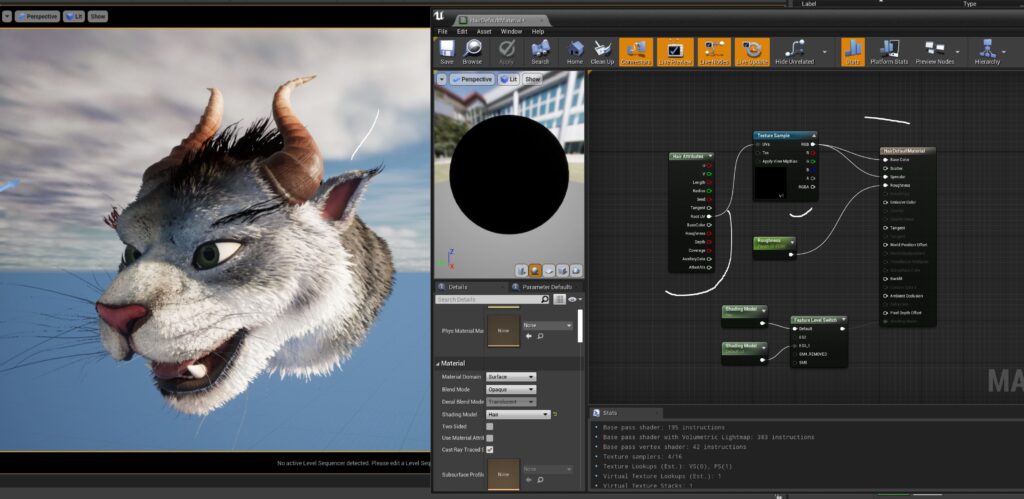
Generating groom textures in UE5: follicle mask and strands textures
Unreal Engine 5 allows the generation of Follicle Mask and Strands textures from Groom Assets to assist with Level of Detail (LOD) handling and skin blending.
- Follicle Texture (Follicle Mask): This texture represents hair root coverage on a mesh’s UV map, described as a “small distance field of the hair roots.” It is used to blend hair with the surface, such as darkening the scalp shader where hair is present to prevent abrupt transitions. Users can generate these by right-clicking a groom asset, adjusting resolution and root radius, and even packing multiple masks into RGB channels for different hair pieces (beard, eyebrows, etc.).
- Strands Textures: These are generated by projecting a groom onto a mesh surface, such as hair cards or a “hair helmet.” Output textures include Depth (for self-shadowing), Coverage (for alpha cutouts), Tangent (for normals), Attributes (for per-strand data), and Material (for base color).
- Usage in LODs: These textures are applied to card-based hair materials. In the Groom Asset Editor, LOD0 typically uses strands, while higher LODs transition to imported card meshes or simplified helmet meshes using these baked textures for performance.
UE5 groom LOD and performance optimization for real-time fur rendering
To maintain performance, UE5 employs several optimization strategies for complex grooms:
- LOD Representations: The system swaps between high-fidelity strands (LOD0), hair cards (LOD1), and mesh “hair helmets” (LOD2+) based on camera distance.
- Hair Count and Clustering: Users can control the number of interpolated strands and use adaptive culling to skip small clusters far from the camera.
- Settings and Physics: Fine-tuning Screen Size thresholds for LOD transitions is essential. Physics simulation can be disabled for distant LODs to save CPU cycles.
- Shader and Memory: Simple materials are recommended for LOD cards. UE 5.3 introduced streaming for grooms and binding assets to reduce the memory footprint.
- Shadows and GPU: Rendering thousands of line primitives is taxing. Optimization involves disabling shadows for distant LODs or using capsule shadows as an approximation.
Probability Mask texture resolution and bit depth: 4K vs 8K and 8-bit vs 16-bit
The quality of the Probability Mask texture, which dictates color distribution, depends on resolution and bit depth:
- Resolution: 4K is standard, but 8K may be necessary for ultra-fine details on large models to avoid blurriness or pixelation.
- Bit Depth: 8-bit textures (256 values) can cause banding in smooth gradients. 16-bit textures (65,536 values) provide virtually smooth transitions.
- Compression and Formats: PNG and OpenEXR are preferred for 16-bit masks. Lossy formats like JPEG should be avoided. While compression (BC4/BC7) saves memory, it can introduce artifacts.
- Trade-offs: If memory is limited, prioritize resolution for hard-edged patterns and bit depth for smooth, gradual color fades.

Probability Mask troubleshooting in UE5: banding, noisy edges, tiling, and mipmaps
Common visual issues with Probability Masks can be resolved through specific adjustments:
- Banding: Caused by low bit depth; fixed by using 16-bit textures or adding dither/noise.
- Noisy Edges: Result from low resolution or abrupt probability jumps; fixed by increasing resolution or softening the mask edges.
- Tiling: Occurs if UVs extend beyond the 0-1 range; fixed by setting the texture sampler to “Clamp” or using non-repeating noise.
- Mipmaps: Lower-resolution mips can blur color boundaries at a distance, causing “color drift.” Solutions include disabling mipmaps, using mip sharpening, or applying a mip bias.
- Flickering: Usually caused by unstable random seeds; ensure randomness is tied to static attributes like hair index or root UV.
Francesco Di Luisi Probability Mask demo breakdown (what to watch for)
Francesco Di Luisi’s demo of the AVASCOT groom shader highlights the effectiveness of the Probability Mask:
- Comparison: A side-by-side view shows that standard gradient blends look artificial and smooth, whereas the Probability Mask creates a “furry,” dithered look with individual strands switching colors.
- Numeric Correlation: An overlay shows how specific grayscale values (e.g., 0.2) translate to a percentage of hairs (20%) adopting a new color.
- Realism: The demo shows irregular transition zones and per-strand color integrity (solid color from root to tip), which enhances the perception of depth and volume compared to flat gradients.
AVASCOT groom shader release date and tutorial availability
The AVASCOT groom shader, created by Francesco Di Luisi, was slated for release in late February 2026. It is expected to include:
- The shader assets (custom materials/blueprints).
- A comprehensive video tutorial covering installation, Probability Mask setup, and multi-color transitions.
- The tutorial aims to help artists integrate VFX-level workflow features into UE5 projects.
PixelHair grooms in Unreal Engine 5: applying Probability Mask to MetaHuman hairstyles
PixelHair, developed by Yelzkizi, provides a library of nearly 200 production-ready hair grooms for Blender and UE5.
- Compatibility: These assets are optimized for MetaHumans and can be attached via Groom Bindings.
- Synergy with Probability Mask: Users can apply the Probability Mask technique to PixelHair grooms to add highlights or graying effects, using the MetaHuman haircap UVs as a guide.
- Future Tech: The project is moving toward Blender’s Geometry Nodes for procedural hair control, which will allow for more non-destructive customization before exporting to Unreal.
- Benefits: PixelHair offers a significant time-saving alternative to manual grooming while maintaining high-quality, game-ready standards for diverse hairstyles.
Frequently Asked Questions(FAQS)
1: What is the Probability Mask in Unreal Engine 5 grooming?
The Probability Mask is a technique/shader feature that controls hair or fur color distribution on a per-strand basis using a grayscale texture. Instead of blending colors smoothly, it uses the texture’s brightness as a probability for each strand to take on a new color. This results in a random, natural mix of hairs of different colors, as seen in real animal fur, rather than an unnatural smooth gradient.
2: Why not use a standard gradient to blend fur colors in UE5?
A standard gradient blending will make each hair fiber gradually change color, which looks fake for fur. In nature, fur transitions aren’t smooth washes of color – individual hairs are one color or another, intermingled. A gradient makes the fur look airbrushed or plastic because it doesn’t capture the per-strand randomness. The Probability Mask addresses this by assigning color on a strand-by-strand basis, yielding a much more authentic, speckled transition.
3: How do I create a Probability Mask texture for my character’s fur or hair?
You create it like any other mask – paint a grayscale texture that maps to the character’s skin/scalp UV where the hair grows. Dark areas of the texture mean “mostly base color hair here,” and bright areas mean “higher chance of secondary color hair here.” Use a 3D painting tool or image editor to paint the pattern of your fur transition (for example, gray gradient between two fur regions). Aim for 16-bit depth to avoid banding and a resolution that captures your pattern detail (4K is common for full body fur). Once painted, import this texture into UE5 and plug it into the groom’s material.
Material Setup, Multi-Color Support, and Mask Values
4: How is the Probability Mask applied in Unreal’s hair material?
In the hair material, you sample the Probability Mask texture at each hair’s root UV coordinates (using the Hair Attributes node). Then you compare that value to a random number per hair.
If the mask value is higher than the random, that strand is colored with the secondary color; if lower, it stays with the base color. In practice, this is done with a few material nodes (texture sample, a rand/ID, and a Step or If node to pick the color). The result is fed into the hair material’s color. Unreal’s upcoming AVASCOT groom shader will likely handle this under the hood, but you can set it up manually as described.
5: Can the Probability Mask handle more than two colors (multi-colored fur patterns)?
Yes. While a single grayscale mask covers a base and one accent color, you can extend the concept using multiple masks or an RGB mask. For example, an RGB probability map can control three different colors (one per channel).
The shader logic becomes more complex (checking against multiple probabilities and assigning different colors), but it’s doable. This way you can achieve patterns like tri-color fur. Another method is layering: use one Probability Mask for color A vs B, then another mask/logic to introduce color C in certain areas. The AVASCOT shader might support multi-color out of the box, but if not, you can still build it by combining mask channels.
6: What do bright and dark areas of the Probability Mask mean exactly?
A bright area in the mask means a high chance that hairs in that region will be the secondary color. Dark means a low chance (so most hairs remain the base color). For instance, 100% white could mean essentially all hairs there switch to the new color, whereas 50% gray means roughly half the hairs will switch (randomly chosen). Black means essentially no hair in that area takes the new color. It’s a probability threshold: brighter = more hairs of the second color, darker = fewer.
Performance Impact and Importing Custom Grooms
7: Will using the Probability Mask affect performance in UE5?
Hardly at all. The Probability Mask approach is a very lightweight addition in the shader. It’s just one texture lookup and a couple of math operations per hair, which is trivial compared to the cost of drawing the hair itself. The heavy part of hair rendering is the sheer number of strands and their shading (transmission, etc.), not this color logic.
Even with thousands of hairs, the GPU can handle this extra work easily. Just be mindful of using reasonable texture sizes (4K or 8K mask) and possibly turn off mipmaps on that mask to avoid artifacts (which might slightly increase texture sampling cost, but still minor). In summary, you get a big visual improvement for minimal performance cost.
8: How do I import custom hair grooms into Unreal Engine 5 (say from Blender or Maya)?
Use the Alembic grooming pipeline. In your hair tool (Blender, Maya XGen, etc.), export the groom as an Alembic (.abc) file with the necessary attributes (width, root positions, possibly UV and color). In UE5, enable the Groom plugin, then import the Alembic. It will create a Groom Asset.
You may also create a Groom Binding asset to attach it to a skeletal mesh (for characters). Once imported, use the Groom Asset Editor to assign a material, adjust LODs, etc. Remember to include groom_root_uv in your export if you want to use textures on the hair; in Maya, a script can transfer scalp UVs to hairs, and Blender’s Alembic does it automatically in recent versions.
PixelHair Assets and Preventing Mask Artifacts
9: What is PixelHair and how can it help me with hair in UE5?
PixelHair is a collection/library of ready-made 3D hair grooms created by Yelzkizi. Instead of hand-crafting a hairstyle, you can purchase/download a PixelHair asset that suits your character (they have hundreds, from afros to braids to ponytails). These assets are compatible with Blender and UE5 (including MetaHumans).
You import them (they often come as Alembic for strands and maybe FBX for cards), attach to your character, and you instantly have a professional hairstyle. The benefits are huge time savings and high realism. You can still apply custom materials or the Probability Mask to PixelHair grooms if you want to recolor or add variation. It’s essentially an alternative to creating hair from scratch – great for indie devs or anyone who needs quality hair quickly.
10: How do I prevent issues like color banding or flicker in Probability Mask fur?
For banding (visible stripes in the color transition), use a 16-bit mask texture – this gives smooth probability gradations and avoids stairstep artifacts. Also avoid over-compressing the texture. For flicker, ensure your random per strand is stable (each hair’s random value shouldn’t change each frame).
In UE5, the Hair Attributes node or a baked attribute provides a consistent random seed per strand, so use that. Also be cautious with mipmaps on the mask texture: they can blur the pattern at distance, causing the distribution to change slightly. If you see weird changes when the camera pulls away, consider disabling mipmaps on the probability mask or adjusting the mip bias so it keeps the pattern sharp. And of course, make sure the texture is set to clamp if needed to avoid tiling (so you don’t get a repeated pattern by accident). With these precautions, the effect should remain stable and artifact-free in motion.
Conclusion
Real-time character grooming in Unreal Engine 5 has taken a significant leap forward with the introduction of the Probability Mask technique in AVASCOT’s groom shader. This approach smartly bridges VFX-quality hair shading with game engine practicality, allowing artists to recreate the organic, random fur transitions we see in nature using simple inputs like a single texture map. By moving beyond smooth gradients to per-fiber color variation, UE5 grooms can achieve a new level of realism – fur and hair now have the mottled, individualized strands that sell the illusion of life.
We’ve explored how the Probability Mask works, why it’s superior to older methods for blending hair colors, and how to implement it in Unreal Engine. From painting the grayscale mask, to setting up the material logic, to troubleshooting potential pitfalls like banding or mipmap artifacts, we’ve covered a comprehensive workflow.
Broader Ecosystem Integration
Crucially, these techniques don’t exist in isolation: they slot into Unreal’s robust groom system, which includes Alembic imports, the Groom Asset Editor for LODs/physics, and texture generation tools for optimizing hair at a distance. When combined with a solid pipeline – for example, authoring grooms in Maya, Blender, or using libraries like PixelHair – and then using the Probability Mask shader, artists have a formidable toolset to create highly realistic hair and fur in real time.
It’s also an exciting time on the technical side: the AVASCOT groom shader is slated for release, promising to put these capabilities (and more features from cinematic hair lookdev) into the community’s hands, complete with tutorials. The fact that it’s real-time is worth emphasizing – what once was the domain of offline renderers and painstaking per-hair control can now be achieved interactively in Unreal Engine. This opens doors not just for games, but for virtual production, VR, and any real-time experience requiring believable digital creatures or characters.
Additionally, solutions like PixelHair demonstrate that creating amazing hair doesn’t always require starting from zero. One can leverage pre-made grooms and focus on shading and integration. The synergy of content and shader tech means even small teams can accomplish visuals that rival big-budget productions: imagine plugging in a PixelHair asset for a wolf model and using Probability Mask textures to give it natural color patterning – you’d get a stunning result in a fraction of the time.
Final Thoughts on Probability Mask Grooming
In conclusion, Probability Mask grooming is a game-changer for anyone concerned with digital hair/fur. It aligns with how nature really works, it’s artist-friendly (paint a texture and you’re set), and it’s efficient for real-time rendering. As you apply these techniques, you’ll find your characters’ hair and fur not only look far more convincing but also respond better under different lighting and distances, because the detail is baked into the distribution of strands. Combined with proper LOD setups and performance tweaks, you can have the best of both worlds: lush, realistic grooms and smooth performance.
With UE5’s continual improvements (like grooming updates in 5.3 and beyond) and the community’s innovations, the gap between real-time and pre-rendered hair is narrowing quickly. So dive in – experiment with Probability Masks on your next furry creature or hairstyled character. With the guidance from Francesco Di Luisi’s shader and the tips outlined here, you’ll be able to create hair and fur that truly elevates the believability of your characters in Unreal Engine 5.

Sources and Citations
- 80 Level – New Unreal Engine 5 Tool For Real-Time Character Grooming (Amber Rutherford, Feb. 10, 2026)
- AVASCOT / Francesco Di Luisi LinkedIn (company page and development updates)
- Francesco Di Luisi – African Wild Dog UE5 Groom Shader Demo
- Epic Games Documentation – Groom Asset Editor User Guide (UE5)
- Groom Asset Editor User Guide (UE5)
- Epic Games Documentation – Groom Asset Editor User Guide (UE4.27 Archive)
- Epic Games Documentation – Generating Groom Textures (UE5)
- Epic Games Documentation – Generating Groom Textures (UE4.27 Archive)
- Epic Games Documentation – Alembic for Grooms Specification (current UE docs)
- Reddit – “How to sample UV/texture colors for hair” (closest matching groom UV discussion)
- Reddit – Hair cards / Hair Attributes node discussion
- CG Channel – Unreal Engine 5.3: Five Key Features for CG Artists
- Yelzkizi / Daniel I. – PixelHair ArtStation Profile
- Example PixelHair Asset – PixelHair Bantu Knots Male 3D Hair Groom
- BlenderArtists – “PixelHair for Blender”
- PixelHair Instagram Description / Product Updates
- Yelzkizi Tutorial – PixelHair Easy 3D Hair from Blender to MetaHuman in UE5
- Yelzkizi Tutorial – How to Make Blender Hair Work with UE Groom System
- 80 Level – Creature Grooming in Houdini and Unreal Engine 5
Recommendations
- Poxel.io: Complete Guide to the Pixel FPS .io Game (How to Play, Weapons, Modes, Maps, Skins, and Settings)
- Aliens: Fireteam Elite 2 Revealed: Everything We Know About the New 4-Player Xenomorph Shooter
- The Witcher 4: Everything We Know About CD Projekt Red’s Next Epic RPG
- How to Unlock Every New Weapon in Battlefield 6 Season 3 (L115, M16A4, RPK-74M, PP-19)
- Star Trek: Starfleet Academy Season 1 Review (2026) — Cast, Story, Ending, and Where It Fits in the Star Trek Timeline
- 007 First Light Unlock Times, Early Access, and Global Release Details Explained
- No Man’s Sky Launches the Swarm Update: Massive Hive of Glass “Death Star” Construct Arrives in 6.4 Update
- The 15 Best Sci-Fi Anime Series of All Time (Ultimate Ranking for 2026 Fans & Beginners Guide)
- Warner Bros. Discovery Is Rebuilding Its Video Game Pipeline After a Significant 2025
- The Best Laptops for Gaming and Schoolwork in 2026 (student-Friendly Buying Guide)



































































































