










Quick Resume has been celebrated as one of the Xbox Series X|S’s best innovations – a feature so convenient that many gamers now take it for granted. It lets you hop between games in seconds without restarting them from scratch. However, for all its greatness, Quick Resume had one notable drawback: it didn’t play nicely with always-online games. That major annoyance finally has a solution. In the April 2026 update, Microsoft delivered a huge fix for Quick Resume, allowing players to disable it on a per-game basis. In this in-depth guide, we’ll explain everything about Quick Resume – how it works, why it’s awesome, where it falls short – and show you how the new per-game Quick Resume toggle works.
You’ll learn how to turn Quick Resume off for specific games (like those multiplayer titles that kept disconnecting), while keeping it on for single-player games where it shines. We’ll also cover all the new Xbox Insider update features (home screen groups, custom colors, etc.), tips for managing suspended games, FAQs, and more. By the end, you’ll know exactly how to get the most out of Quick Resume after this game-changing April 2026 update.

In This Article (22 sections)
What is Xbox Quick Resume and how does it work on Series X|S
Quick Resume is a signature feature of Xbox Series X|S consoles that allows players to seamlessly suspend and switch between multiple games. It functions like a “save state,” freezing a game in the background so players can return to the exact spot they left off without loading screens or title menus. Powered by the console’s SSD and Velocity Architecture, the system can hold approximately three large AAA games or more smaller, older titles at once.
Technically, the console treats the game as a virtual machine and writes the RAM state to the internal SSD. Because this state is stored on persistent storage, games remain resumable even if the console is powered off, rebooted, or unplugged. It works across Xbox Series X|S titles as well as backward-compatible Xbox One, 360, and original Xbox games.
Xbox Quick Resume problems with online games and lost connections
The main drawback of Quick Resume involves always-online or multiplayer titles. While the console preserves the game’s state, it cannot maintain a live network connection while the game is suspended. When a player resumes an online game, they are often met with “connection lost” errors or “zombie sessions” because the server terminated the connection during the period of inactivity. This can lead to glitchy states, such as infinite loading loops or the inability to join matches without a full manual restart. Popular titles like Fortnite, Destiny 2, Halo Infinite, and various sports games often require players to quit the app entirely to fix these connection issues, nullifying the benefits of the feature.
Xbox finally adds a per-game Quick Resume toggle (what changed)
Following years of player feedback, Microsoft introduced a system update in March 2026 (initially for Insiders, with a general release in April 2026) that allows users to disable Quick Resume on a per-game basis. This toggle allows players to exempt specific titles from being suspended, ensuring they always “launch fresh” from a cold start. This change addresses the instability found in online games by allowing the console to fully close them when the player switches away, rather than attempting to preserve a disconnected state.

How to disable Quick Resume for one game on Xbox Series X|S
Players can disable the feature for individual games through two primary methods: the game’s context menu or the management settings. When Quick Resume is disabled for a title, the console will no longer keep it in a suspended state; instead, the game will close normally when the player leaves it. This setting is console-specific and can be reversed at any time if the player decides they want to use Quick Resume for that title again.
Where to find “Manage Quick Resume” on an Xbox game tile
If a game is currently in a suspended state, players can find it in the “Quick Resume” group on the dashboard or within “My games & apps.” By highlighting the game tile and pressing the Menu button (≡), a new option labeled “Manage Quick Resume” will appear. Selecting this opens a screen where the player can toggle “Disable Quick Resume for this game” to On. This will immediately remove the game from the suspended list and prevent it from using the feature in the future.
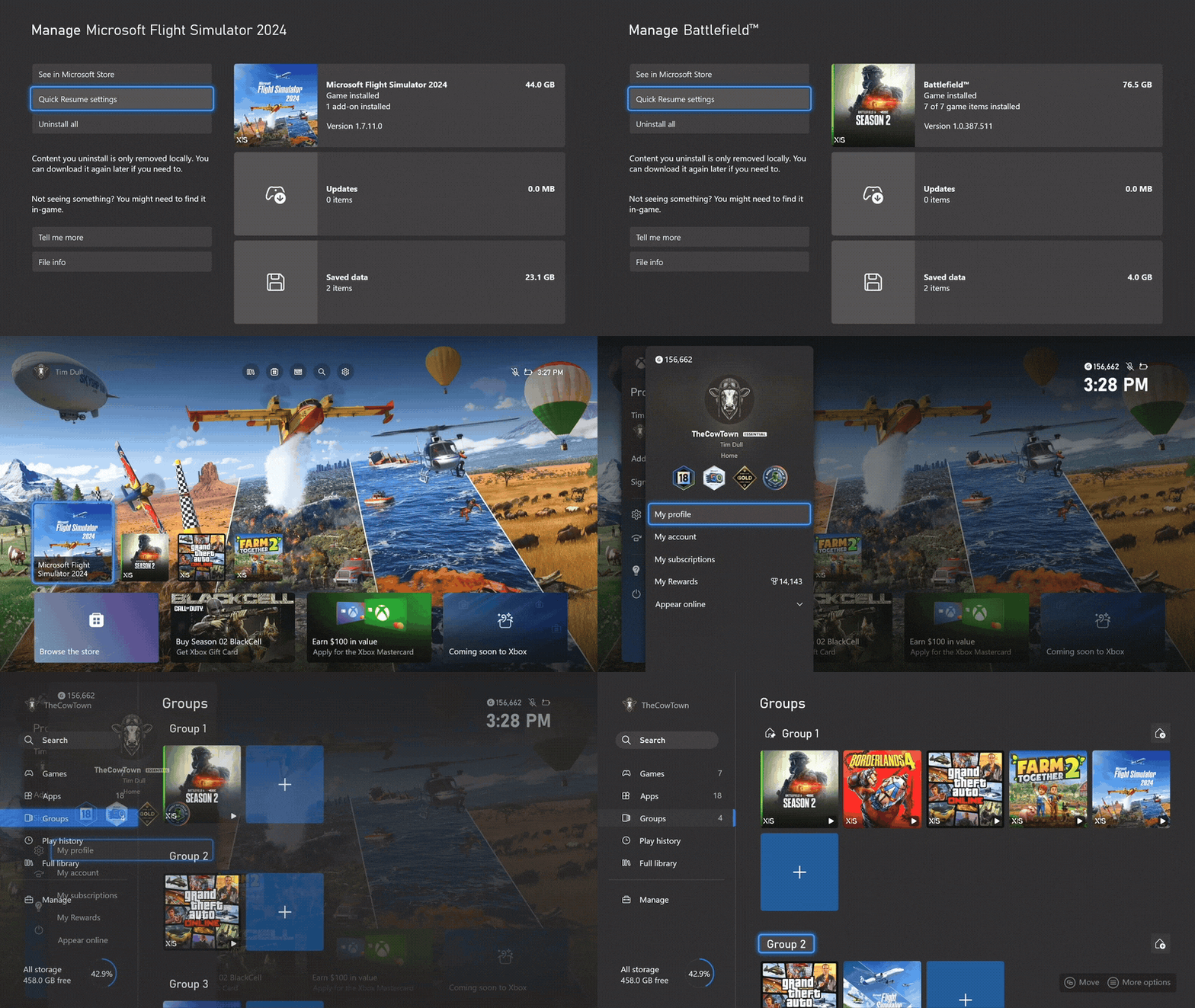
Quick Resume settings menu path: Manage game and add-ons > Quick Resume settings
For games that are not currently suspended, or as a general management method, players can use the following path:
- Highlight a game icon and press the Menu (≡) button.
- Select “Manage game and add-ons.”
- Select the new “Quick Resume settings” option.
- Toggle the “Disable Quick Resume” checkbox to On.
Once this is enabled, the game will no longer display the “Quick Resume” badge upon launching and will always perform a full, fresh start. games you should consider turning Quick Resume off for – let’s explore that.

Which Xbox games should you turn off Quick Resume for
While Quick Resume is beneficial for most single-player and offline games, it is recommended to disable the feature for specific categories: always-online multiplayer games, titles with frequent online check-ins, and games known to glitch or lose progress when suspended. Forcing a fresh boot ensures these titles establish a clean server connection, avoiding error states and “zombie sessions.”
Specific examples of games that benefit from disabling Quick Resume include:
- Fortnite: Avoids server disconnects and ensures daily quests update properly.
- Destiny 2 & Overwatch 2: These always-online titles typically require a restart to reach the title screen anyway.
- Halo Infinite (Multiplayer) & Apex Legends: Prevents the inability to join matches or lobbies after resuming.
- Call of Duty: Warzone & Battlefield: Eliminates mid-match errors and connectivity issues.
- EA Sports games (FIFA, Madden, NBA 2K): Ensures fresh daily logins and prevents co-op syncing issues.
- MMOs and shared-world games: Titles like Sea of Thieves, Fallout 76, Elder Scrolls Online, and Diablo IV are more stable with a fresh launch.
- Co-op games: Titles like Back 4 Blood or Borderlands 3 may experience desyncing if resumed from a suspended state.
Conversely, offline single-player games like Skyrim, The Witcher 3, and Cyberpunk 2077 should keep Quick Resume enabled to maintain the benefit of instant access.
Does disabling Quick Resume improve matchmaking and always-online games
Yes, disabling the feature for online titles improves the experience by ensuring the game establishes a new server connection every time it is launched. This eliminates the “limbo” state where a resumed game client tries to use an expired session, which often results in “connection lost” messages. By using the toggle, players avoid the repetitive cycle of resuming a game only to have to manually quit and restart it to fix errors.
While this does not improve internet speed or ping, it does increase matchmaking reliability and ensures the game world is fully synced with the latest daily updates, rewards, and fireteam statuses. It also prevents minor logic bugs or memory fragmentation that can occur after a game has been suspended for a very long duration.

Quick Resume vs quitting a game: what’s the difference on Xbox
Quick Resume and manually quitting represent two different states:
- Quick Resume: The game is frozen and its state is stored on the SSD. This allows for high-speed re-entry, bypassing menus, and preserving the player’s exact position in the game world.
- Quitting: The game process is fully shut down. Relaunching requires waiting through developer logos and title menus, and the player must load a save file or checkpoint.
The new toggle effectively automates the “Quitting” process for specific games. This is useful because online games often require the “clean start” provided by quitting to function correctly. While Quick Resume offers speed and immersion for narrative games, quitting (or disabling Quick Resume) provides the network integrity required for competitive play. Additionally, system updates or game patches will naturally close Quick Resume sessions to ensure the latest version of the game is running.
Xbox Insider update features: Quick Resume controls, Home groups, custom colors
The per-game Quick Resume toggle was introduced in a March 2026 Insider update (publicly available in April 2026) alongside several other dashboard refinements:
- Quick Resume Settings: The headline feature allowing players to disable Quick Resume for specific titles via the “Manage game and add-ons” menu.
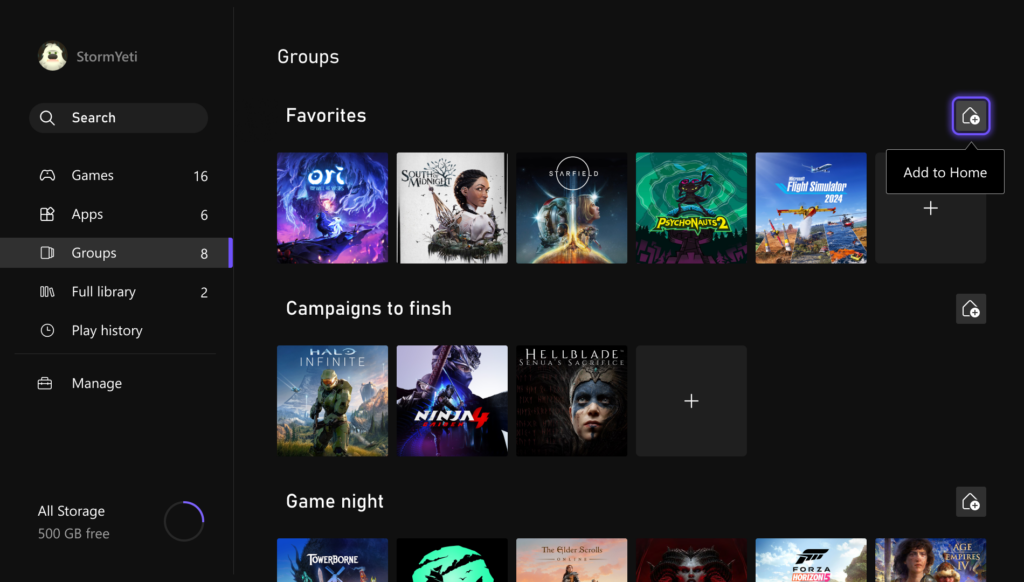
- More Groups on Home: An expansion of the number of custom game/app collections players can pin to their Home screen, increasing the limit from 2 to 10.
- Custom Color Themes: A new color picker tool that allows users to select any hue and shade for their dashboard and Guide accents, replacing the previous preset color limits.
- Xbox Guide Profile Badges: The ability to see up to five recent achievement or tenure badges directly on a player’s profile card within the Guide.
These updates represent a significant effort by the Xbox team to provide more personalization and address long-standing user feedback regarding dashboard organization and feature control.

When the Quick Resume per-game toggle rolls out to everyone (release timing)
The per-game Quick Resume toggle began rolling out to Xbox Insiders in the Alpha Skip-Ahead ring on March 18, 2026. For the general public, the feature is scheduled for release as part of the April 2026 system update. Users will receive a prompt for a system update or an auto-update during that month. Once updated, the settings can be accessed by pressing the Menu button on a game tile and selecting “Manage Quick Resume” or by navigating to Quick Resume settings under “Manage game.” While Insider testing moves through various rings (Alpha, Beta, Delta, Release Preview), the official rollout is expected within two to four weeks of the initial Insider launch.
How to keep Quick Resume for single-player games and disable it for multiplayer
The new toggle allows for a hybrid strategy to maximize console performance:
- Single-player and Offline Games: Leave Quick Resume enabled (default). This applies to RPGs, adventure games, and platformers like The Witcher 3 or Starfield, where instant resuming has no downsides because there is no server dependency.
- Multiplayer and Always-online Games: Enable the “Disable Quick Resume” toggle for titles like Fortnite, Warzone, and Destiny 2. This ensures a fresh boot and a clean server connection every time, avoiding the frustration of manual quits.
- Hybrid Games: For games with both solo and online modes, such as Red Dead Redemption 2 or Halo: The Master Chief Collection, players should choose the setting based on their primary activity or toggle it as their focus changes.
- General Maintenance: You can still use Quick Resume for multiple solo titles simultaneously while excluding online games. Regardless of settings, players should continue to save their progress manually, as system updates or power outages can still clear suspended states.
Common Quick Resume issues and fixes Xbox has shipped over the years
Since its launch in November 2020, Quick Resume has undergone significant refinement:
- Initial Support: Early games like Borderlands 3 and Yakuza: Like A Dragon initially struggled with the feature but were later patched for compatibility.
- May 2021 Update: Introduced the “Quick Resume” status tag and the dashboard group, allowing users to see and manually remove suspended titles.
- March 2022 Update: Added the ability to “Pin to Quick Resume,” ensuring up to two specific games are never automatically bumped out of the suspended state by other titles.
- Game-Specific Fixes: Notable patches include a December 2021 update for Halo Infinite to fix a bug where multiplayer cosmetics found in the campaign wouldn’t sync if collected while using Quick Resume. Other titles like Assassin’s Creed Valhalla and Cyberpunk 2077 received patches to fix crashes and audio bugs related to resuming.
- OS Improvements: Microsoft addressed “black screen” errors upon resuming and optimized how the system manages the SSD cache and state compression.
- 2026 Toggle: The per-game disable switch serves as the final solution for the inherent connectivity limitations of online-only games.

Quick Resume tips: managing suspended games and storage behavior
To get the most out of the feature, users should follow these management practices:
- The Quick Resume Group: Found in “My games & apps,” this group allows you to quickly switch between games, manually remove states to force a fresh start, or pin up to two favorite titles.
- Storage Behavior: Quick Resume data is saved to a reserved portion of the internal SSD or Storage Expansion Card. This cache does not take away from the space available for game installations and is managed automatically by the OS.
- System Limits: The console can hold at least three next-gen memory states, with more available for older backward-compatible titles. The system evicts the least recently used state unless a game is pinned.
- Power Modes: Quick Resume is compatible with both “Instant-On” and “Energy-Saver” modes. Because the state is written to the SSD, it survives a full shutdown and even being unplugged. However, players should return to the Home screen before powering off to ensure the active game is properly suspended.
- State Persistence: Moving a game between drives or applying a game update will typically discard the Quick Resume state, requiring a fresh launch.
- Customization: By combining the “Disable” toggle with “Pins,” users can ensure their online games always start fresh while their favorite single-player games remain ready for instant play.
When the Quick Resume per-game toggle rolls out to everyone (release timing)
The per-game Quick Resume toggle began rolling out to Xbox Insiders in the Alpha Skip-Ahead ring on March 18, 2026. The feature is scheduled for a broad public release as part of the April 2026 system update. Once the update is installed, users can access these settings via the “Manage game” menu or by selecting “Manage Quick Resume” on a game’s tile.
How to keep Quick Resume for single-player games and disable it for multiplayer
The new toggle allows users to balance speed and stability based on the type of game being played:
- Keep for single-player/offline games: Leave Quick Resume enabled for titles like The Witcher 3 or Starfield to enjoy instant resumption without downsides.
- Disable for multiplayer/always-online games: Turn the feature off for games like Fortnite or Destiny 2 to ensure a fresh server connection every time you play.
- Mix and match for hybrid titles: For games with both solo and online components, choose the setting that reflects your primary playstyle.
- Multi-game rotation: You can maintain several single-player games in suspended states while forcing online games to always cold-boot.
- Re-evaluate after patches: If a developer improves a game’s ability to reconnect after a resume, you can choose to re-enable the feature.
- Maintain manual saves: Always save progress normally, as Quick Resume is a convenience and can be cleared by system updates or power loss.
Common Quick Resume issues and fixes Xbox has shipped over the years
Since its 2020 debut, Quick Resume has seen several major improvements:
- Initial Compatibility: Microsoft worked with developers to bring support to titles that didn’t work at launch, such as Borderlands 3.
- May 2021 Update: Introduced visible “Quick Resume” tags and a dedicated dashboard group for easier management.
- March 2022 Update: Added the “Pin to Quick Resume” feature, allowing users to keep up to two favorite games permanently suspended.
- Developer Fixes: Games like Halo Infinite received specific patches to ensure multiplayer unlocks synced correctly when using Quick Resume.
- OS Stability: Updates have addressed “black screen” errors and optimized how the console manages SSD cache and memory states.
Quick Resume tips: managing suspended games and storage behavior
To optimize the feature, follow these management tips:
- Monitor via Groups: Use the “Quick Resume” group in “My games & apps” to see what is suspended or to manually purge a game state.
- Storage Management: Quick Resume data is stored in a reserved system partition on the internal SSD, meaning it does not reduce the space available for game installations.
- Capacity Limits: The system holds at least three next-gen titles or more for older, smaller games, automatically dropping the oldest state when full.
- Save Progress: Always use in-game save points, as suspended states are temporary.
- Be Aware of Updates: Moving games between drives or installing patches will invalidate a Quick Resume state.
- Energy Modes: Quick Resume works in both “Instant-On” and “Energy-Saver” modes and persists even if the console is unplugged.
- Manual Purging: If a game acts up, use the “Remove from Quick Resume” option to force a clean start.
- Control Combination: Use the new toggle with “Pins” to ensure solo games stay ready while online games stay fresh.
- Console Migration: Settings and states are stored locally and do not transfer between different consoles.
- Check Release Notes: Monitor official Xbox notes for game-specific quirks or OS improvements.

Frequently Asked Question (FAQs)
- How many games can Quick Resume suspend at once on Xbox Series X|S?
At least three full-memory next-gen titles, or more if playing smaller or backward-compatible games. - Does Quick Resume still work after the console is turned off or rebooted?
Yes, because states are saved to the internal SSD, they survive full power-offs and reboots. - How can I see which games are currently in Quick Resume, and can I remove them?
Check the “Quick Resume” group in My games & apps; you can remove them by pressing the Menu button and selecting “Remove from Quick Resume.” - Can I turn Quick Resume off entirely, or do I have to disable it game by game?
There is no global switch; the feature must be disabled on a per-game basis using the new toggle. - Will disabling Quick Resume make my games load slower?
Yes, the game will perform a cold boot with standard loading screens instead of resuming instantly. - Do all games support Quick Resume, including older backward-compatible games?
Almost all games (99%) support it, and backward-compatible titles often allow for even more concurrent suspended states. - Why do some games disconnect or restart when using Quick Resume?
Online servers timeout during the suspension period, leading to sync errors or forced restarts upon resumption. - Does Quick Resume use up a lot of storage space on my Xbox?
It uses a reserved system portion of the SSD that does not conflict with your usable game storage space. - What happens if a game updates while it’s in Quick Resume?
The suspended state becomes invalid, and the game will boot fresh to apply the new version. - Do I need to save my game if I’m using Quick Resume?
Yes, you should always save normally, as Quick Resume is a temporary pause state, not a permanent save.
Conclusion
The April 2026 update for Xbox Series X|S marks the final evolution of Quick Resume by addressing its primary weakness: online connectivity. By introducing a per-game toggle, Microsoft has shifted the feature from an automatic system function to a customizable tool. This allows players to retain the speed of instant resumption for single-player epics while ensuring competitive multiplayer games always start fresh. Alongside other features like increased Home groups and custom colors, this update reinforces Xbox’s focus on player choice and dashboard refinement.

Sources and Citations
- Xbox Wire – “Available for Xbox Insiders: More Groups on Home, Custom User Colors, Quick Resume Settings, and More” – Alex Charters (March 18, 2026)
Xbox Wire Article - Kotaku – “Xbox’s Best Feature In Years Just Got A Huge Fix” – Ethan Gach (March 18, 2026)
Kotaku Article - Thurrott – “Xbox Insiders Can Test Disabling Quick Resume on a Per-Game Basis” – Laurent Giret (March 18, 2026)
Thurrott Article - Windows Report – “Xbox Insiders Receive New Features: More Home Groups and Quick Resume Settings” – Akshay Kumar (March 18, 2026)
Windows Report Article - Pure Xbox – “Xbox Series X|S Is Getting Its First Dashboard Update In Ages, Quick Resume Upgrade Included” – Ben Kerry (March 2026)
Pure Xbox Article - Pure Xbox – “Xbox Fans Highlight Quick Resume Issues With Online Games” – Fraser Gilbert (April 18, 2022)
Pure Xbox Article (2022) - GameSpot – “Some Xbox Games Don’t Support Series X/S Quick Resume Feature And They Don’t Warn You” – Levi Winslow (November 11, 2020)
GameSpot Article - Digital Trends – “Microsoft explains why Xbox’s best feature still hasn’t come to PC” – Jacob Roach (July 17, 2022)
Digital Trends Article - VGC – “Halo Infinite update targets Quick Resume issues and missing cosmetics” – Tom Ivan (December 15, 2021)
VGC Article - Xbox Wire – “May Xbox Update Includes Quick Resume Improvements, Passthrough Audio, and More” – Jonathan Hildebrandt (May 11, 2021)
Xbox Wire May 2021 Update
Recommended
- Pokemon and Palworld Clone Pickmos Removed From Steam: “We Are Revising the Game to Ensure a Controversy-Free Experience”
- Scriptorium: Master of Manuscripts – Newly Released Illustration Sandbox Game Lets You Create Medieval Art Freely
- Nintendo’s New Star Fox Game Lets Players Use AR Character Avatars: Full Features, Gameplay Details, and What it Means for AR Gaming
- How do I smooth camera motion in Blender animations?
- ENDIX: Free Multiplayer Gaming Convention Experience You Can Explore Online
- Silksong’s Big Pre-Expansion Patch Fixes Its Biggest Launch Failure: Patch 5 Chinese Localization Overhaul Before Sea of Sorrow
- How to Mark Geometry Points in Blender: Point Clouds, Point Selection, and Geometry Nodes
- What is Lego Batman: Legacy of the Dark Knight?
- Pizza Hut’s Drinkable Pizza Turns Curry Cheese into the Chain’s Weirdest Limited-Time Japan Menu Item



































































































