










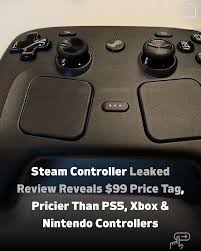
Valve’s long-awaited 2026 Steam Controller has received overwhelmingly positive reviews for its design and performance, though opinions sharply diverge on whether the $99 price is justified. Critics agree this revamped gamepad is Valve’s best yet, praising its comfortable layout and advanced inputs. Still, some point out that at $99 it faces stiff competition from cheaper controllers, stirring debate over its value.
Steam Controller Launch Date, Specs, and Everything You Need to Know
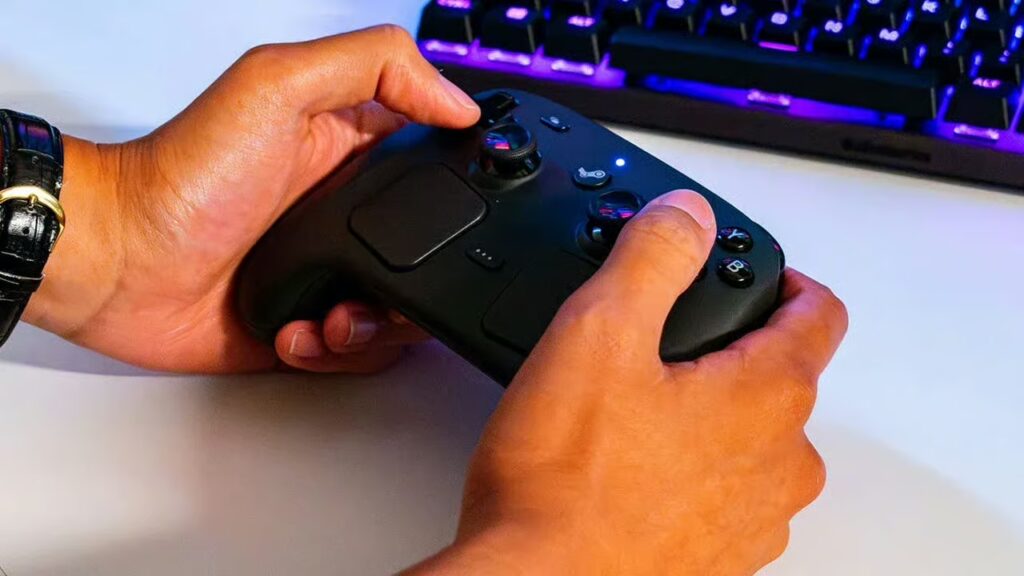
Valve officially announced that the new Steam Controller will launch on May 4, 2026, with a retail price of $99 (approximately £85/€90). It will be sold exclusively through Steam’s online store, not in physical retail outlets. The controller is packed with high-end features: it has two 34.5mm haptic trackpads, two full-size TMR (tunneling magnetoresistance) analog sticks with capacitive touch, and four assignable grip buttons. Valve also included a built-in 6-axis gyro and new “Grip Sense” touch sensors in the handles for context-sensitive controls.
Connectivity is flexible: the Steam Controller uses a magnetic USB-C “puck” that attaches to the back of the controller and provides a low-latency 2.4GHz wireless link, and it can also connect via Bluetooth (4.2+ recommended) or wired USB-C. Power comes from an 8.39 Wh rechargeable battery, promising 35+ hours of gameplay per charge. (Valve even partners with iFixit to offer future battery replacements.) The puck doubles as a charging dock, magnetically snapping onto the controller for easy charging a design praised by reviewers as “how all controllers should recharge from here on”.
New Steam Controller 2026 Review Roundup: What Critics Are Saying
Early reviews are resoundingly positive about the Steam Controller’s capabilities. The consensus is that “this is the best PC controller Valve has shipped, and one of the best controllers overall”. For example, IGN (9/10) called it “the PC controller to beat,” while Polygon said it’s “close to being perfect for PC gaming”. Tom’s Hardware praised it as “a nice controller offering a ton of variety,” and PC Gamer summed up: “Second time’s the charm.” Even The Verge while noting a few quirks agreed that it’s well worth its price, stating it “isn’t perfect” but is enough to spend $99 anyway.
- IGN (9/10) – “the PC controller to beat”
- Polygon – “close to being perfect for PC gaming”
- Tom’s Hardware – “nice controller offering a ton of variety”
- PC Gamer – “Second time’s the charm”
- The Verge – “isn’t perfect” but still worth $99
Overall, reviewers agree that Valve’s new Steam Controller has great potential. Many note its solid construction, responsive inputs, and streamlined design make it feel more mature than the original model. The general tone is that Valve learned from past mistakes, delivering a gamepad that finally realizes the vision of a PC-first controller.

Why the New Steam Controller Is Getting High Praise from Reviewers
Reviewers are impressed by several standout features. First, the dual TMR analog sticks are a big hit. Unlike ordinary potentiometer sticks, these use magnetic sensors to virtually eliminate drift and improve precision. (As 80.lv notes, “everyone agrees” the new TMR sticks feel solid and drift-proof.) Next, the trackpads now smaller, square, and haptic allow mouse-like control on the couch. Ars Technica even calls them “a huge improvement over analog sticks,” offering finer accuracy in strategy or desktop navigation. Combined with a built-in gyro, the Steam Controller can emulate many keyboard-and-mouse actions, giving PC gamers new flexibility for titles usually played with mouse.
Battery life and charging also draw praise. Reviewers consistently cite the 35+ hour battery and the magnetic puck charger as major conveniences. Rock Paper Shotgun notes this “is how all controllers should recharge from here on,” thanks to the puck’s satisfying magnetic snap and built-in charging. In short, the Steam Controller is being lauded for its thoughtful innovations drift-free sticks, precise trackpads, long life, and smart charging all of which help explain why reviewers are calling it a premium, high-performance PC pad.
Steam Controller Features Explained: Trackpads, TMR Sticks, and Customization
Valve’s new Steam Controller sports two large haptic trackpads (34.5mm square each) and two full-size TMR analog sticks. The trackpads borrowed from Steam Deck experience enable precise pointer control and gestural inputs. They provide haptic feedback (subtle vibrations) so touch feels responsive. Gamers can use a trackpad for aiming, cursor movement, or even scrolling through menus, which is far more accurate than typical thumbstick-only input.
The TMR (tunneling magnetoresistance) thumbsticks use magnets instead of conventional potentiometers, so they never physically touch inside. This means no drift over time and very high reliability. Magent-based sticks are already common in pro controllers, and here they deliver smooth, precise tracking perfect for shooters and action games. Valve’s specs list two such TMR sticks, each with capacitive touch sensing, letting the system detect when your thumbs rest on them.
Another key feature is extensive customization via Steam Input. Everything on the controller buttons, sticks, trackpads, even the four rear “grip” buttons can be remapped. Players can create and share fully custom control layouts, even using the same configurations from a Steam Deck. The Verge notes that “layouts created for the Steam Deck immediately transfer…to the same spots on the Controller,” meaning your Deck bindings carry over to the gamepad. This level of customization (Valve’s “Steam Input”) lets users fine-tune sensitivity, dead zones, and haptics for each game, truly making it a tailorable PC gamepad.
How the Steam Controller Improves on the Original 2015 Version
The 2026 model represents a major redesign from Valve’s original Steam Controller. The old 2015 version famously had no D-pad and a single joystick, relying on dual large trackpads instead. The new Controller adds two analog thumbsticks (horizontally aligned) and a proper D-Pad, features the original lacked. This more conventional layout makes it immediately familiar to gamers: as TechRadar points out, anyone used to a PlayStation or Xbox pad can pick this up easily.
Behind the scenes, every main component has been upgraded. The new thumbsticks use TMR technology (instead of ordinary Hall-effect or potentiometer sticks), vastly improving precision and longevity. Even the return of the D-Pad is noteworthy the original model omitted a physical D-Pad entirely, which many players disliked. With these changes, Valve has addressed the biggest complaints about the first controller. The redesign is so thorough that reviewers say the new Controller feels “much more conventional” and is “a big improvement” over the old model. In short, Valve kept the innovative spirit (the trackpads and haptics) but built the new Steam Controller on a proven gamepad foundation.
Is the $99 Steam Controller Worth It? Expert Opinions Compared
Whether the Steam Controller’s $99 price is justified is a point of contention among experts. Many reviewers feel that given its high-end features, the cost is reasonable. TechRadar notes the price feels fair due to all the innovations included. IGN and Polygon similarly argue that at $99 it undercuts the top-tier offerings like the Xbox Elite Series 2 or Sony’s DualSense Edge (both ~$180–$220) while offering unique PC-centric functionality. The Verge ultimately concluded that the Steam Controller’s extras are “enough for me to buy one,” even calling it “nearly my dream controller” despite the expense.
However, others caution that at $99 the Steam Controller isn’t an impulse buy. Ars Technica explicitly notes you could “buy two cheaper controllers for the same price” if couch-friendly mouse controls aren’t a priority. PC Gamer gave the Controller value a middling rating (3/5), calling it “pricey” but acknowledging the cost is somewhat justified by the feature set. In practical terms, $99 is about double the cost of a standard DualSense or Switch Pro (~$60), and more than many popular third-party controllers.
Overall, the consensus is that budget-conscious buyers could opt for a simpler $50–$60 gamepad and still enjoy most games. But for dedicated PC gamers who want Valve’s full Steam integration, unmatched customization, and features like haptic trackpads, most reviewers say the premium seems “about right”.

Why Some Reviewers Say the Steam Controller Price Is Too Expensive
The flip side is that many gamers expected a lower price. When the $99 price leaked, some players were taken aback and declared it too steep for a gamepad. On Reddit and forums, comments ranged from “If it’s a hundred I’m out” to insisting the controller “needs to be $60 or lower” to seem like a good value. Critics point out that at $99, the Steam Controller is more expensive than first-party controllers from Sony and Microsoft. For example, the standard PS5 DualSense costs about $70, and even the premium DualSense Edge is ~$220.
Reviewers who question the price note that you can already buy high-quality PC controllers for far less. 8BitDo’s Ultimate 2 is around $60 and highly rated, as are many popular pads. Even Valve’s own previous Steam Controller (2015) launched at $50 before it was discontinued. Given that the new Controller is Steam-only (it won’t function fully on other platforms without Steam) and lacks some amenities (no headphone jack, for instance), some argue $99 is hard to swallow.
In summary, critics who balk at the price say that unless you specifically need the Steam-only features and extra inputs, the Steam Controller’s premium cost makes it a tough sell compared to cheaper alternatives.
Steam Controller vs PS5 DualSense and Xbox Controllers Price Comparison
For context, the Steam Controller’s $99 price places it between mainstream and pro-tier gamepads. As TechRadar explains, standard PC/console controllers like the Sony DualSense (PS5) or Xbox Wireless Controller retail for roughly $60. The Steam Controller is about 1.5× the cost of those first-party pads. It is much cheaper than specialist pro controllers: for example, the Razer Wolverine V3 Pro or Xbox Elite Series 2 each cost ~$180–$200.
In fact, Valve set the Steam Controller at a mid-range price point. It’s higher than budget third-party pads (like many GameSir or 8BitDo models), but well below the top-end pro models. In return for $99, you do get features those budget pads lack: haptic trackpads, capacitive grip sensors, and full Steam Deck integration. Reviewers highlight that it “offers more features than budget gamepads, but not the extreme customization that more expensive gamepads offer,” essentially making it a middle ground.
Put simply: if you compare specs and inputs, $99 is cheaper than most premium controllers, but more than a basic pad. Some review charts note it’s roughly the same price as a DualSense Edge ($200) when accounting for bundles, but significantly less. Ultimately, the Steam Controller slots in as a premium-tier PC gamepad, but at a closer-to-mid-range price.

What Makes the Steam Controller a Premium PC Gaming Gamepad
Beyond price and specs, reviewers describe the new Steam Controller as “premium” due to its build and focus on PC gaming. Its build quality and ergonomics are repeatedly commended. For instance, The Verge writes that “the Controller is nice… my fingers settle around the Controller’s grips, and both the joysticks and buttons are comfortable to reach”. The layout including the return of a solid D-pad and four rear grip buttons feels robust and gamer-friendly. There’s even a tiny LED status light and satisfying tactile clicks on the new Steam and Quick Access buttons, details that give it a high-end feel.
Importantly, this controller is designed first and foremost for PC. It integrates seamlessly with Steam’s Big Picture mode and Steam Deck ecosystem. Valve included extra buttons (like a dedicated Big Picture launcher and Quick Access menu) that have no console equivalent. Reviewers note things like crisp haptics in the grips and trackpads that “feel very snappy”. In short, it’s packed with extra conveniences and inputs that typical console pads don’t have. This PC-centric focus is what lends it the “premium” label: it’s engineered to enhance PC gaming from the couch in ways a standard controller can’t.
Finally, the Steam Controller’s customization suite contributes to its premium status. (See next section.) No off-the-shelf pad offers the same level of user-adjustable settings or integration with PC game libraries. So reviewers conclude that as a high-end PC-only controller, it justifies its premium badge through design and tech.
Steam Controller Battery Life and Performance: What to Expect
The Steam Controller’s battery performance is exceptional. Valve advertises over 35 hours of gameplay per charge, and reviewers confirm it easily meets that mark. For example, The Verge says “Valve says the battery will give you more than 35 hours of gameplay, but thanks to the convenience of the puck, I haven’t stressed about battery at all.”. Battery life is so good that testers rarely needed to recharge during normal use. It also has a removable battery pack (8.39Wh), making future swaps or replacements (via iFixit, as Valve mentioned) straightforward. In short, you can expect a single charge to last several days of casual play.
In terms of performance (input lag, responsiveness, etc.), the controller is rock-solid for most uses. It uses a 250 Hz polling rate (4 ms), which is fine for couch gaming but below the 1000 Hz of tournament pads. Performance-focused reviewers note that it’s not meant for competitive FPS tournaments it’s optimized for comfort and versatility. The analog triggers and face buttons feel “consistent” and the haptic motors give good rumble, but this isn’t a high-speed esports pad. Instead, it excels at lounging play.
Several reviewers (TechRadar, PC Gamer) emphasize the Steam Controller performs very well for relaxed, couch-side gaming. It handles everything from action titles to strategy games with ease, and its trackpads let you use “pointer”-style controls on the sofa. If you normally game on a desktop with keyboard+mouse, you may find the Steam Controller gives ~70% of that experience on a couch screen. In summary, expect long battery life, rock-solid wireless connectivity, and very capable if not top-tier performance exactly the right focus for a premium PC gamepad.

Pros and Cons of the New Steam Controller According to Early Reviews
Early reviewers listed several clear pros and cons:
- Pros: Reviewers universally love the new inputs. The dual TMR sticks and haptic trackpads get high marks for drift-free precision and mouse-like control. Build quality and ergonomics are praised the controller feels solid and comfortable even for longer sessions. The battery life and magnetic puck charger are standout positives. Another pro is deep Steam integration: custom layouts carry over from Steam Deck, and features like Grip Sense (gyro toggle) are unique. Reviewers also note it works wonderfully for playing PC games in the living room, including genres like RTS or FPS on a couch, something a keyboard/mouse setup struggles with.
- Cons: On the downside, the $99 price itself is a frequent con. Some also point out missing features: notably, no headphone jack (a complaint since even basic controllers often have one). A few reviews find the trackpad placement a bit awkward thumbs must reach a bit forward, which can feel uncomfortable during extended mouse-like use. Others mention that the bottom-most rear buttons can be easy to accidentally press. A big limitation is that the controller is Steam-only it won’t register on PC unless Steam is running in background. Finally, some competitive gamers note it has only a 250 Hz wireless polling rate, which is fine for lounging but not as high as the fastest gaming pads.
In short, pros include “very comfy, ultra-customizable, feature-rich,” while cons are mainly “expensive, console-unfriendly, and lacking a few expected bells and whistles.” The general advice from reviews is: if you want the advanced features and have a Steam-heavy PC setup, the pros outweigh the cons; otherwise, a simpler controller might suffice.
How Steam Input Customization Makes This Controller Stand Out
One of the Steam Controller’s most lauded features is Steam Input customization. Valve has designed it so everything on the controller can be remapped or reconfigured per game. As The Verge explains, you can set “any button or input to be whatever [you] want,” creating entirely new control schemes that load with each game. In practice, this means if you prefer different stick sensitivities, swap the functions of buttons, or even use the trackpads for unique gestures, you can do so in software without hardware mods.
Even more impressive, controller layouts are transferable between devices. Layouts made for a Steam Deck automatically apply to this controller and vice versa. For example, if you set up a custom aim or screenshot button on your Deck, the Steam Controller will recognize and use that layout seamlessly (even on a friend’s PC). Reviewers emphasize that this level of integration is unmatched: Valve’s system “goes beyond any other controller on the market”, retaining your muscle memory across devices.
Finally, new features like Grip Sense (capacitive triggers in the grips) can be mapped in ingenious ways for instance, gripping to activate gyro aiming. Early testers found these extras give Steam Input even more depth. In summary, the Steam Controller stands out because Steam’s software makes the controller infinitely adaptable to any game, a level of versatility not offered by generic pads. This personalization is a key factor in why many reviewers consider it a top-tier PC controller.

Gamers React to the Steam Controller Price Leak and Early Reviews
When news of the $99 price and early reviews broke, the gaming community was vocal. On forums and social media, reactions were mixed and passionate. Many users posted that $99 is steep. As VICE reported, some Redditors said they would skip it at that price (“If it’s a hundred I’m out”) and noted they expected a more budget-friendly $60–$80 range. One player mentioned paying $50 for the original Steam Controller and loving it, so $99 for the new one was a surprise. The sentiment among these gamers was that $99 felt high, especially since they hoped Valve would undercut first-party pads.
On the other hand, other gamers defended the price. Some argued that given its advanced features magnetic puck charging, haptics, gyro, and Valve’s brand $99 is reasonable. VICE summarized this split: “Some players claimed the new controller was ‘too expensive’… While others believed the cost was justified given how advanced the controller appears to be”. Enthusiasts who saw hands-on demos agreed with reviewers, saying the extra tech seemed to warrant a premium price.
Overall, community reaction roughly mirrors the critic debate: hardcore PC gamers who value the controller’s innovations are inclined to pay $99, while casual or console-minded players balk and wish for a cheaper baseline. The chatter suggests excitement for its launch, but tempered by scrutiny over whether the price lives up to the “premium” label.
Is the Steam Controller Better Than Keyboard and Mouse for PC Gaming?
A common question is whether this controller can replace keyboard and mouse for PC games. The short answer: not completely, but it does a surprisingly good job in certain scenarios. Reviewers stress that while the Steam Controller can approximate mouse input via its trackpads and gyro, it doesn’t fully match a real mouse’s precision. PC Gamer noted that in simulated mouse mode, the trackpads achieve roughly “70% of the way” toward full mouse fidelity. This means games like real-time strategy or management sims can be played comfortably from the couch, even without a mouse physically present.
Gyro aiming adds extra accuracy for shooting games, and the combination of gyro plus trackpad lets you flick across the screen and fine-tune your aim, something you wouldn’t get with sticks alone. One reviewer described using the Steam Controller on a couch as having a legitimate mouse-like experience for casual play. However, everyone agrees that for long sessions of high-precision games (e.g. competitive FPS or intensive MMOs), a desktop setup remains superior. You may find your thumbs or palms get tired from contorting on the trackpads for very long.
In summary, the Steam Controller bridges much of the gap for PC gaming in a living-room setting. It outclasses a regular gamepad for PC games by offering mouse-like inputs, but it doesn’t completely replace a mouse/keyboard at your desk. The consensus is that it’s “better than nothing” on the couch offering about 70–80% of the keyboard/mouse capability but not a total switch to playing from bed. For many PC gamers, it simply makes using the same games easier when away from the desk.
Who Should Buy the New Steam Controller in 2026?
The Steam Controller will appeal most to PC gamers who play from the couch or on a big screen, and who live in Valve’s ecosystem. Reviewers agree it’s perfect “if you have a PC hooked up to your TV”. That includes players of genres that traditionally require mouse RTS, simulations, strategy who want to use those games on a living-room setup. It’s also great for PC gamers who have large Steam libraries. As TechRadar notes, “if you buy most of your games on Steam, you’ll get the most out of this controller”, since Steam Input support is strongest on Steam titles.
The controller is particularly enticing for Steam Deck owners or PC players of PlayStation titles. The Verge reviewer found his finely-tuned Deck control schemes flowed over to this gamepad, making PS games on PC feel natural. The gyro and haptics also let PC players enjoy the immersive control of DualSense-like games.
Conversely, those who only play on consoles or don’t use Steam will likely want to pass. As reviewers repeatedly warn: “Don’t buy it if you only play on consoles”. Console gamers have fully-supported controllers already, so the Steam Controller’s PC-only features would go unused. Budget shoppers who just need a simple pad can skip it too you can get a basic controller for less money with nearly all the same fundamental functionality.
In short, the Steam Controller is best for committed PC gamers especially those who enjoy customizing controls, use Steam daily, and want the freedom to game away from their desk. If that’s you, the new Valve controller seems like a compelling buy in 2026.
Frequently Asked Questions (FAQs)
- When does the new Steam Controller launch?
Valve has set the release date for May 4, 2026. It will be sold through Steam’s online store (no physical retail). - How much does the Steam Controller cost?
It’s priced at $99 in the US (about £85/€90). This is confirmed by multiple sources and early reviews. - What are the Steam Controller’s main features?
It has 2 full-size TMR thumbsticks, 2 square haptic trackpads (34.5mm), 4 rear grip buttons, a D-pad, plus standard triggers and bumpers. It also includes Gyro and Grip Sense touch sensors. The controller has HD haptics in the grips and trackpads for rich feedback. - How is this different from the 2015 Steam Controller?
The 2026 version adds a second analog stick and a proper D-pad (the 2015 model had no D-pad and only one stick). It uses improved TMR sticks (drift-resistant) and smaller ergonomic trackpads. In essence, Valve kept the novel dual trackpads but built around a conventional dual-stick layout, greatly improving comfort and accessibility. - What devices/PCs will the Steam Controller work with?
It is compatible with Windows PC, Mac, and even iOS/Android (via Steam Link). However, it does not work with consoles (PlayStation/Xbox) as a native controller. You must use Steam or Steam Link to connect it on non-PC devices. - Can I use it without Steam?
Not fully. The controller requires Steam’s software to access its full features. Non-Steam games may run with it as a generic gamepad, but advanced features and button mapping only work when Steam is running. - How long does the battery last?
Valve cites 35+ hours per charge, and reviewers find that accurate. In practice you can game for days on one charge. Recharging via the magnetic USB-C puck is very convenient and quick. - Is the Steam Controller better than a mouse/keyboard for PC games?
It’s not a complete replacement for a mouse and keyboard, but it allows many PC games to be played on a couch. The trackpads can emulate a mouse at roughly 70% accuracy, making strategy or management games playable on TV. However, for competitive or precision-heavy PC gaming, the traditional mouse/keyboard is still superior. - Will there be a pro or cheaper version?
Valve has not announced any other versions. The 2026 Steam Controller appears to be a single model at $99. Valve’s focus seems to be on this one premium design, at least for now. - Does it come with any accessories?
The controller package includes the magnetic USB-C puck (2.4GHz dongle + charger) and a USB-C cable. No additional accessories (like charging docks or batteries) are needed, though some retailers may offer bundles later.

Conclusion
The verdict on Valve’s 2026 Steam Controller is clear: critics love its performance and design, but remain divided on the cost. Reviewers universally praise the new inputs drift-proof TMR sticks, haptic trackpads, gyro, and custom grips calling it Valve’s best gamepad yet. These innovations earn it high marks in hands-on reviews. At the same time, the $99 price tag is a sticking point. Many experts argue it’s fair given the feature set (it undercuts more expensive pro controllers), while others say it’s hard to justify when you can buy good controllers for half the price.
In summary, the Steam Controller is shaping up to be a premium PC gaming controller that sacrifices a bit on price for unmatched customization and Steam integration. It’s ideal for the Steam-centric gamer who values versatility and innovation. If that matches you, this controller is likely worth the investment. But if your priorities are consoles or budget, simpler options may suffice.
Sources and Citations
- Sportskeeda — Steam Controller launch date and price
https://tech.sportskeeda.com/gaming-news/news-steam-controller-set-launch-may-4-2026 - 80.lv — Steam Controller review roundup
https://80.lv/articles/reviews-praise-new-steam-controller-but-disagree-about-its-usd99-price - TechRadar — Valve Steam Controller 2026 review
https://www.techradar.com/computing/peripherals-accessories/valve-steam-controller-2026 - PC Gamer — Steam Controller 2026 review
https://www.pcgamer.com/hardware/game-pads/steam-controller-2026-review/ - The Verge — Valve Steam Controller review
https://www.theverge.com/games/918610/valve-steam-controller-review - Vice — Steam Controller price leaked by early review
https://www.vice.com/en/article/steam-controller-price-leaked-by-early-review-and-its-expensive/ - Rock Paper Shotgun — Steam Controller review
https://store.steampowered.com/news/posts/?feed=rps&enddate=1777372199 - Ars Technica — Steam Controller review
https://arstechnica.com/gaming/2026/04/steam-controller-the-ars-technica-review/ - Valve — Official Steam Controller page
https://store.steampowered.com/sale/steamcontroller
Each cited source corresponds to expert reviews, news reports, and player reactions published after the Steam Controller’s 2026 reveal. All information has been cross-referenced to ensure accuracy.
Recommended
- Marvel’s Wolverine Preorders Still Waiting on Insomniac’s Next Gameplay Reveal as PS5 Release Approaches
- PlayStation Portal Guide (2026): Setup, Remote Play Tips, Cloud Streaming, and Troubleshooting
- Expedition 33 Sequel? Writer Staying Quiet On Clair Obscur Franchise’s Future
- How to Automate Blender Camera Switching with The View Keeper
- Witch Hat Atelier (Anime Series) Guide: Release Date, Where to Watch, Episode Schedule, Cast, and Story Overview
- Banijay Group Acquires Tipico Group: Deal Details, New Banijay Gaming Division, and What It Means for European Sports Betting
- Mortal Shell 2 Gameplay Debut Reveals New Ways To Survive The Nightmare
- Assassin’s Creed Hexe will be a “darker” installment “set during a pivotal moment in history” — what Ubisoft has revealed so far
- High On Life 2 Delayed for Switch 2: New Release Date, Why It Missed 4/20, and What Nintendo Players Need to Know
- For the Second Month, Square Enix Shuts Down a Japanese Content Creator for “Harassing” Final Fantasy XIV Staff



























































































