





Wafer is a stylised (stylized) 3D texture painting app from Sparseal, positioned for hand-painted and non-photorealistic rendering (NPR) assets rather than purely photoreal pipelines. The Windows release is currently framed as an “open beta” and is being reported as free to download and use, with some important caveats around exporting and saving during the beta period.
The broader context matters for expectations: Wafer is presented as a focused painting tool alongside Sparseal’s other products, and the company background (including founders Pablo Dobarro and Joan Fons, per industry reporting) has helped put it on artists’ radars quickly.

In This Article (19 sections)
Wafer Windows beta download link and install steps
Wafer’s Windows open beta was reported publicly in early April 2026, with CG Channel posting the announcement on April 1, 2026 and later updating the story to note that the beta can be downloaded directly from Sparseal’s website (update dated April 3, 2026). Digital Production’s April 8, 2026 write-up also states the Windows beta can be downloaded from the Wafer website, while noting a practical wrinkle: the product page itself may show a “desktop downloads coming soon” message even while the beta is available.
Official pages referenced in coverage:
textCopyWafer product page (official): https://sparseal.com/wafer/
Sparseal company/products page: https://sparseal.com/
Sparseal beta licence sandbox (export/save): https://platform-dev.sparseal.com/buy/wafer-export-save
Sparseal Discord (linked from official pages): https://discord.gg/  (follow the current invite from the official site
Install flow on Windows (kept deliberately build-agnostic because beta packaging can change between point builds):
- Download the current Windows beta build from the official Wafer page (or the official channel indicated there, if the download is redirected).
- If the download arrives as an archive, extract it; if it arrives as an installer, run it and follow the prompts. (Exact packaging is not described in the public product page text capture.)
- Launch Wafer and verify basic input (mouse + keyboard, and pen tablet if applicable).
- If exporting textures or saving projects is restricted in your beta build, follow the official licensing workflow described by Sparseal’s beta licensing pages (email-based activation and a licence intended for beta builds).
Is Wafer really free right now? What “open beta” means
Multiple industry sources describe Wafer for Windows as “free in open beta” at the time of publication (early April 2026). “Open beta” in this context is best interpreted as:
- Public availability (not a closed invite-only test), and
- A usage period where download access (and at least core functionality) is not sold as a final commercial release.
However, “free to use” does not necessarily mean “everything is unlocked.” A Japanese industry roundup specifically states that while the Windows beta can be downloaded and used for free, exporting textures and saving work data require a paid licence contract. Sparseal’s beta licensing sandbox also frames “Exporting and Saving Documents” as a separate entitlement (“Unlock exporting textures and saving your progress”), and explicitly warns that this is a beta-testing site where products are not actually for purchase, transactions are simulated, and prices/policies may not match the release version.
This mirrors the iPad release pattern visible on Apple’s App Store listing: the iPad app is free to download, with an in‑app purchase labelled “Exporting and Saving Documents” (US listing shows US$19.99).

Wafer system requirements for Windows and supported hardware (pen tablets)
Sparseal’s public product page positions Wafer around “extreme performance, compatibility and energy efficiency,” with explicit claims that no special GPU or CPU features are required and that it can deliver painting performance on broadly compatible devices (it even lists “256 MB RAM, OpenGL 2.0” as part of its “maximum compatibility” pitch). The same page describes an upper end of “up to 64K resolution per layer,” with memory usage presented as the practical limiting factor.
Because those statements are marketing-level positioning rather than a Windows-specific spec sheet, the most defensible interpretation is:
- Wafer is engineered to scale down unusually far compared to many modern DCC tools (as a design goal), but
- artists should still expect real-world stability and performance in the Windows beta to depend on driver quality, GPU configuration, and texture resolution choices (especially when pushing into multi‑tile or extremely high resolutions).
On pen tablets: CG Channel reports that, based on comments from Discord users, the Windows beta supports pen tablets and pen displays from major manufacturers including Wacom, Huion, and XP-Pen.
If pressure/tilt does not behave correctly in the beta, the most common Windows-side culprit is a mismatch between the pen API expected by the application and the mode configured in the tablet driver. Wacom’s developer documentation and support materials outline how Windows apps may receive pen input via Windows Ink or WinTab, with configuration often required in both the driver and the application.
Wafer vs Substance 3D Painter for stylized and hand-painted textures
Comparing Wafer to Adobe’s Substance 3D Painter is useful because both tools cover layer-based painting and PBR workflows, but they approach the problem from different starting assumptions.
Substance 3D Painter is positioned as a full-spectrum texturing application with non-destructive layer workflows, smart materials/masks, decals, and broader ecosystem integration. Adobe’s documentation also highlights “non-destructive and procedural workflows” in Painter’s layer-based UI.
Wafer, by contrast, is marketed as “3D texture painting for stylized, hand-painted and NPR assets,” explicitly emphasising an illustration-style workspace (brushes, layers, masks), multi-channel strokes, and workflow customisation for stylised/NPR shader needs.
This difference becomes concrete in three areas:
- First, performance envelope and target hardware. Adobe’s published system requirements for Substance 3D Painter (as of March 2026) focus on modern discrete GPUs and substantial RAM/VRAM (e.g., Windows 11 64-bit; GPUs like RTX-class; 16–64 GB RAM across tiers). Wafer’s public pitch explicitly claims broad compatibility and low power consumption, with the product page stating it is built to “run anywhere” and citing low baseline requirements in its compatibility messaging.
- Second, “hand-painted” workflows. Painter can support stylised work (Adobe even publishes hand-painted workflow content), but its strength is often in procedural layering, baked mesh maps, generators, and ecosystem assets. Wafer’s product positioning and feature descriptions are explicitly anchored in painterly/NPR outcomes (multi-channel strokes, custom layouts for stylised shaders, illustration-like UI conventions).
- Third, licensing during evaluation. Painter is commercial software sold via Adobe’s Substance 3D plans; Adobe’s pricing page outlines paid subscription tiers. Wafer’s Windows beta is widely reported as free during the open beta availability window (April 2026), albeit with potential export/save gating depending on licensing.

Wafer’s simultaneous multi-channel painting (how it works)
Sparseal describes multi-channel painting as a core capability: “Color, roughness and metalness in a single stroke,” with the additional ability to “define custom channel layouts for NPR and stylized shaders.” The iPad App Store description is even more explicit: “Paint color, roughness, metallic at the same time with any tool,” and supports “standard PBR channels or custom shader domain inputs per layer.”
Operationally, this means Wafer is designed to let one brush stroke update multiple material channels in lockstep. The practical advantage for stylised materials is consistency: when colour breakup, roughness breakup, and metallic accents are intentionally correlated (a common stylised look-dev trick), multi-channel painting reduces channel drift and repetitive edits across separate texture maps.
Comparable capability is historically uncommon enough that it is treated as a headline feature even in high-end VFX painting tools. For example, Foundry’s Mari added (and markets) Multi‑Paint / multi-channel painting as a major feature, describing painting “up to 8 streams at once” so artists can paint multiple channels simultaneously.
PBR workflow in Wafer: metallic/roughness setup and channel control
Wafer’s marketing and store descriptions make clear it supports PBR preview modes and standard PBR channel painting, including roughness and metalness. To understand what “metallic/roughness” implies in a modern cross‑tool pipeline, the Khronos glTF 2.0 specification is a useful reference point because it defines a widely-adopted metallic‑roughness PBR model and precisely documents texture channel meaning and encoding expectations.
In glTF’s metallic‑roughness model:
- Metalness ranges from 0.0 (non‑metal) to 1.0 (metal).
- Roughness ranges from 0.0 (smooth) to 1.0 (rough).
- Roughness and metalness may be packed into one texture: roughness in the green channel, metalness in the blue channel, and the values must be treated as linear (not sRGB).
Wafer’s public descriptions align with this channel-centric view of PBR: painting “color, roughness and metalness” together, and offering “full control” over channel mapping and packing through its configurable exporter.
A practical way to apply this in Wafer is to treat each layer (or layer group) as contributing to:
- Base colour (albedo) for the stylised colour read,
- Roughness for controlling highlight spread and “painted” material response,
- Metalness for isolating metal accents (buckles, trims, weapons) without forcing photoreal calibration.

Non-photorealistic (NPR) texturing in Wafer: custom shader/channel layouts
Sparseal explicitly markets Wafer for “stylized, hand-painted and NPR assets,” and calls out the ability to define “custom channel layouts for NPR and stylized shaders.” The iPad listing similarly says Wafer supports “custom shader domain inputs per layer” beyond standard PBR channels.
This is a notable feature because NPR shader models often rely on non‑standard texture inputs, such as:
- material IDs and mask atlases for toon ramps or outline control,
- hand-authored “light” or “shadow” masks,
- stylised curvature/emphasis maps,
- packed control maps for brushstroke directionality or edge wear that is intentionally not physically based.
Wafer does not publicly enumerate a fixed NPR schema; instead, its promise is configurability. The safest expectation (based on the product claims) is that Wafer can be adapted to NPR shader requirements by defining custom per-layer channel layouts and then exporting those channels in a packed arrangement that matches a target engine or renderer.
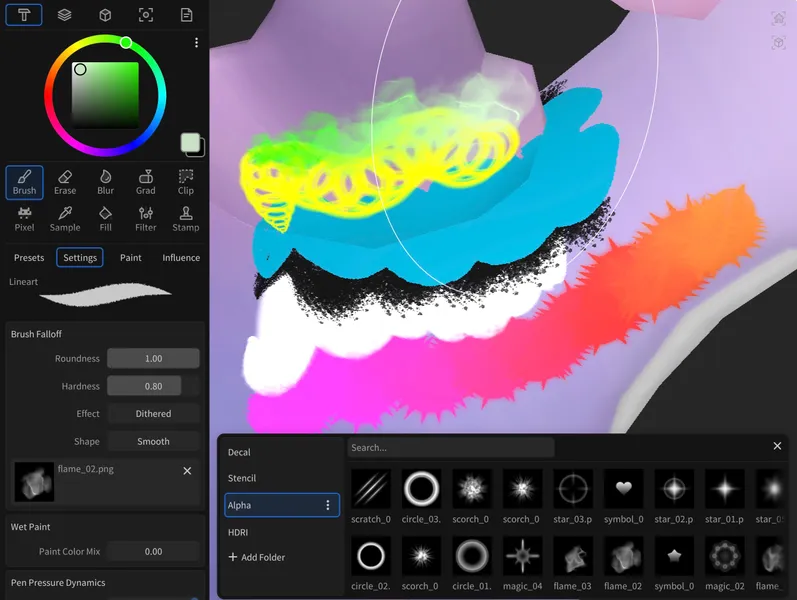
Wafer brush engine: pressure, tilt, stencils, decals, and stamps
Industry reporting and the iPad listing converge on a brush‑centric toolset. CG Channel describes “customizable brushes with support for pen pressure and pen tilt,” plus “stencils, decals and stamps.” The App Store listing states “Brushes with full pressure and tilt support,” and also lists:
- stencils, decals, and stamps,
- custom brush tip shapes and alphas,
- “wet painting and blur,” and gradient/lasso tools.
Sparseal’s product page also positions an integrated Asset Browser that includes stencils, triplanar textures, brush alphas, HDRIs, decals, and stamps, emphasising fast access to these resources while painting.

Wafer layers and masks: non-destructive texture painting workflow
Wafer is explicitly described as layer-based and non-destructive. Sparseal’s product page states it has a “Complete layer system” including paint layers, fill layers, editable masks, blend modes and opacity, and that it is “fully non-destructive.” The iPad listing reinforces this: “Full layer system with canvas and procedural fills,” plus “Paint on layer masks for multi-layer painting and non-destructive workflows.”
For stylised work, this matters as much as the brush feel: non-destructive masks allow artists to iterate on shapes, edge accents, and hand-painted gradients without committing destructive edits across multiple channels (especially when combined with multi-channel painting).
Wafer export and saving in the beta: what’s available and what’s changing
Exporting and saving are the areas where the “free beta” label can be misunderstood.
On iPad, the App Store listing shows Wafer is free to download, and lists an in‑app purchase called “Exporting and Saving Documents” (US store: US$19.99). This strongly implies that export/save is deliberately treated as a paid unlock even when the core painting experience is accessible.
On Windows beta, third‑party reporting is consistent with a similar gating model. A Japanese industry roundup states that while the Windows beta is free to download and use, texture output and saving work data require a paid licence contract. Sparseal’s beta licensing sandbox page explicitly frames “Exporting and Saving Documents” as an unlock, and it includes example packages and thresholds (e.g., “Indie” tier language and price points), while warning that the site is for beta testing only and that products/prices/policies may not match the release version.
CG Channel’s reporting also reflects an evolving beta distribution/activation story, noting that earlier guidance about unlocking save/export in Discord was later superseded by the beta becoming downloadable directly from Sparseal’s website (as of April 3, 2026).
The key expectation to set during evaluation is that export/save behaviour may change between beta builds and may differ between iPad and Windows packaging, but Sparseal has clearly separated “painting experience” from “export/save entitlements” in at least some of its distribution channels.

Best file formats to export from Wafer for game engines and Blender workflows
Sparseal does not publicly enumerate (in the captured product-page text) a fixed list of supported export file formats for Wafer; instead, it advertises control over “resolution, format and channel packing,” and a “fully configurable channel packing pipeline.” The most robust guidance, therefore, is to pick formats based on what your target applications import reliably and what Wafer’s exporter UI offers in your specific beta build.
For mainstream real-time pipelines, the import format support of major engines is well documented:
Unity’s documentation lists many supported texture file formats, including PNG, TGA, EXR, PSD, TIFF, and JPG, among others. Unreal Engine’s documentation similarly lists a wide range of supported image formats for texture import, including PNG, TGA, PSD, EXR, TIFF, JPG/JPEG, DDS (certain cases), and more.
Using that as a compatibility baseline, common best-practice export choices (assuming Wafer supports them in the exporter UI) are:
- Lossless 8‑bit formats for authored colour and masks (PNG, TGA) when you need clean edges for stylised art and predictable compression behaviour in engines. (Unity and Unreal both list PNG and TGA as supported imports.)
- EXR for HDR or higher-precision data when you truly need it and your target pipeline supports it (both Unity and Unreal list EXR import).
- JPEG for photographic base colour only when artefacts are acceptable; glTF explicitly supports JPEG as an image type, but JPEG is generally a poor choice for masks and stylised line edges due to compression artefacts.
For channel packing, follow the conventions of the target renderer/shader model:
- In Unity URP Lit and Complex Lit shaders, Unity documents a standard channel-packed texture layout for metallic/occlusion/smoothness in a single RGBA texture (R = Metallic, G = Occlusion, A = Smoothness) and explicitly instructs disabling sRGB for that packed texture.
- In Unreal Engine, the
sRGBtexture flag is documented with a specific caution: it “should be unchecked if using alpha channels individually as masks,” which aligns with common practice for packed mask textures (RMA/ORM-style maps). - For glTF metallic‑roughness assets, the spec defines roughness in G and metalness in B for the packed metallicRoughnessTexture, and requires linear encoding for those values.
Finally, for Blender-based shading workflows, the Blender manual positions the Principled BSDF node as a compatibility-focused PBR shader where textures painted in tools like Substance Painter can map directly to corresponding inputs (base colour, roughness, metallic, normal). That makes it sensible to export Wafer’s PBR channels as discrete textures (base colour + roughness + metallic + normal) when you want maximum clarity and minimal pipeline assumptions.
Common Wafer beta issues: stability, performance, and troubleshooting tips
In hands-on testing, CG Channel reports “some stability and performance issues” in the Windows beta they tried, and emphasises that it is still early in development. Digital Production similarly urges treating the beta label seriously keeping backups, versioning assets, and not betting delivery timelines on unproven tooling.
The iPad version history also signals typical early-cycle issues being actively fixed (including crash fixes related to smudge sampling and fill operations, plus other import/export and UI fixes). While iPad crash notes are not Windows-specific, they reinforce that features are actively changing and bug-fixing is ongoing.
Troubleshooting heuristics that align with Wafer’s architecture claims and common GPU/pen input pitfalls:
- If performance is poor or the viewport is unstable, prioritise updating GPU drivers and verifying basic graphics API support. Wafer’s public compatibility language explicitly references OpenGL capability as part of its maximum-compatibility claims, which makes driver quality a high-probability factor.
- If pen pressure/tilt does not work as expected, verify whether the tablet driver and the application are aligned on Windows Ink vs WinTab modes; Wacom’s documentation describes these two pen data paths and stresses configuration considerations.
- If packed mask textures look “wrong” in-engine after export, verify colour space flags: Unreal documents that sRGB should be unchecked when using alpha channels as masks, and Unity URP’s channel-packed texture instructions also include disabling sRGB on packed metallic/occlusion/smoothness textures.

Wafer roadmap and release pricing expectations (based on current info)
As of early April 2026 coverage, no stable release date and no official final pricing for Wafer on Windows have been announced in the cited reports.
CG Channel notes that the licence server “suggests” the Windows version will be priced slightly higher than the iPad release, but also states Sparseal has not announced official pricing for the stable release. Digital Production similarly reports the absence of an official stable release date and pricing, while pointing to licence-server information as indicative rather than definitive.
Sparseal’s beta licensing sandbox provides concrete example package tiers and prices for an export/save entitlement (e.g., “Indie” at $45 per user; “Studio” at $120), but explicitly warns these may not match the release version and that purchases are simulated for beta testing.
The most evidence-based “what to expect” is therefore:
- Windows beta access: free to download/use during open beta (as reported).
- Export/save entitlements: likely to be monetised (strongly suggested by both iPad IAP and Windows licence messaging), but final structure/pricing not confirmed as an official stable‑release statement.
Wafer on iPad vs Wafer on Windows: feature differences and portability
Wafer’s origin as an iPad app is consistently reported. Digital Production states the Windows beta aligns with the current iPad release and includes new features introduced in the Wafer 1.1 update (including a Smudge tool). CG Channel similarly reports the Windows build is based on the current iPad release and includes features from the Wafer 1.1 update.
On iPad specifically, the App Store description provides concrete detail on:
- pressure/tilt brush support and mask-based layers,
- multichannel painting (colour/roughness/metallic together),
- performance claims framed around resolution scaling and device memory limits, including support for 16K textures on compatible iPads and up to 24K on an iPad Pro (3rd gen, 2018).
- importing support called out in version history (e.g., “Supports importing .fbx and .vrm files” in a 1.1.1 update entry).
For Windows, the most defensible “difference” expectations are about input devices and workflow ergonomics:
- iPad emphasises touch + stylus workflows (Apple Pencil details appear in user reviews and developer replies).
- Windows emphasises mouse/keyboard and external pen tablets; CG Channel reports beta users discussing broad support across major tablet brands.
Portability-wise, Sparseal’s product messaging points to cross-platform engineering decisions (“Written in Rust” and use of WGPU, per the product page), and CG Channel reports the developer mentioned having builds for multiple platforms (including macOS and Android) in Discord, suggesting broader platform ambitions beyond Windows + iPad.
Wafer community resources: where to get updates, builds, and support
Three places are consistently referenced as “official rails” for updates and support:
- First, the official Wafer product page, which is where Sparseal is reported to host the Windows beta download (per CG Channel’s April 3 update, and Digital Production’s April 8 reporting).
- Second, Sparseal’s Discord, linked directly from the Wafer page and also referenced explicitly in Sparseal’s beta licensing sandbox (“For more information, join our Discord server”).
- Third, Sparseal’s official social/video channels (linked from the Wafer page), including YouTube and social networks (useful for release notes, demo clips, and announcements).
Frequently Asked Questions (FAQs)
- Is Wafer on Windows actually available outside iPad now?
Yes. Multiple reports in early April 2026 describe a Windows open beta, and CG Channel frames it as the first Sparseal product available on a platform other than iPad. - Can Wafer paint directly on a 3D model as well as in 2D?
Yes. Wafer is described as supporting painting directly on the 3D mesh and also painting in a 2D texture/UV view, with the two views kept in sync. - Does Wafer support PBR materials, or is it only for NPR?
It supports PBR workflows and preview (including roughness and metalness), while also being designed for NPR and custom channel layouts. - What is “multi-channel painting” in Wafer?
It means one stroke can update multiple channels (for example, colour, roughness, and metalness) simultaneously. - Is multi-channel painting a rare feature in texture painting software?
It is significant enough that Foundry markets it as a major capability in Mari (Multi‑Paint), describing painting into multiple streams/channels at once. - Does Wafer have layers and masks like Photoshop-style painting apps?
Yes. Wafer is described as having paint layers, fill layers, editable masks, blend modes, and opacity controls, with a non-destructive workflow. - Does the Windows beta support pen tablets like Wacom/Huion/XP-Pen?
CG Channel reports Discord users stating support for major pen tablet manufacturers, including Wacom, Huion, and XP‑Pen. - Why do roughness/metallic maps look wrong after exporting to a game engine?
A common issue is importing non-colour data as sRGB instead of linear. Unreal’s documentation states sRGB should be unchecked when using alpha channels individually as masks, and Unity URP channel packing guidance includes disabling sRGB for packed metallic/occlusion/smoothness textures. - What image formats should I expect to use in Unity or Unreal workflows?
Unity documents support for formats including PNG, TGA, EXR, PSD, and JPG, among others. Unreal documents support for formats including PNG, TGA, PSD, EXR, TIFF, JPG/JPEG, and others. - Will Wafer be paid after the beta?
No official stable-release pricing has been announced in the cited April 2026 reports. Some reporting suggests the licence server hints at pricing, and Sparseal’s beta licensing sandbox shows example tiers/prices but warns they may not match the release version.

Conclusion
Wafer’s Windows open beta (reported in early April 2026) puts an explicitly stylised/NPR-focused texture painting workflow on PC, emphasising multi-channel strokes, an illustration-style layer/mask UI, and a configurable exporter intended to support varied pipelines. The most important “what to expect” points are that the beta is publicly accessible and framed as free to use, but exporting and saving may be gated behind a licence/IAP model depending on platform and build.
Sources and Citations
- Sparseal Wafer product page, https://sparseal.com/wafer/
- CG Channel, “3D texture painting app Wafer is now available for Windows,” https://www.cgchannel.com/2026/04/3d-texture-painting-app-wafer-is-now-available-for-windows/
- CG Channel, “Check out promising new 3D texture painting app Wafer,” https://www.cgchannel.com/2026/02/check-out-promising-new-3d-texture-painting-app-wafer/
- Digital Production, “Sparseal Wafer opens Windows beta,” https://digitalproduction.com/2026/04/08/sparseal-wafer-opens-windows-beta/
- Sparseal beta/licensing page for Wafer, https://sparseal.com/wafer/
- GameMakers.jp, “ゲーム開発関連ツールのリリース・アップデートまとめ【2026/4/4】,” https://gamemakers.jp/article/2026_04_04_134894/
- Apple App Store, “Wafer – 3D Texture Paint,” https://apps.apple.com/us/app/wafer-3d-texture-paint/id6759056701
- Khronos glTF 2.0 Specification, https://registry.khronos.org/glTF/specs/2.0/glTF-2.0.html
- Khronos, “Art Pipeline for glTF,” https://www.khronos.org/blog/art-pipeline-for-gltf
- Unity documentation, “Assign a channel-packed texture to a URP material,” https://docs.unity3d.com/Packages/com.unity.render-pipelines.universal@14.0/manual/shaders-in-universalrp-channel-packed-texture.html
- Unity documentation, “Mask and detail maps,” https://docs.unity3d.com/Packages/com.unity.render-pipelines.high-definition@14.0/manual/Mask-Map-and-Detail-Map.html
- Unity documentation, “Texture Import Settings,” https://docs.unity.cn/Manual/class-TextureImporter.html
- Unreal Engine documentation, “Using Texture Masks in Unreal Engine,” https://dev.epicgames.com/documentation/unreal-engine/using-texture-masks-in-unreal-engine
- Unreal Engine documentation, “Texture Import Guide,” https://dev.epicgames.com/documentation/en-us/unreal-engine/texture-import-guide?application_version=4.27
- Blender Manual, “Principled BSDF,” https://docs.blender.org/manual/en/latest/render/shader_nodes/shader/principled.html
- Foundry Learn, “Multi-Paint,” https://learn.foundry.com/mari/7.5/Content/user_guide/painting/multi-paint/multi-paint.html
- Foundry Learn, “Multi-Channel Paint Node,” https://learn.foundry.com/mari/7.5/Content/reference_guide/nodes/multi_channel_paint_node.html
- Adobe Substance 3D Painter documentation, https://experienceleague.adobe.com/en/docs/substance-3d-painter/using/home
- Adobe Substance 3D Painter system requirements, https://experienceleague.adobe.com/en/docs/substance-3d-painter/using/getting-started/system-requirements
- Wacom documentation, “Windows Ink,” https://developer-support.wacom.com/hc/en-us/articles/12844630619415-Windows-Ink
- Wacom documentation, “Can I use Windows Ink and Wintab applications with Wacom Bridge?” https://support.wacom.com/hc/en-us/articles/28273470604183-Can-I-use-Windows-Ink-and-Wintab-applications-with-Wacom-Bridge
Recommended
- Battlefield 6 Season 3 Brings Reimagined Golmud Railway Map With Major Gameplay Changes and Train Overhaul Explained
- Custom Skyboxes with Blender: Create Equirectangular HDRIs, Fix Seams, and Export to Unity & Unreal
- Alien: Rogue Incursion Part One Nintendo Switch 2 Release Date Explained
- How to Install and Set Up The View Keeper in Blender
- s&box Open-Source Game Creation Platform: How to Build, Mod, and Publish Games with Source 2 + C#
- Arc Raiders Riven Tides Trailer Reveals Massive Beach-Themed Update With New Seaside Map, Beachcombing System, and ARC Turbine Enemy
- Gears of War Movie Director Shares Major Netflix Update
- Lucid Blocks Surreal Minecraft-Style Game About Exploring Liminal Spaces: Release Date, Gameplay, and Apotheosis Crafting
- The Witcher 4: Everything We Know About CD Projekt Red’s Next Epic RPG
- Warner Bros. Wants Bradley Cooper to Write, Direct, and Star in the Ocean’s Eleven Prequel



































































































