





What Is Mesh2Motion and How Does the Animation App Work
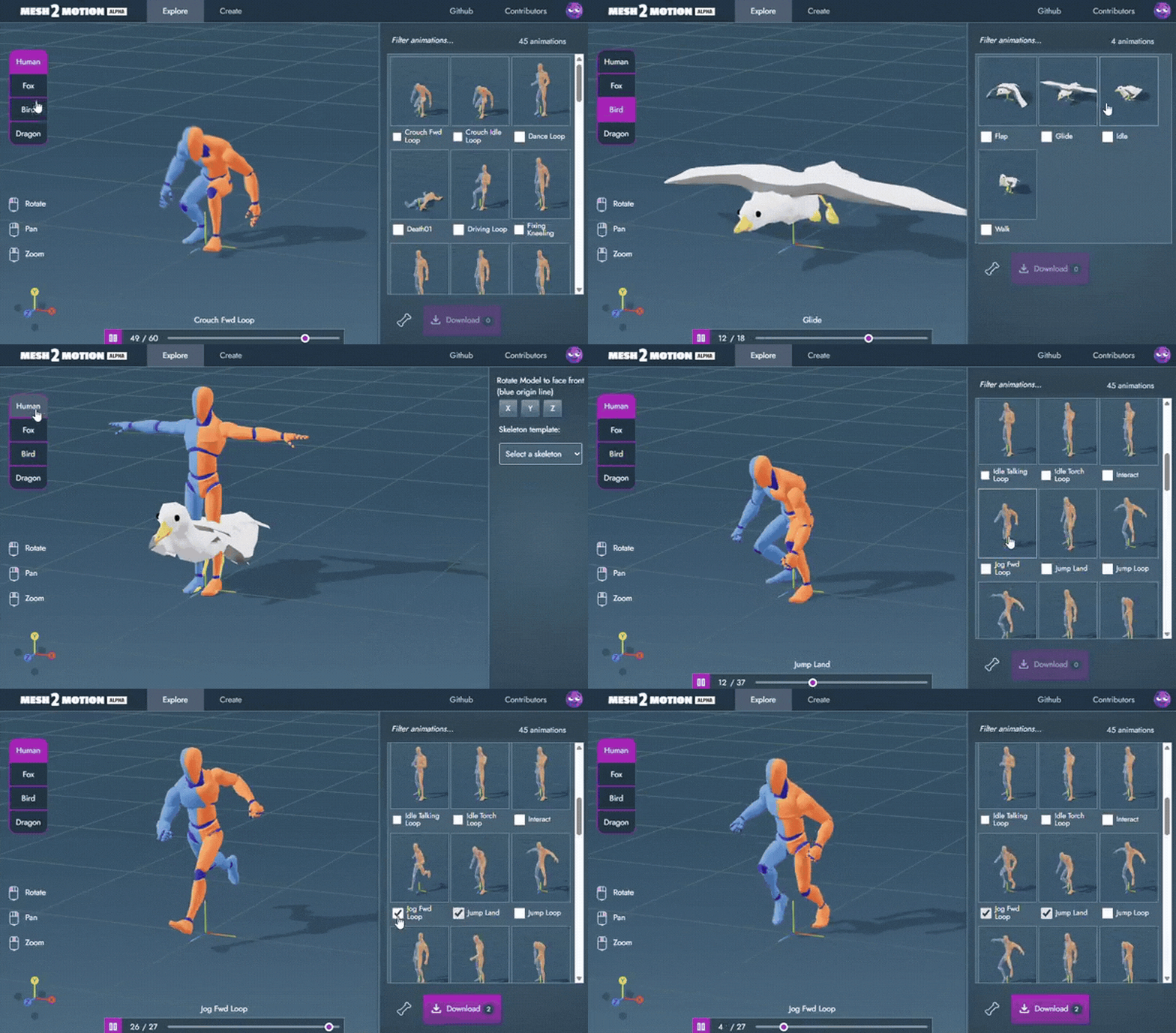
Mesh2Motion is a free, open-source web application for rigging and animating 3D characters. It runs entirely in the browser (no downloads or subscriptions needed) and is designed for use with web and game engines. Users can import common 3D file formats (GLB, GLTF, DAE, FBX) and Mesh2Motion automatically suggests a suitable skeleton for the model. In practice, you simply upload your mesh and the app auto-assigns bones.
The intuitive interface then lets you drag the skeleton into place and preview dozens of animations instantly. Behind the scenes, Mesh2Motion provides standard rigs for humans, animals (birds, dragons, foxes, etc.), and now newly added spider and snake skeletons. Its goal is to make character animation easy and accessible by giving developers ready-made rigs and motion libraries under a permissive open license.

Mesh2Motion Animation App Introduces Spider and Snake Rigs
Release 10 of Mesh2Motion introduces two new creature rigs – a spider and a snake – along with improved editing tools. The update adds a nine-legged arachnid skeleton with 9 built-in motions (idle, walk, attack, death, etc.) and a serpentine skeleton with 7 animations covering similar actions. According to the developer, “part of adding these was to expand the variety of rigs to see how well this tool can support different types of creatures”.
In other words, Mesh2Motion now streamlines workflows for non-human characters: animators can apply these ready-made spider and snake actions in games, simulations, or artwork without manual rigging. These new rigs complement the existing human, four-legged (fox), and dragon skeletons, making Mesh2Motion a versatile Mixamo-like solution for many creature types.
Mesh2Motion Release 10 Features Explained
Release 10 packs a variety of updates beyond the new rigs. Key features include:
- Spider & Snake Rigs: Mesh2Motion now includes a Spider skeleton (9 animations) and a Snake skeleton (7 animations) for quick creature setup.
- Skeleton Editing Tools: Enhanced bone controls let users snap joints to a mesh’s center, move bones to a model’s volume center, and adjust bones independently without affecting children.
- UI Improvements: A new 3D transform widget fixes model orientation on upload, and a consolidated gear/settings menu adds controls for scene lighting and themes. Animation browsing was smoothed out with lazy-loading previews, and all “T-pose” presets were renamed to “Rest Pose” for consistency.
- Rig Debugging Aids: For custom-rig upload, Mesh2Motion now displays the skeleton hierarchy, shows the number of skinned meshes, and offers text filters for bone mapping fields. A “Clear All” button wipe bone mappings more thoroughly, and overall rigging logic was improved.
- Skinning Upgrades: The skinning algorithm was refined to treat different bone groups (torso, limbs, wings, tail) separately for better mesh deformation during animation.
- Technical Updates: Under the hood, Mesh2Motion adopted a configuration file system to make adding new rigs easier, and all core libraries (Three.js, TypeScript, etc.) were updated to modern versions.
Together, these changes streamline the workflow: animators get more creature types out of the box and more precise bone placement tools, while developers benefit from improved performance and extensibility.
Spider Rig Animations in Mesh2Motion
The new Spider rig in Mesh2Motion has a set of 9 animations to cover typical spider behaviors. These include a basic idle stance and a walk cycle for locomotion, as well as combat-like animations such as attack and death. (The 80.lv article notes “the spider comes with 9 animations, including idle, walk, attack, and death”.) This means that after selecting the Spider skeleton, users can immediately animate the model crawling or striking without creating keyframes from scratch.
Other animations in the pack (for example, an “attack with legs” or multiple walk variations) allow for expressive monster movements. By bundling these common motions, Mesh2Motion lets game developers and artists quickly prototype a crawling spider in their scenes – for example, as an enemy in a forest level or a creature in a biology visualization – without manual rigging or animation setup.

Snake Rig Animations in Mesh2Motion
Similarly, the Snake rig provides 7 built-in animations covering the essentials of serpent motion. The pack includes a slither or walk cycle, an idle pose, and actions like attack (strike) and death. With these seven animations, animators can bring a snake model to life immediately: seeing it crawl through the grass, strike its prey, or coil up.
The 80.lv news highlights that the snake animations are “similar” to the spider’s. In practical terms, this means Mesh2Motion users get a ready-made library of snake behaviors for game wildlife, jungle scenes, or enemy creatures. Like the spider rig, the snake animations are designed for fast iteration: you select the Snake skeleton, align it to your model, then simply play the available animations to see the snake move realistically.
How Mesh2Motion Supports Creature Animation Workflows
Mesh2Motion is built around an explore-and-animate workflow that heavily supports creature animation. It offers pre-configured rigs for many animal types (birds, dragons, foxes, etc.) in addition to bipeds. With Release 10, this now explicitly includes spiders and snakes. The interface has an “Explore” landing page (introduced in Update 6) that lets users quickly preview any rig and its animations on a sample model. This makes it easy to test an animation on a creature before importing your own model.
Animators can pick the appropriate rig (e.g. “Spider” or “Fox”), adjust bone alignment using the intuitive drag handles (with snapping and mirroring aids), and immediately browse dozens of motions. Mesh2Motion’s browser-based approach means you can iterate on rigs and animations without switching tools: there is live feedback when moving bones, undo/redo support for experimentation, and a straightforward “import model then export animations” workflow. All of this accelerates creature animation development. Instead of wrestling with Blender rigging or mixing files, developers can prototype creature motions in seconds and then export a GLB file of the animated mesh for use in a game engine.
Skeleton Editing Improvements in Mesh2Motion Release 10
Release 10 adds several user-friendly refinements to the skeleton editor, especially for complex creatures. First, moving a joint now snaps the bone to the mesh’s geometric center by default. This auto-centering drastically speeds up aligning bones within an irregular mesh, which is common for creatures like spiders or dragons. The joint handles themselves have been redesigned: they’re slightly larger and semi-transparent so that overlapping bones can be seen clearly during placement.
A new “independent bone movement” mode lets you drag a parent bone without dragging its children, giving more granular control. Finally, there is a volume-center placement option: a selected bone can be moved to the centroid of its bound vertices, ensuring it sits centrally in the mesh’s volume. Together, these improvements reduce guesswork when positioning a creature’s legs or spine, making rigging faster and more precise than before.

Mesh2Motion Bone Joint Snapping and Volume Center Tools
Two of the key tools behind the skeleton updates are the Bone Joint Snapping and Volume Center features. When you grab a joint to position it, the snapping tool automatically aligns the joint to the center of the underlying mesh geometry. This means your spider leg joint will line up in the middle of a leg segment without tedious manual adjustments. The volume center tool allows you to place a bone at the centroid of all vertices influenced by that bone.
This is especially useful for symmetric creatures: you can ensure each leg or tail bone is centered in its respective limb. These tools can be toggled on in the transform options, and they complement the existing transform gizmo. By handling common alignment tasks automatically, they greatly simplify the rigging process for complex models.
How to Rig and Animate Creatures with Mesh2Motion
Using Mesh2Motion for a new creature is straightforward:
- Upload your model: Click Upload and select your 3D mesh file (GLB, GLTF, DAE, or FBX). The model will appear in the scene and the “Create” page will load.
- Choose a skeleton: Select an appropriate rig from the dropdown (e.g. Spider or Snake) that best matches your creature’s anatomy. Mesh2Motion will automatically assign that skeleton to your mesh.
- Adjust bones: The skeleton will be superimposed on your model. Drag each joint into the correct position. Use the new snapping and volume-center options to quickly align joints to the mesh. You can also mirror bone movements or hide one side to make positioning multi-limbed creatures easier.
- Preview animations: Switch to the Animate page to see all available motions for that rig. Click on idle, walk, attack, etc., to play those animations on your model. This lets you visualize how the creature moves.
- Export if needed: Mesh2Motion can export multiple animations at once as a single GLB package. After rigging and testing, use Export to bundle all key animations for use in your game or engine.
This all happens in-browser and supports undo/redo. As one summary notes, “Mesh2Motion operates in a very straightforward way: import a 3D model, then automatically assign and export animations”. The extra UI tools (explore page, live animation preview, bone snapping) make creature animation quick even for non-technical users.
How Mesh2Motion Simplifies Rig Mapping and Skinning
Mesh2Motion also streamlines rig mapping and skinning when working with custom rigs. Release 10 added features for debugging and mapping skeletons: for example, it can display the skeleton hierarchy and the number of skinned meshes, helping you see how your bones are assigned. The Clear All bone-mapping button was improved to fully reset mappings, and text filters let you quickly find corresponding bones when retargeting animations.
For skinning (deforming the mesh), a new “targeted skinning algorithm” was introduced that groups bones by type (limbs, torso, wings, tail) for more natural deformations. In practice, this means skin weights are handled more intelligently for each body part, reducing common artifacts. These enhancements reduce manual tweaking: Mesh2Motion automatically does much of the heavy lifting in matching bones and distributing weights on creature meshes, so animators spend less time on technical setup and more on creative work.

Browser-Based Character Animation Tools for 3D Models
Mesh2Motion is part of a growing ecosystem of web-based 3D animation tools. The most well-known is Adobe Mixamo, a free online auto-rigger/animation library (though it primarily targets human characters). Other browser solutions include AI-powered services like DeepMotion’s Animate 3D, which can generate animations from video in your browser, and RADiCAL, which offers real-time motion capture via webcam.
Design platforms like Spline let users model and animate in-browser, and Clara.io (now defunct) was an earlier cloud 3D editor. Many of these tools require sign-up and are proprietary. Mesh2Motion stands out by being truly free and open-source, with no login needed, and by focusing on intuitive rigging interfaces. Its breadth of creature skeletons (arachnids, reptiles, birds, four-legged mammals, etc.) differentiates it from most others, making it especially powerful for projects involving diverse characters.
Open-Source Alternatives to Mixamo for Creature Animation
Mixamo has long been the go-to for easy rigging, but its scope is limited and it is not open-source. Mesh2Motion itself is designed as a free, open alternative: it has been described as “a free and open-source web app that allows you to animate your 3D models just like Mixamo”. Crucially, Mesh2Motion supports quadrapeds and avian skeletons in addition to humanoids, which most Mixamo alternatives do not. Other options exist: Blender (open-source) has the Rigify add-on for humanoids and can be extended for animals, but requires a desktop workflow. Game engines like Godot offer their own animation systems, but they lack user-friendly auto-riggers.
MakeHuman is an open-source character generator but focuses on humans. In practice, Mesh2Motion is one of the few open-source tools that combines Mixamo’s ease with built-in creature rigs. Developers needing free creature rigging often find Mesh2Motion fills that gap, whereas closed or paid tools (like commercial plugins or ActorCore) come with restrictions. In short, Mesh2Motion is unique in the open-source space for handling both human and non-human animations effortlessly.
Best Use Cases for Spider and Snake Rigs in 3D Animation
The new spider and snake rigs are well-suited to genres and scenarios involving those creatures. For example, horror or adventure games often feature giant spiders as enemies or obstacles – the Mesh2Motion spider animations (walk, attack, etc.) can quickly bring such enemies to life. Similarly, snake rigs are ideal for jungle or wilderness scenes, educational nature simulations, or any project needing slithering animals. Because these rigs come with attack and idle animations as well as locomotion, they can serve in combat sequences (e.g. a boss battle with a snake) or ambient background creatures.
In a broader sense, adding spiders and snakes shows Mesh2Motion’s focus on “different types of creatures”. Anyone creating ecosystems (like a rainforest environment) or monster movies can use these rigs to prototype creature behavior. The built-in animations remove the need to hand-key thousands of frames for these multi-limbed or limbless models, so even small indie teams can produce convincing creature animation quickly.

Mesh2Motion Release 10 vs Previous Versions
Compared to its predecessors, Release 10 is the first version to introduce arachnid and reptile skeletons. Earlier updates focused on other functionality: for example, Update 9 (Mar 2026) added the ability to import custom animations from external sources. Update 8 (Jan 2026) debuted a Kaiju (giant monster) rig with 10 new animations and an experimental “Upload Rigged Mesh” feature for using your own rigged model. In late 2025, releases improved the user experience – Update 6 created the new default Explore animations page and overhauled the control rigs for existing skeletons.
Mesh2Motion’s development notes mention adding hand animations, undo/redo, and mesh import fixes in updates 5–7. In summary, versions 8–9 expanded creature options (dragon, fox, kaiju, and custom rigs) and workflow features, whereas Release 10 is distinct for its new spider and snake rigs and enhanced bone editing tools. This marks a shift from UI and import improvements to broadening the animation library with new character archetypes.
Why Mesh2Motion Is Useful for Non-Human Character Animation
Mesh2Motion was created with a focus on animals and monsters as well as humans. It stands out because it includes rigs tailored for four-legged and non-humanoid creatures out of the box, something very few other tools offer. For any project involving creatures – a dragon in a fantasy game, a herd of animals in an AR app, or an alien monster in a short film – Mesh2Motion provides ready-made skeletons and animations.
Users don’t have to hand-craft rigs or poses for multi-legged limbs; the app’s auto-rigger handles that complexity. Moreover, everything in Mesh2Motion is open-source (MIT license for code, CC0 for art). This transparency means developers can study and tweak the rigs or animations if needed, a level of control not possible with closed tools. The breadth of its animation library (now including spiders, snakes, birds, etc.) and the lack of cost make it especially valuable for indie creators and educators working with non-human characters.

Frequently Asked Questions (FAQS)
- What is Mesh2Motion?
Mesh2Motion is a free, browser-based 3D rigging and animation tool. It lets you upload a model, auto-assign a skeleton, and apply animations. It’s open-source (MIT code license, CC0 art) and designed as a Mixamo-like app for both human and animal characters. - Is Mesh2Motion free to use and open-source?
Yes. Mesh2Motion is completely free and open-source. There is no subscription or hidden fees – you can use all features from your web browser. The source code is on GitHub under an MIT license, so anyone can contribute or modify it. - What new animation rigs were added in Release 10?
Release 10 added a spider rig with 9 animations (idle, walk, attack, death, etc.) and a snake rig with 7 animations. This means you now have ready-made skeletons and motion cycles for spiders and snakes, expanding the types of creatures you can animate in the app. - How do I rig and animate a model in Mesh2Motion?
First, upload your 3D model (GLB/GLTF/DAE/FBX). Then select a skeleton type (e.g. Spider, Snake, Fox, Human). Mesh2Motion automatically matches and assigns bones to your mesh. Next, position the bones using the on-screen handles (new Release 10 tools help snap them to the mesh center). Finally, go to the Animate tab and click any available animation (walk, attack, etc.) to preview it on your model. You can repeat with different actions. When done, you can export one or more animations as a single GLB file for your game engine. - What 3D model formats does Mesh2Motion support?
Mesh2Motion supports importing GLB, GLTF, DAE, and FBX files. These cover most common game and 3D formats. The exported animations are packaged in GLB format, which is widely supported in modern pipelines. - Can I edit the skeleton or adjust bones in Mesh2Motion?
Yes. Mesh2Motion has an interface for moving and rotating bones, with helpful Release 10 enhancements. Bones now snap to the mesh’s center when dragged, and you can move bones to their volume center. Bone joints are larger and semi-transparent to make overlapping limbs clearer. You can also hide one side in mirror mode and toggle an “independent move” mode so adjusting a parent bone doesn’t drag its children. These tools make it much easier to match the rig to your model. - Can I animate animals and other creatures, or only humans?
Mesh2Motion is explicitly designed for animals and monsters as well as humans. It includes rigs for birds, dragons, foxes, horses, and now spiders and snakes. This makes it ideal for non-human characters. In fact, Mesh2Motion was created as an open-source alternative to Mixamo that supports quadrupeds and birds. You can animate a wide range of creatures with the prebuilt skeletons and animations. - How does Mesh2Motion compare to Adobe Mixamo?
Mesh2Motion is often described as a free, open-source Mixamo alternative. Like Mixamo, it auto-rigs and provides animation packs, but Mesh2Motion supports more creature types (four-legged animals, birds, etc.). Mixamo is proprietary and mainly targets humanoids, whereas Mesh2Motion runs in-browser for free and publishes its code and assets for anyone to use. In short, Mesh2Motion offers similar ease-of-use with the bonus of animal rigs and full open-source licensing. - Are there other open-source tools for creature animation?
Other tools exist but often are not as specialized. For example, Blender is open-source and has rigging (Rigify) but requires manual setup. Godot Engine (open-source) has animation capabilities but no easy auto-rigger. Some teams use plugins or custom scripts, but they are not general-purpose apps. Mesh2Motion is unique as a dedicated browser app with built-in creature rigs. (Another open project is AnimAnalyzer or various community libraries, but they usually cover humans or require coding.) In practice, Mesh2Motion fills the niche for free creature rigging – outside of it, teams typically resort to paid libraries or complex Blender pipelines. - What else was improved in Release 10 vs earlier versions?
Besides the spider/snake rigs, Release 10 polished many features. Skeleton editing got the snapping and volume-center tools described above. The upload model workflow added a 3D transform widget so you can correct your model’s pose on the fly. Theme and lighting controls moved to a unified settings menu. The animation list now lazy-loads previews to avoid “popping” graphics, and all default poses were standardized to “Rest Pose” instead of T-pose. Under the hood, rigs now use a config file for easier future expansion, and the core libraries (Three.js, TypeScript, etc.) were updated to the latest versions. Earlier releases (8 and 9) had introduced the Kaiju (10 animations) and custom animation import; Release 10’s focus is on new creature types and better rig controls.

Conclusion
Mesh2Motion Release 10 significantly broadens the tool’s capabilities for animating non-human characters. By adding spider and snake skeletons, each with a suite of ready-to-use animations, Mesh2Motion now supports even more creature types out of the box. The improved bone editing (snapping to mesh, volume centering, etc.) makes rigging these new skeletons far more user-friendly. Combined with its existing library of human and animal rigs, Mesh2Motion has carved out a unique niche as a free, browser-based character animation platform.
All of this comes with open-source transparency, meaning artists can audit and modify the rigs or animation logic if desired. As an open tool, Mesh2Motion’s rapid development (weekly updates, community contributions) suggests even more features and creature types to come. For game developers, animators, and hobbyists, Release 10 makes it easier than ever to animate spiders, snakes, and other monsters — without any subscription fees or licensing headaches.
Sources and Citations
- https://mesh2motion.org/
Mesh2Motion. “Official Documentation and Website.” - https://github.com/Mesh2Motion/mesh2motion-app
Mesh2Motion. “GitHub README (features, usage, and license). - https://80.lv/articles/update-to-animation-app-mesh2motion-introduces-explore-page-better-control-rigs
80.lv. “Mesh2Motion Update Coverage and Feature Breakdown.” - https://80.lv/articles/update-to-animation-app-mesh2motion-introduces-explore-page-better-control-rigs
80.lv. “Mesh2Motion Updates and Improvements (Release coverage).” - https://www.deepmotion.com/documentation
DeepMotion. “Animate 3D Documentation and Platform Overview.” - https://www.deepmotion.com/animate-3d-api
DeepMotion. “Animate 3D (Browser-Based Animation Tool and API).”
Recommended
- How to Make Gen Z Slang Meme Videos with MetaHuman: Brainrot, Sigma, and Gooning-Style Content for Social Media
- How To Become Ruler In The Sims 4: Royalty And Legacy Guide
- Shinji Mikami Establishes High-Profile Game Development Studio Unbound: What We Know About the New AAA Original IP
- Managing Blender Scenes with Multiple Cameras Using The View Keeper
- Halfbrick cuts 41 jobs: what happened at the Fruit Ninja and Jetpack Joyride studio (March 2026)
- The House of Hikmah Guide: Beginner Tips, Puzzle Mechanics, Story Themes, and How Long It Takes to Beat
- How do I toggle between camera views in Blender?
- Best 3D Sculpting Software: Top Tools for Digital Artists
- Nipsey Hussle’s Braids: A Symbol of His Legacy
- Conquest Character Breakdown: Origin, Age, Comics, Invincible Animated Series and More




























































































