










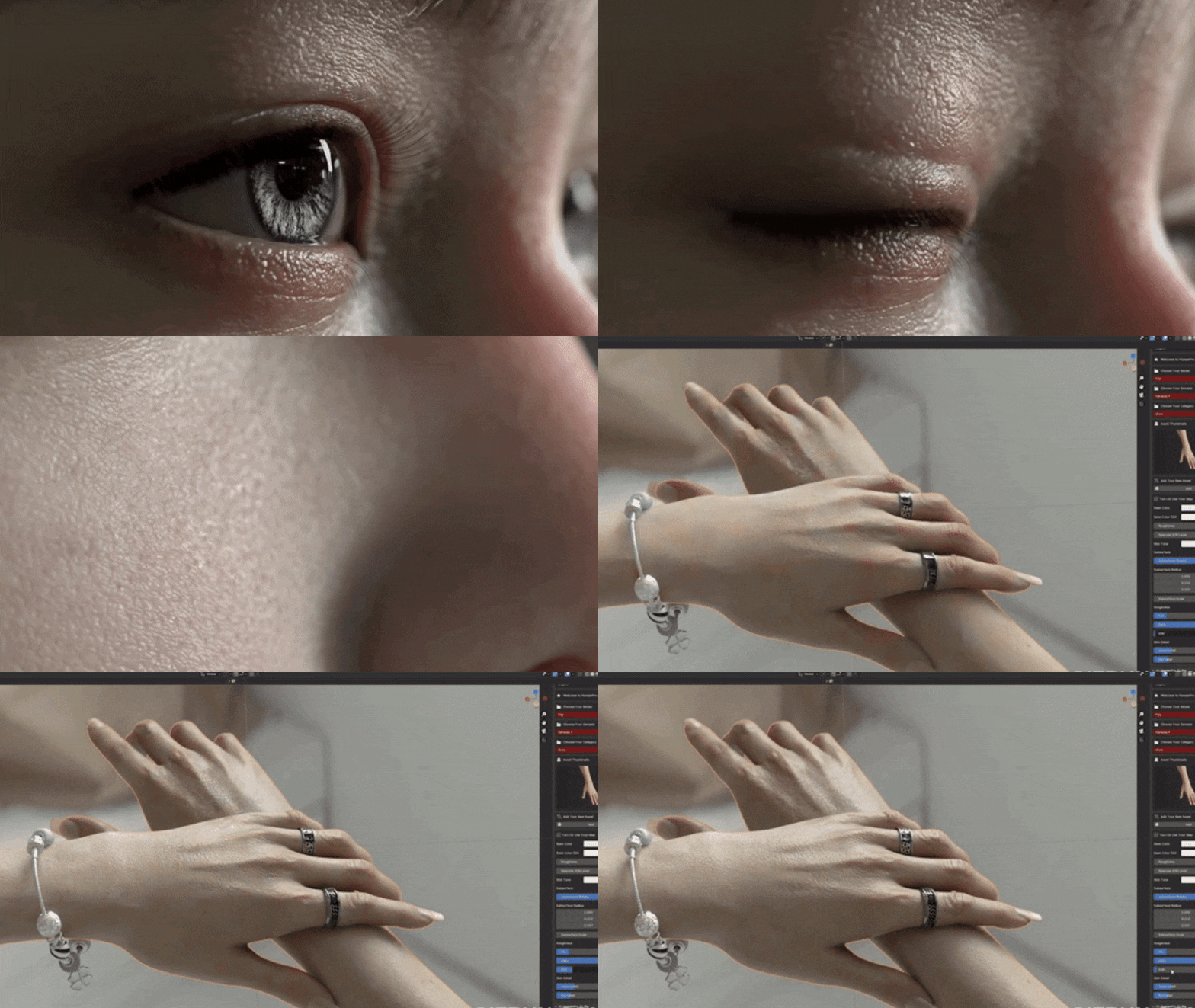
Creating hyper-realistic 3D characters in Blender traditionally requires expert-level work in sculpting fine skin details, rigging complex facial controls, and designing convincing hair. Human Pro for Blender is a new addon that streamlines this process by providing advanced skin shaders, micro-detail displacement maps, a built-in facial control system, and integration paths for high-quality hair assets.
In this comprehensive guide, we’ll explore how Human Pro enhances realistic character workflows in Blender, how it compares to other solutions like MetaHuman, Texturing XYZ, Triplegangers scans, and what additional tools (like Daz Studio, Diffeomorphic, PixelHair, and The View Keeper) complete a full pipeline from model import to final render. We’ll also cover practical tips for using Human Pro effectively, including importing Daz characters, managing library paths, blending shaders for skin and facial hair, achieving photoreal results in Cycles/Eevee, and even exporting characters to Unreal Engine. By the end, artists from beginners to professionals will understand how to build a workflow that yields perfect skin and lifelike animations for their Blender characters with Human Pro.

What is Human Pro for Blender and How Does It Enhance Realistic Character Workflows?
Human Pro is a powerful Blender addon designed to streamline the creation of hyper-realistic human characters by combining an advanced skin shader system with an optimized facial rigging solution. It enables artists to transform basic 3D models into photorealistic digital humans with minimal effort, saving significant time on texture creation, shader setup, and rigging. Key features include one-click application of ultra-realistic skin textures, dynamic wrinkle generation, and intuitive facial controls, making it ideal for indie developers, freelancers, and small studios aiming for high-end results without extensive resources.
Core Enhancements to Workflows:
- Speed and Simplicity: Automates complex tasks like shader configuration, micro-detail sculpting, and facial rig setup, reducing days of work to a single click.
- High-Quality Output: Utilizes 8K scan-based textures and displacement maps for lifelike skin, comparable to big-budget pipelines.
- Daz Studio Integration: Leverages Daz Genesis 8/9 figures via the Diffeomorphic Daz Importer, providing access to a vast library of customizable characters.
- Facial Animation: Includes a FACS-based facial rig for nuanced expressions, with dynamic wrinkles enhancing realism during motion.
By bundling these features, Human Pro empowers artists to focus on creative tasks, delivering emotionally engaging characters suitable for films, games, or virtual productions.
How Human Pro Creates Perfect Skin with Micro-Detail and High-Resolution Displacement Maps
Human Pro achieves photorealistic skin through a sophisticated shader system driven by high-resolution textures and multi-layered displacement maps, likely derived from real human skin scans. Its approach ensures skin holds up under close scrutiny, displaying pores, fine wrinkles, and realistic light interaction.
Key Mechanisms:
- 8K Texture Resolution: Provides ultra-detailed albedo, roughness, and subsurface scattering (SSS) maps, surpassing standard 2K/4K textures for crisp pore-level detail.
- Displacement Mapping: Uses high-bit-depth displacement maps with Blender’s adaptive subdivision in Cycles to physically deform the mesh, creating realistic wrinkles (e.g., crow’s feet, nasolabial folds) and skin texture.
- Multi-Layered Detail: Combines coarse wrinkle displacement for expressions with fine pore and micro-wrinkle normal/bump maps, mimicking Texturing XYZ’s multi-channel approach but pre-configured.
- Physically-Based Shading: Employs Blender’s Principled BSDF with tuned SSS radius, roughness variations (oilier T-zone, drier cheeks), and transmission for lifelike light diffusion, ensuring natural highlights and shadows.
- Dynamic Response: Shader adapts to facial motion, blending wrinkle maps based on mesh deformation for realistic creasing during expressions.
This automation eliminates the need for manual texture painting or sculpting, delivering production-ready skin that rivals photogrammetry scans in a fraction of the time.

Understanding the Facial Control System in Human Pro: Posing, Expressions, and FACS
Human Pro’s facial control system is a FACS-based rig that enables precise, lifelike expressions with minimal setup. It integrates seamlessly with the skin shader to produce dynamic wrinkles, enhancing emotional realism.
Key Features:
- FACS Framework: Uses Facial Action Coding System principles, mapping muscle movements (action units) to sliders for expressions like smirks, frowns, or surprise.
- Intuitive Interface: Offers a user-friendly panel with controls (e.g., “Eyebrow Raise,” “Smile”) driving complex shape keys or bones, simplifying animation.
- Dynamic Wrinkles: Links expression-driven wrinkle maps to mesh deformation, automatically generating forehead lines or crow’s feet when posing, akin to MetaHuman’s tension maps.
- Optimized Performance: Uses texture-based details and efficient rigging to maintain a lightweight viewport, avoiding heavy polygon counts or excessive drivers.
- Animation Ready: Supports keyframing for full animations or quick posing for stills, aligning with professional FACS workflows used by Disney/Pixar.
This synergy of expressive controls and automatic wrinkle formation ensures characters convey nuanced emotions naturally, suitable for cinematic or interactive applications.
How to Import Daz Studio Characters into Blender Using Diffeomorphic for Human Pro Compatibility
Human Pro is optimized for Daz Studio’s Genesis 8/9 figures, imported via the Diffeomorphic Daz Importer addon. This process ensures compatibility and leverages Daz’s extensive character library.
Step-by-Step Import Process:
- Install Dependencies: Set up Daz Studio, acquire Genesis 8/9 figures, and enable the Diffeomorphic Daz Importer in Blender’s Add-ons menu.
- Prepare in Daz: Create or load a character, apply morphs or accessories, and save as a .duf file or export as a .dbz file using Diffeomorphic’s script.
- Import in Blender: Use Daz Importer’s Easy Import to load the .duf/.dbz file, selecting high-resolution options for displacement compatibility and ensuring morphs import.
- Verify Import: Check the character’s mesh, rig, and materials in Blender, confirming proper scale and functionality.
- Apply Human Pro: Enable the Human Pro addon, select the character, and use its UI (e.g., “Apply Shader”) to replace materials with 8K skin textures and add facial controls.
- Customize Settings: Adjust skin tone or detail levels as needed, ensuring Daz morphs align with Human Pro’s rig.
- Test Expressions: Use facial sliders to pose expressions, verifying dynamic wrinkles and bendshape muscle deformations.
This workflow ensures a seamless transition from Daz to Blender, with Human Pro enhancing the imported character’s realism.

Managing the Daz Library Inside Blender and Working Around Pathing Issues
Properly configuring Daz library paths in Blender is critical to avoid missing textures or assets during import, as .duf files reference external files in Daz’s content directories.
Best Practices for Path Management:
- Configure Paths: In Blender’s Daz Importer Global Settings, add up to nine Daz content directories (e.g., My Documents/Daz3D/Studio/My Library or custom paths), mirroring Daz Studio’s setup.
- Save Settings: Use Save Default Settings to persist paths across sessions, preventing repetitive configuration.
- Pre-Check in Daz: Load the character in Daz Studio first, checking the log for missing assets to ensure a complete .duf file.
- Handle Errors: If textures fail to load (e.g., black skin), check Blender’s console for missing file paths, correct them in settings, and re-import.
- Relative Paths: Post-import, use Blender’s File > External Data > Make Paths Relative to maintain links if moving projects.
- Multiple Libraries: Support custom setups by adding all relevant content folders (e.g., default and external drives) to Diffeomorphic’s path list.
These steps ensure reliable imports, minimizing errors and enabling Human Pro to apply its enhancements without issues.
Texture Resolution and Displacement Fidelity in Human Pro Compared to MetaHuman Assets
Human Pro and MetaHuman both target photorealism but differ in their rendering contexts (Blender offline vs. Unreal real-time). Here’s a detailed comparison:
- Texture Resolution: Both use 8K face textures for pore-level detail. Human Pro’s 8K body textures may exceed MetaHuman’s 1K-4K body maps, offering sharper detail in Blender renders.
- Displacement: Human Pro employs true displacement in Cycles for physical mesh deformation, capturing subtle self-shadowing. MetaHuman relies on normal maps and wrinkle maps for real-time efficiency, approximating detail.
- Shader Quality: Human Pro’s Principled BSDF with precise SSS in Cycles can outperform MetaHuman’s real-time SSS in Unreal for light diffusion (e.g., through ears). In Eevee, results are closer to Unreal’s.
- Expression Fidelity: Both use wrinkle maps triggered by expressions, with comparable realism. MetaHuman’s per-character scans may offer slight uniqueness, but Human Pro’s generic maps align well with Genesis anatomy.
- Performance: MetaHuman optimizes for real-time with LODs and texture streaming, while Human Pro maximizes detail for offline renders, potentially surpassing MetaHuman in close-ups at the cost of render time.

Comparing Human Pro to Other Realistic Skin Solutions Like Texturing XYZ and Triplegangers
Human Pro, Texturing XYZ, and Triplegangers offer distinct approaches to realistic skin, varying in workflow complexity, cost, and output.
- Texturing XYZ:
- Workflow: Provides multi-channel scan-based maps (albedo, displacement, specular) for manual projection in ZBrush or Mari, offering ultimate customization but requiring expert skills.
- Quality: Matches or exceeds Human Pro with 8K-16K maps, allowing unique details (e.g., specific scars).
- Cost: $50-$200 per map set, plus significant artist time.
- vs. Human Pro: Human Pro automates a similar multi-channel approach, pre-fitted to Genesis UVs, saving time. XYZ offers more customization but demands manual integration.
- Triplegangers:
- Workflow: Supplies ultra-realistic 3D scans (8K+ textures, dense meshes) requiring retopology and rigging for animation, ideal for specific likenesses.
- Quality: Surpasses Human Pro in anatomical uniqueness (e.g., exact scars), but raw scans need processing.
- Cost: High, with scans costing hundreds, plus pipeline setup time.
- vs. Human Pro: Human Pro offers a ready-rigged solution with near-scan quality, while Triplegangers requires extensive post-processing for usability.
- Human Pro:
- Workflow: One-click application of 8K textures, displacement, and FACS rig, optimized for Daz imports in Blender.
- Quality: Rivals XYZ and Triplegangers for most use cases, with dynamic wrinkles and lifelike shading.
- Cost: ~$60 one-time purchase, highly cost-effective.
- Advantage: Balances ease, speed, and quality, democratizing high-end results for smaller teams.

Can Human Pro match the anatomical quality of scans from 3D Scan Store?
Human Pro delivers high-quality results, but how does it compare to 3D Scan Store’s ultra-realistic scans? Here’s a breakdown:
- Resolution and Detail: 3D Scan Store’s scans use 16K textures (displacement, albedo), capturing pores and wrinkles. Human Pro’s 8K textures suit close-ups but offer less detail for extreme zooms.
- Anatomical Accuracy: 3D Scan Store scans reflect specific individuals’ features (e.g., skin folds, scars). Human Pro’s Genesis mesh is generic, applying high-quality, non-specific skin details, morphable but lacking scan-unique imperfections unless added.
- Displacement Fidelity: Human Pro’s 8K displacement maps, with dense mesh subdivision, nearly match scan detail in stills. 3D Scan Store’s direct captures may include unique nuances (e.g., vein patterns), though differences are subtle.
- Ease of Use: 3D Scan Store models are static, needing rigging for animation. Human Pro’s pre-rigged Genesis figures are animation-ready. Artists can enhance Human Pro with 3D Scan Store displacements.

Alternatives to Human Pro: What to consider from other Blender and third-party skin systems
Human Pro excels in Blender, but other tools offer alternatives or complements:
- Human Generator (HumanGen): Paid Blender addon for customizable, rigged characters. Skin shaders need tweaks for photorealism vs. Human Pro’s micro-detail.
- MB-Lab: Free Blender addon for humanoids, outdated with lower-resolution textures, needing enhancement for photorealism.
- MakeHuman: Free tool for base meshes, requiring work for realism. Limited compatibility with Human Pro’s Daz-based shader.
- Character Creator 4 (Reallusion): External software with SkinGen for layered 4K/8K skin details. Customizable, costly, requires Blender import.
- MetaHuman Creator: Free Unreal Engine tool for realistic characters, less convenient for Blender due to export issues.
- Procedural Skin Shaders: Blender Market shaders (e.g., GlobalSkin) for custom models, needing manual setup for dynamic wrinkles, unlike Human Pro’s integration.
- Custom Pipeline: ZWrap, Texturing XYZ, and Rigify for ultra-realistic characters, but labor-intensive vs. Human Pro’s streamlined approach.
- AutoRig Pro: Rigs custom models, lacks skin textures, needing shaders to match Human Pro’s quality.
Using Texturing XYZ’s multi-channel displacement with Human Pro characters
Texturing XYZ’s multi-channel displacement maps enhance Human Pro’s realism for specific skin details:
- Multi-Channel Maps: Pack three displacement layers (R: broad forms, G: wrinkles, B: pores) into one image for flexible shading.
- Integration Approaches:
- Shader Mixing: Blend XYZ textures with Human Pro’s displacement in Blender nodes, using masks for approximate placement (e.g., forehead wrinkles). UV differences challenge precise alignment.
- Projection: Export Human Pro’s head to ZBrush/Mudbox, project XYZ maps onto subdivided mesh, bake new displacement maps for Genesis UVs for accurate detail transfer.
- Tertiary Detail: Blend XYZ’s blue channel as a bump map for fine pores, altering skin grain without affecting primary shapes.

Combining Triplegangers head scans with Human Pro face controls
Triplegangers’ high-fidelity static head scans combine with Human Pro’s animatable rig:
- Geometry Wrapping: Use R3DS Wrap or Blender’s Shrinkwrap to morph Genesis head to match Triplegangers scan, retaining rigging.
- Texture Transfer: Bake scan’s color/displacement to Genesis UVs using Blender, xNormal, or Substance Painter, preserving scan details.
- Human Pro Integration: Apply Human Pro’s shader, using scan’s albedo for likeness, retaining SSS settings. Blend or replace displacements.
- Face Controls: Genesis rig’s shapekeys (e.g., smile) work, may need sculpting for unique shapes. Use Triplegangers’ expression scans as corrective shapekeys for precise animations.
- Neck/Body Blend: Blend neck texture for smooth transition, keeping Genesis body with Human Pro’s shader.
Realistic hairstyles to try with Human Pro: Styles, formats, and topology compatibility

Realistic hair enhances Human Pro characters. Options and considerations include:
- Hairstyle Styles:
- Short: Buzz cuts, crops, using particles or textured geometry.
- Medium: Bobs, wavy hair, via particles or hair cards.
- Long: Straight, curly, ponytails, needing physics for animation.
- Afro-textured: Curly afros, dreadlocks, braids, using curve guides or grooming.
- Facial Hair: Beards, eyebrows, via particles or textured planes.
- Styled: Buns, mohawks, cornrows, with complex grooming.
- Formats:
- Particle Hair: Blender’s strand-based system for realistic renders, editable with Principled Hair BSDF.
- Hair Cards: Polygon strips for fast rendering, ideal for games, less detailed in close-ups.
- Curves/Alembic: Blender’s curve-based hair or imported Unreal grooms for cross-platform use.
- Procedural Hair: Instanced clumps for braids or dreadlocks, blending with hair cards.
- Topology Compatibility:
- Align scalp cap to head, sculpting for fit.
- Blend scalp edges to match skin or hair color, avoiding visibility.
- Adjust vertex groups for particle hair density/length if head shape changes.
- Reposition hair cards for Daz-specific assets to fit morphed heads.
- Examples:
- Short Afro: Particle hair with high curl, computationally heavy.
- Braids/Dreadlocks: Curve-guided particles or instanced models.
- Long Straight: Combed particle hair, optionally with stiff simulation.
- Ponytail/Bun: Particle base with modeled tie or curve object.
- Male Fade: Short particle hair or normal-mapped stubble.
- Beards/Eyebrows: Particle systems or textured planes for realism.

Where to get high-quality hair assets for Human Pro: PixelHair for Blender and Unreal Engine
PixelHair, by Yelzkizi, is a top source for realistic hair assets compatible with Blender and Unreal Engine, ideal for Human Pro characters.
- PixelHair for Blender & UE5: Offers high-quality hair grooms as:
- Blender files with particle hair on a scalp mesh.
- Alembic files or instructions for Unreal Engine import.
- Textures or materials, often using Principled Hair BSDF or strand textures.
- Collection Diversity: Includes ~125 general hairstyles, 18 beard styles, 44 curls/afros, 48 dreads, covering styles like undercuts, braids, afros, ponytails, and buns.
- Quality: Manually groomed for realism, using Blender’s particle hair system for strand-based rendering.
- Where to Get: Available on Yelzkizi.org and Superhive (BlenderMarket), with some free samples and most as paid individual styles or packs.
- Using with Human Pro:
- Import Blender version of PixelHair asset.
- Position/scale scalp to fit character’s head.
- Parent scalp to head bone for movement.
- Adjust hair material (melanin, textures) for consistency.
- Tweak hairline or comb to avoid intersections.
- Other Sources:
- Blender Market/Superhive: Varying quality hair models or particle setups.
- Daz3D Store: Polygonal hair for Daz characters, importable via Diffeomorphic, less realistic in close-ups.
- Game Marketplaces: Hair cards from Unreal Marketplace, CGTrader, or Sketchfab, needing shader tweaks for Blender renders.
- DIY in Blender: Create custom hair with particle systems, time-intensive but customizable.
- Unreal Compatibility: PixelHair supports MetaHumans with .abc groom files for Unreal’s groom system, enabling use in both Blender and Unreal pipelines.

Best practices for integrating PixelHair grooms with Human Pro head geometry
Integrating PixelHair grooms with Human Pro ensures natural-looking hair for animations or renders.
- Align Scalp Cap: Position scalp mesh to fit head, using x-ray to avoid gaps or deep intersections. Sculpt or use Shrinkwrap if shapes differ significantly.
- Adjust Hairline/Coverage: Edit density vertex group to fine-tune hairline (paint black for less hair, white for more) to match forehead/temples.
- Parenting and Armature: Parent scalp to head bone (Ctrl+P in Pose mode) to follow head movements.
- Material Consistency: Match hair color to character’s features using Principled Hair BSDF’s melanin or textures for variation (e.g., root-to-tip gradients).
- Head Topology/Collisions: Comb hair in Particle Edit to avoid ear/shoulder clipping, especially for long hair in animations.
- Level of Detail/Performance: Reduce viewport children strands for speed, use full strands for Cycles renders, and limit Hair Dynamics for performance.
- Blending with Skin: Ensure scalp material mimics skin or stubble (via texture or normal map) for thin hair areas; project Human Pro’s skin texture if needed.
- Scaling Issues: Apply scale (Ctrl+A) to scalp object to normalize particle hair behavior.
- Simulation: Use hair dynamics with pinned roots or vertex groups for stiffness in ponytails; set head as collider for animations.
- Test Renders: Check angles for scalp visibility, ensure lighting matches scene, and increase sampling for fine strands or use denoising carefully.
How to set up shader blending for facial hair, pores, and skin using Human Pro
Blending shaders in Human Pro allows customization of facial hair, pores, and skin effects.
- Facial Hair (Stubble):
- Duplicate skin’s Principled BSDF, darken base color (gray/brown), increase roughness, add stubble normal/bump map.
- Use painted mask (white for beard area) to mix stubble and skin shaders for natural blending.
- Pores/Skin Detail:
- Add noise texture or Texturing XYZ microdetail as extra bump layer via Normal Mix node to enhance pores.
- Paint roughness mask for oily areas (nose, forehead) to lower roughness (shinier) vs. drier cheeks.
- Scars/Moles/Makeup:
- Scars: Blend normal map for indentation and pink/white color overlay via mask.
- Moles/Freckles: Use Voronoi texture or painted map to darken spots, add subtle bump for raised moles.
- Makeup: Apply soft red gradient mask for blush or override lip color, adjust roughness for matte/shiny effects.
- Eyebrows/Eyelashes: Use particle hair or cards for realism; texture-based brows need darker diffuse and subtle bump, with skin shadow underneath.
- Under-skin Features: Blend faint blue vein texture into subsurface or base color via mask for temples/hands.
- Technical Tips:
- Use Mix Shader for materials, MixRGB/Math for maps.
- Ensure correct color management (non-color for masks/normals, sRGB for albedo).
- Adjust SSS slightly in hair-covered areas; test under varied lighting.
- Optimize performance by using 4K/2K masks or packing into RGBA channels.

Tips for achieving photoreal renders with Human Pro in Cycles and Eevee
Optimizing Human Pro renders in Cycles and Eevee enhances photorealism.
- Cycles for Realism:
- Use HDRI with area lights (key, fill, rim) for soft, natural lighting.
- Set realistic camera settings (50mm lens, Filmic tonemapper) to balance highlights.
- Enable DOF, focusing on eyes, for shallow focus effects.
- Render at 1080p or 4K to capture skin details.
- Tweak SSS samples and radius (~0.01-0.1) to avoid waxy skin.
- Use Adaptive Subdivision for efficient displacement detail.
- Increase samples (150-300) with OptiX/OpenImageDenoise, using albedo/normal denoising to preserve details.
- Ensure eye catchlights and subtle bloom/glare in post-processing for realism.
- Eevee for Fast Rendering:
- Enable SSS with adjusted radius for softened skin.
- Use reflection probes for glossy surfaces (eyes, lips).
- Enable contact shadows for fine details (nose, eyelashes).
- Tweak hair material (Alpha Hashed) for strand rendering; pre-bake displacement to normal maps.
- Add fill lights or Irradiance Volume for fake GI.
- Increase shadow map resolution for crisp shadows.
- Use DOF and subtle bloom for realistic post-effects.
- General Advice:
- Compare with reference photos for lighting/shading accuracy.
- Maintain realistic scene scale (1 unit = 1 meter).
- Use ambient light or weak fill lights to avoid pure black shadows.
- Ensure eye shader has cornea refraction and iris depth for lifelike eyes.

Performance benchmarks: Human Pro vs MetaHuman vs Texturing XYZ inside Blender
Comparing Human Pro, MetaHuman, and Texturing XYZ workflows in Blender focuses on scene speed, render times, and memory usage.
- Geometry Complexity:
- Human Pro: Genesis 8/9 base mesh (16-20k vertices), subdivides to millions with displacement at render. Viewport stays low-poly (20k verts) with normal maps, but subsurf preview (100k-400k verts) slows performance. Shapekeys (~100) add minor animation overhead.
- MetaHuman: Face mesh ~8k polys (LOD0), total body ~tens of thousands. Imports ~700 blendshapes, slowing viewport significantly. Complex rig (many bones/shapes) is heavier than Human Pro’s.
- Texturing XYZ: High-poly sculpts (millions of polys) tank performance unless retopologized to ~20k verts (like Genesis). Performance matches chosen base mesh, similar to Human Pro if using Genesis.
- Texture Memory and Usage:
- Human Pro: 4-6 8K maps (diffuse, displacement, normal, etc.), ~256 MB each uncompressed, totaling several GB VRAM. Downscaling to 4K saves memory with minor detail loss.
- MetaHuman: 8K face, 4K body, 2K arms textures, ~10-15 maps total, comparable to Human Pro. Hair cards’ opacity textures increase fill rate; strand grooms are heavy if converted to particles.
- Texturing XYZ: Typically 8K maps (normal, diffuse, displacement), similar to Human Pro. 16K maps (rare) quadruple memory usage, viable for extreme close-ups.
- Rig/Animation Performance:
- Human Pro: Genesis rig (~180 bones, ~100 shapekeys) is moderate; active shapekeys/drivers add minor overhead, manageable for single characters.
- MetaHuman: Full rig (via DNA addon) with hundreds of shapekeys is heavy, slowing viewport. Simplified FBX import (~50-100 shapekeys, ~100 bones) is closer to Human Pro’s performance.
- Texturing XYZ: Custom rigs (e.g., Rigify) vary; simple rigs (~50 bones) are lighter, complex FACS rigs with many shapekeys match or exceed Human Pro’s overhead.
- Render Time:
- Human Pro (Cycles): Slow due to 8K textures, microdisplacement tessellation, and SSS. Particle hair (e.g., PixelHair) adds shading cost, taking minutes per 1080p frame.
- MetaHuman (Cycles): Faster if using normal maps over displacement, but similar SSS cost. Hair cards’ transparency slows renders; strand hair may compute slower than Human Pro’s opaque strands.
- Texturing XYZ: Matches Human Pro with microdisplacement; baking to normals speeds renders but reduces close-up quality. Tunable based on map/geo complexity.
- Multiple Characters:
- Human Pro: Heavy with multiple 8K textures/rigs; reusable textures or lower subdiv/textures for background characters help.
- MetaHuman: No built-in LOD in Blender, requiring manual decimation/texture reduction, similar to Human Pro’s crowd management.
- Texturing XYZ: Flexible optimization (e.g., omitting unseen maps), but high-quality setups match Human Pro/MetaHuman resource use.
- Pipeline Overhead:
- Human Pro: Self-contained in Blender, minimal setup beyond Daz import.
- MetaHuman: Requires Unreal export/import, adding time overhead.
- Texturing XYZ: Heavy pre-Blender work (ZBrush, Mari), but runtime performance aligns with final mesh/maps.

How to export Human Pro characters from Blender to Unreal Engine with hair and controls
Exporting a Human Pro character from Blender to Unreal Engine (UE) involves transferring the mesh, armature, facial morphs, and hair while preserving functionality.
- Prepare Character in Blender:
- Apply transformations (location/rotation/scale).
- Set Blender units to metric (1 unit = 1m) for correct UE scaling (~1.8m tall character).
- Ensure consistent bone naming; align armature to Y-forward for UE compatibility.
- Simplify rig by baking non-standard constraints/drivers; export facial shapekeys as morph targets.
- Bake displacement to normal maps, as UE relies on normals over true displacement.
- Export Body Mesh and Armature:
- Use FBX export, selecting mesh and armature.
- FBX settings: Enable Selected Objects, Forward = -Z, Up = Y, Apply Scalings = FBX All, Scale = 1.0, Apply Modifiers, uncheck Add Leaf Bones, enable Shape Keys, bake animations if needed.
- Imports mesh, rig, weights, and shapekeys (morphs) to UE.
- In Unreal:
- Import FBX, enabling Import Morph Targets to include shapekeys as morph targets.
- Verify skeleton hierarchy matches Genesis structure.
- Use morph targets for facial animation via Animation Blueprint, Control Rig, or Live Link Face (ARKit mapping if shapekeys align).
- Facial bones import but are less practical than morphs for animation.
- Exporting Materials and Textures:
- Gather Human Pro’s textures (diffuse, normal, roughness) or bake procedural textures to images.
- Import textures to UE, create Material with Subsurface Profile or Digital Human shader.
- Rebuild PBR shading, tweaking normal/SSS values to match Blender.
- Import eye textures, use UE’s eye shader with refraction.
- Exporting Hair:
- For strand hair (e.g., PixelHair), export scalp’s particle system as Alembic (.abc) with Export Hair, Ogawa format, and applied scaling.
- In UE, import Alembic as Groom asset, scaling by 100 (Blender meters to UE centimeters).
- Create Groom Binding Asset to attach to skeletal mesh’s head bone.
- Assign UE Hair Material (default or custom Hair shading model).
- Enable groom simulation (Chaos/Niagara) for physics.
- For hair cards, include in FBX, skin to head bone, or attach post-import.
- Test in Unreal:
- Verify skeletal mesh and hair groom display correctly; debug binding if needed.
- Test morph targets in UE’s Mesh editor for facial deformation.
- Set up Control Rig or mocap for animation.
- Additional Considerations:
- Import Daz clothing with mesh, rig, or use UE’s cloth simulation with painted weights.
- Daz to Unreal bridge is an alternative but excludes Human Pro enhancements; apply HP textures manually post-bridge.
- For games, optimize with lower texture sizes, hair cards, and LODs; for cinematics, retain high detail.

Using The View Keeper for consistent cinematic renders of Human Pro assets
The View Keeper, a Blender addon, ensures consistent camera angles for cinematic renders or animations of Human Pro characters, enhancing continuity and workflow efficiency.
- Save Multiple Camera Angles: Store camera positions as named presets (e.g., “CloseUpFace”, “FullBodyFront”) to instantly return to precise angles, preventing accidental shifts.
- Maintain Consistency Across Sessions: Preserves camera bookmarks in the Blend file, ensuring identical shots across days or project segments.
- Compare Before/After: Lock camera views to render identical perspectives for comparing shader tweaks, poses, or lighting, ensuring accurate A/B tests.
- Cinematic Sequencing: Craft multiple shots (e.g., establishing, close-up) and switch between them to refine compositions, simplifying static shot planning.
- Integration with Rendering: Potentially batch render saved views for multi-angle outputs; manually switch views for sequential renders if not supported.
- Consistent Lighting/Composition: Pair with locked lighting for coherent shots, maintaining horizon lines and lens settings (e.g., 85mm for portraits).
- Technical: Interface in 3D View side panel; save active camera’s transform/lens settings, rename/update/delete views, and possibly store viewport angles.
- Teamwork: Preset views ensure team members render identical shots, embedding storyboard-like camera positions in the scene.
- Portfolio/Animation Use: Set multiple views (e.g., front, profile) for consistent portfolio renders or manage multiple cameras for cutscene animation.
Final thoughts: Building a full pipeline from Daz to Human Pro to Unreal with realistic characters
A pipeline from Daz Studio to Blender (Human Pro) to Unreal Engine leverages each tool for hyper-realistic character creation.
- Daz to Blender (Human Pro): Daz provides base Genesis 8/9 characters with morphs and assets, imported via Diffeomorphic. Human Pro enhances with 8K textures, micro-displacement, and FACS-based facial rigs for VFX-quality realism.
- Enhancing/Customizing: In Blender, customize with Texturing XYZ maps, scars, or makeup via shader nodes, ensuring unique characters matching concept art or references.
- Hair and Clothing:
- Hair: Use PixelHair for realistic grooms, exportable as Alembic to Unreal.
- Clothing: Source from Daz/Marvelous Designer, fit/texture in Blender, and integrate with Human Pro’s shading.
- Pipeline: Skin/face via Human Pro, hair via PixelHair, clothing via Daz/Marvelous, all exportable to Unreal.
- Blender to Unreal: Export FBX for mesh/rig/morphs and Alembic for hair grooms, rebuilding materials in UE with Human Pro textures for near-MetaHuman quality.
- Pipeline Efficiency:
- Daz simplifies base creation, Human Pro automates realism, The View Keeper ensures consistent shots.
- Unreal enables real-time rendering/animation, speeding up cinematics or game cutscenes.
- Collaboration: Artists split tasks (Blender customization vs. Unreal integration) using standard formats (FBX, Alembic).
- Future-Proofing: Built on evolving platforms (Blender, Unreal) and standard formats, adaptable to new standards like glTF/USD.
- Final Outcome: Produces characters for stills, animations, or real-time applications (games, VR), with flexibility to update earlier stages.

10 FAQ Questions and Answers
- Do I need Daz Studio to use Human Pro in Blender?
Yes, Human Pro requires Genesis 8/9 characters from Daz Studio, imported via Diffeomorphic. Daz Studio (free) and Genesis figures are essential. - Does Human Pro come with a 3D human model?
No, Human Pro enhances existing Genesis 8/9 models from Daz with 8K textures and facial rigs, not providing the base mesh. - Which versions of Blender and Daz are compatible with Human Pro?
Compatible with Blender 4.0–4.3+ and Daz Studio’s Genesis 8 (Daz 4.9+) and Genesis 9 (Daz 4.21+), using the latest Diffeomorphic importer. - How is Human Pro different from a standard Daz import?
Human Pro adds 8K textures, micro-displacement, and a FACS-based facial rig, vastly improving realism and animation over standard 4K Daz imports. - Can I use Human Pro on non-Genesis characters?
Not directly; Human Pro is tailored for Genesis 8/9 topology. Custom meshes require advanced fitting to Genesis rigs/UVs. - Does Human Pro’s facial control system support motion capture?
Yes, but requires manual setup. Map mocap (e.g., ARKit) to Human Pro’s shape keys or sliders using Blender’s constraints/drivers. - How resource-intensive is Human Pro?
Heavy with 8K textures (1–2GB VRAM) and micro-displacement. A GPU with 8–12GB VRAM and 32GB RAM is recommended; scale to 4K for lighter performance. - Can Human Pro characters be used in game engines?
Yes, export via FBX to Unreal/Unity with morphs and textures (downscale for performance). Rebuild materials; hair may need conversion to cards or Alembic grooms. - What are alternatives to Human Pro?
Human Generator, MetaHuman Creator, Character Creator 4, Texturing XYZ + custom rigs, MakeHuman/MB-Lab, or addons like Real Skin Shader. Human Pro excels for Genesis-specific realism. - Can Human Pro use 16K 3D Scan Store textures?
Yes, with manual effort. Project 16K scan maps onto Genesis mesh to augment Human Pro’s 8K textures, matching scan quality for extreme detail.

Conclusion
Human Pro elevates 3D character realism in Blender, integrating high-res skin, FACS-based rigs, and compatibility with tools like PixelHair and Texturing XYZ. Its pipeline—Daz for base models, Human Pro for cinematic enhancements, and Unreal for real-time—streamlines hyper-realistic character creation. The View Keeper ensures consistent cinematic shots, while standard formats (FBX, Alembic) support collaboration and future-proofing. This accessible workflow empowers artists to produce VFX-quality digital humans for stills, animations, or games, democratizing professional-grade character creation.
Human Pro, paired with Daz, Blender, and Unreal, forms a robust pipeline for creating hyper-realistic characters efficiently. Tools like The View Keeper and PixelHair enhance consistency and realism, enabling artists to focus on creativity while achieving stunning results across diverse applications.
Sources and Citation
- HumanPro / Human Pro (Blender add-on)
- Blender Market (now redirects to Superhive Market) – “Humanpro” (Vokhanh99): https://superhivemarket.com/products/humanpro
(Redirect URL you may also see used: https://blendermarket.com/products/humanpro ) - 80.lv (Gloria Levine) – “Bring Your Characters to Life with This Highly Realistic Skin Add-on for Blender” (May 20, 2025): https://80.lv/articles/bring-your-characters-to-life-with-this-highly-realistic-skin-add-on-for-blender
- Facebook promo post – “Check out Human Pro for Blender …” (Adapt One):
https://m.facebook.com/adaptchannelone/photos/check-out-human-pro-for-blenderhttpsadaptoneeditoriallink466checkouthumanproforb/1087798086698662/ - LinkedIn promo post – “Check out Human Pro for Blender …”:
https://www.linkedin.com/posts/jeanerichenault_check-out-human-pro-for-blender-httpslnkdin-activity-7298695904151162883-eOg1
- Blender Market (now redirects to Superhive Market) – “Humanpro” (Vokhanh99): https://superhivemarket.com/products/humanpro
- DAZ → Blender (Diffeomorphic)
- Diffeomorphic Blog – “Setting up DAZ library paths”:
https://diffeomorphic.blogspot.com/p/setting-up-daz-library-paths.html
- Diffeomorphic Blog – “Setting up DAZ library paths”:
- MetaHuman texture sizes (Unity forum)
- Unity Discussions thread – “What should be size of textures?” (includes the “MetaHuman textures are 8K (face) / 4K (others)” observation):
https://discussions.unity.com/t/what-should-be-size-of-textures/896972
- Unity Discussions thread – “What should be size of textures?” (includes the “MetaHuman textures are 8K (face) / 4K (others)” observation):
- Triplegangers / scan-library coverage
- 80.lv (Theodore McKenzie) – “Create Realistic 3D Digital Humans With This Enormous Database” (Sept 24, 2024):
https://80.lv/articles/create-realistic-3d-digital-humans-with-this-enormous-database
- 80.lv (Theodore McKenzie) – “Create Realistic 3D Digital Humans With This Enormous Database” (Sept 24, 2024):
- 3D Scan Store example (16K head textures)
- 3D Scan Store – “HD Female 3D Head Model 23”:
https://www.3dscanstore.com/hd-head-scans/hd-head-models/hd-female-3d-head-model-23
- 3D Scan Store – “HD Female 3D Head Model 23”:
- PixelHair / Yelzkizi
- PixelHair / Yelzkizi – PixelHair landing page (note: yelzkizi.org may show a JS security check in some browsers/tools):
https://yelzkizi.org/pixelhair-3d-hair-assets/ - RenderHub – Yelzkizi “Hair Styles” category page (shows item count on RenderHub):
https://www.renderhub.com/yelzkizi/category/hair-styles - RenderHub – example PixelHair listing (includes Blender + Unreal/MetaHuman compatibility text):
https://www.renderhub.com/yelzkizi/pixelhair-hairstyle-dreads-fade-011
- PixelHair / Yelzkizi – PixelHair landing page (note: yelzkizi.org may show a JS security check in some browsers/tools):
- FACS / facial rig context
- iMotions – “Facial Action Coding System (FACS) – A Visual Guidebook”:
https://imotions.com/blog/learning/research-fundamentals/facial-action-coding-system/ - Adam Spring (blog) – “FACS Rigging & Texture Blending | Digital Humans”:
https://adamspring.co.uk/2020/05/25/facs-rigging-texture-blending-digital-humans/ - Blender Artists Forum – “Best way to control facial rig?” (mentions FACS keyshapes / blended target method):
https://blenderartists.org/t/best-way-to-control-facial-rig/1300603 - Blender Artists Forum – “Face rig vs face shape keys?”:
https://blenderartists.org/t/face-rig-vs-face-shape-keys/1150487
- iMotions – “Facial Action Coding System (FACS) – A Visual Guidebook”:
- MetaHuman DNA add-on (PolyHammer)
- CGChannel – “Poly Hammer releases Meta-Human DNA add-on for Blender”:
https://www.cgchannel.com/2025/03/poly-hammer-releases-metahuman-dna-add-on-for-blender/
- CGChannel – “Poly Hammer releases Meta-Human DNA add-on for Blender”:
- Groom export workflow (Unreal Engine forums)
- Unreal Engine Forums – “Groom Exporter from blender, Free Addon”:
https://forums.unrealengine.com/t/groom-exporter-from-blender-free-addon/686778 - Unreal Engine Forums – “Blender to Unreal Groom” (recent workflow discussion):
https://forums.unrealengine.com/t/blender-to-unreal-groom/2693465
- Unreal Engine Forums – “Groom Exporter from blender, Free Addon”:
- Unreal Engine documentation (morph targets + Alembic grooms)
- Epic Docs – “FBX Morph Target Pipeline”:
https://dev.epicgames.com/documentation/en-us/unreal-engine/fbx-morph-target-pipeline-in-unreal-engine - Epic Docs – “Importing Grooms into Unreal Engine”:
https://dev.epicgames.com/documentation/en-us/unreal-engine/importing-grooms-into-unreal-engine - Epic Docs – “Using Alembic for Grooms in Unreal Engine”:
https://dev.epicgames.com/documentation/en-us/unreal-engine/using-alembic-for-grooms-in-unreal-engine - YouTube (morph targets example/tutorial):
https://www.youtube.com/watch?v=cyEKVHVwBJE
- Epic Docs – “FBX Morph Target Pipeline”:
Recommended
- What is the camera’s field of view in Blender?
- Blender Shrinkwrap Hair Curves Geometry Nodes Preset: Complete Guide
- Downloading 3D Models from Sketchfab: A Step-by-Step Guide
- How to Create a Trailer in Unreal Engine 5: Step-by-Step Guide for Cinematic Results
- How to Bake High Poly to Low Poly in Substance Painter: A Complete Workflow Guide
- Role of Streamers in the Game Industry: How Twitch, YouTube, and Kick Creators Shape Game Success
- Mesh to Metahuman: How to Scan Yourself and Create a Realistic Digital Double in Unreal Engine 5
- Is Blender CPU or GPU Intensive? A Complete Guide to Performance in Blender
- What is the View Keeper?
- Blender Set Hair Curve Profile Geometry Nodes Preset





























































































