











In This Article (13 sections)
What is Cairn and How the “survival Climber” Gameplay Works
Cairn is a realistic physics-based rock-climbing simulation where players control Aava, a mountaineer attempting to summit Mount Kami. The game uses “survival climber” mechanics, requiring players to manage resources, plan routes, and monitor physical exertion through in-game cues rather than a traditional HUD.
Cairn Beginner Guide for Climbing Controls and Movement Basics
Movement in Cairn is limb-based, cycling through Aava’s four limbs.
- Basic Controls: Approach a wall and press the grab button to cling. Use the left stick or WASD to move the selected limb to a hold and press the grab button again to latch on.
- Stability: Maintain three points of contact to keep a stable center of gravity. Shaking limbs or strained posture indicate instability.
- Precision: If a hand or foot placement looks insecure (e.g., a flat palm instead of a grip), cancel the move and find a different hold.
- Assist Options: Beginners can enable “Highlight Limbs” and “Hold Feedback” in settings to see solid holds and selected limbs.
- Reach: Players can extend Aava’s reach by holding a direction after a limb is outstretched; using legs to push provides more reach than pulling with arms.
How to Plan Your Route in Cairn Using the Camera and Zoomed-Out View
Scouting the cliff face is a primary survival skill used to avoid dead ends and stamina depletion.
- Scope the Wall: Enter the free-camera mode (L1/LB/Tab) to zoom out and pan across the mountain.
- Identification: Look for natural rest spots, stable platforms, and viable hold clusters. Identify “dead ends” that lead to unreachable sections.
- Strategic Pathing: Choose between direct, high-stamina paths and zig-zagging routes that utilize larger ledges.
- Resource Spotting: Use the zoomed-out view to locate caves, water sources, save points, and different rock types that may be slippery or un-pitonable.

Cairn Stamina Guide for Resting, Recovering, and Avoiding Falls
Stamina management prevents Aava from losing her grip and falling. Recovery is handled through three primary methods:
- Shake-Out Rest: When stable with three limbs secured, tap the recover button. A green flash indicates a good recovery, while a yellow flash indicates a minimal, insufficient rest.
- Pitons (Off-Belay): Securing a piton allows Aava to hang her weight on the rope, fully restoring stamina and allowing access to the backpack.
- Bivouac Camps: Located on flat ledges, these allow for full restoration of health and stamina, gear repair, and game saving.
- Weights and Balances: Keep weight on the legs to slow stamina drain and use consumables like chalk to improve grip efficiency.
How to Tell When Aava is Tired in Cairn (breathing, Shaking, and Bad Posture)
Players must read physical and auditory cues to gauge Aava’s condition:
- Heavy Breathing: Rapid, gasping breaths signify that stamina is nearly exhausted.
- Shaking Limbs: Trembling arms or legs indicate overexertion and an imminent fall.
- Poor Posture: Extreme leaning or contorted positions drain stamina rapidly.
- Audio Cues: Aava will mutter lines such as “I have zero grip” or groan with effort during difficult moves.
- Visual Indicators: A green flash during recovery means she is recharged; a yellow flash means she is still fatigued.
Cairn Piton Guide for Placing Pitons and Using Them as Checkpoints
Pitons act as manual save points and safety anchors.
- Placement: Initiate the mini-game near a crack and hit the action button when the slider aligns with the target zone.
- Checkpoints: If Aava falls, the rope catches her at the last placed piton. It is recommended to place one every 10–15 meters.
- Inventory Access: While secured to a piton, players can open the backpack to eat, drink, apply chalk, or craft items.
- Resource Management: Pitons are limited (starting with approximately 6). They can be found in the world or crafted from scraps (2 scraps = 1 piton).
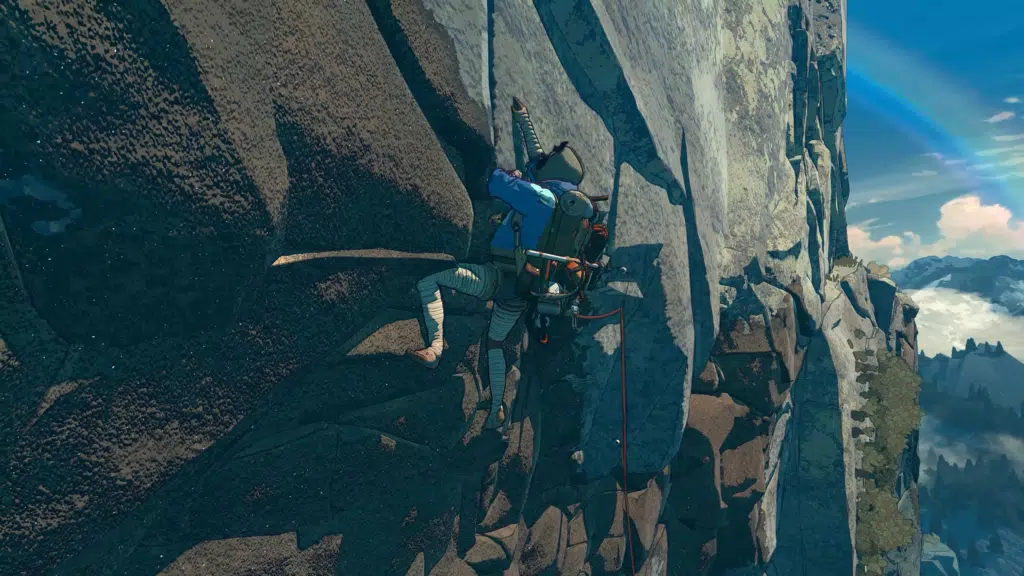
How to Off-Belay in Cairn to Fully Restore Stamina and Access Your Backpack
“Off-belay” occurs when Aava attaches her harness to a piton to hang freely.
- Immediate Benefits: This action instantaneously refills stamina to 100% and enables full inventory management.
- Strategic Use: Off-belay before challenging sections to apply buffs, use medical kits, or reorganize the backpack.
- Environmental Awareness: While stamina drain stops during off-belay, in-game time continues to pass, potentially affecting weather or lighting.
Cairn Piton Timing Guide for Placing Pitons Faster Without Breaking Them
Precision in the placement mini-game is vital for gear preservation.
- Mini-game Outcomes: A perfect hit anchors the piton firmly; a near-miss results in a weak, prone-to-breaking anchor; a complete miss breaks the piton and removes it from inventory.
- Speed vs. Accuracy: Accuracy is more important than speed; a one-swing placement is the fastest method.
- Environmental Impact: High altitude and cold can speed up the timing slider, making placement more difficult.
- Preparation: Position Aava stably before starting the placement to ensure the UI appears immediately without flailing.
Cairn Handholds and Footholds Guide for Finding Safe Grips and Ledges
The quality of a hold determines how fast Aava fatigues.
Footwork: Secure footholds allow Aava to push her weight upward, which is more efficient than pulling with her hands.pots, so move to a better hold as soon as you can. Recognize when you’re on a “bad hold” and treat it as a temporary step, not a resting point. This awareness will keep you from having Aava’s grip slip unexpectedly because you tried to rest on something un-rest-worthy.
Hold Types: Large ledges and “jugs” allow for easier rests, while tiny “crimps” or slopers drain stamina quickly.
Visual Recognition: Look for cracks, protrusions, and horizontal breaks. Avoid smooth or wet rock surfaces that offer poor friction.
To wrap up: Falling in Cairn is often the result of compounding small mistakes: skipping a rest here, choosing a poor hold there, pushing a bit too far beyond safety. The quick fix is usually to do the opposite: rest sooner, place a safety, reposition for balance, etc., all of which we’ve outlined. As one guide said,“the best climbers make fewer bad decisions than the mountain can punish”. By avoiding these common mistakes and applying the fixes, you’ll drastically cut down on those heart-stopping falls. Climb smart, stay alert to Aava’s condition, and the only time you’ll be “falling” is when you’re falling in love with the summit view (and not off a cliff!).– ×1
This summary provides essential gameplay information and answers to common questions regarding the mechanics and systems of the rock-climbing simulation Cairn.

Frequently Asked Questions (FAQs)
- How do I save my progress in Cairn?
Progress is saved at specific points, primarily bivouac camps and certain checkpoints. Resting at a bivouac (marked by a tent icon) triggers an auto-save. There is no quicksave feature during active climbing; falling results in restarting from the last camp or placed piton. On Explorer/Alpinist difficulties with Assist Mode, players can enable more frequent auto-saving on solid ground. - What happens when I fall?
If a piton anchor is below you, the rope catches Aava at that point, allowing you to resume with a stamina penalty. Without a safety anchor, Aava may hit lower ledges or suffer a fatal fall, leading to a game over and respawning at the last save point. Assist mode offers a “rewind” feature to undo falls, but generally, placing pitons is the primary way to avoid catastrophic progress loss. - Can I retrieve and reuse pitons?
This is possible in specific scenarios. You can often retrieve pitons if you reach a safe area above them or if the Climbot can collect them. Mid-climb retrieval usually requires downclimbing. Special troglodyte pitons are indestructible and can be reused infinitely, acting as permanent anchors that are limited only by your carrying capacity. - How do I get more pitons if I run out?
Pitons can be found as loot in supply caches or lost packs throughout the mountain. Additionally, the Climbot can craft new pitons from piton scraps (2 scraps = 1 new piton) at your tent. Exploring troglodyte areas also provides bonus pitons that do not break. - How can I tell if a handhold is good or not?
Look for visual and auditory cues: a firm grip or solid foot placement indicates a good hold, while a flat palm or slipping foot suggests a poor one. Players can enable “Hold Feedback” in the assist settings to see a flash icon on sturdy holds. Generally, large ledges are reliable, while tiny edges or vertical cracks are temporary and will cause Aava to shake or grunt quickly. - How do I heal or restore health if I get injured?
Health is restored by sleeping at bivouacs or consuming food and medicine. While sleeping recovers health, it consumes resources and passes time. Medkits and herbal remedies treat general injuries, while finger tape is specifically required to restore grip capacity for raw or bloody fingers. - Can I climb at night or should I always camp until daytime?
Climbing at night is possible but riskier due to darkness and cold, which drains stamina faster and risks hypothermia. Aava can use a headlamp or Photo Mode to improve visibility, but camping until dawn is advised. If caught on a wall at sunset, players should aim for the nearest ledge or camp rather than navigating in the dark. - What’s the deal with the climbing robot (Climbot), what does it do?
The Climbot is a support companion used for:- Crafting: Turning scrap metal into pitons and trash into chalk at camps.
- Retrieval: Automatically collecting perfectly placed pitons after you pass them.
- Logistics: Acting as a gear carrier, communication link, and providing weather/barometer data.
- Does Cairn have an end-game or something after reaching the summit?
Reaching the summit concludes the story. Post-game content includes Expedition mode, which offers replayable challenges with different characters (Aava or Marco) and styles (Alpine vs. Free Solo). Players can also use chapter select to find missed collectibles or attempt higher difficulty modes like Free Solo for increased challenge. - Any tips for someone new to this type of game?
New players should follow these strategies:- Practice core movement on training walls and treat the game as a puzzle simulator.
- Use the camera (L1/LB) frequently to plan routes and manage stamina religiously.
- Utilize resources like chalk, food, and pitons rather than hoarding them.
- Look for alternative routes if a section seems impossible, and view falls as learning experiences to improve your technique.

Conclusion
Cairnis more than just a climbing game, it’s a holistic test of strategy, skill, and endurance. From the first steps up Mount Kami’s base to the final push toward its elusive summit, you’ll need to combinesmart planning, precise climbing technique, and survival savvy. We covered how Cairn’s “survival climber” gameplay works: carefully managing stamina, using pitons as lifelines, and reading Aava’s body language instead of relying on HUDs. We delved into climbing basics like manual limb control and balancing weight, as well as advanced tactics like using chalk for grip, creating ice cracks for holds, and mastering different rock types.– ×1
For beginners, the key takeaways are: be patient, pay attention to Aava’s cues, and use your resources liberally. Every system in Cairn, stamina, pitons, chalk, tape, food, water, is designed to give you a fighting chance against the mountain when used properly. As you gain confidence, you can push into Cairn’s higher challenges, maybe turning off assists or even attempting the formidableFree Solo mode where only perfection prevails.– ×2
Mount Kami is unforgiving, yet it rewards the persistent. Each bivouac reached is a victory; each risky move conquered is a lesson learned. Remember the common mistakes and corrections: rest before you’re spent, secure that extra piton, trust your legs, and never ignore the warning tremors of fatigue. “Climb slow to climb fast,” as seasoned climbers might say, meaning a well-planned, deliberate ascent will ultimately get you further, faster, than rushing ever could.– ×1
Whether you’re playing Cairn to savor its stunning vistas and narrative of obsession, or for the thrill of mastering its challenging mechanics, we hope this comprehensive guide helps you on your journey. By understanding both the fundamental and advanced techniques, you’ll transform from a shaky beginner into a confident climber. Soon, you’ll find a rhythm in Aava’s movements, a silent dialogue between you, the climber, and Kami, the mountain.
So chalk up those hands, tighten your harness, and face the wall with respect and determination. Cairnwill test you but with the tips and knowledge here, you’re well equipped to test Cairn right back. As you press on and overcome each hurdle, don’t forget to occasionally look around and soak in the awe-inspiring environment (the game’s photo mode is excellent for this!). After all, reaching the summit is the goal, butthe journey itself, every ledge conquered, every cave explored, every dawn survived, is where Cairn’s true beauty lies.— ×1
Good luck, climb safe, and may your pitons hold fast. Mount Kami awaits: go make it yours.– ×1

Sources and Citations
- Wikipedia – Cairn (video game)
- Steam Store Page – Cairn Description
- PlayStation.Blog – “Cairn — 8 advanced climbing tips to make it to the summit”
- Gam3s.gg – “Cairn Guide: Best Tips & Tricks to Reach the Summit”
- Gam3s.gg – “Cairn Stamina System Guide”
- Shacknews – “Cairn controls & PC keybindings”
- Into Indie Games – “Cairn Walkthrough – Training Facility”
- Reddit – Cairn Community Discussions
- The Game Bakers Blog – “Cairn’s Accessibility Options”
- Gaming Nexus – “Cairn Review”
Recommendations
- Mush3D for Maya & Standalone: Shot Sculpting on Alembic/FBX Animation Caches
- How to Create Cinematic Motion Capture with Move One and Metahuman Animator on a Budget (No Mocap Suit Needed)
- Street Fighter Movie’s New Trailer Embraces Its Ridiculousness And Delivers Pure Nostalgic Chaos
- PC Gaming Revenue Outside the Top 20: Why Cyberpunk 2077, Elden Ring, and Skyrim Keep Selling
- Lords of the Fallen 2: Epic Games Store Exclusivity Deal Terminated
- Far Far West Publisher Rejects Generative AI Partners: What the “No GenAI” Policy Means for Games
- Escape From New York Reboot Confirmed: StudioCanal’s New Reimagining, Cast Rumors, and Everything We Know
- How to Build an RPG Character Creator Using MetaHuman in Unreal Engine 5
- Forza Horizon 6 Releases Zoomed Out Image of Full Japan Map — Fans Are Trying to Figure Out How Big It Really Is
- Ludus Has Surpassed 10 Million Downloads: What the Milestone Means, New Divisions Feature, and What’s Next for the Game



































































































