









In This Article (14 sections)
Elie Paquiet’s The Courtyard: Planning, Modular Architecture, and Scene Assembly
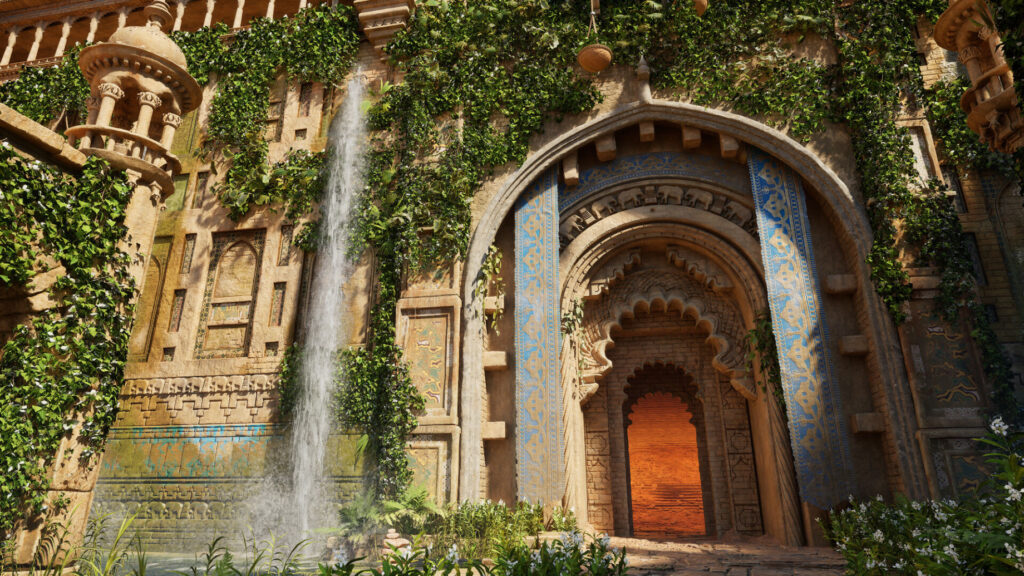
Elie Paquiet’s The Courtyard combines architectural modeling, sculpting, material creation, foliage work, and Unreal Engine scene assembly in a personal environment-art project published on ArtStation on August 4, 2026. Developed over roughly five months of spare-time work, the project uses 3ds Max, ZBrush, and Unreal Engine as central production tools. Its strongest value as a study is not any one asset in isolation but the way multiple reusable elements support a coherent environment. Module dimensions, texture allocation, material transitions, foliage silhouettes, lighting, and camera framing all need to agree if a modular scene is going to feel designed rather than assembled from interchangeable pieces.
Paquiet’s earlier work provides useful context for this material-focused approach. In a 2021 interview, he discussed constructing a Japanese architectural facade procedurally in Substance Designer using height-map layers to organize features. That project should not be confused with The Courtyard’s modeling workflow, but it shows an established interest in structured approaches to architectural surfaces.
The distinction between a material study and a full environment is important because a facade material can be judged mainly through surface definition and presentation, while a complete scene introduces additional questions about scale, alignment, navigation, lighting, and whether neighboring assets remain visually compatible from several viewpoints. A convincing pot cannot rescue an awkward doorway, and detailed plaster cannot fix disconnected rooflines, so reviewing both individual assets and overall assembly is essential.
The setting is described as Mediterranean-inspired fantasy rather than a reconstruction of a specific country. That gives the project room for invention while still requiring visual discipline. Reference gathering is most useful when each image answers a production question instead of simply filling a mood board. Architectural references can help define opening sizes, roof overhangs, wall thickness, and support structures, while surface images can inform plaster, ceramics, and fabrics.
Images of lived-in spaces can suggest how objects accumulate near entrances, sheltered areas, and circulation routes. Connecting each reference to a specific decision also helps control scope because decorative props can then be judged by whether they improve scale, composition, or environmental storytelling rather than by whether they are merely interesting to model.
Early Blockout and Scale Checks in Unreal
Paquiet tested a rough architectural kit directly in Unreal Engine, which is a strong approach for identifying structural problems before detail work begins. Because Unreal Engine uses centimeters as its default distance unit, a three-meter span should arrive as 300 centimeters rather than three generic units. Early scale checks can prevent an entire kit from inheriting an export mistake.
The blockout should also be evaluated as navigable space rather than as a collection of isolated meshes. Moving through the scene at an intended viewing height, checking entrances from both directions, and comparing circulation widths with nearby props can reveal issues that orthographic modeling views do not make obvious. Pivot placement matters as well because even a correctly modeled piece becomes inconvenient if its origin makes grid alignment or repeated assembly difficult.
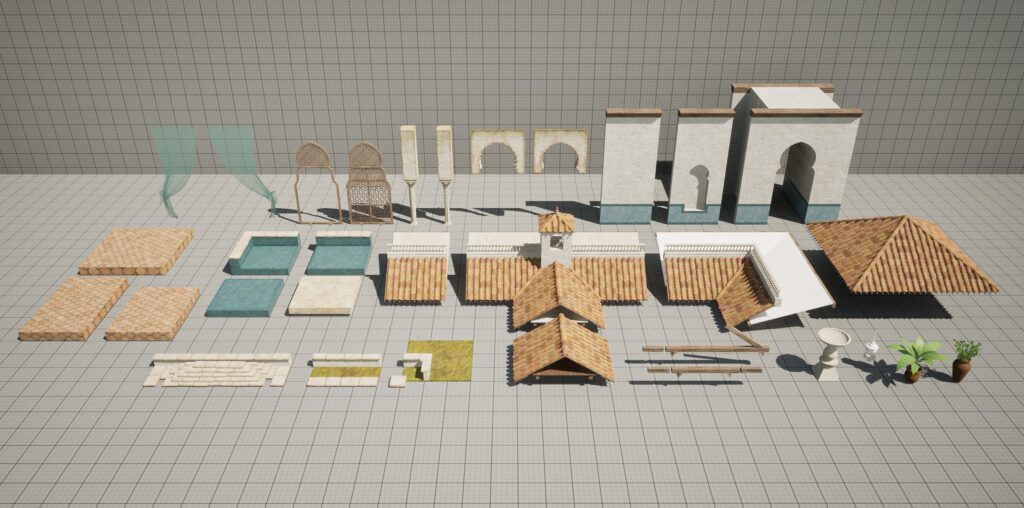
The architecture uses modules at 3m, 4.5m, and 6m scales. Those dimensions share a useful mathematical relationship because they are all multiples of 1.5 meters, although that does not prove Paquiet used a 1.5-meter snapping increment. Compatible widths give the kit flexibility, but width alone is not enough.
A reliable modular system also needs consistent vertical connections, predictable roof and cornice extensions, and corner solutions that do not create overlaps or gaps. Stretching an existing piece is not always a good substitute because uniform scaling also changes openings and decorative proportions. For a comparable project, a small test group containing a straight section, an opening, a corner, and a roof transition can reveal more useful information than a large set of disconnected facade variations.
Production Tool Split and Validation Testing
Paquiet’s tool division assigns dimension-sensitive modeling to 3ds Max, sculpting to ZBrush, and final environment assembly to Unreal Engine. That separation is practical because proportions, pivots, and connection points can be established before surface irregularities are introduced. ZBrush can support both organic and hard-surface refinement, but its presence in the pipeline does not identify which brushes or sculpting presets were used. For modular architecture, visible damage or chipped edges should be added carefully around connection boundaries so that an irregularity that looks good on one asset does not create an obvious seam when multiple pieces meet. The return to Unreal Engine also needs inspection for scale, material assignments, shading continuity, triangulation behavior, and alignment with neighboring modules.
Paquiet also maintained a dedicated test corner, which is especially useful when treated as a validation space rather than a second polished environment. A small scene combining a standard wall connection, a corner, an opening, and a roof junction can expose failures quickly. Testing from fixed and free cameras helps distinguish improvements from accidental changes in viewing conditions.
Material checks should also separate color problems from surface-response problems because base color, roughness, metallic, and specular values affect different parts of the final appearance. Changing one major variable at a time under stable lighting makes it easier to tell whether modeling, texturing, or lighting actually improved the result. The most useful test scene is the one containing difficult connections, not just combinations that already work.
Elie Paquiet’s The Courtyard: Materials, Vertex Painting, Roof Tiles, Props, Rugs, and Fabric Workflows
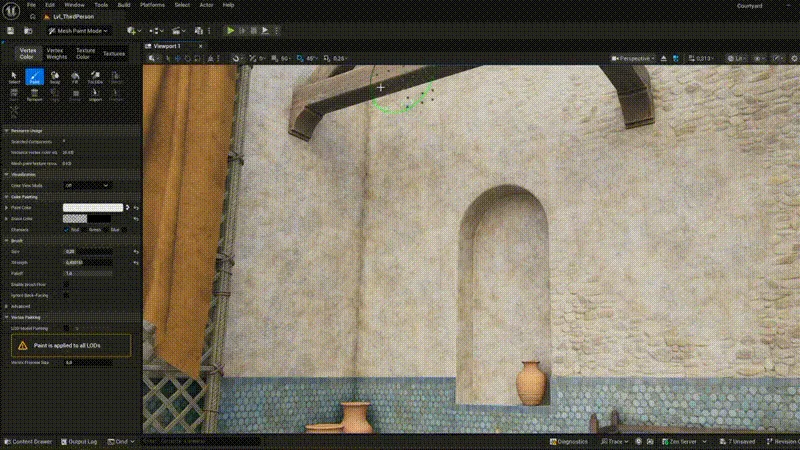
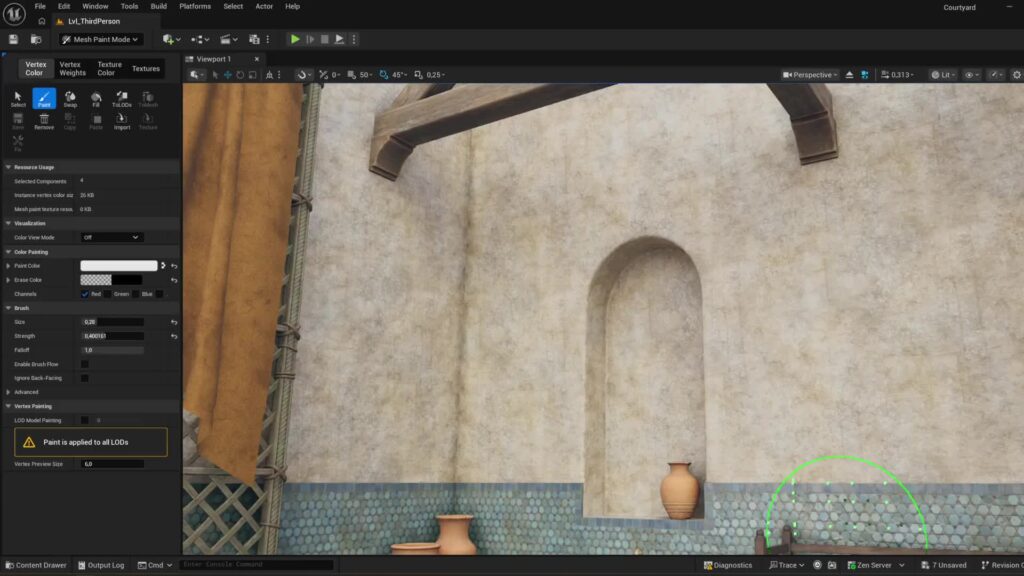
One of the project’s key material systems uses Unreal Engine vertex painting, with red assigned to material blending, green to moss, and blue to leaks. These channel labels represent control data rather than the visible color of the final surface. In a comparable shader, each channel should keep the same meaning across the material library so that painting remains predictable from asset to asset. Variation also works best when it reflects an understandable surface history. Moss, streaks, and blended areas should appear where moisture, exposure, or construction would make them plausible instead of being distributed evenly simply to increase visual complexity.
A technical distinction becomes important when Nanite is involved. Asset vertex colors stored directly on the mesh can be shared by instances and are compatible with Nanite, while unique per-component vertex colors painted through Mesh Paint Mode are not supported on Nanite-enabled meshes. That means an artist needs to decide whether variation should belong to the reusable asset itself or to individual placements in the scene. These are different production requirements, and the shader should be designed around that choice rather than discovering the limitation after the environment is largely assembled.
Roof Tile Geometry and Prop Texturing
Paquiet also used individually modeled roof tiles with Nanite. Dense geometric roof detail can work well where silhouette and parallax matter, but it should be evaluated at the distances and angles used by the final scene. A small prototype should include not only a straight run of tiles but also edges, turns, and intersections between roof sections because these areas expose whether a tile family can resolve architectural transitions without excessive custom fixes. Nanite should not be treated as a guarantee that every dense arrangement is inexpensive. Closely stacked surfaces can still produce overdraw, so the complete assembled roof needs to be inspected and profiled rather than judging performance from a single tile.
Variation in the roof should also remain controlled. Slight differences in shape or placement can prevent visible repetition, but irregularities that look attractive in close-up can create noise when seen across the whole courtyard. The same principle applies to prop texturing. Three large pots share one 1024px texture set, while four smaller pots share another. A texture set should be understood as a painting and material context rather than a single image because exported information can include several maps. Shared texture planning should therefore consider visible surface area, silhouette importance, expected viewing distance, and enough spacing between islands to avoid introducing artifacts for the sake of packing efficiency.
Baking adds another layer of quality control. Resolution, high-definition sources, and projection cages affect how information transfers to the target mesh, so a low-resolution diagnostic bake can reveal projection errors before final output. Handles, rims, and tightly spaced surfaces on pots deserve particular attention because these areas can capture information from neighboring parts of the source mesh if projection is not controlled. The practical goal is not simply to produce bake maps but to make sure they describe the intended surface accurately.
Rug and Curtain Fabric Workflows
The rug workflow uses Substance 3D Designer, with a warmer version created through another base-color export. A comparable process can separate pattern construction from palette work so that borders, central fields, and repeated motifs remain independently adjustable. Designer’s Tile Sampler can distribute custom patterns with controls for scale, rotation, color, and masking, while simpler cases may not require such a complex graph. Gradient Map can then convert structured grayscale information into controlled color variation. The final evaluation should happen on the actual rug mesh in the environment because a mathematically clean pattern may still lose readability at the intended camera distance or compete with more important visual elements.
Curtains were created in Marvelous Designer, while the fabric materials use 512px tileable textures. A practical workflow is to begin with a simple hanging panel and clearly defined suspension points, using pins or constraints only where necessary to establish attachment. Major folds should come from the cloth geometry, while smaller-scale weave and surface variation can remain in the tileable material.
Keeping those responsibilities separate makes both parts easier to control. Texture resolution alone does not define real-world detail density, so the same 512px tile can produce very different texel densities depending on how much surface area it covers. Scene review should therefore compare the fabric against nearby objects of known scale and inspect it both close up and from the final composition.
Elie Paquiet’s The Courtyard: Foliage, Vine Cards, and Environment Detail Integration
Paquiet’s foliage work used botanical-garden photography as reference, while Monstera masks began in Photoshop before continuing through Substance 3D Designer. A strong foliage workflow benefits from separating the overall silhouette from internal surface structure. The first question should be what makes the plant recognizable at a distance, followed by how veins, color variation, or smaller patterning support that silhouette. Building the outline, major divisions, and internal detail as separate components also allows one part to be adjusted without rebuilding everything else.
Reference photographs should be interpreted rather than copied indiscriminately. Several examples of the same plant can help distinguish stable structural features from shadows, highlights, or damage unique to one photograph. Designer tools such as Gradient Map can then turn grayscale masks into controlled color variation while leaving the underlying shape information available for other uses. The final evaluation still needs to happen in-engine because an individually detailed leaf does not automatically create a convincing plant. Spacing, orientation, overlap, and the balance of large and small forms usually contribute more to the overall silhouette than adding extra microdetail to the material.
The climbing vines use branches baked onto planes, textured in Substance 3D Painter, and assembled into clusters with a 1K texture set. This approach depends on deciding what needs to remain geometric and what can be represented in textures. A flat card can work well from some angles while becoming obvious from others, so a useful prototype should be tested against a wall, around a corner, and near an opening. Repeated silhouettes should also be checked because a small number of card arrangements can become visibly patterned once they are placed throughout the environment.
Vine Baking and Performance Considerations
Baking provides maps such as normal, ambient occlusion, curvature, and position that can support Painter workflows, but these maps describe different aspects of the mesh and should not be treated as interchangeable. The quality of the final vine depends on whether the baked information, alpha shape, material response, and cluster arrangement all work together from the actual scene cameras. Performance also needs to be measured rather than assumed. Nanite does not automatically make card-based foliage faster, especially where masked pixels and overlapping layers remain significant. In some situations, more geometric foliage can be more efficient, so representation should be chosen according to the target views, material behavior, and measured rendering cost.
This broader principle applies to all environment detail. Decorative assets should contribute to scale, composition, storytelling, or material contrast rather than simply increasing object count. The strongest modular scenes create variation without losing internal consistency. Props, plants, roof detail, rugs, curtains, and surface wear should all feel like parts of the same place, with their density and visual complexity supporting the architecture instead of competing with it.
Elie Paquiet’s The Courtyard: Unreal Engine Composition, Lighting, Fog, and Final Presentation
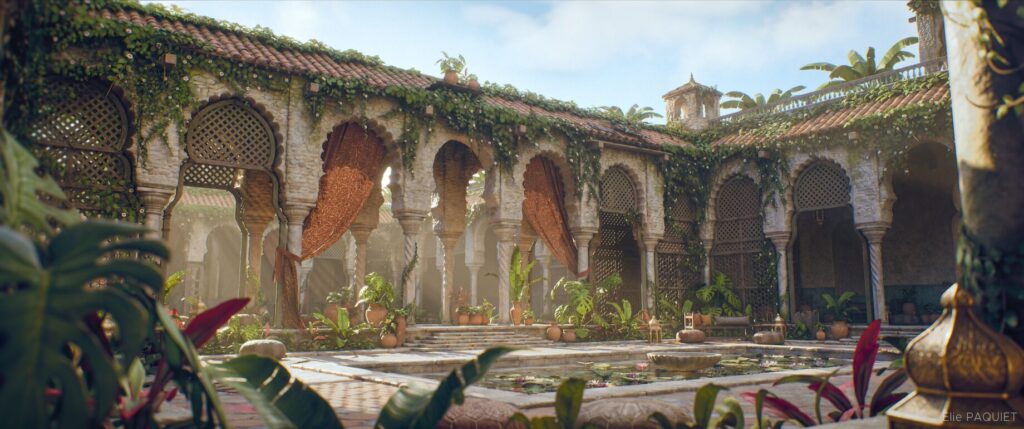
Paquiet composed the final environment using the golden spiral and rule of thirds as framing guides. These should be treated as tools for evaluating relationships within an image rather than as formulas that guarantee a successful composition. A subject can sit perfectly on a guide and still disappear into a similarly colored background or lose attention to a brighter object elsewhere. Unreal Engine’s Cinematic Viewport includes a three-by-three grid for rule-of-thirds framing, while a golden spiral reference would need to be evaluated separately rather than described as a standard built-in overlay.
A practical composition process begins by deciding what the image should emphasize and then judging how foreground elements, architectural openings, and background masses support that focus. Reducing the frame to a small thumbnail is especially useful because it quickly shows which area attracts attention first and whether multiple focal points compete with one another. The composition also needs to remain believable from nearby viewpoints. Moving an object to improve one camera should not create an obvious spatial contradiction immediately outside the final frame, particularly in an environment intended to be explored rather than viewed as a static image.
Lighting, Fog, and Color Grading Workflow
Lighting in The Courtyard combines a directional light, HDRI backdrop, spotlights, and Exponential Height Fog, followed by color grading that pushes shadows cooler and midtones warmer. A comparable workflow should establish the main illumination direction and architectural readability before relying on a strong grade. Additional lights should solve specific problems such as lost forms or insufficient emphasis rather than brightening every dark area. Fog should also be evaluated separately because atmospheric depth can improve the image while simultaneously hiding unresolved lighting or material issues.
Exponential Height Fog and Volumetric Fog controls serve related but different purposes. Volumetric Fog can be enabled as part of the Exponential Height Fog system, while individual lights can contribute through their Volumetric Scattering Intensity. That control should not be confused with the scene’s overall fog density. Comparing the scene with fog disabled, with a restrained setting, and with the intended final atmosphere makes it easier to determine whether the effect is strengthening depth or merely reducing clarity.
Color grading should come after exposure and core lighting are stable. Unreal Engine provides controls for overall color, tonal regions, saturation, contrast, and white balance, but these should refine an already functional image rather than compensate for poor materials or incorrect illumination. A useful grade should preserve distinctions between plaster, ceramics, fabrics, foliage, and other surfaces while supporting one consistent atmosphere across the scene. The strongest presentation therefore comes from coordination rather than any single technique: modular architecture establishes the space, material systems provide variation, foliage and props reinforce scale and life, and composition, lighting, fog, and grading determine how clearly all of that work is communicated.
Frequently Asked Questions (FAQs)
- What is Elie Paquiet’s The Courtyard?
The Courtyard is Elie Paquiet’s personal environment-art project, presented through his ArtStation portfolio as a complete Unreal Engine scene rather than an isolated model or material study. The project combines modular architectural modeling, sculpting, material creation, props, fabrics, foliage, lighting, and composition. Its value as an environment-art example comes from showing how these separate disciplines can work together to create a visually consistent place rather than a collection of individually polished assets. - How long did The Courtyard take to create?
Elie Paquiet describes the project as taking approximately five months of spare-time development. That distinction is important because it does not mean five months of continuous full-time production. The duration reflects his own schedule, workflow, experience, project scope, and available free time, so it should not be used as a direct estimate for how long another artist would need to produce a similar environment. - Does every modular environment need the same module dimensions?
No. The Courtyard uses 3m, 4.5m, and 6m architectural modules, but those dimensions are specific to that project’s needs rather than a universal modular-environment standard. A comparable project should choose measurements that suit its architectural proportions, grid, intended viewing conditions, and assembly requirements. What matters most is that walls, openings, corners, roofs, and other pieces connect predictably without creating gaps, overlaps, or inconsistent proportions. - Can Nanite meshes use vertex colors?
Yes. Unreal Engine supports vertex colors stored directly on the mesh asset when that geometry uses Nanite, allowing those colors to drive material effects such as blending or surface variation. However, this is different from painting unique vertex colors onto individual placed instances through the per-component Mesh Paint workflow. That instance-specific vertex-color approach is not supported on Nanite-enabled meshes, so artists need to decide whether the variation belongs to the reusable asset itself or to each placement. - Does Nanite automatically make a detailed environment run faster?
No. Nanite can make very detailed geometry practical, but it does not guarantee that every dense asset arrangement will perform better. Epic identifies challenges involving closely stacked surfaces, aggregate geometry, overlapping layers, and some forms of card-based foliage, where overdraw and other rendering costs can remain significant. Performance should therefore be measured using the actual assembled scene and expected camera views rather than assuming that a high polygon count becomes irrelevant simply because Nanite is enabled. - Why can a relatively small tileable texture still look detailed?
A tileable texture can repeat across a surface instead of stretching once over the entire object, so its visible detail depends on how much real-world area each repetition covers. A 512px texture repeated frequently across a fabric, for example, can provide much more visible surface detail than the same image stretched over a very large object. The useful measure is therefore the relationship between texture resolution, mapping scale, viewing distance, and visible pattern size rather than texture resolution alone. - What is the difference between baking and texturing?
Baking transfers or calculates information from mesh geometry into maps that can be used during later material work. These can include normal, ambient occlusion, curvature, position, and other mesh maps. Texturing is the subsequent process of defining the visible surface through channels such as color, roughness, metallic response, and additional painted or procedural effects. In Substance 3D Painter, baked maps can help drive masks and generators, but producing those maps is only one stage of creating the finished material. - How should texture resolution be chosen for a comparable scene?
Start by considering how large the asset appears in the final image, how close the camera will approach it, how much unique surface detail is required, and whether several objects can efficiently share a texture set. Increasing resolution is useful when an identifiable loss of detail needs to be corrected, but it should not automatically replace efficient UV layouts, appropriate tiling, or sensible asset prioritization. The most reliable check is to inspect the textured asset inside the actual scene at the camera distances that matter. - Does Unreal Engine include a rule-of-thirds composition guide?
Yes. Unreal Engine’s Cinematic Viewport provides a three-by-three framing grid that can be used as a rule-of-thirds guide when composing a shot. The overlay helps artists evaluate where major subjects and visual divisions sit within the frame, but it does not automatically create a strong composition. Contrast, lighting, color, foreground shapes, background forms, and competing focal points still determine where viewers actually look. - What is a manageable starting point for a similar courtyard project?
Begin with a small architectural prototype rather than trying to build the complete courtyard immediately. A useful starting assembly could include a straight wall section, an opening or corner that creates a difficult connection, one representative material, and a provisional camera inside Unreal Engine. Testing that small group can reveal problems with scale, pivots, modular alignment, material response, and composition before additional assets are produced, making later expansion more controlled and reducing the amount of finished work that may need to be rebuilt.
Conclusion
The most useful way to study Elie Paquiet’s The Courtyard is as a set of connected production decisions rather than a software checklist. A comparable environment needs more than detailed models: it needs dimensions that support assembly, materials that remain controllable and asset representations suited to their intended views.
The broader workflow lesson is to make each stage answer a specific question. Blockout should establish spatial relationships. A test assembly should reveal connection problems. Material experiments should distinguish color from surface response. Camera and lighting tests should clarify what the scene is trying to communicate.
For artists applying these principles, the goal should not be to copy every visible feature. It should be to build a process in which problems can be identified and corrected without rebuilding the entire environment. Reusable assets become most valuable when they support both efficient production and a coherent final image.
Sources and Citations
- 80 Level’s interview with Elie Paquiet, August 28, 2026“Modeling and Texturing Assets and Foliage for a Detailed 3D Environment,” interviewed by Stephanie Almogabar, is the principal account of The Courtyard. Paquiet explains his modular architecture at 3, 4.5, and 6-meter scales, iterative blockout process, modeled roof tiles, baked props, fabric creation, foliage, composition, lighting, and color grading. He also specifies his custom shader’s channel assignments: red for blending the main materials, green for moss, and blue for leaks. This is the source for the project’s actual production decisions. 80.lv
Citation: 80 Level: Modeling and Texturing Assets and Foliage for a Detailed 3D Environment - Elie Paquiet’s original ArtStation presentation of The CourtyardPaquiet’s portfolio states that he developed the environment over roughly five months in his spare time. It identifies 3ds Max for modeling, ZBrush for sculpting, Unreal Engine 5 for scene assembly, and Substance Designer and Painter for textures. It also documents the modular construction approach, use of Nanite, and his decision to create his own foliage and shaders as part of expanding his environment-art skills. Elie Paquiet
Citation: Elie Paquiet on ArtStation: The Courtyard - 80 Level’s earlier Japanese-architecture interview, March 1, 2021“Recreating Japanese Architecture in Substance Designer,” interviewed by Arti Sergeev, documents Paquiet’s procedural Japanese-facade material. It covers layered height-map construction, Height Blend operations, wood patterns, reusable elements, parameter variation, and the development of base-color and roughness maps. This supplies background on his material-authoring approach, but concerns a separate earlier project, not The Courtyard’s production. 80 Level
Citation: 80 Level: Recreating Japanese Architecture in Substance Designer - Epic Games’ Units of Measurement documentationEpic confirms that Unreal Engine uses centimeters as its default distance and length unit and documents the available measurement settings. This supports explanations of consistent asset scale and the conversion between modeling dimensions and engine measurements. It complements Paquiet’s stated modular dimensions without establishing which unit-display settings he personally selected. Epic Games Developers
Citation: Epic Games: Units of Measurement in Unreal Engine - Epic Games’ FBX Static Mesh Pipeline documentationThis guide explains how to prepare, export, and import static meshes, covering pivot placement, triangulation, UV sets, materials, vertex colors, collision, and levels of detail. It also identifies FBX 2020.2 as the version used by Unreal Engine’s documented FBX import pipeline. It is the appropriate technical reference for importing modular assets, rather than evidence of Paquiet’s exact export settings. Epic Games Developers
Citation: Epic Games: FBX Static Mesh Pipeline - Epic Games’ Physically Based Materials documentationEpic explains the principal physically based material inputs: Base Color, Roughness, Metallic, and Specular. The guide distinguishes surface roughness from reflectivity and describes how these values affect the way materials respond to lighting. It supports the article’s technical discussion of believable surfaces and material consistency, while Paquiet’s interview remains the source for his artistic choices. Epic Games Developers
Citation: Epic Games: Physically Based Materials - Epic Games’ two-texture vertex-painting tutorial“How To Create a 2-Texture Material for Vertex Color Painting” demonstrates blending rock and moss textures through a VertexColor expression and Linear Interpolate nodes, including corresponding normal maps. It provides a concrete technical example of using painted vertex data to control material distribution. The tutorial illustrates the underlying technique, not a reconstruction of Paquiet’s complete multilayer shader. Epic Games Developers
Citation: Epic Games: How to Create a 2-Texture Material for Vertex Color Painting - Epic Games’ Nanite Virtualized Geometry overviewEpic describes Nanite as a virtualized geometry system that renders fine geometric detail using an internal mesh format, visibility-based processing, compressed data, streaming, and automatic levels of detail. This explains the technology behind geometry-heavy workflows such as individually modeled roof tiles. It does not provide a benchmark or guarantee a particular frame rate for The Courtyard. Epic Games Developers
Citation: Epic Games: Nanite Virtualized Geometry Overview - Epic Games’ Cinematic Viewport documentationThis guide documents the viewport’s composition and framing aids, including a 3×3 rule-of-thirds grid, crosshair and rabatment overlays, safe-area guides, and letterboxing. It supports explanations of how Unreal Engine assists shot composition. The listed overlays should remain distinct from Paquiet’s own use of the golden spiral as a compositional method. Epic Games Developers
Citation: Epic Games: Cinematic Viewport - Epic Games’ Cine Camera Actor documentationEpic explains the cinematic camera’s filmback, lens, and focus settings, along with camera piloting, previews, and camera-specific post-processing. These controls provide the technical background for discussions of focal length, subject focus, and shot-by-shot adjustments. The documentation also identifies effects available through the camera’s post-processing layer, including exposure, bloom, and color grading. Epic Games Developers
Citation: Epic Games: Cine Camera Actor - Epic Games’ Exponential Height Fog documentationThis page explains how height fog produces greater density at lower elevations and less at higher elevations, with a smooth transition between them. It documents placement, height falloff, secondary fog layers, and the relationship with volumetric fog. This supports the technical explanation of atmospheric depth rather than supplying the project’s individual fog values. Epic Games Developers
Citation: Epic Games: Exponential Height Fog - Epic Games’ Volumetric Fog documentationEpic’s volumetric-fog guide explains the interaction between fog and scene lighting, including the Volumetric Scattering Intensity control used to adjust a light’s contribution. This is the more specific reference for the scattering parameter mentioned in Paquiet’s lighting discussion and should be distinguished from height-based fog density alone. Epic Games Developers
Citation: Epic Games: Volumetric Fog - Epic Games’ Color Grading and the Filmic Tonemapper documentationThis guide distinguishes tone mapping from artistic color correction and documents controls for global adjustments, shadows, midtones, and highlights, including saturation, contrast, gamma, gain, and offset. It provides the technical basis for explaining cool shadows, warmer midtones, and saturation adjustments without presenting those choices as universal settings for every environment. Epic Games Developers
Citation: Epic Games: Color Grading and the Filmic Tonemapper - Adobe’s Substance 3D Designer workflow overviewAdobe explains Designer’s node-based, non-destructive workflow, where connected operations generate or modify image data. It also covers reusable graph instances and exposed parameters, supporting the discussion of procedural patterns, material variations, and iterative texture development. This is the official technical foundation for the material-authoring methods discussed in Paquiet’s interviews. Experience League
Citation: Adobe: Substance 3D Designer Workflow Overview - Adobe’s explanation of texture baking“What Is Baking?” defines baking as saving information about a 3D mesh into texture files. It explains that the process can transfer information from one mesh onto another mesh’s UV layout. This supports the distinction between creating detailed source geometry and recording its information in textures for another surface. Experience League
Citation: Adobe Substance 3D: What Is Baking? - Adobe’s Substance 3D Painter baking documentationAdobe documents the Bake Mesh Maps interface, its available bakers, and the controls used to configure the baking process. It also identifies which baking operations require a high-poly source mesh. This provides application-specific support for explaining Painter’s role in mesh-map generation, separate from Designer’s procedural graph workflow. Experience League
Citation: Adobe: Baking in Substance 3D Painter - Marvelous Designer’s official Pins documentationThe manual documents creating and deleting pins, duplicating them to symmetric patterns, and attaching or detaching pins from an avatar. It is an official reference for the pinning controls used when constraining and arranging simulated fabric. These capabilities explain the toolset; the project interview establishes Paquiet’s use of Marvelous Designer for fabric assets. Marvelous Designer
Citation: Marvelous Designer: Pins - Maxon’s official ZBrush sculpting documentationMaxon describes sculpting as reshaping a model, adding or removing apparent material, and creating fine surface detail. Its documentation links this workflow to sculpting brushes, symmetry, morph targets, 3D layers, and surface noise. This supports the explanation of ZBrush’s sculpting capabilities, while Paquiet’s portfolio establishes that he used ZBrush on The Courtyard’s assets. Maxon Help
Citation: Maxon: Sculpting in ZBrush
Recommendations
- Echoes of Aincrad Crafting Guide: Recipes, Materials and Unlock Requirements
- Did Christopher Nolan’s Depiction of the Gods Pay Off in The Odyssey?
- Castlevania: Belmont’s Curse Runs at Only 30 FPS on Nintendo Switch
- EA Sports College Football 27 Preview: Defense Wins Championships
- Jurassic World Evolution 2 Complete Edition Comes to Nintendo Switch 2 on July 30, 2026
- Unity-Based Tool for JRPG Game Development: RetroGig’s Retro JRPG Template for SNES/PSX-Style RPG Systems
- Keanu Reeves & China Miéville BRZRKR: Light Draws Breath — Release Date, Story, Creative Team & Variant Covers
- CD Projekt Raises Profit Goals with Witcher 4, 5, and 6 Coming: 5 Billion PLN Target Explained
- Creepshow Official Announcement Trailer Reveals a New Anthology Horror Game Experience
- GTA 6 Leans Into Vice City’s Influencer Hustle Where Looks Matter



































































































