







In This Article (8 sections)
HDMI 2.0 vs HDMI 2.1: Differences, Features, and Which Is Best for Streaming
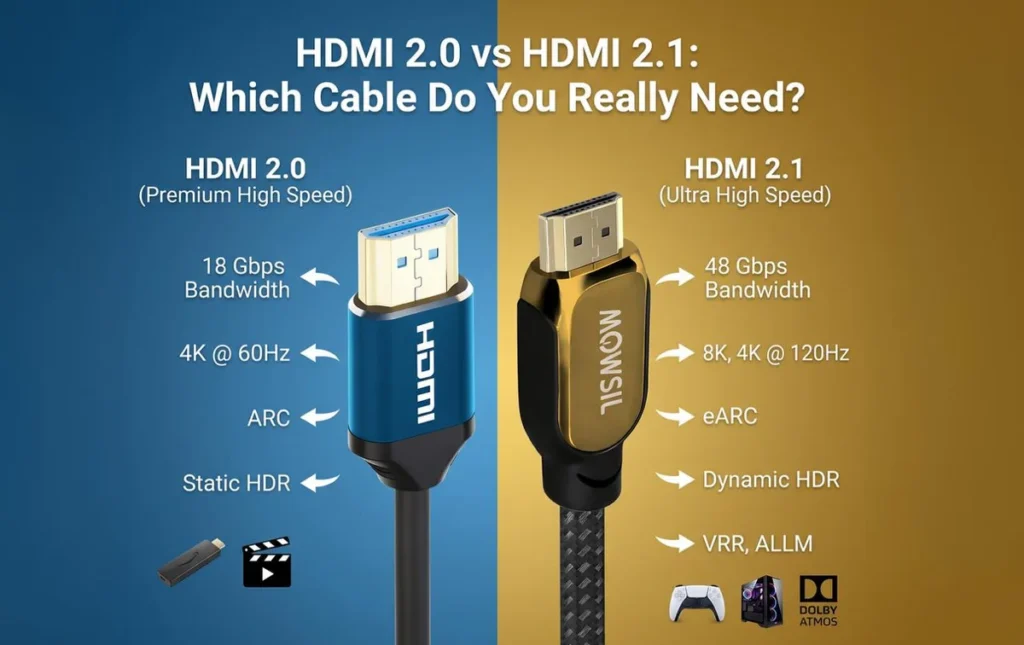
When people compare HDMI 2.0 vs HDMI 2.1, the conversation usually starts with bandwidth and ends with fear of missing out. On paper, HDMI 2.1 is clearly the more advanced standard. HDMI 2.0 introduced up to 18 Gbps of bandwidth, enough for features such as 4K at 50 or 60 frames per second, while HDMI 2.1 increased that to 48 Gbps and added support for 4K120, 8K60, Dynamic HDR, eARC, VRR, ALLM, QFT, QMS, DSC, and later SBTM through HDMI 2.1a.
However, that advantage on paper does not automatically translate into a real-world upgrade for most streamers or content creators because live streaming workflows are shaped more by platform limits, encoder settings, capture hardware, and display requirements than by the HDMI connection itself.
The easiest way to understand the difference between HDMI 2.0 and HDMI 2.1 is to start with transport capacity and then look at the available features. HDMI 2.0’s 18 Gbps bandwidth supports 4K60, 32 audio channels, dynamic auto lip-sync, and CEC extensions. HDMI 2.1 raises bandwidth to 48 Gbps and introduces support for higher resolutions and refresh rates such as 8K60 and 4K120, along with gaming and media features including Dynamic HDR, eARC, VRR, ALLM, QFT, and QMS.
Behind the scenes, HDMI 2.1 also replaces the older TMDS signaling used by HDMI 2.0 with Fixed Rate Link (FRL), allowing the much higher bandwidth. This is also why certified Ultra High Speed HDMI cables were introduced for HDMI 2.1 systems, while Premium High Speed HDMI cables remain the official option for HDMI 2.0’s 18 Gbps applications.
For pure live streaming, most creators still do not need HDMI 2.1. Streaming platforms such as Twitch continue to focus on 1080p60 broadcasts, while YouTube Live supports higher resolutions but still centers most live streaming around up to 60 fps. As a result, viewers typically watch a compressed 60 fps stream, meaning platform limitations and encoding settings become the bottleneck long before HDMI 2.0 does. If your workflow consists of capturing at 1080p60, passing through 4K60, or producing content for standard live streaming, HDMI 2.0 remains more than capable.
HDMI 2.1 becomes worthwhile only when the rest of your setup actually requires it. If you want to play games locally at 4K120 while maintaining low-latency passthrough, HDR, and VRR through a capture device, HDMI 2.1 offers clear benefits. Otherwise, many HDMI 2.0 workflows continue to perform exceptionally well. For example, the Elgato HD60 X uses HDMI 2.0 input and output while supporting passthrough up to 4K60, 1440p120, and 1080p240 with VRR and HDR, while capturing up to 2160p30 or 1080p60 HDR. That performance is already sufficient for a large percentage of streamers.
The feature gap is what makes HDMI 2.1 attractive, but those features do not benefit every user equally. Dynamic HDR improves image quality on a scene-by-scene or frame-by-frame basis, eARC enables higher-quality audio formats such as Dolby Atmos and DTS:X, VRR reduces screen tearing and stutter, ALLM automatically switches displays into low-latency gaming mode, QFT lowers transport-related display latency, and QMS minimizes black-screen delays when changing frame rates during video playback. These improvements are valuable, particularly for gamers and enthusiasts, but they matter far less if your primary goal is simply streaming gameplay at conventional resolutions and frame rates.
One important detail many buyers overlook is that HDMI 2.1 is not a guarantee that every HDMI 2.1 feature is included. HDMI Licensing Administrator states that HDMI 2.1 features are optional, meaning manufacturers can market a product as HDMI 2.1 even if it supports only HDMI 2.0-era capabilities such as TMDS signaling and 18 Gbps bandwidth, provided they clearly list the supported features. Because of this, buyers should compare devices based on the specific features they need rather than relying solely on the HDMI version number. Support for 4K120, VRR passthrough, eARC, or particular capture modes is often far more important than whether the box simply says “HDMI 2.1.”
For content creators, the best HDMI version depends entirely on the production workflow. Creators who primarily record tutorials, edit videos, stream podcasts, or capture gameplay at mainstream settings will find HDMI 2.0 to be a practical and cost-effective choice. Its support for 4K60, HDR, BT.2020, and other 18 Gbps applications through Premium High Speed HDMI cables makes it well suited to the needs of most creators today.
HDMI 2.1 is the better investment for creators whose workflow depends on high refresh rates, the latest gaming consoles, or advanced passthrough and capture capabilities. Devices such as the Elgato 4K X use HDMI 2.1 input and output, supporting lag-free passthrough up to 2160p144, 1440p240, and 1080p240 with VRR and HDR, while capturing up to 2160p144. Those specifications are designed to preserve high-end local gameplay performance while maintaining premium capture quality and offering greater long-term flexibility. If your workflow genuinely requires those capabilities, HDMI 2.1 is the right choice. Otherwise, HDMI 2.0 remains a sensible and fully capable option for the majority of streamers and content creators.
HDMI 2.0 vs HDMI 2.1: Gaming, Streaming, Bandwidth, and Is It Worth It?
For gaming, the difference between HDMI 2.0 and HDMI 2.1 is much more significant than it is for streaming. Sony states that the PS5 supports the HDMI 2.1 specification and 4K120 video output, while Xbox says the Series X includes an HDMI 2.1 port and supports both 60 Hz and 120 Hz output, with 4K120 requiring an HDMI 2.1-compliant display. As a result, competitive or performance-focused gamers can benefit greatly from HDMI 2.1, particularly when pairing a current-generation console with a 120 Hz display while taking advantage of features such as Variable Refresh Rate (VRR) and low-latency gaming technologies.
Streaming, however, usually does not require the same level of bandwidth. A creator can play games locally at a high refresh rate while transmitting a much lower encoded livestream to viewers. Many capture workflows already bridge this gap with HDMI 2.0 hardware. For example, Elgato’s HD60 X can pass through 1440p120 and 1080p240 over HDMI 2.0 while capturing in lower, streaming-friendly formats. Because of this, saying that every streamer needs HDMI 2.1 is misleading. Gamers often benefit from it, while streamers only need it if the gaming portion of their setup requires higher resolutions, refresh rates, or advanced display features.
The biggest improvement HDMI 2.1 brings is not better livestream quality but a more capable video transport system and an improved overall device experience. Compared to HDMI 2.0’s 18 Gbps bandwidth, HDMI 2.1 increases the maximum bandwidth to 48 Gbps, making it possible to support demanding uncompressed video formats such as 4K120 and 8K60. It also introduces several gaming and display enhancements, including VRR for smoother gameplay with reduced screen tearing, Auto Low Latency Mode (ALLM) for automatically enabling low-latency display modes, Quick Frame Transport (QFT) to reduce transport-related latency, Quick Media Switching (QMS) to minimize black-screen interruptions when changing frame rates, and Enhanced Audio Return Channel (eARC) for higher-quality immersive audio formats.
Despite these improvements, HDMI 2.1 does not automatically improve the quality of a typical 1080p60 or 4K60 livestream. Once a video is encoded for platforms such as Twitch or YouTube, factors including bitrate, video codec, motion complexity, transcoding, internet stability, and viewer playback conditions have a much greater impact on the final viewing experience. This means that for many creators, upgrading their encoder, capture settings, lighting, microphone, or internet connection will produce more noticeable improvements than replacing HDMI 2.0 with HDMI 2.1.
Bandwidth is often the easiest way to understand the differences between the two standards. HDMI 2.0 is associated with an 18 Gbps maximum bandwidth and is well suited for 4K60 workflows. HDMI 2.1 raises that limit to 48 Gbps, enabling support for higher resolutions and refresh rates such as 4K120, 4K144, and 8K60. Premium High Speed HDMI cables are certified for 18 Gbps connections, while Ultra High Speed HDMI cables are designed for bandwidths up to 48 Gbps. The higher data rates also require better signal integrity and shielding, making certified Ultra High Speed cables increasingly important for reliable HDMI 2.1 performance.
In practical terms, HDMI 2.0 remains a strong option if your entire setup—including your source device, capture card, display, and streaming workflow—stays within 4K60 or lower. Once your workflow expands to 4K120, high-refresh-rate gaming, 8K content, or requires the full capabilities of Fixed Rate Link (FRL) transport, HDMI 2.1 becomes the better choice.
In 2026, HDMI 2.1 is worth buying when you are paying for the features it provides rather than simply the version number. This distinction has become increasingly important because HDMI products are now marketed by supported features instead of the specification alone. Not every HDMI 2.1 device supports every headline capability, such as the full 48 Gbps bandwidth, FRL, VRR, or other advanced functions, so verifying the exact feature set before purchasing is essential.
For most streamers, HDMI 2.1 is still optional rather than mandatory. Major streaming platforms continue to focus on formats such as 1080p60, meaning the need to upgrade is rarely driven by streaming requirements themselves. HDMI 2.1 offers the greatest value to creators who also want to enjoy 4K120 gaming, VRR, higher-refresh-rate passthrough, or a premium console and display setup. If your workflow is limited to capturing and streaming at 1080p60 or 4K60, HDMI 2.0 remains a practical and cost-effective choice.
When HDMI 2.1 Is Worth It for Streamers and High Refresh Rate Gaming
HDMI 2.1 makes the most sense when your streaming setup is built around preserving the highest possible gameplay experience on the creator side rather than improving what viewers ultimately see. Its biggest advantage is the additional bandwidth for high refresh rate gaming, allowing support for 4K120, 8K60, and premium gaming features such as Variable Refresh Rate (VRR), HDR passthrough, and other low-latency technologies. This makes HDMI 2.1 the ideal choice for console streamers using a PS5 or Xbox Series X at 4K120, PC gamers playing on 4K144 HDMI displays, and creators who want to capture gameplay without sacrificing the quality of their own gaming experience.
High refresh rate displays are where HDMI 2.1 delivers the most noticeable improvements. Modern gaming systems like the PS5 and Xbox Series X require HDMI 2.1-compatible displays to output 4K at 120 Hz, making the newer standard essential for anyone who wants to take full advantage of these capabilities. For streamers, however, these benefits are primarily experienced locally. While you may enjoy smoother gameplay and HDR or VRR passthrough during capture, your audience is still typically watching a 1080p60 or 1440p/4K 60 fps livestream. HDMI 2.1 enhances the creator experience rather than dramatically changing the quality viewers receive.
HDMI 2.1 can also be worthwhile if your setup includes an eARC-enabled home theater or premium audio system. However, eARC alone does not require the full 48 Gbps bandwidth of HDMI 2.1. Certified Premium High Speed or Ultra High Speed HDMI cables can both deliver excellent eARC performance, so the decision should be based on your overall video requirements rather than audio alone.
That said, HDMI 2.0 continues to offer significant value and remains the better choice for many streamers. Its primary limitation is bandwidth, topping out at 18 Gbps, which means it cannot support 4K120, 8K60, or the full range of premium gaming features associated with HDMI 2.1. If your goal is modern high-refresh console gaming with every advanced feature enabled, HDMI 2.0 is no longer the ideal long-term solution.
Despite those limitations, HDMI 2.0 still excels for 4K60 gaming, HDR-capable systems, mainstream capture cards, and most content creation workflows. It offers excellent compatibility, affordability, and performance without requiring new connectors, while Premium High Speed certified cables provide reliable support for 18 Gbps features, including 4K60 and HDR. For streamers who do not need 4K120-class bandwidth, HDMI 2.0 remains a practical and cost-effective standard.
For most creators in 2026, the best HDMI setup is not necessarily the newest one but the one that eliminates the real bottlenecks in the streaming chain. A reliable HDMI 2.0 setup with certified Premium High Speed cables, a quality capture card, and stream settings matched to common platform limits—such as 1080p60 or 1440p/4K at 60 fps—is easier to afford, simpler to troubleshoot, and already delivers the quality most viewers actually experience.
An HDMI 2.1 setup becomes the better investment when you want to play at 4K120 or higher, maintain VRR and HDR passthrough, and capture gameplay at higher resolutions or frame rates. Devices like Elgato’s 4K X are designed for these premium scenarios, while HDMI 2.0-based devices such as the HD60 X still provide features like 4K60 passthrough, 1440p120 passthrough, and 1080p60 HDR capture. Ultimately, the best HDMI setup is the least expensive configuration that fully supports your gaming hardware, display, capture device, and streaming goals without introducing unnecessary compromises.

How to Choose the Right HDMI Standard and Avoid Common Buying Mistakes
Choosing between HDMI 2.0 and HDMI 2.1 starts with understanding your actual needs rather than relying on the version number printed on the packaging. One of the biggest mistakes buyers make is purchasing hardware based solely on the HDMI version label instead of checking the supported features. HDMI 2.1 features are optional, meaning a device can be marketed as HDMI 2.1 while still supporting only TMDS signaling and 18 Gbps instead of the full FRL mode and 48 Gbps bandwidth. Assuming that every HDMI 2.1 device includes all next-generation features can lead to unnecessary spending or buying equipment that does not provide the capabilities you expected.
Before deciding on an upgrade, ask yourself four important questions. What resolution and refresh rate do you actually play at? What does your capture card truly support for both passthrough and recording? What formats do your preferred streaming platforms realistically use? Finally, do you actually need features such as Variable Refresh Rate (VRR), Auto Low Latency Mode (ALLM), enhanced Audio Return Channel (eARC), or 4K at 120 Hz on your display? If your setup revolves around 1080p60 streaming, 4K60 passthrough, and standard HDR, HDMI 2.0 is often still the most practical and cost-effective choice.
Another common mistake is overlooking the rest of the signal chain. Upgrading to an HDMI 2.1 cable alone does not guarantee HDMI 2.1 performance if your TV, monitor, AV receiver, HDMI switch, capture card, or another intermediary device is limited to HDMI 2.0 capabilities. Every device between the source and display must support the features you intend to use. It is also important to connect your hardware to the correct HDMI port, as some displays only offer HDMI 2.1 functionality on specific inputs.
Cable certification should always be chosen after determining your required signal format rather than before. Premium High Speed HDMI cables are certified for 18 Gbps systems typically used with HDMI 2.0, while Ultra High Speed HDMI cables are designed for systems requiring up to 48 Gbps and the full range of HDMI 2.1 capabilities. Buying the appropriate certified cable helps ensure reliable performance without paying for unnecessary specifications.
For most streamers and content creators in 2026, the buying decision is straightforward. HDMI 2.0 remains an excellent choice if your workflow focuses on 1080p60 or 4K60 content creation, your capture device is HDMI 2.0-based, your display does not support 4K120, and your priority is affordability, stability, and broad compatibility. A certified Premium High Speed HDMI cable paired with a mature HDMI 2.0 capture card can still deliver an excellent creator setup.
HDMI 2.1 is the better investment only when you have a specific need for its advanced capabilities. Examples include playing on a PS5 or Xbox Series X at 4K120, using a 4K144 HDMI monitor, relying on VRR for smoother gameplay, or running a capture workflow that requires HDMI 2.1 passthrough or significantly higher frame-rate capture. Whatever hardware you choose, always verify the exact supported features instead of relying on marketing labels alone, and select the correct certified cable for your intended setup. In 2026, understanding the feature list is far more important than simply buying the newest HDMI version.

frequently asked question(FAQs)
- Do I need HDMI 2.1 to stream on Twitch?
No, not in most cases. Twitch’s official broadcasting guidance is still centered on 1080p60-style livestreaming, so HDMI 2.0 is usually enough unless your local gaming display chain specifically needs 4K120, VRR, or similar HDMI 2.1 features. If your stream is being captured at 1080p or 1440p while you play at standard refresh rates, upgrading to HDMI 2.1 is unlikely to improve your Twitch broadcast. - Is HDMI 2.1 required for YouTube streaming?
Not for most creators. YouTube’s official encoder guidance supports up to 60 fps and recommends bitrate ranges based on resolution and codec, which means many YouTube livestreams remain well within workflows that HDMI 2.0 can support. Unless you’re building a setup around high-refresh-rate gaming or advanced passthrough features, HDMI 2.0 is typically more than capable. - Does HDMI 2.1 improve livestream quality by itself?
Usually no. It improves transport capabilities and features around the stream, such as high-refresh passthrough, VRR, and eARC, but the final livestream quality is more strongly shaped by bitrate, codec, resolution, frame rate, encoder settings, and platform transcoding. In most cases, improving your encoder configuration or internet connection will have a much greater impact on stream quality than switching HDMI versions. - Can HDMI 2.0 handle 4K60 for creators?
Yes. HDMI Forum’s official HDMI 2.0 announcement ties the standard to up to 18 Gbps and support for 4K at 50 or 60 Hz, and Premium High Speed cable certification is explicitly aimed at 18 Gbps 4K/Ultra HD use cases including HDR. For creators recording or streaming in 4K60, HDMI 2.0 continues to be a reliable and widely supported option. - When is HDMI 2.1 absolutely worth it?
It is worth it when you need 4K120, high-refresh gaming on a modern console or compatible display, higher-end VRR passthrough, or a premium capture chain such as HDMI 2.1-based 4K144 passthrough and capture. If your hardware can already take advantage of these features, HDMI 2.1 provides noticeable benefits. Otherwise, many users will see little practical difference over HDMI 2.0. - Does every HDMI 2.1 device support 48 Gbps?
No. HDMI Licensing Administrator says HDMI 2.1 features are optional, and a product can claim HDMI 2.1 compliance even if it supports only TMDS and 18 Gbps, as long as the supported features are clearly listed. This is why it’s important to read the product specifications instead of assuming every HDMI 2.1 device includes the maximum bandwidth or every advanced feature. - Do I need an Ultra High Speed HDMI cable for eARC audio?
Not always. HDMI Licensing Administrator states that either Premium High Speed or Ultra High Speed certified cables can provide the best eARC audio performance, and buyers should choose based on the video capabilities their system needs to support. If your setup only requires eARC and standard video modes, replacing a certified Premium High Speed cable may not be necessary. - Can an HDMI 2.0 capture card still be good in 2026?
Yes. Elgato’s official HD60 X specifications show HDMI 2.0 input and output, up to 4K60 passthrough, 1440p120 passthrough, VRR passthrough, and capture modes that are still highly useful for streamers. Since most livestreaming platforms do not require HDMI 2.1 bandwidth, a quality HDMI 2.0 capture card remains an excellent choice for many creators. - Is HDMI 2.1 mainly for gamers rather than streamers?
For many buyers, yes. The strongest mainstream case for HDMI 2.1 is gaming at 4K120 or higher with modern consoles and displays. Streamers benefit from it mainly when that gaming requirement is part of their local setup. If your content is streamed at 1080p60 or 4K60, HDMI 2.0 often delivers everything you need. - What should I check before upgrading from HDMI 2.0 to HDMI 2.1?
Check the whole chain: source device, display, capture card, AVR or switch, exact feature support, and cable certification. An HDMI 2.1 label alone does not guarantee FRL, 48 Gbps, VRR, or 4K120 support across the full setup. Verifying that every component supports the features you actually want will help you avoid spending money on an upgrade that provides little or no real-world benefit.

Conclusion
The most accurate answer to the HDMI 2.0 vs HDMI 2.1 debate in 2026 is that HDMI 2.1 is better, but it is not automatically necessary. For most streamers, the limiting factors are still platform frame-rate expectations, encoder settings, internet stability, and capture workflows rather than the raw ceiling of the HDMI cable connecting devices. HDMI 2.0 still covers a surprisingly large share of real creator needs, especially around 1080p60 streaming, 4K60 passthrough, HDR-capable workflows, and cost-effective capture setups.
HDMI 2.1 is the right upgrade when it solves a real problem: 4K120 gaming, HDMI 2.1 console output, higher-end passthrough, VRR-dependent play, or premium high-refresh capture. The smartest buying strategy is not to chase the newer number. It is to match the HDMI standard to the exact features your workflow actually uses and to verify those features one by one before you buy.
Sources and citation
- HDMI Licensing Administrator, HDMI Specification Overview: Explains HDMI bandwidth, backward compatibility, supported resolutions and advanced connectivity features.
https://www.hdmi.org/spec/hdmi2_1 - HDMI Licensing Administrator, HDMI Specification FAQs: Explains feature implementation, product labeling and manufacturer compatibility requirements.
https://www.hdmi.org/spec/hdmi2 - HDMI Licensing Administrator, Premium HDMI Cable Certification Program: Explains 18 Gbps certification, 4K60 compatibility and HDR support.
https://www.hdmi.org/spec/premiumcable - HDMI Licensing Administrator, Ultra High Speed HDMI Cable: Explains 48 Gbps bandwidth, cable certification and verification requirements.
https://www.hdmi.org/spec21sub/ultrahighspeedcable - HDMI Licensing Administrator, Enhanced Audio Return Channel: Explains eARC connectivity and advanced audio format support.
https://www.hdmi.org/spec21sub/enhancedaudioreturnchannel - HDMI Licensing Administrator, Dynamic HDR: Explains scene-by-scene brightness, contrast and color optimization.
https://www.hdmi.org/spec2sub/dynamichdr - YouTube Help, Choose Live Encoder Settings, Bitrates, and Resolutions: Documents recommended streaming resolutions, frame rates and encoder bitrates.
https://support.google.com/youtube/answer/2853702 - Twitch, Broadcasting Guidelines: Provides recommended streaming resolutions, bitrates and encoding settings.
https://stream.twitch.tv/encoding/ - PlayStation Support, How to Change PS5 Console Resolution: Explains HDMI 2.1 compatibility, 4K120 output and display configuration.
https://www.playstation.com/en-us/support/hardware/ps5-4k-resolution-guide/ - Xbox, Xbox Series X Official Specifications: Documents HDMI 2.1 connectivity, variable refresh rates and 120 FPS capabilities.
https://www.xbox.com/en-US/consoles/xbox-series-x - Elgato, HD60 X Official Product Specifications: Explains HDMI passthrough, 4K60, 1440p120 and supported capture resolutions.
https://www.elgato.com/us/en/p/game-capture-hd60-x - Elgato, Game Capture 4K X Technical Specifications: Confirms HDMI 2.1 connectivity, 4K144 passthrough and advanced capture capabilities.
https://help.elgato.com/hc/en-us/articles/23658118721421-Elgato-Game-Capture-4K-X-Technical-Specifications - Elgato, Elgato x Twitch Streaming Kit Setup Guide: Explains 1080p60 streaming alongside high-resolution console gameplay and HDMI passthrough.
https://www.elgato.com/us/en/explorer/products/capture/elgato-x-twitch-streaming-kit-setup-guide/
Recommendations
- PlayStation Plus November 2026 Reveals 10 Huge Games
- Implementing Blender MCP Server in Python: Build an AI Tool-Calling Bridge for Blender
- According to YouTube, “Independant Animators Are Changing the Industry” What the 2026 Animation Trends Report Reveals
- How to Tell If a Pokémon Card Is Fake: 15 Quick Tests Collectors Use (Texture, Light Test, Fonts & Holo)
- Microsoft says it was not the cause of the FAA ground stop
- Xbox CEO Says Platforms Must Have Exclusive Content: What it Means for the Future of Xbox
- Best Jackdaw Upgrades In Assassin’s Creed Black Flag Resynced
- Disney Is Betting Big on Games and Kingdom Hearts Is a Major Part of Its Plans
- The Co-Op Mouse Adventure Game Hela: of Mice & Magic
- Covenant: the Final Chapter Finally Wraps up the Beloved Supernatural Romance Comic



































































































