



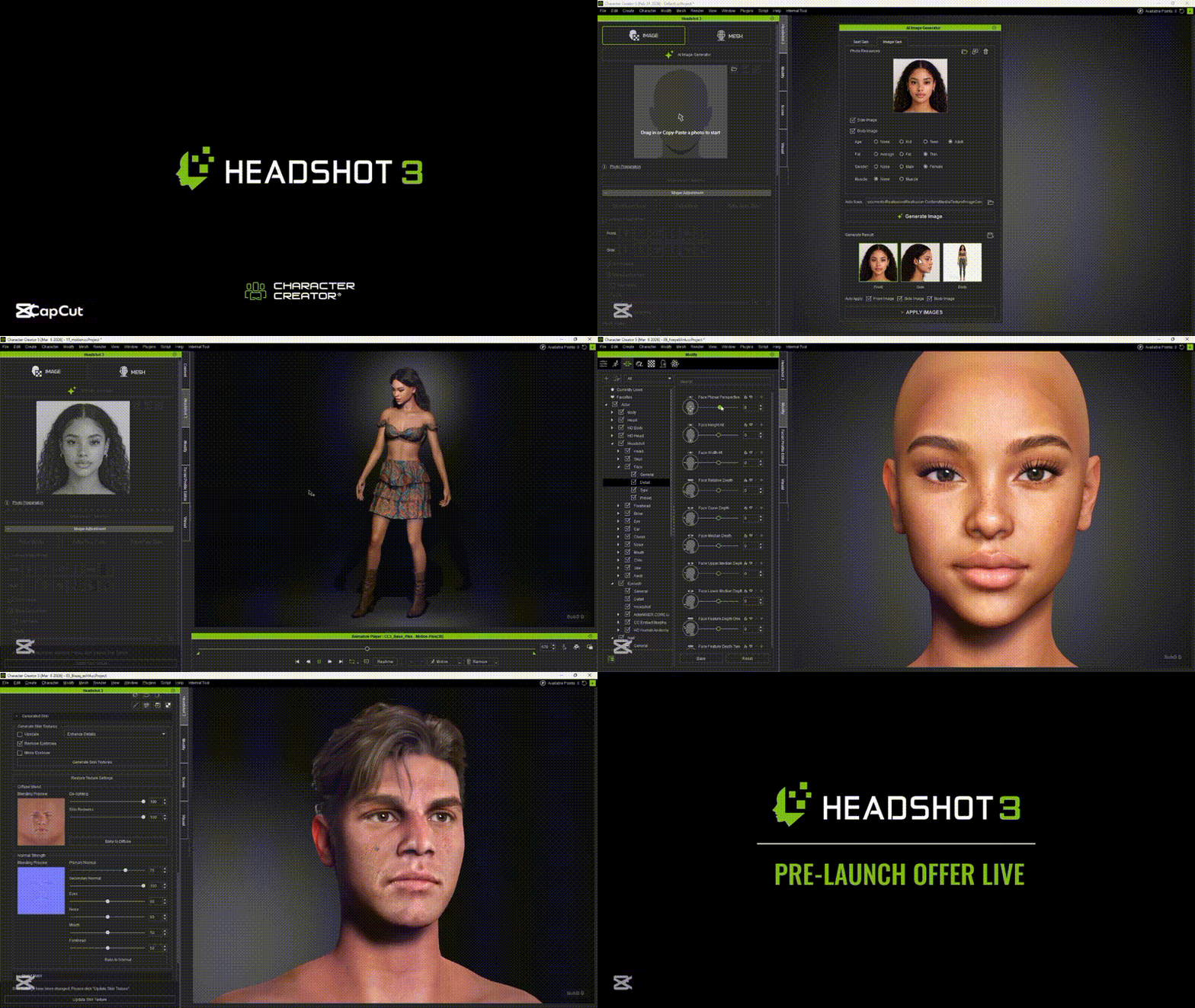
According to Reallusion’s official release, store, update, and trial materials, Headshot 3 launched for Character Creator 5 on April 27, 2026 as an AI-powered plugin that turns either a single facial photo or an imported 3D mesh into a fully rigged, animation-ready 3D head. The same launch window also introduced early bird pricing through May 31, 2026, a free 30-day trial distributed through Reallusion Hub, and a bundled Headshot Morph 1400+ bonus for qualifying purchases.
Headshot 3 Official Launch Date for Character Creator (April 27, 2026)
The official public launch date for Headshot 3 for Character Creator was April 27, 2026. That date is confirmed in the Headshot update page, which lists version 3.0.0423.1 with a release date of 2026-04-27, and in the Character Creator update page, which lists Character Creator 5.07 as released on the same day. Reallusion’s April 15 forum announcement also stated that Headshot 3 would officially launch on April 27, 2026, and the later “now available” launch communications match that rollout.
What is Headshot 3 for Character Creator? AI 3D Head Generator Explained
Headshot 3 is an AI-powered Character Creator plugin built to generate production-ready 3D heads and digital humans from either one facial photo or an imported 3D head mesh. Official product materials describe two core paths: an image workflow based on a proprietary image-to-3D AI model, and a mesh workflow for converting static 3D head assets into fully rigged Character Creator heads. Reallusion’s launch article adds that the new model was trained for higher-precision facial reconstruction and is intended to preserve likeness, facial structure, and demographic variation more faithfully than earlier workflows.

Headshot 3 Requirements: Do You Need Character Creator 5 to Use It?
Yes. Headshot 3 requires Character Creator 5. Reallusion’s own version comparison lists the Character Creator requirement for Headshot 3 as Character Creator 5, and its pre-launch and final-call posts explicitly state that Headshot 3 requires CC5 to operate. The current Headshot update page also separates Headshot 3 as the CC5 branch and Headshot 2 as the CC4 branch, which confirms that Headshot 3 is not the upgrade path for CC4 users unless they also move to CC5. For the base system itself, the current Character Creator download page lists Windows 10 or 11, Intel 7th Gen Core i5, 16 GB RAM, and an 8 GB VRAM GPU as minimum requirements, with higher recommended specs for heavier HD work.
Headshot 3 News and Announcements: Official Statements and Release Coverage
The official announcement sequence was clear and date-stamped. Reallusion published a pre-launch article on March 13, 2026, followed by an April 15 final-call forum announcement, an April 27 launch article, and a launch forum thread confirming that Headshot 3 was now available with early bird pricing. On April 28, an additional forum clarification explained which features are free and which require AI credits. Early trade coverage published immediately after launch highlighted the new image model, body-generation support, and the CC5-only positioning, which shows that the release was recognized quickly by industry press rather than remaining a forum-only update.
Headshot 3 Image Workflow: Create a 3D Head from a Single Photo
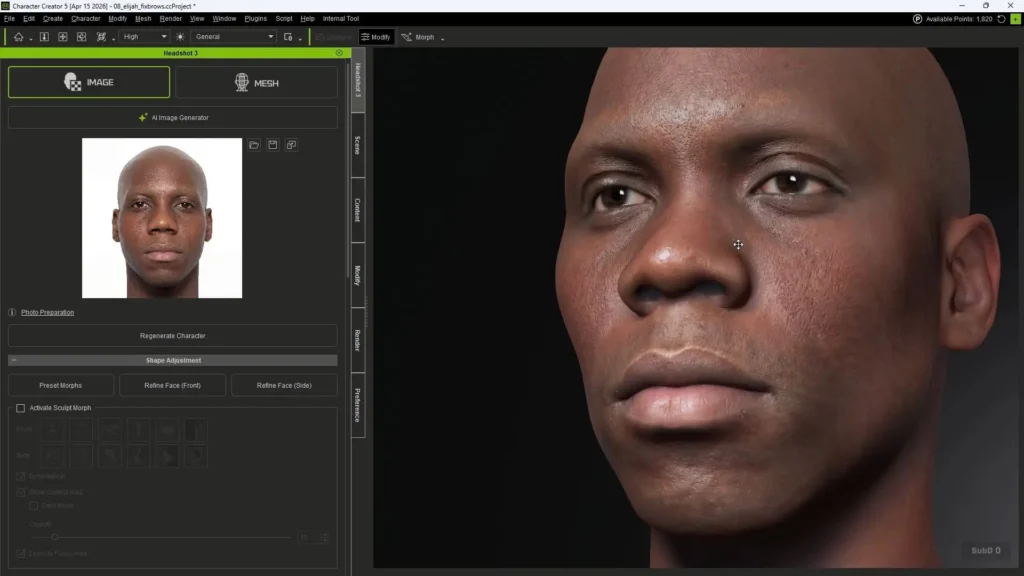
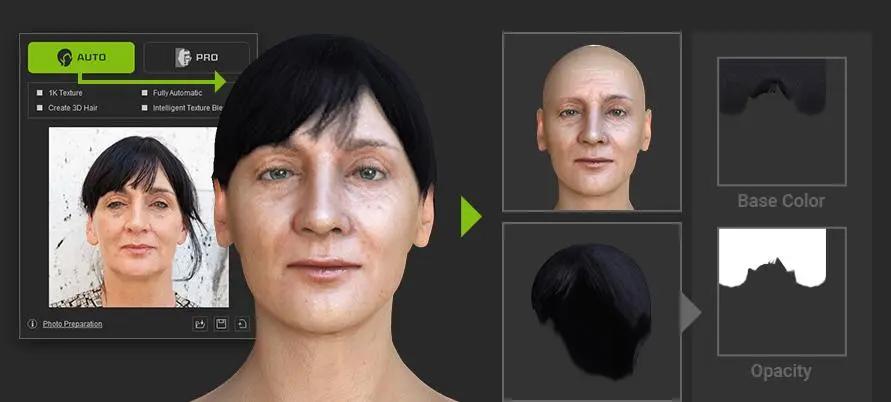
Headshot 3’s image workflow starts with a front-facing facial image and can optionally use a side image for better results. In the current manual, the first step is to import a front image, then optionally add a side image, choose preset morphs to reinforce facial depth and profile structure, and generate the head. Reallusion’s image workflow page adds the rest of the pipeline: automatic 3D head generation, topology and shape refinement, camera lens correction, normal map generation, texture reprojection, de-lighting, redness correction, and texture enhancement. The same workflow can also generate low-poly hair for faster first-pass characters viewed at distance.
Headshot 3 Mesh Workflow: Convert 3D Scans and Sculpts into a Rigged Head
The mesh workflow is the path for creators who already have a scan, sculpt, or mobile-captured head mesh and want to convert it into a rigged Character Creator head. Reallusion’s product page says this workflow converts static head models into fully rigged CC characters through automatic head wrapping, mesh refinement, and texture baking, and that it is optimized for photogrammetry, sculpted assets, and mobile-scanned models. Reallusion’s Headshot update page also describes the new mesh workflow as featuring highly accurate mesh wrapping and texture baking, which is the core value proposition for users bringing in external 3D data rather than starting from a photo.
Headshot 3 Digital Double Workflow: Steps to Make an Animation-Ready Character
A practical Headshot 3 digital double workflow can be summarized in six stages, all supported by the official product page and manual:
- Start with either a front-facing source photo, an AI-generated front image, or a compatible 3D head mesh, depending on whether you want the image or mesh path.
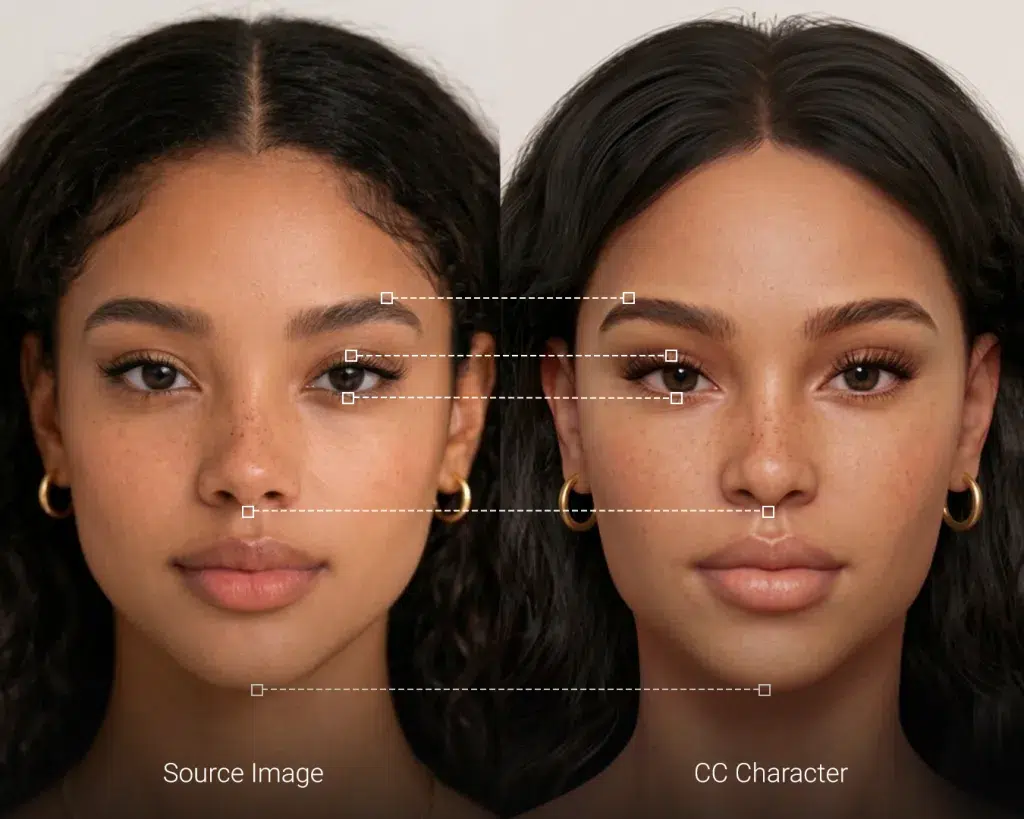
- Generate the 3D head, then reinforce likeness using preset morphs, front-and-side Bézier refinements, sculpt tools, and lens correction if the original photo has perspective distortion.
- Reproject and clean textures after mesh changes, then improve diffuse and normal output with de-lighting, skin redness correction, and primary and secondary normal generation.
- Move from head to body either by selecting a body preset or importing a full-body reference photo so Headshot 3 can generate a matching body shape.
- Match the body skin tone to the generated head, set eye color from the source image, and optionally add auto-generated low-poly hair or replace it with store or library hair.
- Save the result as a fully rigged character ready for lip-sync, facial expression work, and full-body animation, then continue inside Character Creator or send the character onward in the broader pipeline.
Headshot 3 Best Photo Tips: Lighting, Camera Angle, and Avoiding Distortion
The best Headshot 3 source image is still a clean, front-facing photo with balanced lighting, minimal occlusion, and a neutral expression. The current manual says a front image is the first requirement and that a side image can improve accuracy, while the AI image-enhancement documentation shows the system specifically tries to optimize typical problem cases such as uneven lighting, exaggerated expression, off-angle faces, glasses, head cropping, and black-and-white inputs. Reallusion’s workflow page also notes that smartphone and camera photos often introduce lens distortion, which the lens-correction slider can repair, but results will still be easier to control when the image starts with a straighter perspective and fewer lighting artifacts.
Headshot 3 Early Bird Offer: Discount Window and What’s Included
The official Headshot 3 early bird window runs from April 27 through May 31, 2026. During that period, Reallusion says purchases include Headshot Morph 1400+ as a bonus plus 100 AI Image Generations advertised as a $30 value. That early bird offer is separate from the earlier pre-launch campaign, which let some users buy Headshot 2 before launch and receive Headshot 3 at release; Reallusion’s launch forum thread also notes that those pre-launch buyers already had Headshot 3 and 200 AI Image Generation credits placed in their accounts.
Headshot 3 Pricing: How Much the Plugin Costs and Upgrade Pricing from Headshot 2
At launch, the official Headshot 3 product page lists three headline prices for Windows perpetual licenses: a starter package combining Character Creator 5 and Headshot 3 at $329 instead of $498, a direct Headshot 3 early bird price of $129 instead of $199, and an upgrade price of $99 for Headshot 2 customers.
Reallusion’s March 13 pre-launch article also described the $99 price as the loyalty upgrade path for existing Headshot 1 and 2 owners. One detail that is not fully harmonized in the visible public launch copy is the post-promotion upgrade price after the early bird window closes, so the safest verified figure to publish for April 29, 2026 is the active $99 upgrade price shown in official launch materials.
Headshot 3 Free Trial: Where to Download and What Limitations Apply
Reallusion offers a 30-day Headshot trial on the official download page, and that page notes that installation is handled through Reallusion Hub. If Character Creator 5 is not already installed, the CC5 trial page likewise routes the setup through Reallusion Hub first.
The official trial-vs-full matrix is unusually clear. In the Headshot trial, preview rendering is available, and users can save .ccProject, .ccAvatar, and .ccSkin files. However, export functions such as .iAvatar, selected-parts export, .fbx, and .obj, along with Send to iClone, Sketchfab upload, USD for Omniverse, and GoZ, are shown only for the full version. The same matrix also says the embedded morph-slider content is available in trial, while the bundled Headshot Morph 1400+ content is watermarked.

Headshot 3 for Character Creator 5 Download: Installing via Reallusion Hub
The official install flow is straightforward. Reallusion’s Headshot download page says the Hub installer will handle the setup, and the store guidance says to open Reallusion Hub, go to Character Creator, then Plug-ins, and download and install Headshot 3 there. Reallusion’s Hub page describes the application as the central manager for installing, opening, organizing, and updating Reallusion apps and plug-ins, which is why the launch communications consistently point users there first. For pre-launch buyers, Reallusion also said the Headshot 3 license would be added automatically to the account and become installable through Hub on launch day.
Headshot Morph 1400+ Pack: What it is and Why It’s Bundled with Headshot 3
Headshot Morph 1400+ is the morph add-on that expands the facial-shaping side of the Headshot pipeline. Reallusion’s official product page says it builds on Headshot Morph 1000+ by adding new preset sliders for more precise facial construction, enhanced sculpt morphs for easier post-adjustment, and optimization for the CC5 HD workflow. The Headshot 3 manual goes further and explains that all of the preset morphs used in the updated image pipeline come from the included Headshot Morph 1400+ pack, including the 58 facial presets organized across seven facial regions. That explains why the pack is bundled: it is not just a cosmetic bonus, but a core ingredient in the new refinement process.
Headshot 3 AI Image Generator: Creating Better Face Reference Images for Likeness
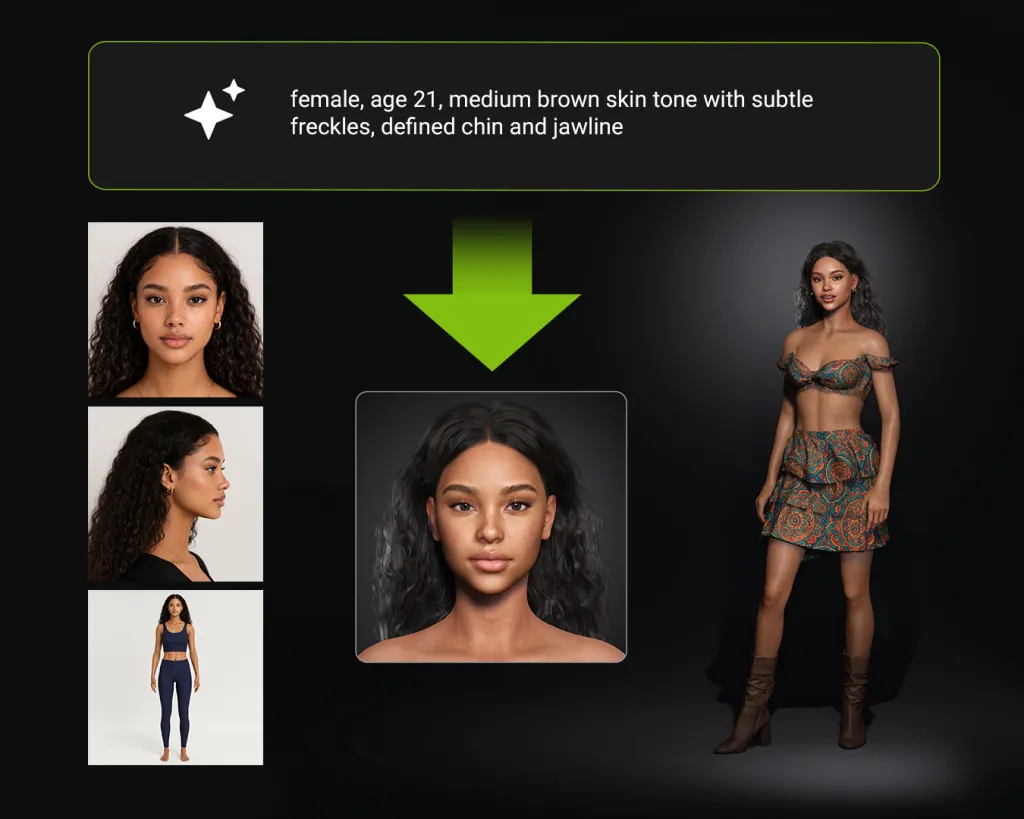
Headshot 3’s AI Image Generator is designed to solve one of the biggest problems in likeness work: inconsistent or incomplete reference images. Reallusion says the generator can create front-facing images from text prompts, transform existing photos into more usable source images, and generate side and body references to support better facial profiles and body proportions. The official launch article says those improvements are aimed at producing a cleaner foundation for sharper texture generation and more accurate overall likeness.
The credit model is also important. Reallusion’s April 28 forum clarification says the core image workflow and mesh workflow do not consume credits and that those head-generation paths will remain free to use inside Headshot 3. Credits are required for AI Image Generation, AI Image Enhancement, and side or body image generation. The manual states that front-image generation costs 15 points for 2K and 30 points for 4K, and the enhancement page says the same point cost applies regardless of how many enhancement fixes are selected for a given generation. Reallusion also states that this feature stack is powered by Google Nano Banana or Nano Banana Pro in its launch article, manual, and forum posts.
Headshot 3 vs Headshot 2: What’s New and What Improved
The cleanest official comparison is Reallusion’s own version table. Headshot 2 was tied to Character Creator 4 and used the older image workflow, while Headshot 3 is built for Character Creator 5 and introduces a next-generation proprietary image-to-3D model, 58 preset morphs, a spline-based reshaper for independent front and side adjustments, AI image generation, AI image enhancement, CC5-optimized sculpt morphs, and body matching from source images.
Reallusion’s “What’s New in Headshot 3” manual page summarizes the result as more accurate geometry, cleaner textures, and a more efficient digital human creation workflow, while officially showing side-by-side comparisons against Headshot 2. The mesh workflow concept carries forward, but Headshot 3 positions it inside the CC5 HD era rather than the older CC4 branch.
Frequently Asked Questions (FAQs)
- Is Headshot 3 officially available now?
Yes. Headshot 3 officially launched on April 27, 2026, and the launch was confirmed by the plugin update page, Character Creator release notes, and Reallusion’s launch forum posts. - Do I need Character Creator 5 to use Headshot 3?
Yes. Reallusion’s official materials repeatedly state that Headshot 3 requires Character Creator 5, and the version comparison lists CC5 as the required host version. - Can Headshot 3 make a rigged 3D head from one photo?
Yes. That is the core promise of the image workflow: import one front-facing photo, optionally add a side image, then generate and refine a rigged head inside Character Creator. - Can Headshot 3 also convert 3D scans or sculpts?
Yes. The mesh workflow is specifically described as converting static head models into fully rigged CC characters through wrapping, mesh refinement, and texture baking. - Does the main head-generation workflow use AI credits?
No. Reallusion’s April 28 clarification says both the image workflow and mesh workflow for core 3D head generation are free inside the plugin and do not consume credits. - What does use AI credits in Headshot 3?
AI Image Generation, AI Image Enhancement, and side or body image generation use the point-based AI system, while the manual lists 15 points for 2K generations and 30 points for 4K generations. - What is included in the early bird launch offer?
The official launch offer runs from April 27 to May 31, 2026 and includes Headshot Morph 1400+ plus 100 AI Image Generations advertised as a $30 value. - How much does Headshot 3 cost at launch?
The official page lists Headshot 3 at $199 regular, $129 during the early bird launch special, and $99 for upgrades from Headshot 2. A Character Creator 5 starter package with Headshot 3 is listed at $329. - Is there a free trial, and what can’t it do?
Yes. There is a 30-day trial, but the official comparison chart shows that export, Send to iClone, Sketchfab upload, USD, and GoZ are reserved for the full version. - What is the biggest practical upgrade over Headshot 2?
Based on Reallusion’s own comparison pages, the biggest upgrade is the new CC5-focused image pipeline: a better proprietary image-to-3D model, 58 preset morphs, Bézier reshape controls, AI-generated references, AI photo cleanup, and body matching from source images.
Conclusion
Headshot 3 is not just a routine version bump for Character Creator users. The official launch materials show a meaningful platform shift: CC5-only integration, a more advanced proprietary image-to-3D model, stronger facial refinement tools, integrated AI reference generation, better photo cleanup, mesh wrapping for external scans and sculpts, and a clearer bridge from likeness reference to a full animation-ready digital double.
For buyers evaluating the launch on published evidence, the safest conclusions are these: the official launch date is April 27, 2026; the current early bird window runs through May 31, 2026; the active public prices are $129 new and $99 upgrade; the free trial is real but export-restricted; and the workflow difference between Headshot 2 and Headshot 3 is substantial enough to matter for both likeness accuracy and production speed. The two areas where official public language is still not perfectly harmonized are the post-promotion upgrade price after the early bird period and the exact terminology overlap between AI “points,” “credits,” and “generations,” so this article stays only with the values and rules explicitly visible in official launch-era sources.
Sources and Citations
- Official product page and feature overview for Headshot 3, including image workflow, mesh workflow, version comparison, and launch pricing.
https://www.reallusion.com/character-creator/headshot/ - Official store page for the Headshot 3 perpetual license, including plugin description, launch offer, and bundled Morph 1400+ pack.
https://www.reallusion.com/plan-and-pricing/individual/perpetual/headshot-3-plugin-3098 - Official Headshot 3 free-trial and download page, including the 30-day trial and Reallusion Hub setup flow.
https://www.reallusion.com/character-creator/headshot/download.html - Official Character Creator 5 free-trial and download page, including the 30-day trial and Reallusion Hub setup flow.
https://www.reallusion.com/character-creator/download.html - Official Character Creator update page confirming Character Creator 5 v5.07 release on April 27, 2026.
https://www.reallusion.com/character-creator/update.html - Official Headshot update page confirming Headshot 3 v3.0.0423.1 release on April 27, 2026.
https://www.reallusion.com/character-creator/headshot/update.html - Reallusion launch article — “Reallusion Redefines Digital Double Creation with the Launch of Headshot 3 for Character Creator 5.”
https://magazine.reallusion.com/2026/04/27/reallusion-redefines-digital-double-creation-with-the-launch-of-headshot-3-for-character-creator-5/ - Reallusion pre-launch article — “Headshot 3 is Coming: Pre-launch Offer Live Now!”
https://magazine.reallusion.com/2026/03/13/headshot-3-is-coming-pre-launch-offer-live-now/ - Reallusion forum announcement — “Headshot 3 Launches April 27 — Pre-Launch Offer Final Call!”
https://discussions.reallusion.com/t/headshot-3-launches-april-27-pre-launch-offer-final-call/16969 - Reallusion forum announcement — “Headshot 3 for Character Creator 5 — Now Available with Early Bird Offer!”
https://discussions.reallusion.com/t/headshot-3-for-character-creator-5-now-available-with-early-bird-offer/17025 - Official Headshot 3 manual — “Generating Front Images.”
https://manual.reallusion.com/Headshot_Plugin/ENU/3.0/04-Image-Mode/Generating-Front-Image.htm - Official Headshot 3 manual — “Modify and Enhance Image with AI Image Generator.”
https://manual.reallusion.com/Headshot_Plugin/ENU/3.0/04-Image-Mode/Modify-and-Enhance-Image-with-AI-Image-Generator.htm - Official Headshot 3 manual — “Refine Face – Front,” covering Bézier control-point refinement.
https://manual.reallusion.com/Headshot_Plugin/ENU/3.0/04-Image-Mode/Refine-Front-Face.htm - Official Headshot 3 manual — “Generated Skin,” covering AI-powered skin, diffuse, normal, DeLight, redness, and texture controls.
https://manual.reallusion.com/Headshot_Plugin/ENU/3.0/08-Texture-Adjustment/Generated-Skin.htm - Official Headshot 3 manual — “Generate Character User Interface,” covering head/body tabs and body generation workflow.
https://manual.reallusion.com/Headshot_Plugin/ENU/3.0/04-Image-Mode/Generate-Character-User-Interface.htm - Official Headshot 3 product page clarification on free core features and AI-credit-based image generation/enhancement.
https://www.reallusion.com/character-creator/headshot/ - CG Channel — “Reallusion releases Headshot 3.0.”
https://www.cgchannel.com/2026/04/reallusion-releases-headshot-3-0/ - befores & afters — “Reallusion redefines digital double creation with the launch of Headshot 3 for Character Creator 5.”
https://beforesandafters.com/2026/04/30/reallusion-redefines-digital-double-creation-with-the-launch-of-headshot-3-for-character-creator-5/ - Digital Production — “Reallusion ships Headshot 3 for CC5.”
https://digitalproduction.com/2026/04/28/reallusion-ships-headshot-3-for-cc5/
Recommended
- Super Mario Has Become the Face of TikTok Shop AI Slop, and It’s Fooling Millions
- NeXus for Blender: Release, Features, Price, and Workflow Guide
- Tim Sweeney Backlash Explained: Why Epic Games Layoffs and His ‘Out of Touch’ Response Sparked Resign Calls
- How Do I Create a Cinematic Camera Shot in Blender?
- Howler 2026.5 Adds 3D Landscape Generator Fractal Garden: Procedural Low-Poly Terrain, Biomes, and Exports
- How to Save Time in Blender Animations with The View Keeper: A Comprehensive Guide
- All Free Mystery Gifts in Pokémon Legends: Complete List of Codes, Rewards & How to Redeem in 2026
- PlayStation 3 Just Got An Update: PS3 System Software 4.93 Patch Notes, Download, and What Changed
- Custom Skyboxes with Blender: Create Equirectangular HDRIs, Fix Seams, and Export to Unity & Unreal
- How to Unlock the Blacksmith in Nioh 3: The Hamamatsu Incident, Eternal Rift Location, and Crafting Basics























































































