







In This Article (7 sections)
Jurassic World Evolution 3 Open-Air Aviaries, Requirements, and Flying Reptile Comfort
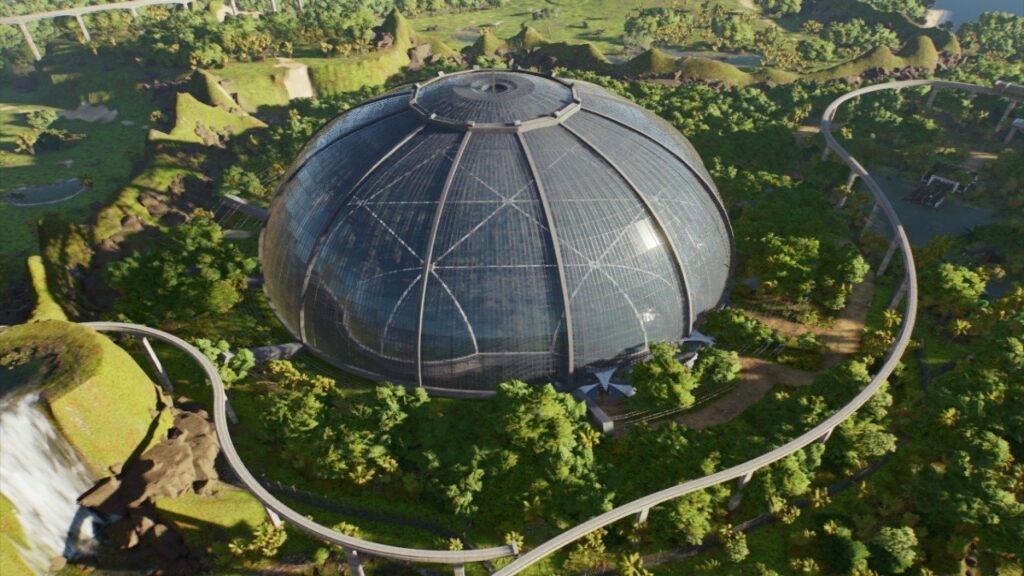
Open-air aviaries in Jurassic World Evolution 3 are designed to make flying reptile habitats feel larger, more natural, and less visually restricted than traditional dome-style structures. Instead of enclosing every pterosaur exhibit beneath heavy glass, open-air builds allow players to blend cliffs, water, rocks, forest, terrain height, scenery, and guest routes into one larger-looking flying enclosure. This makes them especially useful for cinematic park design and for large species that can appear cramped in smaller traditional aviaries.
The main benefit is presentation. A well-built open-air aviary can resemble a coastal cliff, jungle canyon, volcanic basin, research preserve, mountain valley, or lagoon-edge habitat rather than a sealed exhibit. Flying reptiles still require a valid aviary-type enclosure, so the open-air approach should be treated as an advanced way of designing an aviary rather than replacing the enclosure system entirely.
The best results begin with space planning. Flying reptiles need room to move, land, feed, rest, and remain comfortable, so the aviary should not be treated like a small decorative exhibit. Before building, decide whether the habitat will be a mountain aviary, forest preserve, lagoon attraction, canyon enclosure, or research sanctuary. The theme should guide the terrain, scenery, guest layout, and species choice.
Terrain should come first. Raise cliffs around the rear or sides, keep guest areas flatter, and leave the center open for visible flight. High terrain around the edges creates the impression of vertical space without filling the central airspace with obstacles. Deep basins, slopes, and rock walls can also make the habitat feel taller, which is especially helpful for large pterosaurs.
After shaping the land, establish the valid aviary area and then add food, water, resting areas, enrichment, and other species-specific needs. Functional objects should remain easy for the animals to reach. A common mistake is creating beautiful scenery that blocks movement or hides feeders inside dense rocks and foliage.
Pterosaur comfort depends on more than visual scale. Space, food, water, population balance, environmental needs, and stress all matter. Open-air habitats can appear larger than they function mechanically, so overcrowding is easy to miss. Start with fewer animals, monitor comfort, then increase the population gradually if the enclosure can support them.
Feeders should sit in open areas, and water should remain accessible rather than being hidden behind decoration. Broad movement zones are also important because narrow corners and overly cluttered layouts can make the habitat feel restrictive. Function should come before visual detail whenever the two conflict.
Species should also match the enclosure size and style. Pteranodon works well in coastal, jungle, and classic Jurassic Park-style builds because it is large enough to be visible without requiring an enormous preserve. Dimorphodon suits denser environments and smaller cliff or forest habitats. Quetzalcoatlus benefits most from wide open layouts, high terrain, and long sightlines because its scale can look awkward in cramped spaces.
The same rule applies to mixed-species exhibits. Not every combination will work equally well, so animal needs should be checked before choosing a theme. A large open-air aviary should feel spacious from both the animal and guest perspective, not simply look impressive from one camera angle.
Best Open-Air Aviary Designs, Scenery, Lagoons, and Guest Viewing
The strongest open-air aviary designs use terrain and scenery to hide technical boundaries while keeping the central flight zone clear. Cliffs, rocks, trees, water, and layered depth should frame the enclosure without blocking the animals. A raised cliff along the back can make the habitat feel open from the guest side while still creating a natural visual boundary.
A cliff aviary is one of the easiest designs to make convincing. Raise terrain along one side, carve a valley below it, and use rock formations where the terrain meets the enclosure boundary. The result resembles a natural nesting wall rather than a manufactured structure. Larger pterosaurs work particularly well in this layout because the vertical terrain gives them a stronger sense of scale.
A lagoon-edge aviary creates another strong park district. Place the flying reptile habitat beside deep water and use rock shelves, beaches, sand, waterfalls, and coastal vegetation to visually connect the two attractions. The lagoon should still function independently as an aquatic enclosure, while the aviary remains valid for flying reptiles.
Guest paths can then follow the shared viewing area so visitors see marine reptiles below and pterosaurs above. Hotels and viewing galleries can face the water, while balloon tours can provide additional scenic routes around the district. Too many buildings between the lagoon and aviary should be avoided because they weaken the visual connection.
Jungle canopy aviaries work better for smaller species. Dense trees can frame the edges while the middle remains open for movement and visibility. Guest paths can pass through the forest perimeter to create the feeling of discovering animals through vegetation rather than looking directly into a cage.
A research preserve works well in Sandbox Mode. Use natural terrain, limited guest infrastructure, ranger access roads, hidden utilities, and broad flying zones so the habitat feels more like a protected sanctuary than a traditional theme park exhibit.
Decoration should always support the enclosure theme. Coastal builds can use sand, low shrubs, shallow water, rocks, and weathered viewing structures. Mountain aviaries benefit from cliffs, rock spires, waterfalls, and elevated observation areas. Jungle designs can use dense perimeter foliage, shaded paths, and hidden service roads.
Waterfalls are particularly useful because they add motion and help connect height differences. They can also make large habitats feel more alive without taking up the central flight space. As with all scenery, they should not interfere with animal access to food, water, or movement routes.
Open space is part of the design, not wasted space. Filling every part of the habitat with trees, rocks, towers, and scenery can make the aviary look busy but reduces the feeling of flight. The middle should remain readable so guests can track the pterosaurs across the habitat.
Layered depth creates better visuals. Low plants can sit near guest paths, medium rocks can occupy the midground, and cliffs or taller trees can define the background. This gives screenshots and cinematic camera angles more depth while keeping sightlines clear.
Guest viewing should be planned after the aviary footprint is confirmed. Paths, galleries, hotels, restaurants, and tours should face the most active part of the enclosure rather than blank terrain or service areas. Slightly lower viewing areas can make cliffs and flying reptiles appear more impressive by forcing guests to look upward.
Balloon tours can also strengthen large scenic districts because their custom routes can be placed around open habitats. Since the attraction is not threatened by animal attacks, it works well as a visual and guest experience feature around expansive aviary and lagoon combinations.

Open-Air Aviary Building Mistakes and Advanced Sandbox Layout Tips
The most common mistake is making the aviary too small. Open-air designs need enough space to justify their appearance. A cramped enclosure loses the sense of freedom that makes this style appealing, particularly with giant pterosaurs.
The second mistake is overdecorating. Too many trees, rocks, structures, and scenery objects can block views and reduce open flying space. Decorative detail should be concentrated around the edges and focal points rather than spread evenly across the whole enclosure.
Poor terrain planning is another issue. Shaping the land after final structures are already in place can create awkward slopes, misplaced objects, or terrain changes that are difficult to correct. Major cliffs, valleys, water basins, and flat guest areas should therefore be created before final aviary structures and scenery are placed.
Guest planning is equally important. An attractive habitat that cannot be seen clearly may perform poorly as an attraction. Paths should be positioned deliberately, with multiple viewing angles where useful, and foliage should frame the exhibit rather than hide it.
Ignoring species comfort is another common mistake. Open-air aviaries may look enormous from a visual perspective while still having limited functional room. Animals should be added gradually, and mixed-species groups should be monitored carefully to avoid comfort problems, overcrowding, or competition around feeding areas.
Large pterosaurs also need visual height. A flat aviary can make them appear compressed even if the functional enclosure is technically sufficient. Raised cliffs, deep basins, lower guest routes, and strong elevation changes can create more convincing scale.
In Sandbox Mode, open-air aviaries become much more flexible because players can build entire districts rather than isolated exhibits. A coastal aviary can connect to a lagoon, a mountain research zone can contain giant pterosaurs, and a jungle trail can move through several viewing points without making the park feel overcrowded.
Advanced layouts benefit from forced perspective. Larger cliffs and rocks can be placed toward the back, smaller scenery near the guest side, and open water or airspace through the center. This makes the enclosure feel deeper and larger than its actual footprint.
Technical buildings should be hidden wherever possible. Ranger access, staff paths, utilities, and service structures can be placed behind cliffs, vegetation, or terrain so the guest experience remains focused on the animals and environment rather than management infrastructure.
For cinematic builds, camera planning should happen before the final round of decoration. Stand at guest eye level, check the major views, then adjust cliffs, water, rocks, foliage, and paths around those compositions. This prevents excessive detail from being added to areas that barely appear on screen.
The strongest open-air aviaries ultimately balance function, scale, visibility, and natural design. Flying reptiles need enough room and comfort, guests need clear sightlines, and scenery should hide the technical structure without blocking the animals. When terrain, water, foliage, guest routes, and species scale all work together, open-air aviaries can become some of the most impressive and cinematic attractions in Jurassic World Evolution 3.
Frequently Asked Question (FAQs)
- What is the main purpose of open-air aviaries in Jurassic World Evolution 3?
Open-air aviaries are designed to make flying reptile habitats feel larger, more natural, and less visually restricted than traditional dome-style enclosures. They allow players to blend cliffs, water, rocks, foliage, terrain height, and guest routes into the habitat so pterosaurs feel more connected to the wider park environment. - Are open-air aviaries better than traditional aviaries?
Open-air aviaries are better when the goal is natural scenery, large habitats, stronger guest views, and cinematic park design. Traditional aviaries are still useful for smaller spaces, simpler layouts, and straightforward management. The better option depends on the species, available space, and the type of park you want to build. - Do flying reptiles still need aviary-type enclosures?
Yes. Flying reptiles still require valid aviary-type enclosures in Jurassic World Evolution 3. Open-air designs change the visual style and layout of the habitat, but they do not remove the need for proper flying reptile containment and management systems. - Which flying reptile is best for a beginner open-air aviary?
Pteranodon is one of the best choices for beginners because it is recognizable, easy to see while flying, and suitable for several enclosure themes. It can work well in coastal, jungle, cliff, and classic Jurassic Park-style habitats without requiring the enormous visual scale that larger species need. - How do I make an open-air aviary look natural?
Start by shaping the terrain with cliffs, valleys, water, and broad open areas before adding smaller scenery. Use rocks and foliage to hide technical edges, but keep the central flight zone clear so the animals remain visible. Layering low plants, medium rocks, and taller background terrain also helps create depth without making the habitat feel cluttered. - Why do large pterosaurs need bigger aviaries?
Large pterosaurs can look visually cramped when placed in narrow or low enclosures, even if the habitat technically functions. Species such as Quetzalcoatlus benefit from wide open spaces, long sightlines, raised cliffs, and strong height differences because those features better match their scale and make their movement feel more convincing. - Can open-air aviaries be combined with lagoons?
Yes. Lagoon-side aviaries are one of the strongest visual combinations because they allow marine reptiles to occupy the water while flying reptiles move above the surrounding cliffs and shoreline. Using beaches, rocks, waterfalls, and shared viewing areas can make the two habitats feel like one connected prehistoric district. - What is the biggest mistake in open-air aviary design?
The biggest mistake is overdecorating the habitat until the open space disappears. Too many trees, rocks, structures, and scenery objects can block guest views, reduce the sense of flight, and make food, water, or movement areas harder for the animals to use. Most decoration should support the edges while the center remains open. - Are open-air aviaries good for Sandbox Mode?
Yes. Sandbox Mode is especially suitable for open-air aviaries because it gives players more freedom to experiment with large preserves, mountain habitats, coastal districts, lagoon combinations, and cinematic layouts. It also makes it easier to design around appearance and scale rather than focusing only on campaign objectives. - How can I improve guest views around open-air aviaries?
Place viewing paths, hotels, galleries, and tour routes so they face the most active and open part of the enclosure. Elevated cliffs and lower guest areas can make flying reptiles appear larger, while clear central airspace helps visitors track them easily. Avoid placing dense trees or buildings directly between guests and the main flight zone.

Conclusion
Jurassic World Evolution 3: Complete Guide To Open-Air Aviaries shows that the best flying reptile habitats are not just functional enclosures. They are full park experiences. Open-air aviaries give players the tools to create natural looking habitats with cliffs, lagoons, forests, waterfalls, wide skies, and stronger guest views. They are especially useful for large pterosaurs, scenic Sandbox Mode builds, and players who want their parks to feel less artificial.
The most important rule is balance. A good open air aviary must look beautiful, but it must also work. Flying reptiles still need proper enclosure function, comfort, food, water, space, and visibility. Guests need clear views. Terrain must support the design rather than fight it. Decorations should hide structure without blocking the animals.
Traditional aviaries remain useful for simple builds, but open air aviaries are the better choice for ambitious parks. They allow Jurassic World Evolution 3 players to build habitats that feel closer to real ecosystems, more cinematic, and more believable. When planned carefully, an open air aviary can become one of the most memorable attractions in the entire park.
Sources and Citation
- Frontier Developments — Jurassic World Evolution 3 Aviary Guide — Official guide explaining that flying reptiles require Aviary-type enclosures and outlining the basic function of aviaries.
Frontier Developments — Jurassic World Evolution 3 Aviary Guide - GamesRadar+ — Jurassic World Evolution 3 Is Adding Hot Air Balloons — Covers the Balloon Tour attraction, including its waypoint system and Frontier’s explanation of how the attraction works.
GamesRadar+ — Jurassic World Evolution 3 Balloon Tours - TheGamer — Jurassic World Evolution 3 Open-Air Aviary Guide — Guide covering open-air aviary construction, including terrain height, water and waterfall techniques.
TheGamer — Jurassic World Evolution 3 Open-Air Aviary Guide - NoobFeed — Jurassic World Evolution 3: How to Make the Best Aviaries — Covers cliff-style aviaries, slopes, rocks, foliage, caves, walkways, bridges and waterfalls.
NoobFeed — How to Make the Best Aviaries - Steam Community — Jurassic World Evolution 3 Discussions — Community discussion documenting player requests for more aviary height and larger vertical spaces for flying reptiles such as Quetzalcoatlus.
Steam Community — Jurassic World Evolution 3 Discussions - Steam Community — Quetzalcoatlus / Aviary Discussion — A game-specific discussion involving Quetzalcoatlus and aviary management.
Steam Community — Quetzalcoatlus Aviary Discussion
Recommendations
- Jazzy Stealth Action Game Thick as Thieves Hits PC on May 20: Release Date, Gameplay, and What to Expect
- Duet Night Abyss Apologizes After Malware-Infected Launcher Update, Offers Free Loot Boxes (10 Pulls)
- How Switching Between GTA 6’s Two Protagonists Works
- Sony Pictures Entertainment Will Reportedly Lay Off Hundreds of Its Employees: What to Know About the 2026 Restructuring
- Avatar: the Last Airbender Season 2 Trailer Reveals Toph Mentoring Aang in Epic Earth Kingdom Storyline
- How To Increase Inventory Space In Windrose (Fast Guide to Unlock More Slots & Backpacks)
- Stranger Things Creators Say Divisive Season 2 Episode About Eleven’s ‘Sister’ Was Never a Backdoor Pilot for a Spin-Off
- Sales of Resident Evil Requiem Surpassed 6 Million Copies
- Culdcept Begins: Best Cards for Fire Decks and Aggressive Book Builds
- Astro Bot Sales Reach Approximately 4.3 Million Copies Worldwide



































































































