







In This Article (7 sections)
Material Maker 1.8 Release Date, New Features, and Procedural Material Creation
Material Maker 1.8 expands the free, open source procedural material editor with Trimsheet, Auto Export, Crop, and high quality Gaussian Blur nodes, alongside improvements to texture processing, graph navigation, and usability. Released on October 25, 2026, for Windows, Linux, and macOS, the update gives artists more ways to organize reusable surface details and automate repetitive tasks. Built with the Godot Engine, Material Maker uses connected nodes to generate, transform, filter, and combine texture information, allowing artists to adjust materials without rebuilding them manually.
For independent developers, environment artists, and beginners, procedural texturing offers an efficient way to create consistent materials. Rather than painting every texture separately, artists can establish relationships between patterns, masks, colors, and surface properties. For example, a stone courtyard material might combine repeated paving patterns, variations between stones, dirt masks, and different surface finishes. Changing the paving arrangement can then influence several connected elements. The application also includes an experimental painting workflow for 3D models, using procedural graphs to define brushes.
Material Maker 1.8 introduces several notable additions:
- Trimsheet Node: Supports the creation of reusable texture regions for architectural details, decorative strips, panels, and modular assets.
- Auto Export Node: Automatically exports connected input whenever it changes, reducing repetitive manual exporting.
- Crop Node: Adds another operation for selecting and processing portions of texture information.
- High Quality Gaussian Blur: Expands existing blur processing options for creating smoother transitions.
- Tiler and Splatter Position Outputs: Provide additional information about the positions of repeated instances.
- Interface Improvements: Introduce sub node searching, theme controls, and improved alignment shortcuts.
- Performance Improvements: Include optimizations to zooming and post processing, alongside fixes affecting previews, saving, and other interactions.
The Trimsheet node is particularly useful for environment artists creating modular assets. A trim sheet organizes reusable surface details into different texture regions, allowing several objects to share decorative elements. For example, door frames, window surrounds, and wall edges can use different sections of the same texture. This reduces the need to create unique texture sets for every object. However, the node does not automatically unwrap models or establish suitable UV coordinates. Artists must still ensure that the model’s geometry and UV layout correspond to the intended regions. Testing a simple trim layout on one representative object can reveal stretching, inconsistent scale, or visible transitions.
The Auto Export node addresses another common production task. It exports its connected input whenever that input changes, making it useful when artists repeatedly adjust materials that must be updated in another application. A practical test involves connecting a simple texture, configuring the export destination, making a visible change, and checking the resulting file. Artists should distinguish successful exporting from automatic reimporting because a game engine may continue displaying an older asset until it refreshes the imported texture. Clear filenames and organized output folders also help prevent accidental replacement of approved files. Material Maker separately supports command line material exporting, which may be more appropriate for processing multiple saved projects.
The updated Gaussian Blur and Crop operations expand texture processing capabilities. Gaussian Blur can soften transitions between masks, such as the boundary between painted metal and exposed material. However, excessive smoothing can remove important surface details. Crop provides another way to manipulate selected image regions and is best explored initially using a recognizable test image. Gaussian Blur is an addition to Material Maker’s existing blur functionality rather than the application’s first implementation of blur processing.
Tiler and Splatter create repeated instances of input content, with controls for properties such as scale, rotation, and distribution. Tiler uses row and column settings, while Splatter provides an instance count. Their new instance position outputs give artists additional information about where repeated elements appear. This can be useful when developing effects related to individual objects rather than applying unrelated variation across an entire image. For example, a surface containing repeated plates may benefit from consistent variation within each plate. The exact possibilities depend on the output representation and connected nodes, making simple experiments useful before introducing these features into complex graphs.
Material Maker also supports physically based rendering, commonly called PBR. Its Static PBR Material node includes inputs for albedo, metallic, roughness, emission, depth, and normal information, alongside texture size settings. These channels describe how surfaces appear under lighting, making them essential for realistic materials. Beginners can practice by creating a ceramic tile, establishing its shape and spacing, adjusting how its glaze reflects light, and introducing subtle imperfections. Large forms should remain recognizable, while smaller details should support the overall surface rather than overwhelm it.
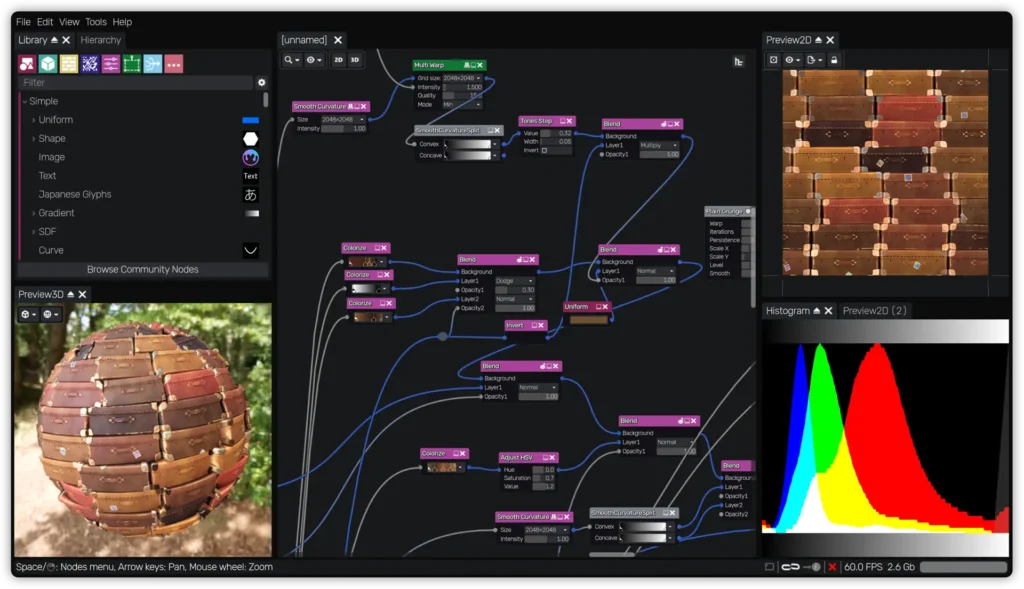
The update’s interface improvements make graph management easier. Sub node searching, theme controls, and alignment shortcuts complement existing library, hierarchy, preview, histogram, and reference panels. Artists can improve organization by grouping related operations, using meaningful names, and arranging connections logically. For instance, keeping clean paint, exposed substrate, and accumulated dirt in recognizable graph sections makes later revisions easier. Search tools help locate elements, but clear organization remains important when returning to a project or sharing it with another artist.
Although version 1.8 introduces several useful additions, the best way to evaluate them is through a familiar project. Artists can recreate an existing material, compare the editing process, and inspect the exported results. Preserving a copy of the original project before opening it in a newer version is also sensible version management practice, particularly when maintaining production assets.
Material Maker 1.8 vs Substance 3D Designer: Exporting Materials to Godot, Unity, and Unreal Engine
Material Maker and Adobe Substance 3D Designer both support procedural material creation through editable node graphs. Adobe Substance 3D Designer provides tools for authoring textures, materials, and filters, with an established ecosystem for distributing configurable assets. Material Maker offers a free alternative for artists whose workflows depend on procedural texture generation and compatible exports rather than particular commercial integrations.
The comparison should focus on production requirements rather than price alone. For example, a team producing approved texture maps for a game scene may find Material Maker suitable, while another team requiring configurable Substance assets across multiple applications may depend on Designer’s SBSAR format. SBSAR packages compiled graphs and supporting resources for compatible applications, making it important in certain production pipelines.
Material Maker should therefore not be assumed to reproduce every Substance 3D Designer feature. Artists should compare required material types, export formats, existing assets, collaboration needs, and compatibility with destination applications before selecting either tool.
Material Maker supports exporting to Godot, Unity, and Unreal Engine, although the procedures differ between platforms.
- Godot: Material Maker provides supported export targets for generating textures and other files used by Godot materials.
- Unity: The documentation describes material file generation and importing assets into Unity projects.
- Unreal Engine 4: Includes a documented export workflow for creating compatible material assets.
- Unreal Engine 5: Uses a documented procedure involving a generated Python script to build the destination material.
For Godot, artists should select the appropriate export target and apply the resulting material to a representative mesh. Surface scale, brightness, reflections, and normal detail should be checked under the lighting used in the actual project. Documentation may contain older Godot terminology, so users should confirm compatibility with their installed engine version rather than relying entirely on outdated class names.
Unity users should verify that imported materials match their project’s rendering configuration, while Unreal Engine users should follow the appropriate version specific export instructions and inspect generated materials before applying them widely. A simple test asset helps reveal orientation, shading, and reflection problems before introducing materials into larger environments.
Regardless of the destination, the procedural graph should remain separate from exported production files. The graph preserves the editable construction process, while exported textures and engine materials are the assets consumed by the project. Maintaining this distinction makes revisions easier and prevents confusion about which files should be edited.
Texture resolution and viewing distance also matter. A material that looks convincing on a preview sphere may require adjustments when applied to a large wall, floor, or small prop. Testing in the destination engine is therefore necessary even when the export process completes successfully.
Material Maker 1.8 also includes performance improvements affecting zooming and post processing, alongside fixes for preview behavior, saving, and other interactions. However, the release notes do not establish a universal percentage increase in material generation speed. Results depend on graph complexity, texture resolution, hardware, and the operations being performed.
Complex generated shaders can affect responsiveness. Material Maker’s performance documentation explains that Buffer nodes can simplify portions of a shader workload by storing intermediate results, although this introduces additional images that must be generated. Artists should balance these tradeoffs according to their projects.
A representative graph provides a better performance test than an empty project. Users can examine how quickly parameter adjustments become visible, whether graph navigation remains responsive, and how long final exports take. Comparisons between versions should use consistent settings to avoid attributing differences caused by texture size or graph complexity to the application update.
It is also important to distinguish authoring performance from runtime performance. A complex procedural graph may be acceptable when it generates static textures for later use, while animated shaders require additional testing inside the destination application.

Material Maker 1.8 System Requirements, Free Download, Steam Version, and Beginner Guide
Material Maker 1.8 is available for Windows, Linux, and macOS. The Steam listing identifies 8 GB of RAM across its platform requirements, although actual performance depends on project complexity and the applications running alongside the editor.
The listed system requirements include:
- Windows: Windows 10, a 64 bit processor supporting SSE4.2, and graphics compatible with Vulkan 1.2 or DirectX 12.
- Linux: An x86_64 processor supporting SSE4.2 and graphics compatible with Vulkan 1.2.
- macOS: An Intel or Apple Silicon processor with Metal support.
- Memory: 8 GB of RAM.
- Storage: Approximately 200 MB for Windows and Linux, and 300 MB for macOS.
These specifications describe basic installation requirements rather than guaranteed performance for every material graph. Large textures, complex nodes, and simultaneous use of modeling or game development applications can increase resource demands. Artists should test representative projects on their intended hardware before relying on Material Maker for larger production workflows.
The application remains free through its official itch.io distribution, which uses a name your own price system and allows downloads without payment. Steam provides a paid distribution option, while the project’s source code is publicly available. The existence of the Steam edition does not mean that the free version has been discontinued.
Artists can choose a distribution channel according to their preferences. The free download is suitable for evaluating procedural texturing, while Steam may appeal to users who prefer managing software through an existing library. Pricing alone should not be interpreted as evidence of different rendering quality or a separate premium material engine. Release information and listed features should determine comparisons between editions.
The project’s GitHub repository identifies its code license as MIT. However, the rights attached to external images, downloaded materials, and other third party resources remain separate from the application’s software license. Artists should therefore confirm permissions when incorporating outside assets into their work.
For teams, consistent application versions are important. Recording the release used for production projects and testing updates before introducing them into shared workflows helps ensure that materials can be reproduced reliably.
Beginners can start with Material Maker 1.8 by completing a simple material from creation to export:
- Create a new material graph: Begin with a basic surface such as ceramic tile, plaster, painted metal, or stone.
- Add procedural nodes: Generate a recognizable pattern and connect the relevant outputs to the material.
- Adjust surface properties: Experiment with color, roughness, metallic behavior, and normal details.
- Inspect the preview: Check the material under different lighting conditions and viewing angles.
- Save the project: Preserve an initial version before introducing additional complexity.
- Export the material: Choose the appropriate destination and generate the required assets.
- Test in the destination application: Apply the material to a representative mesh and inspect its appearance.
- Explore the new features: Experiment separately with Trimsheet, Auto Export, Crop, Gaussian Blur, and instance position outputs.
The official introductory workflow demonstrates adding a node from the library, connecting it to the Material node, and inspecting changes in the preview. Beginning with one simple material makes it easier to understand how graph connections influence the final result.
Once the basic workflow is established, artists can introduce more advanced operations. Trimsheet can be tested with modular geometry, Auto Export with recognizable texture changes, and Tiler or Splatter position outputs with repeated elements. Testing unfamiliar nodes separately makes troubleshooting easier than introducing several new operations into an already complicated graph.
Material Maker 1.8 strengthens the application’s existing procedural workflow through new authoring tools, automation, interface improvements, and processing options. Its free availability makes it accessible to beginners and independent developers, while its export capabilities support integration with established game development tools. Its suitability for professional production ultimately depends on the required materials, destination applications, and workflow expectations.

Frequently Asked Questions (FAQs)
- Is Material Maker 1.8 free?
Yes. Material Maker 1.8 is available as a free download through its official itch.io page, which allows users to choose a payment amount of zero. Steam offers a paid distribution option, and the project’s source code is publicly available. Users can therefore explore procedural material creation without purchasing the Steam edition. - When was Material Maker 1.8 released?
Material Maker 1.8 was released on October 25, 2026, according to the official release information. The update is available for Windows, Linux, and macOS and introduces new procedural nodes, interface improvements, and fixes designed to improve material creation and exporting. - What are the main additions in the update?
The major additions include Trimsheet, Auto Export, and Crop nodes, a high quality Gaussian Blur option, and instance position outputs for Tiler and Splatter. Version 1.8 also introduces sub node searching, theme controls, improved alignment shortcuts, and performance related fixes. These changes improve material organization, texture processing, and everyday workflow efficiency. - Is it a replacement for Substance 3D Designer?
Material Maker can serve as a free alternative to Substance 3D Designer for artists whose projects require compatible procedural materials and texture exports. However, it does not necessarily provide every Designer feature or integration. The better choice depends on existing assets, supported formats, collaboration requirements, and whether the production workflow relies on the Substance ecosystem. - Does the Trimsheet node automatically unwrap models?
No automatic model unwrapping capability is established by the release notes. The Trimsheet node supports the creation of reusable texture regions, but artists must still ensure that their models have suitable UV layouts. Correct UV placement allows different parts of a model to use the intended trim details without unwanted stretching or scaling problems. - What does Auto Export do?
Auto Export automatically exports its connected input whenever that input changes. This reduces the need to manually repeat exporting after every adjustment. Users should configure the destination carefully and verify that the receiving application imports the updated files correctly, since automatic exporting does not necessarily guarantee automatic reimporting. - Can materials be used in Godot, Unity and Unreal Engine?
Yes. Material Maker supports export workflows for Godot, Unity, and Unreal Engine, although the procedures differ. Godot and Unity use their respective export targets, while Unreal Engine workflows vary by version. Artists should test exported materials inside the destination project to confirm compatibility, shading, and texture behavior. - Does the application support painting on 3D models?
Yes. Material Maker includes an experimental painting workflow that allows artists to use procedural graphs to define brushes for painting 3D models. This complements its procedural material authoring capabilities, although creating reusable materials and painting specific models involve different workflows and production requirements. - Will updating make every graph faster?
Not necessarily. Material Maker 1.8 includes optimizations affecting zooming, post processing, and other interactions, but the release notes do not promise universal speed improvements. Actual performance depends on graph complexity, texture resolution, hardware, and processing operations. Artists should compare representative projects under consistent conditions to evaluate improvements. - What is the best first project for a beginner?
A simple ceramic tile, plaster surface, or painted panel is a suitable starting project. Beginners should create a basic graph, adjust essential material properties, inspect the preview, and export the result to one destination application. Completing this workflow provides practical experience before introducing more complicated nodes, procedural effects, or automation.

Conclusion
Material Maker 1.8 improves procedural material creation through practical additions such as Trimsheet, Auto Export, and expanded node outputs. These features help artists create reusable textures, simplify exporting, and manage materials more efficiently. However, evaluating the application requires more than examining its preview quality. Graph organization, export reliability, licensing, and compatibility with destination applications are equally important.
For artists seeking a free alternative to Substance 3D Designer, Material Maker provides an accessible way to learn procedural texturing without an upfront purchase. Starting with a simple material, establishing a clear visual objective, and completing an export test can help users understand the workflow before exploring more advanced features.
Sources and Citations
- Material Maker 1.8 Official GitHub Release: The primary source for the October 25, 2026 release date, complete changelog, Trimsheet and Auto Export nodes, Gaussian Blur, Crop, Tiler, Splatter, interface changes, and bug fixes.
- Material Maker 1.8 Steam Community Announcement: Confirms the October 25 release and provides the full feature changelog, including the new nodes and performance improvements.
- Citation: Material Maker 1.8 – Steam Announcement
- Material Maker Official GitHub Repository: Provides project background, source code, Godot Engine foundation, development information, and MIT licensing.
- Citation: RodZill4 – Material Maker GitHub
- Material Maker Official User Manual: Documentation for node-based material creation, graph editing, procedural textures, and application workflows.
- Citation: Material Maker User Manual
- Material Maker Official itch.io Page: Provides the downloadable application, supported operating systems, project information, and links to the source code and documentation. Note that its displayed download list may lag behind the latest release.
- Citation: Material Maker – RodZilla on itch.io
- Material Maker Steam Store Page: Documents material creation, PBR workflows, engine export capabilities, platform support, and minimum system requirements.
- Citation: Material Maker – Steam Store
- CG Channel – Material Maker 1.8 Release Coverage: Independent coverage explaining the Trimsheet and Auto Export additions, Gaussian Blur, platform availability, and the update’s relevance to game artists.
- Adobe Substance 3D Designer: Official product information about procedural material authoring, node-based graphs, and the Substance asset ecosystem. Useful for the comparison with Material Maker.
- Citation: Adobe Substance 3D Designer
- Adobe Substance 3D – SBSAR Documentation: Explains Substance archive assets and their use in compatible applications, supporting the comparison of configurable Substance assets with Material Maker workflows.
- Citation: Adobe Substance 3D Documentation
Recommendations
- Dragon Ball Xenoverse 3 Looks Like a Massive Upgrade Over the Previous Games
- How to Create a Cinematic Short Film with Metahuman, Motion Design, Text Actors, UDraper, and Cloth Simulation in Unreal Engine 5
- Metahuman Animator: How to Animate Realistic Characters in Unreal Engine 5
- How To Build And Use The Dive Elevator In Subnautica 2: Blueprint Locations, Crafting Recipe, And Best Uses
- Konami’s EFootball Celebrates 1 Billion Downloads with Master League Sprint, a Limited-Time PES Master League-Style Mode
- Gears of War: E-Day Official Tech Demo State of Unreal 2026 Breakdown: Unreal Engine 5, MegaLights,
- Human: Fall Flat Veterans Launch Pretty Cool Games With Hypergryph Funding for New Physics-Based AA Game
- EA Sports FC 27 Release Date, Platforms, and Everything Coming on September 25
- Snake’s Japanese Voice Actor Wants Metal Gear 6 With Kojima
- Streets of Rage Movie: New Writers and Director Bring Fresh Momentum to Sega Adaptation



































































































