








In This Article (12 sections)
mGear 5.4 Update: Facial Rigger 3.0, Anim Picker 2.0 and New Maya Features
mGear 5.4 introduces major improvements to the open source rigging and animation framework for Autodesk Maya, including Facial Rigger 3.0, Anim Picker 2.0, Blocking Ghosts and faster Shifter rig building. Released on October 14, 2026, the update is described by its developers as one of the framework’s largest releases, bringing redesigned tools, improved performance and greater integration between character rigging and animation workflows. The software officially supports Maya 2022 through Maya 2027.
mGear provides a collection of tools for character creation, including Shifter for modular rigging, Rigbits for specialized rigging utilities, Anim Picker for selecting animation controls and Animbits for animation workflows. The framework also includes reusable Python libraries that technical artists and studios can incorporate into customized production pipelines.
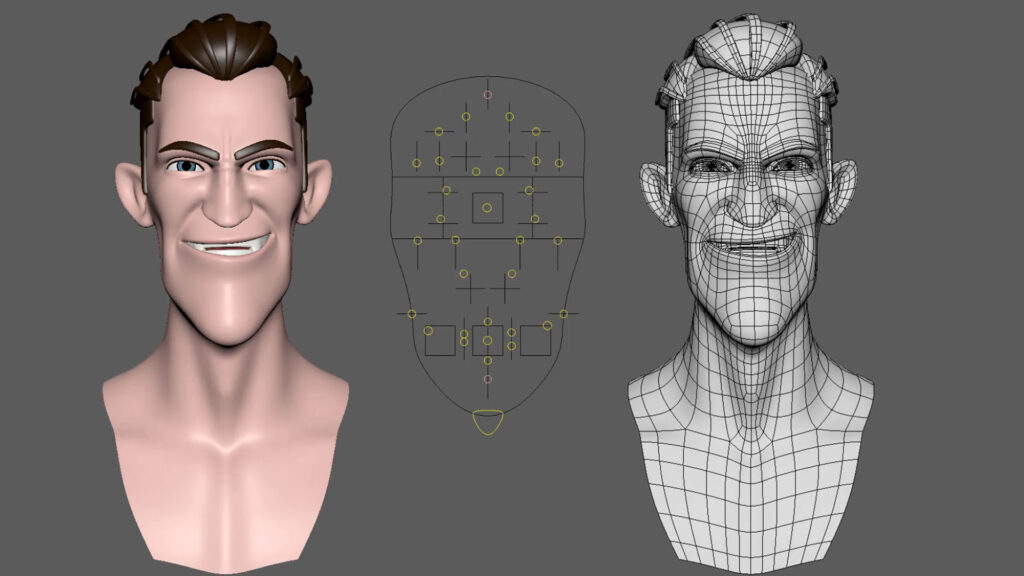
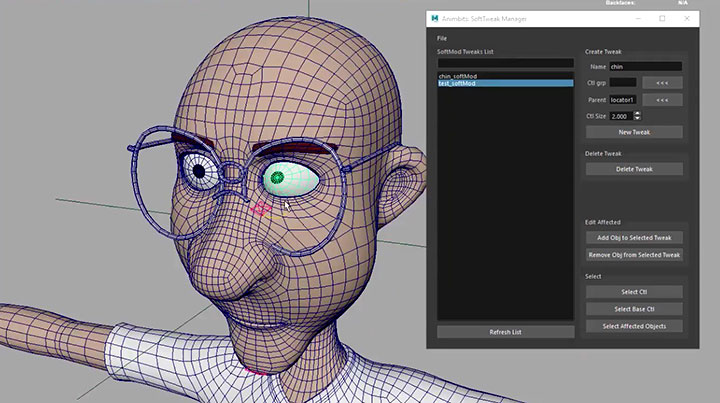
Facial Rigger 3.0 is one of the most significant additions, introducing a unified system for building eye, lip and brow rigs. Previously separate workflows now share a common facial engine, geometry selection methods and user interface. This allows technical artists to configure facial controls more consistently while integrating them into procedural character rigs.
The new facial architecture also includes corresponding Shifter components named eyelid_01, lips_01 and brow_01. These components enable studios to build facial systems alongside body rigs rather than adding them as separate manual operations. Configuration files can be reused across the facial tools and Shifter, making character setup easier to reproduce.
Eye Rigger 3.0 introduces improved topology handling and support for unconventional eye orientations. Artists can build eyelid rigs using vertex loops or edge loops, with the system detecting eyelid layouts through local geometry rather than depending entirely on Maya’s global axes. This makes it suitable for tilted, sideways or unusually positioned eyes. Mirrored controls improve consistency between left and right eyelids, while .eyes configuration files allow settings to be saved and reused.
Facial Rigging Components and Shared Engine
Lips Rigger 3.0 improves mouth rigging through automatic detection of upper and lower lips and their corner positions. Artists no longer need to select central lip vertices manually. The tool supports jaw following, zipper controls, lip rolling, optional squash and stretch, and topological autoskinning for smoother deformation. Its default configuration provides seven upper and five lower controls, with settings stored in .lips files for reuse.
Brow Rigger 3.0 supports individual left, right and center brow setups. It includes main controls, tangent controls, optional secondary controls and a squeeze attribute for bringing the inner brow toward the center. Artists can also use an optional NURBS slide surface to help brow controls follow the shape of the skull. These improvements provide greater flexibility when building expressive facial rigs.
The shared facial engine is particularly valuable for studios managing multiple characters because it establishes consistent setup methods while preserving customization options. Artists can adjust facial controls according to character anatomy, save their configurations and rebuild corresponding systems through Shifter.
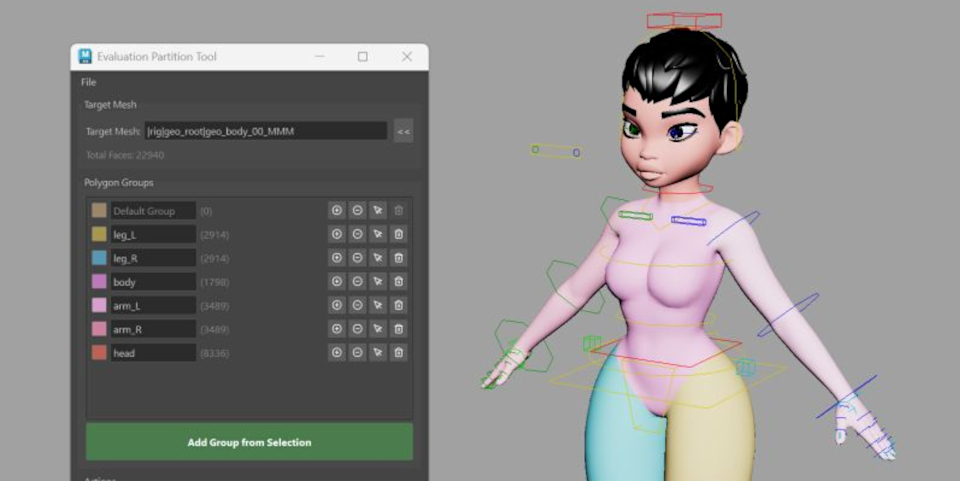
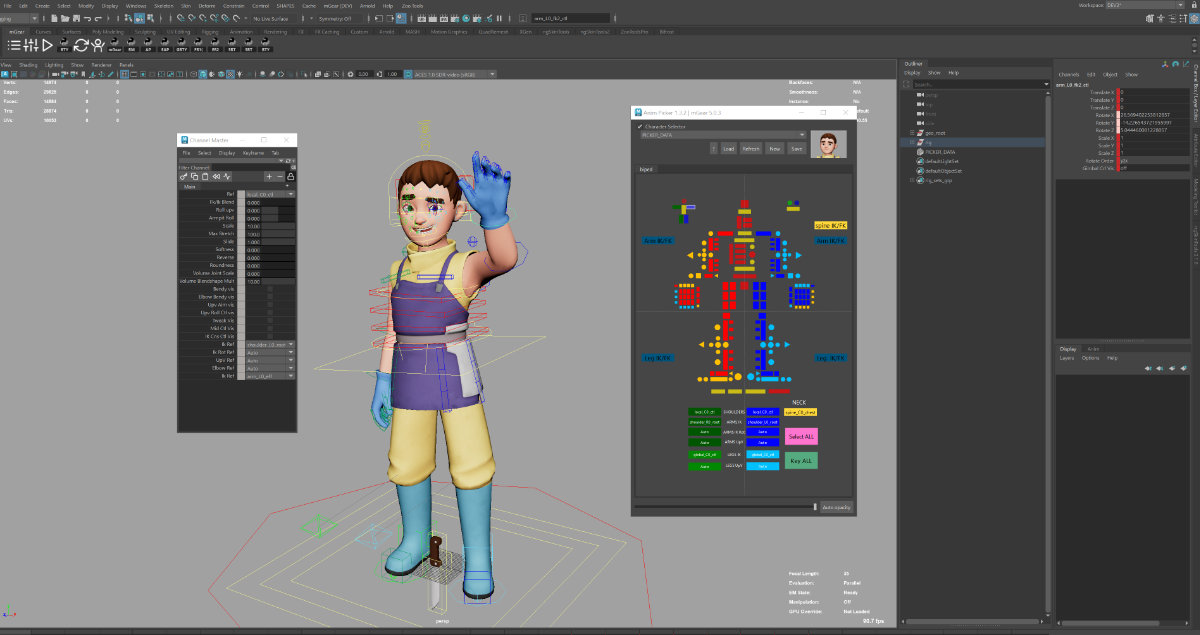
Anim Picker 2.0 is another major improvement, replacing the previous editor with a redesigned interface that supports more advanced control layouts. Anim Picker allows animators to select and manipulate character controls through graphical interfaces instead of locating every controller directly in the Maya viewport.
The updated editor introduces several features:
- Transform handles: Move, scale and rotate picker elements directly within the editor.
- SVG graphics: Import and edit vector shapes for detailed control layouts.
- Interactive controls: Use checkboxes and sliders connected to Maya attributes or scripts.
- Mirrored relationships: Create corresponding picker controls for opposite sides of a character.
- Layered backgrounds: Organize control layouts using multiple visual layers.
- Conditional visibility: Display picker elements according to selected conditions.
- Pinned HUD elements: Keep frequently used controls accessible within the interface.
- Passthrough mode: Interact with Maya’s viewport through transparent areas of a floating picker.
Anim Picker 2.0 also supports high resolution displays, autosave reminders, reusable shape libraries and control tracing. Its editor allows multiple selected items to be modified simultaneously, reducing the work required to organize complex character interfaces.
The picker stores information on a PICKER_DATAS node and supports reusable .pkr files. Version 2.0 introduces a cleaner JSON storage format, with migration support for older pickers. However, legacy setups stored exclusively inside scene nodes without external picker files may require additional migration steps.
Animbits Hub and Technical Enhancements
Beyond facial rigging and animation selection, mGear 5.4 introduces an Animbits Hub that brings commonly used tweening and keyframe tools into a convenient interface. Spring Manager 2.0 has also been rebuilt, adding support for additional simulation solvers and collision options.
Technical improvements include utilities for importing and exporting lattice, shrink wrap and proximity wrap deformers, better namespace handling during skin imports and improvements to HumanIK mapping.
Together, these additions make mGear 5.4 a substantial update for character artists, technical directors and animation studios seeking more integrated tools within Autodesk Maya.
mGear 5.4 Blocking Ghosts: 3D Onion Skinning and Faster Character Animation
One of the most notable animation additions in mGear 5.4 is Blocking Ghosts, a tool that introduces a three dimensional onion skinning workflow for character animation. It allows animators to view transparent copies of a character at different keyed poses, making it easier to evaluate timing, spacing, body mechanics and movement progression.
Traditional onion skinning is commonly associated with two dimensional animation, where previous and following drawings remain partially visible around the current frame. Blocking Ghosts applies a similar principle to complete character meshes inside Maya’s three dimensional viewport.
The tool creates static, semitransparent representations of a character at keyframes associated with selected animation controls. Earlier and later poses can be displayed simultaneously, allowing animators to compare how the character moves throughout a sequence. The current frame’s ghost is hidden because the active character already represents that pose.
To use Blocking Ghosts, animators select the character meshes they want to display and identify the controls whose keyframes should generate ghost poses. They can specify a frame range manually or use Maya’s existing playback range. The tool then generates visual copies at the relevant keyed frames.
Blocking Ghosts offers two useful ways to display character poses. Animators can preserve each ghost’s actual position in the scene or spread the poses along the camera’s right axis. The second option helps separate overlapping silhouettes, making subtle differences in posture and movement easier to identify.
The tool includes several practical features:
- Pose visualization: Display previous and following keyed poses alongside the current character.
- Camera based spacing: Separate overlapping ghosts to make poses easier to compare.
- Interactive navigation: Click a ghost to jump directly to its corresponding animation frame.
- Automatic updates: Refresh ghost poses when relevant keyframes are modified.
- Customizable appearance: Use dedicated ghost shading or the character’s original materials.
- Referenced rig support: Work with referenced characters and namespaced animation rigs.
- Temporary displays: Remove ghosts when the tool closes or a different scene opens.
These capabilities are particularly useful during animation blocking, when artists establish important poses before refining transitions and secondary movements. By displaying multiple poses simultaneously, Blocking Ghosts makes it easier to identify inconsistent silhouettes, awkward spacing and movement that lacks visual clarity.
For example, animators working on walking or jumping sequences can preserve the character’s original scene positions to examine movement through space. For dialogue or acting scenes where the character remains relatively stationary, spreading ghosts along the camera axis can make changes in gestures and expressions easier to compare.
The ability to select which controls define relevant keyframes also helps prevent unnecessary visual clutter. When a selected range contains more than 30 poses, mGear displays a confirmation warning because generating too many ghosts can make the viewport difficult to interpret.
Unlike permanent animation geometry, Blocking Ghosts is designed as a temporary visual aid. The generated poses are not saved with the Maya scene and disappear when the tool is closed or another scene is opened.
Anim Picker Control Access and Organization
Anim Picker 2.0 complements this workflow by making character controls easier to access and organize. Animators can open it as a floating window, dock it within Maya or use the editing interface to create custom layouts. Multiple tabs allow body, face and specialized animation controls to be separated while remaining accessible through one picker.
Clicking a picker item selects its associated Maya controls. Shift can add controls to the current selection, Ctrl can toggle selection and dragging across empty picker space creates a marquee selection. Middle mouse dragging pans the interface, the mouse wheel controls zoom and the F key frames picker content.
Namespace synchronization also allows picker configurations to work with referenced characters. This is useful in larger productions where multiple character instances may share the same rig structure but use different namespaces.
Passthrough mode provides additional convenience by allowing animators to interact with the Maya viewport through transparent areas of the picker. Important control buttons can remain visible while the surrounding interface does not obstruct character manipulation.
These improvements give artists more flexible ways to manage complex rigs while concentrating on posing, movement and animation quality.
Shifter Performance and Validation Improvements
mGear 5.4 also improves Shifter, its modular character rigging system, which allows technical artists to construct reusable rigs from individual components. Through the Guide Manager, artists can load character templates, position guides according to anatomy, build animation controls and prepare rigs for deformation and skinning.
The update reportedly makes Shifter rig builds approximately twice as fast, primarily through improvements to PyMaya node creation and attribute lookups. Actual performance will vary depending on rig complexity, custom components, Maya configuration and installed plugins.
Shifter also introduces better guide validation, options for skipping problematic components, rig wide controls for disabling automatic skinning and a more responsive build log. Additional diagnostics can identify plugins that contribute to unexpectedly slow operations.
The combination of faster rig construction, unified facial components, improved control selection and Blocking Ghosts strengthens mGear’s usefulness throughout the character animation pipeline, from initial rig development to final pose refinement.
mGear 5.4 Maya Compatibility, Installation, Project Migration and Commercial Use
mGear 5.4 officially supports Autodesk Maya 2022 through Maya 2027, making the update available across several Maya generations used in professional animation and game development. The framework is distributed separately from Autodesk Maya and can be installed through Maya’s module system.
The official installation process involves downloading the mGear release archive, extracting its contents and placing the framework in Maya’s modules directory. After launching or restarting a supported Maya version, users can verify that installation was successful by checking whether the mGear menu appears.
The basic installation process includes:
- Download the mGear 5.4 release package from the official project distribution.
- Extract the downloaded archive.
- Copy the extracted release contents into the appropriate Maya
modulesdirectory. - Start or restart Autodesk Maya.
- Confirm that the mGear menu appears in the application.
The standard modules directory is located within the user’s Maya configuration folders on Windows, Linux and macOS. Studios using managed environments may deploy mGear differently through their existing production pipelines.
Existing Maya projects should be tested before upgrading to mGear 5.4, particularly when they rely on older facial rigs, custom scripts or Anim Picker configurations. Although the update maintains compatibility with several previous workflows, some features introduce changes that require attention.
Eye Rigger 2.1 remains available for compatibility, and Eye Rigger 3.0 can import earlier configuration files. Existing custom steps using the older facial module continue building the previous version rather than being automatically converted.
Anim Picker 2.0 introduces a more significant data storage change. Older picker files can generally be migrated when opened, but legacy picker information stored only inside a Maya scene without an external .pkr backup may need to be exported again using the new JSON format.
Some Python import paths have also changed. For example, Bookmarks has moved from Utilbits to Animbits, meaning scripts that previously imported mgear.utilbits.bookmarks require updating. Studios maintaining custom tools or shelf buttons should verify that those scripts continue functioning after installation.
For production environments, maintaining backups of existing scenes, picker files and approved rig configurations is a sensible precaution. Testing representative characters before deploying the update across an entire studio can help identify compatibility problems involving deformation, referenced assets, namespaces and custom pipeline components.
Licensing, Documentation, and Summary
mGear remains free and open source under the MIT licence. The official project documentation confirms that artists and studios can use the framework in commercial productions and sell or distribute rigs created with it. This makes the software suitable for independent artists, animation studios and game developers without requiring commercial licensing fees for the framework itself.
The project is supported through its community resources, documentation and professional services offered by mcsGear. Its official documentation covers Shifter, Rigbits, Anim Picker, Animbits and other components, providing detailed instructions for configuration and production workflows.
For artists upgrading specifically to mGear 5.4, the most important documentation areas are Facial Rigger 3.0, Anim Picker 2.0 and Blocking Ghosts. These features introduce new settings and workflows that may require some adjustment, particularly for users familiar with older mGear versions.
Overall, mGear 5.4 represents a substantial improvement to Autodesk Maya character rigging and animation workflows. Its unified facial engine makes complex character setups more consistent, Anim Picker 2.0 improves access to animation controls and Blocking Ghosts provides a practical method for comparing character poses in three dimensions.
Combined with faster Shifter builds, expanded technical utilities and compatibility across Maya 2022 through Maya 2027, the update gives technical artists and animators a more integrated collection of tools for professional character production.
Frequently Asked Questions (FAQs)
- What is the biggest new feature in mGear 5.4?
Facial Rigger 3.0 is one of the most significant additions because it combines eye, lip and brow rigging through a shared facial engine. This creates a more consistent setup process and allows facial components to integrate directly with Shifter character rigs. However, Anim Picker 2.0 and Blocking Ghosts are equally important improvements for animators, making the update substantial across both rigging and animation workflows. - Does mGear 5.4 include 3D onion skinning in Maya?
Yes. The feature is officially called Blocking Ghosts and provides a three dimensional onion skinning workflow. It creates transparent copies of a character at selected keyframes, allowing animators to compare previous and upcoming poses. Artists can also spread the ghosts along the camera axis, adjust their appearance and click them to navigate directly to corresponding animation frames. - What versions of Maya support mGear 5.4?
According to the official release announcement, mGear 5.4 supports Autodesk Maya 2022 through Maya 2027. This compatibility range allows artists and studios using several Maya versions to access the updated rigging and animation tools. However, existing custom scripts and pipeline extensions should still be tested before adopting the new version. - Is Facial Rigger 3.0 compatible with old Eye Rigger setups?
Yes. mGear retains Eye Rigger 2.1 for compatibility, while Eye Rigger 3.0 can load configuration files created with the older version. Existing custom steps using the previous facial module continue building the older rig rather than automatically converting it. This helps studios maintain existing assets while gradually adopting the redesigned facial system. - Can Anim Picker 2.0 be docked inside Maya?
Yes. Anim Picker 2.0 can operate as a dockable Maya workspace panel, allowing it to remain integrated into an animator’s preferred interface layout. Users can also launch it as a floating window or access a dedicated editing interface for modifying picker designs. These options provide flexibility for different workflows and monitor configurations. - Does Blocking Ghosts work with referenced rigs?
Yes. Blocking Ghosts supports referenced and namespaced character rigs, making it suitable for professional animation scenes where character assets are loaded through Maya references. Animators can generate pose ghosts from selected controls without requiring the rig to be imported directly into the scene. This helps the tool fit into established studio production pipelines. - Are Blocking Ghosts saved permanently in a Maya scene?
No. Blocking Ghosts creates temporary visual representations rather than permanent scene objects. The generated ghosts are not saved with the Maya scene and are removed when the tool is closed or another scene is opened. Animators can regenerate them when needed by selecting the appropriate character meshes, controls and frame range. - Does mGear 5.4 make Shifter faster?
Yes. The mGear development team reports that Shifter rig builds are approximately twice as fast, mainly because of improvements to PyMaya node creation and attribute lookups. The update also improves build logging and guide validation. Actual performance gains can vary depending on rig complexity, custom components and installed Maya plugins. - Is mGear 5.4 free to use in commercial productions?
Yes. mGear is distributed as free and open source software under the MIT licence. Artists and studios can use it to create character rigs for commercial animation, games and other productions. The official project documentation also confirms that rigs created using mGear may be sold or distributed commercially. - Do old Anim Picker files need to be rebuilt from scratch?
Not generally. Anim Picker 2.0 supports migration of older picker configurations, allowing many existing setups to remain usable. However, the update introduces a new JSON storage format, and legacy pickers stored only inside Maya scene nodes without external.pkrbackups may require additional export steps. Keeping backups before upgrading helps protect existing picker data.
Conclusion
mGear 5.4 represents a major improvement to character rigging and animation workflows in Autodesk Maya. Released on October 14, 2026, the update introduces Facial Rigger 3.0, Anim Picker 2.0, Blocking Ghosts and significant Shifter performance improvements. Together, these additions provide artists with more efficient tools for building character rigs, managing animation controls and refining movement within Maya.
Facial Rigger 3.0 introduces a unified foundation for eye, lip and brow rigging, with dedicated Shifter components that allow facial systems to integrate directly into procedural character builds. Anim Picker 2.0 provides a redesigned interface with SVG graphics, interactive sliders, mirrored controls, conditional visibility and a transparent HUD mode. These improvements make complex character rigs easier to manage while giving animators greater flexibility in organizing and accessing controls.
Blocking Ghosts is another important addition, providing a practical three dimensional onion skinning workflow. By displaying transparent character meshes at selected keyframes, the tool allows animators to compare poses, evaluate movement and identify spacing problems. Ghosts can update when keyframes change, spread along the camera axis and provide direct navigation to their corresponding frames without permanently modifying the Maya scene.
For technical artists and studios, the reported twofold improvement in Shifter rig building, enhanced guide validation and additional deformer utilities further strengthen the framework. However, upgrading existing projects requires attention to changes in Anim Picker’s JSON storage and certain Python module paths. Testing older assets, custom scripts and picker configurations before adopting the update across active productions remains important.
Overall, mGear 5.4 offers a more integrated character production workflow, combining faster rig construction with improved facial controls and practical animation tools. With official support for Maya 2022 through Maya 2027 and continued availability under the MIT licence, the framework remains accessible to independent artists and professional studios developing characters for animation and games.
Sources and Citations
- mGear Framework, Version 5.4.0 Release Announcement, October 14, 2026 : Official announcement presenting Facial Rigger 3.0, the completed Anim Picker 2.0 release, new animation tools and expanded deformer import and export capabilities. It confirms support for Maya 2022 through 2027 and reports approximately twice as fast Shifter rig builds. That speed improvement is the developer’s assessment rather than an independent benchmark. mgear-framework.com
Citation: mGear 5.4.0: Official Release Announcement. (mGear Framework) - mGear Documentation, Official Release Log : Detailed version history separating new features, improvements and bug fixes, including the changes introduced in 5.4.0. It documents facial rigging components, skin import improvements and build optimisations, while identifying compatibility changes. In particular, scripts and shelf buttons importing Bookmarks from the former Utilbits module need updating following its move to Animbits. mgear4.readthedocs.io
Citation: mGear Release Log. (mGear Documentation) - mGear Documentation, Rigbits User Guide : Official instructions for rigging utilities, including helper joints, facial rig construction and tools for preserving deformers during rig rebuilds. It explains the Eye, Lips and Brow Rigger workflows, configuration files and integration with Shifter. Separate sections document saving and restoring lattice, shrink wrap and proximity wrap settings, connections and deformation weights. mGear Documentation
Citation: Rigbits User Documentation. (mGear Documentation) - mGear Documentation, Anim Picker User Guide : Official guide explaining how animators create graphical interfaces for selecting and adjusting character controls. It covers vector shapes, interactive sliders, mirrored layouts, conditional visibility and the transparent overlay mode. The documentation also explains storing picker data within Maya scenes and exchanging
.pkrfiles, allowing layouts to be reused across scenes and characters. mGear Documentation
Citation: Anim Picker User Documentation. (mGear Documentation) - mGear Documentation, Animbits User Guide : Official animation reference covering the Animbits Hub, pose blending, keyframe adjustments, selection bookmarks and Blocking Ghosts for comparing poses. It also explains adding and baking secondary motion through Spring Manager. The optional Bone Dynamics solver requires a separately installed plugin, so that functionality should not be described as available solely through installing mGear. mGear Documentation
Citation: Animbits User Documentation. (mGear Documentation) - mGear Documentation, Quick Start and Installation Guide : Introductory walkthrough explaining installation through Maya’s modules folder and building a character rig from a supplied biped template. It covers positioning guides, generating controls, attaching the character mesh to deformation joints and accessing animation tools. The guide also introduces storing rig assets separately so they can be reassembled when a rig is rebuilt. mGear Documentation
Citation: mGear Quick Start and Installation. (mGear Documentation) - mGear Documentation, Shifter User Guide : Detailed reference for Shifter’s modular rigging system, including the Guide Manager, component selection, hierarchy management and reusable templates. It explains build settings, validation, automatic skinning and template comparisons. Its custom step documentation shows how Python scripts can run before or after a build, supporting repeatable studio workflows and shared rig customisations. mGear Documentation
Citation: Shifter User Documentation. (mGear Documentation) - mGear Framework, Official Website : Official project hub providing downloads, documentation, release announcements, community support and professional services. It distinguishes mGear’s Maya rigging and animation tools from ueGear’s integration with Unreal Engine, including asset and animation transfer. The website also explains the project’s development history, community contributions and continued distribution as free, open source software. mgear-framework.com
Citation: mGear Framework Official Website. (mGear Framework) - mGear Documentation, Frequently Asked Questions : Official overview explaining the framework’s intended users, modular rigging capabilities and custom solvers. It clarifies that artists can use the supplied tools without programming knowledge, while developers can extend functionality through Python and C++. The FAQ provides general background on the framework rather than a complete inventory of changes introduced in version 5.4.0. mGear Documentation
Citation: mGear Frequently Asked Questions. (mGear Documentation) - mGear Documentation, MIT Licence : Official licence text establishing permission to use, modify, distribute and sell copies of the software, subject to retaining the copyright and permission notices in copies or substantial portions. It also states that the software is supplied without warranty. This provides the actual licensing conditions behind descriptions of mGear as free and open source. mGear Documentation
Citation: mGear MIT Licence. (mGear Documentation)
Recommendations
- Compulsion Games Seeks New Partnership Opportunities After Separating From Xbox
- How Mega Cat Studios Adapted God of War Into a Retro Pixel Art Game
- Devil May Cry Nero: Character Backstory, Abilities, Game Appearances, and Lore Explained
- Farid M Panah Pixar Win or Lose detached facial features DFF rig in Maya Bifrost
- Nightcrawler and Mystique Avengers: Doomsday Costumes Revealed at D23
- Marvel Rivals Wants Some Lesser-Known Heroes and Villains Characters: Why Deep-Cut Picks Are the Game’s Secret Weapon
- Storm Studios Percy Jackson Season 2 VFX Breakdown: Sirens, Taxis and Vines
- Subnautica 2 Sold 5 Million Copies in 22 Days and Helped KRAFTON Deliver Its Best Second Quarter Ever
- Huion Kamvas 22 Gen 3: Affordable Pen Display for 2D, 3D & Video Editing
- History of Overwatch: Complete Timeline, Origins, Lore & Development Explained



































































































