









In This Article (18 sections)
Tripo Smart Mesh Explained: Topology, Versions, Speed, and Image-to-3D Generation
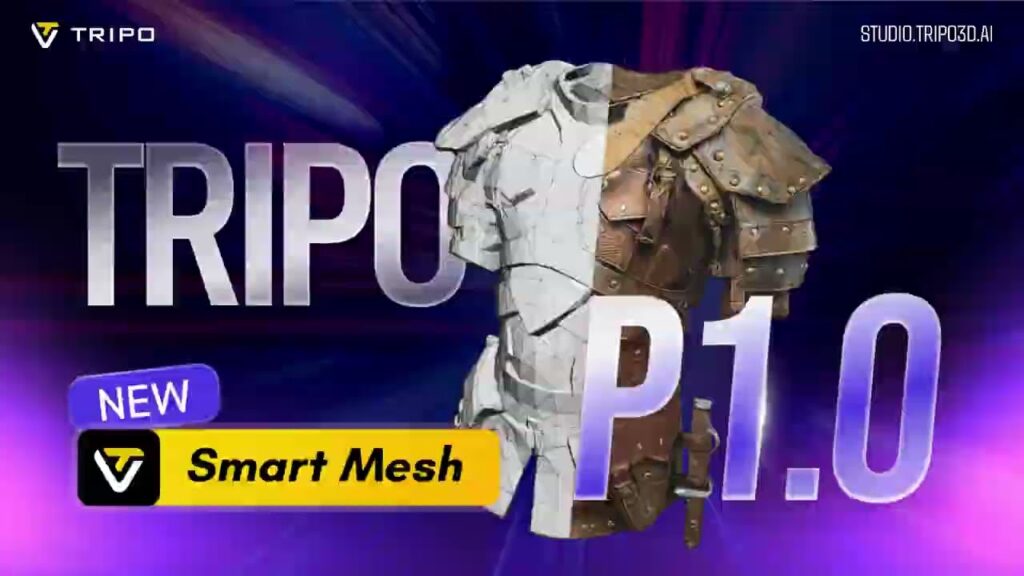
Tripo Smart Mesh targets a practical problem in AI-assisted 3D production: generating an attractive object is not the same as generating geometry that is convenient to edit, animate, and deploy. Tripo’s original Smart Mesh P1.0 announcement promotes structured low-poly mesh generation in approximately two seconds, positioning topology quality alongside generation speed. That timing remains a vendor claim rather than a universal guarantee for a finished, textured, animated asset.
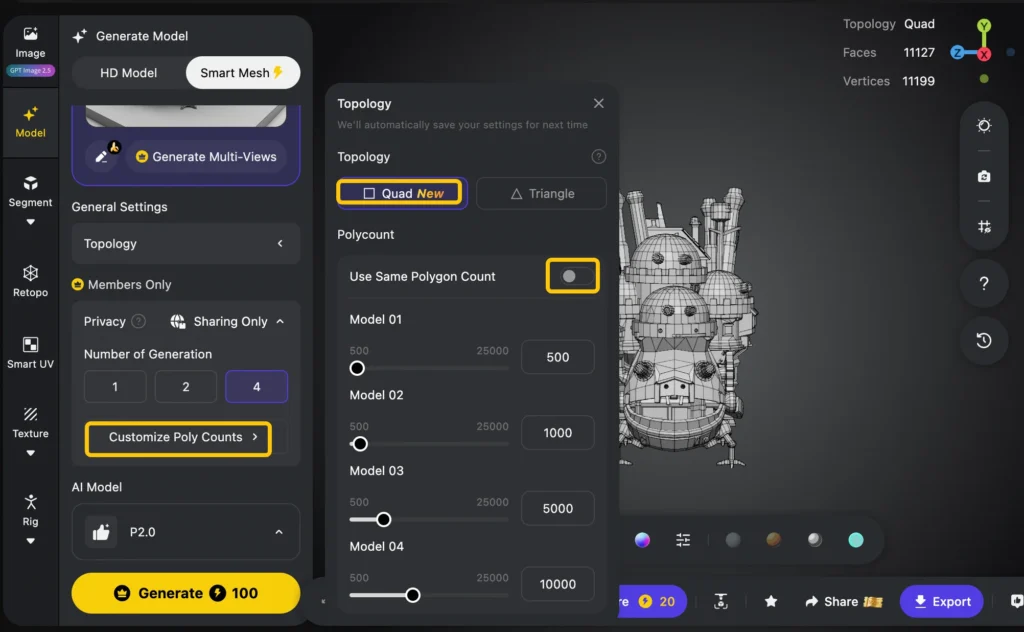
An important version distinction applies as of September 23, 2026. Tripo’s current documentation also covers Smart Mesh P2.0, which adds native quad topology and expands the available polygon budgets. Features described on current Smart Mesh pages should therefore not automatically be attributed to the original P1.0 release. P1.0 is identified as triangle-based, while P2.0 supports both triangle and native quad topology.
Tripo Smart Mesh is an AI-driven workflow for creating comparatively lightweight 3D meshes with controllable topology and face counts. Rather than treating topology cleanup solely as a downstream repair operation, Tripo describes Smart Mesh as generating structured low-poly geometry during the generation process itself. Topology refers to how a mesh’s vertices, edges, and faces connect. Two objects can have similar silhouettes and polygon counts while differing substantially in their underlying structure, so clean topology should describe useful surface organization rather than merely a low number displayed in a statistics panel.
Workflow, Geometry Distribution, and Evaluation
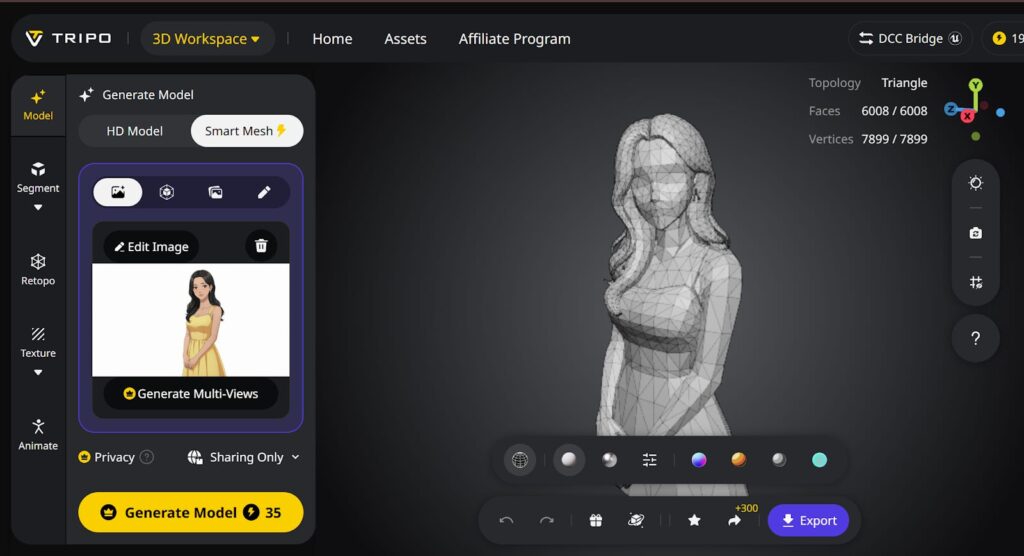
The practical workflow begins with an image or another supported input, continues through topology and density settings, and produces geometry for further work. Tripo presents texturing, rigging, animation, and part separation as additional capabilities that can be applied according to the intended use. These remain separate production concerns even when the interface places them close together. Smart Mesh is therefore most useful to evaluate as an asset-generation component. The relevant question is not simply whether it creates a recognizable model, but whether the resulting structure reduces the work required by the next person or tool. A mesh suitable for a background prop may require only straightforward placement, while an animated character may demand substantial deformation testing.
Tripo’s current Smart Mesh materials describe native quad generation with geometry concentrated around detailed areas while simpler surfaces remain less dense. The intended strategy is to spend geometry where it contributes to shape rather than distribute it evenly without regard to the object’s structure. This distinction between low polygon count and useful topology matters because retopology involves rebuilding or simplifying a mesh to make its structure cleaner and easier to use, not merely reducing the number of faces.
For example, a broad, flat tabletop might need relatively little geometry, while rounded legs or curved armrests need additional faces to preserve their profiles. Giving both regions identical density would not necessarily use the polygon budget effectively. Character assets introduce different priorities. An economical torso does not compensate for an elbow that collapses when bent, so the meaningful test is whether the generated connectivity supports the intended movement.
A sensible review should compare the textured model with its wireframe and then inspect the areas most important to the asset’s intended use. Look for unnecessary density on simple surfaces, missing structural detail, and connections that appear visually plausible but are inconvenient to edit. These checks test Smart Mesh’s claimed advantage without assuming that every generated output achieves the same quality.
Advertised Speed, Production Testing, and Image-to-3D Setup
Tripo explicitly advertises approximately two-second structured mesh generation for Smart Mesh P1.0. However, its announcement does not provide a detailed benchmark protocol covering factors such as request distribution, hardware conditions, queueing, and end-to-end delivery. The figure is therefore better understood as an advertised generation capability rather than a guaranteed completion time for every production task.
The scope of that timer also matters. Tripo’s tutorial treats texture generation as an optional operation performed after mesh generation. The two-second headline should not therefore be interpreted as the time required to create a fully textured, rigged, animated, exported character. A useful studio evaluation would measure the time from submission to visible geometry, the time to a downloadable asset, and the time until that asset passes an agreed acceptance check. Keeping those intervals separate prevents a fast preview from being confused with a completed production handoff.
Testing should also use a representative range of inputs rather than a single favorable demonstration. A team producing mechanical props should test the kinds of mechanical props it actually needs, while a studio creating stylized characters should evaluate its normal character shapes and poses. The more meaningful production metric is accepted assets per artist-hour because generation speed must be considered alongside unsuccessful attempts, inspection, corrections, export problems, and integration work.
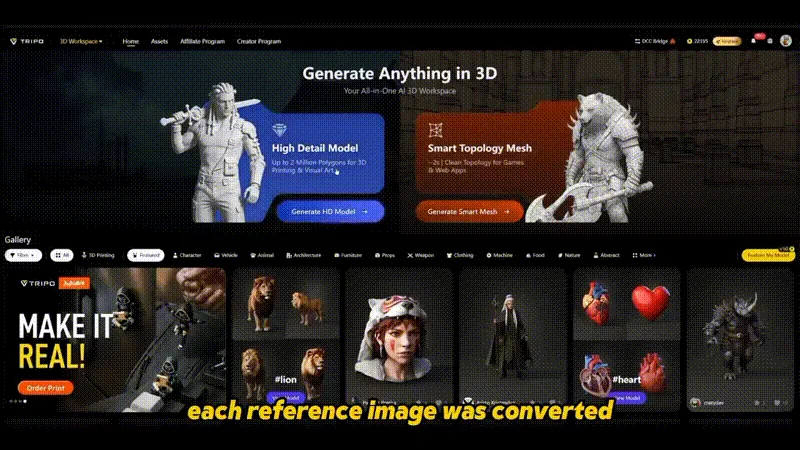
For image-to-3D modeling, begin in Tripo Studio’s 3D workspace and choose Smart Topology Mesh. In the newer workflow, the P2.0 documentation instructs users to select the P2.0 version before uploading references and adjusting topology and face-count settings. Confirming the version first helps avoid expecting controls or capabilities that belong to another release.
Reference Quality and Downstream Topology Choices
The reference should make the intended shape easy to interpret. An unobstructed subject, readable proportions, and a background that does not compete with the object are useful practical qualities. A modeling reference should primarily communicate structure rather than simply create an attractive composition.
Tripo documents single-image, multi-view, and batch workflows. Supported input formats include JPG, PNG, and WEBP, with a stated maximum size of 20 MB per file. The multi-view workflow uses front, left, right, and back references, while the described batch option accepts as many as ten images. The controls available in the active workspace should still be confirmed before preparing a large batch.
After setting topology and polygon budget, generate the model and inspect it from more than the original camera angle. Review the wireframe before committing to later production work. Optional texture generation and export can follow. Additional views should also remain consistent with one another. A front and back view showing different proportions create conflicting instructions instead of providing stronger evidence. Even a coherent reference set should be treated as guidance rather than proof that every hidden cavity, underside, or internal connection has been reconstructed correctly.
Topology choices also depend on the next stage of production. Quads can be useful for editable source assets because they support organized edge loops and subdivision-oriented modeling, but four-sided faces alone do not prove that the edge placement is suitable for a particular character rig. For engine-facing assets, the triangulated result should also be inspected. Runtime meshes are commonly triangulated, and automatic triangulation can introduce undesirable diagonal placement when edge direction matters.
Export Formats, Polygon Budgets, and LOD Variants
Export format introduces another distinction. Core glTF uses triangle-based surface primitive modes rather than a native quad-face primitive, so a GLB delivery file should not be treated as a dependable method for preserving an editable quad master. A practical workflow is to retain the authoring mesh separately while validating a triangulated delivery copy. Subdivision and detailed editing favor one set of topology priorities, while predictable runtime geometry favors another.
Polygon budgets must likewise be considered in their version and topology context. Tripo’s comparison lists a P1.0 triangle range of 500 to 20,000 faces. The newer Smart Mesh workflow lists 500 to 50,000 faces for triangle topology and 500 to 25,000 faces for quad topology. A quad count and a triangle count are not interchangeable. If each ordinary quad is split into two triangles, 10,000 quads become 20,000 triangles without representing an additional increase in geometric detail.
P2.0 can also generate as many as four variants at different face counts in a single pass. This makes density comparisons more convenient, although every candidate still requires inspection. A team could, for example, compare an illustrative prop at 2,000, 5,000, and 10,000 triangles, review the silhouette from the intended camera distance, and inspect the features that distinguish the object. If the largest version produces no meaningful improvement in the intended scene, the additional geometry has not justified itself.
Treat the requested polygon count as an authoring control and the imported count as the delivery check, and record both. Generated variants should also be checked before they are treated as levels of detail. Matching pivots, consistent placement, and acceptable transitions still matter because corresponding LOD meshes need to remain aligned and occupy the same space.
Tripo Smart Mesh in Production: Retopology, Quality Checks, Export, Real-Time Use, and HD Models
Smart Mesh and manual retopology are best compared according to the decisions each workflow must resolve. Retopology is useful not only for reducing complexity but also for preparing difficult geometry for editing and deformation. Achieving a small file or a particular face count does not automatically satisfy those requirements.
Tripo’s own tutorial retains an important role for manual work. It recommends HD generation followed by manual retopology for final animated characters requiring complex rigging and animation. This qualifies stronger interpretations suggesting that automated mesh generation eliminates cleanup altogether. A secondary prop may be acceptable after checking silhouette, shading, and runtime cost, while a face intended for close-up expressions would require much stricter acceptance criteria.
The productive comparison is therefore not simply AI versus artists. The important question is whether an automatically generated starting point satisfies enough of the asset’s requirements to reduce the remaining work. A useful test would give the same asset brief to a manual workflow and an AI-assisted workflow followed by any necessary corrections, then judge both against identical delivery requirements. Revision time should be recorded rather than treating every generated result as a completed success.
A hybrid workflow can therefore be practical. Generate the initial structure, retain the portions that pass inspection, and rebuild only areas that fail the asset’s functional requirements. This preserves the potential efficiency of automation without assuming that manual control has become unnecessary.
Acceptance Criteria and Production-Ready Verification
The term production-ready should also be treated as something to verify against a defined use case. Tripo markets Smart Mesh for production workflows, but that description does not establish that every individual output satisfies a studio’s deformation, shading, performance, and asset-management requirements.
A practical acceptance pass should begin with shape. Rotate the object through a complete turn, inspect its underside, and compare important proportions with the reference. Thin components, openings, overlapping pieces, and connections that were obscured in the source image deserve particular attention. For animated assets, movement should be tested rather than judging only the neutral pose. Joint placement, skinning, polygon density, and topology around elbows, knees, shoulders, mouths, hands, and other deformation areas need inspection because a convincing still image does not replace animation testing.
Material and UV inspection should follow. Verify that the expected maps are present and that the model shades correctly after import. Successful file import does not necessarily mean that every texture map has been connected to its correct material input. Performance also needs to be evaluated in context. CPU rendering costs and GPU work can become different bottlenecks, so a reduced polygon count alone cannot prove that the complete scene will meet its target.
Delivery requirements should be explicit as well. Check scale, orientation, pivot placement, naming, intended collision behavior, and the permissions associated with source material and generated output. These are useful acceptance criteria rather than evidence that Smart Mesh routinely fails them. A generated model becomes production-ready when it passes the requirements of its intended production.
Export Formats and DCC Bridge Setup
Export choices should depend on which information must survive the transfer. Tripo’s format guidance recommends GLB or OBJ for suitable static-model workflows and FBX when rigging or animation needs to be preserved. STL carries geometry only and is unsuitable when the handoff depends on materials, textures, or animation.
For Blender, Tripo provides a DCC Bridge add-on. The documented setup involves downloading the add-on ZIP, installing and enabling it in Blender’s preferences, opening the Tripo panel, and activating the Blender connection in Tripo Studio. Models can then be sent through the export interface. The bridge does not remove the need to inspect the imported asset. Its documentation also states that the connection recognizes the first Blender instance launched, so running multiple Blender instances can create a port conflict. A transfer failure can therefore originate from connection setup rather than from the generated mesh.
For Unity, the bridge is installed through Package Manager using the extracted package’s package.json. Users open Tools → Tripo Bridge, keep the service running, activate the Unity connection in Studio, and send the model through the export command. The bridge supports Built-in, URP, and HDRP configurations. Magenta materials can indicate a shader or render-pipeline mismatch, so pipeline configuration should be checked before assuming the geometry is at fault.
For Unreal Engine, the appropriate bridge package should match the engine version and be placed in the project’s Plugins directory. Users can then open Window → Tripo Bridge, maintain the active connection, enable the Unreal destination in Studio, and send the selected model. Tripo’s guide lists Windows and supported Chromium-based browsers among the requirements.
Regardless of the transfer method, maintain an editable source version and a delivery version. Reopen the delivered asset, inspect its appearance, and test it inside the actual project before treating the export as complete.
Real-Time Performance Across Games, VR, and Web
Smart Mesh is also positioned for game development and other real-time uses where lightweight geometry, controlled polygon budgets, and integration with established production tools are valuable. For games, a useful first test would be a small family of secondary props with related visual requirements. Repeated assets make it easier to judge consistency and integration effort than unrelated showcase objects and can reveal whether the workflow remains useful beyond a single favorable example.
For VR, evaluate the complete scene on the target device. An application targeting 90 frames per second has roughly 11.1 milliseconds available for each frame, but that allowance belongs to the entire frame rather than any individual mesh. Geometry generation does not remove the need to account for rendering and other application work. Optimization should therefore address the bottleneck revealed by measurements instead of assuming that polygon reduction is always the solution.
For web delivery, GLB can package geometry and related asset data in a portable form, but total file size depends on much more than face count. A glTF asset can include buffers, images, textures, materials, skins, and animations. Actual download size and loading behavior should therefore be measured rather than assuming that every low-poly export will automatically be small.
HD Model Workflow and Source-to-Delivery Strategy
Smart Mesh should also be distinguished from Tripo’s HD Model workflow. The current H3.1 feature page advertises high-detail geometry with as many as two million polygons and positions it for applications such as cinematic visual work, hero assets, and detailed presentation. That objective differs from producing a tightly controlled low-poly delivery mesh.
The correct choice begins with the final viewing conditions. A small environmental object may gain little from the same geometric density required by a product that fills the screen, while a close-inspection asset may require details that are unnecessary for a distant background prop.
High-detail generation can also support a lower-detail delivery workflow. A high-resolution detail mesh can provide information for normal maps applied to a lower-resolution render mesh. However, separately generating an HD model and a Smart Mesh model does not prove that they will automatically form a well-matched baking pair. Their silhouettes and surface correspondence should be compared before relying on that workflow.
A useful process is therefore to define the delivery requirement first and generate the least complex candidate likely to satisfy it. Move to a higher-detail source when inspection reveals a specific need rather than simply because a larger polygon budget is available. This separates artistic detail from production convenience. An HD model may be the better source while a carefully prepared lower-poly mesh remains the better deliverable.

TripoSplat and Gaussian Splatting vs. Polygon Meshes for Interactive 3D
TripoSplat addresses a different problem from Smart Mesh. Smart Mesh generates polygonal surfaces, while TripoSplat generates 3D Gaussian representations from images. The two approaches do not merely represent different levels of detail. They create fundamentally different kinds of 3D data, so the strengths of one should not automatically be attributed to the other.
A polygon mesh describes a surface through connected faces. In 3D Gaussian Splatting, appearance is represented using spatial Gaussian primitives with properties controlling position, extent, orientation, opacity, and color. Rendering projects and blends these primitives into an image rather than treating them as conventional polygon faces. The original 3D Gaussian Splatting research established this representation for efficient novel-view rendering.
The difference affects editing. Moving a mesh edge changes an explicit surface boundary, while editing Gaussian data alters the primitives contributing to the rendered appearance. Similar-looking results can therefore require different tools and different forms of validation. Gaussian splats can also require cleanup, compression, and viewing adjustments before production use. They do not eliminate preparation work but move that work into different stages.
TripoSplat Training, Inference, and Evaluation
TripoSplat is an open-source image-to-3D Gaussian generator developed by Tripo’s research organization. One of its main contributions is learned density control, meaning that the system determines where Gaussian primitives should be concentrated rather than depending only on a fixed structural allocation.
The research introduces Density-Sampled Gaussians, or DeG. Gaussian centers are sampled from a learned hierarchical density function organized as an octree. Training adjusts that density according to how Gaussian placement contributes to reducing rendering error, using a policy-gradient formulation that makes the sampling-based allocation trainable.
The published method separates learning into an autoencoder stage and an image-conditioned flow-matching stage. The autoencoder compresses the representation into latent data, while the generative model learns to produce those latents from an image. The goal is not simply to create more primitives but to use the available primitives more effectively.
The official inference repository supports selectable Gaussian counts up to 262,144 and exports .ply and .splat files. It also references an official ComfyUI workflow and states that the code and model weights are released under the MIT license.
The research nevertheless acknowledges limitations. Back-facing regions are not visible during single-image inference and may therefore have lower quality. The system also targets 3D Gaussian Splatting rather than polygon meshes, with a textured mesh decoder identified as a possible future direction. TripoSplat output should consequently not be described as native clean polygon topology.
For evaluation, inspect the unseen side as carefully as the reference-facing side. Test several Gaussian budgets in the intended viewer and judge both appearance and runtime behavior. An impressive front view is only one acceptance condition.
Interactive Environments Require More Than Rendering
The distinction becomes particularly important when interactive environments are involved. A renderable environment and an interactive environment are not the same deliverable. Gaussian Splatting research establishes a method for real-time radiance-field rendering and novel views, but that alone does not specify collision, gameplay rules, object ownership, selection behavior, or persistent application state.
One practical example is collision. Gaussian splats can have no physical presence by default in a viewer, requiring an additional representation such as voxels to support collisions and walkable navigation. This prevents the camera or player from simply passing through the rendered environment.
That does not mean splat-based environments cannot support richer interaction. Demonstrations have combined Gaussian splats with features such as compression, shadow casting, dynamic relighting, and physics. These examples establish that such capabilities can be integrated, not that every generated splat contains them automatically.
A hybrid workflow can therefore make sense. Splats can be used where their visual appearance is valuable, mesh or voxel proxies can handle physical queries, and gameplay behavior can be maintained in explicit application state. This is an architectural approach rather than evidence that Tripo provides an automatic universal conversion between all three layers.
Selection also needs a dedicated implementation. Collision components and raycasts can be used to determine which entity a user selects, for example. A recognizable object does not automatically become an independently selectable gameplay object simply because it appears visually inside the scene.
For production comparisons, avoid treating one Gaussian as equivalent to one triangle. Instead, evaluate the actual renderer, camera movement, interaction requirements, memory consumption, and target hardware. The useful representation is whichever one satisfies the combined requirements with acceptable integration effort.

Tripo Project Eden and the Future of Persistent AI-Generated Interactive Worlds
Project Eden addresses another distinct challenge: the difference between displaying a scene and maintaining a persistent world. Tripo’s research preview, dated May 31, 2026, describes an architecture that separates persistent world state from visual rendering. The intended result is an environment whose identity and changes do not depend entirely on what the current camera can see.
The published architecture contains three layers. An evolving structured state stores underlying content, coarse geometry, semantics, and the consequences of actions. A state-to-observation interface supplies camera-conditioned constraints, while a generative neural renderer produces the visible result. Tripo describes the underlying state as a compact implicit or structured representation rather than simply a massive point cloud.
That distinction prevents an important misconception. Project Eden should not be reduced to the idea of TripoSplat with multiplayer added. The published explanation concerns the separation of world state from observations and does not establish that raw TripoSplat output constitutes Eden’s complete internal representation.
Tripo’s August 6, 2026 research essay describes demonstrations in which extinguishing a fire produces a persistent change and spray-painting a wall creates a mark inherited by later participants. These examples are presented by the company as demonstrations of stateful consequences rather than changes that exist only in a single generated frame.
The public-facing introduction still describes Project Eden as a research preview. Its architecture and demonstrated direction can therefore be discussed, but it should not be assumed to be a complete, generally available substitute for a production game engine.
Smart Mesh, TripoSplat, and Project Eden consequently address different layers of a broader 3D problem. Smart Mesh focuses on usable polygonal geometry and production-oriented topology. TripoSplat focuses on image-derived Gaussian representations and efficient visual reconstruction. Eden explores how an interactive environment can retain identity, semantics, and consequences independently of a single rendered viewpoint.
The broader production lesson is to keep those responsibilities separate. Geometry must support the intended asset workflow, rendering must produce coherent observations, and state must preserve identity and consequences. Progress in any one layer can be valuable, but a convincing interactive world requires these components to work together rather than assuming that a fast mesh generator, a Gaussian renderer, or a persistent-state system automatically provides the functions of the others.
Frequently Asked Questions (FAQs)
- What is Tripo Smart Mesh mainly used for?
Tripo positions Smart Mesh as a tool for creating relatively lightweight 3D assets that can fit into game-development and other real-time production workflows. Its main advantages are controllable polygon budgets and generated mesh structure that can be inspected, edited, exported, and integrated into existing pipelines. That makes it particularly relevant for assets such as props, environmental objects, and some secondary characters where efficiency and manageable geometry are important. - Does Smart Mesh P1.0 create a complete game character in two seconds?
No. Tripo advertises approximately two-second structured mesh generation for Smart Mesh P1.0, but that figure refers to mesh generation rather than the completion of an entire production-ready character. Texturing, rigging, skinning, animation preparation, export, engine integration, and quality checks are separate stages. A mesh may therefore appear very quickly while still requiring additional work before it is ready for use in a finished game. - Does Tripo Smart Mesh support native quads?
Yes, but the feature depends on the version. Smart Mesh P2.0 supports native quad topology, while Tripo identifies P1.0 as triangle-based. This distinction matters because current Smart Mesh documentation includes capabilities that were introduced after P1.0. Native quad generation should therefore be described as a P2.0 feature rather than as something available in the original Smart Mesh release. - What polygon counts does the current Smart Mesh workflow support?
The current Smart Mesh documentation lists a range of 500 to 50,000 faces when using triangle topology and 500 to 25,000 faces when using quad topology. These numbers should always be reported with their topology type because quad and triangle counts are not directly equivalent. For example, an ordinary quad is normally divided into two triangles during triangulation, so the imported runtime count can differ substantially from the authoring count. - Can Smart Mesh replace manual retopology?
It can reduce the amount of manual retopology required in some cases, but whether it replaces it depends on the asset and its intended use. Retopology is not only about lowering polygon count. It also involves arranging edges and faces so the model can be edited, subdivided, shaded, rigged, or deformed effectively. A generated prop may need little correction, while a character intended for demanding animation could still require manual rebuilding around joints, facial areas, or other deformation-sensitive regions. - Which export format should be used for Blender, Unity, or Unreal Engine?
The correct format depends on what information must be preserved. Tripo recommends GLB or OBJ for suitable static-model workflows, while FBX is more appropriate when rigging or animation data needs to be carried across. Tripo also provides DCC Bridge tools for transferring models directly into Blender, Unity, and Unreal Engine. Regardless of the method, the imported model should still be checked for scale, materials, topology, orientation, rigging, and other project-specific requirements. - Is HD Model better than Smart Mesh?
Not necessarily, because the two workflows target different priorities. Tripo positions its H3.1 HD Model workflow around very high-detail geometry for visually demanding uses such as hero assets, cinematic work, or close-up presentation. Smart Mesh instead emphasizes more controlled and economical geometry. The appropriate choice depends on factors such as viewing distance, required surface detail, editing needs, animation requirements, and the polygon budget of the final application rather than simply which option creates more geometry. - Is TripoSplat open source?
Yes. TripoSplat’s official repository states that its code and model weights are released under the MIT license. However, TripoSplat should not be confused with Smart Mesh. It generates a 3D Gaussian representation rather than a conventional polygon mesh and supports outputs such as .ply and .splat files. Its workflow is therefore aimed at Gaussian Splatting rather than producing editable quad or triangle topology in the same way as Smart Mesh. - Do Gaussian splats automatically include collision?
No. A Gaussian splat can provide the visual representation of an environment without providing a physical collision structure. PlayCanvas documentation demonstrates this distinction by using a separate voxel-based collision representation alongside the splat. Without that additional physical layer, a viewer may be able to see and move through the rendered environment while lacking the collision data needed to prevent a player or camera from passing through surfaces. - Is Project Eden already a complete game-development platform?
The available official material does not establish that. Tripo presents Project Eden as a research preview exploring persistent shared worlds, structured world state, generative rendering, and interactions whose consequences can remain visible over time. Those demonstrations show the direction of the research, but they do not establish that Eden already includes the full collection of production tools, deployment systems, guarantees, and workflows normally expected from a complete commercial game-development platform.
Conclusion
Tripo Smart Mesh, TripoSplat, and Project Eden are best understood through the different production questions they raise. Can generated geometry be edited and deployed efficiently? Can an alternative representation deliver the required appearance? Can an environment preserve identity and consequences as users interact with it?
For practical adoption, the most useful standard is not the speed of the first impressive preview. It is the time required to obtain an accepted asset or experience. That includes inspection, correction, export, runtime testing, and the behavior the project actually needs.
A strong evaluation should therefore preserve version distinctions, separate vendor timing claims from end-to-end measurements, and avoid treating visual fidelity as proof of structural correctness. It should also distinguish rendering capability from physical interaction and persistent state.
The path from clean topology in seconds to interactive worlds is not one automatic leap. It is a sequence of engineering problems. The opportunity lies in using faster generation to reduce specific workloads while keeping clear acceptance criteria for everything that follows.
Sources and Citations
- Tripo AI, P Series Smart Mesh Documentation : Official reference comparing P1.0 and P2.0, including topology options, polygon limits, reported generation times and export guidance. It distinguishes P1.0’s triangle output from P2.0’s support for quad and triangle modes. tripo3d.ai
Read the P Series Smart Mesh documentation - Tripo AI, Introducing Smart Mesh P1.0 : Introduces P1.0 and Tripo’s claim that it generates structured meshes in approximately two seconds. The announcement explains its intended uses in games, XR and interactive production, with an emphasis on controlled geometry and easier editing. tripo3d.ai
Read the Smart Mesh P1.0 announcement - Tripo AI, Smart Mesh P1.0 Tutorial : Walks through reference image input, polygon settings, mesh generation, optional texturing and export. It provides practical workflow examples for preparing characters and other assets for games, browser experiences and virtual reality scenes. tripo3d.ai
Read the Smart Mesh tutorial - Tripo AI, Smart Mesh Feature Overview : Summarizes P2.0’s topology controls, multiple view inputs, polygon budgets and batch generation. It also describes related texturing, rigging, animation and export tools used to prepare generated models for further production work. Tripo AI
Explore the official Smart Mesh features - Tripo AI, Game Scene Workflow : Demonstrates a workflow from concept imagery through P2.0 generation, optional retopology, part separation and texturing before transfer to Unity. It explains how polygon budgets and geometry inspection fit into building an interactive scene. Scene
Read the game scene workflow - Tripo Developers, Official API Changelog : Records API updates, model versions and supported generation parameters. Its P2 entry documents quad output, topology specific face limits and restrictions that distinguish the newer model from P1. Tripo Developers
Read the Tripo Developers API changelog - Tripo OpenAPI, Model Release History : Documents earlier API releases, including the March 11, 2026 introduction of Smart Mesh P1.0. It describes the model’s structured mesh generation and clarifies that only a defined selection of generation parameters is supported. Tripo OpenAPI docs
Read the Tripo OpenAPI release history - Kerbl and Colleagues, 3D Gaussian Splatting Research Paper, 2023 : Original research describing how optimized 3D Gaussians represent a scene and enable fast rendering from new viewpoints. It provides the technical foundation for discussing Gaussian splatting, scene reconstruction and rendering performance. arxiv.org
Read the original research paper on arXiv - ACM Transactions on Graphics, Published Gaussian Splatting Paper : The journal publication of the same research, appearing in volume 42, issue 4. This source provides the formal publication record and permanent DOI for citing the method and its experimental results. arxiv.org
Access the ACM publication through its DOI - VAST AI Research, Official TripoSplat Repository : Provides the implementation for generating 3D Gaussian representations from a single image. The repository includes model downloads, inference examples and export instructions, with the training implementation linked separately. GitHub
Explore the official TripoSplat repository - Khronos Group, Gaussian Splatting glTF Extension : Ratified specification defining how Gaussian splats are stored within glTF assets. It covers attributes including position, rotation, scale, opacity and color representation, establishing a common structure for exchange between compatible applications. GitHub
Read the Gaussian splatting glTF specification - PlayCanvas, Gaussian Splatting Documentation : Introduces Gaussian splats and explains how their representation differs from polygon meshes. It also outlines the PlayCanvas tools available for viewing, editing, publishing and rendering detailed splat scenes interactively. PlayCanvas Developer Site
Read the PlayCanvas Gaussian splatting overview - PlayCanvas, Creating Gaussian Splats : Explains how photographs, video frames or synthetic images become splats through camera reconstruction and training. The workflow uses external processing tools to produce PLY files for subsequent viewing and editing in PlayCanvas. PlayCanvas Developer Site
Read the Gaussian splat creation guide - PlayCanvas, Mesh to Splats : Documents a script that converts mesh triangles into splats distributed across their surfaces. It covers material colors, density controls and conversion settings, providing a practical example of using polygon geometry to create splat rendering effects. PlayCanvas Developer Site
Read the mesh to splats documentation - Blender Foundation, Mesh Modeling Manual : Covers mesh structure, geometry editing, UV mapping, mesh analysis and retopology. These references support explanations of polygon topology and the adjustments artists can make when preparing generated assets for modeling, animation or export. Blender 5.2 LTS Manual
Read the Blender mesh modeling manual - Epic Games, Importing Static Meshes into Unreal Engine : Explains how to export a model from another 3D application and import it into Unreal Engine. It covers scale, FBX files, material and texture handling, import options and saving the resulting assets. Epic Developer Community
Read Unreal Engine’s static mesh import guide - Unity Technologies, Importing Models : Explains how Unity imports model files containing meshes, materials, textures and animation data. It also covers import settings, normal maps and blend shapes, providing practical guidance for moving exported assets into a Unity project. Unity Docs
Read Unity’s model import documentation
Recommendations
- LEGO Pokémon Smart Play Sets Explained: How Battles, Healing, and Leveling Up Work
- Obsession Box Office Bonanza: How the Horror Hit Survived Steven Spielberg’s Disclosure Day
- LA Sues Roblox Over “Unsafe Online Environment” For Kids, Marking Yet Another Roblox Lawsuit (Feb 2026)
- Cascadeur 2026.1 Arrives with Rendering Engine Overhaul: Filament Rendering, Root Motion, and Unreal Live
- MW4 Multiplayer in Action Reveals Crazy Kill Block Map with 500+ Combinations
- Reallusion Releases Headshot 3.1: New Features, Texture Editing, and AI Improvements
- Witchspire: How to Get Silver, Best Silver Ore Locations and Farming Route
- Tales of Eternia Remastered Will Be Released for Consoles and PC on October 16
- Call of Duty: Black Ops 1 & 2 Beat Black Ops 7 Player Count on PlayStation
- DLSS 5 Update: Reported 30–40% RTX 40 FPS Gains Explained



































































































