








In This Article (30 sections)
What is V-Ray for Blender
V-Ray for Blender is a production-proven rendering engine integrated directly into the platform. It allows artists to use Chaos’s ray tracer for interactive viewport rendering and final-quality output without leaving Blender. It brings industry-standard photorealism to the open-source platform, including core features for lighting and materials while connecting to the Chaos ecosystem (Cloud and Cosmos). Trusted in VFX and archviz, it offers a dedicated V-Ray Node Editor and empowers users to achieve high-end realism and scalability familiar to 3ds Max or Maya users.
V-Ray for Blender key features for photorealistic rendering
- Physically-accurate lighting: Uses global illumination (brute-force and cached) for realistic reflections, refractions, and caustics. Supports sun & sky models, HDRI, and various light types.
- Lifelike materials: Features a PBR material system (VRayMtl) for any real-world surface, plus specialized shaders for hair, car paint, and skin.
- Real-world cameras: Simulates DSLR settings (ISO, shutter speed, f-stop) and optical effects like bloom, glare, motion blur, and bokeh.
- Robust algorithms: Offers CPU, GPU (CUDA/RTX), and hybrid rendering. Includes adaptive sampling, Adaptive Lights (up to 6x faster), and AI denoising (Intel and NVIDIA).
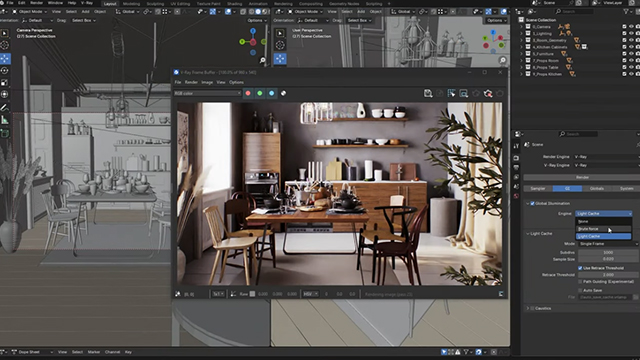
- V-Ray Frame Buffer (VFB): A post-processing window with Light Mix, exposure/color adjustments, LUTs, and render history comparison.
- Geometry handling: Supports instancing, V-Ray Proxy objects for massive scenes, and direct rendering of Blender Geometry Nodes.
- Chaos Cosmos: A library of over 8,800 free, ready-made assets (models, materials, and HDRIs) that import as proxies.
- Chaos Cloud: Connects to online rendering and collaboration tools for sharing interactive reviews and markups.
- Pipeline integration: Allows .vrscene export for cross-platform consistency with other software like 3ds Max and Maya.
V-Ray 7.2 for Blender Update 2 new features (macOS support, distributed rendering, AI tools)
- macOS Support: Runs natively on Apple hardware (M1/M2) with full feature parity.
- Blender 5.0 Compatibility: Seamless support for the latest version and LTS releases (4.2 and 4.5).
- Distributed Rendering (DR 2): Simplified system for rendering a single image across multiple network machines.
- Chaos AI Suite: Includes a beta AI Material Generator (photo to PBR), AI Image Enhancer for detail, and an AI Upscaler (up to 16K).
- V-Ray Fur and Hair: A procedural system for efficient rendering of grass, carpets, and hair geometry.
- Cycles Material Override: Supports Blender’s native material override for clay renders and lighting tests.
- Performance: Shared core with V-Ray for Max/Maya, featuring a cleaner node editor and optimized sampling.

V-Ray for Blender supported Blender versions (Blender 5.0, 4.5 LTS, 4.2 LTS)
V-Ray is compatible with Blender 5.0 and maintains support for 4.5 LTS and 4.2 LTS. It generally supports any build from 4.2 onward. Separate installers are often provided for specific Blender branches to account for API differences. Older versions (e.g., 3.x) are not supported by the modern integration.
V-Ray for Blender system requirements (AVX2 CPU, RAM recommendations, GPU requirements)
- CPU: 64-bit Intel or AMD with AVX2 support (Haswell or Ryzen or newer).
- OS: Windows 10/11 (64-bit) or macOS 11+ (Intel or Apple Silicon). Linux is currently in development.
- RAM: 8 GB minimum; 16 GB recommended; 64 GB+ for complex production.
- GPU (for V-Ray GPU): NVIDIA Maxwell or newer (GTX 900+; RTX recommended) on Windows. macOS supports Apple Silicon M1/M2 via Metal. AMD GPUs are currently not supported for GPU rendering.
- Licensing: Requires Chaos License Server 6.x+ and an internet connection for activation.
How to download V-Ray for Blender free trial
Users can access a 30-day fully functional trial by creating a Chaos account and visiting the V-Ray for Blender product page. Clicking “Try for free” provides access to the installer via the downloads page. Activation requires logging into the Chaos License Server with the registered account.
V-Ray for Blender pricing and subscription plans
- Standalone: Approximately $33/month or $199/year for Blender only.
- V-Ray Solo: ~$466/year for all integrations (one host app at a time).
- V-Ray Premium: ~$698/year for all integrations simultaneously, plus Chaos Phoenix, Vantage, and Scans.
- Educational: Discounted rates for students and educators.
- Existing Subscribers: V-Ray for Blender is included at no extra cost for those with active V-Ray subscriptions for other platforms.

How to install V-Ray for Blender on Windows
- Close Blender and run the installer .exe.
- Select components: Integration, Standalone/Render Node, and License Server.
- Target the correct Blender installation path.
- Log in to the Chaos License Server (
http://localhost:30304). - In Blender, enable the “V-Ray for Blender” add-on in Preferences and select V-Ray as the Render Engine.
How to install V-Ray for Blender on macOS
- Download the DMG and run the .pkg installer.
- Select the V-Ray integration, core engine, and License Server.
- Authorize the installation with the macOS admin password.
- Log in to the License Server web interface.
- Enable the add-on within Blender’s Preferences. Native Apple Silicon support eliminates the need for Rosetta.
V-Ray for Blender portable installation (run the same setup on multiple machines)
For deployment without installers, the V-Ray files can be unpacked manually (using command-line flags like -gui=0 or archive tools). Users must set environment variables (like VRAY_FOR_BLENDER_BIN) so the Blender add-on can locate the binaries. This is ideal for network shares or maintaining identical versions across a studio.

V-Ray for Blender silent install and uninstall for studios
Studios can automate deployment using command-line switches. On Windows, use vray_blender_install.exe -gui=0 -quiet. On macOS, use the sudo installer command. License server settings can be pre-configured via sslocal.conf to point to a central server. Silent uninstallation is achieved using the -remove flag.
How to activate V-Ray for Blender and fix Chaos License Server issues
Activation is handled via the web panel at http://localhost:30304 by signing into a Chaos account.
- “No floating license”: Usually fixed by logging in or restarting the service.
- Connection errors: Ensure the License Server service is running and port 30304 is not blocked by a firewall.
- Offline use: Licenses can be “borrowed” for 14 days for use without internet.
- Updates: Use License Server version 6.2 or higher for compatibility with V-Ray 7.
V-Ray for Blender settings in Blender (V-Ray render engine, VFB, node editor)
- Render Engine: Selected via the Render Properties tab.
- V-Ray Settings: Includes Production/Interactive modes, Quality/Noise thresholds, GI engines (Brute Force/Light Cache), and Device selection (CPU/GPU).
- VFB: A separate window for monitoring renders, featuring layers for color correction, Light Mix, and denoising.
- Node Editor: V-Ray materials are created in the Shader Editor using V-Ray-specific nodes (VRayMtl, textures, utilities).
- Toolbar: Provides quick access to Interactive Rendering and the Chaos Cosmos browser.
- Viewport IPR: Supports Blender’s native “Rendered” viewport mode for real-time V-Ray feedback.

Does V-Ray for Blender support Cycles materials
V-Ray for Blender offers compatibility with existing Cycles materials, allowing users to transition scenes without starting from scratch.
- Out-of-the-box support: V-Ray 7 natively renders essential Cycles nodes, particularly the Principled BSDF. It interprets Diffuse, Glossy, Glass, Emission, and Sheen BSDFs, as well as basic texture nodes, in a physically correct way.
- Automatic material conversion tool: Introduced in V-Ray 7.1 (Update 1), a one-click tool converts Cycles node networks into native V-Ray shader networks. It handles textures, bump maps, and complex setups like Mix Shaders and math nodes.
- Limitations: Complex Cycles-only procedural nodes (like Musgrave or Shader to RGB) may not have direct equivalents and might require manual adjustment.
- Workflow: Users can switch to the V-Ray engine for an immediate preview or use the converter for 100% fidelity and access to V-Ray-specific controls like the V-Ray coat layer.
V-Ray for Blender GPU rendering setup (NVIDIA CUDA/RTX and Apple Silicon)
V-Ray GPU is a high-speed, accelerated version of the renderer that supports diverse hardware configurations.
- Supported Hardware: Requires NVIDIA GPUs (Maxwell or newer) for CUDA and RTX. On macOS, it supports Apple Silicon (M1/M2) via the Metal API. AMD GPUs are currently not supported for GPU rendering.
- Setup: In Render Properties, users switch the Engine type to “V-Ray GPU” and select specific devices (GPUs and/or CPU for hybrid rendering).
- Performance and Memory: While V-Ray GPU supports most features (GI, displacement, hair, volumes), scenes should ideally fit within the GPU VRAM for maximum speed, though out-of-core textures are supported.
- Modes: Supports both Interactive (IPR) for real-time feedback and Production rendering for final frames.
Best V-Ray for Blender render settings for faster renders
Optimizing V-Ray involves balancing the adaptive sampler with various efficiency tools.
- Noise Threshold: This is the primary quality control. Higher values (0.01–0.05) render faster with more noise, while lower values (0.005) are cleaner but slower.
- Denoising: Using the V-Ray Denoiser or NVIDIA AI Denoiser allows for higher noise thresholds, significantly cutting render times.
- Lighting Optimization: Enable Adaptive Lights to speed up scenes with many light sources. Use the Adaptive Dome Light for HDRIs and Light Cache for secondary GI.
- Geometry and Textures: Utilize V-Ray Proxies and instancing for heavy geometry. Clamping maximum texture sizes for test renders can save memory and time.
- Global Overrides: Use “Material Override” for clay renders to test lighting quickly without complex shader calculations.
V-Ray Frame Buffer workflow in Blender (denoising, color corrections, render history)
The V-Ray Frame Buffer (VFB) is a comprehensive post-processing toolset that works independently of Blender’s image editor.
- Post-Processing: Provides real-time, non-destructive adjustments for exposure, white balance, color curves, and LUTs.
- Denoising and Lens Effects: Users can apply denoising and add realistic bloom and glare effects after the render is finished.
- Render History: Saves iterations to disk, allowing for A/B side-by-side comparisons of different settings or lighting setups.
- Light Mix: Allows users to adjust the intensity and color of individual lights or groups after the rendering process is complete.
- Layers and Elements: Supports viewing and compositing individual render elements like Cryptomatte, Z-depth, and specular passes.

V-Ray for Blender materials workflow (V-Ray Material, OpenPBR, textures)
V-Ray materials are built on PBR principles, ensuring high realism and consistency.
- VRayMtl: The core universal shader capable of simulating metals, glass, and plastic. It includes a metalness workflow and a clear coat layer.
- OpenPBR Compliance: V-Ray 7.1 aligns with the OpenPBR standard, ensuring the VRayMtl behaves consistently with Blender’s Principled BSDF.
- Specialized Shaders: Includes VRayHairMtl for realistic hair fibers and VRayFastSSS2 for skin and translucent materials.
- Chaos Cosmos Integration: Provides access to thousands of high-quality scanned materials and “Chaos Scans” for ultra-realistic surfaces.
- Displacement: Supports 2D and vector displacement via V-Ray specific settings or modifiers for high-resolution surface detail.
V-Ray for Blender Geometry Nodes support
V-Ray 7.1 introduced native support for Blender’s Geometry Nodes, allowing procedural scenes to render without intermediate steps.
- Direct Rendering: V-Ray evaluates Geometry Nodes modifiers at render time, eliminating the need to “apply” or bake modifiers to meshes.
- Efficiency: Supports heavy instancing created within node networks, making it ideal for scattering large amounts of vegetation or debris.
- Procedural Workflow: Changes made in the node graph update immediately in the V-Ray render, maintaining “live” scene flexibility.
- Proxy Integration: V-Ray Proxies can be instanced via Geometry Nodes for rendering massive environments with billions of polygons.
V-Ray for Blender lighting setup (HDRI, Sun & Sky, interior lighting)
V-Ray uses photometrically accurate light sources to simulate real-world environments.
- Dome Light: Used for HDRI lighting. The “Adaptive” mode focuses sampling on the brightest areas of the image for faster noise cleanup.
- Sun & Sky: A physically-based system where the sky color and intensity automatically update based on the sun’s position.
- Artificial Lights: Includes Plane, Sphere, Disk, and IES lights for architectural and studio lighting.
- Volumetrics: Environment Fog can be used to create shafts of light and atmospheric depth.
- Portals: Plane lights can be set as portals to guide GI sampling through windows in interior scenes.
Chaos Cosmos Browser in Blender (how to use Chaos Cosmos assets with V-Ray for Blender)
Chaos Cosmos is an integrated library of ready-to-render 3D assets.
- Asset Categories: Features furniture, vegetation, people, vehicles, and HDRIs.
- Ease of Use: Assets are downloaded and imported with a single click, coming pre-configured with V-Ray materials and proper real-world scaling.
- Proxy System: Large assets like trees are automatically imported as V-Ray Proxies, keeping Blender’s viewport fast while maintaining high detail during renders.
- Chaos Scans: Includes ultra-realistic scanned materials for high-end product visualization.
Chaos Cloud rendering and collaboration with V-Ray for Blender
Chaos Cloud provides an integrated remote rendering and review platform.
- Offloading Renders: Scenes can be sent directly from Blender to Chaos’s servers, freeing up local hardware for other tasks.
- Collaboration Tools: Generates shareable links where clients or team members can add time-stamped comments and visual markups on renders.
- AI Enhancement: The cloud interface includes beta tools for AI upscaling (up to 16K) and image detail enhancement.
- Workflow: Uses the .vrscene format to ensure that cloud renders are identical to local results.
The View Keeper batch rendering workflow with V-Ray for Blender
The View Keeper is an add-on that manages multiple camera views within a single scene to automate the rendering process.
- Camera Management: Stores multiple angles, focal lengths, and compositions on a single camera object.
- Batch Processing: Allows users to queue multiple “views” to render sequentially. It automatically updates resolutions, aspect ratios, and output paths for each shot.
- Efficiency: Ideal for overnight rendering of multiple architectural stills or product variations without manual intervention.
- Consistency: Ensures render settings remain uniform across different shots while allowing unique output names and folder organization.
Rendering PixelHair in Blender with V-Ray for Blender
PixelHair by Yelzkizi provides professional 3D hair assets optimized for Blender’s particle hair system and geometry curves.
- Asset Composition: Assets include a scalp mesh with pre-groomed hair systems (braids, afros, dreads, etc.), eliminating the need for manual creation via complex node setups.
- V-Ray Support: V-Ray recognizes Blender’s particle hair strands and renders them as efficient 3D hair primitives rather than heavy tessellated cylinders.
- Shading and Realism: While V-Ray can interpret Cycles’ Principled Hair BSDF, using the native VRayHairMtl (or VRayHairNextMtl) is recommended. It offers physically accurate melanin-based color controls and advanced scattering.
- Optimization: High-end results are achieved through proper rim lighting for specular highlights, depth of field, and ensuring “Cast shadows” is enabled for the hair object.
- Future Compatibility: While currently based on particle systems, PixelHair plans to integrate with Blender’s geometry nodes hair curves, which V-Ray already supports.
V-Ray for Blender troubleshooting (black renders, missing textures, licensing errors, crashes)
Users may encounter specific technical hurdles that can be resolved through systematic checks.
- Black Renders: Often caused by an inactive license, a lack of light sources, incorrect camera exposure settings, or the camera being positioned inside geometry.
- Missing Textures: Usually results in black or incorrect colors. Users should use Blender’s “Find Missing Files” tool or V-Ray’s Directory/Paths settings to manually relink textures.
- Licensing Errors: Common messages include “No floating license” or “Connection refused.” Troubleshooting involves ensuring the Chaos License Server is running on port 30304 and that the user is logged in.
- Crashes and Freezes: Can occur during GPU rendering due to VRAM limits (out-of-core issues) or heavy displacement. Solutions include updating drivers, simplifying geometry, and monitoring system RAM.
- Noise and Quality: Splotchy GI or excessive grain can be fixed by lowering the noise threshold, increasing Light Cache subdivisions, or ensuring “Retrace” is enabled.
V-Ray for Blender vs Cycles comparison
Choosing between V-Ray and Cycles depends on the specific needs of a project, budget, and desired workflow.
- Render Quality: V-Ray is known for “smart defaults” that produce a polished, photographic look out-of-the-box. Cycles X is highly capable but may require more manual adjustment for effects like caustics and lens distortions.
- Ease of Use: Cycles is natively integrated and simpler to learn. V-Ray offers an additional layer of professional-grade control and a dedicated material system.
- Performance: Both are fast on modern GPUs. V-Ray handles extremely large scenes better through advanced memory management and proxies, and it supports native Distributed Rendering (DR) for network farms.
- Features: V-Ray includes specialized production tools like the Light Cache (which can be faster for interiors), native Light Mix, specialized shaders (Car Paint, Skin), and high-end volumetric controls.
- Cost: Cycles is free and open-source. V-Ray for Blender is a commercial product costing approximately $33/month or $199/year for a standalone subscription.
- Workflow Preference: Cycles is ideal for lookdev and cost-sensitive projects. V-Ray is preferred for high-end ArchViz, VFX, and studios requiring cross-platform consistency (e.g., sharing scenes between 3ds Max and Blender).
Frequently Asked Questions (FAQs)
- Is V-Ray for Blender free to use?
No, V-Ray for Blender is a commercial product requiring a license from Chaos. A Blender-only subscription costs approximately $33 per month or $199 annually. A 30-day free trial is available for testing. Users with an existing V-Ray license (such as V-Ray Solo or Premium) can use V-Ray for Blender at no additional cost. - What Blender versions does V-Ray for Blender support?
As of Update 2 in 2025, it supports Blender 4.2 LTS and above, including 4.5 LTS and Blender 5.0. It is not compatible with older 3.x versions. - Do I need to convert my Cycles materials to use V-Ray?
Not necessarily. V-Ray can directly render many Cycles nodes, specifically the Principled BSDF. However, for full fidelity and access to advanced parameters, Chaos provides a one-click material converter that automatically translates Cycles shader networks into native V-Ray shaders. - Can I use my GPU with V-Ray for Blender? Does it support CUDA/RTX or Apple M1?
Yes. V-Ray supports NVIDIA CUDA and RTX GPUs on Windows and Linux, as well as Apple Silicon (M1/M2) via the Metal API on macOS. AMD GPUs are currently not supported for GPU rendering and will default to CPU mode. - V-Ray isn’t appearing in my Blender render engine list – how do I install it properly?
You must run the standalone installer (.exe for Windows, .pkg for Mac) and then enable the “V-Ray for Blender” add-on in Blender’s Preferences. Ensure the V-Ray build matches your specific Blender version. - Can I use Chaos Cosmos assets in Blender with V-Ray?
Yes. The Chaos Cosmos browser is integrated into Blender, allowing you to download and import pre-shaded models, materials, and HDRIs directly into your scene. These assets are optimized as V-Ray proxies to maintain viewport speed. - My renders are coming out completely black. What could be wrong?
This is usually caused by a lack of light sources, an inactive or disconnected license, incorrect camera exposure, or the camera being physically blocked by geometry. Check the Chaos License Server and ensure at least one light source (like a Dome Light) is present. - How do I send a Blender scene to Chaos Cloud for rendering?
Use the Chaos Cloud button or menu within Blender to package and upload your scene. You can configure resolution and frame ranges in the submission dialog and monitor progress via a web dashboard. This requires Chaos Cloud credits. - Does V-Ray for Blender support motion blur and depth of field?
Yes. Depth of field is controlled via Blender’s camera settings (f-stop and focus distance), while motion blur can be enabled in the V-Ray render settings to account for both camera and object movement. - Where can I find documentation or help for V-Ray for Blender?
Official resources include the Chaos Docs website, the Chaos Forums, and the Chaos blog. Technical support is also available for licensed users through official Chaos customer service channels.

Conclusion
V-Ray for Blender in 2026 is a professional-grade rendering solution that bridges Blender’s open-source flexibility with Chaos’s industry-standard technology. It provides a comprehensive ecosystem for artists, ranging from physically accurate materials and lighting to advanced cloud collaboration tools.
- Seamless Integration: The engine operates natively within Blender, supporting the latest versions including Blender 5.0 and various LTS releases. It integrates the V-Ray Frame Buffer for real-time post-processing and the Chaos Cosmos library for instant access to high-quality assets.
- Photorealistic Quality: By utilizing advanced sampling and physically-based lights and cameras, V-Ray delivers high-end results with minimal manual adjustment. Features like Adaptive Lights and the Light Cache optimize complex scenes, particularly for architectural and interior visualization.
- Professional Toolset: The renderer supports GPU acceleration across NVIDIA and Apple Silicon hardware. It handles massive amounts of geometry through proxies and supports Blender’s Geometry Nodes natively, ensuring a non-destructive procedural workflow.
- Optimized Workflow: The inclusion of tools like the automatic Cycles material converter, Light Mix for post-render lighting adjustments, and Chaos Cloud for remote rendering allows artists to focus on creativity rather than technical troubleshooting.
- Continuous Evolution: Recent updates have introduced native macOS support, AI-powered tools for material generation and upscaling, and enhanced support for Blender’s evolving hair and geometry systems.
For studios and freelancers, V-Ray for Blender offers a powerful alternative to Cycles, providing the scalability and consistency required for high-stakes VFX, advertising, and architectural projects. While Cycles remains a robust free tool, V-Ray provides the specialized features and professional support necessary for a high-end production environment. By combining Blender’s modeling prowess with V-Ray’s rendering power, artists can achieve world-class results within a single, integrated pipeline.
Sources and Citations
- Chaos Blog – “V-Ray for Blender update 2: Your fast track to high-end renders”
- Chaos Documentation – V-Ray for Blender Docs (v7.20)
- CG Channel – “Chaos releases V-Ray 7.2 for Blender” (Jim Thacker, Dec. 11, 2025)
- Chaos Website – V-Ray for Blender – Product Page & Features
- BlenderArtists Forum – “Vray for Blender” discussion
- Yelzkizi Blog – “Blender Roll Hair Curves Guide”
- Chaos Cosmos Details – Chaos Cosmos Asset Library
- Reddit Discussion – V-Ray license server issue (r/Maya)
- Reddit Discussion – V-Ray GPU black screen troubleshooting (r/SketchUp)
- Design8 Knowledgebase – “V-Ray for Blender – System Requirements & Supported Versions”
- Chaos Blog – “The high-quality rendering your creativity deserves: V-Ray for Blender is here”
- Foro3D News – “Chaos launches V-Ray 7.1 for Blender (Update 1)”
- Chaos “What’s New” Page – V-Ray for Blender, Update 2 – Release Notes
- Chaos Support FAQ – Chaos Forums: V-Ray for Blender Issues
- BlenderArtists Forum – “V-Ray vs Cycles comparisons” discussion
Recommendations
- Screamer Review: What It Is, How It Works, and Why It Still Scares People Online
- “Our Goal Is to Not Have a Huge Gap”: Boss Confirms Harry Potter Series Won’t Be Annual as Season 2 Scripts Remain Unfinished
- Heroes of Might and Magic: Olden Era Hits 1M Sales as Early Access Roadmap Reveals Major Updates
- Helldivers 2 Exo Experts Warbond Revealed: New EXO-51 Lumberer & EXO-55 Breakthrough Mechs, Weapons, and Armor
- Delivery Bot That Took Human Job Asks Man for Help, Man Says ‘F**k You!’: Viral Robot Delivery Moment Explained
- Cyberpunk 2077 Hair Mods: Top Custom Hairstyles, Installation Guides, and Community Favorites
- Netflix’s New Shark Horror Movie Thrash Starring Bridgerton’s Phoebe Dynevor Is Surprisingly Watchable Despite Mixed Reviews
- Can I use real-world camera settings in Blender?
- Stalker 2: Cost of Hope – Official Announcement Trailer | Xbox Partner Preview Showcase 2026: Release Date, Story, Duty vs Freedom, and New Locations



































































































