








In This Article (19 sections)
Wafer 3D Texture Painting App Now Available on Windows and MacOS
The arrival of the 3D texture painting app Wafer has come to Windows and macOS marks a significant expansion for stylized digital art workflows across desktop platforms. Previously associated with a more limited ecosystem, Wafer has now evolved into a cross-platform solution that allows artists, game developers, and 3D designers to work on high-quality texture painting projects directly on desktop machines.
Wafer is positioned as a stylized-focused painting tool that emphasizes intuitive brush control, layered texturing, and artist-friendly workflows. With its expansion to Windows and macOS, it now directly competes with established desktop tools used in professional game development pipelines.
The desktop release is particularly important because it removes platform restrictions that previously limited adoption. Artists who prefer high-performance GPUs, larger monitors, and desktop-class input devices like drawing tablets can now fully integrate Wafer into their production pipelines.
This move also signals a broader shift in the digital art industry: mobile-first creative tools are increasingly transitioning into full desktop production environments.
What is Wafer? Overview of the Stylized 3D Texture Painting Software
Wafer is a stylized 3D texture painting application designed for artists who want a simplified yet powerful alternative to traditional industry tools. Unlike overly complex enterprise software, Wafer focuses on usability and speed without sacrificing essential features required for game-ready asset creation.
At its core, Wafer allows users to:
- Paint directly on 3D models
- Work with UV-based texture maps
- Apply stylized brush effects
- Manage layered texture workflows
- Export assets for game engines and rendering pipelines
The software is especially attractive to indie developers and stylized game studios who prioritize artistic expression over hyper-realistic rendering pipelines.
Wafer’s design philosophy centers on accessibility. Instead of overwhelming users with dense menus and technical configurations, it provides a clean interface optimized for real-time feedback and visual iteration.

Wafer Desktop Release Brings Ipad-Only App to PC and Mac Users
Before its desktop release, Wafer was primarily associated with iPad-based creative workflows. This meant that many professional users were unable to integrate it into full production pipelines.
The expansion to Windows and macOS dramatically changes this limitation.
With the desktop version, users benefit from:
- Improved hardware performance
- Support for high-resolution texture sets
- Faster rendering and brush response times
- Better compatibility with industry pipelines
- Multi-monitor workspace setups
This transition reflects a growing trend where creative applications begin on tablets for accessibility but eventually migrate to desktop environments for professional scalability.
For many artists, this update essentially transforms Wafer from a sketching tool into a production-ready texture painting solution.
Key Features of Wafer 3D Texture Painting App for Game Developers
Wafer includes a wide range of features tailored specifically for game development and stylized asset creation.
Key features include:
- Real-time 3D texture painting
- Multi-layer texture management
- Stylized brush engine with customizable strokes
- Seamless UV mapping integration
- Support for PBR workflows
- Fast preview rendering system
Game developers benefit from Wafer’s ability to streamline asset creation, particularly for indie and mid-sized studios that need efficient pipelines without expensive licensing overhead.
The software is designed to reduce friction in the creative process, allowing developers to iterate quickly on visual concepts.
How Wafer Multichannel Painting Improves 3D Texture Workflow
One of Wafer’s most important features is its multichannel painting system. This allows artists to paint multiple texture channels simultaneously, including:
- Diffuse / Albedo
- Roughness
- Metallic
- Normal maps
- Emissive maps
Instead of switching between multiple tools or exporting repeatedly, artists can manage all texture data within a single unified workspace.
This significantly improves workflow efficiency by:
- Reducing export/import cycles
- Minimizing texture inconsistencies
- Improving visual accuracy across channels
- Allowing faster iteration cycles
Multichannel painting is particularly useful in game development environments where assets must be optimized for real-time rendering engines.

Wafer Support for PBR Texturing Explained for Beginners
Physically Based Rendering (PBR) has become the standard for modern 3D workflows, and Wafer integrates PBR support directly into its painting system.
PBR texturing in Wafer allows users to define how materials react to light using texture maps such as:
- Base Color
- Metallic
- Roughness
- Normal maps
For beginners, this means that materials created in Wafer will behave realistically in game engines like Unity or Unreal Engine without requiring manual shader adjustments.
The benefit of Wafer’s PBR workflow is its simplicity. Instead of manually configuring complex material graphs, artists can focus on painting and visual design.
This makes it ideal for users transitioning from 2D illustration to 3D asset creation.
Windows vs MacOS Version of Wafer: What’s Different?
Although Wafer is available on both Windows and macOS, the core functionality remains consistent across platforms. However, there are subtle differences based on system architecture and hardware integration.
Windows Version Advantages
- Broader GPU compatibility
- Better support for custom drawing tablet drivers
- More flexibility in hardware upgrades
- Stronger performance on high-end gaming PCs
MacOS Version Advantages
- Optimized for Apple Silicon performance
- Smooth integration with macOS system rendering
- Stable performance on unified memory architecture
- Better energy efficiency on laptops
Both versions maintain identical feature sets, ensuring that artists do not lose functionality regardless of platform choice.
Does Wafer Support FBX, OBJ, and GLB 3D Model Import?
A critical feature for any 3D painting application is model compatibility. Wafer supports common industry formats, allowing users to import and export assets easily.
Supported formats typically include:
- FBX (industry standard for animation and game assets)
- OBJ (widely used static mesh format)
- GLB / glTF (modern real-time 3D format)
This compatibility ensures that Wafer can integrate seamlessly into existing pipelines used by Unity, Unreal Engine, Blender, and other 3D tools.
Artists can import models, paint directly on them, and export fully textured assets without needing additional conversion software.

Wafer Brush Tools, Stencils, and Layer System Breakdown
Wafer provides a flexible brush system designed for stylized workflows. The brush engine includes customizable parameters such as:
- Brush size and hardness
- Pressure sensitivity
- Texture stamping
- Stroke stabilization
- Stencils and Texture Overlays:
Stencils allow artists to project patterns onto 3D surfaces, which is especially useful for stylized detailing such as scratches, fabric patterns, or hand-painted effects. - Layer System:
Wafer uses a layered approach similar to 2D painting software, allowing users to:- Stack texture effects
- Adjust opacity and blending modes
- Organize complex material builds
- Non-destructively edit textures
This layer-based workflow makes Wafer approachable for users coming from Photoshop or Procreate.
How Wafer Handles 3D and 2D UV Painting Workflows
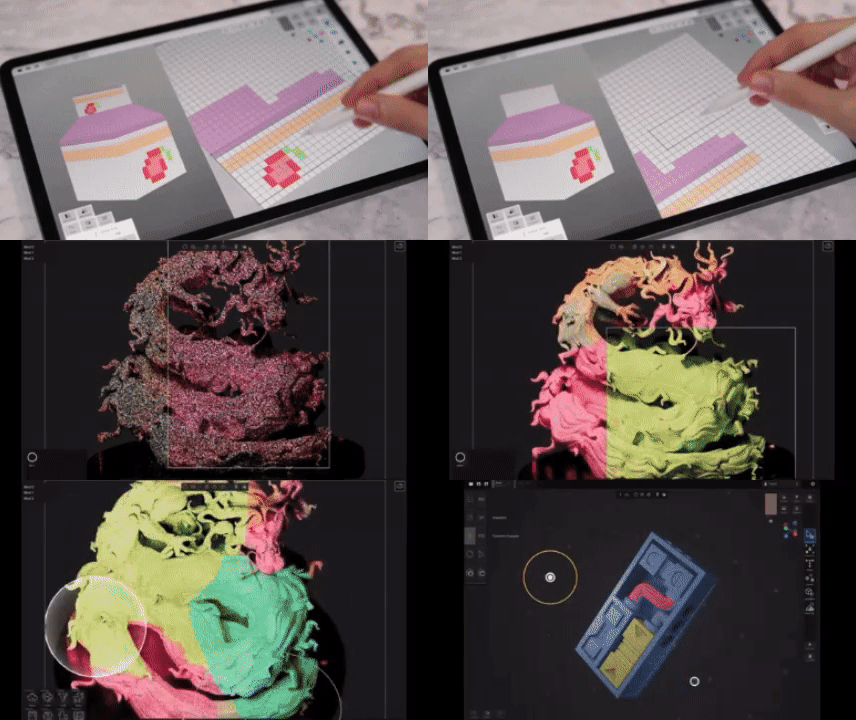
Wafer bridges the gap between 3D painting and traditional 2D UV workflows. Users can paint directly on models while simultaneously viewing UV maps.
This dual approach provides:
- Real-time 3D visualization
- Precise UV editing control
- Reduced texture stretching errors
- Faster correction of mapping issues
For advanced users, this hybrid workflow ensures both artistic freedom and technical precision. Beginners benefit from immediate visual feedback, while professionals gain the control needed for production-quality assets.
Wafer Performance Benefits for High-Resolution Texture Painting
Performance is a critical factor in texture painting applications, especially when working with 4K or 8K textures.
Wafer is optimized for:
- GPU-accelerated rendering
- Efficient memory usage
- Real-time brush feedback
- Smooth navigation on complex models
On desktop systems, Wafer can handle significantly larger texture sets compared to mobile-only workflows. This makes it suitable for modern AAA-style asset creation as well as indie stylized projects.

Is Wafer Good for Stylized Game Art and NPR Texturing?
Wafer is particularly strong in stylized and non-photorealistic rendering (NPR) workflows.
It is well-suited for:
- Cartoon-style textures
- Hand-painted environments
- Stylized characters
- Fantasy and indie game art
- Illustrative 3D assets
The brush system is designed to replicate traditional painting aesthetics while maintaining the benefits of digital 3D workflows. This makes Wafer a strong alternative for artists who prefer expressive visuals over strict realism.
Wafer Pricing Model: Free Download with Paid Export License Explained
Wafer follows a modern freemium-style pricing model. Typically, users can:
- Download and use the software for free
- Access core painting tools without restrictions
- Upgrade to a paid license for advanced export features
The paid export license generally unlocks:
- Commercial asset exports
- High-resolution texture output
- Advanced pipeline integration tools
This model makes Wafer accessible for beginners while still monetizing professional workflows.
Best Alternatives to Wafer for 3D Texture Painting Software
While Wafer is gaining popularity, several established tools remain strong competitors in the 3D painting space.
Popular alternatives include:
- Substance Painter (industry standard for PBR workflows)
- Blender Texture Paint (free and open-source)
- 3DCoat (comprehensive sculpting and painting tool)
- ArmorPaint (real-time PBR painting tool)
Each alternative offers different strengths, but Wafer differentiates itself through simplicity and stylized-focused design.

Future Updates for Wafer and Potential Android or Cross-Platform Expansion
The expansion to Windows and macOS suggests that Wafer is moving toward a fully cross-platform future.
Potential future developments may include:
- Android support for mobile creators
- Cloud-based project syncing
- Expanded brush libraries
- AI-assisted texture generation
- Enhanced engine integrations
If development continues at its current pace, Wafer could evolve into a full ecosystem for stylized 3D asset creation across devices.
Frequently Asked Questions (FAQs)
- What is Wafer used for?
Wafer is used for painting textures directly onto 3D models for game development and digital art. - Is Wafer available on Windows and macOS?
Yes, Wafer is now available on both Windows and macOS. - Does Wafer support PBR workflows?
Yes, Wafer fully supports Physically Based Rendering texture maps. - Can Wafer import FBX models?
Yes, it supports FBX along with OBJ and GLB formats. - Is Wafer beginner-friendly?
Yes, its simplified interface makes it accessible to beginners. - Does Wafer work for stylized art?
Yes, it is optimized for stylized and NPR workflows. - Is Wafer free?
It offers a free version with optional paid export features. - Can Wafer be used professionally?
Yes, it can be integrated into professional game pipelines. - Does Wafer support layer-based painting?
Yes, it includes a full layer system similar to Photoshop. - What makes Wafer different from Substance Painter?
Wafer focuses more on simplicity and stylized workflows rather than complex enterprise features.

Conclusion
The expansion of Wafer to Windows and macOS represents a meaningful shift in accessible 3D content creation. By combining a simplified interface, multichannel painting, and stylized workflow optimization, Wafer positions itself as a strong alternative in the growing market of real-time texture painting tools.
Its emphasis on usability, cross-platform availability, and game-ready output makes it especially valuable for indie developers and artists seeking efficient production pipelines without sacrificing creative control.
As the software continues to evolve, its role in stylized game development workflows is likely to expand further, especially if future updates introduce broader platform support and deeper engine integrations.
Sources and Citations
- Official Wafer product information covering the browser platform, available features, supported workflows, and core application overview.
https://wafer.app/ - Wafer desktop release announcement overview discussing desktop availability, platform expansion, and application rollout details.
https://wafer.app/blog - Developer documentation and feature notes detailing tools, workflow systems, integrations, updates, and technical functionality.
https://docs.wafer.app/)
Recommended
- Aliens: Fireteam Elite 2 Release Date Confirmed for Summer Launch Window
- Managing Camera Settings and Reducing Scene Clutter in Blender Projects with The View Keeper
- One Piece: Elbaph Arc Premiere Review (Episode 1156) Release Date, Where to Watch, and Full Breakdown
- The Witcher 4 Development in Unreal Engine: UE5 Tech Demo Breakdown, Key Features, and Release Timeline
- The Ultimate Guide to Hair for Games: Techniques, Tools, and Trends
- Daredevil: Born Again Returns for Season 2 on Disney+
- Creating Parallax Effect with Godot: Parallax2D Setup, Infinite Backgrounds, and Common Fixes
- How to Install and Set Up The View Keeper in Blender
- Battlefield 6 Takes Home Game of the Year at UKIE Video Game Awards 2026
- Iron Lung Will Be Available to Watch on YouTube this Month: Release Date, Streaming Details, and What to Expect



































































































