







In This Article (8 sections)
Alan Wake 2 Update 1.2.10 Release, Installation, Platform Scope, and General Fixes
The Alan Wake 2 patch adds FSR 4 support and a separate FSR Frame Generation option, expanding the PC version’s graphics features. Remedy announced the update on August 18, 2026, alongside fixes for the console editions. For players revisiting the game, the important questions are which graphics cards qualify, how the new options work, and whether a higher displayed frame rate translates into a better playing experience.
Understanding the difference between upscaling and frame generation is essential: one reconstructs a higher-resolution image from lower-resolution rendering, while the other creates intermediate images between rendered frames. They can complement each other, but they should not be treated as interchangeable performance settings. AMD documents these as separate technologies with different processing methods and hardware considerations. The most useful approach is therefore to establish a responsive baseline, choose an appropriate reconstruction setting, and evaluate frame generation afterward. A larger frame-rate counter is valuable only when the resulting image, motion, and controls remain satisfactory.
Remedy released update 1.2.10 on August 18, 2026. Its corresponding console versions are PlayStation 5 build 1.200.009 and Xbox Series build 1.2.0.10. The different version numbers matter when checking whether an installation is current. A console should not be considered outdated simply because its version string does not match the PC build, since version comparisons should always be made within the same platform. This release also belongs to a longer sequence of graphics updates. Remedy’s earlier January 30, 2025, PC update introduced DLSS 4-related improvements, including transformer-based reconstruction, Multi Frame Generation on compatible NVIDIA hardware, and additional ray-tracing enhancements. The August 2026 release should not be confused with that earlier update.
For practical evaluation, separate the patch into graphics functionality and gameplay reliability. Graphics changes deserve controlled comparisons using the same scene and settings. Reliability changes should be tested against the particular cinematic, interaction, or saved-game situation that previously caused trouble. Combining every change into a single “performance improvement” claim would obscure what each part of the update actually does. The FSR additions are PC-only, while the console releases receive the general fixes. This distinction prevents a common misunderstanding: an update being released across several platforms does not mean every platform receives every graphics feature named in its coverage. Platform-specific additions and shared fixes need to be read separately.
Console players should evaluate the update through the issues relevant to their version, rather than looking for PC graphics-menu controls. The useful checks are whether an affected cinematic remains synchronized, whether a previously blocked interaction now works, and whether a reproducible stability problem persists. PC benchmark results also should not be used as evidence of a console performance improvement. They describe a different hardware and software configuration, often involving options that are not exposed in the same way. Nothing about the patch’s PC-specific FSR announcement establishes a new console frame-rate target. Such a claim would require separate platform-specific documentation or appropriately controlled console testing.
For the Epic Games Store PC installation, open the Epic Games Launcher, locate Alan Wake 2 in the Library, and allow its pending update to finish before launching. Remedy has previously documented the Epic Games Store as the delivery route for the game’s PC graphics updates.
Close the game before updating, and confirm that the launcher has completed installation rather than merely finished downloading. Then install an appropriate official graphics driver for the card in use. For Radeon owners, use the current compatible production driver rather than treating a historical version number as permanently sufficient. The June 2026 driver is particularly relevant as the documented RX 7000-series FSR support milestone, but that does not make it the only suitable release.
When file verification is needed, Epic’s documented procedure is to open the Library, select the three-dot menu beside the game, choose Manage, and select Verify. Epic states that this process checks the installation and does not affect saved data. After installation, return to the graphics menu and establish a fresh baseline. Recheck reconstruction, rendering resolution, and frame-generation preferences instead of assuming a previous configuration remains the best choice. A disciplined sequence is more useful than changing everything at once: confirm the update, confirm the driver, test reconstruction, and then evaluate generated frames.
Remedy says the update corrects remaining cinematic audio-synchronization problems across all platforms. A useful retest should begin with the same scene that previously showed the problem. General impressions from unrelated dialogue are less informative than repeating the affected sequence and observing whether speech, visible movement, and sound effects remain aligned. Keep the initial test conditions unchanged by using the same audio output and normal display configuration before experimenting with additional settings. This makes it easier to determine whether the game update itself changed the result.
For a persistent issue, record whether the offset is noticeable immediately or becomes more pronounced as the cinematic continues. Include the platform, installed game version, scene, and audio-output arrangement in any report. The appropriate interpretation is a targeted correction, not a blanket assurance that every possible audiovisual problem has disappeared. A reproducible account of the remaining behavior is more useful than assuming all synchronization complaints share the same cause.
The update also addresses New Game Plus Lighthouse access being blocked by the Crossbow Cult Stash. For an affected playthrough, the sensible first step is to update the game and test the existing save. Revisit the relevant stash interaction or Lighthouse objective as appropriate, while preserving a separate manual save before making further changes. Starting a fresh run or deleting saved progress should not be the first troubleshooting response. The immediate question is whether the updated game resolves the specific obstruction in the current playthrough. It is also important to describe the problem precisely.
A report about an inaccessible destination should identify the relevant New Game Plus state and stash interaction, rather than simply saying that progression is “broken.” That detail helps distinguish this particular issue from an unrelated objective or missing prerequisite. For completion-focused players, the value of this correction is practical rather than graphical. A stable rendering configuration cannot compensate for an interaction that prevents a planned exploration or collection route from continuing.
The Quick Slots change fixes a potential crash occurring under particular circumstances. A useful retest should reproduce ordinary use from a safe saved-game position. Equip the usual items, use the relevant shortcuts, and observe whether the previous sequence still causes a failure. Avoid introducing several graphics or control changes during the same test. For continuing crashes, record the item selection, input sequence, platform, and installed version.
On PC, include the graphics driver and whether the installation contains modifications. These details are more actionable than a report containing only a general crash description. Installation verification is also a reasonable diagnostic step for PC users, since Epic’s tool checks the game’s files and repairs discrepancies. This targeted fix should not be expanded into a claim that all inventory-related instability has been eliminated. Different failures need their own reproduction steps and evidence.

FSR 4 and FSR Frame Generation: How to Enable Them, Supported GPUs, and Troubleshooting
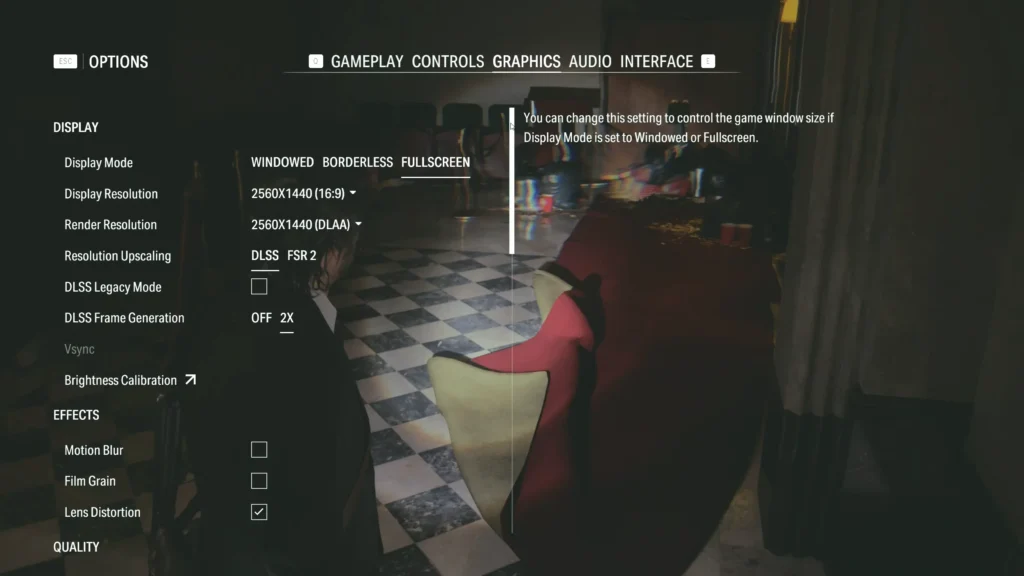
Selecting FSR Super Resolution automatically activates FSR 4 on compatible hardware; a separately labelled FSR 4 switch is unnecessary. Begin by updating the game and installing an appropriate graphics driver. After launching the PC version, open the graphics settings, select FSR Super Resolution, and choose the available rendering-quality or render-resolution option that suits the target display. For an initial comparison, keep the display’s output resolution unchanged. Start with a quality-oriented reconstruction setting rather than simultaneously lowering output resolution, reducing every graphics option, and enabling frame generation. Changing one variable at a time makes it easier to identify which adjustment improves performance and which compromises image quality.
AMD’s documented Quality scaling ratio is 1.5 times in each dimension. At a 3840 × 2160 output resolution, that corresponds to a 2560 × 1440 input image before reconstruction. The output remains 4K, but the underlying scene is not rendered at native 4K resolution. Leave frame generation disabled during the first test. Walk through a repeatable section, turn the camera slowly, and inspect fine objects against contrasting backgrounds. Then repeat the same route after changing the reconstruction mode. This provides a more useful comparison than judging a stationary screenshot or a frame-rate reading from an unusually simple scene.
FSR Frame Generation has its own graphics-menu option, available when the game detects supported hardware. Enable it after establishing acceptable performance without generated frames. This sequence helps distinguish improvements to the underlying rendering rate from improvements to displayed motion. It also provides a reference for evaluating whether the controls still feel responsive. AMD’s general guidance for FSR 3 frame generation recommends approximately 60 frames per second before interpolation, with upscaling already applied. This is a useful tuning target, not a documented Alan Wake 2 requirement that necessarily locks the setting below that number. AMD also cautions that lower input frame rates can make interpolation artifacts more noticeable.
After enabling frame generation, test normal camera movement, aiming, quick directional changes, and transitions between gameplay and menus. Judge the result by the complete experience rather than the counter alone. A presentation that looks smoother but feels less immediate may be a poor trade-off for a particular player. For a clean comparison, avoid introducing another frame-generation system at the same time. Test the in-game option on its own first, keeping driver-level experiments and third-party modifications outside the initial evaluation. Otherwise, identifying the source of an improvement or problem becomes unnecessarily difficult.
AMD’s current documentation identifies Radeon RX 9000-series and RX 7000-series discrete graphics cards as supported hardware for its machine-learning upscaling technology. Advice describing FSR 4 as permanently exclusive to RX 9000 cards is therefore outdated for this release period. The RX 7000 expansion is supported by dated primary documentation. AMD Software: Adrenalin Edition 26.6.2, updated on June 22, 2026, explicitly added FSR Upscaling 4.1 support for Radeon RX 7000-series graphics cards. That establishes a driver-support milestone; it should not be misrepresented as Remedy’s separately published minimum driver requirement for this patch.
AMD’s June 24, 2026, FSR SDK 2.3 announcement further documented the expansion to RDNA 3 discrete GPUs alongside RDNA 4. Consequently, the broad architectural distinction is RX 7000-series RDNA 3 and RX 9000-series RDNA 4, rather than simply “new AMD cards.” Older Radeon hardware should not be assumed to gain the same machine-learning upscaling path merely because it can run another version of FSR. AMD documents analytical fallback paths separately from its newer machine-learning implementation. Frame-generation compatibility also needs separate consideration. AMD’s current SDK distinguishes machine-learning frame generation for RDNA 4 from analytical alternatives. That distinction does not establish which exact frame-generation component Remedy bundled, nor does it justify calling every available option “FSR 4 Frame Generation.”
If FSR 4 is not showing in Alan Wake 2, start by checking the selected reconstruction method rather than searching only for a version number in the menu. The important troubleshooting question is whether the intended supported rendering path is active, not whether every technology name appears as a separate switch. Next, confirm the actual graphics-card model and installed driver. RX 7000 owners should pay particular attention to driver currency because AMD’s documented FSR Upscaling 4.1 support for that family arrived in the June 2026 driver release. An older driver can therefore be an important difference between otherwise similar installations.
Avoid using the general statement “my GPU supports FSR” as proof of FSR 4 eligibility. AMD’s documentation differentiates its machine-learning implementation from analytical alternatives used on other hardware. Also check whether the problem concerns upscaling or frame generation. An unavailable frame-generation control does not, by itself, diagnose the upscaling path. They are separate components and should be investigated separately.
For an installation that has previously used graphics modifications, return to an unmodified configuration using the modification’s own removal instructions before troubleshooting the official integration. Then verify the game files through the launcher. Do not begin by downloading replacement graphics libraries from an unrelated source. Establishing a clean game installation and an appropriate official driver provides a clearer diagnostic starting point.

Alan Wake 2 FSR 4 Performance, Image Quality, and Recommended Graphics Settings
FSR upscaling addresses spatial resolution. It reconstructs the final image using a lower-resolution rendered input and information carried across frames. Frame generation addresses the intervals between rendered images, using motion information to construct additional intermediate frames. Consider a hypothetical 4K presentation using a 1440p input. The input contains approximately 44% as many pixels as native 4K. That calculation explains why reconstruction can reduce part of the rendering workload, but it does not mean the complete game automatically becomes 56% faster. Geometry processing, simulation, reconstruction itself, and other work do not disappear simply because the input image contains fewer pixels.
Now consider a separate hypothetical case in which frame generation inserts one intermediate image between each pair of rendered frames. The display receives more images, but the game has not necessarily calculated a new simulation state for every one of them. The resulting presentation should therefore not be described as equivalent to rendering every displayed frame conventionally. This is why “120 FPS” needs context.
A measurement should state whether it represents rendered frames or a presentation that includes generated frames. Without that distinction, comparisons can make two substantially different experiences appear identical. Upscaling and frame generation can be complementary, but their settings should still be assessed independently. First determine whether reconstruction delivers an acceptable balance of detail and rendering performance. Then determine whether interpolation improves motion enough to justify any visible artifacts or change in responsiveness.
AMD describes its newer machine-learning upscaling as improving detail reconstruction, reducing ghosting, preserving particles, and increasing stability around difficult fine features compared with earlier analytical approaches. These are manufacturer descriptions of the technology, not a guarantee that every scene in Alan Wake 2 will show the same improvement. Performance must be considered separately from reconstruction quality. AMD’s technical documentation shows that the upscaling pass has its own processing and memory costs, which vary with hardware and output resolution. A better reconstruction model is not computationally free.
For useful testing, choose a route that includes more than one visual condition. Inspect fine geometry, moving objects, reflective surfaces, and dark-to-bright transitions where available. Use both slow camera pans and faster turns. A reconstruction setting that looks excellent while stationary may be less convincing when details move across the screen. Keep the comparison controlled by using the same save, route, output resolution, ray-tracing configuration, and graphics preset.
Record performance with frame generation disabled before repeating the test with it enabled. That separates reconstruction performance from interpolated presentation. Pay attention to consistency rather than only the highest observed number. A brief peak says little about whether a demanding section remains comfortable to play. The appropriate expectation is a new balance of reconstruction quality, rendering cost, and presentation smoothness, not a universal percentage improvement. Hardware-specific results are more informative than a blanket claim that the patch “doubles performance.”
A sensible starting configuration is native display output, a quality-oriented FSR setting, a moderate graphics preset, ray tracing disabled initially, and frame generation switched off for the baseline test. These are tuning recommendations rather than a benchmark-derived universal preset. At 1440p output, begin with Quality and examine the image in motion before reducing the internal resolution further. At 4K, also begin with Quality, then consider Balanced or Performance when additional rendering headroom is needed. At 1080p, be more cautious about aggressive scaling because the reconstruction starts from a smaller input image.
AMD’s standard scaling ratios are 1.5 times per dimension for Quality, approximately 1.7 times for Balanced, and 2 times for Performance. Performance mode at 1920 × 1080 output therefore starts from approximately 960 × 540, illustrating why the same mode can involve different compromises at different output resolutions. After choosing the reconstruction mode, adjust demanding visual settings individually. Test a lower shadow or volumetric setting, for example, and compare the same route before accepting the change. Avoid immediately reducing every option, as that may produce a faster result without showing which compromises were actually necessary.
Treat ray tracing as a separate decision. Establish satisfactory responsiveness without it, then add the available ray-tracing features incrementally. This makes the visual benefit and performance cost easier to judge. Frame generation should come after these decisions, not substitute for them. AMD’s approximately 60-FPS pre-interpolation guidance offers a reasonable target when achievable, although personal tolerance and the actual scene still matter. Finally, hold motion blur, film grain, and sharpening preferences constant while comparing reconstruction modes. Altering several image-processing settings simultaneously can make one mode appear better for reasons unrelated to the upscaler itself.
FSR 4 vs DLSS 4 and the Agility SDK Ray-Tracing Changes
Alan Wake 2’s documented DLSS 4 update arrived on January 30, 2025. Remedy described transformer-based Super Resolution, Ray Reconstruction, and DLAA improvements for GeForce RTX hardware, alongside other NVIDIA-specific graphics enhancements. NVIDIA’s accompanying documentation distinguishes the feature tiers. The updated frame-generation model supports RTX 40- and RTX 50-series GPUs, while Multi Frame Generation is an RTX 50-series feature in that release. These should not be confused with the broader RTX availability of transformer-based image reconstruction.
FSR 4 and DLSS Super Resolution can be compared as reconstruction approaches, but an entire graphics configuration contains more than its upscaler. Ray Reconstruction, frame generation, multi-frame generation, and ray-tracing quality are separate variables. Enabling different combinations on two cards does not produce an isolated upscaling comparison. A fair image-quality assessment should hold output resolution and other visual settings as closely matched as possible.
It should also examine movement, because temporal reconstruction cannot be fully judged from a single still image. Performance comparisons require equally careful labelling. Generated-frame output from one configuration should not be presented as directly equivalent to an ungenerated rendering rate from another. When comparing complete playing experiences, responsiveness and motion artifacts deserve attention alongside the frame counter.
The practical choice also begins with hardware eligibility. Supported Radeon users should assess the new AMD option on their own systems, while RTX users should evaluate the game’s available DLSS configuration. There is no defensible universal winner without a defined GPU, resolution, scene, feature combination, and evaluation method.
Update 1.2.10 also moves Opacity Micromaps and Shader Execution Reordering to the Agility SDK for broader GPU-vendor support. Opacity Micromaps, commonly abbreviated OMM, address the handling of transparency information during ray tracing. Microsoft explains that they can reduce expensive shader work when a ray encounters geometry whose relevant region is already known to be opaque or transparent. Cut-out surfaces such as foliage illustrate the type of workload involved.
Shader Execution Reordering, or SER, tackles a different problem: inefficient execution when parallel ray-tracing work follows divergent paths. Microsoft’s implementation lets shaders provide information that can help group work more coherently. However, accepting the API does not necessarily mean a particular device performs the same degree of reordering or receives the same performance benefit.
That distinction is central to interpreting “cross-vendor support.” A shared interface provides a common implementation route; it does not guarantee identical hardware acceleration across every AMD, NVIDIA, and Intel graphics card. The Agility SDK change should also remain separate from the FSR discussion. OMM and SER concern ray-tracing execution, whereas upscaling concerns image reconstruction. One is not a hidden activation requirement for the other. For players, the appropriate maintenance route is to update the game and graphics driver. Manually replacing developer-runtime files is not a sensible first step when evaluating an officially distributed patch.
Frequently Asked Questions (FAQs)
- When was Alan Wake 2 update 1.2.10 released?
It was released on August 18, 2026. This date is important because it separates update 1.2.10 from Alan Wake 2’s earlier PC graphics update, which focused on DLSS 4-related features. The August 2026 patch adds new PC-side FSR functionality while also delivering fixes across platforms. When checking whether the update is installed, players should compare version numbers within their own platform, since the PC, PlayStation 5, and Xbox builds do not use identical numbering. - Does FSR 4 support Radeon RX 7000 graphics cards?
Yes. AMD expanded FSR Upscaling 4.1 support to Radeon RX 7000-series graphics cards in June 2026, so advice describing FSR 4 as limited only to Radeon RX 9000 cards is outdated for this release period. The supported range includes RX 7000-series RDNA 3 and RX 9000-series RDNA 4 discrete GPUs. However, driver currency still matters. An RX 7000 card may need an appropriate updated AMD driver before the FSR 4 path appears or functions correctly in Alan Wake 2. - Is there a separate FSR 4 button in Alan Wake 2?
No separate FSR 4 button is required. On supported hardware, selecting FSR Super Resolution activates the appropriate FSR 4 upscaling path automatically. That means players should not assume something is broken just because the menu does not display a distinct “FSR 4” toggle. If the option seems unavailable, the better troubleshooting path is to check the selected reconstruction method, the exact GPU model, the installed driver, and whether the game installation is fully updated and unmodified. - Is FSR Frame Generation the same thing as FSR 4 upscaling?
No. FSR 4 upscaling and FSR Frame Generation do different jobs. Upscaling reconstructs a higher-resolution final image from a lower-resolution rendered input, while frame generation creates additional intermediate images between rendered frames. They can be used together, but they should not be treated as the same performance setting. A system that supports one feature does not automatically support every version or implementation of the other, especially because AMD documents different hardware considerations for upscaling and frame generation. - Does frame generation make controls respond like a natively rendered higher frame rate?
Not necessarily. Frame generation can make motion look smoother because the display receives more images, but those generated frames are not the same as fully rendered frames with new game-simulation updates behind them. This distinction matters for controls, especially in a game where camera movement, aiming, and quick reactions affect the feel of play. A frame-rate counter may rise sharply, but players should still test whether input response feels immediate enough. If the game looks smoother but feels less responsive, the trade-off may not be worth it. - What frame rate should be targeted before enabling frame generation?
Approximately 60 FPS before interpolation is a sensible starting target, based on AMD’s general FSR 3 frame-generation guidance. This should be understood as tuning advice, not as a confirmed Alan Wake 2 requirement that prevents the option from working below that number. The reason for aiming at a strong baseline is that frame generation works best when the underlying rendered performance is already comfortable. If the base frame rate is too low, generated frames may increase smoothness on paper while making artifacts or input-latency concerns more noticeable. - Does the patch add FSR 4 graphics settings to PS5 and Xbox?
No. The FSR additions are specified for the PC version of Alan Wake 2. The PlayStation 5 and Xbox versions received the broader update fixes, but they should not be expected to include the same FSR 4 menu options or PC-style frame-generation controls. Console players should evaluate the patch based on the issues relevant to their platform, such as cinematic audio synchronization, progression fixes, or stability improvements. PC benchmark results also should not be used as proof of console performance changes. - Does Alan Wake 2 still offer DLSS options for NVIDIA users?
Yes. Alan Wake 2 still has documented DLSS options for NVIDIA users, including the earlier DLSS 4-related integration with transformer-based reconstruction and hardware-dependent frame-generation features. NVIDIA’s feature tiers are important: updated frame generation applies to RTX 40- and RTX 50-series cards, while Multi Frame Generation is tied to RTX 50-series hardware in that release. These features should be compared carefully and separately. DLSS Super Resolution, Ray Reconstruction, frame generation, and Multi Frame Generation are not all the same setting. - Does FSR Quality render a 4K image at native 4K internally?
No. With AMD’s standard 1.5-times Quality scaling ratio, a 3840 × 2160 output uses a 2560 × 1440 input before reconstruction. The image displayed on the screen is still 4K in output dimensions, but the scene is not rendered internally at native 4K. This is why upscaling can reduce part of the rendering workload. It also explains why comparisons between native rendering and FSR Quality should be made carefully, especially when judging fine detail, motion stability, and image reconstruction in demanding scenes. - Will verifying Alan Wake 2 through Epic delete saved progress?
Epic states that verifying game files does not affect saved data. Verification checks the installed game files and repairs discrepancies, which can help if the update did not install properly or if modified or damaged files are causing problems. It is a useful troubleshooting step before assuming the patch itself is broken. However, verification is not the same as manually deleting folders, removing mods, changing configuration files, or altering saved-game data. Players who have used modifications should also follow the mod’s own removal instructions when returning to a clean installation.

Conclusion
The Alan Wake 2 patch adds FSR 4 support at a point when AMD’s compatible discrete-GPU range includes both Radeon RX 9000 and RX 7000 families. That broader hardware context matters when evaluating the update and avoiding outdated compatibility advice.
The best configuration is not simply whichever combination produces the largest displayed frame-rate number. Reconstruction quality, underlying rendering performance, frame pacing, and control response need to be considered together.
Begin with a clean, updated installation and an appropriate driver. Establish a comfortable baseline, compare reconstruction modes in repeatable scenes, and add frame generation only after its benefits can be judged against that baseline.
The same evidence-based approach applies to the bug fixes: revisit the specific affected scene or interaction, preserve saved progress, and distinguish a targeted correction from a guarantee covering every possible problem. This makes the update easier to assess without exaggerating either its graphics benefits or its reliability improvements.
Sources and Citations
- Remedy Entertainment’s Alan Wake 2 update 1.2.10 notes, August 18, 2026Remedy lists the update as PC 1.2.10, PlayStation 5 1.200.009, and Xbox Series 1.2.0.10. The PC changes add FSR 4, automatically enabled on supported GPUs when FSR Super Resolution is selected, and an FSR Frame Generation setting. Opacity Micromaps and Shader Execution Reordering also move to the Agility SDK. The cinematic audio-synchronization fix applies to all platforms, while other fixes address the Crossbow Cult Stash and a potential Quick Slots crash. The notes do not identify the exact FSR upscaling or frame-generation library versions bundled with the game. (Alan Wake)
Citation: Remedy Entertainment: Alan Wake 2 Update 1.2.10 Notes - AMD Software: Adrenalin Edition 26.6.2 Driver Release Notes, updated June 22, 2026AMD explicitly lists FSR Upscaling 4.1 support for Radeon RX 7000-series graphics cards under the driver’s new features. This is the direct driver-level reference for the June compatibility expansion. The driver’s broader supported-products list should not be confused with FSR 4 compatibility: being able to install this driver does not mean every supported graphics card receives its machine-learning upscaling features. (AMD)
Citation: AMD: Adrenalin Edition 26.6.2 Driver Release Notes - AMD’s FSR SDK 2.3 announcement, June 24, 2026This announcement confirms that FSR Upscaling 4.1.1 extends machine-learning upscaling to Radeon RX 7000-series discrete GPUs, alongside RX 9000-series support. Crucially, it lists separate requirements for the SDK’s other components: machine-learning Frame Generation 4.0.1 and Ray Regeneration 1.2 require RX 9000-series GPUs or newer. It therefore supports the RX 7000 upscaling expansion without implying that those cards gain every machine-learning feature in the SDK. (AMD GPUOpen)
Citation: AMD GPUOpen: FSR Upscaling 4.1 RDNA 3 Support Now Available in FSR SDK 2.3 - AMD GPUOpen’s FSR Upscaling overviewAMD explains that its machine-learning upscaler uses neural networks to reconstruct higher-resolution output from lower-resolution frames. The overview describes intended improvements in ghosting, particle preservation, fine detail, and temporal stability, while distinguishing machine-learning operation from older analytical fallback paths. These are AMD’s explanations of the technology and its capabilities, not independent measurements of image quality or performance in Alan Wake 2. (AMD GPUOpen)
Citation: AMD GPUOpen: FSR Upscaling - AMD GPUOpen’s FSR Upscaling 4.1.1 manualThe integration manual explains reconstruction using spatial and temporal information, including color, depth, and motion-vector inputs. It documents the preset per-dimension scaling factors: Native AA 1.0×, Quality 1.5×, Balanced 1.7×, Performance 2.0×, and Ultra Performance 3.0×. These describe the relationship between rendering and presentation resolution, not guaranteed frame-rate multipliers. The manual is a technical reference for FSR 4.1.1, rather than proof that Remedy’s update uses that precise version. (AMD GPUOpen)
Citation: AMD GPUOpen Manuals: FSR Upscaling 4.1.1 - AMD GPUOpen’s FSR Frame Generation documentationThis documentation explains the creation of intermediate frames and distinguishes machine-learning frame generation from its analytical fallback. It also confirms compatibility with third-party upscalers when the required motion vectors and depth information are supplied. That supports explaining why upscaling and frame generation are separate components, but SDK-level interoperability does not establish which combinations a particular game exposes in its settings. The page also discusses frame pacing, variable refresh rates, and software-interference considerations. (AMD GPUOpen)
Citation: AMD GPUOpen: FSR Frame Generation - AMD GPUOpen’s FidelityFX Super Resolution 3 documentationThe FSR 3 documentation confirms that frame generation is optional and that FSR 3.1 frame generation can work with compatible third-party upscalers. It recommends a minimum of approximately 60 FPS before interpolation, for example after upscaling, for the best results. AMD discourages lower input rates because interpolation artifacts become more visible and says sub-30-FPS input should be avoided. This is guidance for frame-generation conditions, not Alan Wake 2’s minimum hardware specification. (AMD GPUOpen)
Citation: AMD GPUOpen: FidelityFX Super Resolution 3 - Remedy’s DLSS 4 and Multi Frame Generation announcement, January 30, 2025Remedy’s announcement documents the earlier PC integration of DLSS 4, Multi Frame Generation, RTX Mega Geometry, and an Ultra ray-tracing quality setting. It also identifies the new transformer-based Super Resolution, Ray Reconstruction, and DLAA models available across GeForce RTX GPUs. This provides the historical NVIDIA graphics context and keeps those January 2025 additions separate from the FSR and Agility SDK changes in the August 2026 update. (Alan Wake)
Citation: Remedy Entertainment: DLSS 4 with Multi Frame Generation, RTX Mega Geometry, Ultra Quality Ray Tracing and More Comes to PC - NVIDIA’s accompanying DLSS 4 technical coverage, January 30, 2025The Alan Wake 2 section details Multi Frame Generation for RTX 50-series GPUs, the updated Frame Generation model for RTX 40- and 50-series GPUs, and transformer-model improvements across the RTX range. It also explains RTX Mega Geometry’s work on ray-tracing acceleration structures and the Ultra setting’s additional effects. Any performance figures on this page are NVIDIA’s published measurements, not independent benchmarks. Remedy links directly to this article from its announcement. (NVIDIA)
Citation: NVIDIA: DLSS 4 with Multi Frame Generation and Enhancements Available Now - Microsoft’s D3D12 Opacity Micromaps article, May 30, 2025Microsoft explains how Opacity Micromaps reduce unnecessary shader work when tracing rays through geometry containing transparent and opaque regions, such as alpha-tested surfaces. The article describes the feature’s relationship to DirectX Raytracing 1.2, the Agility SDK, and driver-reported support. It provides the technical foundation for Remedy’s announcement, while making clear that using a cross-vendor API does not automatically give every GPU the necessary feature support. (Microsoft for Developers)
Citation: Microsoft DirectX Developer Blog: D3D12 Opacity Micromaps - Microsoft’s D3D12 Shader Execution Reordering article, February 26, 2026Microsoft explains how Shader Execution Reordering groups ray-tracing work more coherently so it can execute more efficiently in parallel. The article documents its official release, Shader Model 6.9 requirements, and Agility SDK 1.619 availability. It also distinguishes accepting shader code from actually accelerating it on a particular device. Microsoft explicitly cautions that synthetic performance gains should not be treated as equivalent gains in complete games. (Microsoft for Developers)
Citation: Microsoft DirectX Developer Blog: D3D12 Shader Execution Reordering - Epic Games’ official game-file verification instructionsEpic explains that verification checks for damaged or corrupted game files and repairs files that differ from the expected installation. Its instructions use the game’s Library menu > three dots > Manage > Verify. The page explicitly confirms that saved data is not affected, supporting the article’s installation-repair procedure and save-data clarification. It does not present verification as a guaranteed fix for every crash or graphics problem. (Epic Games Store)
Citation: Epic Games Support: How Do I Verify Game Files in the Epic Games Launcher?
Recommendations
- Echoes of Aincrad Crafting Guide: Recipes, Materials and Unlock Requirements
- Did Christopher Nolan’s Depiction of the Gods Pay Off in The Odyssey?
- Castlevania: Belmont’s Curse Runs at Only 30 FPS on Nintendo Switch
- EA Sports College Football 27 Preview: Defense Wins Championships
- Jurassic World Evolution 2 Complete Edition Comes to Nintendo Switch 2 on July 30, 2026
- Unity-Based Tool for JRPG Game Development: RetroGig’s Retro JRPG Template for SNES/PSX-Style RPG Systems
- Keanu Reeves & China Miéville BRZRKR: Light Draws Breath — Release Date, Story, Creative Team & Variant Covers
- CD Projekt Raises Profit Goals with Witcher 4, 5, and 6 Coming: 5 Billion PLN Target Explained
- Creepshow Official Announcement Trailer Reveals a New Anthology Horror Game Experience
- GTA 6 Leans Into Vice City’s Influencer Hustle Where Looks Matter



































































































