









In This Article (19 sections)
Autodesk Maya 2027.1 Release Date and Full Feature Overview
Autodesk Maya 2027.1 represents a mid-cycle production-focused update to Autodesk’s flagship 3D modeling, animation, and VFX software. Positioned as an incremental but high-impact release, Maya 2027.1 continues Autodesk’s strategy of refining core production workflows while expanding procedural systems, simulation tools, and AI-assisted animation capabilities.
The release is expected to target studios working in film, television, game development, and visualization, with a strong emphasis on pipeline stability and performance optimization. Autodesk Maya releases typically follow a yearly major version cycle, with point releases such as 2027.1 focusing on workflow enhancements, bug fixes, and feature expansion.
Maya 2027.1 introduces improvements across modeling, animation, simulation, rendering, and interoperability tools. Among the most discussed additions are Smart Bevel enhancements, expanded Bifrost procedural simulation tools, improved USD workflows, and deeper integration with AI-assisted animation systems.
From a production standpoint, Autodesk Maya 2027.1 is designed to reduce iteration time, improve artist efficiency, and streamline complex scene management for large-scale production pipelines.
What is New in Autodesk Maya 2027.1
Autodesk Maya 2027.1 introduces a range of upgrades across multiple disciplines. The update is not a full architectural overhaul but instead a refinement of existing systems with targeted performance and usability improvements.
Key updates include:
- Enhanced Smart Bevel system with adaptive edge detection
- Expanded Bifrost procedural simulation graph tools
- Improved animation graph editor responsiveness
- New OpenTimelineIO workflow improvements
- USD pipeline stability and performance upgrades
- LookdevX MaterialX node expansion
- AI-assisted motion generation enhancements
- Arnold rendering optimization improvements
- Faster viewport performance for complex scenes
These improvements are designed to address long-standing production bottlenecks such as heavy scene lag, complex rig evaluation slowdowns, and simulation caching inefficiencies.
Overall, Autodesk Maya 2027.1 focuses on making the software more predictable and scalable for modern production environments.

Autodesk Maya 2027.1 Smart Bevel Improvements Explained
One of the most significant modeling upgrades in Autodesk Maya 2027.1 is the Smart Bevel system enhancement. This tool automates and refines bevel generation by intelligently analyzing mesh topology and edge flow.
The Smart Bevel improvements include:
- Adaptive bevel width based on curvature detection
- Improved corner resolution for hard-surface models
- Reduced artifacts in high-density meshes
- Context-aware bevel grouping for symmetrical objects
- Faster computation for real-time viewport updates
These enhancements are particularly useful for game asset creation and hard-surface modeling workflows, where bevel accuracy directly impacts shading quality and realism.
Smart Bevel in Maya 2027.1 also improves non-destructive workflows, allowing artists to adjust bevel parameters after application without introducing topology corruption. This is especially valuable for procedural modeling pipelines where iterative design is essential.
Maya 2027.1 Animation Tool Updates and Workflow Changes
Autodesk Maya 2027.1 introduces several animation system improvements designed to streamline keyframe management, rig interaction, and graph editor performance.
Key animation updates include:
- Faster playback performance in dense animation scenes
- Reduced lag in Graph Editor manipulation
- Improved keyframe filtering and selection tools
- Enhanced time slider responsiveness
- More stable playback caching system
The animation workflow in Maya 2027.1 is optimized for large-scale character animation projects, where scenes may contain thousands of animation curves and layered rigs.
Additionally, deformation evaluation has been improved, allowing animators to work more fluidly with complex rigs without constant viewport stuttering or caching delays.
These changes significantly improve usability for studios working on cinematic-quality animation sequences.
Autodesk Maya 2027.1 Bifrost Simulation Features
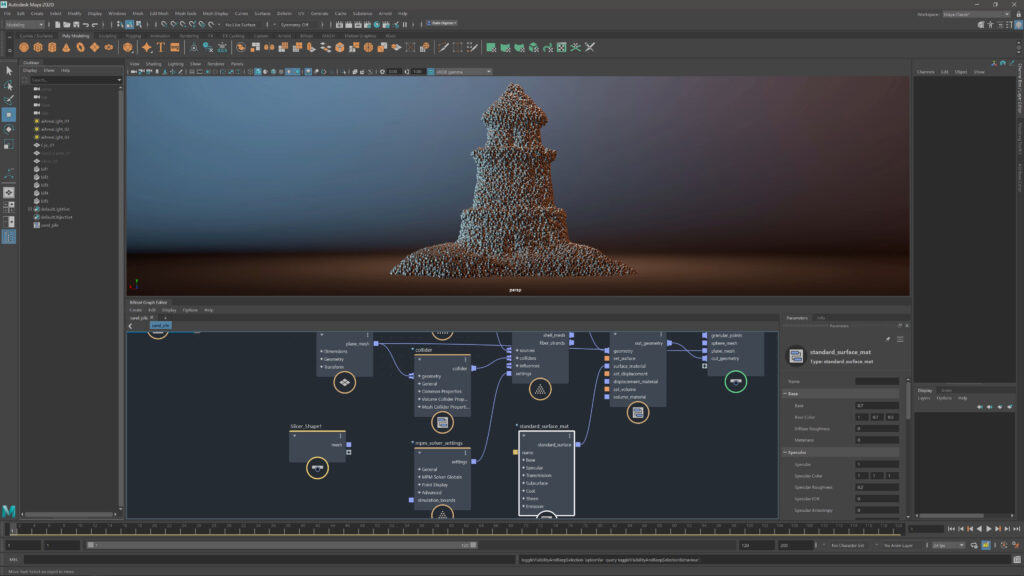
Bifrost remains one of the most powerful procedural simulation systems inside Autodesk Maya, and version 2027.1 expands its capabilities further.
New Bifrost features include:
- Expanded node library for procedural effects
- Faster simulation caching system
- Improved particle system stability
- Enhanced fluid and smoke simulation controls
- Better integration with USD-based scenes
Bifrost in Maya 2027.1 focuses on making complex simulations more accessible through node-based workflows. Artists can build procedural environments, destruction systems, and atmospheric effects with greater control and less manual scripting.
Performance improvements also allow simulations to scale more efficiently across multi-core CPU systems, making it more suitable for high-end VFX production pipelines.

Maya 2027.1 OpenTimelineIO Support and USD Workflow Enhancements
Autodesk Maya 2027.1 continues to strengthen its interoperability with industry-standard pipelines through improved OpenTimelineIO (OTIO) and USD (Universal Scene Description) support.
Enhancements include:
- Faster USD scene loading and export times
- Improved layer management in USD workflows
- Better compatibility with external pipeline tools
- Expanded OTIO timeline synchronization features
- Reduced memory overhead for large USD scenes
These updates are especially important for studios using cross-software pipelines involving tools like Houdini, Unreal Engine, and Nuke.
USD integration in Maya 2027.1 allows for more scalable scene assembly, enabling large collaborative teams to work on complex assets without overwriting or duplicating data.
Autodesk Maya 2027.1 LookdevX and MaterialX Updates
LookdevX in Autodesk Maya 2027.1 receives significant improvements aimed at shader development and material authoring workflows.
Key updates include:
- Expanded MaterialX node support
- Improved shader graph performance
- More intuitive node-based material editing
- Faster viewport shading updates
- Better compatibility with Arnold and USD shading pipelines
MaterialX integration allows for more standardized material creation across multiple DCC tools and rendering engines. This ensures consistent shading behavior across production environments.
For look development artists, Maya 2027.1 provides a more stable and responsive material editing environment, reducing iteration time when building complex shading networks.
Maya 2027.1 AI Animation and MotionMaker Features
One of the emerging areas in Autodesk Maya 2027.1 is AI-assisted animation, particularly through MotionMaker enhancements.
Key AI-driven features include:
- Automated in-between frame generation
- Motion prediction for character rigs
- AI-assisted walk cycle generation
- Smart pose suggestion tools
- Behavioral motion smoothing
These features are designed to assist animators rather than replace manual animation workflows. MotionMaker tools help reduce repetitive keyframing tasks, allowing artists to focus on performance and storytelling.
AI integration in Maya 2027.1 also improves animation cleanup processes by automatically detecting jitter, unnatural movement, and inconsistent motion curves.

Autodesk Maya 2027.1 Arnold Rendering Improvements
Arnold Renderer in Autodesk Maya 2027.1 receives performance and quality enhancements focused on production rendering efficiency.
Improvements include:
- Faster global illumination calculations
- Optimized GPU rendering pipeline
- Reduced render noise in early sampling stages
- Better denoising algorithm integration
- Improved AOV management and output flexibility
These upgrades help reduce render times while maintaining high visual fidelity, which is critical for film and high-end VFX production.
Arnold in Maya 2027.1 also improves memory handling for large texture sets and complex shader networks, making it more stable in heavy production scenes.
Maya 2027.1 System Requirements for Windows, Linux, and MacOS
Autodesk Maya 2027.1 continues to support professional production environments across major operating systems.
Expected system requirements include:
Windows:
- Windows 11 (64-bit)
- Modern multi-core CPU (Intel or AMD)
- 16GB minimum RAM (32GB+ recommended)
- DirectX 12-compatible GPU
Linux:
- Supported enterprise distributions
- OpenGL/Vulkan-compatible GPU drivers
- High-performance CPU architecture
macOS:
- Latest supported macOS version
- Apple Silicon optimization improvements
- Metal-compatible GPU support
For optimal performance, Autodesk recommends workstation-grade hardware, especially for simulation-heavy and rendering-intensive workflows.
Autodesk Maya 2027.1 vs Maya 2026 Key Differences
Compared to Maya 2026, Autodesk Maya 2027.1 introduces several notable improvements:
- Smarter bevel modeling system
- More stable Bifrost simulations
- Improved USD pipeline performance
- Enhanced AI animation tools
- Faster Arnold rendering pipeline
- Better viewport responsiveness
Maya 2026 focused heavily on foundational pipeline improvements, while Maya 2027.1 builds upon that foundation with more intelligent automation and performance scaling.
The biggest difference lies in workflow efficiency, with Maya 2027.1 significantly reducing manual overhead in animation, modeling, and simulation tasks.

Best New Maya 2027.1 Features for Game Developers and VFX Artists
For game developers and VFX artists, Maya 2027.1 introduces several highly valuable features:
- Optimized asset creation with Smart Bevel
- Faster USD-based asset pipelines
- Improved real-time viewport performance
- Enhanced Bifrost procedural world building
- Better Arnold rendering consistency
- AI-assisted animation tools for rapid prototyping
Game developers benefit from improved export workflows to engines like Unreal Engine and Unity, while VFX artists gain better simulation control and rendering efficiency.
How Autodesk Maya 2027.1 Improves 3D Animation Pipelines
Autodesk Maya 2027.1 significantly improves end-to-end 3D animation pipelines by reducing friction between modeling, rigging, animation, simulation, and rendering stages.
Key pipeline improvements include:
- More stable cross-department file handling
- Faster asset iteration cycles
- Improved caching systems for animation playback
- Better interoperability with USD-based production pipelines
- Reduced bottlenecks in simulation-heavy scenes
These enhancements make Maya 2027.1 more suitable for large-scale studio environments where multiple departments collaborate on the same assets.
Maya 2027.1 Render Farm Compatibility and Performance Guide
Maya 2027.1 is designed with modern render farm environments in mind, ensuring compatibility with distributed rendering systems.
Key considerations include:
- Improved network cache handling
- Faster scene export for distributed rendering
- Better support for Arnold render nodes
- Reduced memory usage per render task
- Enhanced job scheduling compatibility
These improvements help studios scale rendering workloads across large compute clusters while minimizing failures and inconsistencies.
Should You Upgrade to Autodesk Maya 2027.1 in 2026
Upgrading to Autodesk Maya 2027.1 depends heavily on production requirements.
You should upgrade if:
- You rely heavily on Bifrost simulations
- You need improved USD pipeline performance
- You work in large animation or VFX teams
- You require faster rendering and viewport performance
- You want AI-assisted animation tools
You may delay upgrading if:
- Your pipeline depends on legacy plugins not yet updated
- Your studio prioritizes long-term LTS stability versions
- You are mid-production on a locked toolchain version
Overall, Maya 2027.1 is best suited for studios focused on modern, scalable, and procedural production workflows.
Frequently Asked Questions (FAQs)
- What is Autodesk Maya 2027.1 used for?
Autodesk Maya 2027.1 is used for 3D modeling, animation, simulation, and rendering in film, games, and VFX production. - Is Maya 2027.1 better than Maya 2026?
Yes, it improves performance, simulation systems, and AI-assisted animation tools. - What is Smart Bevel in Maya 2027.1?
It is an automated modeling tool that creates optimized bevels based on mesh topology. - Does Maya 2027.1 support USD workflows?
Yes, it improves USD scene handling and pipeline performance. - What is Bifrost in Maya 2027.1?
Bifrost is a procedural simulation system for effects like fluids, smoke, and destruction. - Does Maya 2027.1 use AI tools?
Yes, it includes AI-assisted animation and MotionMaker features. - Is Arnold faster in Maya 2027.1?
Yes, rendering performance and memory efficiency are improved. - Can Maya 2027.1 run on macOS?
Yes, with Apple Silicon and Metal support. - Is Maya 2027.1 good for game development?
Yes, it improves asset creation and engine export workflows. - Should beginners use Maya 2027.1?
Yes, but it is primarily designed for professional production pipelines.

Conclusion
Autodesk Maya 2027.1 represents a significant refinement in Autodesk’s 3D software ecosystem, focusing on smarter modeling tools, enhanced procedural simulation, improved rendering performance, and stronger AI-assisted workflows. With upgrades across Smart Bevel, Bifrost, USD, LookdevX, and Arnold, it delivers a more efficient and scalable production environment for modern studios. While not a radical overhaul, it meaningfully improves every major stage of the 3D production pipeline.
Sources and Citations
- Autodesk Official Documentation
https://www.autodesk.com/support - Autodesk Maya Product Page
https://www.autodesk.com/products/maya/overview - Autodesk Developer Network Resources
https://aps.autodesk.com - Arnold Renderer Documentation
https://www.arnoldrenderer.com/docs - OpenUSD Documentation (Pixar)
https://openusd.org
Recommendations
- Bethesda Acknowledges Starfield PS5 Crashes, Hotfix Coming Soon: What Players Need to Know
- The Best Bearded Video Game Characters: Iconic Facial Hair and Their Impact on Gaming
- Blender Set Hair Curve Profile Geometry Nodes Preset
- How to Get a Free Fortnite Skin and Car in the Rocket League Crossover Event (Rivals & Rockets Guide)
- How to Make a Character Follow a Path in Blender: A Complete Beginner’s Guide
- Mass Effect Andromeda Was “Done Dirty” by EA, Actor Says: What Happened, What Fans Missed, and Where the Series Goes Next
- Blender Developers Meeting Notes 27 April 2026: Key Updates, New Features, Module Meetings, and Weekly Reports
- All ARC Raiders Quests (2026) – Full Mission List, Quest Chains, and Unlock Order
- What is Stranger than Heaven? Full Overview from Xbox Presents Showcase
- Dark Outlaw Games Founder Jason Blundell Appeared on Stream With JCbackfire to Decompress About the Unexpected Shift



































































































