









What did Blender CEO Francesco Siddi say about Anthropic funding
Blender CEO Francesco Siddi publicly welcomed Anthropic’s sponsorship as a way to support Blender’s mission and maintain independence. He stressed that the donation would help the team “keep pursuing projects independently, and … focus on building tools for artists and creators”. In a Blender Today LIVE stream, Siddi went further to reassure users that the partnership was not intended to take over Blender with AI. He stated plainly, “this is towards helping Blender itself as a software, this is not an AI takeover.” In short, Siddi framed the funding as a boost for Blender’s development – not a shift in its goals.
Anthropic joins Blender Development Fund Corporate Patron explained
Anthropic has become a Corporate Patron of the Blender Development Fund, joining the top tier of Blender’s sponsorship program. As a Corporate Patron, Anthropic will give a large annual gift to Blender (next section) and in return become part of a group including other major industry sponsors. Corporate patrons do get certain privileges – for example, the Foundation will consult them during annual planning – but they do not gain ownership of Blender. In practice, becoming a Corporate Patron simply means Anthropic is officially supporting Blender’s open-source work with big funding. The donation is earmarked for Blender core development (especially the Python API), but like other patrons, Anthropic will have no special editorial control over Blender’s roadmap.

How much money is Anthropic donating to Blender per year
Anthropic has pledged €240,000 per year to the Blender project. According to reports, this sum roughly equates to funding the salaries of about four full-time Blender developers. The Foundation says this money will go directly into Blender’s core development, with a particular focus on improving the Python API and other foundational features.
Blender funding policy “no strings attached” explained
Blender’s funding policy makes it clear that donations do not create obligations or influence. The official statement says “corporate participation in the Development Fund does not imply alignment between Blender and the donor’s mission, products, or strategy.” In other words, the only requirement for becoming a patron is that the company supports Blender’s mission of developing top-notch free 3D software. There are no hidden deals – the donation simply helps pay developer salaries and projects, without giving the donor ownership or any special demands. This “no strings attached” approach is a cornerstone of Blender’s philosophy and is explicitly highlighted in the announcement.
Does Anthropic funding give Claude influence over Blender development
No – donating money to the Development Fund does not give Anthropic or Claude any direct influence over Blender’s code or decisions. Blender is fully open-source under the GPL, so no company can own or control the code base. In fact, the Blender Foundation points out that each Corporate Patron represents only a modest fraction of its total budget (around 7% or so). While patrons have a designated contact at the Foundation and can discuss grant planning, they do not get a controlling vote. Industry analysts agree that funding alone “doesn’t mean [they] get a say in anything” – Blender’s development and governance remain in the hands of its community and Foundation.

What is the Claude-Blender connector and what does it do
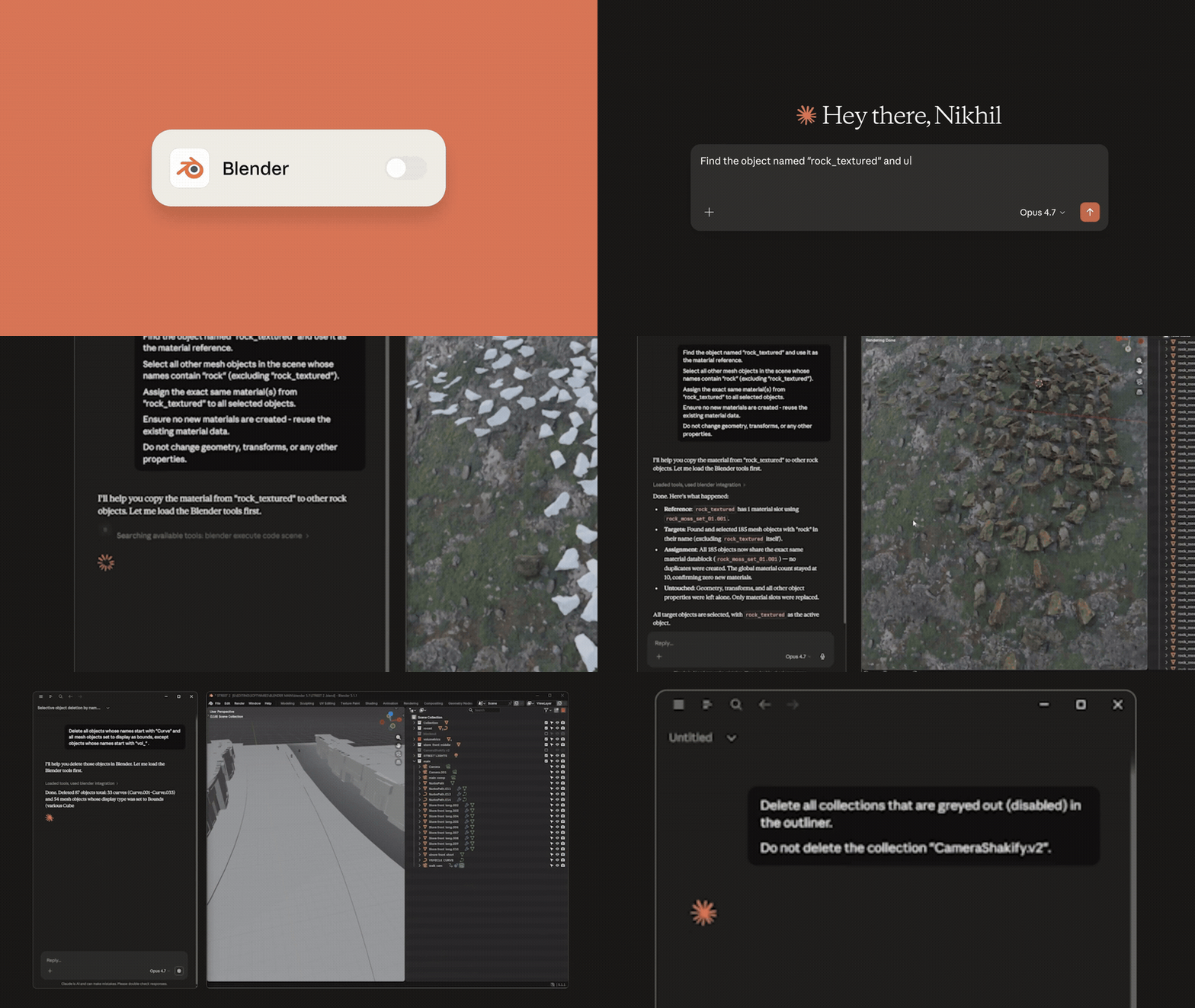
The Claude–Blender connector is a new add-on developed by the Blender Lab that links Anthropic’s Claude AI assistant with Blender. It functions as an interface between Claude (running on Claude Desktop) and Blender’s Python API. With this connector installed, you can ask Claude to analyze or manipulate your 3D scene in natural language.
For example, Claude can generate Python scripts to batch-move objects, change materials, or fix errors in a scene. It can also answer questions about scene contents or summarize complex setups. Essentially, the connector turns Claude into a kind of smart assistant for Blender: anything you could do by writing a Python script in Blender, you can now potentially describe to Claude in English and have Claude execute it for you through the connector.
Blender MCP server for Claude: how it connects AI to Blender scenes
This connector is built on the Model Context Protocol (MCP), an open standard for connecting language models to external applications. In practice, installing the Claude-Blender add-on starts a local MCP server inside Blender. When connected, Claude (or any LLM) can send JSON-formatted commands to this server. The server interprets those commands as Blender Python API calls. For instance, Claude might send a command to create a new object, delete something, or fetch scene metadata.
The MCP server executes these commands directly in Blender’s environment. This two-way bridge means Claude can both retrieve information about your 3D scene (like listing all lights or objects) and control Blender by running code (for example, changing lighting or building geometry). All communication is done locally: no scene data is sent out, just the commands to modify or query the scene.
How to install the Claude-Blender connector (Blender 5.1)
The Claude–Blender connector is delivered as a Blender add-on. According to the project’s documentation, the installation steps are: download the connector add-on file, then open Blender 5.1 and go to Edit → Preferences → Add-ons → Install…. Select the downloaded file (often named addon.py), and then enable the checkbox to activate the add-on. (Some instructions also mention adding the “Blender Lab” add-on repository first, then installing the MCP server from there, so you get update notifications – the exact process can be found in the Blender Lab documentation.)
Once installed and enabled, start the add-on’s MCP server (usually via a new panel in the 3D View). After that, follow the Claude Desktop setup (pointing Claude’s MCP setting to Blender). Full step-by-step guidance is provided in the official documentation and on the connector’s GitHub.
Why Blender users reacted negatively to Anthropic sponsorship
Reaction in the community has been mixed and often contentious. Many long-time Blender users are personally wary of big AI companies and generative AI in art. Some community members expressed upset or distrust, fearing that this “AI money” might come with strings or unwanted change. Social media posts ranged from praise (“more funding for Blender is great”) to anger (“never donate to Blender again”).
The negativity largely stems from ethical concerns: artists are sensitive about AI models trained on art without consent, and some view any ties to commercial AI companies as “icky.” In one media report, users were cited calling the sponsorship “bloody money” and demanding assurances about Blender’s independence. In summary, the negative reactions are driven mostly by skepticism about generative AI and a mistrust of big tech sponsors, rather than any confirmed technical issues with the deal.

Blender Development Fund sponsors list and how corporate patronage works
Blender’s Development Fund is supported by dozens of sponsors. Among Corporate Patrons (the top tier) are companies like Epic Games, Netflix Animation, Wacom, PICO XR, Bolt Graphics, and even individuals like Aras Pranckevičius (Blender’s original creator). Each Patron commits to donate on the order of €240k/year. There are also Corporate Titanium supporters (around €120k/year) – for example NVIDIA, AMD, and OTOY.
These corporate donations are blended with many smaller donations from studios, artists, and individuals to fund Blender’s developers. The system is designed so that no single sponsor dominates: even the largest patrons only contribute a few percent of the total budget. Patrons do get certain benefits (such as a contact person at the Foundation and input on grant planning), but crucially they do not control Blender’s direction. The development fund simply provides financial stability so Blender can keep improving.
Is Blender adding generative AI features because of Anthropic
No, there is no mandate for Blender to become an AI-content generator, and no announcements of built-in generative AI features. The Anthropic funding is directed at general Blender development (like the Python API), not at specific AI art tools. According to Blender’s leadership, the focus remains on empowering artists through traditional 3D tools. They specifically highlighted that this sponsorship was “to help Blender itself as a software,” not to push an AI agenda.
Any AI-related functionality in Blender is expected to remain optional and community-driven (for example via add-ons or scripts). Blender’s funding policy also reinforces this: corporate support does not imply Blender will adopt that company’s products or strategy. In short, Blender is not being turned into an AI art generator – the project will continue adding features based on community and developer priorities, with AI integrations remaining as just one of many possible extensions.
How Claude could be used in Blender for scripting and automation
Claude can serve as an AI-assisted scripting partner in Blender. With the connector active, you can ask Claude to perform repetitive or complex tasks by generating Blender Python code. For instance, Claude could summarize Blender documentation for you, batch-rename objects, adjust thousands of lights, or generate models using APIs – all via natural language prompts.
Some example capabilities include: creating or modifying meshes, applying and tweaking materials, moving cameras or lights, and even running arbitrary Blender Python commands that the user might describe in text. Essentially, Claude can offload boring or tedious tasks: for example, “make every cube on layer 3 blue” or “rig this character automatically.” Early tests indicate Claude excels at writing the needed Python scripts to accomplish these kinds of tasks, potentially speeding up workflows and helping non-experts access Blender’s powerful API through conversation.
Blender Python API development funding and what it could accelerate
One explicit goal of Anthropic’s funding is to improve the Blender Python API. The Python API is what developers and add-on creators use to automate Blender. Historically, it has been somewhat brittle or inconsistent (especially in headless mode), and many community requests focus on making it more robust and easier to use. The new funding can accelerate these improvements.
For example, Blender developers might work on fixing known scripting bugs, improving documentation, or adding new API functions that have been missing. Enhancing the API means authors of add-ons and tools (including AI connectors) can build more powerful features. In practical terms, this could mean faster development of custom extensions, more reliable automation, and higher-quality scripting support across Blender. By investing in the Python API, Anthropic is indirectly helping any user who relies on scripting – not just AI applications.

Open-source Blender governance: can any company “take over” Blender
By design, no company can “take over” Blender. The project is governed by the Blender Foundation (a non-profit organization) and a worldwide community of contributors. The code is fully open-source under the GNU GPL license, which means every line of Blender is publicly visible and modifiable by anyone. In practical terms, that means if one company tried to impose unwanted changes, the community could simply refuse or even fork the project (though the latter is rare in Blender’s case).
All development decisions are made through community processes and elected boards – corporate patrons help fund developers, but don’t run the show. As one tech blog noted, funding “doesn’t mean [patrons] get a say in anything” – Blender’s development remains democratized and transparent.
Key takeaways from Blender Today LIVE on AI and Blender funding
In the April 2026 episode of Blender Today LIVE, Blender’s team reiterated the main points about AI and funding. They emphasized that Blender’s mission – empowering creators with open 3D tools – is unchanged. Pablo Vazquez and Francesco Siddi clarified that Anthropic’s donation is simply meant to improve Blender’s software itself, not to force AI features. Siddi repeated the line we’ve cited: “This is … helping Blender itself as a software, this is not an AI takeover”. They also reminded viewers of the funding policy: corporate donations are “no strings attached,” exactly like any other, and do not alter Blender’s core mission.
Finally, they encouraged concerned users to keep supporting Blender (e.g. through individual donations or by using and contributing to the software) because broad community backing is what preserves Blender’s independence and values. In summary, the live broadcast highlighted transparency and continuity: Blender remains open to optional AI extensions but focused on artist-driven development.
Frequently Asked Questions (FAQs)
- Who is Anthropic and what is Claude?
Anthropic is an AI research company (founded by former OpenAI members) that created Claude, a family of large language models. Claude is essentially an AI assistant that can understand and generate text or code. Anthropic’s recent news is that they are funding Blender and building integrations like the Claude–Blender connector. - What is the Blender Development Fund and a Corporate Patron?
The Blender Development Fund is Blender’s official donation program. Companies can join as Corporate Patrons by giving a large annual pledge (currently €240k+ per year). This status gives them recognition and a say in grant discussions, but it does not give them control over Blender’s code or features – it’s simply a formal way to support Blender’s development. - How much is Anthropic donating to Blender?
Anthropic has committed €240,000 per year to Blender. This is a significant gift that goes directly to funding Blender’s development. - Will Anthropic or Claude control Blender’s development now?
No. Blender is open-source, so no donor can own or dictate it. The Foundation explicitly states that corporate funding comes with no control or implied alignment. Anthropic gets a liaison but not a veto. All major decisions still go through Blender’s normal community-driven processes. - What is the new Claude–Blender connector?
It’s a plugin that connects Claude (running on your desktop) to Blender via the Model Context Protocol. In practice, it lets you describe tasks to Claude in natural language, and Claude will send Blender Python API commands to perform those tasks in your scene. For example, Claude can batch-update objects or analyze your scene data. - How do I install and use the Claude–Blender connector in Blender 5.1?
The connector is installed like any Blender add-on. You download the connector’s add-on file (often anaddon.pyscript), then open Blender 5.1 and go to Edit → Preferences → Add-ons → Install. Select the downloaded file and enable it. After enabling, use the new UI panel to start the MCP server. Then, in the Claude Desktop settings, configure a new MCP server entry pointing to your running Blender server. Detailed instructions are available on the official docs and GitHub. - Why are some Blender users upset about this sponsorship?
Many users have ideological concerns. Some distrust large AI companies due to privacy or ethics issues (e.g. training on copyrighted art). They worry that big tech money might sway Blender’s direction away from artists. Others simply dislike generative AI in creative tools. This led to strong reactions online (some praising the funding, others vowing to boycott). In reality, though, the donation has no strings – Blender remains artist-centric. The backlash mostly reflects fear of change, not any demonstrated problem with the deal. - Is Blender going to add AI art generators because of this deal?
No official plan has been announced to integrate generative art features at the core of Blender. So far, the only AI integration is optional add-ons (like the Claude connector). The Foundation stresses that improving Blender’s general API and tools is the goal, not embedding AI art generators. Users who want AI features can use add-ons or external tools, but there is no requirement for Blender to force AI content on everyone. - How can Claude help me work in Blender?
You can think of Claude as an intelligent scripting assistant. Using the connector, you might tell Claude to perform tasks like “create a low-poly castle scene,” “apply a glass material to all spheres,” or “automatically rig this character.” Claude will translate those prompts into Blender Python commands behind the scenes. It can also answer questions about your scene (e.g. “How many vertices does this mesh have?”) or help write small scripts. In short, Claude can automate repetitive tasks and generate scripts for you, potentially speeding up your workflow. - What does Blender’s funding policy say about corporate sponsors?
Blender’s policy is explicit: corporate donations do not imply any endorsement or control. Donors simply pledge to support Blender’s mission. As quoted on the Foundation’s funding page, “Corporate participation in the Development Fund does not imply alignment between Blender and the donor’s mission”. This is meant to reassure the community that all funding – whether from a game studio or an AI company – is handled with the same rules: it is money for development, nothing more.

Conclusion
Anthropic’s entry as a Corporate Patron is a significant financial boost for Blender, specifically targeted at strengthening the software (especially its Python API). Blender leadership has emphasized that this support does not alter Blender’s mission or give Anthropic control. While some artists and community members have voiced concern over AI industry involvement, the official stance is that Blender remains driven by its open-source community and focus on creators’ tools.
The new Claude integration and MCP server are powerful additions, enabling advanced automation for those who choose to use them, but they are optional and exist within Blender’s longstanding plugin architecture. Ultimately, this sponsorship brings in more resources without changing Blender’s open and artist-centric ethos. Users who value Blender’s freedom are encouraged to continue supporting the project (through donations, development, or community contributions) to ensure it stays robust and independent, regardless of any single sponsor.
Sources and Citations
- CG Channel
https://www.cgchannel.com/2026/04/ai-developer-anthropic-becomes-blenders-latest-corporate-patron/ - 80 Level
https://80.lv/articles/blender-ceo-on-anthropic-funding-this-is-not-ai-takeover - GamingOnLinux
https://store.steampowered.com/news/group/4218320/view/535507353628312800 - GitHub BlenderMCP
https://github.com/ahujasid/blender-mcp - BlenderNation
https://www.blendernation.com/2026/04/29/anthropic-adds-blender-support-joins-the-blender-development-fund-as-corporate-patron/ - Blender Foundation
https://www.blender.org/press/anthropic-joins-the-blender-development-fund-as-corporate-patron/
Recommended
- The Devil In Me Game Dev Celebrates Star’s Win At The Oscars: Jessie Buckley’s Best Actress Victory Explained
- How do I export a camera from Blender to another software?
- How to Reduce Topology in Blender: Decimate, Remesh, and Retopology Methods to Lower Polycount
- High-End Gaming PCs Are More Expensive Than Ever, But You Don’t Actually Need One: Smarter Ways to Game in 2026
- LEGO Batman: Legacy of the Dark Knight Reveals Gotham by Gaslight Batsuit: Release Date, Trailer Details, and How the Suit Fits the Game
- Why Tomodachi Life Doesn’t Support Switch 2 Handheld Mode Boost Despite 1080p Handheld Resolution
- Role of Streamers in the Game Industry: How Twitch, YouTube, and Kick Creators Shape Game Success
- Final Fantasy 14 8.0 Update Won’t Be Another “Rebirth” Like A Realm Reborn,
- Yoshi-P SaysAvatar Ty Lee Voice Actor Comments on Leak: Reacts to Aang Movie Footage Leak and Calls for Theatrical Release






























































































