









In This Article (22 sections)
Introduction to Crowd Simulation in Unreal Engine
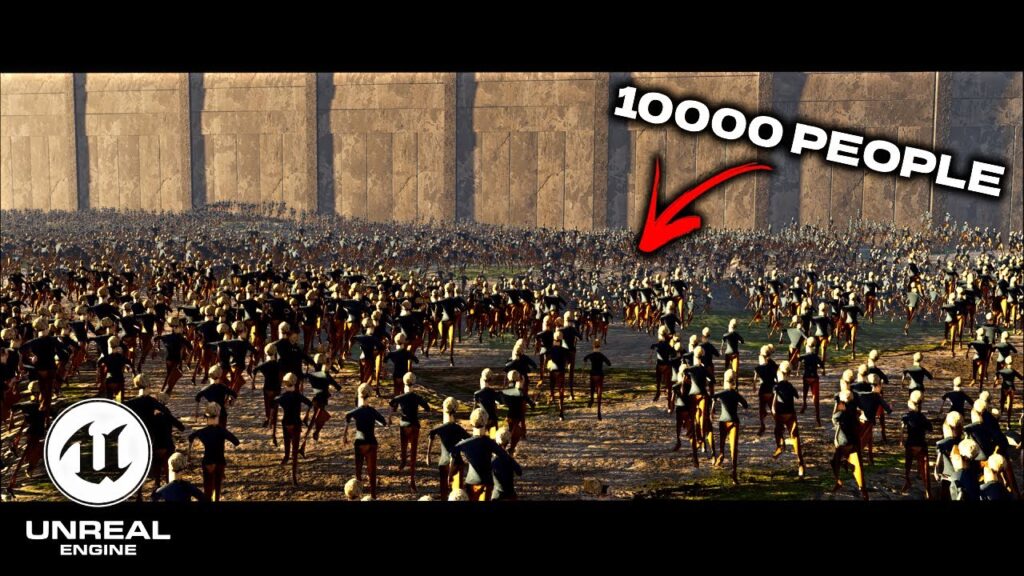
Creating and animating massive crowds in Unreal Engine requires a blend of art and technology. Whether you’re depicting hordes of people in a bustling city or a stampede of animals across a plain, the goal is to achieve realism at scale without sacrificing performance. Unreal Engine offers different ways to create and animate massive crowds, from built-in systems to custom workflows. In this introduction, we’ll explore why crowd simulation is challenging and outline the core techniques that will be detailed in this article. We’ll cover GPU-driven particle crowds (Niagara), baking animations to textures (AnimToTexture and Vertex Animation Textures), traditional AI-driven crowds with skeletal meshes, and cinematic tricks using Sequencer.
Each approach has its pros and cons, and often a combination yields the best results. By understanding these tools and optimization strategies, you can populate scenes with hundreds or even thousands of characters – be it a horde of people or a stampede of animals – while maintaining realism and interactivity. The following sections delve into specific techniques like Niagara crowd simulation, AnimToTexture, vertex animation textures, and more, providing a comprehensive guide for beginners and advanced users alike on the different ways to animate massive crowds in Unreal Engine.
Utilizing Niagara for Crowd Simulation in Unreal Engine
Niagara VFX in Unreal Engine powers large-scale crowd simulations by treating agents as GPU-instanced particles, efficiently managing thousands of animated units. Each crowd member operates as a particle or instanced mesh with customizable logic and animation data, enabling real-time demonstrations like 100,000 animated birds using vertex animation textures. Niagara’s flexible scripting system supports programming complex behaviors, such as flocking or obstacle avoidance, creating intelligent crowd AI.
It handles agent position updates, animation selection, and state transitions, leveraging GPU compute to minimize CPU load. Static meshes with baked animations are rendered via Niagara’s Static Mesh Renderer, with dynamic material parameters driving GPU-based animation playback. Ideal for non-interactive background crowds like city populations or stadium audiences, Niagara can integrate with traditional AI for interactive agents, delivering a balance of high performance and visual realism.
Implementing AnimToTexture for Efficient Crowd Animations
AnimToTexture, an official Unreal Engine plugin, optimizes crowd animations by converting skeletal animations into textures, as showcased in Epic’s City Sample with 35,000 MetaHuman pedestrians. It bakes animation frames into textures that store bone or vertex data, allowing static meshes to replicate skeletal animations through GPU-driven materials, eliminating runtime skeletal rig calculations. The plugin generates an AnimToTexture Data Asset, a static mesh, and a material setup from a skeletal mesh and its animations.
Instanced via Niagara or HISM, these meshes animate thousands of characters with minimal CPU overhead. Support for Nanite (UE 5.3+) enables high-poly crowd models. Multiple animations can be baked into a single texture, with material parameters switching animations or offsetting frames for visual variety, making it ideal for large-scale, non-interactive crowds in games or cinematics.

Leveraging Vertex Animation Textures for Large-Scale Crowds
Vertex Animation Textures (VAT), including those produced by AnimToTexture, drive large-scale crowd animations by baking vertex or bone motion into textures, deformed on the GPU to reduce CPU load. VAT supports skeletal animations or complex simulations like cloth or ragdolls, with bone-based VAT being memory-efficient.
The workflow involves baking animations, preparing compatible static meshes, creating materials with World Position Offset to sample VAT frames, and instancing via Niagara or HISM. Niagara synchronizes animation playback with particle data, such as random start times, as demonstrated in a 100,000-bird flock. Houdini exports VAT for pre-baked cinematic crowds. Balancing texture memory and animation length, shared VAT clips with random offsets ensure variety, enabling real-time rendering of armies, herds, or swarms with fluid, high-quality motion.
Creating Cinematic Crowd Scenes with Unreal Engine Sequencer
Sequencer in Unreal Engine orchestrates cinematic crowd scenes by integrating Niagara, AnimToTexture, or skeletal animations with timeline-driven events. Crowds run as level simulations, with Sequencer triggering high-level actions like movement or reactions. For moderate crowds, Sequencer assigns animation tracks to skeletal meshes with randomized offsets. Mass AI (UE 5.1+) supports keyframed crowd state changes. Determinism is achieved using fixed random seeds or baked agent positions. Sequencer’s camera tools, like depth of field, enhance visuals, with ray tracing for high-quality renders. Hybrid approaches animate hero characters individually while simulations manage masses, creating dynamic scenes like battles or city squares within Unreal’s cinematic pipeline.

Designing Diverse Character Models for Crowd Simulations
To avoid “clone syndrome” in crowd scenes, Unreal Engine employs techniques to create diverse character designs, ensuring visually rich and believable crowds:
- Modular Characters: Construct unique characters by combining interchangeable parts, such as heads, hair, clothing (tops, bottoms, shoes), and accessories, using Blueprints, as seen in Epic’s City Sample, generating hundreds of distinct combinations from a limited asset pool for varied crowd appearances.
- Skeletal Variations: Utilize multiple skeletal meshes sharing a single rig, applying slight bone scaling for differences in height, build, or proportions, maintaining animation compatibility while creating diverse silhouettes across the crowd.
- Texture Variations: Apply material instances to randomize clothing colors, patterns, or face textures, leveraging texture atlases to sample different designs (e.g., logos, stripes) from a single mesh, enhancing visual diversity with minimal asset overhead.
- Accessories: Randomly attach lightweight props like hats, backpacks, handbags, or umbrellas to select crowd members, using low-polycount static mesh components to break visual monotony and add realism without significant performance impact.
- Animals/Creatures: For non-human crowds (e.g., herds of deer, packs of wolves), introduce variations in size, fur color, or morph targets, using a single skeletal mesh with randomized scales or material tweaks to create diverse, lifelike groups.
- Facial Variety: Employ high-fidelity MetaHumans for close-up characters and simpler models with texture swaps or minimal blendshapes for distant crowds, preventing static faces and ensuring subtle expressiveness in scenes like cheering audiences.
- LOD Diversity: Use impostor billboards with varied photographic images of people for far-off crowds, implementing sprite-based rendering for distant stadiums or cityscapes, maintaining diversity with low computational cost for background populations.
Randomized animations complement these techniques, ensuring each crowd member appears as a unique individual, enhancing the overall realism of the scene.
Optimizing Skeletal Meshes for Performance in Crowd Scenes
Optimizing skeletal meshes for crowd scenes reduces computational overhead, enabling efficient rendering of numerous animated characters:
- LODs (Levels of Detail): Design high-detail LOD0 meshes (e.g., 50,000 polygons, full skeletal rig) for characters near the camera, transitioning to low-poly LOD3/4 (e.g., 2,000–5,000 polygons, simplified rigs with merged or removed bones like fingers) for distant crowds, and switching to impostors or vertex animations at extreme distances to minimize processing.
- Animation Sharing Plugin: Enable multiple characters to share a single animation instance (e.g., a walk cycle computed once for 100 guards), using Epic’s Animation Sharing Plugin to reduce CPU cost, with randomized playback offsets or slight pose variations to prevent synchronized movements and maintain natural crowd behavior.
- Tick Management: Reduce tick frequency for distant characters via the Animation Budget Allocator, updating animations at half-rate (e.g., every other frame) or pausing non-visible characters, skipping per-bone updates for minor bones (e.g., fingers, facial bones) to conserve CPU resources while preserving visual quality.
- Simplify Physics/Collisions: Disable physics simulations for most crowd members, reserving ragdoll or hit reactions for key agents, and use simplified collision capsules for select characters to minimize CPU-intensive physics calculations, ensuring smooth performance in large crowds.
- Skeletal Mesh Settings: Implement Update Rate Optimization (URO) to dynamically throttle animation updates based on distance or frame time, and use LOD-biased animations with simpler montages or fewer blend curves for distant characters, reducing computational load without noticeable quality loss.
- MassEntity Framework: Leverage UE5’s Mass Crowd system to draw thousands of skeletal meshes in a single draw call, updating transforms in bulk via Component Manager, treating crowds in a data-oriented manner to handle large-scale animations efficiently, ideal for advanced developers or studios.
- Bone Culling: Activate per-bone culling to skip calculations for off-screen bones, and use LOD-stripped animation tracks with reduced key density or removed curve data for distant characters, optimizing animation processing for large crowds while maintaining visual fidelity.
Hybrid approaches combine VAT for background crowds with skeletal meshes for interactive agents, balancing performance and interactivity for seamless crowd scenes.

Applying Material Instances to Enhance Crowd Variety
Material instances enhance crowd variety by creating diverse appearances from minimal assets, leveraging GPU efficiency for large-scale scenes:
- Color Variation: Use vector parameters in material instances to randomize clothing colors (e.g., shirts, jackets), pre-creating a pool of 10–20 color variants for each outfit type, assigning them randomly to crowd members to achieve diverse appearances with negligible performance cost, avoiding runtime instance creation.
- Texture Swaps: Implement material instances to swap face or clothing textures, using texture atlases to sample varied patterns (e.g., different logos, stripes, or facial features) from a single mesh, creating unique looks for each character without requiring additional mesh assets.
- Mask/Gradient Tricks: Author textures with masks in spare channels to designate recolorable areas (e.g., t-shirt logos, jacket patches) or use gradient maps to dynamically map colors to grayscale patterns, enabling varied designs through material parameters for efficient crowd customization.
- PerInstanceRandom: Utilize Unreal’s PerInstanceRandom node in instanced meshes (via Niagara or HISM) to randomize colors, UV offsets, or texture selections within a single material, ensuring each character has a unique appearance without additional material instances, leveraging GPU efficiency.
- Animated Crowds: Integrate animation texture instances (from AnimToTexture) with appearance variations, such as randomized clothing colors or texture swaps, using the same material instance to drive both animation frame data and visual tweaks, ensuring diversity in animated crowds with minimal overhead.
- Optimization: Employ texture atlases to consolidate multiple clothing or accessory textures into one, reducing draw calls by sharing a single material across all crowd members, with UV offsets or parameters selecting specific designs, optimizing performance for large crowds.
- Detail Variation: Randomly apply dirt, wear, or roughness via normal maps or texture overlays, using material parameters to blend mud or scuff marks on clothing, adding realism and breaking uniformity with subtle, GPU-driven variations that enhance crowd authenticity.
These techniques allow a small set of assets to produce visually distinct crowds, with material instances enabling efficient, artist-friendly customization for large-scale scenes.

Configuring Camera Settings to Effectively Capture Crowds
Capturing large crowds in Unreal Engine requires careful camera configuration to balance visual impact and performance. Thoughtful settings and techniques can emphasize crowd scale, enhance storytelling, and mask optimization tricks, ensuring a seamless experience in both gameplay and cinematics. Below is a detailed list of considerations and strategies for configuring camera settings to effectively showcase massive crowds:
- Field of View (FOV) and Framing: Adjust the FOV to capture the crowd’s scale, using a wide-angle lens (e.g., 15mm, ~90–120 degrees) for sweeping shots that emphasize hundreds of agents, creating a “sea of people” effect, especially from low angles. Narrower FOV (e.g., 50mm) focuses on specific crowd sections for intimate moments. Wide FOV increases rendering load by including more agents, so in gameplay, limit FOV if performance drops; in cinematics, consider rendering crowd layers (foreground, midground, background) separately for compositing to manage extreme agent counts.
- Depth of Field (DOF): Apply a shallow DOF to direct viewer focus, blurring distant crowd members to highlight a foreground character or key group, enhancing narrative focus and masking low-detail models (e.g., impostors or low-poly meshes in stadium stands). Configure DOF via Camera settings or Post Process Volume, setting a focal distance and blur radius to ensure background agents beyond a threshold (e.g., 50 meters) are out of focus, reducing the need for high-fidelity assets and improving performance.
- Motion Blur: Enable motion blur to add realism to fast-moving crowds or dynamic camera pans, creating a sense of speed and chaos (e.g., a running mob or stampeding herd). Use Unreal’s post-process motion blur, ensuring crowd systems (Niagara, vertex animations) output motion vectors by enabling “Output Velocity” in materials to avoid artifacts. Motion blur smooths minor animation imperfections (e.g., low-frame-rate VAT) but incurs a GPU cost, so balance blur intensity with performance, especially in real-time gameplay.
- Camera Distance and Culling: Optimize rendering with frustum and occlusion culling, setting crowd actors’ cull distances (e.g., 500 meters max visibility) via Cull Distance Volumes or spawner logic to avoid rendering unseen agents. Tune LOD transitions based on camera distance, aggressively switching to lower LODs (e.g., impostors at 200+ meters) as the camera pulls back, ensuring smooth performance without visual pops by enabling dithered LOD transitions in materials.
- Cinematic Camera Effects: Enhance crowd spectacle with filmic effects like subtle camera shake to convey weight (e.g., stadium cheers or army charges), controlled via Sequencer or Blueprint for intensity variation. Add lens flares or bloom for reflective crowd elements (e.g., armor, accessories) to boost atmosphere, but use sparingly to avoid visual clutter, as these effects increase GPU load minimally but can distract if overused.
- Multiple Camera Angles for Illusion of Scale: Use multiple angles in cinematics to imply a larger crowd, cutting between shots (e.g., left and right arena sides) that reuse crowd actors, creating a full-stadium illusion. Reposition crowds between shots via Blueprints for edited sequences, ensuring continuity in single-take scenes, enhancing perceived scale without simulating thousands of agents simultaneously.
- Capture Resolution and Detail: Render cinematics at high resolutions (e.g., 4K) for clarity, requiring detailed crowd textures and materials to avoid pixelation, or use lower resolutions (e.g., 1080p) with motion blur or downsampling to mask simpler assets like impostors. Adjust crowd detail based on screen coverage; distant crowds occupying few pixels need less fidelity, optimizing GPU performance.
- Camera Movement: Plan camera trajectories to suit crowd quality: slow pans allow viewer inspection, requiring polished animations, while fast sweeps or flyovers (e.g., helicopter shots) emphasize mass, hiding minor flaws. Combine wide shots showcasing scale with push-ins to hero agents for narrative focus, directing detail where needed and optimizing rendering for distant masses.
- In-Game Camera Constraints: Implement distance-based logic in gameplay, despawning or simplifying crowds during specific camera modes (e.g., aiming down sights reduces peripheral NPCs). Adjust crowd density for first-person vs. third-person views, testing high-vantage scenarios (e.g., city overlooks) to ensure culling and LODs handle maximum agent visibility, maintaining performance in open-world settings.
These camera settings and techniques create a compelling crowd presentation, leveraging artistic choices like DOF and motion blur to mask optimizations while using culling and LODs to maintain performance, ensuring both gameplay and cinematic scenes feel immersive and impactful.

Incorporating Particle Emitters for Dynamic Crowd Effects
Particle emitters, using Niagara or Cascade, enhance crowd scenes by adding environmental and ambient effects that make static crowds feel dynamic and immersive. These effects simulate interactions with the environment, adding realism and context to crowd behavior. Below is a detailed list of strategies for incorporating particle emitters to create dynamic crowd effects:
- Dust and Debris from Movement: Simulate ground disturbance from large moving crowds (e.g., marching soldiers, stampeding animals) with Niagara emitters spawning dust clouds at ground level. Place emitters to trail the crowd, generating random puffs triggered by footfalls via crowd system events (e.g., “agent running” spawns dust) or volume-based logic (agents entering an area emit particles), adding weight and motion realism with minimal GPU cost.
- Footstep Effects: Add footstep-specific particles like water splashes, mud splatters, or snow displacement for crowds traversing varied terrain. Randomly spawn particles for a subset of footsteps (e.g., every 10th footfall) to imply collective impact without overwhelming performance, using decals for persistent footprints or flying snow particles to enhance environmental interaction, configurable via Niagara’s particle attributes.
- Confetti, Paper, or Rain Interactions: Create festive or chaotic atmospheres with emitters for confetti in parades or papers in protests, spawning particles that fall through the crowd with optional GPU collisions (e.g., bouncing off character heads via simplified collision shapes). For rainy scenes, emit raindrops hitting umbrellas or ground near agents, using Niagara’s collision modules to simulate splashes, boosting immersion with low-performance impact.
- Crowd Reaction Explosions: Enhance dramatic events like explosions or magical effects with particles for debris, smoke, or shrapnel amidst the crowd, using Niagara’s collision or kill volumes to interact with agents (e.g., smoke disperses as agents move). In battles, attach blood spray particles to hit agents, triggered by combat events, adding chaos and intensity with GPU-driven effects, as seen in community demos for blood effects.
- Ambient Effects to Fill Space: Simulate atmospheric phenomena from large crowds, like haze or dust motes in desert scenes, with large-scale Niagara emitters enveloping the crowd area, emitting subtle fog to unify the scene and mask graphical imperfections. Adjust particle density to maintain performance, using bounds to cull off-screen emitters, creating a cohesive crowd presence without clear visibility of every agent.
- Interactive Particle Crowds: Use Niagara particles as crowd agents that spawn secondary effects, like paper trash kicked by moving agents or dust swirls per step, with GPU collisions enabling interactions (e.g., agents disturbing smoke clouds). Configure particle attributes to link crowd motion with secondary systems, creating ripple effects for advanced, dynamic scenes, leveraging Niagara’s flexibility for synchronized behaviors.
- Audio Emitters with Particles: Pair particle bursts with audio cues, like footstep sounds or cheers synced with confetti cannons, using Unreal’s MetaSounds triggered by Niagara events. Randomly attach sound cues to select agents or use ambient crowd murmurs that scale with camera proximity, enhancing realism through audio-visual synergy with minimal CPU overhead.
- Performance Optimization: Prioritize GPU-based Niagara emitters for crowd effects, as CPU particles scale poorly with high counts. Set sensible emitter bounds to cull off-screen effects, optimize particle counts (e.g., fewer, larger dust clouds vs. many small ones), and use sprite-based particles for simple effects like sparks to minimize GPU load, ensuring dynamic effects don’t compromise frame rates.
These particle emitter strategies add life to crowd scenes, providing environmental context (dust for movement, confetti for celebration) and masking minor imperfections, with GPU-driven Niagara systems ensuring performance efficiency for immersive, realistic crowd experiences.

Managing Collisions in Dense Crowd Simulations
Handling collisions in dense crowd simulations is critical to prevent interpenetration and maintain realism, but full physics simulations are impractical for large crowds. Below is a detailed list of strategies to manage collisions and avoidance effectively in Unreal Engine:
- Physics Collisions vs. Logical Avoidance: Avoid full physics collisions, opting for logical avoidance systems like Reciprocal Velocity Obstacles (RVO) or Detour Crowd. RVO, integrated into Character Movement Component, adjusts agent velocities to prevent overlaps without physics, while Detour Crowd, part of Recast navigation, samples navmesh paths for collision-free movement, configurable via Detour Crowd Manager settings (e.g., agent radius, avoidance strength) for moderate crowd sizes.
- Mass Crowd System: Use UE5’s Mass Crowd for large-scale avoidance, batch-processing thousands of agents’ navigation via the MassEntity framework, as seen in City Sample’s pedestrian crowds. Define agent traits for simplified avoidance logic, enabling efficient collision handling for dense scenes, though setup complexity requires advanced knowledge.
- Collision Channels and Simplified Shapes: Implement custom “Crowd” collision channels with capsule or sphere shapes, set to overlap rather than block, generating events for Blueprint/C++ logic (e.g., overlapping agents slow down or sidestep). This minimizes physics overhead while reducing clipping, suitable for moderate crowds with scripted responses.
- No Collisions (Artistic License): Skip collisions for cinematic background crowds, allowing minor interpenetration hidden by camera distance, motion blur, or dense agent placement. Choreograph non-converging paths (e.g., parallel marching groups) to minimize overlaps, saving significant performance for non-critical scenes.
- Limit Crowd Density: Enforce minimum spacing during agent spawning (e.g., via Niagara’s initial separation or Mass AI’s agent radius) to mimic real-world personal space, reducing collision frequency. Adjust spawn logic to maintain realistic density, preventing overcrowding that triggers excessive avoidance calculations.
- Collision Reactions: Define simple reactions for collisions, like agents stopping or sliding along each other using RVO’s slide behavior in CharacterMovement, avoiding complex force simulations. Restrict vertical collisions to prevent unrealistic stacking (e.g., no climbing over agents unless intentional), optimizing performance for horizontal movement.
- Crowd vs. Player Collision: Treat crowds as “ghosts” to the player in gameplay, allowing slight clipping or triggering avoidance behaviors via proximity checks (e.g., nearby agents sidestep using AI logic), preventing frustrating blocks while maintaining performance by limiting full physics interactions.
- Event-based Collision Removal: For chaotic events (e.g., explosions), despawn affected agents instead of simulating ragdolls, replacing them with particle effects (dust, debris) to imply impact, as seen in community demos for blood/death effects. This avoids costly physics calculations, maintaining performance during intense scenes.
These strategies balance realism and performance, using avoidance algorithms (RVO, Mass Crowd) for natural flow and faking collisions with scripted responses or particles, ensuring dense crowds move convincingly without overwhelming the engine.

Addressing Common Drawbacks in Crowd Animation Workflows
Crowd animation workflows in Unreal Engine face several challenges that can impact realism and performance. Below is a detailed list addressing common drawbacks and solutions to mitigate them:
- Repetitive or Synchronized Motions: Prevent synchronized animations (e.g., all agents walking in unison) by randomizing start offsets using Animation Sharing Plugin’s random playback timing or Niagara/AnimToTexture’s per-instance frame offsets. Introduce multiple animation states (e.g., idle, walk, glance) with staggered transitions via random delays or noise functions, ensuring natural, varied crowd motion.
- Pop-in and LOD Transitions: Minimize noticeable LOD switches or agent spawning by enabling dithered LOD transitions in materials to fade geometry smoothly. Spawn/despawn agents off-screen or behind occluders, scaling them up gradually if spawned in view. Align low-LOD poses with high-LOD at swap points to prevent pose jumps, ensuring seamless visual transitions.
- Floating or Sliding Feet: Address foot sliding on uneven terrain by using root-motion animations for path-following crowds, ensuring movement matches animation speed to avoid mismatches. For large crowds without IK, design levels with flat terrain or use high camera angles to obscure feet, minimizing visibility of minor sliding issues.
- Performance Bottlenecks (CPU or GPU): Profile CPU bottlenecks (e.g., excessive AI ticks) by ensuring Animation Sharing and tick throttling (Animation Budget Allocator) are active, and optimize Blueprints to avoid per-agent heavy logic. Reduce GPU overdraw by using opaque materials for crowds and minimizing transparent particles (e.g., smoke), consolidating material variations to fewer draw calls for efficiency.
- Complex Setup and Pipeline Issues: Streamline workflows like AnimToTexture by automating texture rebaking with Editor Utility Blueprints or Python scripts, maintaining organized asset libraries (e.g., data assets listing animations). Monitor engine version compatibility (e.g., Niagara/AnimToTexture changes from UE 5.1 to 5.2), staying updated via release notes and community forums to avoid pipeline disruptions.
- Memory Consumption: Manage memory for large crowds by reducing texture resolutions for distant agents (leveraging mipmaps) and optimizing AnimToTexture sizes (e.g., smaller textures for low-LOD animations). Use level streaming or sub-levels to load only visible crowd assets, unloading unused variations to free memory, especially in open-world scenarios.
- Interactivity and AI Limitations: Address non-interactive crowd systems (e.g., Niagara-based) by designing hybrid approaches, switching nearby agents to AI controllers for player interaction (e.g., 20 closest agents use Detour Crowd for avoidance), while distant agents remain precomputed. Plan interactivity zones to limit AI complexity, maintaining performance for background crowds.
- Troubleshooting and Debugging Difficulty: Simplify debugging for large crowds by testing small-scale setups first (e.g., one AnimToTexture agent) and using Unreal’s tools like vis log for AI or Niagara’s particle attribute debug display. Incrementally scale crowd size, checking for issues like vertex ordering errors in animation textures that cause distortions, catching problems early.
These solutions proactively address common pitfalls, smoothing out issues like synchronization, performance, and interactivity to create polished, efficient crowd animations that maintain the illusion of a living, dynamic scene.

Tips and Tricks for Realistic Crowd Animations in Unreal Engine
Achieving lifelike crowd animations in Unreal Engine combines artistic observation with technical finesse. Below is a detailed list of tips and tricks to enhance realism, making crowds feel organic and immersive:
- Use Real Human Reference: Study real-world crowd footage (e.g., concerts, protests) to capture subtle variations in speed, posture, and behavior, such as individuals pausing to glance around or weaving through gaps. Incorporate these into animations by adding secondary actions (e.g., waving, pointing) assigned randomly to agents, breaking uniformity for a natural, lived-in feel.
- Randomize Animation Speed Slightly: Vary animation play rates by ±10% (e.g., 0.9x to 1.1x speed for walk cycles) using Animation Sharing Plugin or Niagara’s per-instance parameters, allowing agents to drift naturally relative to each other, avoiding robotic synchronization while maintaining plausible human motion.
- Phase Shift Loops: Offset looping animations (e.g., clapping, cheering) with random start frames via AnimToTexture materials or Animation Montages, ensuring actions like claps are staggered across the crowd to prevent unnatural unison, mimicking real-world crowd dynamics with minimal setup.
- Blend Animations for Variety: Blend between animation states (e.g., 50% idle arms crossed, 50% idle phone glance) using Animation Blueprints or pre-baked blended clips in AnimToTexture, multiplying motion variants without new animations, adding subtle diversity to crowd behaviors.
- Add Secondary Motion: Incorporate physics-driven secondary elements like cloth, hair, or accessories (e.g., swaying coat tails) for closer agents, using lightweight physics simulations or baked oscillations in materials (e.g., sine-wave ponytail swing) to add lifelike motion with controlled performance cost.
- Ensure Grounding: Align agents to terrain using trace-based placement on spawn, adjusting height to prevent floating or sinking. For moving crowds, use root-motion animations or simplified foot IK for key agents, or design flat terrain and high camera angles to minimize visibility of grounding issues in large crowds.
- Sound Design: Enhance realism with crowd audio, like murmurs, cheers, or randomized footstep sounds attached to select agents via MetaSounds, scaling volume with camera proximity. Sync audio cues with particle effects (e.g., confetti cannon with cheer sound) to create immersive audio-visual synergy.
- Crowd Focus and Focal Points: Simulate varied reactions to events (e.g., a gunshot) by propagating behaviors in waves, with initial agents reacting first and others following after random delays (scripted via Blueprints or Niagara events), avoiding uniform state flips for realistic human response dynamics.
- Hide Imperfections with Environment: Mask minor animation flaws with dense crowd placement or environmental clutter (e.g., market stalls, fog), where overlapping silhouettes obscure issues like odd poses. Dense crowds (100+ agents) appear more convincing than sparse ones, as individual scrutiny is reduced.
- Consistency in Scale and Speed: Match crowd movement to world scale (e.g., walking ~1.4 m/s or ~140 cm/s in UE units), verifying distances covered align with animation speeds to avoid unnatural gliding or slow-motion effects, ensuring subconscious viewer comfort.
- Use Case-specific Tricks: Tailor techniques to scenarios, like stadium crowds using animated billboard cards with shader-driven wave patterns (UV animation for clapping sections), or street crowds clumping around points of interest (e.g., newsstands) via spawn logic for organic distribution.
- Test in Context: Evaluate crowds under final lighting, camera motion, and environmental conditions, adjusting shadow settings (e.g., disable shadows for distant agents) or time-of-day for dramatic long shadows to enhance realism, addressing rendering artifacts like strobing from excessive moving entities.
These tips layer subtle variations and environmental integration to create emergent, organic crowd behavior, prioritizing the collective impression of life over individual perfection, resulting in realistic and captivating crowd animations for games and cinematics.

Comparing Real-Time and Pre-Baked Crowd Animation Techniques
Choosing between real-time and pre-baked crowd animation techniques in Unreal Engine involves weighing interactivity, visual fidelity, performance, flexibility, and use case suitability. Real-time techniques leverage dynamic systems like AI or Niagara for interactive crowds, while pre-baked methods use precomputed animations for controlled, high-fidelity results. Below is a detailed comparison across key considerations:
- Interactivity and Responsiveness:
- Real-Time Crowds: Utilize AI-driven systems (e.g., Unreal’s Detour Crowd, Mass AI) or Niagara simulations to enable dynamic responses to player actions or random events, such as crowds scattering when a player throws an object or adapting to environmental triggers like explosions. Essential for gameplay where unpredictability and interaction drive immersion, these systems allow agents to adjust behaviors in real-time based on game state or user input.
- Pre-Baked Crowds: Rely on offline-authored animations (e.g., baked in Maya, Houdini, or via AnimToTexture), offering no runtime responsiveness. Ideal for scripted scenes like cinematic battles where crowd behavior is fixed, these animations repeat identically each playback, lacking adaptability to dynamic game events or player interactions, limiting their use in interactive contexts.
- Visual Fidelity:
- Pre-Baked Crowds: Achieve superior detail through offline tools, allowing animators to craft nuanced motions (e.g., character interactions, stumbles) or simulate complex physics (ragdolls, crowd turbulence) at high computational cost during pre-production. Tools like Houdini or motion capture can produce lifelike animations imported via Alembic or AnimToTexture, delivering cinematic-quality realism unattainable in real-time without extensive coding.
- Real-Time Crowds: Capable of impressive scale (e.g., Niagara’s million-agent demos), but often limited to broad, pattern-based motions (e.g., flocking, pathfollowing) unless programmed with detailed AI behaviors. Subtle human nuances like individual emotional reactions require significant scripting, making real-time crowds less detailed compared to pre-baked animations for specific, controlled scenarios.
- Performance:
- Real-Time Crowds: Incur runtime CPU/GPU load, with AI-driven crowds stressing CPU through decision-making loops (mitigated by Mass AI’s batch processing) and Niagara crowds taxing GPU but scaling well for large agent counts. Performance varies with hardware, requiring dynamic adjustments like reducing crowd size or complexity on lower-end systems to maintain frame rates.
- Pre-Baked Crowds: Shift computational cost to pre-production, where simulations or animations are computed offline. Runtime playback (e.g., via AnimToTexture or instanced static meshes) is lightweight, primarily involving rendering precomputed data, but large animation textures or keyframe data can increase memory usage. LOD adjustments are limited to swapping baked sequences, less flexible than real-time scaling.
- Flexibility:
- Real-Time Crowds: Highly adaptable, allowing behavior tweaks via AI parameters or Niagara scripts without re-authoring assets. Systems can be reused across scenarios (e.g., Niagara simulating birds, fish, or pedestrians with parameter changes) and automatically adapt to level changes via navmesh or dynamic pathfinding, ideal for evolving game designs.
- Pre-Baked Crowds: Inflexible, requiring re-export from DCC tools (e.g., Maya, Houdini) if level layouts, timings, or behaviors change, akin to re-editing a video. Suitable for cinematic pipelines with fixed sequences, but challenging in games where dynamic events (e.g., player movement) may cause baked crowds to clip or misalign with the environment.
- Use Cases:
- Real-Time Techniques: Optimal for interactive games, open-world environments (e.g., GTA-style pedestrian systems), or VR experiences where crowds must react to player movement in real-time to maintain immersion. Suited for scenarios requiring dynamic navigation, avoidance, or state changes, ensuring gameplay responsiveness.
- Pre-Baked Techniques: Ideal for cinematic cutscenes, film sequences, or scripted game events like stadium waves or enemy ambushes in non-interactive moments, where high-fidelity, choreographed animations ensure a polished, repeatable visual. Pre-baked crowds guarantee consistent performance in controlled contexts.
- Hybrid Approaches: Combine real-time navigation (e.g., Mass AI for pathfinding) with pre-baked animation clips (e.g., AnimToTexture walk cycles) for gameplay crowds that move dynamically but use authored motions. In cinematics, overlay keyframed hero characters on real-time background simulations via Sequencer, blending flexibility and fidelity for narrative-driven scenes.
- Unreal-Specific Example (Mass AI vs. AnimToTexture+Niagara):
- Mass AI (Real-Time): Provides dynamic avoidance, pathfinding, and state-based behaviors, ideal for gameplay with interactive crowds navigating complex environments, but demands CPU resources and setup complexity for agent logic and navmesh integration.
- AnimToTexture+Niagara (Pre-Baked): Leverages precomputed animation textures for massive crowd sizes with minimal runtime cost, ensuring consistency and high agent counts, but lacks dynamic decision-making unless scripted in Niagara, suitable for background or cinematic crowds with fixed paths.
In summary, real-time techniques excel in interactive, adaptable scenarios, scaling with hardware but requiring runtime resources, while pre-baked techniques offer superior fidelity and runtime efficiency for scripted, high-detail scenes at the cost of flexibility. Hybrid approaches often provide the best balance, using real-time systems for gameplay and pre-baked animations for cinematics, allowing developers to leverage Unreal’s strengths for diverse project needs.

Integrating Crowd Simulations into Game Environments
Integrating crowd simulations into game environments requires seamless coordination with AI, rendering, collisions, and level streaming systems to ensure natural behavior and performance. Below is a detailed list of considerations and best practices for embedding crowds into a game world:
- Level Design for Crowds: Design environments with crowd-friendly spaces like wide plazas, open streets, or fields to accommodate large gatherings, avoiding narrow corridors that cause pathfinding issues or clipping. Use invisible barriers, fences, or railings to separate crowds from player paths (e.g., spectators in stands), maintaining formation without direct interaction, enhancing visual presence while simplifying collision logic.
- Streaming and LOD with Crowds: Coordinate crowd spawning/despawning with Unreal’s World Partition or level streaming volumes, triggering crowd systems when areas become visible and despawning when out of sight to prevent “pop-in.” Set distance-based culling (e.g., max draw distance of 500 meters) and LOD transitions (e.g., impostors beyond 200 meters) to optimize rendering, fading agents in/out behind occluders for smooth transitions.
- AI Navigation Setup: Generate a robust NavMesh across crowd areas, enabling pathfinding for AI-driven crowds. Use the Crowd Manager in Project Settings with DetourCrowdAIController for enhanced avoidance on navmesh, tuning parameters like agent radius and avoidance strength. For Mass AI, integrate its custom navmesh querying, ensuring compatibility with game navigation data for efficient, large-scale crowd movement.
- Performance Scaling: Implement scalability settings to adjust crowd density based on hardware, reducing agent counts or using simpler impostors at lower graphics settings via a global multiplier (e.g., 50% fewer agents on low settings). Group crowd spawners under a toggle linked to user graphics options, ensuring consistent performance across platforms, from high-end PCs to consoles.
- Interactions with Gameplay: Define crowd-player interactions early, choosing between solid collisions (e.g., Assassin’s Creed’s gentle push animations) or ghost-like behavior (slight clipping with scripted avoidance). Support gameplay states like panic (crowds flee during combat) or despawning after fleeing, integrating with combat systems only for critical agents to avoid complexity. Ensure crowds align with game mechanics (e.g., no minimap clutter from non-interactive agents).
- Testing Edge Cases: Simulate extreme scenarios like players driving through crowds (e.g., scatter vs. block), explosions (e.g., despawn with particle effects), or combat triggers (e.g., toggle cower/flee states). Hook crowd logic to game event dispatchers (e.g., “alarm” state triggers behavior changes), ensuring robust responses to dynamic gameplay events without performance degradation.
- Tooling for Placement: Use Procedural Content Generation (PCG) in UE5.2+ to scatter crowd spawn points on surfaces, adapting to level changes automatically, or place volumes defining crowd density (e.g., 50 agents in a city square) for designer-friendly control. Combine manual spawn points for static crowds with dynamic systems for wandering agents, streamlining level integration.
- Networking Considerations: In multiplayer games, treat crowds as client-side cosmetics to avoid server bandwidth saturation, simulating simplified crowd logic on servers only if gameplay-relevant (e.g., crowds block paths). Use client-side proxies for visual crowds, disabling them in high-latency multiplayer modes to maintain network performance, planning early to avoid retrofitting.
- Debug and Iterate: Test crowds in Play In Editor (PIE) across scenarios, verifying editor vs. packaged game consistency, as performance differences may affect behavior. Monitor memory usage to prevent leaks (e.g., persisting animation textures), ensuring clean spawn/update/destroy lifecycles via profiling tools like Unreal Insights for robust integration.
- Third-Party Tool Integration: Incorporate tools like Golaem or Atoms for cinematic crowds, ensuring compatibility with game loops (e.g., triggered cutscenes) but relying on Unreal’s native systems (Mass AI, Niagara) for gameplay-critical crowds to maintain reliability and control, avoiding dependency issues in dynamic environments.
These practices ensure crowds integrate naturally into game worlds, enhancing immersion through thoughtful level design, performance scaling, and gameplay interaction, making crowds feel like a seamless part of the environment rather than a standalone system.

Best Practices for Crowd Animation in Cinematic Productions
Crowd animation for cinematic productions in Unreal Engine prioritizes visual quality, control, and iteration speed over real-time constraints, leveraging offline tools and Unreal’s rendering capabilities. Below is a detailed list of best practices for creating polished crowd animations in films, TV, cutscenes, or previsualization:
- Leverage Offline Simulation and Import Results: Use external tools like Golaem, Massive, Miarmy, or Houdini to simulate complex crowd behaviors (e.g., war scenes with AI-driven chaos), exporting results as Alembic caches or USD files for Unreal import. Golaem 8 supports in-engine simulation, blending high-fidelity offline animations with Unreal’s real-time lighting and Sequencer for rapid look development, maximizing realism without runtime performance limits.
- Use Sequencer to Orchestrate Crowds: Organize crowd elements in Sequencer tracks, separating simulations (e.g., Niagara spawners, Mass AI) from hero characters for easy muting or adjustment. Create folders for multiple crowd layers (e.g., opposing armies), enabling precise control, and adjust playback rates globally for dramatic timing tweaks (e.g., slow-motion charges), ensuring cohesive orchestration across complex scenes.
- Cinematic LOD: Optimize per shot rather than using dynamic LODs, manually swapping high-detail crowd assets for impostors or simplified rigs in wide shots where agents are small or motion-blurred. Exclude occluded crowd sections (e.g., behind foreground objects) from rendering, or use 2D crowd videos on planes for distant stadiums, cheating detail to focus resources on visible elements.
- High-Quality Assets for Close-ups: Deploy high-fidelity assets like MetaHumans or hand-animated characters for crowd members in close-ups or focal points, surrounded by medium-detail extras and low-detail background crowds. Layer detail hierarchically, mimicking film production’s use of real extras near actors, ensuring seamless transitions between hero and mass animations for narrative impact.
- Rendering Techniques: Configure Movie Render Queue with high temporal samples (e.g., 8x anti-aliasing, 16x motion blur) to eliminate flicker from thin crowd geometry (e.g., limbs) at distance. Use path tracing for realistic lighting or combine raster shadows for crowds with ray-traced environment lighting to balance quality and render time, testing ray tracing with dynamic crowds to manage shadow/reflection costs.
- Crowd Lighting and Shading: Vary material properties beyond color, using randomized roughness (e.g., shiny vs. matte clothing) to break uniformity, enhancing cinematic realism. Adjust lighting to manage dense crowd shadows, using ambient setups (e.g., overcast skies) or baked lighting for distant agents to reduce complex shadow calculations, ensuring visual clarity without noise.
- Shot Continuity: Maintain crowd consistency across multiple shots by using a single simulation timeline or identical random seeds for separate simulations, preventing positional or behavioral discontinuities. Use Sequencer’s sub-sequences to reference a master crowd simulation, cutting cameras in separate tracks to ensure coherent action across angles.
- Performance for Iteration: Enable fast iteration with proxy crowds (e.g., every 10th agent or simple shapes) during Sequencer scrubbing, toggling full-quality assets for final renders. Use simplified Niagara systems or disable non-critical components for previews, ensuring smooth editing workflows on standard hardware before high-end rendering.
- Documentation and Collaboration: Document crowd systems clearly (e.g., “Niagara_Crowd1: density controlled by Parameter_X, reset via Button_Y”) for multi-team pipelines, organizing assets in named folders by sequence. Standardize naming conventions (e.g., “Crowd_Seq01_ArmyA”) to prevent errors like accidental deletions by lighting artists, fostering efficient collaboration.
- Backup Plan: Prepare contingency renders to address simulation issues near deadlines, such as alternate passes excluding problematic agents for compositing or manual keyframe fallbacks for critical frames. Render foreground/background separately for 2D patching, mimicking film VFX workflows to fix minor crowd errors without full re-simulation, ensuring delivery under pressure.
These best practices harness Unreal’s real-time preview and cinematic rendering capabilities, combining offline simulations, per-shot optimization, and robust pipeline management to deliver high-quality crowd animations that meet the exacting standards of cinematic productions.

Exploring Third-Party Plugins for Advanced Crowd Simulation
Third-party plugins enhance Unreal Engine’s crowd simulation capabilities, complementing built-in tools like Niagara and MassAI. Here’s a concise overview of notable solutions and their integration with Unreal:
- Golaem Crowd: A Maya-based plugin with Unreal integration (Golaem 8), ideal for complex, film-quality crowd behaviors. Artists can simulate in Maya, export caches to Unreal for real-time rendering, using ready-to-use characters and motions. It’s paid and best for cinematic projects requiring high control.
- Miarmy: Another Maya-based tool, Miarmy exports Alembic/FBX caches to Unreal for rendering. Suitable for studios already using Miarmy, it supports high-end film and commercial workflows.
- Massive: Standalone software for high-end films, with no direct Unreal integration. Exports animations as FBX point caches for Unreal rendering, suited for complex, expensive projects.
- AXYZ Anima (Chaos Anima): Targets archviz with a library of scanned 3D/4D people and an Unreal plugin. Artists set up crowd paths in Anima’s standalone app, importing to Unreal for realistic, precomputed movements like escalator navigation. It’s a paid, visualization-focused solution.
- Atoms Crowd: Supports Maya, Houdini, and Unreal with AtomsUnreal plugin, enabling GPU-instanced skeletal meshes and USD imports. Ideal for unifying pipelines and handling LODs, used in TV/film like “The Witcher.”
- MetaHuman Crowd Variations: Community tools generate varied MetaHumans with simpler rigs, using Animation Sharing for efficient crowd animation, suitable for high-quality short films.
- City Sample Crowd (Epic’s content): A Marketplace pack from Epic’s Matrix demo, combining AnimToTexture, MetaHuman-derived characters, and MassAI for optimized crowd setups.
When choosing plugins, consider project needs: Golaem/Atoms for film-quality, Anima for quick archviz, or MassAI/Niagara for simpler game crowds. Check compatibility and costs, as these tools add complexity but offer proven results.

Case Studies: Successful Crowd Implementations in Unreal Engine
Real-world examples highlight effective crowd techniques in Unreal Engine:
- The Matrix Awakens (2021): Epic’s demo featured 35,000 MetaHuman pedestrians using MassAI for movement and AnimToTexture for efficient rendering. Optimized LODs and navmesh sidewalks enabled real-time city crowds.
- Fortnite Live Events: Used Animation Sharing and LOD culling for AI hordes (e.g., zombies), limiting AI scope to nearby players for performance in fast-paced games.
- Reel FX’s “Super Giant Robot Brothers” (2022): Leveraged Atoms Crowd for city evacuation scenes, simulating in Maya and importing to Unreal for real-time rendering, optimizing cinematic workflows.
- Archviz Airport Lounge Demo (AXYZ/Chaos): Anima populated a realistic airport with pre-baked crowd paths, ensuring obstacle avoidance for believable visualization.
- “Game of Thrones” Previs (2019): Unreal planned the Long Night battle with simplified AI mannequins, aiding camera and pacing decisions for filmmaking.
- “Valley of the Ancient” Demo (2021): Niagara simulated a robot insect swarm, showcasing fluid, coordinated behavior for non-human crowds.
These cases validate combining data-oriented design, third-party tools, and optimizations like GPU instancing for impactful crowd scenes.
Future Trends in Crowd Simulation and Animation Technologies
Emerging trends will shape crowd simulation in Unreal Engine:
- Machine Learning and AI: ML could generate natural crowd behaviors, learning obstacle avoidance or animation synthesis for varied movements.
- GPU Offloading: Future compute shaders may handle AI decisions on GPU, enabling larger interactive crowds.
- Enhanced Mass/Crowd Tools: Epic’s MassAI may gain simpler UIs and better animation integration for easier crowd setups.
- Realistic Rendering: Improved instancing and potential Nanite support for skinned meshes could enhance crowd visuals.
- Cloud-powered Crowds: Cloud computing may precompute or stream large simulations for MMOs or visualizations.
- Interdisciplinary Integration: PCG and Chaos physics could enhance crowd placement and physical interactions.
- Metaverse/Social Spaces: Crowd AI may represent large player groups in unified virtual events.
- VR Crowds: Optimized rendering and gaze-based detail could improve VR crowd immersion.
- Improved Authoring Tools: Future “Crowd Rig” tools may simplify flow field design and previews.
- AI Crowd Audio: AI-generated crowd sounds could dynamically match animations.
These advancements promise smarter, more efficient crowd systems, blurring real-time and cinematic boundaries.
Frequently Asked Questions (FAQs)
- What is crowd simulation in Unreal Engine, and why is it difficult to do at scale?
Crowd simulation in Unreal Engine is the process of creating, animating, and rendering large numbers of characters or creatures in the same scene while keeping motion believable and performance stable. The reason it becomes difficult at scale is that every additional agent can add CPU work, GPU work, memory usage, and draw calls. If each crowd member is a full skeletal mesh with its own animation blueprint, collision, and AI logic, the CPU cost grows fast and frame rate collapses. The article explains that Unreal supports multiple crowd approaches because no single method fits every use case. Background crowds in a city or stadium can be treated very differently from interactive crowds that react to the player. The practical challenge is choosing a system that matches the needed interactivity, then optimizing aggressively so the scene can handle hundreds or thousands of agents without visual repetition or animation artifacts. - What is the best method for rendering thousands of crowd characters in Unreal Engine?
For very large crowds, the most scalable approach is to avoid runtime skeletal animation on most agents and instead use GPU-friendly instancing with pre-baked animation. The article highlights two main routes for this: Niagara-driven instanced crowds and animation baked into textures using AnimToTexture or Vertex Animation Textures. The core idea is that you convert expensive per-character bone evaluation into a shared GPU playback system that can animate many instances with minimal CPU overhead. This is why techniques like Niagara plus baked animation are commonly used for large-scale background crowds, such as city pedestrians, stadium audiences, armies, swarms, and herds. When a project needs both scale and interactivity, the best-performing setup is usually hybrid: a small number of near-camera or gameplay-relevant characters remain skeletal and AI-driven, while the majority of the crowd uses instanced static meshes driven by animation textures. - How does Niagara work for crowd simulation, and when should it be used?
Niagara can power crowd simulation by treating each crowd member as a GPU-instanced particle that renders a mesh and carries per-agent data like position, velocity, animation state, and random variation. The article describes Niagara as ideal for massive, non-interactive crowds because it can update many agents efficiently using GPU compute rather than running expensive CPU logic per character. Niagara can also drive simple behaviors such as flocking patterns, obstacle avoidance logic, and state switching by using its scripting system, which makes it suitable for things like birds, insects, distant pedestrians, and background armies. The reason this works so well is that Niagara can render huge numbers of instanced meshes in a way that keeps draw calls low and avoids the heavy overhead of skeleton evaluation. In practice, Niagara is most valuable when the crowd’s main job is to sell scale and motion rather than provide deep gameplay interaction. - What is AnimToTexture in Unreal Engine, and how does it help crowd animation performance?
AnimToTexture is an Unreal Engine plugin that converts skeletal animation into texture data so the animation can be played back on a static mesh through materials, removing the need to run skeletal rigs at runtime for every crowd member. The article explains that the plugin generates an AnimToTexture Data Asset, a static mesh, and a material setup that reads baked animation frames from textures and applies them on the GPU. This approach was used at large scale in Epic’s crowd examples, allowing tens of thousands of animated pedestrians while keeping CPU load low. AnimToTexture is especially useful because it enables animation variety through material parameters, such as switching between different baked clips or randomizing start offsets so the crowd does not move in perfect sync. The tradeoff is that animation textures consume memory, and you must plan how many clips, how long they are, and how much variation you need. - What is the difference between AnimToTexture and Vertex Animation Textures (VAT)?
Vertex Animation Textures are a broader technique where motion is baked into textures and applied in a material to deform meshes on the GPU, typically through World Position Offset. AnimToTexture is an Unreal-supported workflow that can produce VAT-like results, especially for crowds, by baking skeletal animation into textures that drive either vertex deformation or bone-based transforms depending on the setup. The article frames VAT as a powerful method not only for character motion but also for baked simulations like cloth, ragdolls, or complex creature movement when you want consistent playback without runtime simulation cost. The biggest practical difference is pipeline focus. AnimToTexture is positioned as a plug-and-play Unreal crowd workflow, while VAT as a category includes external tool pipelines like Houdini VAT exports for cinematic crowd caches. In both cases, the goal is similar: shift repeated animation computation away from per-character skeletal evaluation and toward shared, GPU-driven playback. - When should skeletal meshes be used for crowds instead of baked animation techniques?
Skeletal meshes should be used when individual agents must be interactive, reactive, or physically accurate in ways that baked crowds cannot handle. The article emphasizes that traditional AI-driven crowds with skeletal meshes are suitable for gameplay agents that need navmesh pathfinding, player avoidance, combat reactions, ragdolls, or complex state machines. The cost is that skeletal meshes are expensive at scale because every character adds animation update cost, bone transforms, and often CPU-side logic. This is why the recommended approach is to reserve skeletal meshes for hero characters and a limited number of nearby or relevant NPCs. For everything beyond that range, the crowd can switch to baked approaches like AnimToTexture or VAT-driven instances. This keeps the game responsive while still allowing the scene to look densely populated. - How can crowd scenes avoid repetition so characters do not look like clones?
Clone syndrome happens when many agents share the same mesh, textures, and animation timing, causing the crowd to look artificial. The article outlines several methods to break this repetition while keeping performance under control. Visual variety is commonly achieved through modular characters that mix interchangeable parts like heads, hair, clothing, and accessories, plus skeletal variations such as slight bone scaling for height and body proportions. Material variety is a major performance-friendly method because it can create many unique looks from a small set of assets using material instances, texture atlases, and parameter-based recoloring. Animation variety is equally important, and it is often handled by randomizing animation start offsets, switching between multiple clips, and adding small play-rate differences so loops drift naturally instead of syncing. The key is that these variations should be driven by instancing-friendly parameters rather than creating thousands of unique meshes or materials that increase draw calls. - What are the most important optimization techniques for large crowds in Unreal Engine?
The article stresses that crowd optimization is not a single switch but a stack of small decisions that reduce CPU cost, GPU cost, and memory pressure. For skeletal crowds, the most important optimizations include aggressive LODs, simplifying rigs at distance, using animation sharing so one animation evaluation can drive many characters, and using tick management tools like the Animation Budget Allocator to reduce update rates for distant agents. It also recommends simplifying physics and collisions by avoiding full ragdolls on most agents and using simple collision shapes where needed. For instanced or Niagara crowds, optimization centers on keeping materials efficient, limiting overdraw, reducing texture memory for baked animations, and using culling and distance-based visibility rules so the engine is not rendering what the camera cannot meaningfully see. The most reliable performance pattern is hybrid crowd design where only a small subset of agents carries high-cost features while the majority remains lightweight. - How does Sequencer help with crowd animation for cinematics in Unreal Engine?
Sequencer is Unreal Engine’s cinematic timeline tool, and the article describes it as a strong way to orchestrate crowd scenes for film-like shots. Sequencer can trigger crowd simulations, synchronize high-level actions, and coordinate multiple systems such as Niagara effects, AnimToTexture crowds, and skeletal hero characters. In cinematic production, the goal often shifts from real-time interactivity to controlled presentation, and Sequencer supports that by enabling deterministic playback through fixed random seeds or baked agent positions. The article also highlights that camera techniques inside Sequencer, such as depth of field and motion blur, can make crowds look more realistic while masking distant LOD transitions or lower-detail agents. A common cinematic approach is to animate hero characters with full detail while letting a background system handle the mass crowd, producing a convincing scene without trying to make every agent fully simulated. - How should collisions and avoidance be handled in dense crowds without heavy physics cost?
Full physics collisions for thousands of agents are rarely practical because they create massive CPU overhead and can destabilize performance. The article explains that dense crowd collision should be handled with lighter strategies such as logical avoidance systems, simplified collision primitives, and selective interactivity. In many cases, background crowds can avoid full collisions entirely, with minor interpenetration hidden by distance, motion blur, depth of field, and dense composition. For gameplay, the common approach is to reserve meaningful collision and avoidance for the player and nearby agents, while distant agents remain lightweight and non-blocking. The article also notes that in chaotic scenes, instead of simulating expensive reactions like thousands of ragdolls, a more efficient approach is to despawn agents and sell the event with particles like dust, debris, or smoke, preserving the illusion without paying the simulation cost.
Conclusion
Mastering crowd animation in Unreal Engine elevates project immersion using tools like Niagara, AnimToTexture, and MassAI. For games, prioritize efficiency with Animation Sharing and LODs; for cinematics, use pre-baked simulations and third-party tools for fidelity. Thoughtful character variety, camera work, and effects create convincing scenes. Learn from case studies, iterate, and profile to optimize workflows. Future trends like AI-driven animations and enhanced engine tools will further simplify crowd creation, enabling dynamic, lifelike virtual worlds that captivate audiences.
Sources and Citations
- Epic Games Community — “Simulating Large Crowds in Niagara”
- SideFX Official Tutorial — “Vertex Animation Textures in Unreal”
- Epic Games Documentation — “Animation Sharing Plugin”
- Epic Games Marketplace / Fab — “City Sample Crowds”
- Link: City Sample Crowds – Unreal Engine Marketplace
- Fab search/link fallback: City Sample Crowds – Fab Search
- GamingBolt News — “The Matrix Awakens Demo Features 35,000 MetaHuman Pedestrians…”
- Unreal Engine Forums — Particle Effects and Vertex Animation for Large Groups
- Chaos / AXYZ Anima — Product Page
- Link: Chaos Anima
- Golaem Crowd — Golaem 8 Release / Release Notes
- Link: Golaem 8 Release Notes / Documentation
- Main product page: Golaem Crowd
- Epic Games Documentation — “Using Avoidance with the Navigation System”
- Atoms Crowd by Toolchefs — Reel FX / SGRB Unreal Case Study
- Link: Atoms Crowd – Toolchefs
- Likely case-study search: Atoms Toolchefs Search: Reel FX SGRB Unreal
Recommendations
- “Thanks for Being Here! What’s Your Favorite Role I’ve Done So Far?” – Why Actors Ask Fans This Question and What It Reveals
- Ucupaint for Beginners: How to Texture Paint With Layers in Blender (Step-by-Step)
- The Things We Keep Side Job Walkthrough (MOUSE: P.I. For Hire): Letter Location, Objectives, and Rewards
- Developer Tetra Studios Is Building a Multiplayer Parkour FPS Called ShatterRush as Titanfall’s Future Looks Uncertain
- Baldur’s Gate 3 Astarion and Lae’zel actors join Wizards of the Coast’s official D&D campaign (Dungeon Masters)
- s&box Open-Source Game Creation Platform: How to Build, Mod, and Publish Games with Source 2 + C#
- Call of Duty: Black Ops 7 Earns $30,000 for Every Negative Review on Steam, Report Claims
- 3D Hair Assets for Visual Storytelling and Virtual Identities: Best Practices for Interactive Media, Customization, Fashion, and Digital Twins
- A Quiet Place: Part III Cast Update: Jack O’Connell Joins as Emily Blunt and Cillian Murphy Return
- How Ace Combat 7 Inspired Sentenced to Be a Hero (and Why It Makes Perfect Sense)



































































































