




In This Article (8 sections)
Dark Roll 2 Combines Dark Fantasy Marble Platforming With Responsive Soft Landings
A soft landing cushion might seem like a minor detail in a difficult platformer, but Dark Roll 2 turns that detail into an instructive example of responsive game development. Developed and published by Artbarian Games, the upcoming dark fantasy 3D platformer centers on physics based rolling through dangerous environments. Players control an orb, making speed, direction, and contact with the world central to the experience.
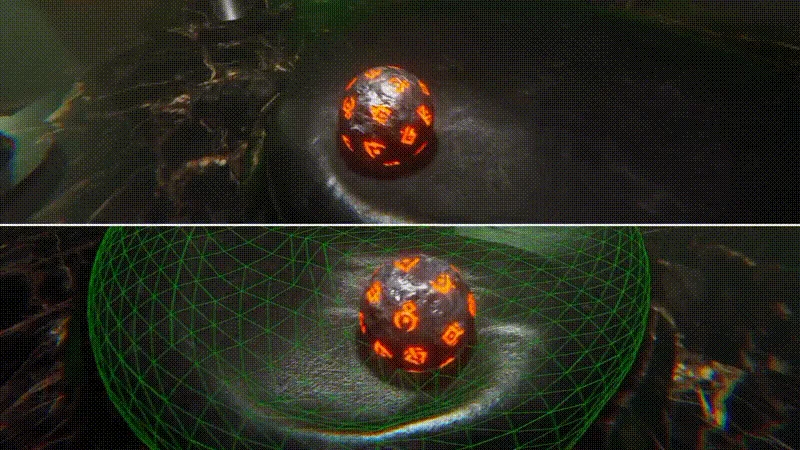
When the developer needed somewhere for that orb to land safely after a fall, it created a pillow like mesh in Unity that visibly yields to contact and recovers afterward. The appeal of this effect extends beyond making an object look soft: it shows how a focused combination of contact detection, geometric deformation, and controlled recovery can communicate a material’s behavior without requiring a comprehensive physical simulation.
The developer has clarified that “soulslike” describes an inspiration rather than a complete genre conversion. Dark fantasy presentation, challenging situations, occasional enemies, and boss encounters influence the experience, but Dark Roll 2 remains primarily a marble platformer. Those influences do not establish a conventional combat RPG structure, an extensive weapon system, or character builds. The original Dark Roll, which launched on Steam on August 1, 2019, is available as a free to play game and combined rolling challenges with gem collection, puzzles, and enemies. That predecessor provides a foundation for understanding the sequel’s direction, while the central design question remains how the tension of dangerous environments can be translated into movement.
Dark Roll 2’s official description emphasizes physics based movement, precision platforming, traps, and environmental hazards. These ingredients make reaching a destination with the right movement conditions as important as reaching it at all. In a generic rolling platformer situation, an orb approaching a gap needs enough speed to cross it without carrying itself beyond the landing zone. The player is therefore planning both a route and a sequence of changes in motion.
Landing feedback helps make the result understandable: a cushion that appears completely rigid may feel disconnected from its purpose, while one that visibly springs upward may suggest that it will launch the player again. These are design considerations, not a description of an undisclosed movement formula; the available material does not reveal every acceleration value, collision setting, or controller parameter.
The game’s Steam description advertises worlds that differ in presentation and challenges, alongside three difficulty levels. Those difficulty choices should not be confused with an automatic adaptive difficulty system. A rolling character can face challenges involving careful positioning, precise timing, or the selection of a safe route, although these examples do not identify unannounced Dark Roll 2 worlds.
Traps, difficult landings, environmental problems, and boss encounters can each place different demands on the same movement system. A trap may test timing, an environmental problem may require understanding relationships between objects or routes, and a boss introduces behavior that must be observed. The final number of worlds and the complete campaign structure cannot be inferred from the original game’s content totals.
Across these situations, there is a useful distinction between difficulty caused by demanding execution and difficulty caused by unclear information. Missing a clearly indicated landing can suggest a better approach for the next attempt, while a surface that behaves differently from its appearance makes that learning harder.
The pillow addresses a small part of this communication problem by visibly responding to contact and suggesting a yielding landing surface. Within an otherwise threatening sequence, it can also mark a transition from a dangerous descent to a stable position. That does not establish that every cushion is a checkpoint, puzzle element, or hidden mechanic. Its value comes from communicating the behavior of one important surface at the moment the player encounters it.

How Dark Roll 2’s Custom Unity Script Detects Contact and Deforms the Pillow
Artbarian Games’ public Unity development explanation identifies a custom script that changes the pillow mesh when a spherical object presses into it. The developer explicitly clarified that the showcased effect deforms the mesh, meaning that it changes geometric vertex positions rather than relying only on a shader to suggest a dent. Unity’s Mesh.vertices API supplies the general capability needed for this approach: it can return a copy of a mesh’s vertex positions or accept an updated array, with those positions expressed in the mesh’s local coordinate space. The visual objective is to create a convincing relationship between the contact area and the surrounding cushion, allowing a depression to blend into the rest of the surface.
The initial explanation describes two passes over information associated with the original mesh. A preserved copy of the original vertices provides the reference shape. The first pass checks contact against a SphereCollider and measures the deepest penetration, while the second moves affected vertices away from the sphere, with influence declining over a configurable distance.
Keeping an undeformed reference matters because the script needs a stable description of the cushion’s resting shape as well as its current appearance. As a general reconstruction of the approach, the original positions define the resting object, current positions represent its visible state, and contact calculations establish a desired deformation. Recovery can then move the visible state toward the resting shape when the depression is no longer required.
This separation helps avoid treating an existing dent as the next calculation’s undeformed starting point. Repeatedly adding displacement without a stable reference can cause unwanted accumulation unless the implementation explicitly compensates for it. The two passes also separate detection from response, allowing the script to establish whether meaningful contact exists and how deep the overlap is before deciding how much surrounding material should move. These explanations describe the logic implied by the developer’s account, not a reproduction of the complete production script. The public breakdown does not establish every data structure, update callback, or optimization, and the arrangement of Unity’s mesh reading and writing operations remains an implementation choice.
A sphere is convenient for this kind of geometric explanation because its surface can be described using a center and a radius. Unity’s SphereCollider specifies its radius in local space before the object’s transform scale is applied. For an illustrative reconstruction, let p represent an original vertex position, c the sphere center, and r the effective radius. All three must use a consistent coordinate system. This is especially important because mesh vertices are local values: Transform.TransformPoint converts a local position into world space and includes scale, while Transform.InverseTransformPoint performs the inverse conversion. Comparing an unconverted local vertex with a world space sphere center would mix incompatible measurements. With consistent coordinates, the basic relationships are:
- Distance from the sphere center:
d = length(p − c). A vertex lies inside the sphere whend < r. - Penetration depth:
penetration = max(0, r − d). This provides a nonnegative measure of how far the sampled point lies inside the sphere. - Outward direction:
direction = (p − c) / d. When the distance is nonzero, this direction can be multiplied by a displacement amount to produce a positional adjustment. A robust implementation needs special handling whendis zero because the direction is undefined at the exact center.
These equations explain geometric relationships rather than reproduce lines from Artbarian Games’ code. Penetration depth and displacement are related but distinct: one measures overlap, while the other describes the movement applied to the mesh. Contact also needs to be distinguished from proximity. A wide influence radius can make nearby vertices respond smoothly, but it should not necessarily cause a dent before the player touches the cushion. Establishing contact before applying the surrounding falloff is one way to maintain that distinction. Similarly, testing individual vertices against a sphere is different from calculating the minimum separation between two complete colliders, and the disclosed approach does not establish the use of a particular physics collision query.
A convincing pillow response needs more than a literal correction of intersecting points. Nearby material can contribute to a broader depression, while an additional region can move outward to suggest displaced cushioning. In a follow up post, the developer identified surrounding bulging as an improvement and described the demonstrated mesh as approximately 1,000 vertices and 2,000 triangles. Those figures describe that showcased version, not a guaranteed final asset specification or performance benchmark.
More vertices provide additional locations where the surface can change direction, but they also increase the work performed by a straightforward algorithm that processes each vertex. Sparse sampling can miss a small intersection between widely separated vertices. The outer bulge strengthens the material impression, although it does not establish mathematically conserved volume without evidence of a volume constraint or equivalent calculation.
Lighting introduces another consideration after the geometry changes. Unity documents that recalculating normals can help shading reflect the altered surface, but split vertices at UV seams may produce discontinuities. Recalculating normals also does not automatically regenerate tangents. These are general implementation considerations rather than confirmed details of Dark Roll 2’s rendering code, but they explain why a convincing result depends on more than moving vertices. Geometry, sampling density, and shading all influence whether the cushion reads as a continuous soft surface.

Quintic Smootherstep, Shape Recovery, and Impact Absorption in Dark Roll 2
Artbarian Games’ developer explicitly identified quintic smootherstep as the falloff function used in the initial pillow explanation. Its purpose becomes clearer when compared with ordinary smoothstep. Unity’s public C# reference implementation of Mathf.SmoothStep clamps the interpolation input and applies a cubic polynomial, while the API documentation describes interpolation with smoothing at the limits. Quintic smootherstep uses a different polynomial that provides an additional degree of smoothness where the affected region meets the surrounding surface. The functions and their derivatives are:
- Cubic smoothstep:
S(t) = 3t² − 2t³. Its first derivative isS′(t) = 6t − 6t², and its second derivative isS″(t) = 6 − 12t. The first derivative is zero at both endpoints, but the second derivative is nonzero at both. - Quintic smootherstep:
Q(t) = 6t⁵ − 15t⁴ + 10t³. Its first derivative isQ′(t) = 30t²(t − 1)², and its second derivative isQ″(t) = 60t(2t² − 3t + 1). Both derivatives are zero whentis zero or one.
Both functions return zero for an input of zero and one for an input of one. Both also have a zero first derivative at those endpoints, but the quintic function’s zero second derivative allows it to join constant regions without a sudden change in either its first or second derivative.
Applied to the pillow, a normalized distance could run from a strongly affected region toward the outer edge, with an illustrative influence weight of 1 − Q(t). That produces strong influence at one end and none at the other, although the exact mapping from distance to t remains an implementation choice. When t represents distance across the surface, these derivatives describe a spatial transition. Calling them velocity and acceleration is an analogy unless the function is being evaluated as a trajectory over time.
This spatial falloff addresses how deformation is distributed across the cushion. It does not determine how quickly the pillow changes shape or returns to rest, and it cannot automatically fix sparse geometry, split normals, or every deformation artifact. A broad, gradual influence can soften the visible boundary around a dent, but the mesh still needs enough useful samples and appropriate shading to represent that transition. This is why the falloff function, mesh structure, and rendering behavior remain separate parts of the effect, even though the player experiences them together as one material response.
The developer describes separate squash and recovery speeds and, in another explanation, names SmoothDamp and MoveTowards as helpers used to prevent snapping. This temporal control allows a landing to register quickly while the cushion takes a different amount of time to settle afterward. Unity’s Vector3.MoveTowards advances toward a target by no more than a specified distance per call and, with an appropriate positive step, reaches that target without passing beyond it. Unity recommends incorporating elapsed time when the intended movement speed should remain independent of frame rate. Vector3.SmoothDamp uses a spring like damping response that slows as the position approaches its target and avoids overshooting it. That behavior can support a yielding, settling appearance without implying repeated oscillation.
An illustrative design could therefore respond rapidly when the desired depression increases, then relax more gradually when it decreases. Changing those relative rates changes the apparent material: fast recovery may suggest a more resilient cushion, while prolonged recovery may suggest a substance that settles slowly. This is a design interpretation rather than proof of a particular material simulation. Separate squash and recovery speeds do not establish calculations of physical pressure, material density, or force derived from the orb’s mass. The published explanation also does not provide enough detail to assign every named helper to an exact stage of the production script. The supported distinction is that the distribution of the deformation and its timing are controlled separately.
The developer also directly addressed requests for more bounce, explaining that the surface was intended to suppress the fall. A landing cushion receives the player and helps conclude a movement sequence, while a launch surface creates another movement event. A visible dent can suggest that an impact has been absorbed, whereas a forceful rebound suggests that energy has been returned to the orb.
Unity’s Physics Material documentation treats bounciness as a property affecting rebound between colliders, with the result depending on both surfaces and their combination settings. Animating a cushion therefore does not, by itself, establish the orb’s physical rebound; similar mesh deformation could accompany different collision responses. For this effect, additional wobbling or rebound would need to support the intended safe, readable landing to improve the interaction.

Dark Roll 2 Ghost Racing, Steam Demo, and Planned 2027 Release
Artbarian Games’ developer has described improving completion times as a second layer of play. In the public explanation of ghost racing, players could select their own best performance, the player directly above them, the top ranked entry, or another leaderboard participant. The developer also described options to race without a ghost or disable leaderboard participation. These choices let recorded performances provide a visible comparison: instead of seeing only that another player finished faster, a competitor can observe where the recorded run gains distance. For a precision platformer, that gives a level another purpose after an initial successful attempt, shifting attention toward understanding where time can be saved.
A ghost can make route analysis more concrete by showing a more efficient line, a better timed approach, or less unnecessary movement. These are general ways replay comparisons can help, not claims about a particular optimal Dark Roll 2 route. There is also a technical distinction between a leaderboard entry and the replay displayed alongside it. Valve’s Steamworks documentation supports attaching user generated content to leaderboard entries, explicitly including replays or ghosts as possible uses, while the game remains responsible for implementing suitable recording and playback. The described feature therefore concerns competition against recorded performances; it does not establish simultaneous live multiplayer races.
The Dark Roll 2 Steam demo was released on July 16, 2026. Its official announcement confirms seven handcrafted levels, ghost racing, leaderboard competition, unlockable orb skins, and a concluding boss fight against Igor the Overseer. The demo description also includes environmental challenges, gem collection, and dangerous terrain, while its account of Igor emphasizes reading attacks, dodging, and discovering an effective strategy. The store page explains that Steam achievements unlock skins and that every skin earned in the demo carries over to the full game. That is a specific progression promise and does not establish that every setting, leaderboard entry, or form of campaign progress will also transfer.
The seven levels offer a way to assess the movement across multiple challenges, beyond what a short development clip can show. Useful evaluation questions include whether the orb’s behavior becomes understandable, whether mistakes suggest a better approach, and whether repeating a level remains engaging. These are evaluation criteria rather than evidence that the demo has been independently benchmarked or exhaustively reviewed here. The pillow demonstrations and the demo also provide different kinds of evidence: a development post showing an effect does not automatically confirm that every publicly available demo build contains that exact version. The storefront’s stated content remains the stronger basis for describing what the demo expressly promises.
As of September 23, 2026, Steam listed Dark Roll 2’s planned release window as Q1 2027, meaning January through March rather than a confirmed launch day. In a public response, the developer also said it was aiming for February 2027. That is a more specific development target within the advertised quarter, but it is not a finalized release date, and neither statement supports assigning an exact day.
The Steam listing provides Windows system requirements, supporting a Windows PC release through Steam without confirming console versions or native versions for other desktop platforms. The developer has also stated that the full sequel will be paid, unlike the free original, while leaving a specific launch price unconfirmed in that statement. The free demo therefore does not indicate that the full game will follow a free to play model.

Frequently Asked Questions (FAQs)
- What is Dark Roll 2?
Dark Roll 2 is Artbarian Games’ dark fantasy marble platformer, built around movement governed by physics through challenging 3D environments. Players guide an orb through hazardous levels, controlling its momentum and timing their movements to avoid traps and reach the exit. The challenge combines precise movement with environmental puzzles, gem collecting and boss encounters. - Is Dark Roll 2 being developed in Unity?
Yes. The developer has confirmed that Dark Roll 2 uses Unity, and the pillow development posts describe Unity components such asSphereCollider. These components provide information that the custom script uses to calculate the deformation. However, the posts do not identify the specific Unity editor version used for the production project. - How does the custom pillow deformation work?
The script checks where the player’s sphere presses into the pillow and moves affected vertices, the points that define the mesh, to create a depression. The deformation gradually fades toward the surrounding surface, while a later version adds an outward bulge around the compressed area. When the player moves away, the vertices gradually return to their original positions. Separate compression and recovery speeds let the pillow respond quickly to contact and recover more slowly afterward. - Is the pillow a shader effect or a complete soft-body simulation?
The developer identifies the effect as a script that deforms the pillow’s mesh, meaning it changes the geometry of the visible surface. This can create a convincing impression of softness without calculating all the internal forces involved in a complete soft body simulation. The explanation also does not establish exact volume conservation, so the outward bulge should be understood as a visual approximation of compression. - Why is a SphereCollider useful for pillow deformation?
ASphereColliderprovides a simple shape with a center and radius, making it straightforward to calculate which parts of the pillow are close to or inside the pressing sphere. Unity defines its radius in the object’s local space, and the object’s scale affects its size in the scene. Any reconstruction therefore needs consistent coordinates and measurements, otherwise the dent could appear in the wrong place or at the wrong size. - Why use quintic smootherstep instead of ordinary SmoothStep?
Quintic smootherstep helps the dent blend more gently into the surrounding surface. Its first and second derivatives reach zero at both endpoints, while ordinary cubic SmoothStep only has zero first derivatives there. For this effect, that means a smoother change in the deformation’s influence near its boundaries, helping reduce a visible ridge around the dent. These properties describe the blending curve, rather than proving anything about the pillow’s physical velocity or acceleration. - Does the pillow launch the player back into the air?
That is not its stated purpose. The pillow was created to provide a soft landing spot, with the intended behavior being to cushion the fall. Its visible compression and gradual return to shape help communicate that softness. The surface recovering its shape should therefore not be interpreted as confirmation that it acts as a springboard or launches the player upward. - How many levels are in the Dark Roll 2 demo?
The official demo description confirms seven handcrafted levels and a concluding boss fight against Igor the Overseer. These levels introduce the game’s rolling controls, traps and environmental challenges, giving players a sample of its precision platforming. The boss encounter then requires players to read Igor’s attacks, dodge carefully and work out how to defeat him. - Do skins unlocked in the demo transfer to the full game?
Yes. The demo’s Steam page explicitly confirms that every skin unlocked in the demo carries over to the full version. These cosmetic rewards are earned through Steam Achievements and change the appearance of the player’s orb. The confirmation specifically covers skins; it does not establish that completed levels, leaderboard records or every other form of progress will also transfer. - When will Dark Roll 2 release, and will it be free?
Steam now lists February 16, 2027, as the planned release date, providing a more specific date within the previously listed Q1 2027 window. This also aligns with the developer’s earlier February target. The developer has stated that the full game will be paid, while the available demo is free to download and play.

Conclusion
Dark Roll 2’s pillow illustrates how a focused technical feature can support both presentation and play. Its significance lies in the relationship between contact, visible deformation, and an understandable landing response.
The broader engineering lesson is to separate the problem into manageable parts. Contact detection determines whether a response is needed. Displacement defines the altered shape. Falloff controls the transition into the surrounding surface. Recovery determines how the object settles afterward. Rendering and collision behavior then need to remain consistent with the intended interaction.
None of those decisions requires the effect to claim more physical accuracy than it actually implements. A surface can be convincing because it responds coherently, not because it simulates every property of real cushioning.
For Dark Roll 2, that makes the pillow more than an isolated visual curiosity. It is a useful case study in choosing a narrowly defined effect, refining the details that players notice, and keeping the result aligned with its gameplay purpose: providing a soft landing in a demanding rolling-platformer world.
Sources and Citations
- Developer’s Original Unity Explanation of the Pillow Deformation
Posting as Levardos, the developer explains how Dark Roll 2’s pillow effect preserves the original mesh vertices, checks contact against a SphereCollider, measures penetration, and displaces affected vertices. The post specifically identifies a quintic smootherstep falloff,6t⁵ − 15t⁴ + 10t³, alongside separate squash and recovery speeds. This is the primary source for the original implementation description. Reddit
Citation: Mesh Deforming Script for Soft Pillow Effect for My Game! - Developer’s Follow-Up Deformation Update
The developer’s follow-up confirms that the revised effect adds bulging around the outer deformation radius. It also identifies the demonstrated mesh as approximately 1,000 vertices and 2,000 triangles, while acknowledging occasional visible vertex movement artifacts. This supports discussion of the improvement and the demonstrated mesh’s limitations. Reddit
Citation: You Guys Seemed to Love My Pillow-Like Mesh Deformer, So I Improved It! - Developer’s Additional Explanation of Contact, Bulging, and Movement Smoothing
In this GamePhysics discussion, the developer explains how the sphere’s radius and distance from the mesh determine indentation depth. The description separates the effect into the central dent, surrounding falloff, and outward bulge, and explicitly names SmoothDamp and MoveTowards as tools used to soften deformation and recovery. Reddit
Citation: Dark Roll 2: Silly Little Unimportant Feature I Made for My Game - Dark Roll 2 Official Steam Listing
The official listing identifies Artbarian Games as developer and publisher and describes Dark Roll 2 as a soulslike-inspired, physics-based 3D platformer. It confirms precision rolling, environmental hazards, difficulty options, orb skins, time challenges, achievements, and Steam Leaderboards. The listing currently gives Q1 2027 as the planned release window. Steam Store
Citation: Dark Roll 2 on Steam - Dark Roll 2 Official Demo Listing
Steam lists the free demo’s release date as July 16, 2026. Its description confirms seven handcrafted levels, a boss fight against Igor the Overseer, ghost racing, Steam Leaderboards, and three difficulty settings. It also states that orb skins unlocked through demo achievements carry over to the full game. Steam Store
Citation: Dark Roll 2 Demo on Steam - Artbarian Games’ Demo Announcement
The official Steam announcement is titled “Dark Roll 2 Demo Now Available!”, and its indexed summary highlights seven levels with a boss fight. The announcement was located, although its full article body was not retrievable during verification. Steam Store
Citation: Dark Roll 2 Demo Now Available! - Unity Mesh Vertex Documentation
Unity documents thatMesh.verticesreturns a copy of the vertex-position array and that these positions are expressed in local space. Its example demonstrates modifying the array and assigning it back to the mesh. This provides technical background for vertex-based deformation without establishing the exact contents of Dark Roll 2’s script. Unity Documentation
Citation: Unity Scripting API: Mesh.vertices - Unity Local-to-World Coordinate Transformation
TheTransform.TransformPointdocumentation explains how to convert a position from local space to world space and explicitly notes that the result is affected by scale. This supports explanations of how mesh-local positions can be compared with objects positioned in the wider scene. Unity Documentation
Citation: Unity Scripting API: Transform.TransformPoint - Unity World-to-Local Coordinate Transformation
Unity’sTransform.InverseTransformPointdocumentation covers the reverse conversion, from world space into local space. It also distinguishes position transformations from direction transformations, providing a reference for keeping deformation calculations in a consistent coordinate system. Unity Documentation
Citation: Unity Scripting API: Transform.InverseTransformPoint - Unity SphereCollider Documentation
Unity definesSphereCollideras a sphere-shaped primitive collider and documents its center and radius as local-space properties. This is the relevant API reference for the collider explicitly identified in the developer’s contact and penetration explanation. Unity Documentation
Citation: Unity Scripting API: SphereCollider - Unity MeshCollider and Collision-Geometry Updates
TheMeshCollider.sharedMeshreference identifies the mesh used for collision detection. Unity explains that assigning a mesh whose vertices, indices, or triangles have changed causes the collider’s shape to be rebuilt. This supports discussion of collision-geometry updates, but does not establish whether Dark Roll 2 updates its pillow’s collider this way. Unity Documentation
Citation: Unity Scripting API: MeshCollider.sharedMesh - Unity SmoothDamp Documentation
Unity’s vector version ofSmoothDampgradually moves a value toward a target using spring-like damping. Its documentation explains that movement slows near the target and does not overshoot it. This provides technical context for the smoothing operation named by the developer, without assuming which overload the game uses. Unity Documentation
Citation: Unity Scripting API: Vector3.SmoothDamp - Unity MoveTowards Documentation
TheVector3.MoveTowardsreference explains how to move toward a target by a limited distance per call. It also documents multiplying that distance by the appropriate time step for frame-rate-independent movement. This is relevant background for controlled deformation and recovery rather than instantly snapping vertices into position. Unity Documentation
Citation: Unity Scripting API: Vector3.MoveTowards - Unity Mathf.SmoothStep Documentation
Unity documentsMathf.SmoothStepas interpolation between two values with smoothing at the endpoints. The interpolation parameter is clamped to 0–1, and the transition accelerates from the start before slowing toward the end. This supplies the documented behavior for comparison with the developer’s custom falloff. Unity Documentation
Citation: Unity Scripting API: Mathf.SmoothStep - Unity’s Public C# Implementation of Mathf.SmoothStep
Unity’s reference source shows thatMathf.SmoothStepclamps its input and evaluates the cubic expression3t² − 2t³before blending between the endpoints. This is the direct implementation source for distinguishing Unity’s built-in SmoothStep from the developer’s explicitly stated quintic smootherstep. GitHub
Citation: UnityCsReference: Mathf.cs - Unity Normal-Recalculation Documentation
Unity explains thatMesh.RecalculateNormalsrebuilds mesh normals from its triangles and vertices, making it relevant after vertex positions change. The documentation also warns that split vertices at UV seams can produce discontinuities and that tangents are not generated automatically. These are useful qualifications for discussion of shading on deformed meshes. Unity Documentation
Citation: Unity Scripting API: Mesh.RecalculateNormals - Unity Physics Material Documentation
Unity’s Physics Material reference covers static friction, dynamic friction, bounciness, and the rules for combining those properties between colliders. This supports discussion of collision response and energy loss on impact, rather than the separate vertex-deformation effect. It does not confirm the material values used in Dark Roll 2. Unity Documentation
Citation: Unity Manual: Physics Material Asset Reference - Developer’s Ghost-Racing Feature Explanation
The developer confirms that Dark Roll 2’s ghost system uses replay data associated with Steam Leaderboards. Players can race their own best performance, the player immediately above them, the top-ranked player, or another selected leaderboard participant. The post also states that ghost racing and leaderboard participation can be disabled. Reddit
Citation: Dark Roll 2 Will Have “Ghost Replay Racing”! - Valve’s Steam Leaderboards Documentation
Valve’s official documentation explains leaderboard creation, score submission, ranking, and retrieval. Its “Attaching User Generated Content” section explicitly identifies recorded replays and raceable ghosts as content that can be attached to leaderboard entries and downloaded by other players. Steamworks
Citation: Steamworks Documentation: Steam Leaderboards - Valve’s AttachLeaderboardUGC API Reference
TheISteamUserStats::AttachLeaderboardUGCreference documents the specific API for attaching shared content to the current user’s leaderboard entry. It explains how other users retrieve the attached content handle and confirms that the attachment remains available even if the underlying Steam Cloud file is subsequently changed or deleted. Steamworks
Citation: Steamworks API: ISteamUserStats::AttachLeaderboardUGC
Recommendations
- Echoes of Aincrad Crafting Guide: Recipes, Materials and Unlock Requirements
- Did Christopher Nolan’s Depiction of the Gods Pay Off in The Odyssey?
- Castlevania: Belmont’s Curse Runs at Only 30 FPS on Nintendo Switch
- EA Sports College Football 27 Preview: Defense Wins Championships
- Jurassic World Evolution 2 Complete Edition Comes to Nintendo Switch 2 on July 30, 2026
- Unity-Based Tool for JRPG Game Development: RetroGig’s Retro JRPG Template for SNES/PSX-Style RPG Systems
- Keanu Reeves & China Miéville BRZRKR: Light Draws Breath — Release Date, Story, Creative Team & Variant Covers
- CD Projekt Raises Profit Goals with Witcher 4, 5, and 6 Coming: 5 Billion PLN Target Explained
- Creepshow Official Announcement Trailer Reveals a New Anthology Horror Game Experience
- GTA 6 Leans Into Vice City’s Influencer Hustle Where Looks Matter



































































































