







In This Article (19 sections)
MLB the Show Mobile Release Date and Platform Availability
MLB The Show Mobile officially launched as Sony San Diego Studio and MLB expanded the franchise onto smartphones and tablets for the first time in a fully dedicated mobile experience. The release marked one of the biggest changes in the history of the MLB The Show franchise because the series had previously focused almost entirely on PlayStation consoles before later expanding to Xbox and Nintendo Switch. The mobile version represents a new push toward portable live-service baseball gaming built around shorter sessions, touch controls, card collection systems, and online progression.
The game became available simultaneously in multiple regions through the Apple App Store and Google Play Store. Players on iOS and Android devices can download the game directly from their respective storefronts, with support varying depending on hardware generation and operating system requirements. Unlike the yearly premium console releases, MLB The Show Mobile launched as a standalone free-to-play experience rather than a direct port of the latest console title.
Sony positioned MLB The Show Mobile as a companion ecosystem rather than a replacement for the console game. That distinction is important because many fans initially assumed the mobile version would simply stream or replicate MLB The Show on smartphones. Instead, the mobile release introduces a separate gameplay structure designed specifically for mobile users while retaining the recognizable MLB The Show presentation style, real players, authentic teams, official stadiums, and card-collecting systems.
The launch also arrived during a period when sports publishers increasingly targeted mobile gaming audiences. EA Sports, 2K, and other publishers have invested heavily in smartphone versions of their franchises. MLB The Show Mobile represents Sony’s entry into that competitive mobile sports market while attempting to maintain the simulation-oriented identity that made MLB The Show successful on consoles.
Is MLB the Show Mobile Free-to-Play and What it Includes
MLB The Show Mobile follows a free-to-play structure. Players can download and begin playing without purchasing the game upfront, which differs significantly from the annual premium pricing model used by MLB The Show on PlayStation, Xbox, and Nintendo Switch.
The free-to-play model includes access to core gameplay systems, online competition, team-building mechanics, card collection features, progression systems, and live events. Users can build a roster using earned rewards and participate in multiplayer matchmaking without needing an initial purchase.
However, the game also includes optional monetization systems that are common in modern mobile sports titles. These systems revolve around premium currencies, accelerated progression, special card packs, cosmetic customization, and limited-time content drops. While players can technically progress without spending money, users willing to invest financially may gain faster access to elite player cards or roster improvements.
The game includes several onboarding rewards for new players, including starter packs, introductory missions, and beginner progression paths designed to ease users into the ecosystem. Daily login rewards, seasonal programs, and limited-time objectives encourage long-term engagement.
Sony and MLB also emphasized live-service content during launch promotion. This includes roster updates reflecting real MLB performances, time-limited challenges, special event cards, themed programs, and seasonal content refreshes designed to keep the game active throughout the baseball season.
The inclusion of official MLB licensing remains one of the game’s biggest selling points. Real teams, real players, official uniforms, and authentic stadium branding help distinguish MLB The Show Mobile from many lower-budget mobile baseball competitors.

MLB the Show Mobile Gameplay Modes Explained
MLB The Show Mobile includes multiple gameplay modes tailored to shorter mobile play sessions while still attempting to preserve the strategic depth associated with baseball simulation games.
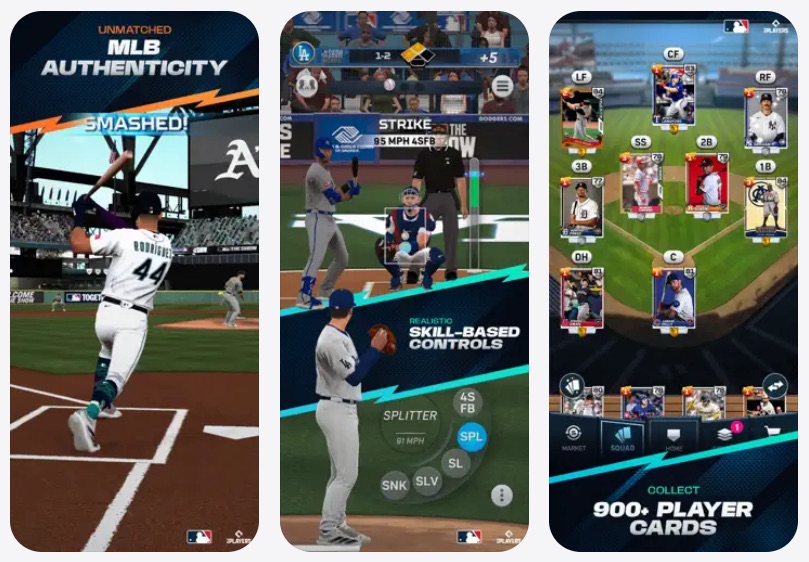
The primary mode revolves around team building and competitive progression. Players assemble rosters using collectible cards featuring MLB athletes, legends, and special event versions. These rosters can then compete in online matches, seasonal ladders, or limited-time challenges.
Quick Play modes provide shorter match formats for users who prefer fast gameplay sessions. These condensed games reduce inning counts and streamline pacing to better fit mobile usage habits. Mobile players often engage in gaming sessions lasting only a few minutes, so the design prioritizes accessibility and speed.
Solo challenge content also plays a major role. These include pitching challenges, batting objectives, historical moments, skill drills, and progression missions that reward currency and player cards. Offline-friendly content gives users consistent ways to earn rewards without depending entirely on multiplayer competition.
Ranked online play introduces matchmaking systems designed to pair users with opponents of similar skill levels and roster strength. Competitive seasons allow players to climb rankings and earn exclusive rewards.
Live event systems mirror trends seen in other sports mobile games. Limited-time events tied to MLB performances, postseason moments, and special baseball milestones rotate regularly to maintain player engagement.
The game also simplifies certain console mechanics to accommodate touchscreen gameplay. While MLB The Show console titles are known for deep simulation controls, the mobile version streamlines batting, pitching, and fielding inputs for accessibility while still retaining timing and strategy elements.
Topps Card Collecting and Team Building in MLB the Show Mobile
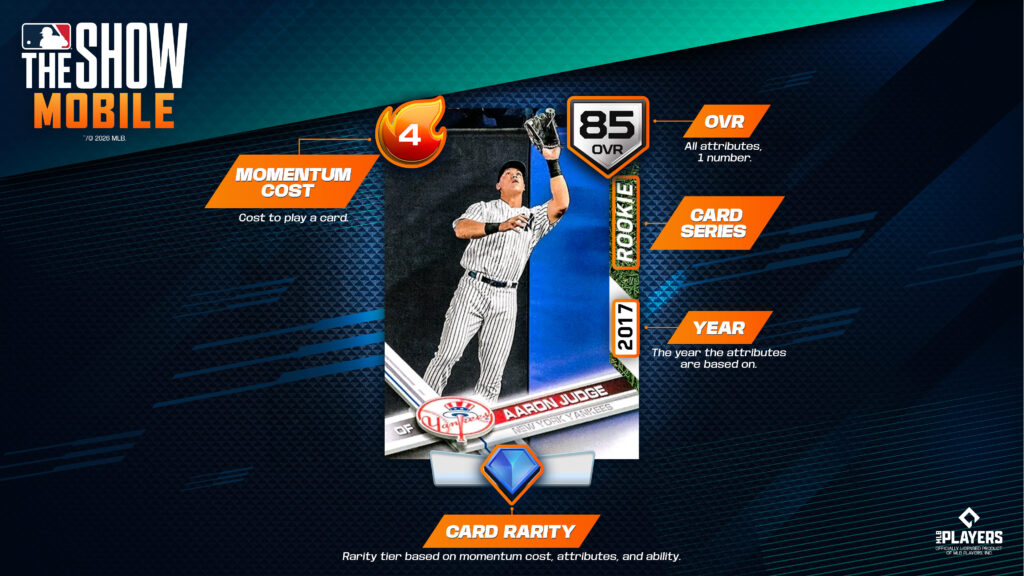
Topps integration forms a central pillar of MLB The Show Mobile’s progression systems. The game heavily emphasizes collecting digital baseball cards featuring officially licensed MLB players and legends.
These cards vary in rarity, overall rating, attributes, and special bonuses. Certain cards focus on offensive power, while others specialize in pitching accuracy, speed, defense, or clutch performance. Building a balanced roster becomes one of the game’s primary long-term goals.
The connection with Topps helps reinforce authenticity. Baseball card culture has historically been deeply tied to MLB fandom, and the mobile game attempts to recreate that collecting excitement digitally. Limited-edition cards, event-exclusive releases, seasonal drops, and upgraded variants encourage users to continually engage with the game.
Team building involves more than simply acquiring high-rated players. Chemistry systems, lineup optimization, bullpen management, and strategic roster construction all affect competitive performance. Certain events may require specific teams, player types, or league affiliations, forcing users to diversify their collections.
Card packs remain one of the most discussed features because they tie directly into the game’s monetization structure. Packs can be earned through gameplay or purchased using premium currency. Higher-tier packs generally offer better odds at elite cards, though randomized outcomes remain part of the system.
Special promotional cards tied to real-world MLB performances also help maintain engagement throughout the season. If a player performs exceptionally well in real life, that athlete may receive upgraded in-game versions or limited-time featured cards.
Community Marketplace: How Trading Works in MLB the Show Mobile
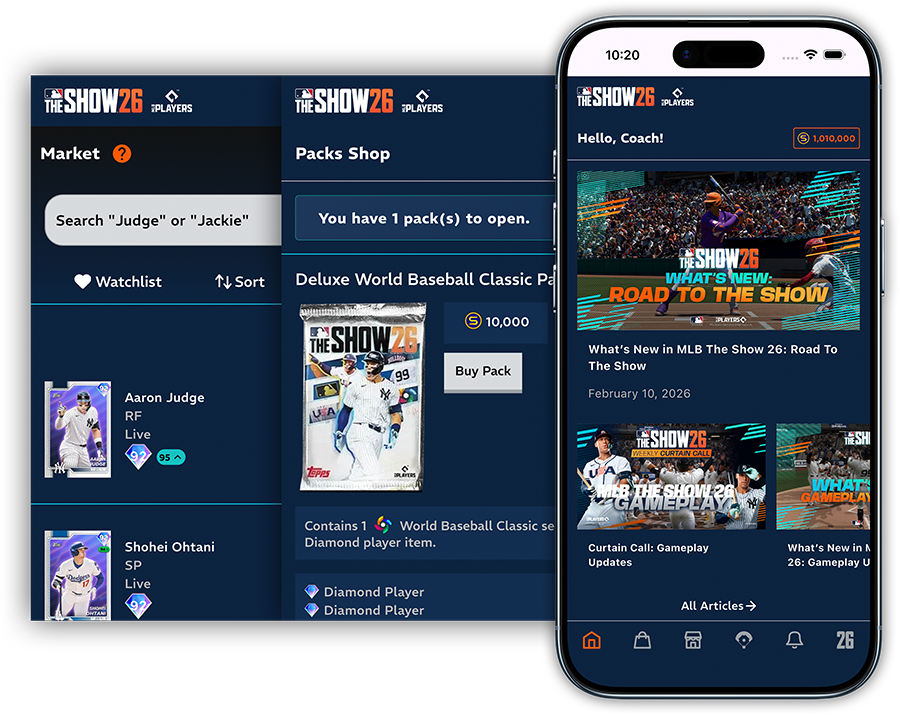
The Community Marketplace allows users to buy, sell, and trade cards using in-game currency systems. This feature mirrors marketplace mechanics that longtime MLB The Show fans recognize from the Diamond Dynasty ecosystem on consoles.
Players can list cards for sale, browse listings from other users, and strategically invest in athletes whose value may rise due to real-world performance or in-game demand. Marketplace activity creates a player-driven economy that adds another layer of strategy beyond gameplay itself.
Some users focus heavily on market flipping, purchasing undervalued cards and reselling them for profit. Others use the marketplace primarily to complete roster gaps or acquire favorite players.
The mobile marketplace interface has been optimized for touchscreen navigation. Filtering systems allow users to sort by position, rarity, rating, price range, and team affiliation.
Marketplace inflation and pricing trends became major discussion topics shortly after launch. Highly desirable cards can command extremely high prices, particularly during competitive seasons or special events.
Sony also implemented safeguards intended to reduce exploits, account abuse, and unauthorized currency farming. Listing limits, verification systems, and anti-bot protections are designed to maintain marketplace stability.
Does MLB the Show Mobile Have Cross-Play with Console
One of the most common questions surrounding MLB The Show Mobile concerns cross-play and cross-progression support with console versions.
The mobile game does not function as a direct cross-platform gameplay extension of the console editions in the traditional sense. Mobile users are generally separated into their own ecosystem because gameplay mechanics, controls, pacing, and progression structures differ substantially from console MLB The Show titles.
However, account connectivity systems may still allow certain forms of profile linking or reward integration depending on platform support updates and Sony account functionality. This means users may eventually see shared rewards, linked progression benefits, or companion features across devices.
Competitive balance represents one reason full cross-play is difficult. Console users playing with physical controllers and advanced simulation mechanics would possess significant advantages over touchscreen mobile users in many gameplay situations.
Instead of true console-versus-mobile matchmaking, Sony appears focused on creating parallel ecosystems that share branding, progression philosophies, and live-service structures without forcing incompatible control environments together.
Cross-save functionality remains one of the most requested future features from the community. Many fans want the ability to continue roster progression between console and mobile devices seamlessly.
Supported Devices and Performance Expectations
MLB The Show Mobile supports a range of modern smartphones and tablets, though performance varies significantly depending on hardware capability.
On iOS, newer iPhones and iPads generally deliver smoother framerates, faster load times, and more stable online performance. Android support covers numerous flagship and mid-range devices, though optimization consistency may vary across manufacturers.
Performance expectations differ from console versions because mobile hardware limitations require visual compromises. Stadium detail, crowd density, lighting complexity, animation fidelity, and environmental effects are often scaled back to ensure stable performance on smartphones.
Battery consumption became an early discussion point among players. Sports games featuring real-time online gameplay and high-detail 3D rendering can drain battery life relatively quickly, especially on older devices.
Players can typically adjust graphics settings, framerate targets, resolution scaling, and battery optimization modes to improve stability. Lower-end devices may need reduced visual settings for smoother gameplay.
Internet stability also affects performance. Ranked online matches require reliable connections, and unstable mobile networks may cause lag, input delays, or disconnects.
Storage requirements represent another important consideration. Live-service sports games frequently expand over time through updates, seasonal assets, commentary additions, and new card content.
Account Creation and Login Options for MLB the Show Mobile
Players must create or connect accounts to access most online functionality in MLB The Show Mobile. Account systems help synchronize progression, protect purchases, and maintain competitive integrity.
Login options typically include platform-based authentication through Google Play or Apple accounts. Additional support for Sony account connectivity may provide expanded ecosystem features.
Guest accounts are sometimes available initially, though long-term progression usually requires proper account binding to avoid data loss.
Cloud saving systems ensure that progress, purchased items, card collections, and achievements remain protected even if users change devices.
Security measures also play a significant role because mobile sports games frequently become targets for account theft, unauthorized marketplace activity, and cheating attempts. Two-factor authentication and linked account verification can improve account safety.
The onboarding process guides users through tutorial systems, starter roster selection, beginner rewards, and control customization before unlocking broader online functionality.
Monetization, In-App Purchases, and Drop-Rate Disclosures
Monetization remains one of the most heavily debated aspects of MLB The Show Mobile. Like many free-to-play sports games, the title relies on recurring player spending rather than upfront purchases.
In-app purchases include premium currency bundles, special packs, event passes, cosmetic customization items, and progression accelerators. These purchases help fund ongoing live-service support while also creating controversy surrounding competitive balance.
Drop-rate disclosures have become increasingly important due to regulatory scrutiny in multiple regions. The game outlines probability percentages for certain pack rewards so players understand the chances of acquiring rare cards.
Critics argue that randomized pack systems can encourage excessive spending behaviors, particularly among competitive users chasing elite rosters. Supporters counter that free-to-play games require monetization systems to sustain long-term development and server support.
Sony appears to have balanced monetization carefully to avoid accusations of extreme pay-to-win mechanics at launch. Skilled players can still compete effectively through strategic roster building and consistent gameplay engagement.
Seasonal passes and limited-time promotions create recurring spending opportunities. Exclusive cards tied to real-world baseball events or themed programs often become major revenue drivers.
How MLB the Show Mobile Compares to MLB the Show Console
MLB The Show Mobile differs substantially from the console experience despite sharing branding and presentation elements.
Console MLB The Show titles prioritize simulation depth, realistic gameplay pacing, franchise management complexity, and advanced mechanics. The mobile version instead focuses on accessibility, shorter sessions, live-service engagement, and touchscreen usability.
Graphically, the console versions remain significantly more advanced. PlayStation and Xbox hardware support higher-quality animations, realistic lighting, deeper stadium detail, and smoother player movement.
Control systems also differ dramatically. Console players use analog sticks, triggers, and advanced batting or pitching interfaces that provide greater precision. Mobile gameplay necessarily simplifies many mechanics for touchscreen controls.
Game structure represents another major difference. Console MLB The Show still revolves around premium yearly releases, while the mobile title operates as an evolving free-to-play platform with ongoing seasonal updates.
Despite these differences, the mobile game attempts to preserve the franchise identity through authentic MLB licensing, recognizable presentation styles, commentary approaches, and card-collection systems.
For longtime MLB The Show fans, the mobile version functions more as a companion experience than a replacement for console gameplay.
Best Beginner Tips for MLB the Show Mobile
New players entering MLB The Show Mobile should prioritize completing tutorial missions and beginner objectives first. These early rewards provide valuable currency, starter cards, and progression boosts.
Building a balanced roster matters more than simply chasing the highest overall-rated players immediately. Strong pitching depth, bullpen reliability, and defensive consistency can significantly improve competitive performance.
Players should avoid spending premium currency recklessly during the early stages. Saving resources for major events or guaranteed high-value opportunities often produces better long-term results.
Daily login rewards and limited-time missions provide important progression boosts. Consistent activity helps free-to-play users remain competitive without excessive spending.
Control customization also matters significantly. Players should experiment with batting sensitivity, pitching interfaces, and touchscreen layouts until they find comfortable settings.
Marketplace awareness can help beginners progress efficiently. Monitoring pricing trends and avoiding overpriced purchases prevents wasted currency.
Patience remains important. Mobile sports games are typically designed around gradual progression rather than instant roster completion.
Competitive Play and Matchmaking on Mobile
Competitive multiplayer forms one of the central pillars of MLB The Show Mobile. Ranked systems, skill-based matchmaking, and seasonal ladders create ongoing goals for players seeking long-term engagement.
Matchmaking algorithms attempt to pair users with opponents of similar skill levels and roster strength. This helps reduce frustration caused by major competitive imbalances.
Latency and connection stability remain important factors in online baseball gameplay. Timing-sensitive mechanics such as batting and pitching can become inconsistent under poor network conditions.
Seasonal ranking systems reward consistent performance with exclusive cards, currency, cosmetics, and leaderboard recognition. Higher competitive tiers typically feature more experienced players with optimized rosters.
Anti-cheat measures also play a role in maintaining competitive integrity. Mobile games frequently face challenges involving unauthorized software, automation tools, and exploit abuse.
Tournament-style events and limited-time competitive challenges help diversify online gameplay beyond standard ranked matches.
Controller Support and Control Settings on Mobile
Controller support represents one of the most requested features among serious mobile players. MLB The Show Mobile supports various Bluetooth-compatible controllers on supported devices, allowing users to replicate a more console-like experience.
Controllers generally provide improved precision for batting timing, pitching control, and defensive movement compared to touchscreen inputs. Competitive players often prefer physical controls because they reduce input inconsistency.
The game also allows extensive control customization. Users can modify button layouts, sensitivity settings, vibration options, and input assistance systems.
Touchscreen users benefit from accessibility-focused features such as aim assistance, gesture simplification, and adaptive interfaces designed specifically for mobile screens.
Control responsiveness varies depending on hardware quality, operating system optimization, and Bluetooth latency. Premium devices generally deliver smoother controller experiences.
Battery consumption may increase when using external controllers alongside online gameplay sessions.
Common Launch Issues and Troubleshooting Steps
Like many major live-service launches, MLB The Show Mobile experienced several common launch-day issues affecting portions of the player base.
Server congestion became one of the most visible problems during peak launch periods. Users occasionally encountered login failures, matchmaking delays, or disconnection errors due to high traffic volume.
Performance instability on older devices also generated complaints. Frame drops, overheating, crashes, and excessive battery drain appeared more frequently on unsupported or lower-end hardware.
Some users experienced account synchronization issues when linking platform accounts or restoring progress across devices.
Connection quality plays a major role in troubleshooting. Restarting routers, switching between Wi-Fi and mobile data, or closing background applications can improve stability.
Clearing cached data and updating device operating systems may also resolve compatibility issues.
Storage limitations represent another common problem. Insufficient available storage can prevent updates, cause crashes, or interrupt installation processes.
Sony typically addresses major launch problems through rapid hotfixes, server-side adjustments, and optimization patches during the weeks following release.

MLB the Show Mobile Roadmap and Future Updates
Sony San Diego Studio appears committed to supporting MLB The Show Mobile as a long-term live-service platform rather than a one-time release.
Future updates are expected to include new gameplay events, expanded card collections, additional customization options, balance adjustments, and seasonal MLB content integration.
Roster updates tied to real-world MLB performances will likely remain a central feature throughout the baseball season. Breakout players, trades, injuries, and postseason moments can influence in-game content direction.
Community feedback is expected to shape future development priorities. Early player discussions have focused heavily on controller optimization, cross-progression possibilities, monetization balance, and matchmaking improvements.
Esports-style competitive features may also expand over time if the player base remains strong. Ranked tournaments, seasonal championships, and creator-focused events could help sustain long-term engagement.
Visual enhancements and performance optimizations are also likely as developers continue refining support across different mobile hardware generations.
The success of MLB The Show Mobile could significantly influence Sony’s future strategy regarding mobile sports gaming and cross-platform live-service ecosystems.
Frequently Asked Questions (FAQs)
- What is MLB The Show Mobile?
MLB The Show Mobile is a free-to-play smartphone baseball game based on the MLB The Show franchise. It features licensed MLB teams, player cards, online competition, and team-building mechanics designed specifically for mobile devices. - Is MLB The Show Mobile free?
Yes, MLB The Show Mobile is free-to-play. Players can download and play without purchasing the game upfront, although optional in-app purchases are included. - Does MLB The Show Mobile support Android and iPhone?
Yes, the game supports both Android and iOS devices through Google Play and the Apple App Store. - Can MLB The Show Mobile play against console users?
The game does not currently offer traditional cross-play between mobile and console players because the gameplay systems and controls differ significantly. - Does MLB The Show Mobile have controller support?
Yes, supported Bluetooth controllers can be used on compatible devices for improved gameplay precision. - What are Topps cards in MLB The Show Mobile?
Topps cards are collectible player cards used for roster building, progression, and team customization within the game. - Is MLB The Show Mobile pay-to-win?
The game includes optional purchases that can accelerate progression, but skilled free-to-play users can still compete effectively through consistent gameplay and strategic roster management. - Why is MLB The Show Mobile lagging on some phones?
Performance issues may occur on older or unsupported devices, especially during online matches or high-graphics gameplay situations. - Can you trade cards in MLB The Show Mobile?
Yes, the Community Marketplace allows players to buy, sell, and trade cards using in-game currency systems. - Will MLB The Show Mobile receive future updates?
Yes, Sony San Diego Studio plans to support the game with ongoing live-service updates, seasonal events, roster changes, and gameplay improvements.

Conclusion
MLB The Show Mobile represents a major evolution for the long-running baseball franchise as Sony expands beyond traditional console gaming into the competitive mobile sports market. Rather than simply recreating the console experience on smartphones, the game introduces a dedicated mobile ecosystem built around accessibility through live-service progression, card collecting, competitive matchmaking, and shorter gameplay sessions optimized for smartphones and tablets.
The mobile version differs substantially from the console releases in terms of controls, gameplay pacing, graphics, and monetization structure, yet it still retains the core MLB The Show identity through official licensing, authentic presentation, and recognizable team-building systems. Features such as Topps card collecting, the Community Marketplace, ranked multiplayer, and seasonal live updates help create a long-term progression ecosystem intended to keep players engaged throughout the baseball season.
At launch, the game faced the usual challenges associated with large-scale mobile live-service releases, including server congestion, device optimization concerns, and balance discussions surrounding monetization. Even so, the title represents an important strategic move for Sony as mobile gaming continues to grow globally.
If Sony San Diego Studio successfully supports MLB The Show Mobile with regular content updates, improved optimization, expanded controller functionality, and community-driven feature improvements, the game could become one of the most important mobile sports releases in recent years. The long-term success of the project may also influence how future PlayStation sports franchises approach cross-platform ecosystems and live-service mobile integration.
Sources and Citations
- Official MLB The Show website
https://theshow.com/ - Apple App Store MLB The Show Mobile page
https://apps.apple.com/ - Google Play Store MLB The Show Mobile page
https://play.google.com/store - MLB official website
https://www.mlb.com/ - Topps official website
https://www.topps.com/ - PlayStation official blog
https://blog.playstation.com/ - Sony Interactive Entertainment official website
https://www.sony.com/en/SonyInfo/ - MLB The Show support page
https://theshow.com/support/ - Apple iOS support documentation
https://support.apple.com/ - Android support documentation
https://support.google.com/android/
Recommended
- Material Authoring Software InstaMAT Gets Native Linux Edition: Feature Parity, Limitations, Downloads, and Studio Pipeline Impact
- How to Do Hair in Unreal Engine 5 from Blender: Materials, Physics, Modular Hair, Transparency, and Real-Time Shading
- Pokémon Scalpers Are Reselling Limited Edition Pop-Tarts: Target Exclusive Boxes, EBay Listings, and What’s Going On
- Call of Duty 2026 Xbox Game Pass Rumor: Will Microsoft Skip a Day-One Release?
- Machine Learning That Powers Enemy AI in Arc Raiders: How Next-Gen Game AI Creates Smarter Enemies
- Baldur’s Gate 3 Astarion and Lae’zel actors join Wizards of the Coast’s official D&D campaign (Dungeon Masters)
- The Ultimate Guide to the Most Popular Black Hairstyle Options
- Lords of the Fallen 2: Epic Games Store Exclusivity Deal Terminated
- A Kratos-less God of War Spin-Off Is In The Works: Latest Rumors, Leaks, and What We Know So Far (March 2026)
- Amazon Says Fallout Season 2 Audience Trails Only Reacher Season 2 on Prime Video



































































































