



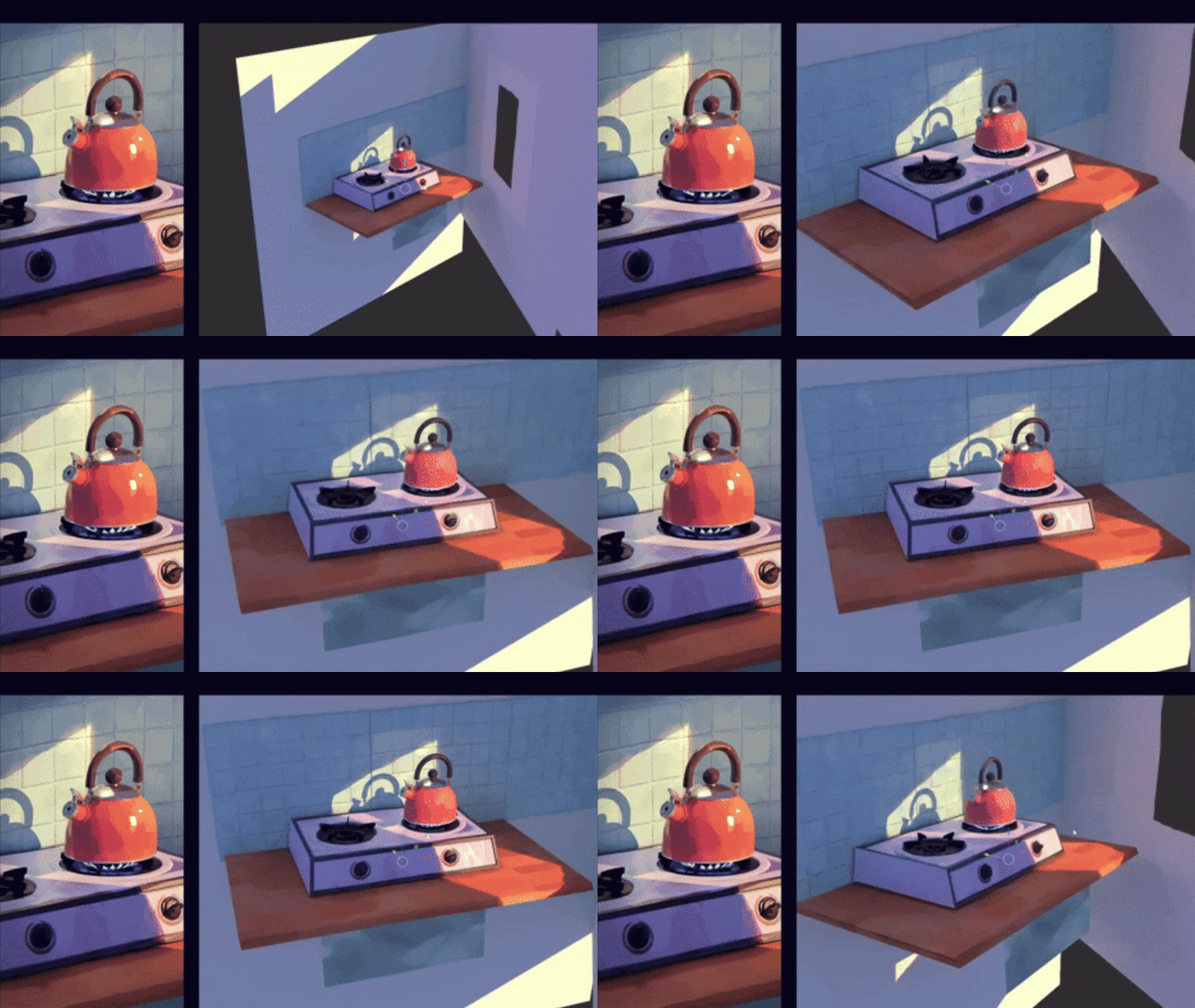
A painterly look in 3D means giving your renders the charm of hand-crafted art – soft brush strokes, vivid colors, and stylized lighting. Many artists strive to make 3D animation look painted in Blender by blending traditional 2D aesthetics with modern 3D tools. This guide covers things to know and techniques for that goal: from painterly shaders and painterly textures to stylized lighting, camera animation for painterly animation, and useful addons for painterly look in Blender. We discuss examples and expert tips (both verified and community) and link to official docs and tutorials.
Stylized rendering relies on creative choices rather than realism. As one guide notes, stylized textures are often hand-painted to suggest detail instead of mimicking reality. In practice this means simplifying forms, using flat color transitions, and emphasizing mood. We’ll show how Blender’s materials, lights, and even Grease Pencil can help achieve a 2D-like, painterly effect.
Introduction to Creating a Painterly Look in Blender
The painterly look is about capturing the feel of an illustration or painting within 3D scenes. Instead of photorealism, you emphasize artistic strokes, color contrasts, and composition. To do this in Blender, you typically combine hand-drawn techniques (like paintbrush-style textures or grease pencil outlines) with 3D models and animation. The result is a hybrid that feels hand-crafted yet dynamic.
Key strategies include custom shaders (e.g. cel or ramp shaders), stylized lighting (flat shadows, colored highlights), and deliberate camera moves. For example, you might disable specular highlights (to avoid glossy realism) and paint lights and shadows directly on the model, as artist Omar Faruq Tawsif does. Also, adding a post-process Kuwahara filter in the compositor can mimic brush strokes by smoothing regions while preserving edges. Throughout this article we’ll cite tutorials and art breakdowns so you can see how top artists achieve these effects.

Understanding the 2D Aesthetic in 3D Animation
Achieving a 2D look on 3D models starts with understanding what makes 2D art distinct: flat shading, exaggerated colors, and clear silhouettes. Stylized 3D often discards complex lighting – instead of soft global illumination, you use graphic light and shadow regions. Techniques like two-tone lighting (inspired by anime) divide faces into flat light/shadow areas. You can also color your shadows or highlights (for example, teal shadows with warm key lights) to mimic 2D shading.
To simplify shapes, avoid heavy surface detail: trim down fine textures and rely on broad strokes. A stylized shader might remove high-frequency detail and quantize colors, giving a painted feel. In practice, artists often use gradient ramps or color-band nodes so that surfaces only show a few bands of tone, as if painted. Edge lines can also help: using Blender’s Freestyle or outline shaders gives a hand-drawn border to meshes. In summary, think like an illustrator: prioritize clear shapes, strong silhouettes, and flat shading to give 3D objects a convincing 2D vibe.
Utilizing Painterly Shaders for a Hand-Painted Effect
Painterly shaders are custom materials that mimic brush strokes and painted textures on 3D surfaces. In Blender, you can build these in the Shader Editor using noise, ramps, and masks. A common approach is to smear or stylize normals: for example, mix in noise textures on the normal input to blur detail. As Maxime Heckel notes, a good painterly shader will often remove fine surface detail and preserve edges. In practice, artists might smear normals with Voronoi or noise, then overlay a brush-texture mask.
Another trick is to use Color Ramps on lighting or base colors. For instance, feed the dot product of the light and normal into a Color Ramp to create flat light bands. You can also quantize colors by snapping shader outputs to a palette or banding them. The effect is similar to a cel shader: flat color regions and crisp edges. Don’t forget shadow and highlight tuning: reducing specularity (as recommended by Omar Faruq Tawsif) avoids shiny realism and helps the result appear hand-painted. Finally, for textures, use greyscale or line-art masks (via Image Textures or Grease Pencil) in your shader for stylized details like cross-hatching or canvas texture.
Verified tip: Blender artist Omar Faruq Tawsif provides custom hand-paint brushes for Blender’s Texture Paint, enabling you to paint directly on 3D models for a true 3D-painted look.

Techniques for Painterly Lighting in Blender
Lighting is a powerful tool for creating a painterly feel. Rather than realistic light bounces, use artistic lighting: hand-painted light on textures or flat, colored lighting. As one expert suggests, try painting lights and shadows in your texture maps themselves (turning off Blender’s specular highlights entirely). This way the model looks like it was painted with highlights and shadows baked in.
Another technique is simple yet effective: use one main light with soft shadows and fill light to suggest depth. Blender’s volumetric or fog effects can add atmosphere, emulating misty, layered paintings. Florian Renaux’s Morning Walk scene, for example, uses volumetric fog and color grading in post to achieve a dreamy painterly mood. Color temperature is key: consider tinted lights or colored shadows (as noted above) to enhance the art style.
Experiment with non-photoreal setups: clamp light bounces, remove environment reflections, and avoid bloom or glare. If you do use bloom, make it subtle and color-matched. Also, try reducing shadow contrast – 2D art often uses gentle shading, so widen your light source or soften shadows. The goal is to evoke the controlled, deliberate strokes of a painter rather than the randomness of real-world lighting.
Applying Painterly Textures to 3D Models
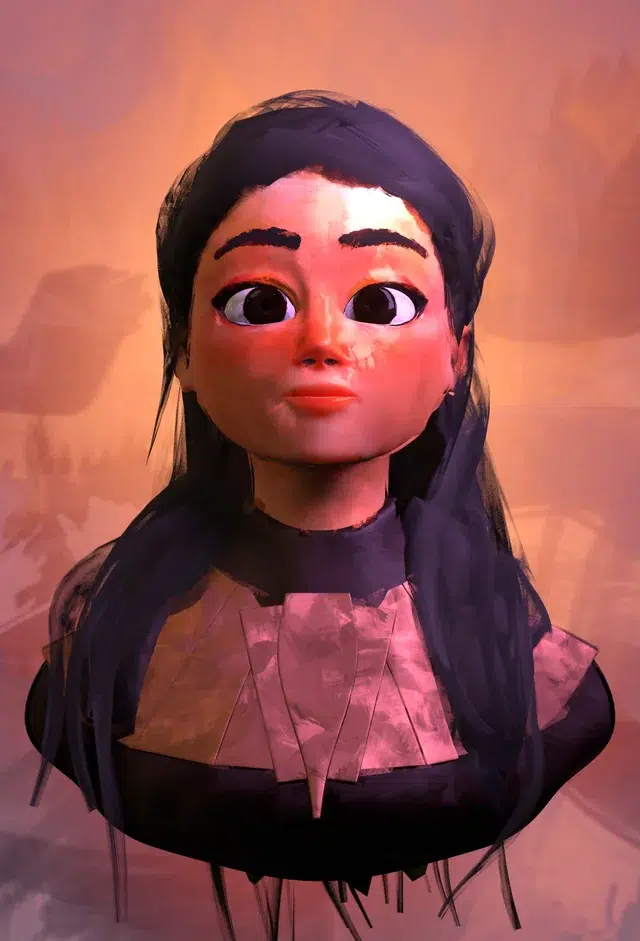
Hand-painted textures are at the heart of the painterly look. Instead of PBR or photo-textures, use stylized or painted textures. Many artists paint textures in software like Krita or Photoshop and then apply them to their UVs. The GarageFarm guide on stylized rendering notes that hand-painted textures “suggest surface detail without relying on high-frequency detail”. This means you paint in large color blotches or brush strokes that imply material, rather than literal details.
In Blender, you can also paint directly on models. For instance, Omar Faruq Tawsif’s brush pack lets you paint 3D scenes entirely inside Blender, using Blender’s Texture Paint mode. This keeps your workflow seamless – you paint onto the mesh and see results in real-time. The brushes in that collection are designed for painterly strokes, making creating an “illustration” effect easier. Faruq notes that using these brushes lets him use nearly 100% of his UV space, versus 60-75% when painting externally.
Tips: Keep UV seams hidden or masked, so brush strokes flow uninterrupted across the model. Limit your color palette to a few harmonious hues, and use blending or smudging to soften transitions. You can also overlay subtle noise or canvas texture in a shader to simulate brush grain. If you prefer external painting, bake a UV snapshot, paint in 2D, then import it back. Use Substance Painter or Blender’s own tools to mix hand-painted layers with procedural grunge for variety (as a compromise).
Camera Animation Tips for Painterly Animations
Camera movement can greatly affect the painted feel. In 2D animation, even a static scene often has subtle “camera” pans or shakes. In 3D, treat your camera like a brush. Try slow, smooth pans or zooms instead of fast cuts. A parallax move (camera sliding sideways) can make static layers feel like a 2.5D painting. You might even simulate a slight handheld jitter to add life, as one animator did for a stop-motion short; he animated his camera as if it were hand-held, bringing viewers closer to the characters. This made the scene feel more intimate and painterly.
Keyframing style matters: use ease-in/ease-out on moves to mimic the arc of a painter’s glance. Avoid real-world camera effects like DOF (which can blur detail oddly). Instead, consider drawing focus with 2D elements or lighting. For instance, you could animate a grease pencil stroke that “draws” something as the camera moves. If your scene is truly static, a very slow orbit or a “reveal” shot (camera creeping around an object) can showcase the art like a portrait. Finally, keep the compositional principles of painting in mind: balance your frame and guide the viewer’s eye as a painter would.
Addons to Enhance the Painterly Look in Blender
Blender’s community has developed tools to speed up painterly workflows. Notably, the Brushstroke Tools addon (by Blender Studio) generates 3D brush-stroke geometry via Geometry Nodes. With it, you can flood a model with procedural brush strokes or manually draw strokes on the surface, creating a layered paint effect in real-time. This is especially useful for building complex “brushwork” detailing.
For texturing, the custom Omar Faruq Tawsif brush collection (referenced earlier) is available on Gumroad. Installing it adds a pack of artistic brushes to the Texture Paint workspace, enabling rich painterly textures without external programs. The Grease Pencil itself has many addons (like “Deep Paint” on Blender Market) for turn-based 2D painting on 3D models.
Other useful tools include Blender’s Freestyle (built-in NPR line renderer) for outlines, and Kuwahara filter in the Compositor (in Blender 4.x) for painterly blur. There are also stylized post-process addons (like the Painterly filter) that instantly add brush-like effects. In general, look for NPR or stylization kits on Blender Market or the Blender Add-ons site. Combining these with Blender’s grease pencil and compositing can dramatically boost the hand-painted look.
Community observation: The official Blender extensions page highlights Brushstroke Tools as “layers of 3D brushstrokes… generated procedurally”. This is a great example of how geometry nodes can emulate painterly layers inside Blender.

Combining Grease Pencil with 3D Models for a 2D Effect
Blender’s Grease Pencil lets you literally draw 2D strokes in 3D space. You can overlay these strokes on top of 3D models to simulate hand-drawn outlines, hatching, or highlights. According to the Blender Manual: “Grease Pencil is a Blender object… used to make traditional 2D animation… placing it in 3D space as a collection of points”. In other words, you can sketch over your 3D scene as if you were painting on a canvas.
Practically, you might use Grease Pencil to trace an outline around a model, or to add expressive strokes (e.g. scribbles of light or shadows). Some artists create 3D backgrounds and then draw characters or accents with GPencil on a separate layer. You can also convert your 3D scene to line art (using the Line Art modifier) and render that as a Grease Pencil layer. These techniques blend the crisp geometry of 3D with the charm of 2D illustration.
Tip: Animate Grease Pencil layers alongside your camera. For instance, draw frame-by-frame “boil” or texture variations on top of 3D surfaces to simulate a living painting. Or use shader-to-vertex tricks (e.g. convert strokes to mesh) for hybrid effects. Grease Pencil effectively bridges the 2D and 3D worlds, making your animation feel hand-painted.
Best Practices for Rendering Painterly Animations
Rendering for a painterly look has its own best practices. First, work in high resolution and consider downscaling: real paintings are often high-detail. Keep consistent lighting and texture across frames to avoid distracting flicker. Since you’re stylizing, you can often get away with fewer samples in Cycles (to retain a bit of noise and “imperfection” like paint granulation) or use Eevee for speed with Dither enabled to break up banding.
In the Compositor, post-processing is key. The new Kuwahara filter node (Blender 4.x) is explicitly designed for this style. As the Blender manual explains, the anisotropic Kuwahara preserves edges while smoothing regions – “similar to brush strokes” in effect. This makes it ideal for painterly passes. Artist Paul Guilhem Repaux used Kuwahara plus noise to get a watercolor look in his 3D landscape. In practice, you might render a clean image and then use Kuwahara + a little noise or blur to mimic paint strokes.
Also leverage Blender’s built-in stylized tools: the Freestyle line renderer for crisp edges, and Eevee for fast test renders. Freestyle can add outlines or hatching in post, giving a classic cartoon style. Finally, always render to an image sequence rather than a compressed movie for better control in post. This lets you apply different filters per frame if needed, ensuring smooth consistency. By combining these practices – consistent lighting, painterly post-effects, and creative filtering – your final animation will hold together as a cohesive hand-painted piece.

Case Studies: Successful Painterly Animations in Blender
Several Blender artists and projects have showcased impressive painterly styles. A Home for Swallows is an upcoming short where artist Alan Wyatt developed an entire NPR pipeline. He built Live Paint compositing filters that give everything a traditional art look. (According to 80.lv, Wyatt “worked on the painterly effect for the pipeline, enhancing the visual style with procedural filters”.) The animated tests hint at fluid, brushy motion.
Another example is Morning Walk by Florian Renaux. In a breakdown, he explains how post-process steps (volumetric fog and color grading) gave his lakeside scene a dreamy, painted ambiance. He even adds a final “paint effect” in Photoshop/Topaz on still frames to reinforce the style.
More recently, artist Simon Zhang shared a rendered landscape where he combined a noise texture and compositing tricks. Zhang’s shared setup uses a noise grunge texture on the scene and presumably a compositing filter to yield a watercolor-like finish. He notes using the Botaniq add-on for plants and hints at a tutorial for his painterly effect. The result (visible in 80.lv) looks like a still painting come to life.
These case studies show that Blender can produce high-quality painterly results when using a consistent artistic pipeline: hand-painted textures, custom shaders, and final compositing. They also highlight community resources (like Wyatt’s Live Paint filter and Zhang’s noise method) that you can adapt for your projects.
Common Challenges and How to Overcome Them
Going painterly has pitfalls. One common challenge is inconsistent style: mixing realistic elements with stylized ones can break the illusion. To avoid this, apply your artistic choices uniformly (textures, lighting, even camera animation) so nothing feels out of place. The GarageFarm guide warns to use a coherent visual language for all assets.
Another issue is overdoing detail. Paradoxically, a high-res 3D mesh can ruin the look if it’s too sharp or noisy. Counteract this by baking details, smoothing normals, or using post-filters (the Kuwahara filter again helps erase needless detail while keeping edges crisp. As one artist emphasizes, specular highlights (which bring realism) should usually be minimized or off for a painterly style.
Managing Blender’s render settings can be tricky too. For instance, Freestyle outlines can flicker if frames aren’t consistent. Solve this by enabling “animate” in Freestyle line settings and ensuring camera paths are smooth. Also, since stylized scenes often use unusual materials, preview often: Eevee can give instant feedback on looks and help catch issues early.
Finally, remember performance: heavy shaders (many noise nodes or high-res textures) and large scenes can slow rendering. Keep shaders as simple as possible (GarageFarm advises against “overcomplicated shaders”) and use proxies or LOD techniques for background objects if needed. With careful planning and testing, you can overcome these hurdles and maintain a consistent, high-quality painterly animation.

Conclusion: Bringing Your 3D Animations to Life with a Painterly Style
Achieving a hand-painted look in Blender is an art in itself – it requires melding 2D artistry with 3D tools. By using painterly shaders (smooth ramps, custom brushes), painterly textures (hand-painted or stylized maps), and painterly lighting (flat or colored light), you can transform a 3D scene into an illustration. Careful camera animation and leveraging addons like Brushstroke Tools or Blender’s Grease Pencil further reinforce the effect.
As the examples show, it’s entirely possible to make Blender renders look like paintings. It often takes extra steps (turning off realism features, adding post-process filters, or editing textures by hand), but the payoff is a unique, storybook quality. With practice and experimentation, you’ll learn which combination of shaders, lights, and filters best “sticks” the painterly style in your work.
Frequently Asked Questions (FAQs)
- How can I make 3D animation look painted in Blender?
Use non-photorealistic techniques. This includes hand-painted textures, custom painterly shaders (like color ramps and noise-blended normals), and stylized lighting (soft or colored light). Also consider Blender’s compositor – apply filters like Kuwahara to mimic brush strokes. Tutorials recommend disabling specular highlights and painting shadows on textures. Combine these with artistic camera moves and post-process color grading, and your 3D animation will have a convincingly painted feel. - What is painterly lighting in Blender?
Painterly lighting refers to light setups that feel hand-painted. Instead of realistic lighting, use simple key lights, gentle fill lights, and perhaps fog or colored atmosphere. You might paint lights directly onto textures (as Omar Faruq Tawsif does). Stylized lighting techniques include “two-tone lighting” with flat light/shadow bands and tinted shadows. The goal is to accentuate form with artistic intent rather than physical accuracy. - How do painterly shaders work?
Painterly shaders intentionally simplify and stylize the appearance of materials. They often remove small details (smooth normals, erase textures) and preserve strong edges. Artists use Blender’s Shader Editor with Color Ramps to create flat lighting bands, and overlay hand-drawn texture maps or noise masks to simulate brush strokes. The result is a material that looks like it was painted by hand. - How can I achieve a 2D look on 3D models?
Focus on silhouette and flat shading. Simplify your model shapes and use shaders with minimal gradient. A common method is cel-shading, where light and shadow are cut into solid regions (using ramp nodes). Add black or colored outlines via Freestyle or Grease Pencil. For textures, paint details on UVs instead of relying on real-world images. Blending 2D artwork (for example, by using Grease Pencil strokes over 3D) also helps the final render read as 2D. - What are good things to know and techniques for painterly style?
First, remember consistency: keep your style unified (textures, lighting, camera). Know that less is often more – too much detail can break the illusion. Key techniques include using vertex color or layered nodes to tint areas, applying post-process filters (like Kuwahara) to “paintify” the image, and even painting over frames in 2D if needed. Watch community breakdowns (like those by Omar or Alan Wyatt) to pick up practical tips like disabling specular highlights and using volumetric effects. - How should I animate the camera for a painterly animation?
Animate it gently, as if you’re moving a canvas. Slow pans, subtle zooms, or slight tilts give a dynamic feeling without distracting. You can mimic a real painter by adding a tiny handheld shake – Daria Kashcheeva did this in her film by animating her camera movements. Avoid rapid, jarring cuts. Instead, let the camera flow through the scene like viewing a painting come to life. If using multiple layers, a parallax or multi-plane move enhances depth. - What addons help create a painterly look in Blender?
Several tools can assist. The Brushstroke Tools addon (Blender Studio) generates procedural 3D brush strokes on your models. Texture-paint addons like Omar’s custom brushes pack make hand-painting easier. For outlines, Blender’s Freestyle is built-in. There are also stylized compositing addons (like Painterly Filter) and Grease Pencil extensions (e.g. Deep Paint addon on Blender Market). These collectively speed up the creation of that 2D/painted effect. - How do I create painterly textures in Blender?
You can paint directly in Blender’s Texture Paint mode using artistic brushes (like Omar’s pack). Work on your model’s UVs, painting broad strokes of color and shading. Alternatively, create textures in 2D software: export a UV snapshot, paint in Photoshop or Krita with a stylized brush style, then re-import. Use layers and masks to separate colors. Remember to use a limited palette and add subtle noise or canvas grain for authenticity. - Can I combine 2D and 3D in Blender for this effect?
Yes. Blender’s Grease Pencil is perfect for overlaying 2D art on 3D scenes. You can draw directly over your 3D view, adding hand-drawn outlines or annotations. Some artists use Grease Pencil to add final stylized touches (like highlights or lines) atop their 3D renders. Essentially, you can render a 3D scene and then animate 2D GPencil strokes on top, blending the worlds. This hybrid technique preserves the 2D feel even in 3D shots. - How do I render painterly animations without losing detail?
Render at high enough resolution, then use post-process to stylize. For example, render a clean image sequence in Cycles (with moderate sampling so you have some noise) or in Eevee with filmic color. Then add effects: a subtle Kuwahara or blur filter will smooth details into “brush strokes”. Use Freestyle for consistent outlines. Ensure your color management matches an artistic look (scene-referred, with creative LUTs for color grading). And keep an eye on consistency between frames – animate filters or camera so no flicker occurs. In short, render crisp 3D frames, then “paint them over” with post-processing.

conclusion
Achieving a painted style in Blender is a creative process as much as a technical one. By studying the painterly look – flat shading, vibrant color, expressive lighting – and using Blender’s tools (shaders, lights, Grease Pencil, and post-filters) in new ways, you can transform any 3D animation into a hand-drawn masterpiece.
Start with simple scenes, apply one stylized element at a time (for example, hand-paint one texture or adjust one light to be non-realistic), and iterate. Use the examples and tips above as a checklist: stylize your shaders, textures, and lighting consistently; animate your camera thoughtfully; leverage addons and Grease Pencil; and finalize with compositing magic like the Kuwahara filter. With practice, your 3D animations will truly look painted – bringing a unique, artistic life to your work.
sources and citation
- Blender Manual – Grease Pencil Introduction
link- Introduction — Blender Manual
source- Blender Manual. - Blender Manual – Compositor: Kuwahara Node
link- Kuwahara Node — Blender Manual
source- Blender Manual. - Stylized Rendering in 3D: A Guide to Artistic Expression Beyond Realism, GarageFarm
link- Stylized Rendering in 3D: A Guide to Artistic Expression Beyond Realism
source- GarageFarm.NET blog. - Bringing Stylized Scenes to Life, GarageFarm
link- Exploring Aesthetics in 3D Rendering: Common Styles and Techniques
source- GarageFarm.NET blog. Closest official GarageFarm match I found for this entry. - Brushstroke Tools – Blender Extensions (official addon description)
link- Brushstroke Tools
source- Blender Extensions. - Maxime Heckel – On Crafting Painterly Shaders
link- On Crafting Painterly Shaders
source- Maxime Heckel Blog. - Omar Faruq Tawsif interview – 3D Hand-Painted Brushes (80.lv, Dec 2022)
link- A Collection of Great Brushes for Texture Painting in Blender
source- 80.lv. - Omar Faruq Tawsif lighting – Blender NPR Painterly Lighting (80.lv, Oct 2024)
link- Learn How to Create Painterly-Style Lighting in Blender
source- 80.lv. - Florian Renaux – Morning Walk Project: Painterly Environment (80.lv, Apr 2024)
link- How to Create a Painterly Lakeside Cabin Environment in Blender
source- 80.lv. - Alan Wyatt – A Home for Swallows (painterly effect pipeline) (80.lv, May 2024)
link- Check Out This Beautiful Animation With Blender’s Painterly Effect
source- 80.lv. - Simon Zhang – Gorgeous Painterly Landscape in Blender (80.lv, Mar 2025)
link- 3D Artist Showcased Gorgeous Painterly Effect Made with Blender
source- 80.lv. - Paul Repaux – Watercolor-like 3D Landscape (80.lv, Aug 2024)
link- This Beautiful Painterly Landscape Is Actually 3D
source- 80.lv. - GarageFarm Blog – Stylized Rendering (Blender tools and workflows)
link- Stylized Rendering in 3D: A Guide to Artistic Expression Beyond Realism
source- GarageFarm.NET blog.
Recommended
- How to Transfer Daz 3D Hair to Unreal Engine: Groom Workflow for Metahuman Integration
- How Do I Track an Object With a Camera in Blender?
- Killing Floor dev Tripwire Interactive lays off 23 employees: what happened, who was affected, and what’s next
- Hades 2 Aphrodite Guide: Boons, Character Design, and Gameplay Mechanics
- Hellblade 2 and Unreal Engine 5: What Makes the Sequel a Visual Breakthrough
- How do I toggle between camera views in Blender?
- How to Make Stylized Anime Hair Naturally in Blender
- Is Arcane 3D Animated? Unveiling the Secrets Behind Its Revolutionary Style
- Exporting Custom MetaHuman Grooms from Maya XGen to Unreal Engine: A Comprehensive Guide





























































































