







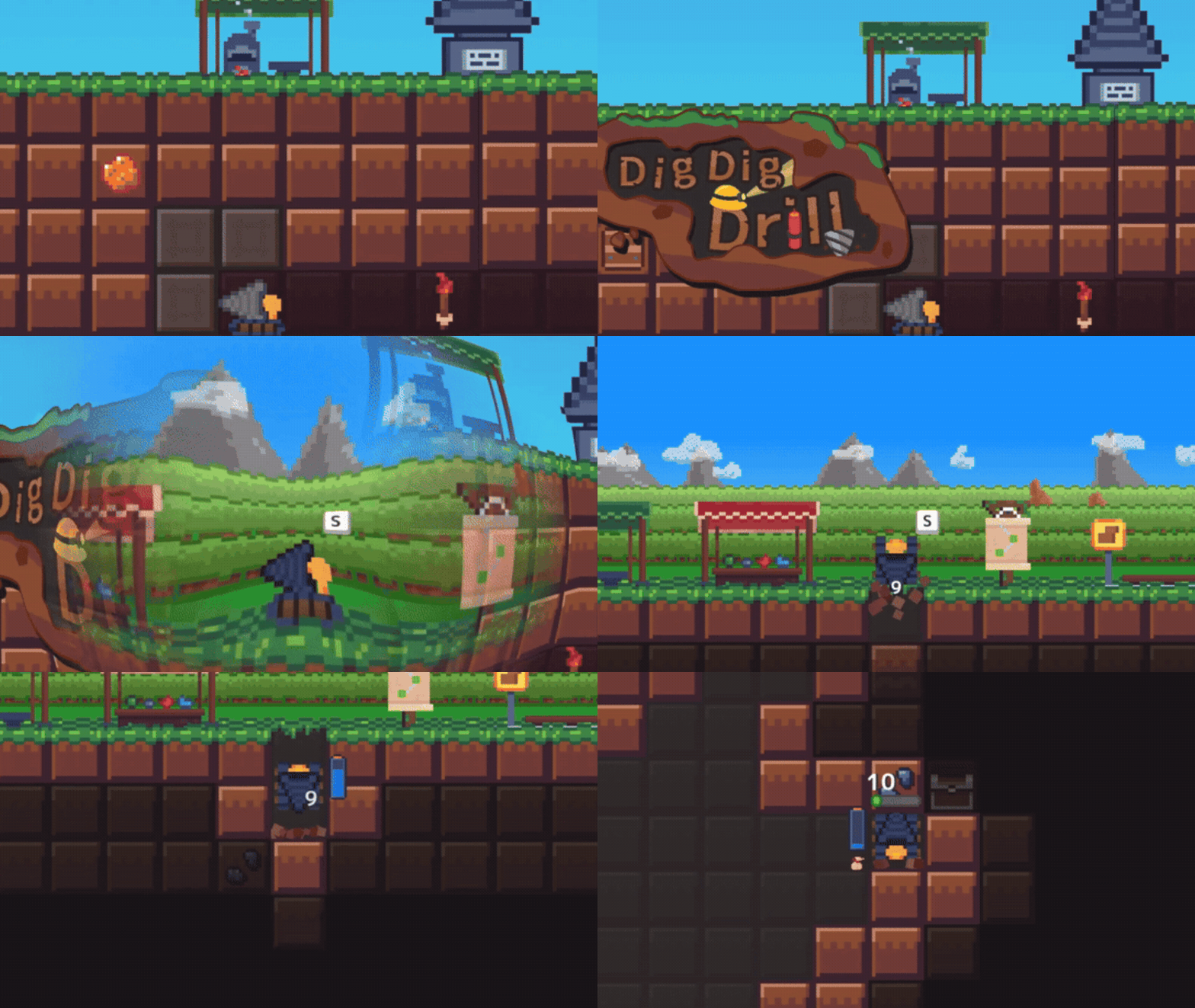
DigDigDrill is an underground mining and resource-collecting game built around relaxed, “no enemies / no time limits” digging, plus a puzzle-like forging system for crafting drills from ore shapes and blueprints. The core progression loop is straightforward: mine blocks to collect ores and treasure chests, return to the surface when the bag fills, and turn resources into upgrades and stronger, synergy-focused drills on the way to floor 999 and beyond.
This article consolidates mechanics, optimisation strategies, and endgame systems using a mix of official store descriptions, developer comments, patch notes, and well-documented community references, including Japanese resources for the game’s original title ほりほりドリル (Horihori Drill).

DigDigDrill beginner guide and best early-game drill upgrades
Early progression is mostly about raising baseline stats (damage/dig power, energy economy, bag size, and movement), because several “barrier” checkpoints require sufficient damage output to clear. A commonly noted early wall is the “healing block” barrier that appears at regular intervals; one documented approach is either overpowering the regeneration with better drills or destroying the jewels/crystals that act as the healing source.
Surface upgrades matter because they set the floor for every run, regardless of which drill build is equipped. In one widely shared Steam guide, Bag size upgrades increase capacity in +5 steps up to a stated maximum of 70, and Energy upgrades increase max energy in +10 steps up to a stated maximum of 110. That same reference describes Drill Slots upgrades that expand loadout flexibility (including “sub slots” used to inherit bonuses), which becomes increasingly important once synergies and mixed-purpose builds (speed + bombs + luck) become central.
DigDigDrill tips and tricks for efficient mining routes
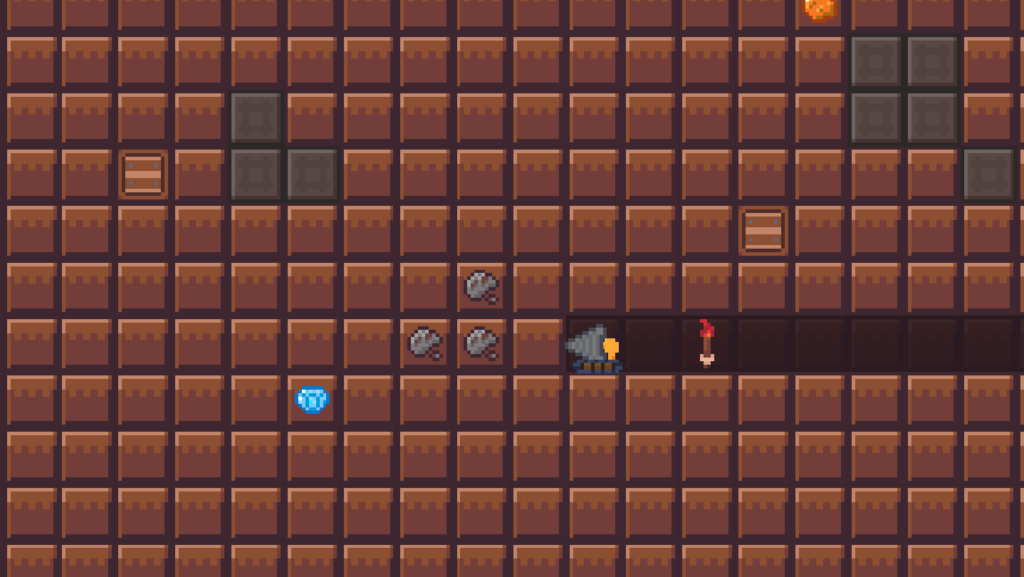
Efficient routing in DigDigDrill generally rewards minimising backtracking and timing “return to surface” moments around inventory pressure and milestone barriers. The game loop explicitly supports this: mine, fill the bag, return to the surface, then resume repeating until floor 999. Community route descriptions often emphasise sweeping horizontally across a layer to collect ore clusters, then shifting down several tiles to repeat, using visibility tools (lantern/torches) to keep scan coverage high.
Because the mine can be regenerated (see depth rewards below), “route efficiency” is less about preserving a permanent tunnel network and more about repeatable patterns that maximise ore and chest density per minute. A practical implication is that highly explosive “screen-clear” styles can be optimal for farming phases, while more controlled drilling (reduced blast radius, higher sight/torch play) becomes valuable in curse-sensitive endgame areas.
DigDigDrill depth rewards guide and when to reset the mine
Progression gates and facilities are tied to depth rewards. One published Steam guide lists major unlocks including: upgrades at 50, warp teleports at 100, a map at 150, a warp building at 200, and a “Ground Builder” at 300 that regenerates the entire underground while returning placed teleports and not resetting the “depth reward counter.” The same source lists later utility unlocks: blueprint creation at 600, drill fusion at 800, and a “Ruin Builder” at 999 that opens the endgame location.
Reset timing (regenerating the underground) is best viewed as a farming lever. The Ground Builder is described as fully regenerating the underground (including recovery resources), effectively letting the same depth band be re-farmed for ores and chests. A separate Japanese guide similarly explains that “ground creation” regenerates the underground and recovers placed warp devices, encouraging frequent use rather than hoarding.
How to farm gears and upgrade materials in DigDigDrill
“Gears” and similar upgrade materials are repeatedly referenced as a mid-to-late progression accelerator. One Japanese play diary describes a “modification” system that uses gears to raise simple stats and explicitly notes that respec/reallocation can be done at any time, reducing the risk of experimenting with builds. A Nintendo Switch review also describes resetting the whole mine specifically to gain “bonus gears,” framing resets as a legit upgrade-material strategy rather than a setback.
For a more concrete drop source, the Steam guide describing depth rewards notes that opening golden chests has a chance to drop “black cogs” that grant +1 to a chosen stat, and that certain depth milestones directly award black cogs (e.g., 5 black cogs at 500 and again at 900).
DigDigDrill warp guide: how warps work and when to use them
Warps are a central time-saver once unlocked. A Japanese guide explains operationally that a warp device can be placed by a long-press, and that long-pressing again while overlapping it returns to the surface; travel from the surface back to the placed warp point is also supported. The same reference recommends the core rhythm: dig until the bag is full, warp up to deposit/reset inventory, then warp back to the deepest point and continue.
The timing advice aligns with depth reward unlocks: warps are awarded and later enabled through a warp building unlock, while mine regeneration returns warps to inventory for re-use. Warps therefore become a “compounding” investment each additional warp improves run cadence, which increases material inflow, which increases forging and upgrades, further reducing time-to-999.
How to craft drills in DigDigDrill using blueprint puzzles
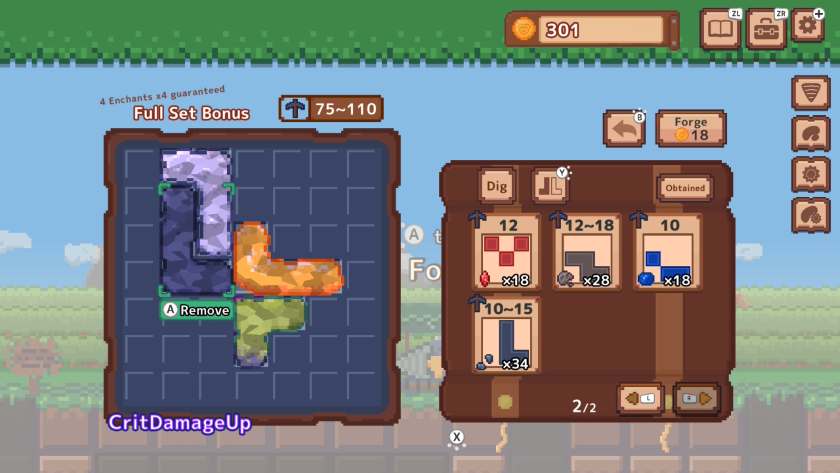
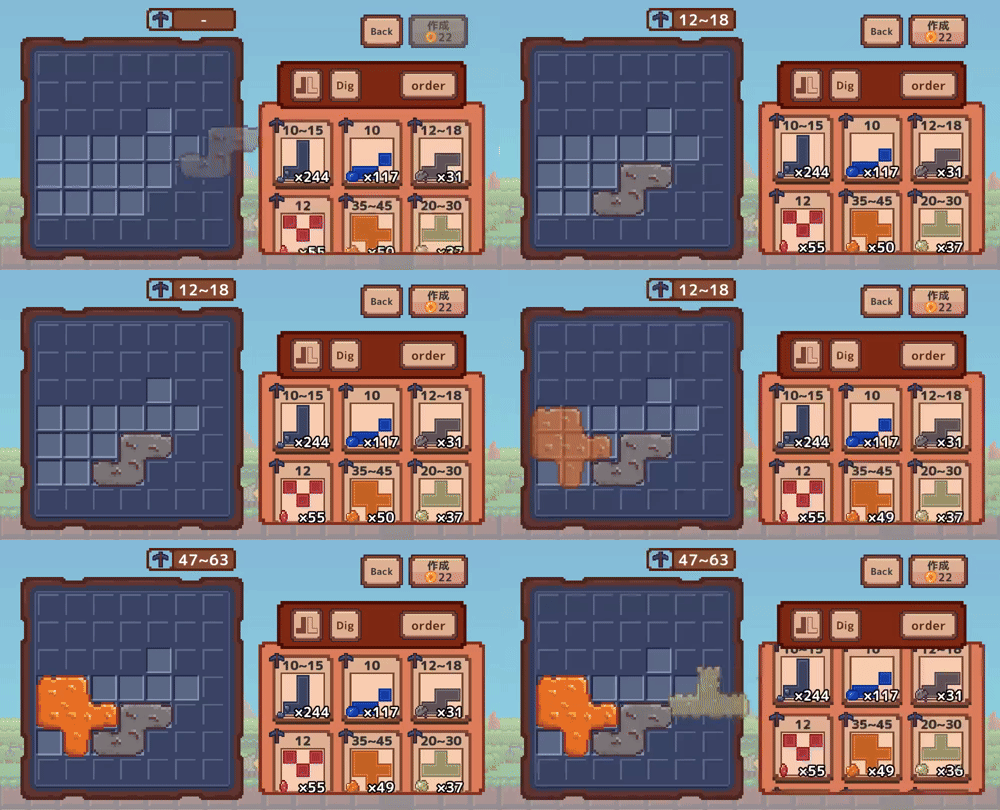
DigDigDrill’s defining system is forging: drills are crafted by fitting ore pieces (each with a distinct shape) into blueprint grids. The official store descriptions summarise this as “block-puzzle style forging” where smarter fitting can produce a stronger end result, while synergistic special effects (enchants) let builds specialise in movement speed, explosives, or other optimisations.
Importantly, a developer explicitly clarified that filling every grid square is not required just to craft a drill: placing 1–2 ores and pressing create is enough to produce a drill (with the intention to address the misunderstanding). This matters because early-game ore variety can be limited, making perfect fills unrealistic; crafting “good-enough” drills to push depth and unlock more ore types is often the fastest path.
Community-maintained documentation (Japanese) provides detail on how effects are rolled. It states that the set of special effects (abilities/enchants) offered by a crafted drill depends on the attributes of the ores used to fill the blueprint, with up to four effects selected from a pool of four to six based on those attributes. The same reference states a “full fill” bonus: crafting without leaving empty cells guarantees four special effects.
Blueprint rarity also affects control over outcomes. The same Japanese documentation describes two blueprint types (blue and purple), claiming purple blueprints drop only from golden chests and can guarantee a specific effect if a particular cell is filled; it also notes a special rule where ores placed on purple marked squares do not enter the effect-selection lottery. These mechanics, taken together, are the foundation for “target farming” specific enchants rather than relying purely on randomness.

DigDigDrill chest farming tips and how to get more blueprints
Chests are explicitly part of the primary loop (mine → collect chests → return to surface), and they are also directly connected to crafting power through blueprint acquisition. Nintendo-focused coverage highlights that collecting hidden chests and blueprints enables crafting increasingly powerful drills, and even frames blueprint pieces as “connecting” to help access new ore types.
From a mechanics standpoint, golden chests are particularly valuable because they can drop rare blueprint types and stat materials (e.g., “black cogs”). The Lockpicking-style enchant (“鍵開け”) described in Japanese documentation is also explicitly tied to golden chests, giving a chance not to consume a key when opening them and even listing an “additional gold chest” bonus tied to the ore-tree system.
Because blueprint control improves dramatically with full fills and purple blueprint rules, chest farming tends to scale: better enchants → faster chest access → more blueprints → more consistent targeting of best-in-slot effects.
DigDigDrill bombs and utility items: best uses for clearing blocks
Explosives are both an official and community-recognised optimisation axis. Switch-focused coverage explicitly calls out “explosion-enhancing drill tips” that increase dynamite blast size, enabling rapid clearing of large areas. Reviews of the game similarly highlight explosive enchants such as Bomber (increasing bomb range) and chance-based blast triggers tied to drilling crates, ores, or battery recharging.
Japanese documentation details the underlying enchant triggers and probabilities. The “Energy Explosion” effect (“エネルギー爆発”) is described as a battery-replacement trigger that can place a bomb with a stated 40/50/60% activation rate (depending on enchant tier), while “Crate Explosion” (“木箱爆発”) and “Ore Explosion” (“鉱石爆発”) similarly trigger on crate or ore destruction with stated 40/50/60% rates. “Explosion Enhance” (“爆発強化”) then increases explosion range by 1/2/3 tiles, functioning as the core scaling stat for screen-clearing builds.
In endgame content where collateral damage matters (notably in ruins), players frequently recommend controlling blast radius through loadout swapping: one build places energy bombs (large clears), then switching to a torch/utility build reduces chain range to avoid destroying curse-related objects and “spirits.” This “place bomb → swap” rhythm is repeatedly described as a way to keep explosive efficiency while reducing unintended losses.
DigDigDrill ore list and what each ore is used for
Ores in DigDigDrill are not just currency they are the raw input for drill power and the attribute routing that determines which special effects are available when forging. Community documentation describes “ore attributes” (鉱石属性) as the driver for effect pools (4–6 candidates), with up to four chosen when a drill is crafted.
A practical, research-backed way to interpret “what each ore is used for” is:
- Dig power range (how strong it can make a drill head/body),
- Attribute category (which family of enchants it can roll into),
- Depth band availability (when it enters the loot table).

Core ore list with attributes and depth availability
The following ore list (names and depth bands) is documented in Japanese resources for ほりほりドリル / DigDigDrill and is useful for planning when specific enchant families become realistically farmable.
- Flint (採掘 / Mining): depth 1–70.
- Sapphire (スピード / Speed): depth 1–100.
- Iron (破壊 / Destruction): depth 70–140.
- Ruby (道具 / Tools): depth 101–200.
- Copper (収集 / Collection): depth 140–200.
- Tin (会心 / Critical): depth 201–270.
- Aquamarine (スピード / Speed): depth 201–300.
- Silver (探検 / Exploration): depth 270–340.
- Peridot (ラッキー / Lucky): depth 301–400.
- Gold (会心 / Critical): depth 340–400.
- Fossil (収集 / Collection): depth 401–470.
- Amber (道具 / Tools): depth 401–500.
- Coral (爆発 / Explosion): depth 470–540.
- Pearl (ラッキー / Lucky): depth 501–600.
- Platinum (採掘 / Mining): depth 540–600.
- Aluminium (探検 / Exploration): depth 601–670.
- Moonstone (スピード / Speed): depth 601–700.
- Cobalt (会心 / Critical): depth 670–740.
- Tiger’s eye (道具 / Tools): depth 701–800.
- Lead (爆発 / Explosion): depth 740–800.
- Turquoise (収集 / Collection): depth 801–870.
- Sunstone (道具 / Tools): depth 801–900.
- Barite (だいりせき) (採掘 / Mining): depth 870–940.
- Diamond (強化 / Enhancement): depth 901–999.
- Obsidian (破壊 / Destruction): depth 940–999.
An additional set of ores is listed as added in an update (ver1.1.0) in that same reference, including Shell, Damascus, Coal, Hihi’irokane, Meteoric iron, Mythril, Jade, Orichalcum, Titanium, and Adamantite, with their own attribute categories and depth bands.
What the ore attributes actually unlock in forging
Attribute families map directly to the enchants that can roll on the resulting drill. Japanese documentation lists attribute → ability groupings such as:
- Explosions: Ore/Crate/Battery-triggered explosions and explosion-range amplifiers.
- Collection/Lucky: extra ore drops (“GoodLuck”), bag-space avoidance (“SmartStorage”), lockpicking, coin gain, and the “Collector” scaling-damage effect.
- Enhancement: Destiny (global probability up), cost down, and duration extension (“ExtraTime / プラスタイム”).
- Exploration/Tools: lantern radius, torch range upgrades, torch placement triggers, and energy-saving triggers.
- Critical/Destruction: crit chance/damage and overheat-style damage/speed trade-offs.
This is why “which ore” matters even when the blueprint can be filled: ore selection changes the effect pool and therefore the probability of assembling a specific build archetype.
Best DigDigDrill drill enchantments for faster mining and survival
DigDigDrill’s build depth comes from stacking and combining enchants with compatible triggers (ore break, battery swap, crit, etc.) and then tuning the result for either speed (race to 999) or stability (ruins, curses, controlled clears). Many enchants are explicitly documented with activation rates and effects, enabling evidence-based optimisation rather than guesswork.
High-impact enchantments for fast progression
Dig Power Up (採掘力アップ) and Dig Speed Up (採掘速度アップ) are baseline enhancers: the Japanese effect table lists Dig Power Up as +10/+20/+30 dig power per tier and Dig Speed Up as +20/+30/+40% dig speed. Move Speed Up (移動速度アップ) is similarly listed as +20/+25/+30% movement speed, supporting faster routing and time-to-ore density.
Overheat (オーバーヒート) is a key “barrier breaker” option: it increases drill cost by 1, but raises dig speed and damage by +15/+20/+25% (with additional bonuses listed for the ore-tree system). Overheat therefore trades energy economy for raw throughput often valuable when hitting regeneration barriers or high-HP layers.
QuickStart (クイックスタート) and StartDash (スタートダッシュ) are time-savers: QuickStart increases dig and move speed after battery replacement (+30/+40/+50%), and StartDash boosts movement speed for the first 15 seconds (+50/+60/+70%). These effects are most valuable when battery cycling is frequent (bomb builds, energy saver play) or when runs are optimised around short, repetitive loops.
Survival and consistency enchantments for long runs
Destiny (運命) is documented as a global probability increase (+10/+15/+20%), directly strengthening any build relying on proc-based effects (extra ore, bombs, storage, energy saving, etc.). EnergySaver (節約) is documented as a chance not to consume energy while drilling (20/25/30%), with an additional “energy generation” bonus tied to the ore-tree system. Together, these reduce the “dead time” spent refuelling and improve sustained DPS.
Visibility tools are also survival tech. Lantern (ランタン) increases player light radius by 1/2/3 tiles, and Torch enhancement (たいまつ強化) expands torch light radius by 1/2/3 tiles. Torches can also be generated by triggers: CritLight (会心ライト) places torches on crit with a listed proc rate, and Scout (ていさつ) places torches on battery swap with a 50/60/70% proc rate. These tools become materially important in endgame areas where spotting “spirits,” curse objects, or route-critical structures is part of the success condition.

DigDigDrill best drill build combinations for progression
A research-backed way to think about “best builds” is by role separation, because the game supports multi-drill loadouts and swapping. The following combinations are consistently supported by documented mechanics:
- Bomb-clear build (farming/speed)
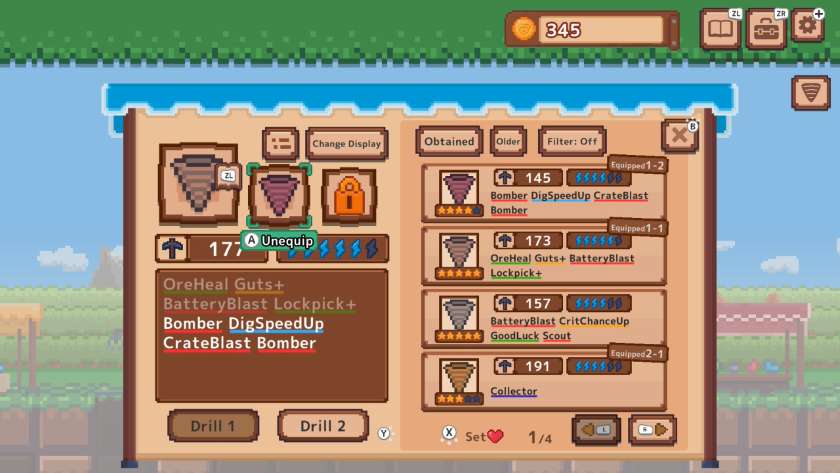
Energy Explosion (battery-swap bomb placement) + Explosion Enhance (blast radius) + a proc booster like Destiny. This maps to official messaging about “explosion-enhancing tips” and community emphasis on explosive builds for fast clearing. - Ore-output build (resource acceleration)
GoodLuck (extra ore on ore break) + SmartStorage (bag doesn’t fill on ore storage) + Destiny (proc boost). This combination aims to maximise ore per minute while delaying forced returns to the surface. - Barrier breaker / scaling build (high-HP layers, ruins)
Collector (damage increases as ores are collected) + SmartStorage (to prevent bag lock) + visibility utilities (lantern/torch systems). Japanese ruins guidance explicitly recommends Collector as a counter to sharply rising curse multipliers, since it scales “the longer you stay underground,” and also recommends pairing storage control to avoid bag saturation.
DigDigDrill ruins and curse mechanics guide
Endgame content after floor 999 includes high-difficulty “ruins” stages. Official descriptions and coverage reference curses as a progression modifier and warn that curses can hamper the day’s haul, adding strategic constraints beyond raw digging speed.
Japanese ruins documentation provides concrete mechanics: it states curses are applied every 100 floors, and that curse scaling depends on ruins level (1–10), with multipliers rising from ×30% at level 1 up to ×3000% at level 10. This explains why builds that trivialise the normal mine can still stall in higher ruins curse scaling effectively outpaces “flat” damage increases unless scaling or counterplay is used.
Common countermeasures cluster into three categories:
- Scaling damage + inventory control
Collector-based scaling is explicitly recommended in Japanese ruins strategy, paired with storage management so items do not accumulate in the bag. - Curse reduction play
A Steam thread describes a cautious approach: use bombs to clear tiles, convert certain potions to anti-curse with a secondary drill, and collect shrines until curse is reduced to zero, making later “DPS checks” comparable to low-level ruins. - Purification + controlled explosions
Multiple community references recommend purifying curse-linked objects before detonations. One Japanese diary advises using a Light Totem to purify cursed pots before exploding, and explicitly recommends swapping drill sets after placing energy bombs to narrow chain range and protect spirits and curse objects. A Steam guide echoes this caution, recommending limiting high-tier bomber stacking to avoid destroying cursed pots unintentionally, and prioritising sight/visibility.
Fastest way to reach floor 999 in DigDigDrill
Reaching floor 999 efficiently is a blend of baseline upgrades, forging strategy, and macro-routing using warps and resets. Official descriptions set floor 999 as the main target (“Your goal: Floor 999!”) while also indicating additional stages appear after clearing the game, so “fast to 999” is both a completion goal and the gateway to endgame systems.
From a mechanics standpoint, speed runs are constrained by periodic barriers and downtime. A Japanese play diary documents a regeneration barrier row every 100 depth that must be cleared to continue, either by overpowering its healing or by destroying the healing source jewels. These barriers are also represented in achievements (“No Help” requires reaching 999 without breaking healing crystals), implying that barrier management is intended as a major skill and build check.
A widely repeatable “fast progression” framework is therefore:
- Upgrade first (bag size, energy cap, drill slots) so each run yields more ore and fewer forced stops.
- Craft usable drills early rather than waiting for perfect blueprint fills; a developer confirmed drills can be created with only 1–2 ores placed.
- Pivot to targeted enchants once ore variety and blueprint control improve (full fill bonus, purple blueprint guarantees).
- Exploit warps to compress travel time and keep mining at deepest unlocked layers.
- Use mine resets to refresh ore/chest density and farm gears/cogs for permanent stats.
Because DigDigDrill supports different build archetypes (speed courier vs bomb clearer vs scaling damage), “fastest” will vary by player comfort. However, the documented enchant kit strongly supports a bomb-centric core (Energy Explosion + Explosion Enhance + Destiny/EnergySaver) for clearing, supplemented by a barrier-breaker swap set if required.
DigDigDrill achievements guide and fastest completion tips
DigDigDrill includes achievements that directly encode optimisation targets, especially around reaching floor 999 quickly and repeatedly. The achievement list includes time-based milestones: “RTA” (reach 999 within 30 minutes), “RTA!” (within 15 minutes), and “RTA?!?!” (within 5 minutes). It also includes repetition and endgame progression goals such as reaching 999 a total of 25 times (“Regular Customer”) and clearing ruins ranks (e.g., “Legend Explorer” for RuinsRank 10).
Achievement optimisation generally mirrors the build logic described elsewhere:
Time attacks (RTA series) tend to benefit from high movement speed, strong barrier-breaking damage, and warp usage to eliminate non-mining travel. Blueprint-related achievements (e.g., filling blueprint grids) reward mastering full fills, purple blueprint targeting, and ore-attribute planning to reduce wasted rerolls.

DigDigDrill endgame guide after floor 999
After reaching floor 999, the game unlocks additional stages that explicitly target “strong miners,” and community guidance describes the “Ruin Builder” as the functional unlock for the new endgame location. Endgame systems also expand build surfaces beyond drills: charms (another placement puzzle), haniwa, totems, and an “ore tree” style progression system are all referenced across reviews, patch notes, and community resources.
The ruins meta is strongly shaped by curse scaling and the need for controlled clears. Curses are noted in Switch coverage as a strategic twist; Japanese documentation then provides the numeric escalation per ruins level, explaining why builds that succeed at RuinsRank 1 can fail sharply at higher ranks. In response, endgame “standard practice” shifts toward:
- Collector scaling and bag-space suppression (SmartStorage, inventory control) to offset curse multipliers.
- Purification tech (Light Totem, torch play) and visibility stacks (lantern/torch range/sight equivalents) to reduce accidental losses and to locate objectives in ruins.
- Bomb discipline via loadout swapping, keeping explosive efficiency while preventing large-chain collateral damage to curse objects and spirits.
Finally, it is worth noting that a developer response in a “gate at 999” discussion stated an intention to rebalance end mechanics, meaning the precise tuning of the final gates/locks may shift across versions.
Frequently Asked Questions (FAQs)
- Is it necessary to fill every blueprint square to craft a drill?
No. A developer clarified that placing 1–2 ores and pressing the create button is sufficient to craft a drill, and that the current UI/tutorial flow caused misunderstanding. - What is the benefit of fully filling a blueprint?
Community documentation states that completing a blueprint without leaving empty cells guarantees four special effects (enchants) on the crafted drill. - How are drill enchantments decided when forging?
Japanese documentation describes the enchant pool as determined by the attributes of ores used to fill the blueprint, with up to four effects selected from a pool of four to six based on those attributes. - What is the single most important enchant for getting more ore?
“GoodLuck” (幸運) is documented as having a chance to drop an additional ore when an ore is destroyed (40/50/60% depending on tier), making it a direct ore-output multiplier. - How do bomb builds work in DigDigDrill?
Energy Explosion (エネルギー爆発) is documented as a battery-replacement trigger that places a bomb with a stated proc rate (40/50/60%), and Explosion Enhance (爆発強化) increases blast radius by 1/2/3 tiles. - What is the safest way to use explosions in the ruins?
Multiple community references recommend purifying cursed pots before detonations and swapping to a less-explosive loadout after placing bombs to reduce chain range and protect spirits. - How do warps work, and when should they be used?
A Japanese guide explains warps can be placed, used to return to the surface, and used from the surface to return to the placed point, enabling repeated deep mining loops until the bag is full. - When should the mine be reset/regenerated?
A Steam guide describes the Ground Builder (unlock listed at depth 300) as regenerating the underground so resources can be farmed again, while returning teleport devices and not resetting the depth reward counter making it strong for farming cycles. - Why does progress slow down at certain depths?
A play diary documents healing/regenerating block barriers every 100 floors, requiring either sufficient damage to outpace healing or destruction of the healing source jewels/crystals. - Are there achievements for speedrunning to floor 999?
Yes. The achievement list includes timed goals for reaching floor 999 within 30 minutes (RTA), 15 minutes (RTA!), and 5 minutes (RTA?!?!).
conclusion
DigDigDrill’s progression to floor 999 is best understood as an optimisation puzzle spanning three layers: permanent upgrades and gear/cog investment, blueprint and ore driven crafting control, and build archetypes tuned for either speed clears (explosions and movement) or endgame stability (curse management, visibility, controlled detonations). The strongest strategies emerge when these layers reinforce each other: ore attributes and blueprint control create reliable enchants, enchants accelerate farming, farming fuels upgrades and resets, and those upgrades reduce time to 999 while preparing the player for ruins difficulty scaling and curses.
sources and citation
Primary and semi-primary references (official descriptions, developer statements, and patch notes):
- Steam store description and feature summary: no enemies, no time limits, puzzle-like drill forging, Floor 999 goal, and extra stages for stronger miners. DigDigDrill on Steam
- Nintendo official store description for Switch: no enemies, no time limits, custom drill creation, and Floor 999 progression. DigDigDrill for Nintendo Switch — Nintendo Official Site
- Nintendo-focused announcement write-up covering blueprints, crafting, curses, explosion-enhancing abilities, and ore exchange upgrades. DigDigDrill announced for Nintendo Switch — Nintendo Everything
- I could not verify a direct public developer post for the “you do not need to fill every blueprint grid to craft a drill” citation, but this public review states exactly that mechanic. 『ほりほりドリル』レビュー — 電撃オンライン
- Steam news and patch notes index, including the “Reforge by Hammer” quality-of-life update and other ongoing changes. DigDigDrill Steam News Hub
- Ore list with depth bands, attributes, and notes on ores added in ver. 1.1.0. 鉱石一覧[ほりほりドリル] — robs-ark
- Ability and enchant effect table, including effects such as Destiny, Energy Explosion, SmartStorage, and Collector. 鉱石&ドリル特殊効果 — ほりほりドリル個人的攻略メモ
- Blueprint mechanics reference covering attribute-based effect pools, full-fill bonus, and purple blueprint rules. 100階層ごとの攻略法 — ほりほりドリル(DDDril)wiki
- Additional blueprint mechanics reference covering the purple-square exclusion rule and full-fill bonus details. 製作のコツ[ほりほりドリル] — robs-ark
- Ruins and curse scaling reference showing curse every 100 floors and level-based multipliers through level 10. 遺跡攻略 — ほりほりドリル(DDDril)wiki
- Depth rewards and reset-related progression reference, including Ground Builder, warp unlocks, and Ruin Builder-style progression systems. 施設一覧と使い方[ほりほりドリル] — robs-ark
- Warp usage and reset recovery guide noting warp placement strategy and recovery via ground reset. 初回攻略メモ — ほりほりドリル個人的攻略メモ
- Totem examples, including Light Totem purifying cursed pots lit by torches and Pierce Totem utility. トーテム一覧 — ほりほりドリル個人的攻略メモ
- Review and community observations on progression, resets, and practical drill-building strategy. DigDigDrill Steam Guides
- Community discussion corroborating bomb builds, curse management, Collector/Smart Storage strategies, and Ruins play patterns. Ruins level 8+ tips?? — Steam Discussions
- Achievement list covering RTA, RTA!, RTA?!?!, Ruins rank clears, and other endgame progression achievements. DigDigDrill Achievements — Steam Community
- Alternate achievement page that is easier to scan for the speedrun and endgame entries if you want a backup citation link. DigDigDrill Achievements — GameFAQs
- Press-release style announcement page with the same Nintendo-launch-era wording on curses, ore exchange, and crafting. GamesPress announcement for DigDigDrill on Nintendo platforms
Recommended
- How to Convert a Real Human to Metahuman Using Photogrammetry: Complete Workflow Guide for Unreal Engine 5
- Mastering Water Simulation in Unreal Engine: Techniques, Tools, and Best Practices
- Family Guy Stewie Spinoff Series Greenlit for 2 Seasons: Release Date, Plot, Cast, and Everything We Know
- How to Make a 3D VTuber Avatar: The Complete Guide for Beginners and Content Creators
- Fortnite Adding Ability to Create Your Own Star Wars Games: Star Wars Toolset Coming to UEFN (March 19, 2026)
- Amazon Introduces New DDoS Protection for Devs Using AWS GameLift Servers (How It Works + Setup)
- Digital Fashion in Blender & Marvelous Designer: A Comprehensive Guide
- Metahuman Creator in Unreal Engine: How to Build High-Fidelity Digital Humans Step by Step
- Brainrot Metahuman Animation for YouTube and Social Media: How to Create Viral Character Content in Unreal Engine 5
- IO Interactive and Build A Rocket Boy End MindsEye Partnership as Hitman Crossover DLC Is Canceled































































































