











Blender 5.2 LTS Introduces New Cycles Texture Cache System is designed to make Cycles far more memory-efficient in texture-heavy production scenes by generating optimized .tx textures and loading only what the renderer actually needs (right resolution, right tiles, right UDIMs) instead of pulling full image files into memory up front.
What is the Cycles Texture Cache in Blender 5.2 LTS
The Cycles Texture Cache in Blender 5.2 LTS is a rendering-side texture streaming and caching system that converts regular image textures into .tx files and then loads only the necessary portions of those textures during rendering. This approach targets two common bottlenecks in modern scenes: GPU/CPU memory pressure and the long “load everything before the first sample” startup behavior that occurs when a project has many large textures.
At a high level, the cache works by:
- Generating a
.txcompanion file for each image texture. - Using the
.txstructure (tiled + mipmapped) to access only the needed regions and resolutions. - Reusing cached tiles across shading evaluations, instead of repeatedly loading full-resolution images.
What Are .tx Texture Files in Blender and Why Cycles Uses Them
A .tx file is an optimized texture format commonly used in offline and GPU-accelerated rendering pipelines. The key idea is that the texture is stored in a tiled layout and includes mipmaps (pre-filtered downscaled versions), enabling fast partial reads and appropriate resolution selection.
Cycles uses .tx files in Blender 5.2 LTS because they enable:
- Tile-based reads: fetch only the parts of a texture that are actually sampled.
- Mipmap-based reads: fetch a lower-resolution level when the texture appears small on screen or in the final render.
- Reduced memory footprint: avoid holding entire 4K/8K/16K images in memory when only a fraction is used.

Where Blender 5.2 Stores Texture Cache Files (blender_tx Folder Location)
By default, Blender 5.2 creates a blender_tx/ folder next to each source image and writes the generated .tx files there.
This “next to the source” design is pipeline-friendly because:
- The
.txstays close to the source texture it was generated from. - Relative paths remain predictable when moving a project between machines (as long as textures move together).
How to Enable Cycles Texture Cache in Blender 5.2 (Render Properties > Performance)
To turn it on in Blender 5.2 LTS:
- Set the render engine to Cycles.
- Go to Render Properties.
- Open Performance.
- In Texture Cache, enable Texture Cache and (optionally) Auto Generate.
In the same panel, Blender exposes a Generate All button, which triggers manual .tx generation (useful for pre-processing before a render farm submission).

Blender 5.2 “Auto Generate” .tx Files Explained (when to Turn it On)
Auto Generate automatically creates and updates .tx files as needed when rendering. It is intended to keep the workflow simple: you connect your regular textures, and Blender handles .tx generation behind the scenes.
When to turn Auto Generate ON:
- Lookdev and iteration phases where textures change frequently.
- Solo workflows where you want the simplest setup.
- Local rendering where Blender can freely write to the texture directories.
When to turn Auto Generate OFF (or be cautious):
- Shared texture libraries where artists do not have write permissions.
- Locked-down production storage where generated files should be created only by a pipeline step.
- Render farm workflows where you want deterministic pre-generation (so render nodes don’t spend time converting textures).
How to Rebuild or Regenerate .tx Files in Blender 5.2 Cycles Texture Cache
Regeneration is necessary when .tx files become missing, outdated, corrupted, or were generated with older assumptions.
Practical ways to rebuild:
- Use “Generate All” in the Texture Cache panel to force generation for the scene’s textures.
- Delete the
blender_tx/folder beside the source texture(s), then re-render with Auto Generate enabled (Blender will recreate the.txfiles as needed). - Update the source images (or re-save them) if the pipeline relies on modification timestamps; Blender is designed to regenerate
.txwhen the source changes.
Best practice for teams: treat .tx generation as a reproducible build step (like baking) so results are consistent across machines.
Blender 5.2 Cycles Texture Cache Memory Savings for Texture-Heavy Scenes
The main win is memory: instead of loading full image textures, Cycles can load only the tiles and mip levels required to shade the final image. This is especially impactful in scenes that have:
- Many unique texture files (asset libraries, kitbash scenes, large environments).
- Very large texture resolutions (8K–16K maps).
- UDIM sets with many tiles.
In practice, the memory savings come from two mechanisms working together:
- Not loading full-res by default (mipmaps pick the right level).
- Not loading full images by default (tiles pick only the needed regions).
Cycles Texture Cache Mipmaps in Blender 5.2 (automatic Lower-Res Textures)
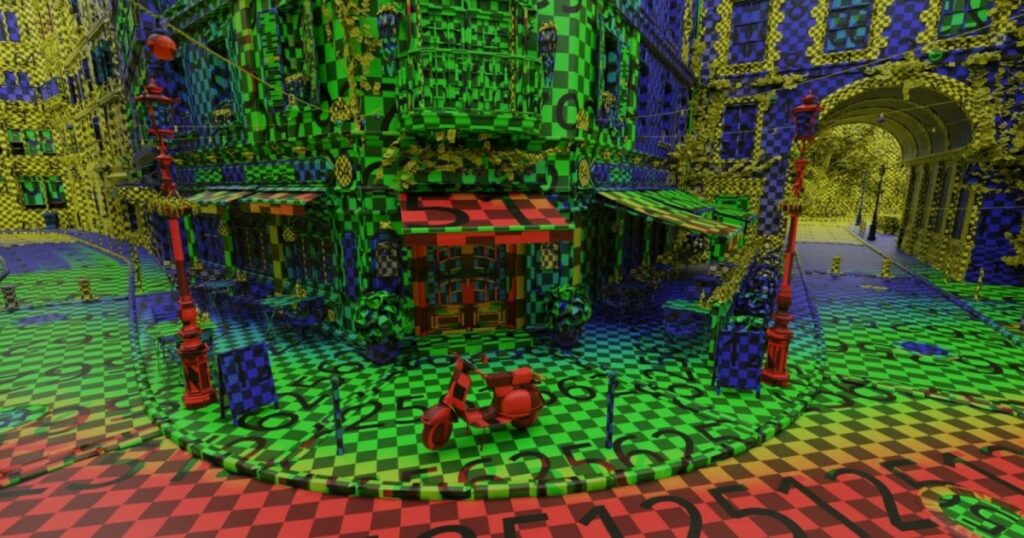
Mipmaps are precomputed downscaled versions of an image. In a .tx workflow, they allow the renderer to choose a resolution level that matches how large the texture appears in the render, avoiding wasted bandwidth and memory.
Blender 5.2 LTS specifically mentions improvements tied to correct mipmap selection, including ray differentials in the native SVM shading system (used to estimate texture footprint). This helps Cycles pick more appropriate mip levels automatically.
Practical outcomes of mipmaps in the texture cache:
- Lower memory usage for distant or small-on-screen textures.
- Less texture aliasing risk when the correct mip level is chosen.
- Faster texture access due to smaller data reads.
Cycles Texture Cache Tiles and UDIMs in Blender 5.2 (what Gets Loaded)
Tiled textures store images in fixed-size blocks (tiles). Instead of reading an entire image, Cycles can request only the tiles that intersect the sampled UV footprint.
For UDIM workflows, the key advantage is similar: Cycles Texture Cache is designed to load only what is needed, both in terms of:
- Which UDIM tiles are actually sampled.
- Which regions (tiles) inside those UDIM images are required.
- Which mipmap levels are appropriate.
This matters most for large UDIM sets (dozens to hundreds of tiles) where traditional “load everything” behavior can be a hard memory limit on GPUs.
Cycles Texture Cache on GPU Backends (CUDA, OptiX, HIP, Metal, OneAPI)
Blender 5.2 LTS positions the Cycles Texture Cache as working across CPU and all GPU backends, including CUDA, OptiX, HIP, Metal, and oneAPI.
A key technical note is that GPU support is described as using a “batch-load-and-relaunch approach for GPU kernels,” with cache eviction tied into Blender’s existing tiled rendering system. In other words, Cycles can manage texture residency and update GPU-side rendering work in response to what textures/tiles are needed.
Practical best practice across GPU backends:
- Put the cache (and/or generated
.tx) on fast storage (NVMe/SSD) to reduce “first-time” generation and I/O penalties. - Pre-generate
.txfor farm rendering to avoid per-node texture conversion.

Blender 5.2 Cycles Texture Cache Render Startup Time Improvements
Texture-heavy scenes often suffer from slow render startup because the renderer needs to load (and sometimes decode) many images before rendering can begin. Blender 5.2’s cache targets this by avoiding full upfront loads and by using the .tx structure for partial reads at the correct resolution.
Expected improvements are most noticeable when:
- The scene references many textures but only a subset are visible to the camera.
- The render uses many UDIMs but only some tiles contribute to the final framing.
- The texture resolutions are high enough that “load full image” is expensive.
Blender 5.2 Texture Cache Color Space and Filtering Behavior
One major usability goal is that artists should not have to manually “configure” .tx generation for every texture. Blender 5.2’s approach is described as inferring settings such as color space and filtering from how textures are used in shader nodes.
In practical terms, this means the .tx generation step can incorporate the intent of the node graph:
- Color-managed textures used as “color” should preserve expected transforms.
- Textures used as “data” should avoid unintended color conversions.
- Filtering choices should align with how the texture is sampled in shading.
For production correctness, a useful rule is: if a texture’s color space or sampling intent changes, regenerate .tx files to ensure the cached representation matches the new usage.
Blender 5.2 Texture Cache vs Simplify (which One to Use)
The Cycles Texture Cache and Simplify solve different problems:
- Texture Cache: improves memory efficiency and streaming by using
.txfiles and loading only needed tiles/mip levels. Best when you need full-quality textures but can’t afford the memory cost. - Simplify: intentionally reduces render workload/quality (including texture limits in Simplify settings) to speed up viewport and preview renders or to fit within constraints.
Recommended usage:
- Use Texture Cache when final quality matters and the bottleneck is texture memory or startup loading.
- Use Simplify when you want predictable speedups by lowering complexity (especially during layout, animation blocking, or preview rendering).
- Use both in early lookdev/preview stages: Simplify keeps iteration fast, while Texture Cache keeps memory stable on complex texture sets.

Using Blender 5.2 Cycles Texture Cache in Render Farms and Pipelines
In pipeline contexts, .tx files are typically treated as derived build artifacts, generated from source textures and reproducible as part of a publish step.
Recommended production patterns:
- Pre-generate
.txbefore farm submission (use “Generate All” or pipeline automation) to avoid unpredictable conversion time on render nodes. - Use a consistent cache location strategy:
- Store
blender_tx/next to textures for portability; or - Redirect to a fast local cache path per machine when network storage is slow.
- Store
- Versioning approach:
- Source-control the original textures (authoritative).
- Optionally source-control
.txonly if farm nodes cannot reliably generate them, or if deterministic performance is required.
- Known roadmap considerations:
- Additional improvements are noted as planned for render farms, production pipelines, and packed texture support, so pipeline choices may evolve through the Blender 5.2 cycle.
Cycles Texture Cache Not Working in Blender 5.2 (common Fixes)
Common causes and fixes when .tx caching does not appear to engage:
- Texture Cache not enabled
- Ensure the Texture Cache checkbox is enabled in Render Properties > Performance.
- Auto Generate disabled and no manual generation
- Enable Auto Generate or press Generate All to create
.txfiles.
- Enable Auto Generate or press Generate All to create
- No write permissions
- If textures are in a read-only directory, Blender cannot create
blender_tx/. Use a writable location strategy (preferences/path override) or pre-generate in a build step.
- If textures are in a read-only directory, Blender cannot create
- Network/slow storage bottlenecks
- First-time
.txgeneration can be I/O heavy. Pre-generate on fast storage or cache locally for farm nodes.
- First-time
- Stale or corrupted
.tx- Delete the
blender_tx/folder for the affected textures and regenerate.
- Delete the
- Expecting gains in texture-light scenes
- If a scene is geometry/volume bound or uses few image textures, the cache may not show obvious benefits; it is designed primarily for many image textures.

Frequently Asked Questions (FAQs)
- Does Blender 5.2 LTS Texture Cache work only for final renders, or also for viewport rendering?
It is presented primarily as a Cycles rendering feature, with further improvements planned for viewport interactivity. - Do I need to convert textures manually to
.txbefore using Cycles Texture Cache?
No. Blender supports automatic generation through Auto Generate and manual generation via Generate All in the Texture Cache panel. - Where are
.txfiles stored by default?
Blender generates them in ablender_tx/folder next to each source image by default. - What is the core benefit of
.txcompared to standard PNG/JPEG/EXR textures?.txis designed for tiled, mipmapped access, allowing partial reads and resolution-appropriate sampling rather than loading full images. - Does the cache help with UDIM sets?
Yes its key design goal is loading only the needed tiles and resolutions, which is especially helpful in large texture sets and UDIM-heavy assets. - Is the Cycles Texture Cache limited to CPU rendering?
No. It is described as working across CPU and all GPU backends. - Will Auto Generate regenerate
.txfiles if I change the source texture?
Yes automatic regeneration when the source image changes is part of the intended workflow. - How does Blender decide color space and filtering for
.txgeneration?
Blender’s approach is described as inferring color space and filtering from how the texture is used in shader nodes. - Should
.txfiles be checked into version control for teams?
Often,.txfiles are treated as derived artifacts; checking them in can make sense for render farms or locked-down storage, but many pipelines prefer reproducible generation during publishing. - When is Blender 5.2 LTS expected to release?
As of May 4, 2026, Blender 5.2 LTS is described as being in alpha, with a full release expected in July.

Conclusion
Blender 5.2 LTS Introduces New Cycles Texture Cache System represents a major modernization of Cycles texture handling: .tx generation, tiled+mipmapped access, and selective loading of tiles/resolutions are aimed at making heavy production scenes more stable and faster to start rendering. The system is designed to remain artist-friendly through Auto Generate workflows while still supporting pipeline-grade pre-generation via “Generate All,” and it is positioned as working across CPU and all major GPU backends.
Sources and Citations
- Blender 5.2 LTS introduces Cycles Texture Cache
https://code.blender.org/2026/05/cycles-texture-cache/ - 80 Level coverage on Blender 5.2 Cycles Texture Cache
https://80.lv/articles/blender-5-2-lts-introduces-new-cycles-texture-cache-system - Blender developer release notes for Cycles Texture Cache
https://developer.blender.org/docs/release_notes/5.2/cycles/ - Blender source UI panel for Texture Cache
https://projects.blender.org/blender/blender/src/branch/main/scripts/startup/bl_ui/properties_render.py - OpenImageIO maketx documentation
https://openimageio.readthedocs.io/en/stable/maketx.html - Historical .tx workflow discussion
https://devtalk.blender.org/t/tiled-and-mipmapped-tx-textures-support/22789/
Recommended
- Dosa Divas: The Kotaku Review – A Flavorful RPG With Heart, Humor, and Flawed Cooking Mechanics
- Digital Fashion in Blender & Marvelous Designer: A Comprehensive Guide
- Why Pixar Canceled a Female-Led Movie Similar to KPop Demon Hunters — The Untold Story of ‘Be Fri’
- Saving and Switching Blender Camera Angles with The View Keeper
- Scientists Make Breakthrough That Allows Lab-Grown Brain Cells To Play A Sort Of Video Game (UC Santa Cruz Cart-Pole Results Explained)
- Chinese Esports Host Accused of Blackface Following On-Stream Stunt at Naraka: Bladepoint NBPL 2026
- Unlocking Cinematic Power: The Best 5 Blender Camera Add-ons to Elevate Your Workflow
- Evil Dead Rise Star Lily Sullivan Has a Sneaky (and Extremely Gross) Cameo in Lee Cronin’s The Mummy (2026)
- How to Make a MetaHuman Talk: Ultimate Guide to Voice and Facial Animation
- Artemis II Crew Watched Project Hail Mary in Quarantine Before Launch Astronaut Jeremy Hansen Gives Ryan Gosling a Thumbs Up Halfway to the Moon




























































































