





In This Article (15 sections)
Godot 4.8 Dev 4 Development Snapshot Overview
Godot 4.8 Dev 4 was released on August 26, 2026, adding Trail3D, VisualShader node groups, multi bounce ambient occlusion, and directional lightmap specular alongside broader Compatibility renderer capabilities and improvements to editor layouts, text fitting, and Android development setup. These additions affect visual effects, shader authoring, 3D lighting, and general development workflows, but they belong to a development snapshot rather than a production ready Godot 4.8 release. The announcement credits 86 contributors with submitting 224 fixes since the preceding snapshot and identifies the build with commit b56a91878, which can help developers reproduce issues using the exact same engine version. The 224 figure refers to the wider set of fixes included in the snapshot rather than 224 separate new features.
The feature names also require some context when evaluating what the snapshot actually changes. Multi bounce ambient occlusion remains an approximation, directional lightmap specular does not reproduce every characteristic of real time lighting, and feature support is not identical across all renderers. The practical value therefore comes from understanding where each addition improves an existing workflow and where its limitations remain. As of September 23, 2026, Dev 4 is also no longer the newest Godot 4.8 development snapshot, since Godot published Dev 6 on September 15, 2026. Dev 4 remains important as the build that introduced the particular combination of features discussed here, but developers investigating bugs or regressions should distinguish its behavior from later development versions.
Like other development snapshots, Godot 4.8 Dev 4 is intended to expose ongoing engine changes to wider testing rather than serve as a stable production release. Godot’s release policy advises against treating prerelease builds as production ready software, making an isolated test project a safer place to evaluate these features than immediately converting the only working copy of an active commercial game. The more useful question is therefore not simply whether the snapshot launches successfully, but whether a specific feature improves a real production task while maintaining acceptable rendering results, export behavior, and project maintainability.

Godot 4.8 Trail3D and VisualShader Node Groups
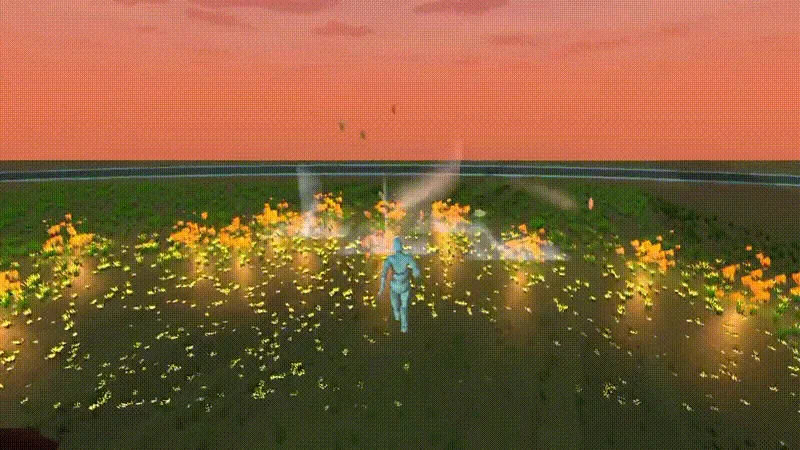
Godot 4.8 Dev 4 introduces Trail3D as a native trail effect node, bringing a specialized ribbon rendering capability into the engine rather than requiring every project to build its own solution. The implementation arrived through pull request #117107 and builds on work from the CozyCube add on ecosystem. Trail3D draws a flat trail in 3D space and can optionally use billboarded presentation, so it should be understood as a visual ribbon rather than a solid tube, collision shape, or general replacement for procedural geometry. Generic line drawing and solid line construction remain outside the feature’s scope.
Reasonable uses include magical projectile streaks, movement accents for fast moving objects, and stylized weapon swing effects, although these are applications of the ribbon design rather than finished presets included with the snapshot. Trail3D also inherits from Line3D, but the release announcement notes that Line3D itself is not directly implemented beyond its enumeration declarations in this build, so developers should not assume that a complete standalone Line3D drawing system arrived at the same time.
Getting Started with Trail3D
A simple Trail3D test can begin with a moving Node3D and a Trail3D attached to it, using a clear motion path before placing the effect inside a more complicated gameplay sequence. Trail generation depends on movement of the trail head while emitting is enabled. Developers can choose whether the trail is limited by time or maximum length through limit_mode, with lifetime controlling retained history in lifetime mode and max_length controlling its extent in maximum length mode. Appearance can then be refined using width, width_curve, color_gradient, and mesh_alignment.
Starting with an obvious width and short motion helps confirm that the trail is working before tapering, color transitions, and other presentation details are introduced. The min_section_length property controls the minimum movement distance required before another section is added, while clear() removes the current trail. The documentation also specifies that only one active trail is supported and that setting emitting to true clears the existing trail mesh, so the feature should not be treated as an unrestricted pause and resume history system. Sudden turns, stopping, and teleporting should also be tested because an effect that looks correct during smooth movement may behave differently when gameplay state changes abruptly.
VisualShader Node Groups Overview
VisualShader node groups solve a different problem by reducing repeated logic and making large shader graphs easier to understand. The implementation adds a reusable VisualShaderGroup resource and a VisualShaderNodeGroup node that instances that resource inside a shader graph. A group is more than a visual container around nearby nodes because it defines input and output ports and encapsulates its own internal graph. Godot’s documentation compares the concept to a function, and groups can be used inside a VisualShader or even another group. This makes them suitable for reusable operations such as color processing or mask calculations, where a parent shader can supply a small set of values without exposing every internal node at each use site.
The documented workflow begins with a Group node whose internal graph can be opened through its edit control. Group Input and Group Output nodes provide an Edit Ports interface for defining connections, and port names must be unique across both the inputs and outputs. Once the internal calculation is connected, the parent graph treats the group as a single operation. A VisualShaderNodeGroup receives its reusable logic through the group property, and the assigned VisualShaderGroup resource defines the available ports. This resource relationship is what allows the same operation to be reused across multiple materials instead of recreating similar node arrangements manually.
There are still limitations: Parameter related and Varying related nodes are not permitted inside the group resource, and nodes incompatible with the surrounding shader context can produce default outputs instead of the intended result. For shared material libraries, port naming and interface changes should therefore be handled carefully, and any reused group should be checked across several materials and shader contexts rather than assumed to work everywhere. Cleaner organization is also not proof of lower GPU cost, since VisualShader still generates shader code, so node groups should primarily be treated as a maintainability feature unless performance measurements show otherwise.
Godot 4.8 Multi Bounce Ambient Occlusion
Godot 4.8 Dev 4 also introduces a multi bounce ambient occlusion approximation designed to reduce excessive darkening in areas affected by AO. Traditional ambient occlusion darkens regions where nearby geometry restricts incoming ambient illumination, while the new approach additionally considers the surface albedo to approximate how local interreflections can preserve some brightness and color. The term multi bounce should not be interpreted as a new scene wide ray traced global illumination system.
The implementation does not trace multiple successive light paths through the environment. Instead, its merged shader code calculates a color dependent correction from the material albedo and existing AO value before applying occlusion to ambient lighting, making it a local mathematical approximation rather than a complete replacement for broader lighting systems.
Renderer support is an important limitation. The final merged implementation is available only in Forward+. Earlier discussions included other rendering paths, but the review history shows that the remaining Compatibility code and the Mobile implementation were removed before the feature was merged. Looking only at earlier proposals or comments can therefore create an incorrect impression of renderer availability. The most useful visual evaluation is whether recessed and contact areas keep enough depth while avoiding unnecessarily heavy darkening or excessive loss of material color. It is less useful to treat the feature as a general brightness control, especially in scenes where ambient occlusion contributes very little to the image.
The merged implementation uses albedo to calculate an RGB occlusion correction rather than relying only on a single scalar darkening value. Its shader expression also prevents the corrected ambient occlusion multiplier from

Godot 4.8 Directional Lightmap Specular and Compatibility Renderer Updates
Godot 4.8 adds directional lightmap specular to address a limitation of baked lighting on static surfaces: reproducing a convincing view dependent specular response without keeping the same real time lighting arrangement active. The feature reconstructs an approximate specular contribution from directional information stored in the lightmap.
The term directional refers to the lightmap data rather than an exclusive dependency on DirectionalLight3D. Godot’s LightmapGI.directional option stores directional information using spherical harmonics and can apply to different light types, so the feature should not be treated as something limited to sunlight or one particular light node. To use it, directional baking must be enabled and specular_intensity must be set above zero. Its documented default is 0.0, which means a directional bake alone does not automatically produce the new specular contribution.
The lighting data itself is baked, but the resulting highlight is not simply painted permanently into the surface texture. At runtime, the engine uses the stored directional information to approximate a specular lobe. Because the representation effectively stores one lighting direction per texel, highlights can become warped in areas where several light sources contribute different directions. A broad glossy surface viewed from a moving camera is therefore a useful test case because a single screenshot may hide artifacts that become obvious as the viewpoint changes. The result should be compared against a reference lighting setup rather than assuming that matching one frame means the baked approximation behaves identically to real time lighting.
Baked vs Real-Time Lighting Trade-offs
The distinction between baked and real time lighting remains important. With LightmapGI and a light configured for static baking, direct and indirect contributions are stored for static lightmapped surfaces. Dynamic baking instead leaves direct lighting and shadows in real time while baking the indirect contribution, allowing limited changes to the direct illumination without recalculating the stored indirect light. Directional lightmap specular adds another option within that broader trade off by reconstructing a specular response from the bake instead of requiring the original direct light calculation on every relevant static surface. It remains an approximation of the lighting represented by the lightmap rather than a promise of identical output to independently evaluated real time lights.
Scene behavior should determine which approach is appropriate. A fixed interior is a sensible candidate because its baked illumination may remain valid throughout play, while a continuously changing sun direction creates a different requirement because the relationship between the active light and previously baked illumination changes over time. Lightmap preparation also remains necessary. Meshes still require suitable secondary lightmap UV coordinates, and the LightmapGI workflow still requires configuring and baking scene data. Directional baking adds data and processing costs rather than making baked lighting completely free. A meaningful comparison should therefore examine highlight movement, contact detail, bake size, and measured frame time separately using the same materials and camera motion.
Compatibility Renderer Decal Support
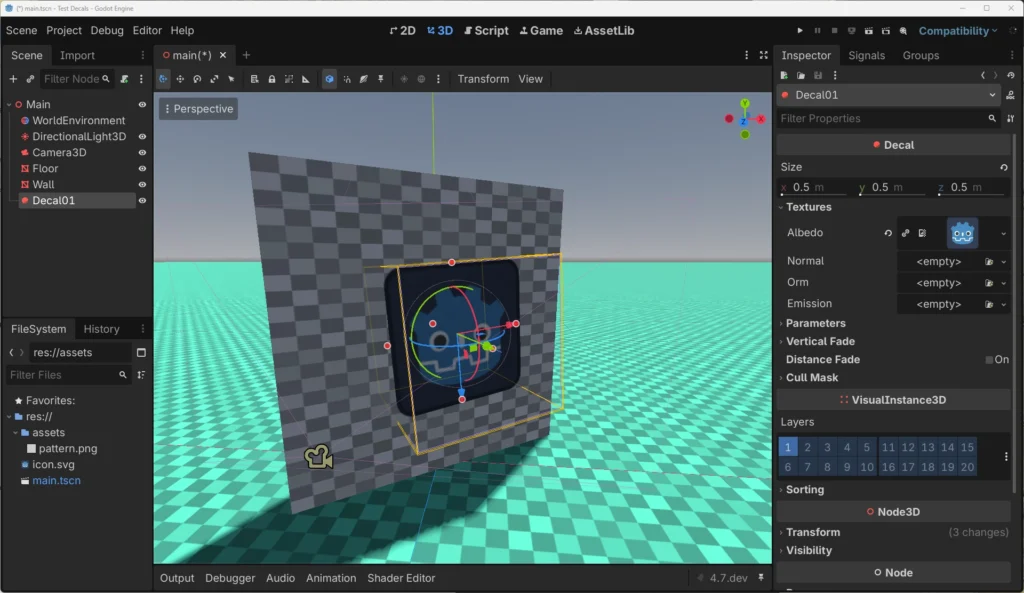
Godot 4.8 Dev 4 also introduces decal support to the Compatibility renderer through pull request #118070, adapting the Mobile renderer approach to OpenGL. This expands Compatibility renderer capabilities without making its feature set identical to Godot’s other rendering methods. Decals project localized visual detail onto existing surfaces and can be used for effects such as impact marks or stains without modifying the underlying mesh for every individual mark.
The implementation defaults to a maximum of 64 decals visible in a frame, with that value configurable through a project setting but still limited by hardware buffer constraints. There is also a hard limit of eight decals per receiving surface, which should not be confused with a limit of eight decals for the entire level.
Those limits mean developers should test both the total visible decal count and how many marks accumulate on individual surfaces. A scene can remain below the overall default while still exceeding the limit on one wall or object. For an impact effect system, older marks can be retired and a visual priority can be established when many effects overlap. Raising the global limit should also be tested on the least capable supported device, since a configuration that performs well on a development workstation may not be appropriate across the full hardware range.
Godot 4.8 Editor Layout, Automatic Font Sizing, and Android Setup
Godot 4.8 also changes how the editor organizes its main screens by converting them into regular EditorDock components. This allows a more flexible workspace with closable screens, floating behavior, and a dedicated setting for main screen tab style. The change affects editor organization rather than a game’s runtime presentation. The Game screen is an important exception in implementation terms because its custom behavior remains tied to WindowWrapper, but this should not be interpreted as meaning that the Game screen cannot float. The distinction concerns how its floating behavior is implemented.
The added flexibility allows developers to arrange visual editing screens and other frequently used workspaces according to their own monitor setups and working habits rather than following one fixed layout. Plugin authors should also review the change because the older main screen plugin workflow remains supported but is deprecated and may have edge case compatibility problems. Godot’s EditorDock documentation describes the newer integration model, including registering and removing docks through EditorPlugin. A custom editor extension should therefore be tested by opening and closing its dock, restoring a saved layout, and disabling and re enabling the plugin, rather than assuming that working correctly in its initial position is enough to validate it under the new system.
Automatic Font Sizing for Text Controls
Automatic font sizing for Label and RichTextLabel addresses another editor and interface workflow problem. Instead of requiring a custom script for every constrained text element, these controls can now select a font size that fits within their available rectangle while remaining inside configured limits. The implemented API uses resize_font_to_fit, minimum_font_size, and maximum_font_size. Although the release announcement refers to auto_font_size, min_font_size, and max_font_size, those announcement terms should not be copied into scripts in place of the actual property names.
For Label, enabling resize_font_to_fit causes the control to choose the largest permitted size that avoids truncating the text within the available space. The documented defaults are false for resizing, 10 for the minimum size, and 60 for the maximum. get_rendered_font_size() can be used to inspect the size actually selected for rendering. RichTextLabel introduces an additional consideration because sizes overridden through BBCode font size tags scale relative to the theme font size when automatic fitting is active.
Mixed size text should therefore be evaluated as a complete composition. Long translations, unusually long player names, and narrow window sizes make useful test cases, while the minimum font size should represent a genuine readability requirement rather than simply the smallest value that hides an overflow issue. If text cannot remain readable within its allotted area, changes to wrapping, spacing, or content presentation may be preferable to continued shrinking.
Editor Managed Android Setup
Godot 4.8 also introduces an editor managed workflow for setting up Android and Java development dependencies. An internal AndroidSDKManager validates the configured SDK paths and can offer setup when an installation is missing or invalid. With user approval, it can obtain Android command line tooling, configure the required Android packages, and install a Java SDK from Adoptium. Managed installations are placed in editor specific locations, and the relevant Editor Settings paths are updated automatically. Existing valid manual configurations can continue to be used, so developers with an established toolchain are not required to abandon it.
The setup workflow can appear when an Android export preset is added without the required dependencies. The Project menu also provides Setup Android Build…, replacing the earlier Install Android Build Template wording and incorporating dependency setup prompts. Godot’s Android export documentation describes this automatic workflow for desktop editors on Windows, macOS, and Linux while retaining manual installation as an alternative. The feature prepares the development environment, but application export settings and release signing remain separate parts of the Android export process.
A useful validation process is to test the automated setup on a clean development environment and export a small project before introducing custom build requirements. Teams should also document whether a project expects editor managed dependencies or externally maintained installations so that the setup can be reproduced consistently.
Frequently Asked Questions (FAQs)
- Does automated Android setup remove every manual export task?
No. The automated Android setup mainly simplifies installing and configuring development dependencies such as the Android SDK tools and Java environment. Developers still need to handle application specific export settings, package configuration, and release signing as part of the Android export process. Manual SDK setup also remains available for teams that prefer to manage their own toolchains or already have a working configuration. - When was Godot 4.8 Dev 4 released?
Godot 4.8 Dev 4 was released on August 26, 2026. The official release archive keeps downloads for that exact development build, which can be useful when reproducing bugs or checking behavior tied to a specific snapshot. It should not be confused with the eventual stable Godot 4.8 release or with later development builds that may contain additional fixes and changes. - Is Godot 4.8 Dev 4 suitable for production projects?
Godot 4.8 Dev 4 is a development snapshot created for testing features and ongoing engine changes. Godot’s release policy does not treat prerelease builds as production ready, so using it as the only working version of an important project introduces unnecessary risk. A separate evaluation copy is the safer approach, particularly for projects that depend on custom extensions, plugins, or multiple export platforms. - Does Trail3D require a third-party add-on?
No. The Trail3D implementation included in Dev 4 is built directly into the engine, so using the native node does not require installing the earlier add on that helped inspire its development. Trail3D is intended for ribbon style visual effects such as movement trails or projectile streaks, rather than for creating solid tubes, collision shapes, or general purpose procedural geometry. - Can VisualShader node groups be reused across shaders?
Yes. AVisualShaderNodeGroupcan instance a reusableVisualShaderGroupresource, allowing the same shader logic to be represented through clearly defined input and output ports. This can make large shader graphs easier to maintain and reduce repeated node setups. However, the surrounding shader context still matters, so a group that works correctly in one shader type is not automatically guaranteed to work unchanged in every other context. - Is multi-bounce AO the same as full global illumination?
No. Multi bounce ambient occlusion is an approximation that uses surface albedo together with ambient occlusion information to reduce excessive darkening and preserve more local color and brightness. It does not trace complete light paths through the scene or simulate a full sequence of physical light bounces, so it should not be treated as a replacement for a broader global illumination system. - Does multi-bounce AO work in the Compatibility renderer?
No, not in the final implementation merged for Godot 4.8 Dev 4. The feature is implemented for the Forward+ renderer. Earlier development discussions included work involving other rendering paths, but those should not be confused with the capabilities of the final merged version that shipped in this snapshot. - How is directional lightmap specular enabled?
Directional lightmap specular requires bakingLightmapGIwithdirectionalenabled and then settingspecular_intensityabove zero. Because the defaultspecular_intensityvalue is0.0, simply creating a directional lightmap does not automatically turn the effect on. The resulting highlights are reconstructed from directional information stored in the lightmap, so they remain an approximation rather than an identical recreation of real time lighting from every original light source. - What are the Compatibility renderer’s decal limits?
The Compatibility renderer implementation defaults to a maximum of 64 decals visible in a frame, with that value configurable through a project setting and still subject to hardware buffer limitations. There is also a separate hard limit of eight decals per receiving surface. Increasing the overall frame limit therefore does not remove the eight decal restriction on an individual surface. - What are the correct automatic font-sizing property names?
The implemented property names areresize_font_to_fit,minimum_font_size, andmaximum_font_size. These are the names developers should use when working with the merged API and class references. The shorter names mentioned in the release announcement, such asauto_font_size, should not be substituted into scripts because they do not match the actual implemented properties.

Conclusion
Godot 4.8 Dev 4 offers improvements across several distinct workflows: native trail effects, reusable visual shader logic, refined ambient occlusion and a new specular option for directional lightmaps. Its additional editor, text-layout and Android setup changes extend the snapshot’s relevance beyond rendering alone.
The most important adoption principle is to evaluate each capability on its actual terms. A ribbon effect is not a universal line system, an AO approximation is not full light transport, and reconstructed lightmap specular is not interchangeable with every real-time lighting arrangement.
For development teams, the strongest approach is a controlled comparison: preserve the working project, isolate the desired feature and test the exported result on representative hardware. That process makes it possible to benefit from the snapshot’s additions without confusing promising functionality with completed production validation.
Sources and Citations
- Godot Engine GitHub, Multi Bounce Ambient Occlusion, PR #115426 : Documents a merged approximation that reduces excessive darkening from ambient occlusion by incorporating surface color. It applies to both real time SSAO and baked occlusion, with comparison images demonstrating improved color preservation in shaded areas.
Implement Multi Bounce Ambient Occlusion Approximation - Godot Engine GitHub, Directional Lightmap Specular Lighting, PR #109737 : Documents the merged addition of approximate specular highlights from directional lightmaps. It includes visual comparisons and performance measurements, explaining how directional information from baked lighting can contribute to highlights on reflective surfaces.
Add Directional Lightmap Specular Light - Godot Engine GitHub, Compatibility Renderer Decals, PR #118070 : Documents the merged addition of decals to the Compatibility renderer using an OpenGL adaptation of the Mobile renderer’s approach. It explains the configurable frame limit, hardware constraints and maximum of eight decals per surface.
Add Decal Support to Compatibility Renderer - Godot Engine GitHub, VisualShader Node Groups, PR #99404 : This merged change introduces reusable VisualShader node groups with editable inputs and outputs. It allows shader logic to be organized into nested subgraphs, making complex graphs easier to manage and common node arrangements easier to reuse.
Implement VisualShader Node Groups and Subgraphs - Godot Engine GitHub, Main Screen Editor Docks, PR #113051 : This merged change integrates main screen editors with the dock system, supporting more flexible layouts and floating editor panels. It also deprecates the older main screen plugin workflow while retaining compatibility support.
Change Main Screen Plugins Into Docks - Godot Engine GitHub, Automatic Font Resizing, PR #116791 : This merged change adds optional automatic font sizing to Label and RichTextLabel so text fits within the control’s bounds. It supports minimum and maximum sizes and responds to changes in text, themes and control dimensions.
Add Resize Font to Fit Option to Label and RichTextLabel - Godot Engine GitHub, Android and Java SDK Setup, PR #121849 : This merged change detects missing or invalid Android and Java SDK installations and offers guided setup within the editor. Downloads require user acceptance, while developers retain the option to configure their SDK installations manually.
Automate Android and Java SDK Setup
Recommendations
- F1 25 2026 Season Pack DLC reveal date and time
- Mortal Kombat Actor on Street Fighter Rivalry: Lewis Tan Reacts to Andrew Schulz’s Game Awards Jab
- James Tolkan, Back to the Future and Top Gun Actor, Dies at 94: Cause of Death, Career Highlights, and Tributes
- UFC 6 Game: Release, Roster, New Features, and Gameplay Changes
- Jurassic World Evolution 3 Rebirth Geothermal Power Explained
- Eidos-Montréal Is Laying Off Over a Hundred Employees as 124 Jobs Are Cut
- Blackmagic Design Released DaVinci Resolve 21 In Public Beta: 15 Features, AI Tools, and Photo Workflow Changes
- Zach Galifianakis Rules Out Between Two Ferns Return as He Says the Show “Wouldn’t Work Anymore” in Today’s Climate
- Nacon Subsidiaries File for Insolvency: What Happened
- Murderbot Season 2 Adds Steve Buscemi, Wanda Sykes and More



































































































