






In This Article (14 sections)
Lassyla’s Procedural Blender EEVEE Hand Painted Shader and Setup
Lassyla’s procedural Blender EEVEE hand painted shader is a reusable material designed to make 3D objects resemble stylized painted illustrations. It runs in EEVEE and generates much of its visual complexity procedurally, meaning mathematical textures and shader nodes create surface variation instead of relying on a conventional hand painted texture map. The original tutorial is titled “how i make stylized materials in blender,” while Lassyla’s downloadable material is described as the shader used for most of her illustrations and includes a demonstration scene.
Public descriptions identify Noise Texture, Voronoi Texture and Fresnel as important parts of the material. Together, these elements add visual information to relatively simple models without requiring individually painted image textures. Broad color areas establish the identity of the object, Noise Texture interrupts mechanically smooth surfaces, Voronoi introduces more deliberate clustered variation, and Fresnel adds view dependent information around surfaces turning away from the camera. Lighting then defines the model through readable stylized shadow shapes.
A procedural approach offers several practical advantages. The same material can be applied to different objects, while colors, texture scale, contrast and surface variation can be adjusted directly through shader controls. It can also reduce dependence on UV painting when Generated or Object coordinates are suitable. However, procedural does not mean completely automatic. Different models have different scales, silhouettes, topology and artistic requirements, so a pattern that works on a small prop may appear too dense on a large building, while a strong Fresnel effect that suits a rounded character may become distracting on angular architecture.
Beginner Node Setup for the Base Shader
A beginner version of the material can be created with a relatively small collection of nodes. Switch the render engine to EEVEE, create a new material and keep the Material Output connected to a Principled BSDF. Add Texture Coordinate and Mapping nodes, then connect Generated or Object coordinates through the Mapping node to a low frequency Noise Texture. Pass the Noise Fac output through a Color Ramp containing a darker and lighter version of the chosen base color, then connect the result to the material’s Base Color.
Add a second Noise Texture at a higher scale and reduce its influence so that it provides subtle smaller detail without overwhelming the broad color pattern. A Voronoi Texture can then be introduced through another Color Ramp and blended lightly into the existing color. Increasing the material’s Roughness helps suppress sharp photorealistic reflections and reinforces the illustrated appearance.
The overall workflow benefits from a deliberately limited palette. A useful starting point includes a dominant local color, a darker related shade, a lighter accent and perhaps one contrasting hue. Closely related colors usually produce a more convincing painterly result than unrestricted random colors because the object maintains a clear visual identity.
The model itself also matters. Simple proportions, deliberate bevels, readable planes and controlled smooth shading give the material stronger forms to describe. A shader can enrich an existing silhouette, but it cannot completely compensate for unclear modeling.
Downloading Lassyla’s Material and Demo Scene
Lassyla distributes “Lassyla Material + Demo Scene (Blender EEVEE)” through her Ko fi shop. The download contains a Blender file with the material and a demonstration scene. The listing uses a pay what you want structure, although availability and payment requirements can change.
After obtaining the file, inspect the demonstration scene before copying only the material. Check the Blender version, render engine, lights, world setup, camera and color management because the material’s appearance is influenced by the surrounding scene. Lassyla also recommends adding the material Blender file to Blender’s Asset Library so it can be accessed conveniently from other projects. Before moving or renaming files, confirm that there are no external dependencies associated with the demonstration scene.

Blender EEVEE Hand Painted Shader Nodes, Lighting and Painterly Effects
The verified structure of Lassyla’s shader centers on Noise Texture, Voronoi Texture and Fresnel, supported by coordinate, mapping, color and mixing nodes. The exact downloadable node tree remains the authoritative implementation, while Blender versions may change node names, socket layouts and EEVEE behavior. Recreating the material is therefore easier when each node is understood according to its role rather than copied mechanically from one screenshot.
Texture Coordinate and Mapping nodes establish where procedural patterns appear. Generated coordinates are convenient because Blender automatically derives them from an object’s dimensions, while Object coordinates can provide more consistent texture space across several models when they reference a common coordinate object. The Mapping node controls position, rotation and scale before those coordinates reach the procedural textures.
Noise Texture supplies continuous irregular variation. Lower frequencies produce broad color patches that can resemble pigment variation, underpainting or changing brush pressure. Medium frequencies create visible painterly breakup, while high frequencies should generally be used sparingly because excessive fine detail can make a material look like static or create instability during animation.
Using several frequency ranges is more convincing than relying on one Noise Texture. Broad noise establishes the main variation, while finer noise introduces subtle surface activity. The fine layer should remain secondary. If it becomes more noticeable than the silhouette, lighting or major color shapes, its scale or strength is probably too high.
Voronoi Texture introduces a different pattern structure. Its distance based output can create islands, clusters, spots and cellular shapes rather than the softer clouds produced by noise. Blending it lightly with Noise Texture can break up otherwise uniform procedural variation. If it becomes too dominant, however, the material may resemble cracked stone, scales or cells rather than paint.
Color, Edge, and Shadow Control
Color Ramp nodes provide much of the artistic control. Procedural textures normally generate grayscale values, so the Color Ramp converts those values into selected colors and determines how sharply they transition. Moving the handles can transform a soft mottled surface into clearly separated painted patches without changing the underlying procedural texture.
Fresnel adds information based on viewing angle. Surfaces facing the camera receive different values from surfaces turning away from it. After remapping or mixing this output, the shader can create a light rim, darkened edge or subtle silhouette separation. The effect should be evaluated from several camera angles because its strength changes with the viewpoint.
Math, Mix and Map Range operations determine how different procedural masks interact. Multiply can restrict one effect using another, Add can layer an accent over the base, Subtract can remove information from selected regions, and Mix Color blends values according to a factor. A successful procedural shader often depends more on thoughtful mixing than on the sheer number of texture nodes.
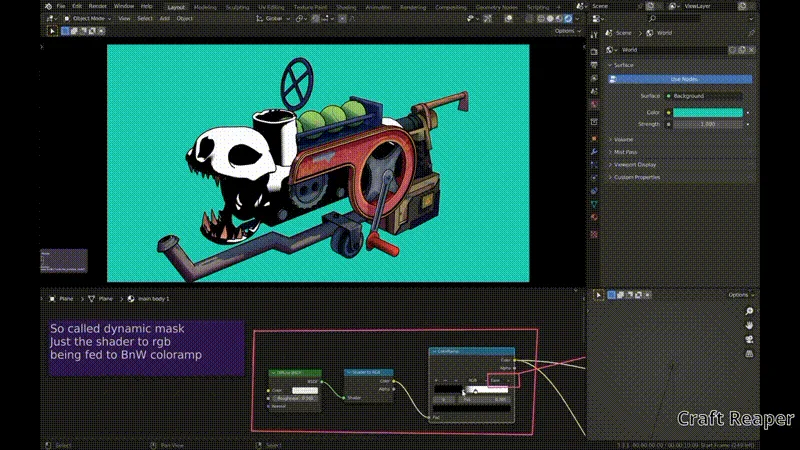
For an EEVEE specific stylized shadow system, a BSDF can be passed through Shader to RGB and remapped with a Color Ramp. This converts evaluated lighting into color data that can be pushed toward graphic shadow bands or softer painted transitions. Constant interpolation produces harder toon style divisions, while Linear or smoother transitions create softer shading. This method is specific to EEVEE and should not be expected to behave identically in Cycles.
Lighting and Painterly Brushstroke Techniques
Lighting should support the shader rather than compete with it. Begin with one dominant Area or Sun light. A larger Area light creates softer transitions, while a Sun light provides consistent direction across the scene. Position the key light so that the major planes remain easy to read, then use world illumination or a weaker fill light to preserve useful color information in the shadows without flattening the scene.
A warm light and cool shadow relationship can reinforce the illustrated style when the colors remain coordinated with the material palette. Contact shadows and ambient occlusion can clarify intersections, but excessive darkening can make the surface look dirty. Stylized lighting works best when it directs attention and clarifies volume rather than simply enabling every available EEVEE effect.
Procedural brushstroke details can be created by stretching coordinates through the Mapping node. Increasing scale along one axis or reducing it along others turns isotropic noise into elongated forms. Noise Texture, Wave Texture or a distorted Voronoi setup can then create directional marks. A Wave Texture provides consistent direction, while noise or distortion prevents the result from becoming perfect stripes.
Pass the resulting pattern through a Color Ramp to isolate scattered marks, then mix them into the base color at low strength. A slightly lighter, warmer or darker version of the existing color generally feels more natural than pure white or black. Brush direction should support the underlying form. Horizontal strokes can work well on ground planes, while vertical or curved marks may better describe vegetation, cloth or tall objects.
Object and Generated coordinates generally keep procedural marks attached to the model during animation. Unsuitable world based coordinates can make a moving object appear to slide through its texture, so deformation and camera motion should always be tested.
Controlled Imperfection and Customization
Making procedural materials appear hand painted depends on controlled imperfection. Work from large to small by establishing the base palette first, then broad variation, medium scale breakup and finally subtle fine detail. Avoid unrestricted color randomness. A blue object, for example, might move between desaturated navy, medium blue and a warmer light blue instead of introducing unrelated colors.
Texture should also help describe form. Mapping can stretch patterns along a useful direction, while manual vertex colors or simple painted masks can protect important regions such as faces, logos or focal details. A procedural workflow does not need to avoid every hand authored input. Combining automated variation with selective manual control can produce a cleaner final result.
Customization should begin with the Color Ramps or exposed node inputs controlling the main palette, shadow, highlight and edge effect. After establishing the new colors, adjust each texture scale according to the object and final viewing distance. Broad variation should stay broad, medium detail should remain readable, and fine texture should be barely noticeable rather than dominant.
Different materials also require different treatment. Stylized stone may benefit from low saturation and broad mottling, foliage may use stronger value separation, cloth can support more directional markings and polished surfaces need carefully controlled highlights. Saving a duplicate before major edits allows the original shader to remain intact while new versions are adapted to individual projects.

Applying, Optimizing and Troubleshooting the Blender EEVEE Hand Painted Shader
To apply the material, select the model, open Material Properties and choose the shader from the material data block menu. If the object contains several material slots, enter Edit Mode and assign the material only to the desired faces. Check the procedural coordinate behavior immediately because the appearance can change dramatically between models.
Generated coordinates normalize according to an object’s bounds, which means the same shader can produce different apparent texture scales on differently shaped models. Object coordinates can provide greater consistency, especially when several objects reference a shared Empty. Applying object scale can also correct unexpected stretching caused by nonuniform transforms.
Surface normals and shading settings deserve equal attention. Fresnel and other view dependent effects respond to normals, so incorrect normals can create inverted lighting or broken edges. Flat shading, smooth shading, controlled sharp edges, custom normals and bevels all influence the final result. Test the material on the actual production asset rather than relying only on a preview sphere because thin surfaces, sharp corners, large planes and concave forms reveal different problems.
For repeated or linked objects, decide whether one shared material is desirable. Shared materials make global palette changes easy, while copied materials allow independent control. Object Info can also introduce controlled differences among repeated props without requiring a separate shader for every object.
Optimizing Shader Performance
Performance should be considered when the material becomes more complex. Procedural shaders avoid large painted image textures, but Noise Texture, Voronoi Texture, Mix operations and lighting conversions still require computation. A shader that performs well on one object may become expensive when used across an entire environment.
Remove nodes that produce no visible improvement and avoid unnecessarily high detail settings. High Noise Texture detail values can increase cost without noticeably improving the final image. Repeated logic can be grouped and reused, while shared materials reduce maintenance.
Avoid geometry heavy displacement when color or subtle bump information can provide the required appearance. For an illustrated surface, much of the perceived detail can remain entirely within color and shading instead of altering the mesh.
EEVEE sampling should be adjusted according to the output. More samples can reduce aliasing but increase rendering time. If tiny procedural marks require excessive sampling to remain stable, simplifying the material may be more efficient than increasing quality settings across the entire scene. Shadow resolution and other lighting settings can likewise be reduced where extremely fine detail is unnecessary.
Troubleshooting Common Shader Problems
Several common problems can usually be corrected quickly:
- If the material resembles television static, reduce the scale or strength of the fine Noise Texture and bring its Color Ramp values closer together.
- If procedural patterns stretch, check the coordinate source, applied object scale and Mapping settings. Difficult models may benefit from UV coordinates.
- If every object has a different apparent pattern size, Generated coordinates are probably normalizing each model independently. Object coordinates using a shared Empty can provide consistency.
- If the material looks correct in Material Preview but different in the final render, compare the preview lighting with the actual scene and verify that EEVEE is being used.
- If shadows are too hard, widen the transition in the relevant Color Ramp. If they are too soft, tighten the handles, strengthen the key light or reduce fill illumination.
- If Fresnel overwhelms the object, reduce its mix factor or remap it more subtly. Because it changes with viewpoint, inspect several camera positions.
- If colors appear washed out, check light strength, world illumination, exposure, view transform and the values used in the material palette.
- If procedural marks flicker during animation, reduce high frequency detail and inspect sampling, motion blur and temporal effects. Details smaller than a pixel are unlikely to remain stable.
- If the downloaded material does not appear in the Asset Browser, configure the correct folder as an Asset Library or append the material directly from the Blender file.
- If a low poly model develops unattractive gradients, reconsider whether the object should use flat shading, smooth shading or intentionally controlled sharp edges.
The most reliable approach is to evaluate the shader in the same conditions in which the final artwork will be shown. Final camera distance, resolution, animation, lighting and object scale determine whether procedural detail actually supports the illustration. Lassyla’s material is therefore most useful as a flexible system for understanding how controlled noise, color ramps, view dependent effects and stylized lighting can create a painted look without requiring every surface to be manually textured.

Frequently Asked Questions (FAQs)
- What is Lassyla’s procedural EEVEE shader?
Lassyla’s shader is a Blender EEVEE material designed to give 3D models a stylized, hand painted appearance without relying primarily on manually painted texture maps. It uses procedural shader nodes to create color variation, surface breakup, edge effects, and other details. The downloadable package also includes a demo scene so users can study how the material works within Lassyla’s broader lighting and scene setup. - Does the shader require hand-painted textures?
No. The main effect is described as fully procedural, so conventional hand painted texture maps are not required for the shader to produce its stylized look. However, artists can still add painted masks, vertex colors, or other manual details when they want tighter control over important areas such as faces, logos, or focal points. - Which procedural nodes are used in Lassyla’s shader?
Published descriptions specifically identify Noise Texture, Voronoi Texture, and Fresnel as important parts of the setup. Noise provides irregular surface variation, Voronoi adds more structured breakup, and Fresnel can create view dependent edge effects. Mapping, Color Ramp, mixing, and shader output nodes are also needed to control how these elements combine, but the official Blender file should be used for the exact node arrangement. - Does Lassyla’s shader work in Cycles?
The material is designed and distributed specifically for EEVEE, so it should not be expected to reproduce the same result automatically in Cycles. Any part of the shader that uses Shader to RGB is especially important because that workflow is specific to EEVEE. Ordinary procedural textures can still be reused in Cycles, but the lighting and final shading setup would need to be rebuilt or adapted. - Can beginners use the procedural hand-painted shader?
Yes. Beginners can apply the downloaded material and inspect the demo scene to see how the different nodes interact. Rebuilding a simpler version can also be useful for learning core Blender concepts such as Texture Coordinate, Mapping, Noise Texture, Color Ramp, and Mix nodes. Some experimentation will still be needed to understand how the shader changes between different models. - Can the shader be used on any Blender model?
The shader can be applied to many types of models, but it will usually need adjustment rather than producing an ideal result immediately. Object size, proportions, normals, topology, coordinate method, texture scale, palette, and lighting all influence how the procedural patterns appear. A setting that looks good on a small rounded character may need significant changes for architecture, props, or large environments. - Why does the shader look different from Lassyla’s preview?
The material itself is only one part of the final appearance. Blender version, EEVEE settings, lighting, world illumination, color management, camera setup, object scale, and surface normals can all change how the shader looks. The best way to troubleshoot differences is to compare the complete demo scene with your project rather than copying only the material and expecting an identical render. - Where can Lassyla’s material and demo scene be downloaded?
The official package is distributed through Lassyla’s Ko fi shop under the title “Lassyla Material + Demo Scene (Blender EEVEE).” It includes the Blender material and a demonstration scene showing how it is used. The listing is described as pay what you want, although current availability and any minimum payment requirement can change over time. - How can the procedural shader be made faster?
Performance can be improved by removing unnecessary texture nodes, lowering excessive Noise Texture detail, simplifying very fine patterns, and reusing shared materials instead of duplicating large node networks. Avoiding unnecessary displacement can also help. EEVEE sampling and shadow settings should then be adjusted according to the final resolution and scene complexity rather than simply using the highest values available. - Can Lassyla’s shader be customized into a unique art style?
Yes. The shader is most useful as a flexible starting point rather than something that must always reproduce Lassyla’s exact appearance. Artists can change Color Ramp palettes, Noise and Voronoi scales, Fresnel strength, shadow transitions, and directional procedural marks. Adjusting those elements to suit a project’s own shapes, lighting, and color language can turn the original setup into a distinct visual style.

Conclusion
The Procedural Blender EEVEE hand-painted shader tutorial by Lassyla offers a practical demonstration of how stylized rendering can emerge from carefully controlled procedural systems. Its effectiveness does not depend on unlimited complexity. It depends on separating broad color variation from medium and fine detail, remapping grayscale textures into a deliberate palette, using view dependent accents sparingly, and supporting the material with readable EEVEE lighting.
Noise Texture supplies organic irregularity, Voronoi introduces differently structured breakup, and Fresnel helps separate forms near their silhouettes. Color Ramp, Mapping, Mix, and Math nodes turn those raw signals into an art directed surface. The material can therefore add substantial visual information to simple or low-poly models without requiring a unique painted texture for every asset.
The downloadable material and demo scene provide the most reliable reference for Lassyla’s exact implementation. Rebuilding a simplified version remains worthwhile, however, because it reveals why the effect works. Once artists understand coordinates, scale hierarchy, controlled contrast, palette design, and EEVEE-specific shading, they can customize the workflow rather than remaining dependent on a fixed preset.
Sources and Citations
- Lassyla — “how i make stylized materials in blender” (YouTube) — Original tutorial demonstrating the procedural EEVEE shader workflow.
- Lassyla — “Lassyla Material + Demo Scene (Blender EEVEE)” (Ko-fi Shop) — Shader and demo scene referenced alongside the tutorial.
- Amber Rutherford — “Tutorial: Procedural Blender Shader With Hand-Painted Look” (80 Level) — Published August 18, 2026, covering Lassyla’s procedural EEVEE shader and downloadable material.
- 3D人 — “how i make stylized materials in blender” — Japanese-language coverage of Lassyla’s procedural EEVEE shader tutorial and demo data.
- Blender Foundation — Shader to RGB Node (Blender 5.2 LTS Manual)
- Blender Foundation — Texture Coordinate Node (Blender 5.2 LTS Manual)
- Blender Foundation — Mapping Node (Blender 5.2 LTS Manual)
- Blender Foundation — Fresnel Node (Blender 5.2 LTS Manual)
- Blender Foundation — Asset Browser (Blender 5.2 LTS Manual)
- Blender Foundation — EEVEE Sampling (Blender 5.2 LTS Manual)
- Blender Foundation — EEVEE Performance (Blender 5.2 LTS Manual)
- Blender Foundation — EEVEE Light Settings (Blender 5.2 LTS Manual) — Covers EEVEE lighting and shadow settings, including Virtual Shadow Mapping and Shadow Map Raytracing.
Recommendations
- Toy Story 5 is a Thoughtful Critique of Technology and Childhood Play
- Avatar: Fire and Ash Digital Release Date Confirmed After $1.5 Billion Box Office Run
- Stalker 2: Cost of Hope – Official Announcement Trailer | Xbox Partner Preview Showcase 2026: Release Date, Story, Duty vs Freedom, and New Locations
- Avatar: the Last Airbender Cast on Finding Toph and Bringing Ba Sing Se to Life (behind-the-Scenes Insights)
- Sony Shuts Down Bluepoint Games: Demon’s Souls Remake Studio Closing in March 2026
- 3D texture painting app Wafer is now free in beta for Windows (download, features, and what to expect)
- BAFTA Film Awards 2026 Predictions: Marty Supreme, Timothée Chalamet, Leonardo DiCaprio, Sinners, Frankenstein and Hamnet
- What is a Stylized Grass Shader in Unity and How it Works
- Cinematic MetaHuman Look At System in Unreal Engine: Eye + Head Tracking for Sequencer
- 2024’S Riven Remake: Gameplay, Puzzles, VR Support, and Major Changes Explained



































































































