





Substance 3D Painter remains central to modern 3D pipelines because it solves the exact stage where production quality, technical accuracy, and iteration speed meet: asset-specific texturing. In current workflows, artists still need to import meshes, organize texture sets, bake geometric data, paint directly on the model, and export maps that match real-time engines, DCC tools, and renderer requirements. Painter still covers all of those needs in one place, and it continues to receive active updates in 2026.
Its ongoing relevance also comes from interoperability. Painter supports major mesh formats, including USD, creates engine-ready outputs through templates and channel packing, exposes scripting and plugin automation, and fits into workflows that now care as much about standards and collaboration as they do about final pixels. That combination is why Substance 3D Painter still matters for games, film, VFX, product visualization, and motion-focused 3D work.
What is Substance 3D Painter used for in modern 3D pipelines
In modern production, Substance 3D Painter is primarily used as the asset-level surfacing and texturing stage between modeling and final integration. A new project stores the mesh and its texturing information, creates a Texture Set for each material definition found on the imported model, and can also handle USD-specific options such as scope, variants, subdivision levels, animation frame selection, UV tiles, and auto-unwrapping when UVs are missing. From there, artists bake mesh-derived maps, build layered materials and masks, preview the result in real time, and export textures in naming and packing conventions that match downstream tools.
That role is broader than “painting textures.” In practice, Painter is used to convert sculpted or modeled assets into production-ready surfaces, tie those surfaces to PBR conventions, and hand them off cleanly to engines and renderers. Its export system lets teams control texture composition, size, file type, padding, bit depth, and naming, while output templates make it possible to standardize those choices across a project or studio.
Why Substance 3D Painter is still essential for game art workflows
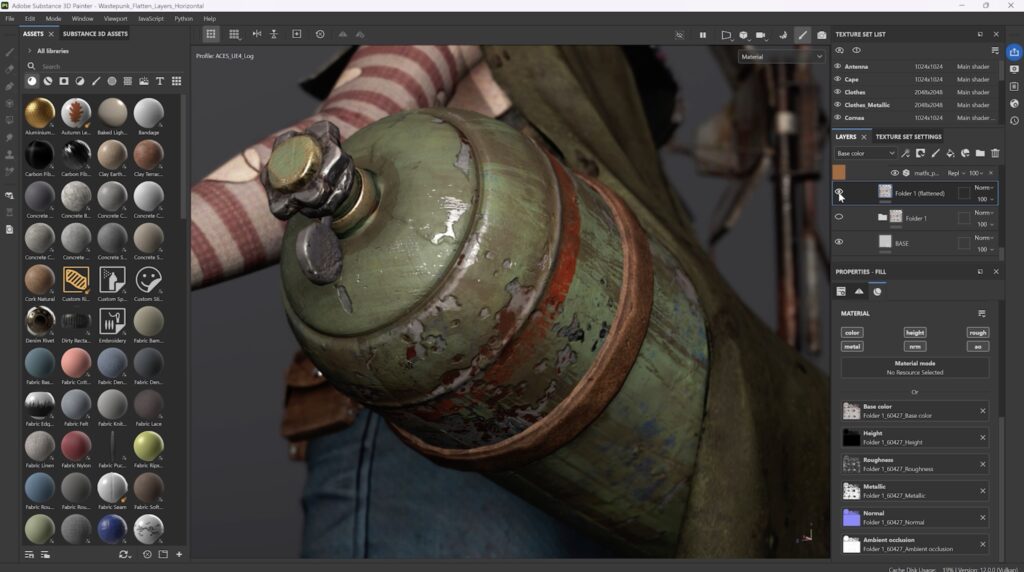
Substance 3D Painter is still essential for game art because game production depends on repeatable baking, fast texture iteration, art-direction consistency, and clean engine handoff. Painter addresses those needs directly through mesh-map baking, smart materials and masks, engine-specific export presets, and a live layer-based workflow that makes it easy to adjust a prop, character, or environment asset without rebuilding the whole material setup from scratch. Recent releases also added practical quality-of-life improvements such as auto-update for resources, easier mesh reimport, layer flattening, path workflow enhancements, and better baking controls, all of which reduce friction in day-to-day production.
That production value is reflected in current workflow case studies. One 2025 Unreal Engine 5 production described Painter as essential for all characters and the backbone of its environment texturing process, citing both speed and style consistency. Other teams have credited Painter’s smart material workflow with keeping multiple artists aligned on a shared art direction while reducing iteration time. Those are exactly the pressures that make a texturing tool “essential” in games, and Painter still addresses them well in 2026.

Substance 3D Painter workflow from high-poly bake to final texture export
A standard Substance 3D Painter workflow starts with importing the low-poly production mesh, selecting the project template, setting the working resolution, choosing the correct normal map convention, and defining whether the project will use regular UVs or a UV tile workflow. If the source file is USD, artists can also choose scope, variants, subdivision level, and animation frame before the project is created. Once inside the project, artists move to Baking Mode, define the high-poly source, choose the bakers they need, set common bake parameters such as resolution and dilation, adjust the cage, and generate mesh maps for each Texture Set or UV Tile.
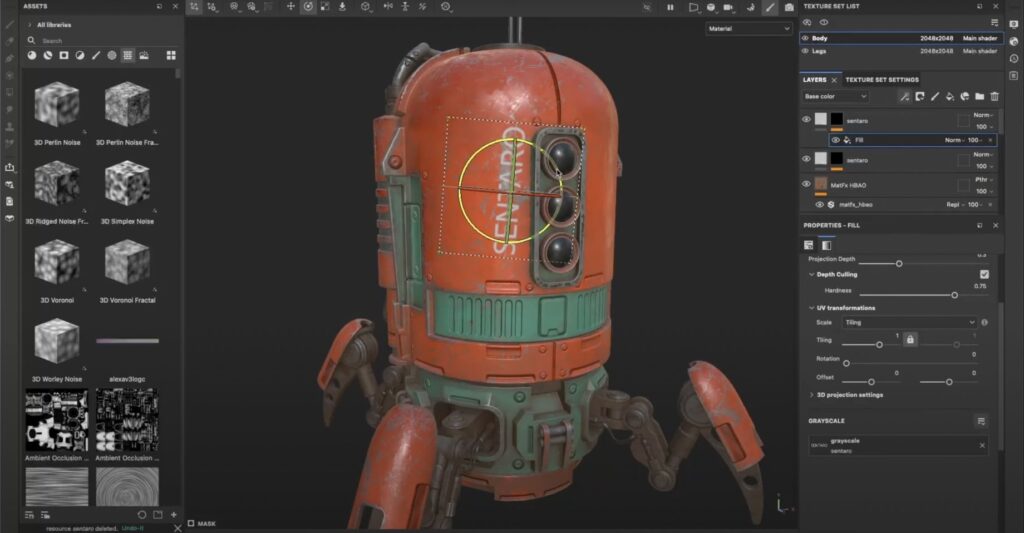
After baking, the artist builds the surface using layers, masks, generators, smart materials, fill layers, hand-painted details, and anchor-point-driven relationships between channels. When look development is approved, export is handled through the Export Textures window, where teams can apply shared or custom templates, set per-texture file types and bit depth, define padding, and export to engine- or renderer-specific outputs. Painter can work up to 4K interactively and export up to 8K when hardware allows, which is useful for both hero assets and downstream repurposing.
How Substance 3D Painter fits into a PBR texturing pipeline
Painter fits naturally into a PBR texturing pipeline because it authors the map sets that physically based materials expect. Adobe’s PBR guide emphasizes that PBR is a methodology rather than a single hard standard, and that the two most common workflows are metal/roughness and specular/glossiness. Painter supports both workflows, supports custom shaders when a studio needs a specialized implementation, and ships with export templates for standard metallic/roughness and converted specular/glossiness outputs.
That matters because modern downstream targets read those maps differently but still rely on the same core logic. Unity’s URP Lit shader supports both metallic and specular workflow modes and uses channel packing for metallic, occlusion, and smoothness, while Unreal’s material system centers on inputs such as Base Color, Metallic, and Roughness and commonly uses channel-packed grayscale textures to reduce memory and texture fetches. Painter’s job in a PBR pipeline is to make those authored values visually coherent on the asset and technically compatible at export.
Substance 3D Painter for AAA games, indie games, and real-time projects
Painter remains useful across production scales because its core strengths are not tied to team size. Official workflow pages still describe Substance 3D tools as being used from indie mobile games to AAA productions, and the examples support that claim: a 2025 UE5 production reported using Painter for all character texturing and for all environment assets alongside Designer for tileable materials, while a smaller game team described smart materials as a major factor in keeping style consistent across multiple artists and reusable asset variants.
The same logic extends to real-time showcase work. A recent real-time graphics demo workflow described Painter and Designer as helping a team iterate quickly, maintain consistency, and optimize assets for real-time performance. That range is important because it shows Painter is not just “AAA software” or “indie software.” It is a production texturing tool that scales from solo and small-team asset creation to large, performance-constrained real-time pipelines.
Substance 3D Painter baking workflow explained for modern asset creation
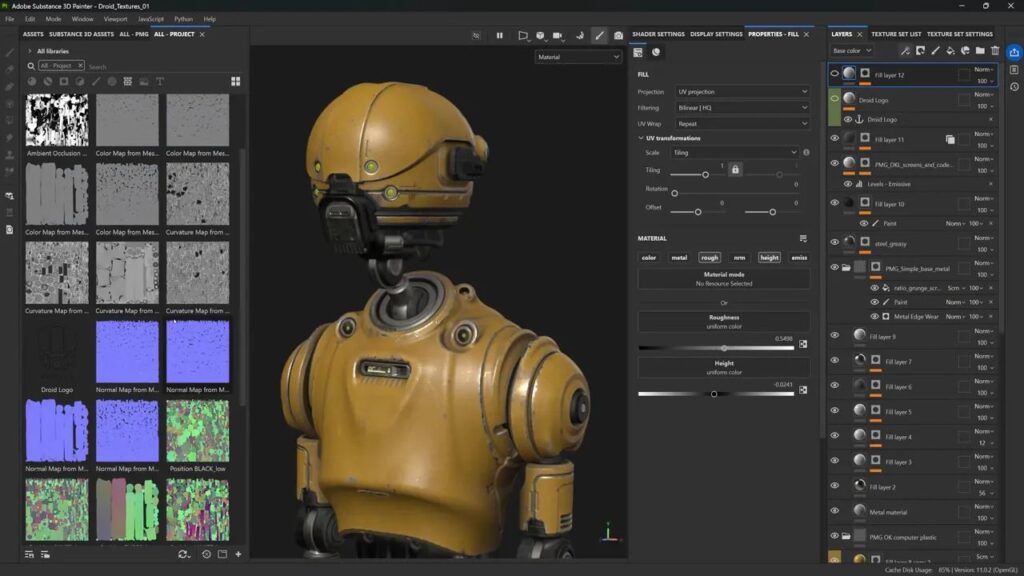
Baking in Painter is the process of transferring mesh-based information into textures, and that information is then consumed by shaders, filters, generators, smart materials, and smart masks. In current production, that means baking is not an optional cleanup pass; it is a structural step that gives the texturing stack access to curvature, ambient occlusion, normal information, thickness, position, ID data, and other geometric signals. Painter’s own documentation explicitly notes that smart materials and smart masks rely on baked curvature and normal maps alongside other baked information.
Painter’s baking workflow is production-oriented. Artists switch into Baking Mode, select Texture Sets and UV Tiles, choose individual bakers, define shared settings such as resolution and high-poly parameters, and then refine the cage to minimize projection artifacts. Current settings also expose detailed control for AO, curvature, thickness, position, and bent-normal generation, including ray counts, sampling radius, normalization, self-occlusion, and distance behavior relative to the mesh bounding box.
Internally, Painter’s baker outputs are generated as 16-bit RGBA textures, even though the final saved precision depends on the file format chosen during export. Painter 11.0 added an experimental automatic baking cage, and the 12.1 beta adds auto-rebake, edge protection, skew painting tools, and a revised baker panel, which shows that baking remains a major area of active development.
How artists use Anchor Points and smart masks in Substance 3D Painter
Anchor Points are one of the reasons Painter remains powerful beyond basic texture painting. The official documentation describes an Anchor Point as a way to expose an element in the layer stack and reference it elsewhere in the stack for different purposes and with different adjustments. In practice, artists use this to drive wear masks, edge highlights, dust breakup, roughness variation, emissive control, and layered detail relationships without duplicating the same logic over and over. It turns the layer stack into a more non-linear system, where one authored signal can influence several downstream effects.
Smart materials and smart masks work alongside that system. Smart materials are reusable layer presets, while smart masks are reusable effect-stack presets; both are designed to adapt to the current mesh topology. Because generators and smart masks can consume baked maps, artists can build reusable wear-and-tear setups that react differently from asset to asset while still preserving a shared visual language. That is why a Painter workflow often feels procedural even when the artist remains on a single mesh: the reuse is happening through baked-map-aware masks, layered presets, and anchor-point references rather than through a fully node-based material graph.
Substance 3D Painter export settings for Unreal Engine and Unity
Painter’s Unreal Engine and Unity export settings matter because incorrect normal conventions, tangent handling, or channel packing create visible shading problems even when the texture art itself is good. Painter’s project settings explicitly note that Unreal Engine uses DirectX normals by default, while Unity uses OpenGL by default. The same settings page also notes that “Compute Tangent Space per Fragment” should be enabled for Unreal Engine and disabled for Unity unless a Unity HDRP workflow specifically requires otherwise.
On export, Painter ships with dedicated templates for Unreal Engine Packed, Unity HD Render Pipeline, and Unity Universal Render Pipeline. The Unreal preset is designed to pack textures with the lowest possible memory footprint, while Unity presets target metallic/smoothness or specular/smoothness conventions depending on the render pipeline. Unity’s own documentation shows that URP’s Lit shader can pack Metallic into red, Occlusion into green, and Smoothness into alpha, while Unreal documentation encourages channel packing for grayscale maps such as ambient occlusion, roughness, and metallic. When the defaults are not enough, custom output templates can be duplicated, renamed, shared on disk, and embedded into the project so teams can preserve studio-specific export rules.
Substance 3D Painter and USD workflow support in modern production
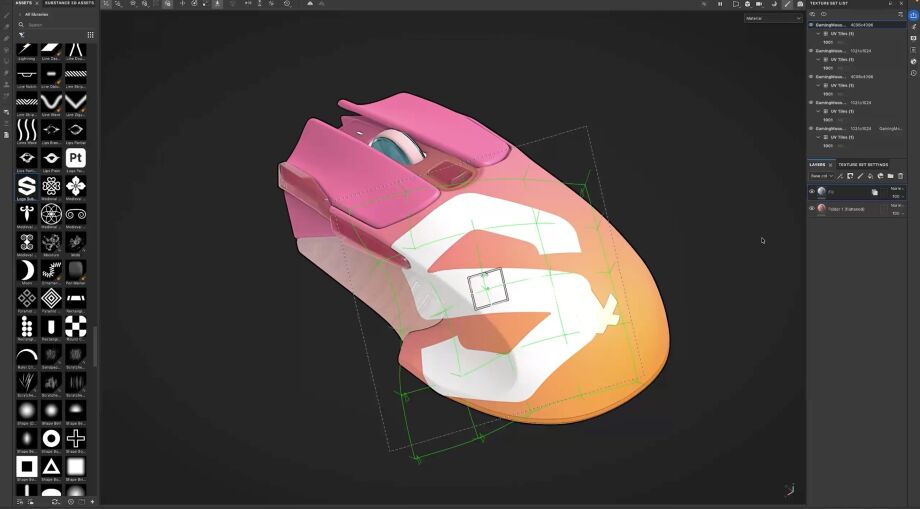
Painter’s USD support is one of the clearest reasons it still matters in modern pipelines. Official documentation states that the USD workflow has been available since Painter 8.3 and allows artists to create projects with USD-specific features such as scope and variant choice, subdivision levels, and animation frames, while also enabling export of materials and textures through USD and adding USD as a mesh-only export format. That makes Painter more than a standalone texture painter; it makes it a participant in scene-standardized asset exchange.
The export side is especially relevant for production. When artists enable the USD asset export option, Painter can output texture maps, a .usda file that points to those textures, and optional .usd assets that assemble the materials with the original mesh or with the mesh generated inside the project. That aligns naturally with OpenUSD’s role as a scalable interchange system for multi-asset, collaborative workflows. Painter 12.0 also updated its USD library to version 25.05, and the 12.1 beta goes further by adding OpenPBR 1.1 support and import/export of OpenPBR materials and textures through USD, signalling that Painter is aligning with current interchange standards rather than standing outside them.
Substance 3D Painter plugins and scripting for pipeline automation
Painter supports serious pipeline automation through plugins, APIs, command-line arguments, and remote scripting. The current documentation states that custom plugins can be built through a dedicated scripting API, primarily in JavaScript with optional QML user interfaces, and the application includes default plugins such as Autosave and Resources Updater. The Plugins menu separates JavaScript- and Python-based plugins, and it exposes reload, enable/disable, configure, and about actions so tools can be iterated without reinstalling the application.
The automation side goes much deeper than menu extensions. Painter’s Python API can create and export projects, configure resource locations, and build custom plugins. Command-line options can launch projects with a specific mesh, attach mesh maps, define export paths, split by UDIM, set VRAM budget, and enable remote scripting. Remote control allows external Python scripts to execute JavaScript or Python commands inside Painter when it is launched with --enable-remote-scripting. Auto-update can also be triggered manually, automatically, or via Python, which is useful for keeping shared material libraries and project dependencies synchronized in a studio environment.
Substance 3D Painter vs Substance 3D Designer in a studio pipeline
Substance 3D Painter and Substance 3D Designer belong in the same pipeline, but they solve different problems. Painter is built for texturing directly on 3D meshes in real time, while Designer is built for material authoring through node graphs, procedural generation, parametrization, and non-destructive workflows. Adobe’s own product and documentation pages make that distinction explicit: Painter is for applying and authoring texture detail on specific assets, and Designer is for generating materials, textures, filters, patterns, and procedural systems that can be reused widely.
In a studio pipeline, Designer usually owns reusable material logic, tileables, parametric libraries, and procedural tooling, while Painter owns asset-specific surfacing, decals, localized damage, bake-aware masking, and final texture handoff. The relationship is complementary, not competitive. That is even clearer in 2026 because Designer has moved further into OpenPBR-oriented workflows and pipeline tooling, while Painter is adding OpenPBR support for on-asset application and USD-based interchange. A modern studio does not usually choose one instead of the other; it decides where procedural material generation stops and where asset-level surfacing begins.

How Substance 3D Painter speeds up look development and material iteration
Painter speeds up look development because it collapses several decisions into one working context: the artist can see the asset, the baked mesh data, the layered material logic, and the downstream export target without bouncing constantly between separate tools. Official workflow pages for film and VFX emphasize Painter’s high-quality real-time viewport and describe its surfacing as closer to final output, especially for hero assets and precise material work. That matters in review-heavy environments because faster visual validation means fewer blind adjustments.
The software’s recent updates reinforce that iteration-first design. Auto-update can watch external resources and refresh them automatically, the 12.0 release added layer flattening with direct export of flattened results to disk, and the improved project settings now make mesh reimport less repetitive by saving and pre-filling the previously loaded file path. Combined with smart materials, anchor points, and custom output templates, those features let teams move from exploratory lookdev to locked-down delivery without having to rebuild the texture stack from scratch.
Substance 3D Painter for film, VFX, product visualization, and motion design
Painter is not limited to game production. Official VFX materials describe the Substance 3D toolset as being used from advertising and television work to feature films, and they specifically call out Painter for hero-asset surfacing, smoother UDIM painting across UV tiles, smart materials and generators, interactive path tracing, custom shaders, output templates, scripting, automation, and full compliance with the VFX Reference Platform. That is why Painter remains useful in film and VFX pipelines where asset detail, standards compliance, and renderer handoff are as important as the painting experience itself.
The same cross-domain value appears in product visualization and motion work. Adobe’s business materials position Substance 3D workflows around digital twins, product imagery, ecommerce visuals, and high-volume variant generation, while broader use-case pages describe the toolset as supporting everything from prototypes to high-end visualizations. On the motion side, Adobe has documented workflows where motion designers use Painter-prepared models with After Effects, and current After Effects documentation explicitly notes that 3D models can be prepared in Painter before import. That combination makes Painter relevant to product marketing, design visualization, and 3D-enhanced motion graphics as well as to traditional entertainment pipelines.
Latest Substance 3D Painter features improving texturing workflows in 2026
As of April 23, 2026, the latest stable Substance 3D Painter release is 12.0, released on March 9, 2026, while the latest publicly documented preview is 12.1.0 Beta, released on March 31, 2026. Stable 12.0 adds layer flattening directly in the layer stack, direct export of flattened content to disk, Warp to Geometry for better decal placement on complex surfaces, a revised project creation and settings workflow, easier mesh reimport, an updated USD library, an updated JavaScript API, and Python 3.13. Painter 11.1, released in late 2025, also introduced the Ribbon path tool and Vulkan support, which affected viewport and GPU-based baking behavior.
The 12.1 beta is important, but it should still be treated as beta. Adobe’s preview notes describe major baking improvements, a reorganized baker panel, per-channel auto-rebake, skew-painting tools, edge protection, a hard-surface auto-unwrap mode, and OpenPBR 1.1 support with USD import/export. Those additions show where the product is heading: more robust baking control, stronger standards alignment, and less manual cleanup around common hard-surface and interchange pain points.
Is Substance 3D Painter worth learning for modern 3D careers in 2026
Yes, Substance 3D Painter is still worth learning in 2026 for artists who want to work in game art, surfacing, look development, film and VFX texturing, product visualization, or motion-adjacent 3D. The strongest reason is not brand familiarity alone; it is that Painter maps directly to current production skills that studios and teams still need: bake-driven texturing, PBR authoring, UDIM awareness, engine export, standards-aware interchange, and workflow automation. The software is still actively developed, still used across multiple industries, and still supported by up-to-date learning resources and education access.
The caveat is that Painter should be learned as part of a broader pipeline skill set. The most durable career value comes when Painter knowledge is paired with modeling, UV layout, high-poly to low-poly baking, PBR theory, engine-side material setup, and at least a working understanding of procedural material authoring in Designer. In other words, Painter is still a high-value specialization, but it becomes a career multiplier when it is connected to the rest of the pipeline rather than treated as an isolated app.
Frequently Asked Questions (FAQs)
- What is Substance 3D Painter best used for? It is best used for asset-specific texturing: importing a finished production mesh, baking geometry derived maps, building layered materials and masks, painting directly on the surface, and exporting engine or renderer-ready texture sets. That makes it especially strong for props, characters, hero assets, and any model that needs bespoke surfacing rather than only generic tileables.
- Is Substance 3D Painter only for game development? No. Official workflows and product materials place Painter in games, film, VFX, product design, automotive, architecture, consumer packaged goods, and motion-oriented 3D work. Its role changes depending on the industry, but the core strengths surfacing, PBR authoring, and controlled export remain the same.
- Can Substance 3D Painter replace Substance 3D Designer? Not completely. Painter is optimized for texturing directly on a mesh in real time, while Designer is optimized for procedural, node-based material authoring and reusable systems. In most studio pipelines, Designer creates scalable materials and Painter applies and customizes them on specific assets.
- Does Substance 3D Painter support Unreal Engine and Unity workflows well? Yes. Painter includes default export templates for Unreal Engine Packed, Unity HDRP, and Unity URP, and its project settings explicitly document the correct normal-map and tangent-space conventions for Unreal and Unity. Unity’s own URP documentation and Unreal’s material documentation also align well with Painter’s packed export logic.
- Which mesh maps are most important to bake first? At minimum, ambient occlusion, curvature, and normal data are foundational because Painter’s smart materials, smart masks, and generators rely on baked geometric information. Depending on the asset and style, ID, position, thickness, and bent normals also become important for masking, stylization, and advanced material breakup.
- Why do artists care so much about Smart Materials, Smart Masks, and Anchor Points? Because they dramatically reduce repetitive work. Smart materials and masks let artists reuse topology-aware surfacing setups across many assets, while Anchor Points let one part of the layer stack drive other parts of the stack in a non-linear way. Together, they make Painter faster, more consistent, and more procedural without leaving the mesh-texturing context.
- Is Painter’s USD support important in real production? Yes. Painter can create projects from USD files using scope, variant, subdivision, and frame controls, and it can export USD assets that reference texture maps and optionally assemble materials with the mesh. That matters because OpenUSD is designed for scalable interchange and collaborative 3D workflows, which are increasingly standard in modern pipelines.
- Can studios automate Painter instead of using it only by hand? Yes. Painter has JavaScript/QML plugin support, a Python API, remote scripting, command-line options, and auto-update functions that can be exposed to Python. That makes it suitable for pipeline tasks like project setup, shared export templates, resource synchronization, and externally triggered processing.
- What is the latest Substance 3D Painter release in 2026? As of April 23, 2026, the latest stable release documented by Adobe is 12.0 from March 9, 2026, and the latest publicly documented preview is 12.1.0 Beta from March 31, 2026. The beta includes new baking and OpenPBR features, but Adobe explicitly notes that beta builds are not recommended for urgent or sensitive production.
- What should artists learn alongside Painter to stay competitive in 2026? The strongest companion skills are modeling, UVs, high-poly to low-poly baking, PBR theory, engine-side material setup, USD-aware interchange, and procedural material creation in Designer. Painter remains valuable on its own, but its career value rises sharply when it is part of full-pipeline competence.
Conclusion
Substance 3D Painter still matters in modern pipelines because the underlying production problem it solves has not gone away. Teams still need a reliable place to bake geometry data, author PBR textures on specific assets, preserve art direction across many models, export accurately to engines and renderers, and automate repetitive steps when scale increases. Painter continues to meet those needs in 2026 while also moving toward more standards-friendly workflows through USD and emerging OpenPBR support.
Its long-term value is not that it does everything, but that it does the surfacing stage exceptionally well while connecting cleanly to the rest of the pipeline. In modern production, that combination of focused capability, interoperability, and active development is exactly why Substance 3D Painter still holds a meaningful role across games, film, VFX, product visualization, and motion work.
Sources and citation
This article was based primarily on official documentation and release notes current through April 2026, then cross-checked against official engine and standards references. Stable and beta features were separated deliberately so that experimental capabilities were not presented as general-release facts.
- Official Substance 3D Painter documentation
https://experienceleague.adobe.com/en/docs/substance-3d-painter/using/home - Project Creation
https://experienceleague.adobe.com/en/docs/substance-3d-painter/using/getting-started/project-creation - Mesh Map Settings
https://experienceleague.adobe.com/en/docs/substance-3d-painter/using/baking/mesh-map-settings - Export Settings / Output Templates
https://experienceleague.adobe.com/en/docs/substance-3d-painter/using/export/export-window/list-of-exports - Plugins
https://experienceleague.adobe.com/en/docs/substance-3d-painter/using/features/plugins/plugins - Remote Control With Scripting
https://experienceleague.adobe.com/en/docs/substance-3d-painter/using/scripting-and-development/scripts-and-plugins/remote-control-with-scripting - Command Lines / Auto-Update Controls
https://experienceleague.adobe.com/en/docs/substance-3d-painter/using/pipeline-and-integration/configuration/command-lines - USD Workflow
https://experienceleague.adobe.com/en/docs/substance-3d-painter/using/features/universal-scene-description-usd - Substance 3D Painter Release Notes
https://experienceleague.adobe.com/en/docs/substance-3d-painter/using/release-notes/release-notes - All Substance 3D Painter Changes
https://experienceleague.adobe.com/en/docs/substance-3d-painter/using/release-notes/all-changes - Substance 3D Painter Product Page
https://www.adobe.com/products/substance3d/apps/painter.html - Substance 3D VFX & Animation Workflow
https://www.adobe.com/products/substance3d/discover/3d-in-film-vfx-animation.html - Substance 3D Product Visualization
https://www.adobe.com/products/substance3d/discover/brand-and-product-visualization.html - Substance 3D Tutorials / Learn Page
https://www.adobe.com/learn/substance-3d-painter - Substance 3D Education
https://www.substance3d.com/education/ - Unity URP Lit Shader Documentation
https://docs.unity3d.com/Manual/urp/lit-shader.html - Unreal Engine Materials Documentation
https://dev.epicgames.com/documentation/en-us/unreal-engine/unreal-engine-materials - OpenUSD
https://openusd.org/ - OpenPBR Specification
https://academysoftwarefoundation.github.io/OpenPBR/
Recommeneded
- Warner Bros. Discovery Is Rebuilding Its Video Game Pipeline After a Significant 2025
- How BALL x PIT Helped Devolver Digital Triple Its Annual Revenue From New Games (FY2025 Breakdown)
- How do I create a POV shot with the Blender camera?
- Can I use real-world camera settings in Blender?
- The Best SSDs for PS5 in 2026: Top NVMe M.2 Picks That Meet Sony’s Requirements
- How do I change the camera’s near and far clipping distances in Blender?
- Samsung Galaxy S26 Is About to Get AirDrop: How Quick Share Will Send Files to iPhone, iPad, and Mac
- Castlevania: Belmont’s Curse is a New Castlevania Game Coming in 2026 — Release Date, Trailer, Platforms, Story & Gameplay
- High-End Gaming PCs Are More Expensive Than Ever, But You Don’t Actually Need One: Smarter Ways to Game in 2026
- Achieving a Painterly Look in Blender: Techniques to Make 3D Animations Appear Hand-Painted



























































































